HOW TO ADD REAL-TIME SALES POPUPS TO A SHOPIFY STORE
Shopify Tutorial | Real-Time Sales Notifications | Social Proof Marketing | 2026
Introduction
Getting visitors to your Shopify store is only the first step. The real challenge is convincing them to trust your business and complete a purchase.
Customers often hesitate before buying from an unfamiliar online store. They might wonder whether other people have purchased the products, whether the store is reliable, or whether the products are worth buying.
One way to address this uncertainty is by displaying real-time sales popups.
These small notifications appear on your storefront to highlight recent purchases, showing shoppers that other customers are actively buying from your business.
For example, a notification might say:
Sarah from New York recently purchased Classic Leather Boots.
When based on genuine purchase activity, notifications like this can provide useful social proof and make your storefront feel more active.
You don’t need to hire a Shopify developer or edit complicated theme files to add these notifications.
With AB Sales Popup, you can customize sales notifications, choose popup designs, adjust their appearance, and display them on your Shopify storefront.
This guide explains how to add real-time sales popups to Shopify using AB Sales Popup, with your six actual screenshots included in the correct order.
What Are Real-Time Sales Popups in Shopify?
Real-time sales popups are small notifications that show recent customer purchase activity on your online store.
They typically appear in a corner of the storefront and contain details such as the purchased product, customer location, and relative purchase time.
For example, a notification may show that a customer recently purchased a specific product.
These notifications are commonly used as a form of social proof, helping visitors see that genuine transactions are taking place.
Sales popups are particularly useful for new Shopify businesses, niche eCommerce stores, fashion brands, beauty retailers, and other merchants seeking to communicate authentic customer activity.
Why Shopify Merchants Use Sales Popups
Build trust with new customers
Visitors who are unfamiliar with your store may feel more confident when they see that other people have made genuine purchases.
Showcase popular products
Purchase notifications can draw attention to products that customers are buying.
Support customer decision-making
Relevant purchase activity may help shoppers feel more comfortable proceeding with an order.
Create a more engaging storefront
Small, well-designed notifications can make the shopping experience feel more interactive.
Support conversion optimization
Sales popups can be tested as part of a broader conversion strategy, although they do not guarantee higher conversion rates or reduced abandonment.
Common Problems Shopify Merchants Face Without Social Proof
A Shopify store may have attractive product images, detailed descriptions, and competitive pricing but still struggle to convince first-time visitors to buy.
Customers may be unfamiliar with the brand, unsure whether products are popular, or concerned about the reliability of a new business.
Social proof can help address some of these concerns when it is based on real customer activity.
However, manually building real-time sales notifications often requires custom JavaScript, event tracking, and storefront integration.
A dedicated Shopify app makes these features easier to manage.
Introducing AB Sales Popup
FOMO, sosyal kanıt ve satış açılır pencereleriyle satışları artırın | Shopify App Store
AB Sales Popup
AB Sales Popup is a Shopify application designed to display purchase notifications, visitor counters, sold counters, countdown timers, and stock-related urgency elements.
The application supports Shopify Online Store 2.0 integration through theme app blocks and embeds. Shopify App Store
The app offers tools for merchants who want to display real shopping activity and customize how those notifications appear.
Key features
- Real-time purchase notifications.
- Popup content customization.
- Customer and product information placeholders.
- Festive, Basic, and Custom popup themes.
- Light and dark appearance modes.
- Desktop and mobile popup positioning.
- Adjustable border and corner styles.
- Live popup preview.
- Verified orders feed.
- Visitor counters, sold counters, and countdown tools.
App Link: AB Sales Popup — Shopify App Store
Step 1: Search for Shopify App Store
Open Google, search for Shopify App Store, and click the official website.
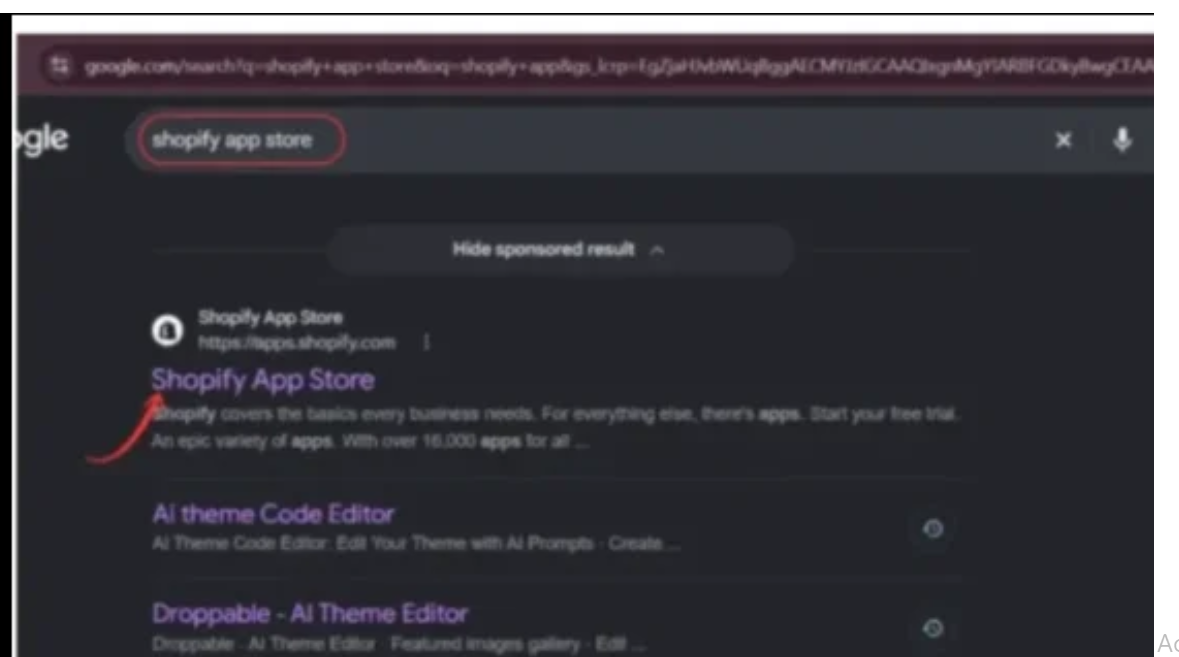
Image 1: Finding the official Shopify App Store through Google.
Step 2: Search for AB Sales Popup
In the Shopify App Store search bar, type AB Sales Popup and select the app with the black-and-yellow notification bell icon.
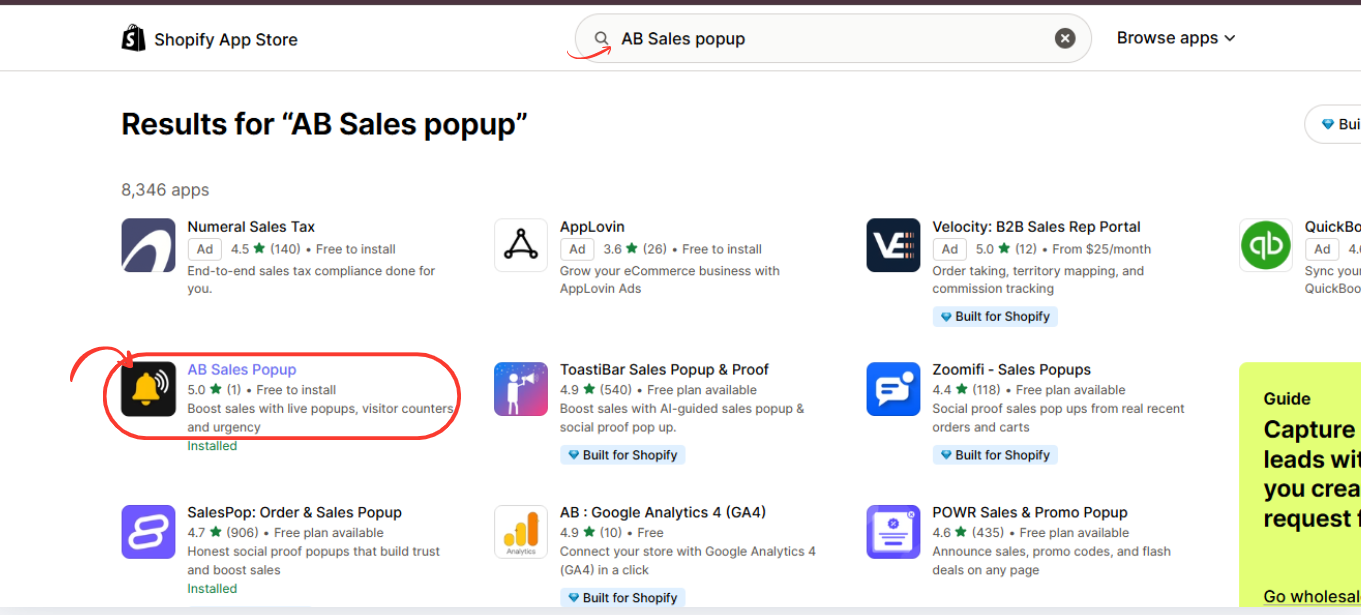
Image 2: Finding AB Sales Popup in the Shopify App Store.
Step 3: Install and Open AB Sales Popup
Open the app listing, review its features, and click Install, or Open if it is already installed.
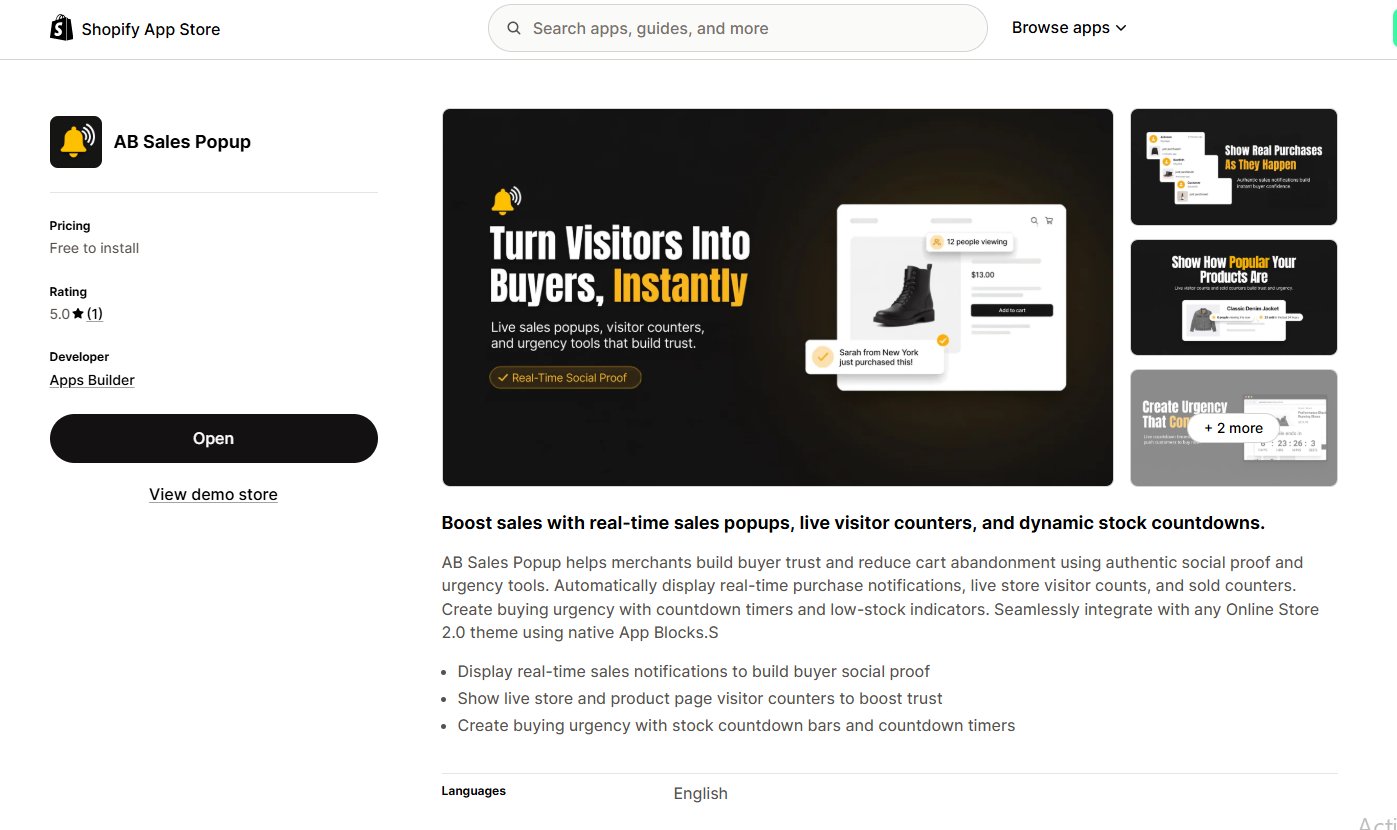
Image 3: Official AB Sales Popup listing with sales notification, visitor counter, and urgency features.
Step 4: Customize Real-Time Sales Notifications
Go to Shopify Admin → Apps → AB Sales Popup → Sales Notifications.
Choose your popup theme, select Light or Dark Mode, and customize the customer name, product details, and purchase time fields.
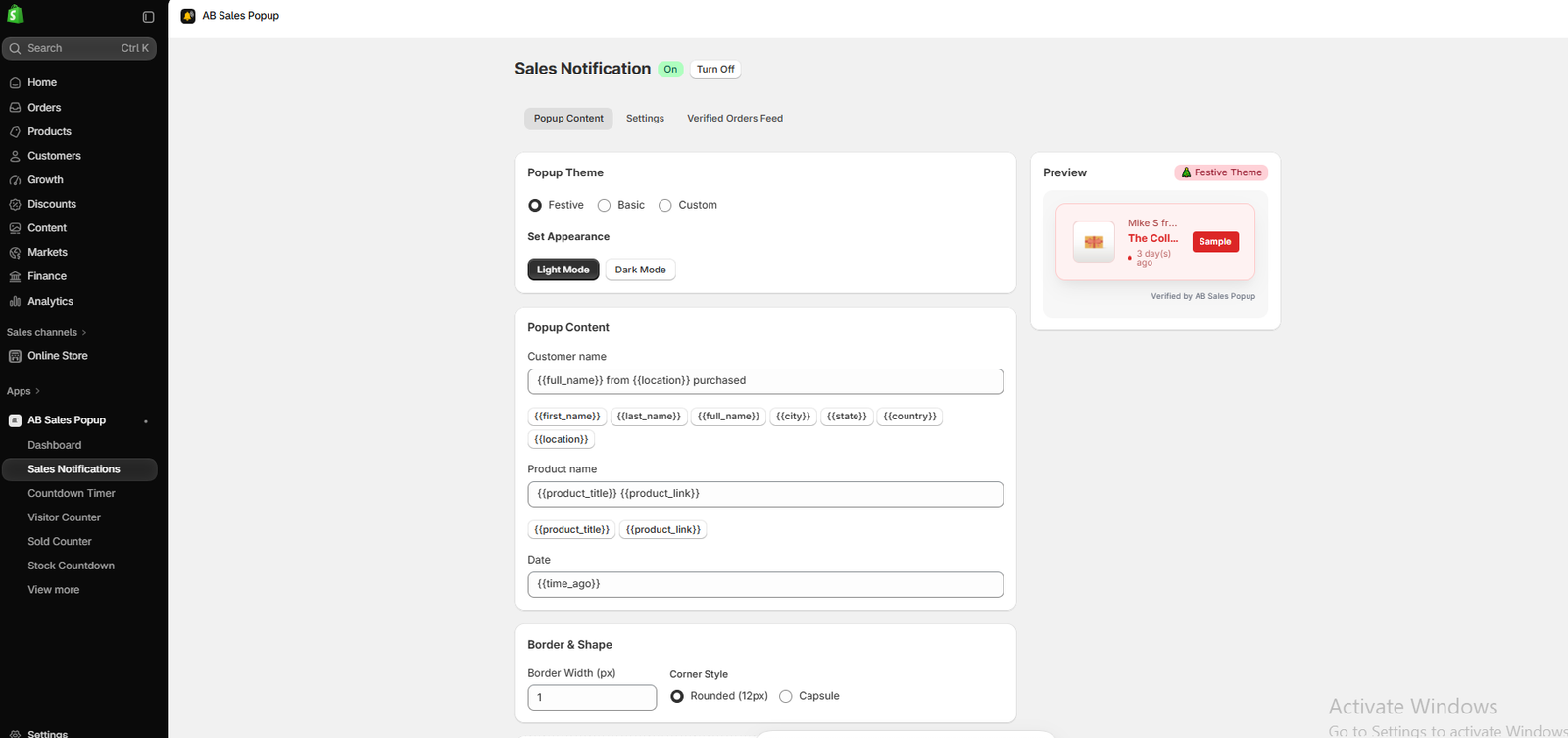
Image 4: Configuring notification content, appearance, and popup preview.
Step 5: Adjust Popup Shape and Position
Scroll down to Border & Shape and Position.
Choose Rounded or Capsule corners, adjust border width, and select where notifications appear on desktop and mobile. Click Save when finished.
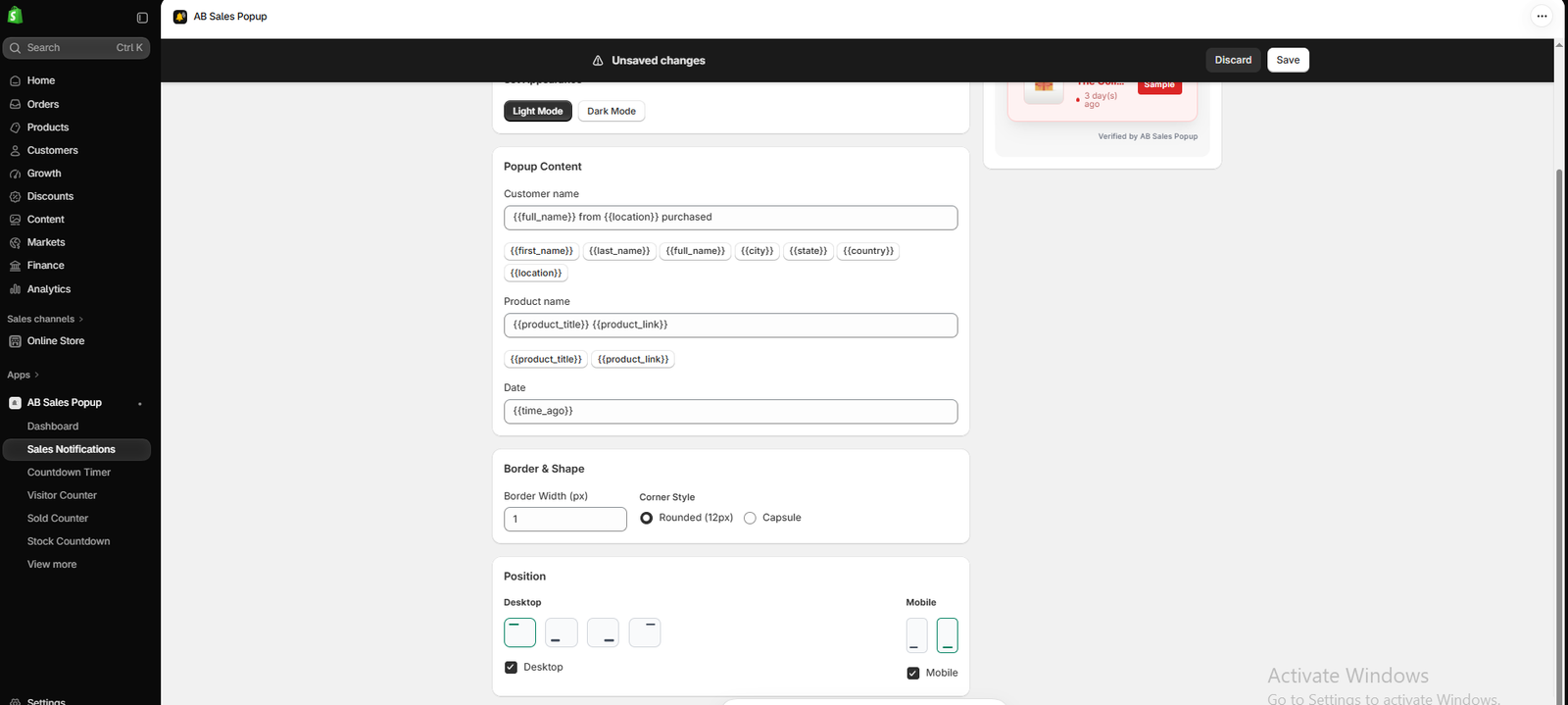
Image 5: Adjusting popup border width, corner shape, and desktop/mobile placement.
Step 6: Enable the Popup in Your Shopify Store
Navigate to Online Store → Themes → Edit theme → App embeds.
Enable Sales Notifications Pop from AB Sales Popup, inspect the notification on your storefront preview, and click Save.
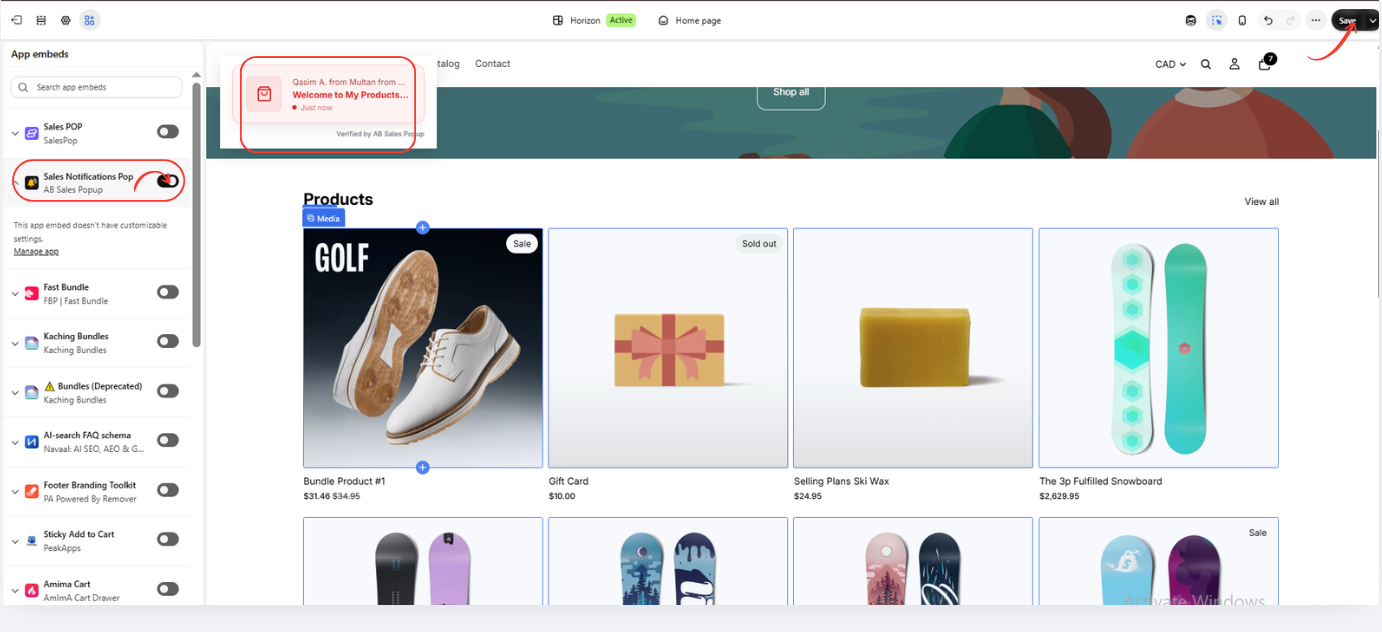
Image 6: AB Sales Popup enabled in Shopify’s theme editor, displaying a sales notification on the storefront.
Best Practices for Using Real-Time Sales Popups
Display genuine purchase activity
Only show authentic sales information. False customer names, invented orders, or misleading purchase timestamps can undermine customer trust.
Keep notifications short
Use concise messages that customers can understand quickly.
Avoid excessive popup frequency
Too many notifications can distract shoppers from product information and checkout.
Choose the right position
Keep notifications away from important interactive elements, particularly on mobile.
Maintain consistent branding
Choose popup colors, typography, borders, and shapes that complement your Shopify theme.
Protect customer privacy
Limit the personal information displayed and ensure your use of purchase data complies with applicable privacy requirements.
Monitor performance
Evaluate how the popups affect customer behavior, engagement, and conversion results rather than assuming they will automatically improve sales.
Real-Time Sales Popups vs Other Shopify Social Proof Tools
| Feature | Primary purpose |
|---|---|
| Sales Notifications | Show recent purchase activity |
| Visitor Counter | Show visitor activity |
| Sold Counter | Show product sales counts |
| Countdown Timer | Display a time-based promotion |
| Stock Countdown | Communicate available stock information |
AB Sales Popup provides several of these tools within one application. Shopify App Store
Different stores may benefit from different combinations. Use only counters and urgency messages that accurately reflect real data.
Frequently Asked Questions
1. What is a real-time sales popup in Shopify?
It is a small storefront notification displaying recent customer purchase activity.
2. Can I add sales notifications without coding?
Yes. AB Sales Popup provides a visual configuration interface and Shopify theme integration.
3. Can I customize the sales popup design?
Yes. The app’s interface includes Festive, Basic, and Custom themes alongside light and dark appearance modes.
4. Can I change where notifications appear?
Yes. The app provides separate positioning controls for desktop and mobile.
5. Can I show the purchased product name?
Yes. The Popup Content section supports product title and product link placeholders.
6. Can I display customer location?
The interface includes location-related placeholders, subject to available data and appropriate privacy handling.
7. Does AB Sales Popup work with Shopify Horizon?
Your screenshot demonstrates the app embed and popup preview inside the Shopify Horizon theme editor.
8. Will sales popups increase my Shopify conversion rate?
They may help communicate social proof, but results vary. Test their impact and prioritize genuine customer information.
9. Is AB Sales Popup free?
The Shopify App Store advertises a free-to-install Starter plan with usage limits and a paid plan. Check the current listing for billing details. Shopify App Store
Conclusion
Real-time sales popups offer Shopify merchants a way to highlight authentic customer activity and communicate social proof to new visitors.
When implemented thoughtfully, they can complement product reviews, trust signals, and other conversion-focused storefront features.
With AB Sales Popup, merchants can configure purchase notifications, customize their content and appearance, choose desktop and mobile positions, and enable the popup through Shopify’s theme editor.
The six screenshots in this tutorial demonstrate the complete setup process, from locating the app in the Shopify App Store to displaying a sales notification on the storefront.
For the best customer experience, keep notifications relevant, maintain a clean design, respect customer privacy, and use genuine purchase data.
Ready to add real-time sales notifications to your Shopify store?Explore AB Sales Popup on Shopify




