AI CODE EDITOR VS HIRING A SHOPIFY DEVELOPER: COST, SPEED AND QUALITY
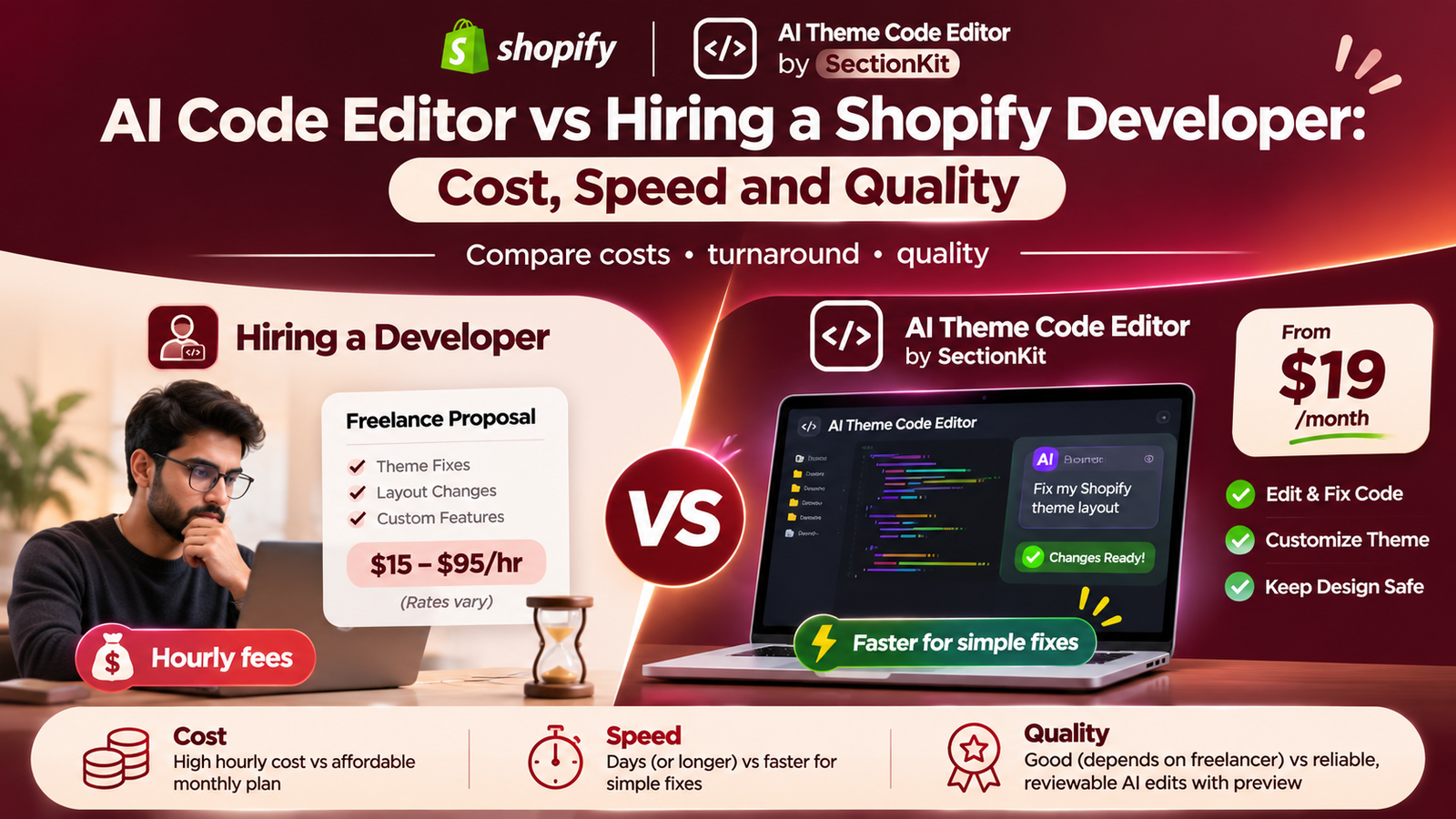
Introduction
Every Shopify merchant eventually needs to customize their online store. Whether it’s fixing a broken layout, adding a new section, improving product pages, or making a theme mobile-friendly, these changes can require technical work.
Traditionally, merchants have relied on Shopify developers and freelancers to complete these tasks.
But hiring a developer can be expensive and time-consuming, especially when the change is relatively small.
Imagine paying a freelancer $100 to fix a product page button or waiting several days for a simple layout adjustment. What if you could describe the same problem to an AI assistant and receive a proposed code fix in seconds?
That’s the idea behind AI Theme Code Editor by SectionKit.
Instead of hiring a developer for every small change, Shopify merchants can use natural-language prompts to generate Liquid, CSS, and JavaScript modifications.
But how does AI actually compare with a professional Shopify developer in terms of cost, speed, and quality?
In this article, we’ll compare both approaches and explain when AI Theme Code Editor offers better value—and when hiring an experienced developer remains the smarter choice.
The Merchant’s Challenge: Why Hiring Shopify Developers Can Be Expensive
Running a Shopify store involves continuous customization.
You might need to adjust product page layouts, fix a broken Add to Cart button, create a promotional banner, or improve mobile responsiveness.
Even small changes can create additional expenses.
1. High freelance development costs
Shopify developers charge according to their skills, experience, and project complexity.
According to Upwork’s Shopify developer cost guide, commonly reported hourly rates are $15–$29, while experienced specialists may charge approximately $95 per hour or more. Upwork+1
This means even a relatively small task can cost significantly more than an AI editing subscription.
2. Waiting for developer availability
Before a freelancer begins work, merchants may need to search for candidates, compare proposals, discuss requirements, and arrange access to the store.
A task that requires only a short code modification might involve a much longer overall turnaround.
3. Paying separately for every change
Some freelancers charge by the hour, while others quote a fixed fee for each project.
If you need several small modifications each month, the total cost can increase quickly.
4. Communication challenges
Explaining design changes to a developer may require screenshots, meetings, revisions, and additional clarification.
5. Ongoing maintenance costs
After completing a customization, another issue may appear following a theme update or third-party app installation.
This can create additional work and expenses.
For merchants who frequently make small changes, relying exclusively on freelance development may not be the most efficient option.
Introducing AI Theme Code Editor by SectionKit
AI Theme Code Editor is designed to help Shopify merchants edit and customize their themes through simple AI prompts.
Rather than manually writing code or hiring a freelancer for every small task, merchants can describe what they want in plain English.
For example:
Fix my Shopify collection page layout. Correct overlapping product cards, improve spacing, and make the layout responsive without changing my existing design.
The AI assistant can inspect the relevant theme files and generate proposed code changes.
The app includes a theme file explorer, code editor, AI assistant, sandbox workflow, live preview, and editing history.
It supports theme customization tasks involving Liquid, CSS, and JavaScript. Shopify App Store
App Link: Install AI Theme Code Editor on Shopify
AI Code Editor vs Shopify Developer: Complete Comparison
| Feature | Hiring a Shopify Developer | AI Theme Code Editor |
|---|---|---|
| Cost | Hourly or project-based fees | Free plan; paid plans from $19/month |
| Getting started | Find, hire, and brief a developer | Install the app and enter a prompt |
| Simple code changes | Depends on developer availability | Can generate proposed changes in seconds |
| Multiple revisions | May involve extra time or charges | Additional prompts within plan limits |
| Coding knowledge | Developer handles coding | Merchant can use natural language |
| Custom Shopify sections | Professionally developed | AI-generated sections and blocks |
| Debugging | Human investigation and testing | AI-assisted investigation |
| Code quality | Depends on developer expertise | Depends on AI output and review |
| Complex integrations | Often the stronger option | May require developer oversight |
| Preview and testing | Depends on agreed workflow | Built-in sandbox and preview workflow |
| Best suited for | Complex, critical, bespoke projects | Frequent small fixes and customizations |
The biggest difference is that AI can reduce the cost and time required to produce an initial solution, while an experienced developer can provide deeper technical judgment, custom architecture, and accountability.
1. Cost Comparison: How Much Can You Save?
Cost is one of the strongest reasons merchants consider AI-assisted Shopify development.
Hiring a Shopify freelancer
Freelancers may charge hourly rates or fixed project fees.
Upwork provides the following indicative hourly rates for Shopify developers. Upwork
| Developer level | Indicative hourly rate |
|---|---|
| Beginner | $15/hour |
| Intermediate | $33/hour |
| Expert | $95/hour |
These are market examples, not guaranteed quotes. Individual freelancers may charge significantly more or less.
Suppose a merchant needs five hours of theme customization.
Example: Five hours of freelance work
Beginner

Using AI Theme Code Editor
AI Theme Code Editor offers the following plans on its Shopify App Store listing. Shopify App Store
| Plan | Price |
|---|---|
| Free | Free to install |
| Starter | $19/month |
| Business | $49/month |
| Premium | $129/month |
The plans include different token allowances and features. Additional token top-ups are available, and usage limits may apply.
For a merchant who makes frequent small changes, the $19 Starter plan may cost less than even one hour of work from some freelancers.
Example: Monthly customization costs
Consider a hypothetical merchant who needs six small theme changes during a month.
Assume each task takes a freelancer one hour at $33/hour.
Freelance developer

Starter subscription, if the tasks fit within plan limits
In this illustrative scenario, the difference is $179, or about 90% of the freelance labor cost.
This is a comparison of subscription cost against estimated freelancer hours—not a guarantee of equivalent output. AI requests may require additional tokens, testing, revisions, or human review.
2. Speed Comparison: Seconds vs Hours or Days
Time is another major difference.
Traditional freelancer workflow
When hiring a Shopify developer, the process might involve finding a freelancer, requesting a quote, explaining the issue, granting theme access, waiting for implementation, and reviewing the result.
Even if the actual code change is small, coordination can take considerably longer than the development work itself.
AI Theme Code Editor workflow
With AI Theme Code Editor, the merchant can open the connected theme, describe the problem, and request a modification immediately.
For a straightforward task, the AI may generate code in seconds.
The result can then be reviewed using the editor’s sandbox and preview tools.
However, generating code quickly is different from completing and validating a working fix. Complex problems may require multiple prompts and additional testing.
Example: Fixing a broken Add to Cart button
Hiring a developer
Explain the problem, agree on the price, arrange access, and wait for the developer to diagnose and fix the issue.
Using AI Theme Code Editor
Open the connected theme and enter a prompt asking AI to investigate the Add to Cart problem. Review the generated fix and test the cart before applying it.
For clearly scoped, uncomplicated fixes, AI can offer a much faster starting point.
3. Quality Comparison: Is AI Better Than a Shopify Developer?
Quality matters just as much as cost and speed.
A cheap or fast modification is not valuable if it breaks another part of your store.
Where AI Theme Code Editor performs well
AI assistance can be particularly useful for repetitive, clearly defined tasks such as adjusting CSS, fixing spacing, modifying headings, creating standard sections, or investigating common Liquid errors.
It can also help merchants experiment with different designs without preparing a separate freelance brief for every change.
Where experienced developers perform better
Professional Shopify developers may be preferable for complex systems, advanced integrations, major theme restructuring, accessibility audits, performance engineering, and business-critical functionality.
Experienced developers can also assess broader architectural implications that an AI assistant may overlook.
Which produces better quality?
Neither approach automatically guarantees better results.
A skilled developer can deliver excellent work, but hiring a freelancer does not guarantee quality.
AI can generate useful and professional-looking code, but it may also introduce errors or misunderstand requirements.
For merchants, the strongest approach is often to use AI for straightforward tasks and reserve developer assistance for more complicated or high-risk projects.
4. What Shopify Tasks Can AI Theme Code Editor Help With?
AI Theme Code Editor is designed to support numerous storefront modifications.
Typical requests include:
- Fixing broken product and collection page layouts.
- Adjusting section spacing, typography, and alignment.
- Improving mobile-responsive styling.
- Creating custom Shopify sections and blocks.
- Adding promotional elements and product information layouts.
- Investigating Liquid, CSS, or JavaScript problems.
- Modifying existing theme components.
- Reviewing proposed changes before applying them.
Merchants can request these changes through the AI Assistant rather than manually writing the complete implementation.
5. How to Use AI Theme Code Editor Instead of Hiring a Freelancer
Step 1: Open the Shopify App Store
First, open your browser and search Google for Shopify App Store.
Click the official Shopify App Store result.
You can also visit https://apps.shopify.com directly.
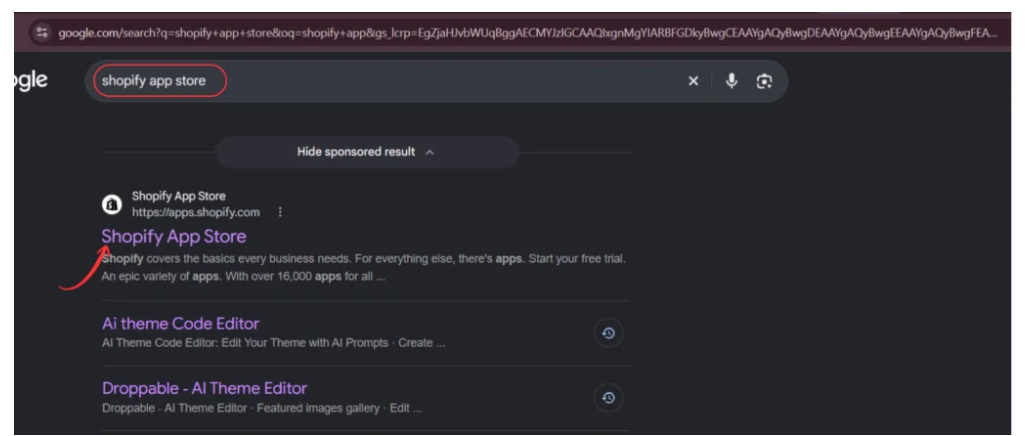
Image 1: Search for the official Shopify App Store.
The Shopify App Store provides applications that help merchants customize and manage their online stores.
Step 2: Search for AI Theme Code Editor
After opening the Shopify App Store, locate the search field.
Enter AI Theme Code Editor.
Find the app named AI theme Code Editor, identified by its code-editor icon, and select it.
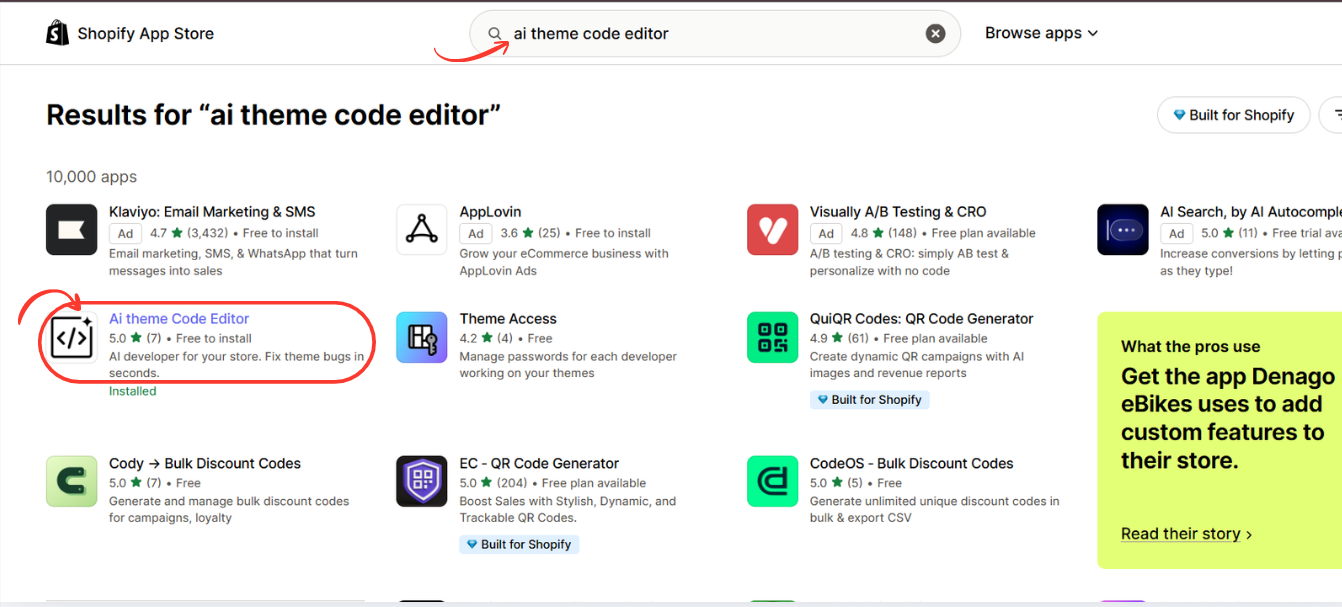
Image 2: Search for AI Theme Code Editor and open its app listing.
Step 3: Install or Open AI Theme Code Editor
On the app listing, review its features and installation information.
Click Install if you have not installed the app.
Complete Shopify’s authorization process to connect it to your store.
If the app is already installed, click Open.
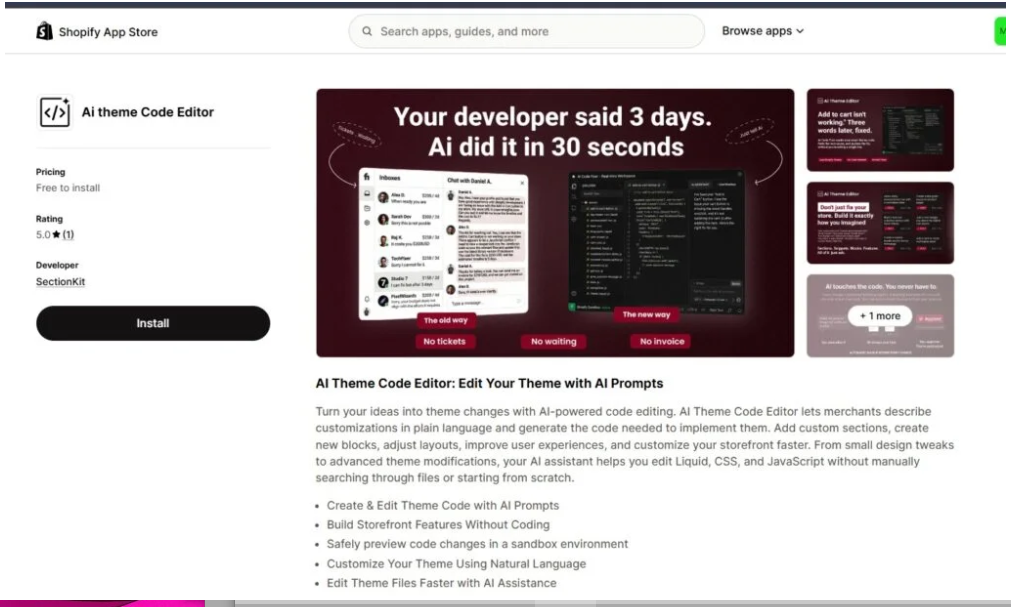
Image 3: Install or open AI Theme Code Editor through the Shopify App Store.
After opening the application, you can access the relevant theme management and editing tools.
Step 4: Connect Your Shopify Theme
Open AI Theme Code Editor from your Shopify admin dashboard.
Navigate to Connected Themes in the app sidebar.
The Connected Themes page allows you to select which Shopify theme you want to work on.
Click Connect theme if your desired theme is not already connected.
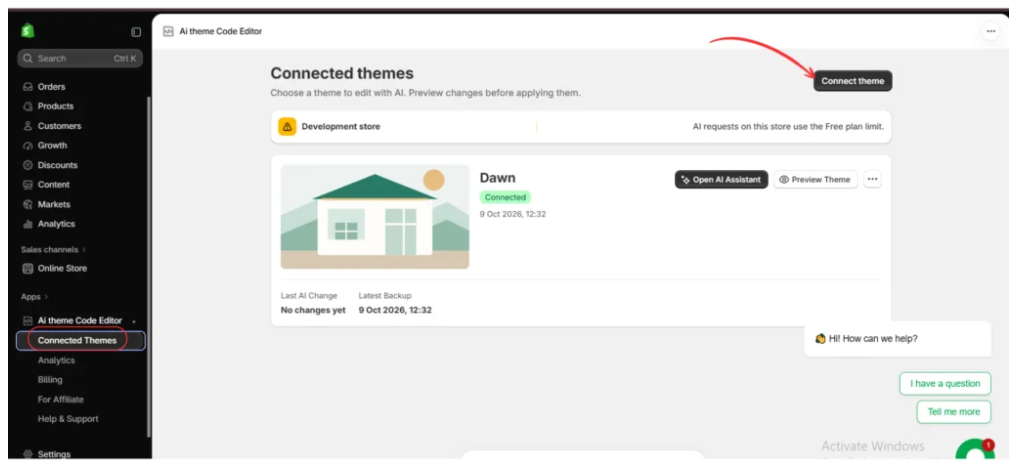
Image 4: Open Connected Themes and connect the Shopify theme you want to optimize for mobile devices.
In the example screenshot, the Dawn theme is already connected.
Before editing, verify that you have selected the correct theme.
Consider making a duplicate of your Shopify theme so that your original version remains available if a change causes unexpected behavior.
Step 5: Open the AI Assistant
After connecting your Shopify theme, locate it in the Connected Themes dashboard.
Click Open AI Assistant.
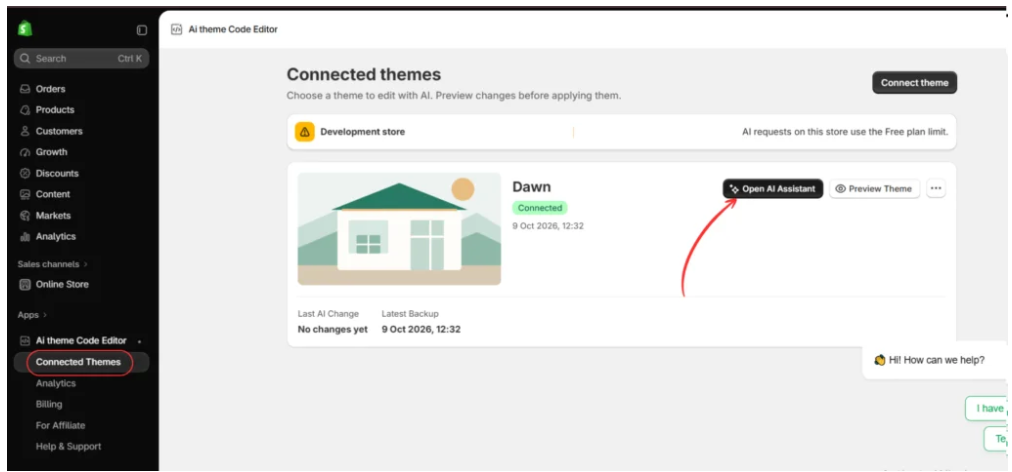
Image 5: Click Open AI Assistant to begin troubleshooting your Shopify theme.
The AI editing workspace will open.
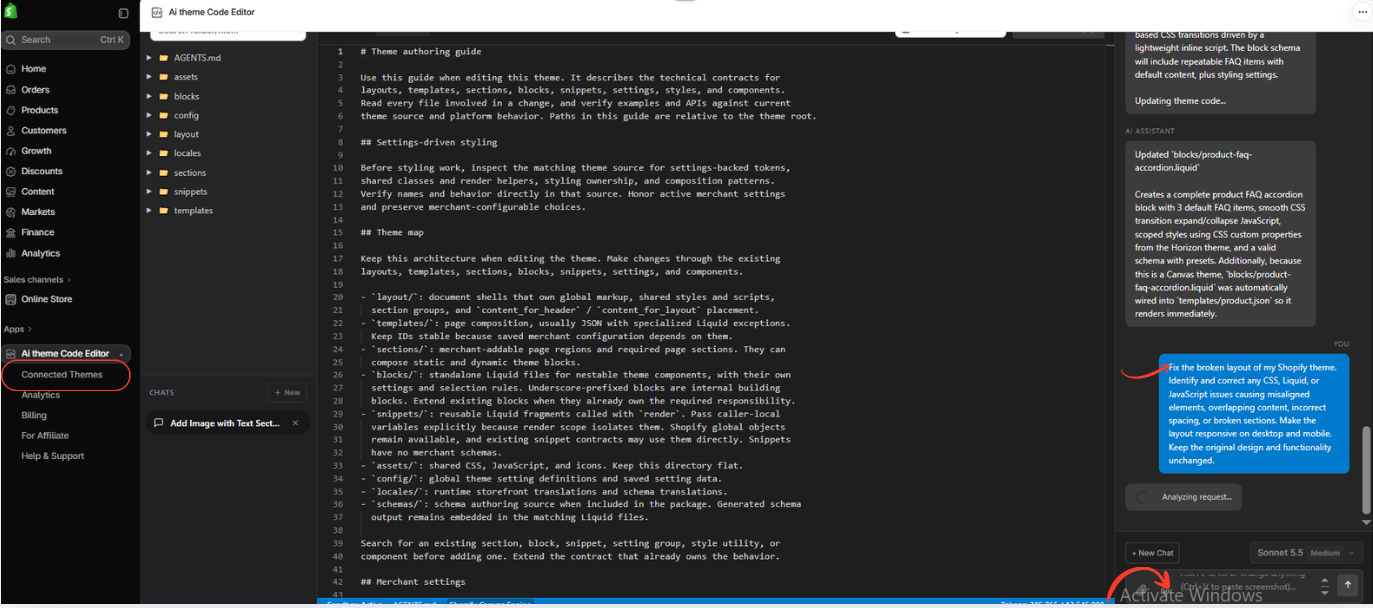
You will see the theme file explorer on the left, the code editor in the center, and the AI Assistant panel on the right.
Step 6: Tell AI to Fix Your Mobile Layout
Inside the AI Theme Code Editor workspace, locate the AI Assistant chat box.
Describe the mobile layout issue you want to fix.
For example, if your Shopify collection page looks broken on smartphones, ask the AI to identify and correct the relevant responsive styling problems.
Step 7: Apply approved changes
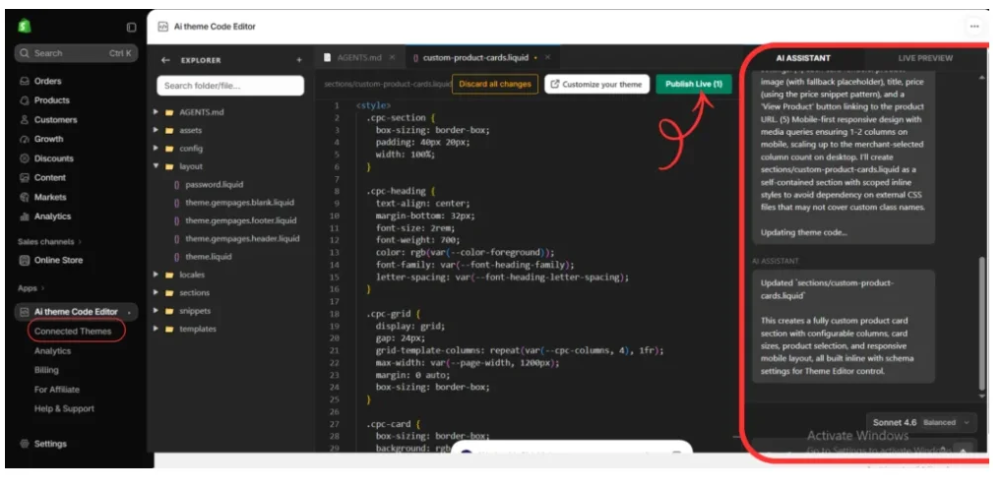
Once the modification has been reviewed and tested, use the appropriate app controls to apply it to the intended theme.
This process can reduce the need to hire a freelancer for every routine customization, while keeping review and testing in the merchant’s workflow.
Step 8: Preview Your Shopify Theme After Debugging
Once your changes are saved in the sandbox, select the Live Preview tab.
The app provides an Open Live Preview button to help you inspect the storefront.
Click the button to open the Shopify preview.
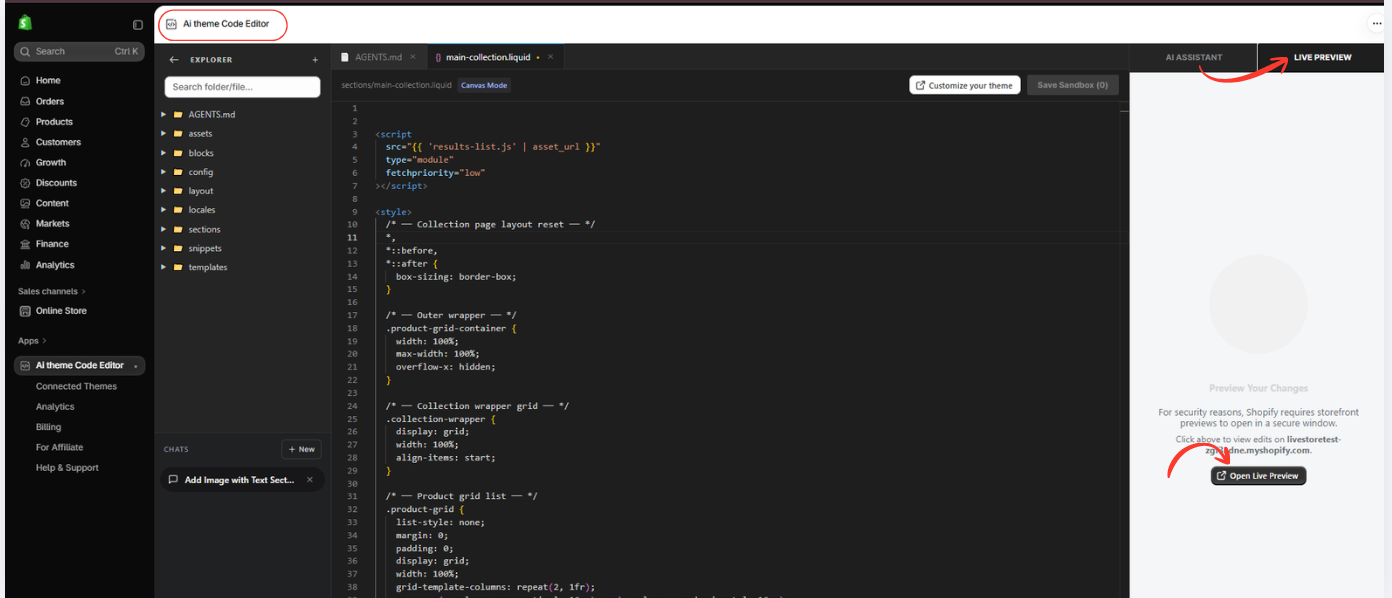
Image 8: Open Live Preview to inspect the updated Shopify theme and check whether the errors have been resolved.
Review the sections that were previously displaying errors.
Check product cards, collection grids, navigation menus, section settings, and other relevant storefront elements.
Test the changes on desktop and mobile.
If you are debugging a specific Liquid error, revisit the page where it originally appeared and confirm whether the issue has been resolved.
The supplied screenshot shows the preview-opening workflow, rather than a completed storefront test. You should verify the result before approving or applying changes to the live theme.
6. Which One Should You Choose?
How to Hire an Expert Shopify Developer in 2025: The Ultimate
Choose AI Theme Code Editor for everyday theme customization.
It is particularly attractive for merchants who want quick design changes, simple bug fixes, and more affordable experimentation without hiring a developer for each task.
Ultimate Shopify Template Development Guide 2026
Choose a professional Shopify developer for complex projects.
A developer is often a better choice for major custom development, complicated integrations, security-sensitive modifications, and projects that require deeper technical accountability.
For merchants working with a limited budget, trying AI Theme Code Editor first on a clearly scoped task can be a sensible approach.
Frequently Asked Questions (FAQs)
1. Is AI Theme Code Editor cheaper than hiring a Shopify developer?
For many small or recurring customization tasks, it can be substantially cheaper. The Starter plan costs $19/month, while freelance development is usually billed hourly or by project.
2. Can AI Theme Code Editor fix Shopify problems in seconds?
It can generate proposed code fixes in seconds for some tasks. More complicated issues may require additional time, testing, and revisions.
3. Can AI replace Shopify freelancers completely?
Not in every situation. AI is useful for routine editing and troubleshooting, while experienced developers remain valuable for complex and critical projects.
4. Is AI-generated Shopify code reliable?
AI-generated code can be useful, but it should be reviewed and tested before being published.
5. Can I create Shopify sections without hiring a developer?
Yes. AI Theme Code Editor allows merchants to request custom sections and blocks through natural-language instructions.
6. Does AI Theme Code Editor support Shopify Dawn?
The previously provided app screenshots demonstrate a connected Dawn theme and an AI code-editing workflow.
7. Will I be charged for every small change?
The app uses plan-based token allowances rather than standard freelancer hourly billing. Your total cost depends on the selected plan and usage.
8. Which is better for a new Shopify merchant?
For straightforward changes and limited budgets, AI Theme Code Editor is a useful starting option. For complex requirements, hiring an experienced developer may be more appropriate.
Conclusion: AI Theme Code Editor or Shopify Freelancer?
Hiring a Shopify developer remains valuable for demanding technical projects, but it is not always necessary for every small theme adjustment.
Freelance development can become expensive when merchants need frequent modifications, and the time required to coordinate those changes may slow down storefront improvements.
AI Theme Code Editor by SectionKit offers a compelling alternative for everyday Shopify customization.
Merchants can describe changes in plain English, generate proposed theme code, and use the available editing and preview tools without manually writing every line.
For straightforward fixes, AI can reduce both the initial turnaround time and development expenses.
For complex or critical work, professional developers still offer important advantages in expertise, testing, and accountability.
The best approach is to use AI where it saves time and money, and invest in human expertise when the complexity or risk justifies it.
Ready to customize your Shopify theme more efficiently?Try AI Theme Code Editor by SectionKit




