HOW TO CREATE LIFESTYLE PRODUCT PHOTOS WITH AI FOR YOUR SHOPIFY STORE
Shopify AI Photography Guide | Lifestyle Product Images | 2026

Introduction
High-quality product photography is essential for building a professional Shopify store. Customers want to see more than just a product against a plain background. They also want to understand how the product looks, where it can be used, and how it fits into their everyday lives.
This is where lifestyle product photography becomes important.
Lifestyle photographs show products in realistic settings, such as clothing worn outdoors, skincare products in a spa, furniture inside a living room, or sports equipment in natural environments.
These photographs help customers visualize products and create a more engaging shopping experience.
However, traditional lifestyle photography can be expensive. Hiring photographers, arranging models, finding locations, and organizing photoshoots for every product can require significant time and money.
Fortunately, AI-powered image generation offers a more flexible alternative.
With PA AI Image Generator, Shopify merchants can create professional-looking lifestyle product photos using existing product images as references.
The app provides different photography presets, allowing merchants to choose the styles that best match their products, customers, and brand identity.
In this guide, we’ll explain how to create lifestyle product photos with AI for Shopify, explore the available photography styles, and demonstrate the process using your actual PA AI Image Generator screenshots.
What Is Lifestyle Product Photography?
Lifestyle product photography is a photography style that presents products in environments where they might naturally be used.
Instead of focusing entirely on the product itself, lifestyle imagery helps communicate context, atmosphere, and potential use.
For example, a handbag can be shown as part of a fashion outfit, a coffee product can be presented in a café setting, or outdoor equipment can be displayed in a mountain environment.
These compositions can make a product more relatable to potential customers.
Studio photography vs. lifestyle photography
| Studio photography | Lifestyle photography |
|---|---|
| Usually uses a plain or controlled background | Features a relevant environment |
| Focuses on product details | Shows product context and styling |
| Useful for main product images | Useful for supporting imagery and marketing |
| Provides a consistent catalog appearance | Helps communicate a brand’s lifestyle |
| Emphasizes product clarity | Emphasizes storytelling and visual appeal |
Both styles have value. A Shopify store can use studio photography to show product details accurately and lifestyle photography to provide additional context.
Why Lifestyle Product Photos Matter for Shopify Stores
1. Help customers visualize products
Customers may find it easier to imagine owning or using a product when they see it in a relevant setting.
For example, a decorative cushion photographed on a sofa can communicate its styling possibilities more clearly than an isolated product photograph.
2. Create a stronger brand identity
Lifestyle imagery can communicate a brand’s aesthetic.
A luxury jewelry store may prefer elegant, warm-toned compositions, while an outdoor clothing brand may choose adventurous natural settings.
3. Make product pages more engaging
A combination of clear product images, close-ups, and lifestyle photographs can provide a more complete product presentation.
4. Support social media marketing
Lifestyle images can be useful for Pinterest, Instagram, Facebook, and other visually focused marketing platforms.
5. Reduce purchasing uncertainty
Accurate contextual photography can help customers better understand a product’s intended use and appearance.
However, lifestyle images should not replace clear original photographs or misrepresent the actual product.
The Challenges of Traditional Lifestyle Photography
Organizing a traditional lifestyle photoshoot often requires multiple resources.
Merchants may need photographers, models, locations, props, lighting equipment, travel arrangements, and photo editing services.
For a Shopify store with hundreds of products, repeating this process can become expensive.
Seasonal campaigns may require entirely different settings, and new product launches often create additional photography requirements.
AI-powered photography offers a way to create supplementary lifestyle images without arranging a physical photoshoot for every creative concept.
Introducing PA AI Image Generator for Shopify
PA AI Image Generator is a Shopify application that helps merchants generate additional product images using their existing Shopify catalog photographs.
Merchants can select products, choose photography presets, configure generation settings, and review their completed images.
The app offers a variety of lifestyle photography presets for different product categories and marketing needs.
Key features
- Lifestyle photography presets: Create product imagery featuring different environments.
- Industry-based categories: Explore styles for fashion, beauty, jewelry, home decor, sports, food, pets, and more.
- Custom instructions: Describe your preferred lighting, background, and visual composition.
- Product and collection selection: Work with individual Shopify products or groups of products.
- Multiple image formats: Configure image dimensions and output settings.
- Gallery management: Review completed generation jobs and results.
- Shopify publishing controls: Add approved images to your products.
App Link: PA AI Image Generator — Shopify App Store
Different Lifestyle Photography Styles Available for Shopify Merchants
The best lifestyle photography style depends on your product and the environment in which customers expect to see it.
Here are some examples of the lifestyle presets visible in your app screenshots.
| Lifestyle preset | Suitable product category |
|---|---|
| Lifestyle – Home | Furniture and home decor |
| Lifestyle – Jewelry Styled | Jewelry and fashion accessories |
| Lifestyle – Athletic Action | Fitness and sports products |
| Lifestyle – Outdoor | Outdoor and travel products |
| Lifestyle – Cafe Outfit | Fashion and lifestyle clothing |
| Lifestyle – Beauty Spa | Cosmetics and skincare |
| Lifestyle – Beverage Cafe | Coffee and beverage products |
| Lifestyle – Outdoor Sports Gear | Outdoor sports equipment |
| Lifestyle – Pet With Owner | Pet accessories |
| Lifestyle – Pet Outdoor | Pet and outdoor products |
| Lifestyle – Nursery | Baby and nursery products |
| Lifestyle – Food Hero | Food and beverage products |
| Lifestyle – Workspace | Office and desk accessories |
These presets provide different visual directions. Merchants can choose whichever style is most relevant to their products.
How Lifestyle Photography Can Support Shopify Conversions
Lifestyle photographs can help customers understand how products fit into real-life environments.
For example, customers purchasing furniture may benefit from seeing a product in a furnished room, while sports shoppers may find outdoor product imagery more relatable.
Lifestyle images can also help a store communicate its brand identity and prepare advertising content.
However, attractive images alone do not guarantee higher conversion rates.
Merchants should test product imagery and measure metrics such as add-to-cart rate, product page conversion rate, and revenue per session.
Step-by-Step Guide: How to Create Lifestyle Product Photos With PA AI Image Generator
This tutorial includes your two original screenshots in the exact order provided, with an explanation of the features visible in each image.
Step 1: Install PA AI Image Generator
Visit the Shopify App Store and search for PA AI Image Generator.
Open the app listing and install it on your Shopify store.
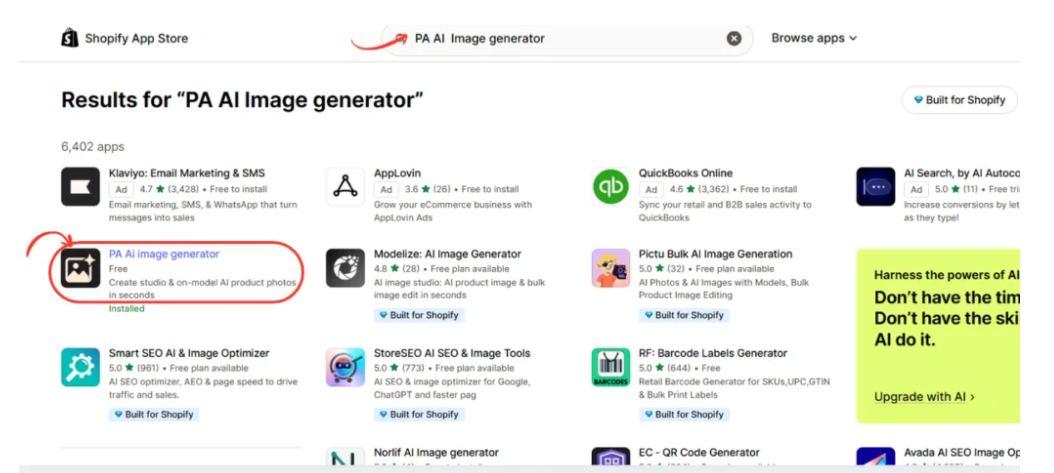
Once installed, access the application through Shopify Admin.Open PA AI Image Generator
Step 2: Open Generate Images
Inside your Shopify Admin, navigate to:
Apps → PA AI Image Generator → Generate Images

The app allows you to choose individual Shopify products or entire collections.
Select the products whose existing photographs you want to use as references.
For example, if you sell handbags, choose the handbags that need additional lifestyle photography.
If you manage a larger collection, you can select multiple products for the generation workflow.
After selecting your products, click Continue.
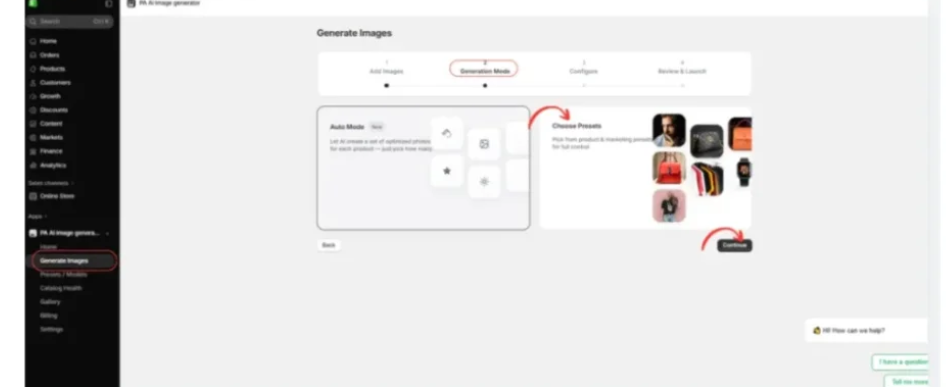
Step 3: Choose the Preset Generation Mode
Proceed to the Generation Mode stage.
Choose Choose Presets to browse the photography styles available in the app.

Preset-based generation is particularly useful when merchants want to control the overall look of their product images.
This allows a merchant to select an appropriate visual style rather than relying entirely on automatic scene selection.
Step 4: Select the Lifestyle Photography Category
Actual PA AI Image Generator screenshot with Lifestyle filter and initial lifestyle photography presets
Image 1: The actual PA AI Image Generator interface showing the Lifestyle (15) filter selected and the first row of lifestyle photography presets.
Image explanation
This first screenshot shows the Choose Presets section inside PA AI Image Generator.
At the top, the app displays the image generation workflow: Add Images, Generation Mode, Choose Presets, Configure, and Review & Launch.

Under Shot Type, Lifestyle (15) is selected, which filters the preset library to lifestyle photography styles.
The first visible options are:
Lifestyle – Home: Useful for creating visual compositions featuring home decor, furniture, and interior products.
Lifestyle – Jewelry Styled: Designed for jewelry and accessory-oriented compositions with an elegant presentation.
Lifestyle – Athletic Action: Suitable for fitness and sports-related products.
Lifestyle – Outdoor: Useful for products that benefit from nature, travel, and outdoor lifestyle settings.
What should merchants do?
Choose the preset that best matches the product and how you want customers to visualize it.
For example, a furniture store might select Lifestyle – Home, while a sports accessories store may prefer Lifestyle – Athletic Action.
The selected style should complement the product rather than distract from it.
Step 5: Explore More Lifestyle Photography Presets
Actual PA AI Image Generator screenshot showing cafe beauty sports pet nursery food and workspace lifestyle presets
Image 2: Additional lifestyle photography presets available in PA AI Image Generator, including café, beauty, outdoor sports, pets, nursery, food, and workspace scenes.
Image explanation
Your second screenshot shows more photography presets as the merchant scrolls through the Lifestyle category.
These include:

Lifestyle – Cafe Outfit: A café-themed composition, useful for fashion and lifestyle brands.
Lifestyle – Beauty Spa: Suitable for cosmetics, skincare, and beauty-related products.
Lifestyle – Beverage Cafe: Designed for beverage and coffee-related imagery.
Lifestyle – Outdoor Sports Gear: Useful for sports accessories and outdoor equipment.
Lifestyle – Pet With Owner: A photography style showing pets in a human-centered lifestyle context.
Lifestyle – Pet Outdoor: Suitable for pet products in outdoor environments.
Lifestyle – Nursery: A playful visual style suitable for baby and nursery-related products.
Lifestyle – Food Hero: Designed for food products that benefit from appetizing, product-focused compositions.
Lifestyle – Workspace: Useful for office equipment, desk accessories, and work-related products.
What should merchants do?
Review the full range of presets and choose the styles relevant to your store.
For example, a skincare merchant could select Lifestyle – Beauty Spa, while a pet accessories merchant could choose Lifestyle – Pet Outdoor.
Merchants can choose more than one preset when they want multiple visual variations, subject to the app’s generation limits.
After selecting the desired presets, click Continue at the bottom-right corner.
Step 6: Configure Your Lifestyle Photography Settings
After choosing the presets, proceed to the Configure stage.
The application provides options for customizing the generated images.
Depending on your selected workflow, you can adjust image dimensions, backgrounds, output formats, and custom instructions.
For example, you can use this prompt:
Example AI Lifestyle Photography Prompt Copy
Create a professional lifestyle product photograph using my existing product image as a reference. Place the product naturally in a realistic environment appropriate for its intended use. Use professional lighting, balanced colors, and an attractive composition. Preserve the original product design, exact colors, branding, and important details. Do not invent features or change the product appearance.
The instruction should clearly describe your preferred environment while emphasizing product accuracy.
Step 7: Review and Launch Image Generation
Once the configuration is complete, proceed to Review & Launch.
Check your selected products, photography presets, and generation settings.
Start the generation job when everything looks correct.
The app will process the selected products and create images based on the chosen settings.
The number of results and processing time depend on the generation workload and applicable limits.
Step 8: Review Your Lifestyle Images in Gallery
After generation, open Gallery from the app’s left navigation menu.
The Gallery displays image generation jobs and their progress.
Open a completed job to review the generated photographs.
Check the product’s shape, colors, proportions, logos, packaging, and other important details.
If the generated image introduces inaccurate product features, it should be revised or excluded.
Step 9: Download or Publish the Generated Images
After reviewing your images, select the results that accurately represent your products.
PA AI Image Generator provides options to download generated images and publish approved photographs to Shopify products.
You can use these images for product galleries, collection pages, promotional banners, and social media campaigns.
For the best shopping experience, combine lifestyle photographs with accurate original product images.
Best Practices for Creating Lifestyle Product Photos With AI
Choose environments that match your products
A skincare product may look appropriate in a spa-inspired environment, while outdoor equipment is better suited to a natural landscape. The selected scene should help customers understand the product’s intended use.
Maintain a consistent brand style
Use coordinated lighting, backgrounds, and colors across your product collection. This helps create a recognizable visual identity.
Keep your actual product details unchanged
Generated images should accurately represent the product’s shape, colors, design, and branding. Avoid publishing photographs that show features customers will not receive.
Use different images for different marketing purposes
A clean studio photograph is often useful as the main product image, while lifestyle photographs may work better for collection banners, advertising, and social media.
Optimize images for mobile devices
Choose appropriate dimensions and review images on mobile screens. Make sure the product remains clearly visible after cropping.
Test which photographs perform best
Monitor product page engagement, add-to-cart rates, and conversions. Where possible, compare different images through controlled testing.
Where Can Shopify Merchants Use AI Lifestyle Product Images?
Shopify product pages
Add lifestyle images alongside accurate studio photographs to show customers how products might look in relevant settings.
Collection banners
Create coordinated visuals for fashion collections, home decor categories, outdoor equipment, and other product groups.
Instagram and Facebook
Use lifestyle imagery in social media posts and promotional campaigns to present products in relatable environments.
Create visually appealing product compositions appropriate for discovery-oriented content.
Email marketing campaigns
Include relevant lifestyle visuals in new-product announcements, seasonal promotions, and collection launches.
Seasonal advertising
Use suitable photography presets to explore creative concepts for different seasons and promotional periods.
Frequently Asked Questions
1. What is AI lifestyle product photography?
AI lifestyle product photography involves generating product images in realistic-looking environments using existing photographs as references.
2. Can I create lifestyle images for Shopify without hiring a photographer?
Yes. AI image-generation tools can create additional lifestyle compositions without requiring a separate physical photoshoot for each scene.
3. Does PA AI Image Generator offer different lifestyle photography styles?
Yes. Your screenshots show lifestyle presets for home decor, jewelry, fitness, outdoor products, beauty, food, pets, and other categories.
4. Can I choose my own photography style?
Yes. Merchants can select available presets based on their products, branding, and marketing requirements.
5. Can I generate multiple images for one product?
Yes. The app supports choosing multiple relevant presets, subject to generation limits.
6. Can I create lifestyle images for an entire Shopify collection?
Yes. The app includes product and collection selection workflows.
7. Can AI lifestyle photographs improve Shopify conversions?
They can help customers visualize products and make more informed purchasing decisions. However, conversion improvements are not guaranteed and should be tested.
8. Can I publish AI-generated lifestyle images directly to Shopify?
The app provides publishing controls for adding approved images to Shopify products.
Conclusion
Lifestyle product photography helps Shopify merchants present products in meaningful, attractive, and relatable environments.
Instead of showing every product against a plain background, merchants can create visual compositions that demonstrate how products might fit into customers’ everyday lives.
However, traditional lifestyle photoshoots can require photographers, models, locations, lighting equipment, and significant preparation.
With PA AI Image Generator, Shopify merchants can use existing catalog photographs and choose from a variety of lifestyle photography presets.
As demonstrated in the screenshots, the app offers styles for home decor, jewelry, fitness, outdoor equipment, beauty, beverages, pet products, nursery items, food, and workspace accessories.
The main advantage is flexibility. Merchants can choose photography styles based on their product category, desired appearance, and brand identity.
By combining accurate original product images with carefully reviewed AI-generated lifestyle photography, Shopify stores can create a more consistent visual experience and develop additional creative assets for their marketing campaigns.
Ready to create professional-looking lifestyle product photos for your Shopify store?Try PA AI Image Generator on Shopify




