DO AI PRODUCT IMAGES HURT CUSTOMER TRUST? HOW TO USE THEM HONESTLY

Introduction
Artificial intelligence is changing how Shopify merchants create and manage product photography. Instead of arranging expensive photoshoots for every product, store owners can now use AI to generate professional-looking studio images, lifestyle photographs, on-model visuals, and promotional content.
AI product photography offers significant benefits, including creative flexibility, faster content production, and reduced dependence on traditional photography services.
However, as AI-generated images become more realistic, an important question arises:
Do AI product images hurt customer trust?
Customers shopping online depend on photographs to understand what they are purchasing. If an AI-generated image changes the product’s color, shape, material, size, or features, customers may develop unrealistic expectations.
This can lead to disappointment, complaints, returns, and reduced confidence in the store.
The problem isn’t necessarily the use of artificial intelligence. It’s whether the images accurately represent the products being sold.
With tools such as PA AI Image Generator, Shopify merchants can create additional product visuals from existing photographs. But responsible use, careful reviewing, and transparent marketing practices remain essential.
In this guide, we’ll explain how AI product photography affects customer trust, the potential risks of misleading imagery, and how Shopify merchants can use AI-generated photographs honestly while maintaining a professional storefront.
What Are AI-Generated Product Images?
AI-generated product images are photographs or visual compositions created or modified using artificial intelligence.
Instead of physically photographing a product in every possible environment, merchants can use existing product images as references and generate alternative presentations.
For example, a basic photograph of a handbag can become the reference for a studio-style product composition or a lifestyle scene.
Similarly, a snowboard can be presented against a clean studio background, in a snowy mountain environment, or alongside a model in a winter sports setting.
AI photography can be particularly useful for creating supporting visuals for ecommerce product galleries and marketing campaigns.
However, AI-generated images are not always exact reproductions of the original product.
The technology may unintentionally modify logos, surface textures, accessories, proportions, or other important details.
This is why accuracy matters.
Why Customer Trust Matters in Ecommerce
Customer trust is one of the foundations of a successful Shopify store.
Unlike shopping in a physical store, online customers cannot always touch, try, or examine the product before ordering.
Instead, they rely on product photographs, descriptions, reviews, measurements, shipping information, and store policies.
When product images accurately represent the merchandise, customers can make more informed purchasing decisions.
But when images create unrealistic expectations, trust may suffer.
Accurate images help customers understand products
Photographs should show the real product’s design, colors, materials, and important features.
Consistent visuals create a professional impression
A store with coordinated, high-quality product photography can feel more organized and credible.
Honest product representation reduces uncertainty
Customers should understand what is included with the product and which details are only part of the photography scene.
Trust supports long-term relationships
Accurate product information can contribute to customer satisfaction, repeat purchases, and positive experiences.
Can AI Product Images Damage Customer Trust?
Yes, AI product images can damage customer trust when they misrepresent the actual merchandise.
However, using AI does not automatically make a product image misleading.
The difference lies in how the photograph is generated, reviewed, described, and published.
For example, using AI to create a suitable background for an accurately represented product is different from using AI to invent product features that don’t exist.
The first may improve the visual presentation.
The second could mislead customers.
Shopify merchants should treat AI product photography as a creative tool rather than a substitute for accurate product information.
7 Ways AI Product Images Can Become Misleading
1. Changing the original product’s appearance
AI may unintentionally change product colors, shapes, patterns, or materials.
For example, a black handbag might appear dark brown, or a product’s proportions might look different from reality.
2. Creating nonexistent features
Generated images may add buttons, compartments, stitching, ports, or other features that aren’t present on the real product.
This is particularly important for electronics and technical equipment.
3. Altering logos and product labels
AI may distort brand logos, text, packaging, or labels.
Merchants should ensure these details remain accurate.
4. Making products appear larger or smaller
AI-generated environments can create misleading impressions of scale.
Furniture, jewelry, bags, and home decor products are especially sensitive to this issue.
5. Showing unrealistic materials
A generated photograph may make plastic look like metal or synthetic fabric resemble genuine leather.
These differences can affect customer expectations.
6. Displaying accessories that aren’t included
Lifestyle scenes may include decorative props, additional products, or accessories.
Customers should not be led to believe these items are included unless they actually are.
7. Using unrealistic on-model imagery
AI-generated models can sometimes distort clothing fit, footwear proportions, jewelry placement, or how a product interacts with the body.
For apparel, accurate fit information remains especially important.
How to Use AI Product Images Honestly on Shopify
Keep the real product as the main focus
Your primary product images should clearly and accurately represent what customers will receive.
You can supplement these photographs with AI-generated lifestyle scenes, studio backgrounds, and promotional compositions.
Preserve product details
Before publishing, compare the generated result with the original photograph.
Check the product’s shape, colors, logos, materials, and important features.
Be clear about AI-generated lifestyle scenes
When an image is substantially AI-generated and customers could reasonably interpret it as an actual photoshoot or real-world product demonstration, a short disclosure can provide helpful context.
For example:
Lifestyle image created with AI. Product details may appear differently in the styled scene. Refer to original product images and specifications for accurate information.
Disclosure does not make inaccurate product representation acceptable. Merchants should still correct or remove misleading visuals.
Use original photographs alongside AI images
A combination of real product photography and carefully reviewed AI-generated imagery can provide both accuracy and visual inspiration.
Avoid fabricated customer evidence
Do not present AI-generated people as actual customers, verified reviewers, or individuals who have genuinely purchased or endorsed the product.
Review all images before publication
Even when a prompt asks AI to preserve details, the final result may contain inaccuracies.
A manual review is essential.
Introducing PA AI Image Generator for Shopify
PA AI Image Generator helps Shopify merchants create product imagery using existing catalog photographs as references.
The application offers different photography styles that can be selected according to the merchant’s products, brand identity, and marketing requirements.
Rather than arranging a separate photoshoot for each composition, merchants can explore different studio and lifestyle settings through the app.
Studio photography
Generate clean, product-focused compositions suitable for supplementary ecommerce imagery.
Lifestyle photography
Create product photographs featuring relevant indoor or outdoor settings.
On-model photography
Explore model-based creative compositions for clothing, accessories, and suitable products.
Detail and macro photography
Generate close-up compositions intended to emphasize product features, subject to accuracy checks.
Seasonal photography
Create holiday-themed visuals for Christmas, Valentine’s Day, Black Friday, and promotional campaigns.
Product and collection generation
Select individual Shopify products or groups of products for image generation.
Gallery and publishing controls
Review completed images, download results, and publish approved photographs to Shopify products.
App Link: https://apps.shopify.com/pa-ai-image-generator
Real Examples: AI Product Photography and Customer Trust
The snowboard photography examples previously shared from PA AI Image Generator illustrate why merchants should distinguish between attractive product imagery and accurate product representation.
Example 1: Original Studio Product Photograph
Image: Snowboard standing upright against a neutral gray background.
This original-style photograph displays the snowboard’s general shape, colors, and surface design.
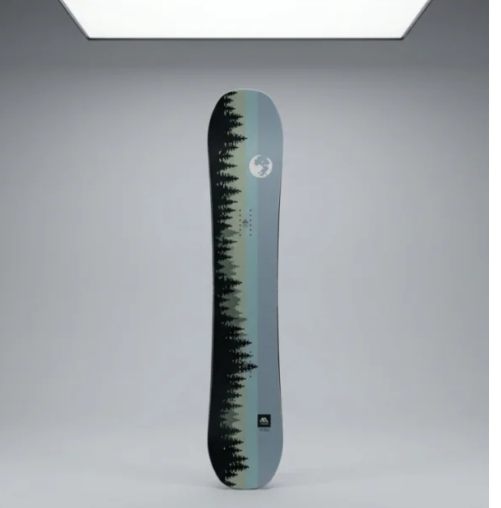
A clean product image gives customers an opportunity to examine the merchandise without visual distractions.
For an ecommerce product gallery, accurate studio photography is useful because it communicates what the product actually looks like.
Trust lesson: Keep a clear, accurate product photograph available so shoppers can verify the item’s design.
Example 2: AI Lifestyle Photograph in a Mountain Environment
Image: Blue snowboard held by hands wearing accessories against a snowy mountain background.
The composition uses a visually engaging lifestyle scene to communicate outdoor activity.
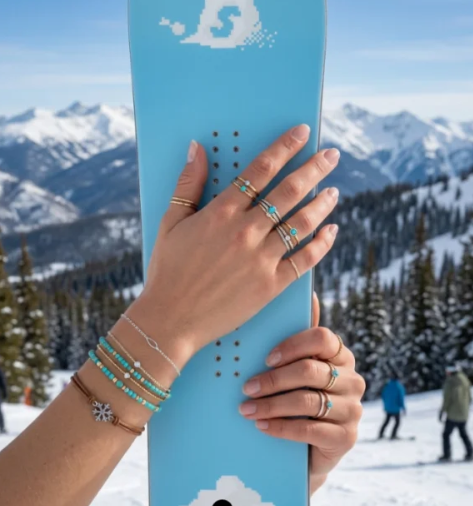
This type of imagery can help create an emotional connection to the product category.
However, the board shown in the lifestyle example differs in appearance from the original reference photograph.
That means it should not automatically be used as an accurate representation of the same product.
Trust lesson: An attractive AI lifestyle photograph should only be published as a specific product image if the depicted product accurately matches the merchandise.
Example 3: AI Outdoor Product Photography
Image: Two snowboards displayed in a snowy mountain landscape.
This composition features dramatic mountains, winter scenery, and outdoor equipment.
It creates a visually appealing promotional concept for a sports-related brand.

However, merchants should verify that the snowboards, colors, graphics, and any implied included accessories match the actual products and offer.
Trust lesson: Lifestyle backgrounds can enhance marketing, but they must not introduce misleading product expectations.
Example 4: Natural Winter Photography
Image: Two colorful snowboards leaning against a wooden fence.
This photograph creates a natural-looking winter sports environment.
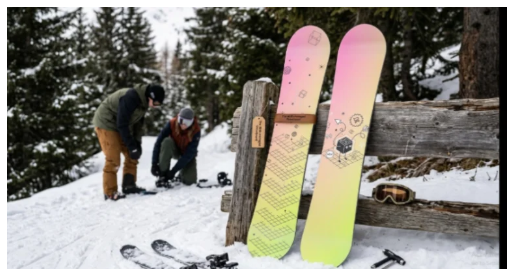
The snowy setting and background activity provide useful lifestyle context.
However, the merchant should check that the snowboard designs represent the correct products and that viewers won’t mistake the scene for a verified real-world demonstration.
Trust lesson: Use AI scenes to provide context while maintaining transparency and product accuracy.
Example 5: On-Model and Product Detail Photography
Image: Three compositions showing close-up snowboard details and a model standing alongside a snowboard.
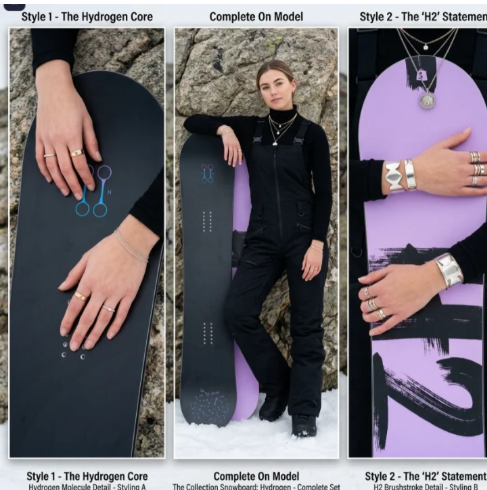
These images demonstrate how AI can create varied creative presentations.
The close-ups emphasize graphics and styling, while the on-model composition offers lifestyle context.
However, product designs, physical details, scale, and how the product appears beside a person must all be reviewed.
Trust lesson: AI-generated models and product details can support visual storytelling, but they should not replace accurate information about product dimensions, materials, and specifications.
How to Create More Trustworthy AI Product Images With PA AI Image Generator
Step 1: Search for PA AI Image Generator in the Shopify App Store
First, open the Shopify App Store.
Use the search bar to search for PA AI Image Generator.
The search results will display the app alongside other image generation and ecommerce photography applications.

Image 1: Search for PA AI Image Generator in the Shopify App Store.
Image explanation: The screenshot shows the Shopify App Store search results, with PA AI Image Generator highlighted. Its listing describes the app as a tool for creating studio and on-model AI product photography.
Click the app to open its listing.
Step 2: Install and Open PA AI Image Generator
On the app listing, review the description, available features, and pricing information.
Click Install if the app has not yet been installed, then approve the requested Shopify permissions.
Once installation is complete, select Open to launch the application.
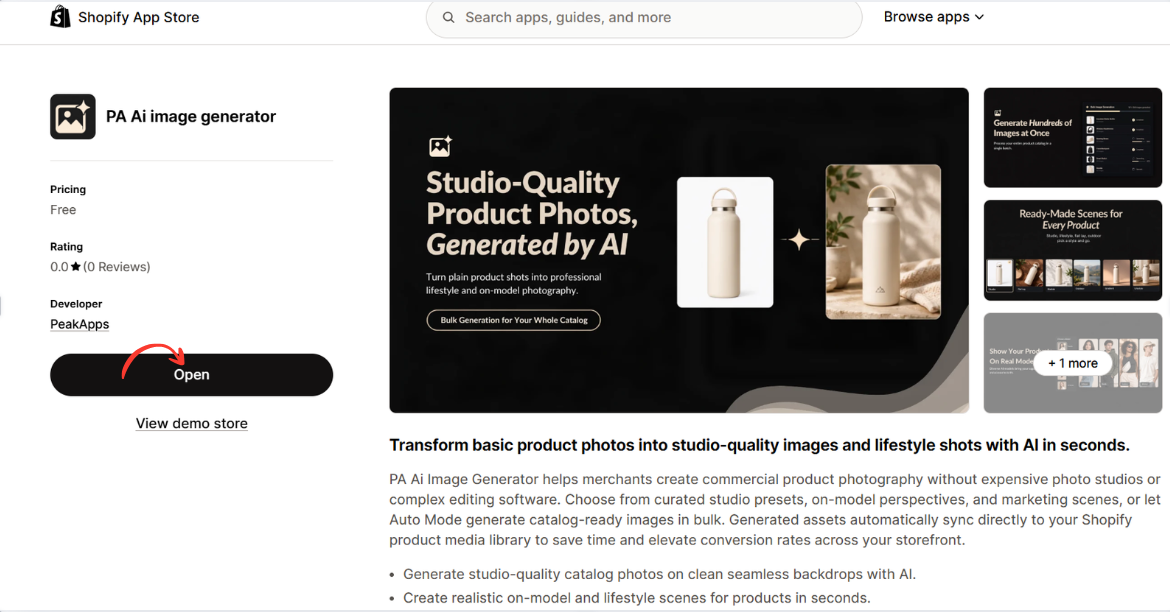
Image 2: Open PA AI Image Generator from its Shopify App Store listing.
Image explanation: The screenshot displays the app listing, including an illustration demonstrating how an ordinary product image can become a lifestyle-style photograph.
The Open button is highlighted, showing how merchants can access the installed app.
Step 3: Open the Generate Images Dashboard
After opening the app, locate Generate Images in the left navigation menu.
The image-generation workflow begins with selecting the products you want to use.
Click Browse Products to choose individual products from your Shopify catalog.
Alternatively, you can use Browse Collections to work with a collection.
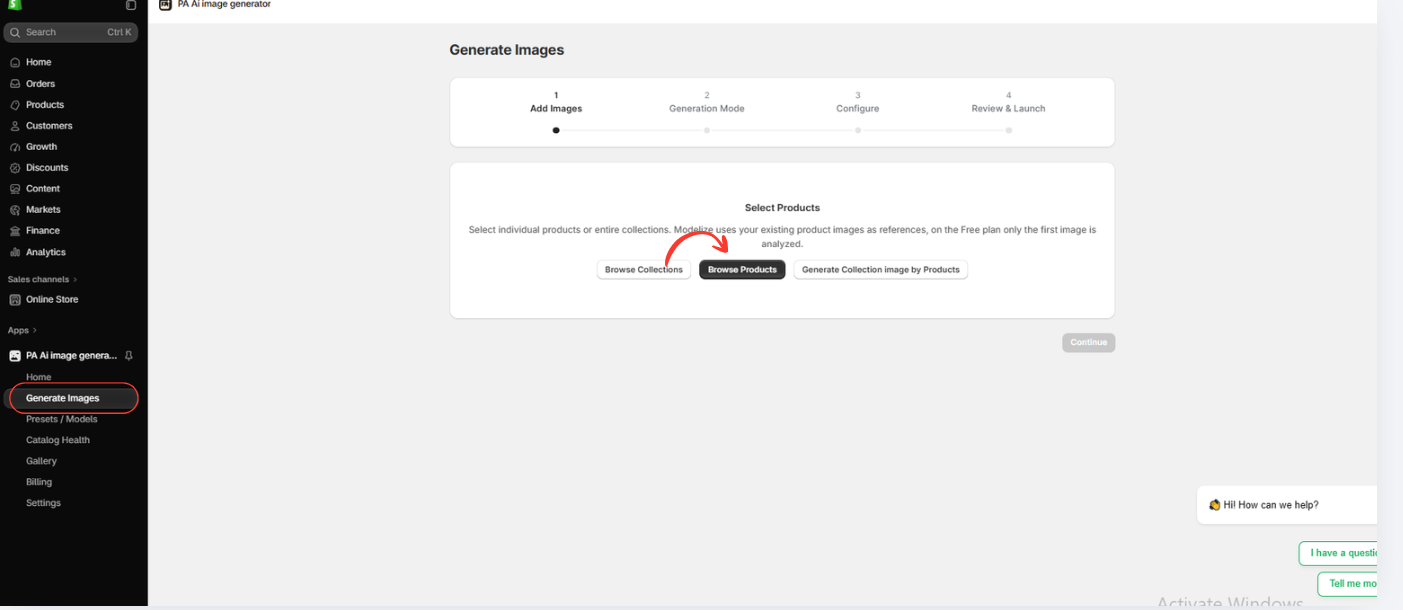
Image 3: Open Generate Images and select Browse Products.
Image explanation: The screenshot displays the image-generation interface with a progress indicator for selecting images, choosing a generation mode, configuring settings, and reviewing the generation request.
The Browse Products option allows merchants to use images already stored in Shopify.
Step 6: Choose an AI Image Generation Mode
The next screen displays two generation approaches:
Auto Mode: Allows AI to create a set of optimized product images based on the available product references.
Choose Presets: Allows you to select specific photography styles and compositions.
For this tutorial, select Choose Presets.
This option gives you more control over the visual direction of your final product photographs.

Image 6: Select Choose Presets to customize the style of AI-generated product images.
Image explanation: The screenshot shows the available generation modes. The Choose Presets option is highlighted, with previews of different photography styles.
Click Continue to browse the preset library.
Step 7: Explore Professional Product Photography Presets
The app provides a library of presets organized into several categories.
You can browse photography types such as Studio, On Model, Ghost Mannequin, Floating, Lifestyle, Flat Lay, Detail/Macro, Packaging, and Seasonal.
Industry filters include fashion, beauty, electronics, home products, jewelry, and sports.
Choose presets based on your product category and intended use.

AI Product Photography vs Misleading Product Photography
| Responsible AI photography | Misleading AI photography |
|---|---|
| Preserves the real product appearance | Changes important product features |
| Uses appropriate lifestyle backgrounds | Creates unrealistic product claims |
| Includes accurate product references | Replaces all reliable references |
| Reviews generated details | Publishes unchecked AI images |
| Clearly identifies synthetic scenes when relevant | Presents fabricated scenes as real evidence |
| Supports informed purchasing | Creates unrealistic expectations |
The important distinction is not whether AI was used.
It is whether the resulting images communicate accurate information to customers.
Best Practices for Building Customer Trust With AI Photography
Show authentic product details
Customers should be able to examine the actual product’s appearance, including important physical characteristics.
Avoid exaggerated image editing
Changes that make a product look materially different from reality can create misleading expectations.
Use AI for creative backgrounds and supplementary visuals
AI can be useful for lifestyle scenes, seasonal compositions, and marketing concepts when the underlying product remains accurately represented.
Provide clear measurements and specifications
Images alone may not explain product size, material, or functionality. Include accurate written information alongside photographs.
Be transparent about substantially synthetic imagery
Clear descriptions can help customers distinguish between actual product documentation and illustrative lifestyle imagery.
Respect customer expectations
Every image should help customers make an informed decision rather than persuade them through inaccurate visual claims.
Frequently Asked Questions
1. Do AI-generated product images automatically reduce customer trust?
No. AI-generated images do not automatically harm trust. Problems arise when images misrepresent products or create misleading expectations.
2. Is it acceptable to use AI product photography on Shopify?
AI-generated product imagery can be used when it complies with applicable requirements and accurately represents the merchandise.
3. Should Shopify merchants disclose AI-generated product images?
Disclosure is particularly advisable when substantially synthetic scenes could be mistaken for real photographs or genuine product demonstrations. The exact legal requirements depend on the market and context.
4. Can AI change product colors or logos?
Yes. AI may unintentionally alter colors, branding, shapes, or other details. Always review generated images before publishing.
5. Should I remove all original product photographs?
Generally, no. Accurate original images help customers understand what they are purchasing.
6. Can PA AI Image Generator create lifestyle photographs?
Yes. The app offers photography presets for lifestyle, studio, seasonal, and other visual compositions.
7. Can AI-generated images improve Shopify product presentation?
Yes. Carefully reviewed AI imagery can help create supplementary visuals, more consistent marketing materials, and engaging lifestyle compositions.
8. What is the safest way to use AI product photography?
Start with accurate original photographs, select appropriate presets, use detailed instructions, review every result, and avoid publishing misleading imagery.
Conclusion
AI product photography offers exciting opportunities for Shopify merchants who want to create professional-looking product images without arranging traditional photoshoots for every creative concept.
However, customer trust should always remain a priority.
The key challenge is ensuring that AI-generated photographs accurately represent the merchandise being sold.
Images that change product colors, materials, proportions, logos, or features can create unrealistic expectations and potentially harm the customer experience.
With PA AI Image Generator, Shopify merchants can create additional studio photographs, lifestyle compositions, seasonal imagery, and marketing visuals using their existing product photographs.
But the best results come from using AI responsibly.
Merchants should preserve accurate product details, review every generated image, provide truthful product descriptions, and use original photographs wherever customers need reliable visual information.
AI product photography should enhance your product presentation—not replace honesty or accuracy.
By combining authentic product information with carefully reviewed AI-generated visuals, Shopify merchants can create attractive, professional, and trustworthy shopping experiences.
Create professional-looking product imagery while keeping customer trust at the center of your Shopify store.
Explore PA AI Image Generator: https://apps.shopify.com/pa-ai-image-generator




