AI PRODUCT PHOTOGRAPHY FOR ELECTRONICS AND GADGETS
Shopify AI Photography Guide | Electronics & Tech Accessories | 2026

Introduction
High-quality product photography plays an important role in the success of an online electronics store. Whether customers are shopping for headphones, wireless earbuds, smartwatches, laptops, speakers, or other gadgets, they want to examine the product carefully before making a purchase.
Electronics customers often pay attention to small details, including product design, color, size, buttons, ports, materials, and overall appearance.
A blurry or poorly presented photograph can make it difficult for customers to understand the product’s features and may reduce their confidence in purchasing.
However, creating professional product photography for electronics can be expensive and time-consuming. Traditional photoshoots often require photographers, lighting equipment, controlled studio environments, editing software, and carefully arranged product setups.
Fortunately, AI product photography for electronics and gadgets offers a more flexible alternative.
With PA AI Image Generator, Shopify merchants can use existing product images as references and create professional-looking studio photographs, floating product compositions, detailed close-ups, lifestyle scenes, and promotional visuals.
In this guide, we’ll explain how AI product photography works for electronics, explore useful photography styles, and demonstrate how to generate images using the actual PA AI Image Generator interface.
Why Product Photography Matters for Electronics Stores
1. Customers want to examine product details
Electronics are often purchased based on their design, functionality, specifications, and physical features.
Clear photographs help shoppers understand the product’s shape, controls, connectivity ports, materials, and accessories.
2. Professional images support customer confidence
A consistent and accurate product gallery helps customers understand what they are purchasing.
Images should clearly show the actual product instead of introducing misleading or unrealistic features.
3. Visual presentation helps communicate product quality
Lighting, camera angles, and composition can make important design details more visible.
For example, a well-lit photograph of wireless headphones can highlight their ear cushions, headband, finish, and physical controls.
4. Lifestyle photography demonstrates product context
A laptop displayed in a modern workspace can help customers imagine using it during their working day.
Similarly, wireless earbuds photographed alongside a phone or travel accessories can communicate their intended use.
5. Product images support digital marketing
Electronics merchants can use attractive imagery across Shopify product pages, collections, email campaigns, social media, and promotional advertising.
Challenges of Traditional Electronics Product Photography
Professional electronics photography can be challenging because many gadgets include reflective surfaces, glossy materials, screens, and small details.
Merchants often face expenses and difficulties related to:
- Hiring professional product photographers.
- Arranging studio lighting for reflective surfaces.
- Photographing multiple product colors and variants.
- Capturing close-ups of buttons, ports, and controls.
- Creating floating product advertisements.
- Preparing lifestyle settings for different gadgets.
- Editing reflections and backgrounds.
- Producing new images for frequent product launches.
For smaller Shopify businesses, repeating this process across a large electronics catalog can become costly.
AI image generation can help create supplementary creative images without requiring a separate physical photoshoot for every style.
What Is AI Product Photography for Electronics?
AI product photography uses artificial intelligence to create new visual compositions based on existing product photographs.
For example, a basic photograph of wireless headphones can serve as a reference for an image with a professional studio background, dramatic lighting, or a promotional gradient.
Similarly, smartwatches can be presented in floating product compositions, while laptops can be shown in modern workspace environments.
AI allows merchants to explore different creative directions more easily.
However, it is essential to verify the results because AI may change product details, including logos, screen displays, buttons, ports, or other features.
Introducing PA AI Image Generator for Shopify
PA AI Image Generator is a Shopify application that allows merchants to generate product visuals using existing catalog images.
Instead of manually creating every photograph, merchants can select products and choose from different photography presets.
The application provides options suitable for electronics, technology accessories, fashion, home decor, jewelry, beauty products, and other categories.
Key Features
- Studio Photography: Generate clean, professional-looking product images.
- Floating Product Photography: Create dynamic promotional compositions.
- Detail and Macro Photography: Highlight product surfaces and design details.
- Lifestyle Photography: Present gadgets in relevant environments.
- Packaging Photography: Create product packaging and unboxing-style visuals.
- Seasonal Marketing Images: Prepare images for promotional campaigns.
- Bulk Image Generation: Work with multiple Shopify products.
- Custom Image Settings: Adjust aspect ratios, backgrounds, resolution, formats, and instructions.
- Gallery Management: Review and publish approved generated images.
App Link: PA AI Image Generator — Shopify App Store
Best AI Photography Styles for Electronics and Gadgets
Different electronics products require different visual approaches.
| Product type | Recommended photography style |
|---|---|
| Wireless earbuds | Floating – Wireless Earbuds |
| Smartwatches | Floating – Hero |
| Headphones | Studio – Gradient |
| Laptops | Lifestyle – Workspace |
| Smartphones | Studio, Detail / Macro |
| Gaming accessories | Studio – Gradient |
| Electronics packaging | Packaging – Unboxing |
| Computer accessories | Lifestyle – Workspace |
| Tech promotional campaigns | Seasonal – Black Friday |
These photography styles can help merchants create additional marketing visuals while maintaining a consistent brand appearance.
Why AI Photography Is Useful for Electronics Merchants
Create more product image variations
Merchants can create additional visual styles based on existing product references without organizing a separate photoshoot for every scene.
Prepare marketing images for product launches
New gadgets often require promotional images for social media, homepage banners, and advertising campaigns.
AI generation can support these creative requirements.
Maintain consistent branding
Using similar backgrounds, lighting styles, and photography presets across related products can help create a more cohesive catalog.
Reduce supplementary photography costs
AI photography can reduce certain expenses associated with producing additional lifestyle and promotional images.
Experiment with different creative styles
Merchants can explore clean studio images, gradient backgrounds, floating compositions, and realistic workspace scenes.
Step 1: Search for PA AI Image Generator in the Shopify App Store
First, open the Shopify App Store.
Use the search bar to search for PA AI Image Generator.
The search results will display the app alongside other image generation and ecommerce photography applications.

Image 1: Search for PA AI Image Generator in the Shopify App Store.
Image explanation: The screenshot shows the Shopify App Store search results, with PA AI Image Generator highlighted. Its listing describes the app as a tool for creating studio and on-model AI product photography.
Click the app to open its listing.
Step 2: Install and Open PA AI Image Generator
On the app listing, review the description, available features, and pricing information.
Click Install if the app has not yet been installed, then approve the requested Shopify permissions.
Once installation is complete, select Open to launch the application.
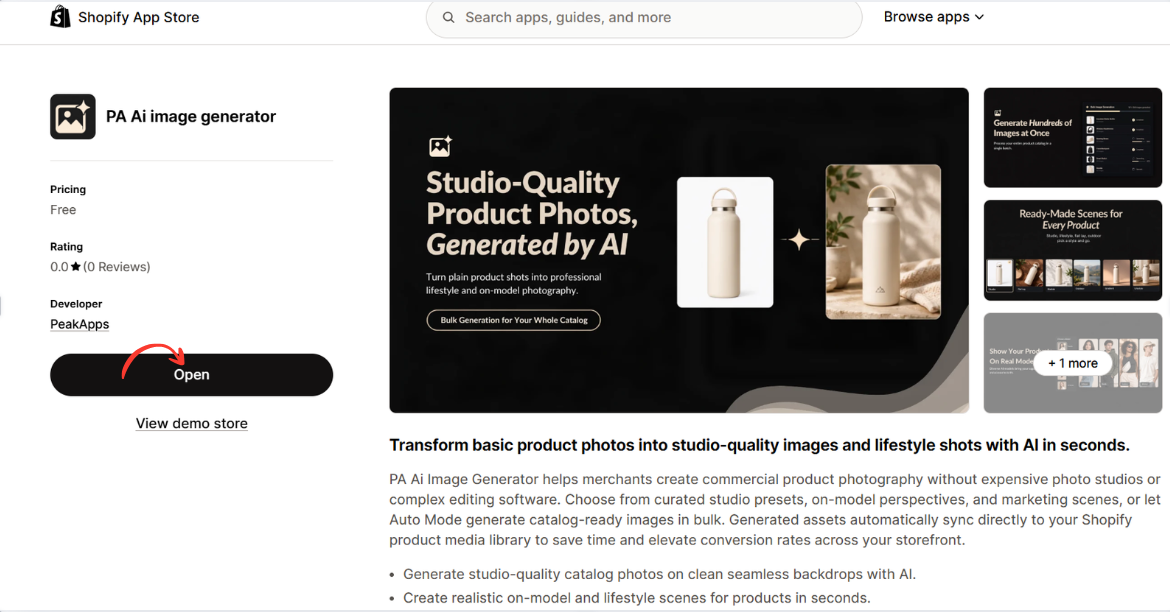
Image 2: Open PA AI Image Generator from its Shopify App Store listing.
Image explanation: The screenshot displays the app listing, including an illustration demonstrating how an ordinary product image can become a lifestyle-style photograph.
The Open button is highlighted, showing how merchants can access the installed app.
Step 3: Select the products that need better photography
Open your Shopify Admin and review your existing product catalog.

Identify products with low-quality photographs, missing angles, inconsistent backgrounds, or limited lifestyle imagery.
Step 4: Open PA AI Image Generator
Navigate to Apps → PA AI Image Generator → Generate Images.
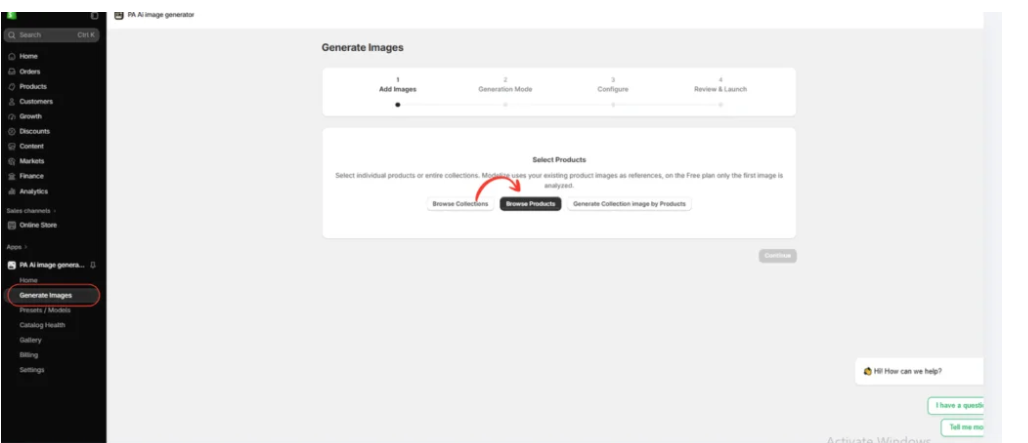
Select individual products or collections using the available product-selection options.
Step 5: Choose a photography style
Select Choose Presets to explore the available photography options.

Merchants can choose different presets depending on their products and brand identity.
For example, clothing stores may prefer on-model photographs, while furniture stores may prefer interior lifestyle photography.
Step 6: Select the right preset
Image 6: The preset selection interface inside PA AI Image Generator.

The preset library allows merchants to choose different compositions, including studio, lifestyle, on-model, seasonal, and collection photography.
Rather than applying the same style to every product, merchants can choose presets that match their requirements.
Step 4: Select the Tech & Electronics Photography Category

Image 1: The original PA AI Image Generator screenshot showing the Tech & Electronics category and seven available photography presets.
Image explanation
Your screenshot shows the Choose Presets interface within PA AI Image Generator.
In the Industries section, Tech & Electronics (9) is selected, filtering the photography library to electronics-related styles.
Seven presets are visible in the screenshot.
Detail – Texture: Useful for creating close-up compositions that emphasize product materials, textures, and design details. The preview features a laptop.
Floating – Hero: Creates a stylized floating product composition. The example features smartwatches against a neutral background.
Packaging – Unboxing: Provides a packaging-oriented visual concept, useful for giftable gadgets and product presentation campaigns.
Floating – Wireless Earbuds: Suitable for creative wireless earbud images featuring a floating composition.
Studio – Gradient: Creates a product-focused studio presentation with a colorful background. The screenshot shows black headphones against a bright yellow backdrop.
Lifestyle – Workspace: Suitable for products associated with offices, desks, and everyday work environments.
Seasonal – Black Friday: Useful for promotional product images and seasonal marketing campaigns.
What should merchants do?
Choose the preset that best suits your electronic product.
For headphones, Studio – Gradient may be suitable.
For wireless earbuds, Floating – Wireless Earbuds offers a promotional visual style.
For laptops and computer accessories, Lifestyle – Workspace can provide a relevant environment.
For smartwatches, Floating – Hero may create an attractive product-focused composition.
Remember that merchants can select different styles depending on their products and marketing requirements.
After choosing the desired preset, click Continue.
How to Make Electronics Product Photos Look More Professional
Use clean, modern backgrounds
Electronics often benefit from minimalist backgrounds that keep the product clearly visible. Neutral colors or subtle gradients can work particularly well for headphones, speakers, and smartwatches.
Highlight important product details
For electronics, details such as charging ports, buttons, display screens, and material finishes matter. Include accurate close-up photographs where customers need to inspect these features.
Maintain consistent lighting
Use similar lighting and shadow styles across related products. This helps create a cohesive appearance across your Shopify collections.
Use lifestyle images to demonstrate context
A laptop shown in a workspace or wireless earbuds in a travel-related composition can help customers visualize where they might use the product.
Preserve original product specifications
Never use AI-generated visuals that misrepresent the number of buttons, charging connections, screen layout, dimensions, or included accessories.
AI Product Photography vs Traditional Electronics Photography
| Feature | Traditional photography | AI photography |
|---|---|---|
| Physical studio | Often required | Not required for generated scenes |
| Photographer | Usually required | Not required for supplementary AI images |
| Product accuracy | Captures actual items | Requires careful verification |
| Creative backgrounds | Physical or digitally edited | Generated through AI |
| Image variations | May require extra production | Can generate multiple concepts |
| Initial product references | Captured with a camera | Usually needs existing images |
| Best use | Accurate product documentation | Lifestyle and marketing variations |
Which one is better?
Traditional photography remains particularly valuable for accurately documenting electronics.
AI product photography is useful for creating additional promotional and lifestyle imagery without arranging multiple physical photoshoots.
For many Shopify electronics stores, combining both methods provides a practical balance.
Frequently Asked Questions
1. Can AI create professional electronics product photographs?
Yes. AI image generation can produce professional-looking studio, lifestyle, and promotional images based on existing product references.
2. Can I generate AI product images for wireless earbuds?
Yes. PA AI Image Generator includes a Floating – Wireless Earbuds photography preset.
3. Can I create smartwatch product advertisements using AI?
Yes. Floating – Hero and other suitable presets can provide creative compositions for smartwatch marketing.
4. Can AI create laptop lifestyle photographs?
Yes. The Lifestyle – Workspace preset is suitable for office and desktop-related imagery.
5. Can I generate Black Friday promotional product images?
Yes. The app includes a Seasonal – Black Friday preset.
6. Can I generate images for multiple electronic products?
Yes. PA AI Image Generator supports selecting products and collections for image generation.
7. Can I publish AI-generated photographs directly to Shopify?
The app provides publishing controls for approved generated images.
8. Will AI preserve electronic product details accurately?
Not always. AI may modify logos, ports, buttons, screens, or other important details, so merchants should verify every result before publishing.
Conclusion
Professional product photography is an important part of building a successful Shopify electronics and gadgets store.
Customers want to examine product designs, understand physical features, and see how gadgets might fit into their daily lives.
However, producing multiple studio and lifestyle photographs through traditional photoshoots can require considerable time and expense.
With PA AI Image Generator, Shopify merchants can use existing catalog images to create additional studio-style photographs, floating product compositions, close-up visuals, workspace scenes, and promotional graphics.
As demonstrated by the actual app screenshot, merchants can choose from different photography presets, including Floating – Wireless Earbuds, Studio – Gradient, Lifestyle – Workspace, and Seasonal – Black Friday.
The main advantage is flexibility. Merchants can select photography styles based on their products, audience, and branding requirements.
By combining accurate original product photographs with carefully reviewed AI-generated images, electronics stores can create attractive product galleries and additional marketing materials.
Ready to create professional-looking electronics product photographs with AI?Explore PA AI Image Generator on Shopify




