AI PRODUCT PHOTOGRAPHY FOR HOME DECOR STORES
Shopify Home Decor Guide | AI Product Photography | 2026

Introduction
High-quality product photography plays an important role in the success of an online home decor store. When customers shop for furniture, wall art, decorative accessories, cushions, lighting, or other home essentials, they want to imagine how these products will look inside their own homes.
Unlike physical retail stores, Shopify merchants cannot give customers the opportunity to touch furniture, examine materials in person, or see how decorations look in different rooms. Instead, customers rely on product photographs to understand the design, appearance, and intended use of each item.
However, arranging professional home decor photography can be expensive and time-consuming. Creating attractive interior scenes often requires furnished rooms, photographers, decorators, lighting equipment, and carefully selected accessories.
Fortunately, AI product photography for home decor stores offers a more flexible approach.
With PA AI Image Generator, Shopify merchants can use existing product photographs as references and generate professional-looking studio, home lifestyle, and seasonal images.
In this guide, we’ll explain how to create AI product photography for home decor products, explore different photography styles, and demonstrate the process using actual screenshots and example results.
Why Product Photography Matters for Home Decor Stores
Home decor is a highly visual product category. Customers often make purchasing decisions based on how well a product matches their preferred interior design style.
1. Helps customers visualize products in their homes
A photograph of a sofa against a plain background can show its shape and color. However, a lifestyle image featuring that sofa inside a furnished living room helps customers imagine how it might look in their own space.
2. Creates an attractive store appearance
Consistent photography can make product pages, collection pages, and homepage banners appear more professional.
3. Highlights product styling possibilities
Home decor products often look more appealing when displayed alongside complementary furniture, lighting, plants, wall art, and other decorative accessories.
4. Supports visual marketing campaigns
Lifestyle photographs can be used for Pinterest, Instagram, Facebook, email marketing, and promotional campaigns.
5. Builds a recognizable visual identity
Whether your store focuses on modern, minimalist, Scandinavian, bohemian, rustic, or luxury interiors, consistent product photography helps communicate your brand’s personality.
The Merchant’s Challenge: Traditional Home Decor Photography
Creating professional home decor photography is often more complicated than photographing smaller products.
Furniture and decorative items may require large spaces, carefully arranged rooms, transportation, professional lighting, and extensive styling.
Merchants commonly face difficulties such as:
- Expensive photography studios and interior locations.
- Transporting large furniture for photoshoots.
- Purchasing or renting decorative props.
- Hiring photographers and interior stylists.
- Creating multiple room settings for different products.
- Maintaining consistent photographs across a large catalog.
- Producing new images for seasonal campaigns.
For smaller Shopify businesses, these requirements can make it difficult to create visually attractive imagery for every product.
AI-powered photography can help merchants produce additional lifestyle compositions from their existing product references.
What Is AI Product Photography for Home Decor?
AI product photography uses artificial intelligence to generate new product visuals based on existing images and selected creative settings.
For example, a simple photograph of a decorative chair can serve as a reference for a lifestyle composition featuring that chair inside a furnished living room.
Similarly, wall art can be presented in a gallery-style interior, cushions can be displayed in a cozy living-room arrangement, and decorative accessories can be placed in carefully styled environments.
Rather than arranging every scene physically, merchants can explore multiple photographic styles through AI image generation.
However, AI-generated images may change product colors, proportions, textures, or designs. Merchants should verify that the images accurately represent the items they sell.
Introducing PA AI Image Generator for Shopify
PA AI Image Generator is a Shopify application designed to help merchants create product photography using existing Shopify catalog images.
The app provides a variety of photography presets, including options for home decor, furniture, lifestyle products, seasonal marketing, and studio photography.
Merchants can choose a preset based on their products and preferred appearance.
Key Features
- Lifestyle photography: Create styled indoor environments.
- Studio furniture photography: Generate clean product-focused images.
- Home decor compositions: Present products in coordinated interior settings.
- Seasonal photography: Create holiday-themed marketing visuals.
- Custom generation settings: Adjust the image format, ratio, background, and creative instructions.
- Bulk image generation: Generate images for multiple selected products.
- Gallery management: Review completed images before publishing.
- Shopify integration: Add approved images to product listings.
App link: PA AI Image Generator — Shopify App Store
Different AI Photography Styles for Home Decor Products
The best photography style depends on the product and how the merchant wants to present it.
| Product type | Recommended photography style | Main benefit |
|---|---|---|
| Sofas and couches | Studio – Furniture | Highlights furniture appearance |
| Decorative cushions | Lifestyle – Home | Shows cushion combinations in rooms |
| Wall art | Lifestyle – Home | Demonstrates wall styling |
| Decorative chairs | Lifestyle – Home, Studio | Shows furniture in context |
| Indoor plants | Lifestyle – Home | Creates natural interior scenes |
| Lamps and lighting | Lifestyle – Home | Demonstrates decorative placement |
| Rugs and carpets | Lifestyle – Home | Shows room coordination |
| Holiday decorations | Seasonal – Christmas | Creates seasonal promotional imagery |
These recommendations are flexible. Merchants should select whichever preset best suits their product and brand style.
Why AI Photography Is Useful for Home Decor Merchants
Create multiple interior styles
Merchants can experiment with minimalist, contemporary, luxury, rustic, and natural interior compositions without arranging every room physically.
Reduce additional photography expenses
AI-generated visuals can reduce the need for certain supplementary lifestyle photoshoots.
Make product collections more consistent
Similar backgrounds, lighting, and compositions help create a cohesive visual experience.
Create seasonal marketing visuals
Home decor stores can develop festive and seasonal imagery for promotional campaigns.
Support social media marketing
Styled room photographs can provide visual content for Pinterest, Instagram, and other image-focused platforms.
Step 1: Search for PA AI Image Generator in the Shopify App Store
First, open the Shopify App Store.
Use the search bar to search for PA AI Image Generator.
The search results will display the app alongside other image generation and ecommerce photography applications.

Image 1: Search for PA AI Image Generator in the Shopify App Store.
Image explanation: The screenshot shows the Shopify App Store search results, with PA AI Image Generator highlighted. Its listing describes the app as a tool for creating studio and on-model AI product photography.
Click the app to open its listing.
Step 2: Install and Open PA AI Image Generator
On the app listing, review the description, available features, and pricing information.
Click Install if the app has not yet been installed, then approve the requested Shopify permissions.
Once installation is complete, select Open to launch the application.
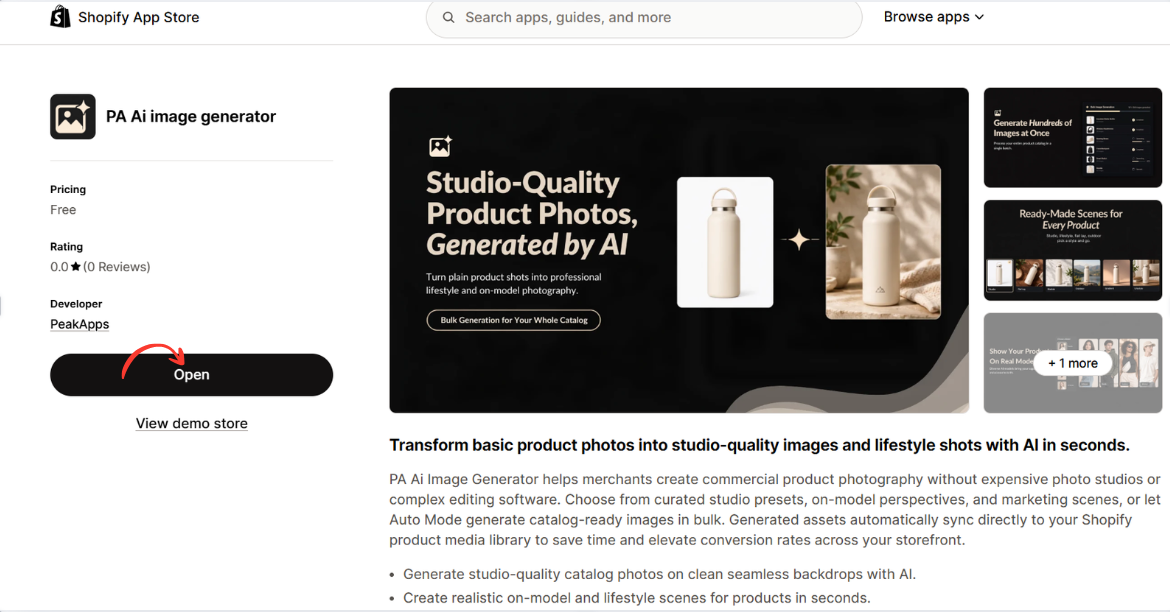
Image 2: Open PA AI Image Generator from its Shopify App Store listing.
Image explanation: The screenshot displays the app listing, including an illustration demonstrating how an ordinary product image can become a lifestyle-style photograph.
The Open button is highlighted, showing how merchants can access the installed app.
Step 3: Open the Generate Images Dashboard
After opening the app, locate Generate Images in the left navigation menu.
The image-generation workflow begins with selecting the products you want to use.
Click Browse Products to choose individual products from your Shopify catalog.
Alternatively, you can use Browse Collections to work with a collection.
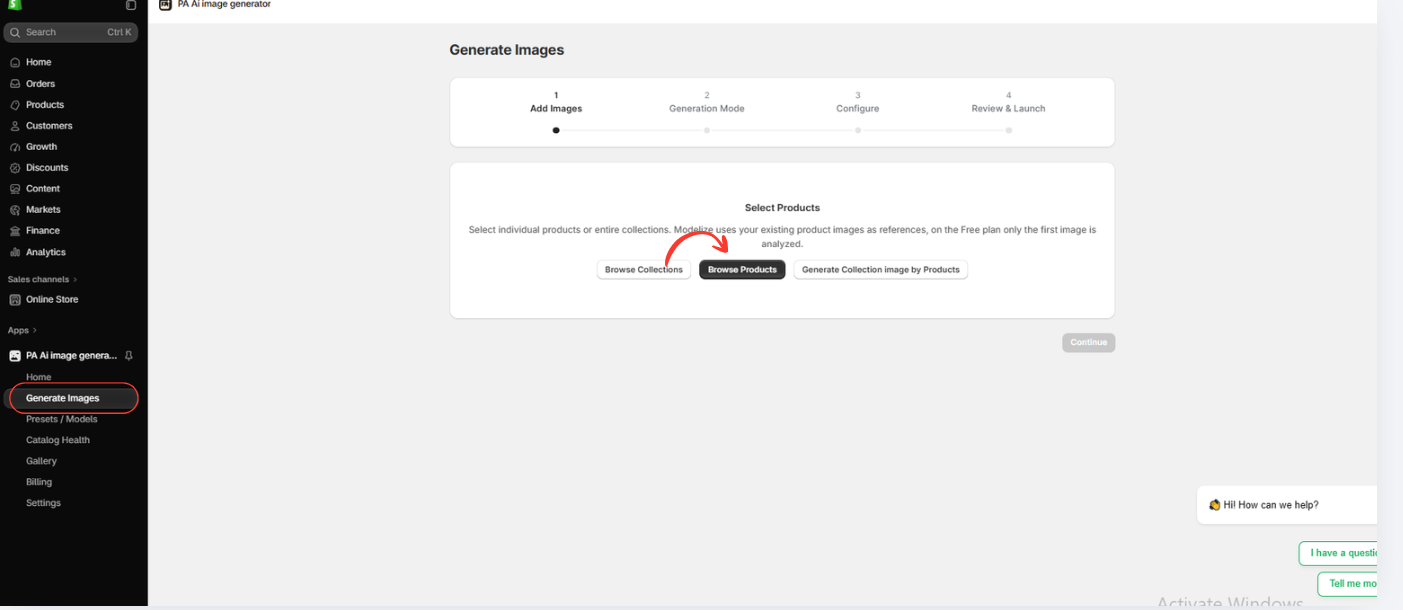
Image 3: Open Generate Images and select Browse Products.
Image explanation: The screenshot displays the image-generation interface with a progress indicator for selecting images, choosing a generation mode, configuring settings, and reviewing the generation request.
The Browse Products option allows merchants to use images already stored in Shopify.
Step 4: Select the Home & Furniture Category
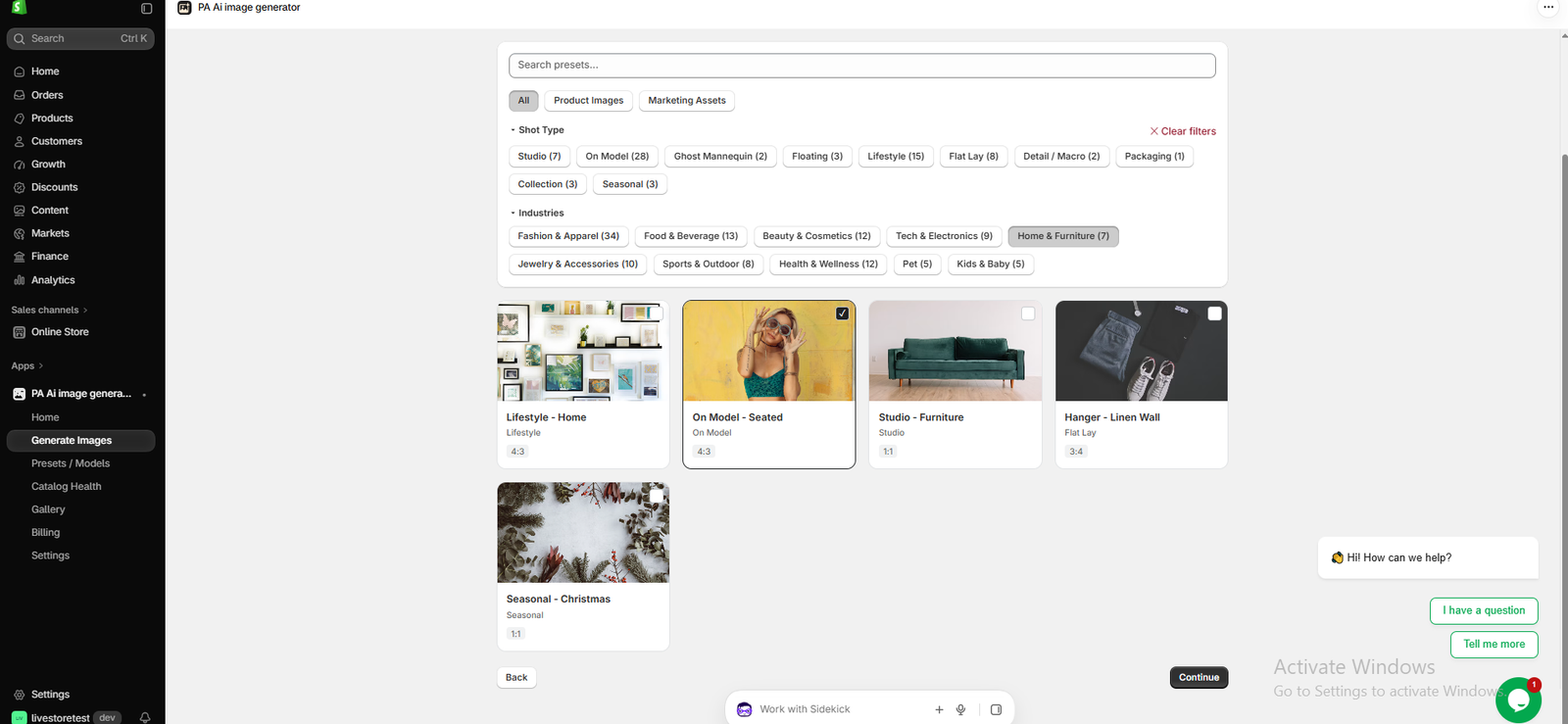
Image 1: The actual PA AI Image Generator interface showing Home & Furniture presets, with On Model – Seated selected.
Image explanation
Your first screenshot shows the PA AI Image Generator preset library with Home & Furniture (7) selected under Industries.
The screenshot includes five visible photography preset options:
Lifestyle – Home: Designed for creating home decor and styled interior photography.
On Model – Seated: A composition featuring a seated person, which may suit certain furniture or lifestyle products.
Studio – Furniture: Useful for clean furniture photography without elaborate backgrounds.
Hanger – Linen Wall: A flat-lay style that may be suitable for textiles and selected accessories.
Seasonal – Christmas: Suitable for creating holiday-themed decorative imagery.
In your screenshot, On Model – Seated is selected, indicated by the checked box.
What should merchants do?
Select the photography preset that matches your product and intended presentation.
For home accessories and decorative products, Lifestyle – Home may be a suitable starting point. For furniture catalog images, Studio – Furniture may provide a cleaner appearance.
Once you select the appropriate preset, click Continue.
Step 5: Create a Professional Living Room Lifestyle Image
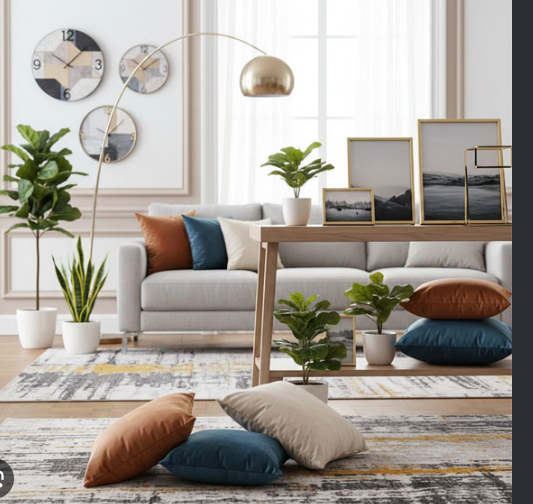
Image 2: A stylish living-room composition showing a sofa, decorative cushions, wall clocks, plants, framed art, and interior lighting.
Image explanation
Your second uploaded image demonstrates the type of professional home interior composition that can be used for home decor marketing.
The image features a bright living room with a light-colored sofa, coordinated blue and brown cushions, decorative plants, wall clocks, framed artwork, and a modern floor lamp.
The neutral color palette and carefully arranged accessories create a cohesive living space.
Rather than presenting decorative cushions or wall art separately, this type of lifestyle photograph shows how multiple products can complement one another in a real-looking interior.
How merchants can use this photography style
This type of image can be used for homepage banners, living-room collection pages, decorative cushion promotions, wall art marketing, and room styling inspiration.
It is particularly useful for stores that want to communicate a modern, coordinated home decor aesthetic.
Step 6: Create Warm and Natural Home Decor Photography
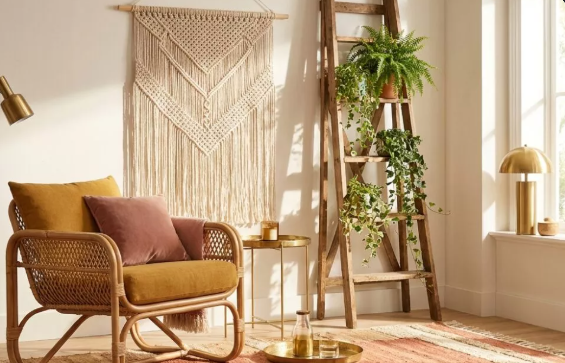
Image 3: A warm, natural home interior scene featuring a rattan chair, macrame wall decor, cushions, greenery, and decorative furniture.
Image explanation
Your third uploaded image illustrates a different home decor photography style.
This composition uses warm natural colors, sunlight, greenery, woven textures, and wooden furniture to create a cozy interior.
The photograph includes a rattan-style chair with cushions, a macrame wall hanging, a decorative wooden ladder, indoor plants, a small table, and warm lighting.
Compared with the previous living-room image, this scene emphasizes a natural, bohemian aesthetic.
What makes this result useful?
The photograph demonstrates how home decor products can be presented through a coordinated interior design theme.
It can be useful for promoting accent chairs, wall decorations, indoor plants, natural fiber accessories, and bohemian-inspired home collections.
For Shopify merchants, this provides another possible visual direction beyond traditional white-background product images.
Step 7: Configure the Image Generation Settings
After selecting the appropriate preset, open the Configure stage.
Review the available settings for image dimensions, backgrounds, output format, and custom instructions.
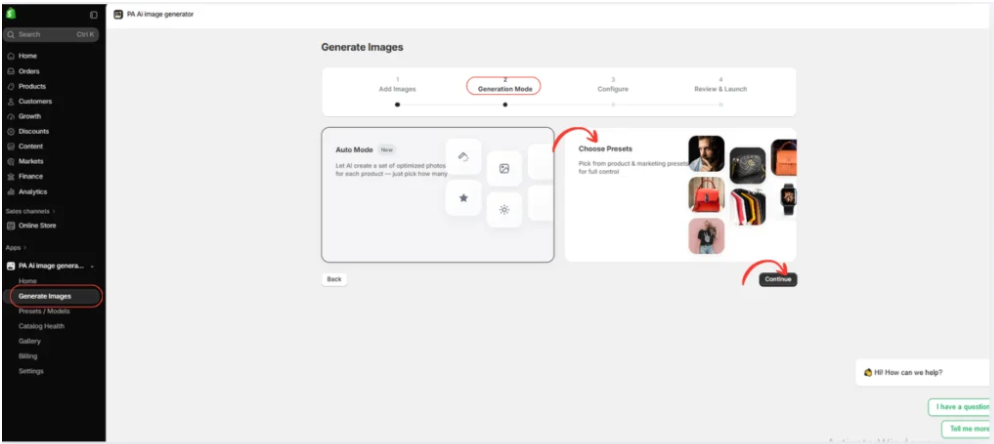
For home decor products, you can use an instruction such as:
Create a professional home interior photograph using my selected product image as a reference. Place the product in a warm, modern living room with realistic natural lighting, coordinated furniture, and elegant decor. Preserve the original product’s shape, color, material appearance, and design. Do not change its actual features.
Merchants can adjust the visual direction depending on their brand.
For a minimalist furniture brand, request simple arrangements with neutral colors. For a bohemian decor brand, request warmer tones, natural textures, and complementary accessories.
Step 8: Review and Launch the AI Image Generation
Once your configuration is complete, proceed to Review & Launch.
Check your selected products, presets, and generation settings.
Start the generation job when you are satisfied with the choices.
The application will create images based on the selected settings and available product references.
Step 9: Review Your Generated Images in Gallery
After generation, open the Gallery section in PA AI Image Generator.
Review the completed photographs and inspect the products carefully.
For home decor and furniture, pay particular attention to product size, proportions, materials, colors, patterns, and physical details.
Remember that generated room scenes are illustrative. A photograph may make a sofa appear larger, a cushion appear smaller, or a decorative item look different from the actual product.
Ensure customers can still access accurate photographs and measurements.
Step 10: Download or Publish Your Images
Once you have reviewed the results, choose the images you want to use.
Use the available Gallery controls to download your photographs or publish approved images to your Shopify product listings.
You can also prepare selected images for collection banners, promotional campaigns, and social media.
For the best shopping experience, combine accurate individual product photographs with supplementary lifestyle images.
Best Practices for AI Home Decor Photography
Maintain a consistent interior design style
Choose similar lighting, furniture tones, and backgrounds across related products to create a recognizable brand appearance.
Keep product dimensions accurate
Furniture and home decor products need accurate proportions. Avoid using generated images that make an item appear much larger or smaller than it really is.
Choose backgrounds that complement the product
For example, a neutral sofa may work well in a minimalist living room, while a woven chair may suit a warm, natural interior.
Use lifestyle images alongside original photographs
Lifestyle imagery can inspire customers, but clear original product photos and measurements are essential for making informed purchases.
Create different images for different marketing channels
Square photographs can work well in product galleries, while wider interior compositions may be more useful for homepage banners and promotions.
Frequently Asked Questions
1. Can AI create professional home decor product photographs?
Yes. AI image generation can create studio-style and lifestyle compositions from existing product references, giving merchants additional options for product presentation.
2. Can I use PA AI Image Generator for furniture products?
Yes. The app includes a Home & Furniture category, with a Studio – Furniture preset among the available options.
3. Can I create living-room scenes using AI?
Yes. Lifestyle photography presets can be used to create furnished room compositions. The results depend on the references and generation settings.
4. Can I choose different interior styles?
You can choose relevant presets and provide custom instructions describing your desired interior style, such as modern, minimalist, rustic, or bohemian.
5. Can I create images for multiple home decor products?
Yes. PA AI Image Generator supports selecting products and collections for image-generation workflows.
6. Can I create Christmas-themed home decor photographs?
Yes. The screenshot shows a Seasonal – Christmas photography preset.
7. Can I publish generated photographs to Shopify?
Yes. The app provides Gallery controls for downloading and publishing approved images.
8. Will AI preserve furniture dimensions and materials accurately?
Not always. AI may alter proportions, surface textures, or construction details, so merchants should verify generated images before publication.
Conclusion
Professional product photography is an important part of building an attractive Shopify home decor store.
Customers want to see how furniture, decorative accessories, cushions, wall art, and lighting can fit into different interior environments.
However, arranging physical photoshoots for every product and room style can be expensive and time-consuming.
With PA AI Image Generator, Shopify merchants can create additional product visuals using existing catalog images, photography presets, and customizable generation settings.
As the examples in this guide demonstrate, home decor photography can feature bright modern living rooms, natural bohemian interiors, clean furniture presentations, and seasonal decorative scenes.
The key benefit is flexibility: merchants can choose photography styles based on their products, customers, and brand identity.
By combining accurate product photographs with carefully reviewed AI-generated lifestyle imagery, Shopify home decor stores can create visually consistent catalogs and engaging marketing materials.
Create professional-looking home decor product photography with AI.Explore PA AI Image Generator on Shopify




