AI PRODUCT PHOTOGRAPHY FOR SHOES AND BAGS
Shopify AI Photography Guide | Shoes, Handbags & Accessories | 2026
Introduction
High-quality product photography is essential for online shoe and handbag stores. Whether customers are shopping for sneakers, running shoes, luxury handbags, backpacks, or fashion accessories, product images are often the first thing they notice.
Customers want to see the product’s design, colors, material, shape, and how it looks in everyday situations.
However, creating professional photographs for every pair of shoes or handbag can be expensive. Traditional photoshoots often require photographers, models, studio equipment, locations, and post-production editing.
For Shopify merchants managing large catalogs, creating different photographs for every product can become time-consuming.
Fortunately, AI product photography for shoes and bags offers a more flexible alternative.
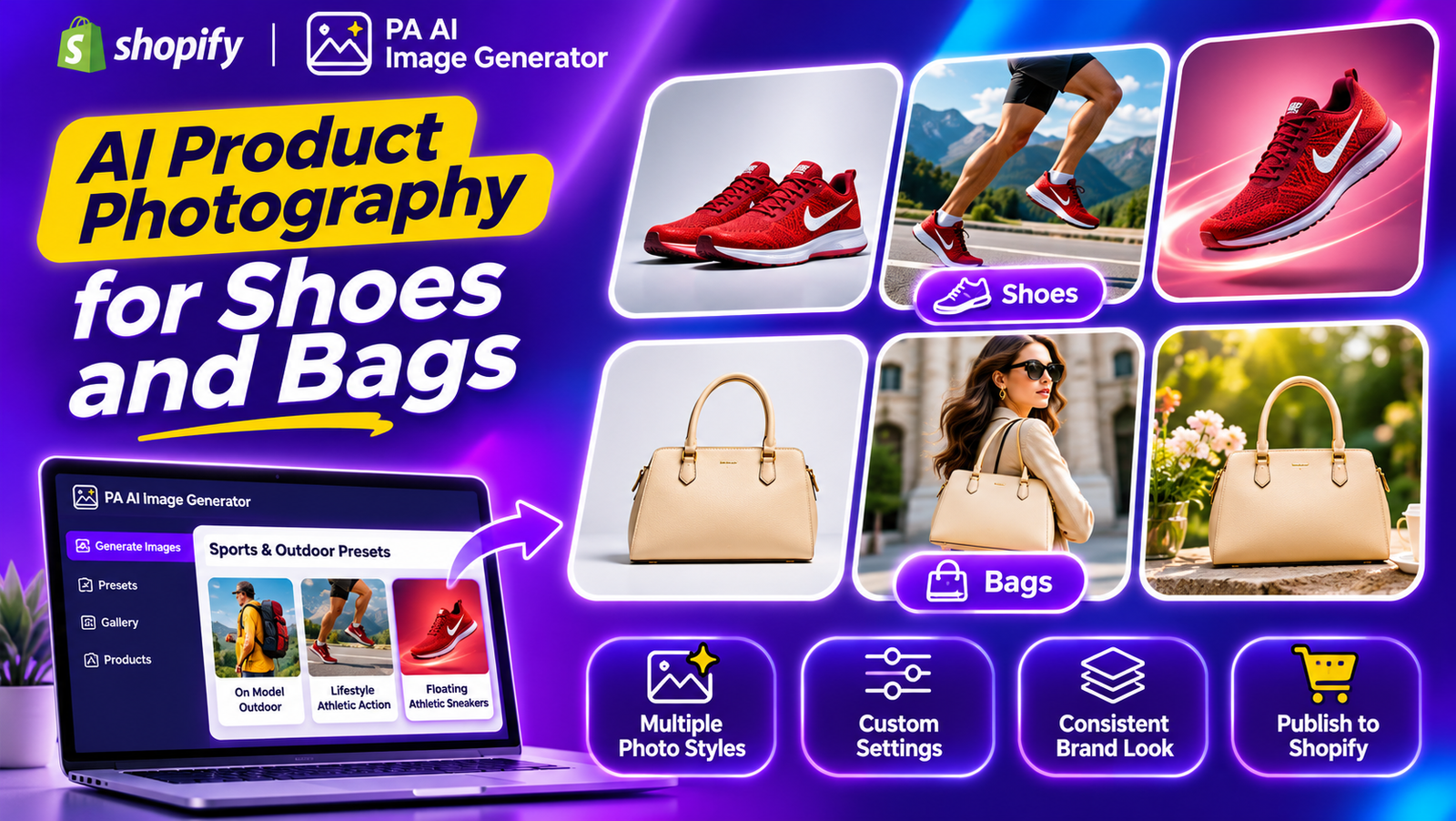
With PA AI Image Generator, Shopify merchants can use existing product images as references and create professional-looking studio photographs, on-model compositions, outdoor lifestyle images, and promotional visuals.
In this guide, we’ll explore how AI product photography works for shoes and bags, the different photography styles available, and how merchants can create attractive product images using PA AI Image Generator.
Why Product Photography Matters for Shoes and Handbags
1. Helps customers examine product designs
Customers shopping for shoes and handbags want to understand their appearance before purchasing.
Clear photographs help communicate shape, color, stitching, materials, and design features.
2. Creates a professional shopping experience
Consistent product photography helps Shopify stores maintain an organized and attractive catalog.
A collection featuring similar backgrounds, lighting, and image dimensions can appear more cohesive.
3. Shows products in real-life situations
Lifestyle photographs can demonstrate how shoes look with different outfits or how handbags fit into everyday activities.
These images provide additional context beyond traditional product photographs.
4. Supports brand identity
Different brands require different photography styles.
A luxury handbag brand might prefer elegant studio compositions, while an athletic footwear store may favor energetic, action-oriented photographs.
5. Supports marketing campaigns
Professional-looking images can be used across Shopify product pages, Instagram, Pinterest, Facebook, collection banners, and promotional campaigns.
Problems Merchants Face With Traditional Shoe and Bag Photography
Creating professional footwear and handbag photography often involves several challenges.
- Hiring photographers for new product collections.
- Booking studios and arranging lighting.
- Hiring models for footwear and fashion campaigns.
- Photographing different colors and product variations.
- Creating studio and lifestyle photographs separately.
- Editing backgrounds and correcting image colors.
- Maintaining consistent photography across the entire catalog.
- Producing seasonal marketing images.
For smaller Shopify businesses, these requirements can increase production costs.
AI-generated photography can help merchants create additional visual compositions without arranging a physical photoshoot for every scene.
What Is AI Product Photography for Shoes and Bags?
AI product photography uses artificial intelligence to generate new images based on existing product references.
For example, a basic photograph of running shoes can be used as a reference for a studio-style advertisement or athletic lifestyle composition.
Similarly, a handbag can be presented in a clean studio setting, a fashion-oriented scene, or an elegant promotional composition.
AI tools allow merchants to experiment with different photographic styles, lighting, backgrounds, and creative environments.
However, AI-generated images may alter logos, colors, stitching, shapes, or other product details. Merchants should verify each generated image before publishing it.
Introducing PA AI Image Generator for Shopify
PA AI Image Generator helps Shopify merchants generate additional product imagery using their existing catalog photographs.
Instead of relying entirely on traditional product photoshoots, merchants can select products, choose photography presets, and create different visual compositions.
The app offers various photography categories suitable for shoes, handbags, clothing, sports equipment, jewelry, beauty products, and other ecommerce categories.
Key Features
- Studio photography: Create clean, product-focused photographs.
- On-model photography: Present suitable products in model-oriented compositions.
- Lifestyle photography: Generate product images featuring relevant environments.
- Athletic photography: Explore energetic sports-oriented visual styles.
- Floating product images: Create promotional compositions featuring products against stylized backgrounds.
- Bulk image generation: Select multiple Shopify products for image generation.
- Custom settings: Configure backgrounds, instructions, image ratios, resolution, and output formats.
- Gallery management: Review and publish approved product images.
App Link: PA AI Image Generator — Shopify App Store
Best AI Photography Styles for Shoes and Bags
Different footwear and handbag products benefit from different photography styles.
| Product category | Suitable photography style |
|---|---|
| Running shoes | Lifestyle – Athletic Action |
| Sneakers | Floating – Athletic Sneakers |
| Outdoor shoes | On Model – Outdoor |
| Hiking footwear | Lifestyle – Outdoor |
| Sports bags | Lifestyle – Outdoor Sports Gear |
| Fashion handbags | Studio, Lifestyle |
| Travel backpacks | Lifestyle – Outdoor |
| Luxury bags | Clean Studio, Detail / Macro |
The photography style depends on what the merchant chooses. A running shoe brand may prefer athletic photography, while a luxury handbag brand may choose clean, minimalist studio compositions.
Why AI Product Photography Is Useful for Footwear Brands
Create more photographic variations
Merchants can experiment with different compositions without repeating the entire physical photography process.
Prepare images for different marketing channels
Studio photographs can support product galleries, while lifestyle images can provide additional creative assets for advertisements and social media.
Support frequent product launches
Shoe and handbag stores often introduce new designs, colors, and seasonal collections. AI generation can provide supplementary imagery for these launches.
Maintain consistent visual styling
Using similar presets and settings across related products can help create a coordinated catalog.
Reduce supplementary photography requirements
AI can reduce the need to arrange separate physical photoshoots for certain marketing and lifestyle images.
Step 1: Search for PA AI Image Generator in the Shopify App Store
First, open the Shopify App Store.
Use the search bar to search for PA AI Image Generator.
The search results will display the app alongside other image generation and ecommerce photography applications.

Image 1: Search for PA AI Image Generator in the Shopify App Store.
Image explanation: The screenshot shows the Shopify App Store search results, with PA AI Image Generator highlighted. Its listing describes the app as a tool for creating studio and on-model AI product photography.
Click the app to open its listing.
Step 2: Install and Open PA AI Image Generator
On the app listing, review the description, available features, and pricing information.
Click Install if the app has not yet been installed, then approve the requested Shopify permissions.
Once installation is complete, select Open to launch the application.
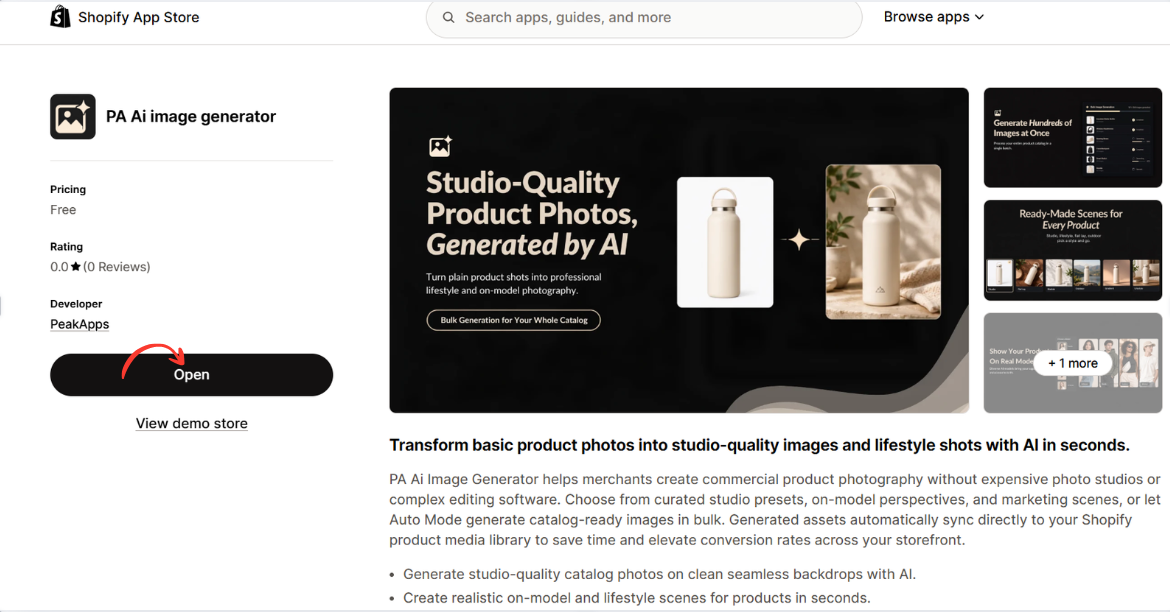
Image 2: Open PA AI Image Generator from its Shopify App Store listing.
Image explanation: The screenshot displays the app listing, including an illustration demonstrating how an ordinary product image can become a lifestyle-style photograph.
The Open button is highlighted, showing how merchants can access the installed app.
Step 3: Select the products that need better photography
Open your Shopify Admin and review your existing product catalog.

Identify products with low-quality photographs, missing angles, inconsistent backgrounds, or limited lifestyle imagery.
Step 4: Open PA AI Image Generator
Navigate to Apps → PA AI Image Generator → Generate Images.
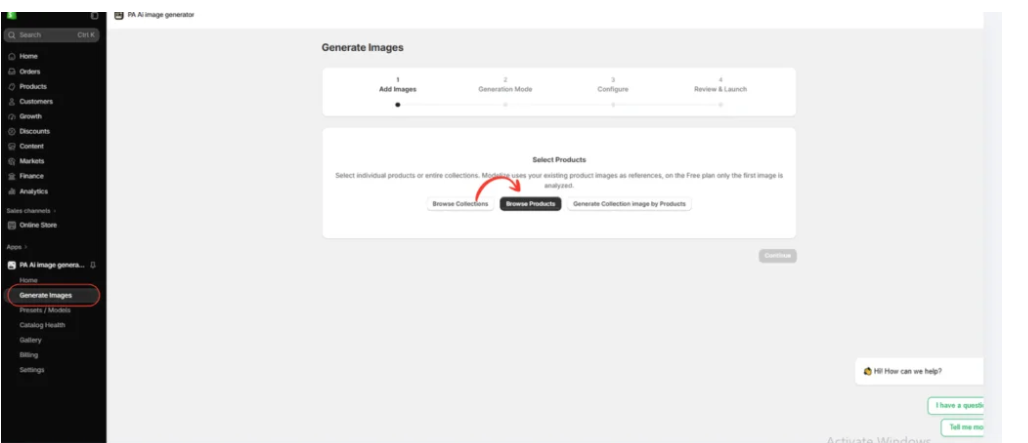
Select individual products or collections using the available product-selection options.
Step 5: Choose a photography style
Select Choose Presets to explore the available photography options.

Merchants can choose different presets depending on their products and brand identity.
For example, clothing stores may prefer on-model photographs, while furniture stores may prefer interior lifestyle photography.
Step 6: Select the right preset
Image 6: The preset selection interface inside PA AI Image Generator.

The preset library allows merchants to choose different compositions, including studio, lifestyle, on-model, seasonal, and collection photography.
Rather than applying the same style to every product, merchants can choose presets that match their requirements.
Step 7: Select the Sports & Outdoor Photography Category
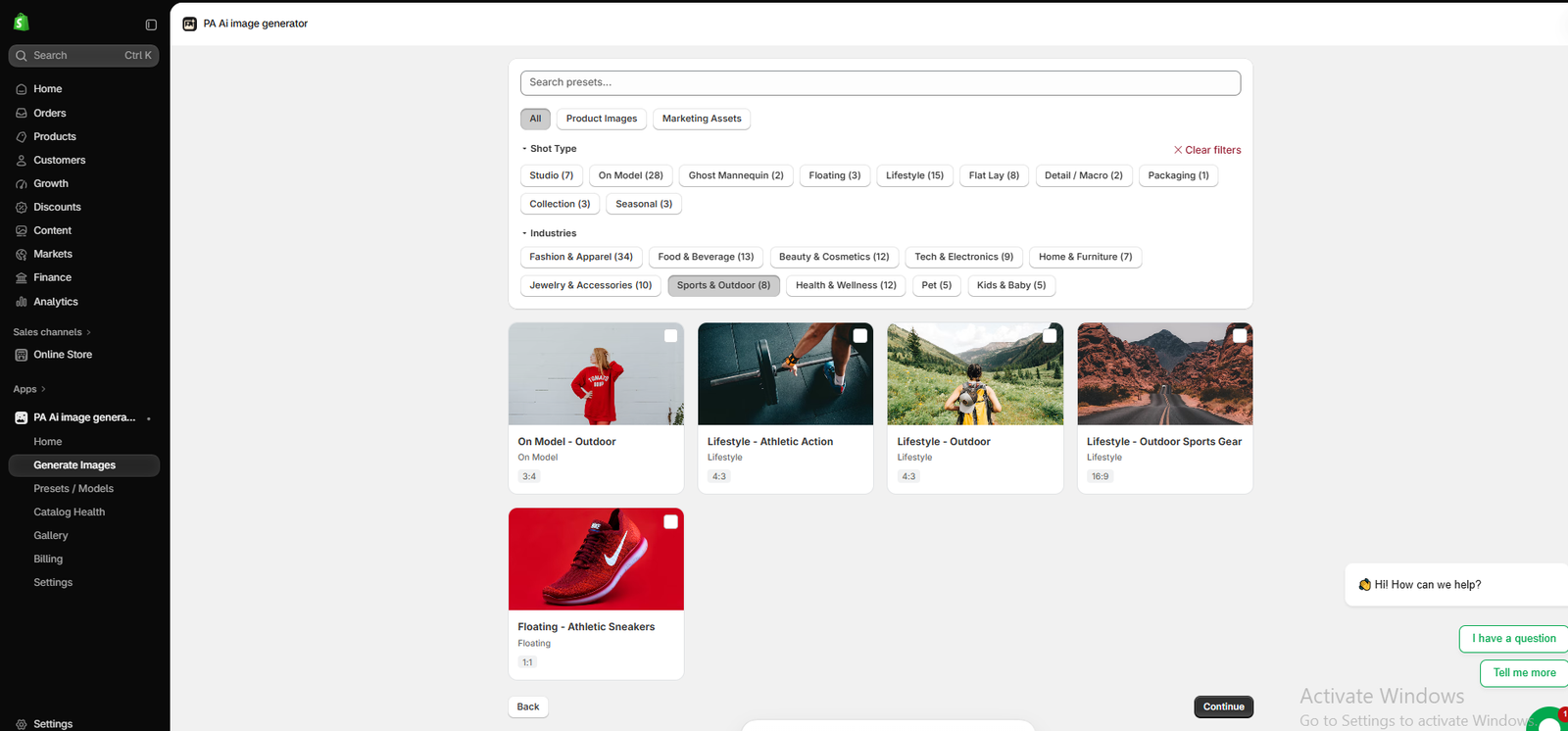
Image 1: The actual PA AI Image Generator interface showing the Sports & Outdoor category with five photography presets.
Image explanation
Your uploaded screenshot shows the Choose Presets interface inside PA AI Image Generator.
Under the Industries filter, Sports & Outdoor (8) is selected.
The screen displays the following five photography presets:
On Model – Outdoor: A model-oriented photography style suitable for selected outdoor clothing, footwear, and accessories.
Lifestyle – Athletic Action: Useful for sports and fitness-related product compositions.
Lifestyle – Outdoor: Designed for products associated with outdoor environments, hiking, and travel.
Lifestyle – Outdoor Sports Gear: Provides outdoor sports-themed compositions that can be useful for equipment and accessories.
Floating – Athletic Sneakers: A product-focused promotional style featuring athletic shoes in a stylized presentation.
The screenshot also shows the Continue button at the bottom-right corner.
What should merchants do?
Choose the preset that best fits your product.
For athletic sneakers, Floating – Athletic Sneakers can be a useful choice for creating promotional visuals.
For running shoes and fitness-related products, Lifestyle – Athletic Action may be appropriate.
For hiking footwear or backpacks, Lifestyle – Outdoor provides a relevant creative direction.
For handbags, merchants can explore the Fashion & Apparel category or other suitable studio and lifestyle presets.
Select your desired preset and click Continue.
Step 8: Configure the image settings
Image 7: Configure the image background, aspect ratio, format, and publishing preferences.
Use appropriate settings for the intended image placement.

A square composition may suit product galleries, while a wide composition may be useful for promotional banners.
You can also provide custom instructions, such as:
“Create a professional ecommerce product photograph using my existing product image as a reference. Preserve the original product design, colors, shape, and branding. Use realistic lighting, a clean composition, and a visually attractive background.”
Step 9: Generate and review the images
Image 8: The Gallery dashboard showing image generation jobs and processing statuses.
Once the generation process is complete, review the results in Gallery.
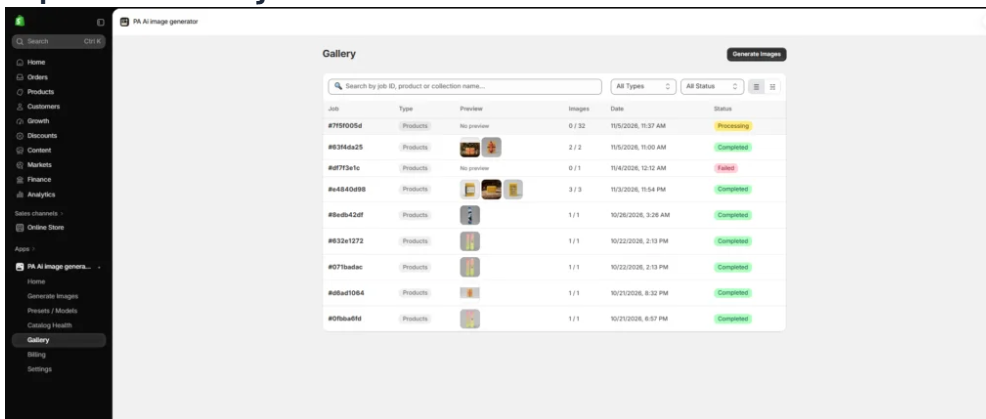
Check that all important product details match the original item.
If the result contains inaccurate colors, logos, proportions, or features, revise the image before publication.
Step 10: Publish approved product images
After reviewing the generated photographs, use the app’s Gallery controls to download or publish approved images to your Shopify products.
Combine the best lifestyle compositions with accurate original photographs to give customers both visual inspiration and reliable product information.
Frequently Asked Questions
1. Can AI create professional shoe product photographs?
Yes. AI image-generation tools can produce studio-style, lifestyle, and promotional shoe photographs using existing product references.
2. Can I create sneaker advertisements using AI?
Yes. PA AI Image Generator includes a Floating – Athletic Sneakers preset suitable for stylized athletic footwear visuals.
3. Can I generate lifestyle photographs for handbags?
Yes. Merchants can explore appropriate fashion, studio, and lifestyle presets for handbag photography.
4. Can AI generate images of running shoes in action?
AI can create athletic lifestyle compositions. However, generated images should be checked for realistic movement and accurate product details.
5. Can I generate multiple product images at once?
Yes. PA AI Image Generator supports selecting multiple Shopify products and collections.
6. Can I customize the background of my images?
The app provides background preferences and custom generation instructions.
7. Can I publish AI-generated product images directly to Shopify?
The app provides publishing controls for approved generated images.
8. Will AI preserve shoe logos and handbag designs perfectly?
Not always. AI can alter branding, stitching, colors, shapes, or other details. Always review the results carefully.
Conclusion
Professional product photography plays an important role in the success of Shopify footwear and handbag stores.
Customers want clear photographs that show product designs, materials, colors, and real-life usage.
However, traditional photoshoots can require photographers, models, studios, locations, and considerable preparation.
With PA AI Image Generator, Shopify merchants can create supplementary studio-style images, athletic lifestyle compositions, outdoor photography, and promotional visuals from existing product references.
As demonstrated by the actual app screenshot, merchants can choose different photography presets depending on their products and branding requirements.
A running shoe store may benefit from Athletic Action or Floating Sneakers presets, while a handbag brand may prefer elegant studio or fashion-oriented lifestyle photography.
The biggest advantage is flexibility: merchants can choose the photography style that fits their products rather than using one generic visual approach for every item.
By combining original product photographs with accurate, carefully reviewed AI-generated imagery, Shopify stores can create more engaging product galleries and develop additional marketing visuals.
Ready to create professional-looking shoe and handbag photographs with AI?Try PA AI Image Generator on Shopify




