7 TIPS FOR GETTING THE BEST RESULTS FROM AI PRODUCT PHOTOS
Shopify Product Photography Guide | AI Image Generation | 2026

Introduction
High-quality product photography is essential for creating a professional Shopify store. Whether you’re selling clothing, jewelry, skincare, electronics, home decor, or outdoor equipment, attractive product images help customers understand your products and make confident purchasing decisions.
However, traditional product photography can be expensive and time-consuming. Hiring professional photographers, arranging studio setups, and preparing different product backgrounds may not be practical for every merchant.
Fortunately, AI product photography makes it easier to create additional studio-quality images, lifestyle photographs, and marketing visuals using existing product references.
But generating attractive AI images requires more than simply uploading a photograph and clicking a button.
To achieve the best results, merchants need to choose the right reference photographs, select suitable photography presets, customize their generation settings, and carefully review the final images.
With PA AI Image Generator, Shopify merchants can create different photography styles and manage generated images through their store.
In this article, we’ll explore 7 practical tips for getting the best results from AI product photos, with real examples from PA AI Image Generator.
Why AI Product Photo Quality Matters
AI-generated product photography can improve how products are visually presented across an ecommerce store.
Professional-looking imagery can help merchants create consistent product galleries, prepare lifestyle marketing materials, and develop more visually engaging collections.
However, poorly generated AI images can introduce problems such as incorrect product colors, unrealistic proportions, distorted logos, or misleading product details.
For this reason, the goal should not simply be creating attractive photographs.
The goal is to create attractive, consistent, and accurate product imagery that supports customer confidence.
Common Mistakes Merchants Make With AI Product Photography
Many merchants produce unsatisfactory results because they do not prepare their product references or generation settings carefully.
Some common mistakes include uploading blurry product images, choosing unsuitable photography presets, giving overly vague instructions, selecting incorrect image dimensions, and publishing results without checking their accuracy.
The following seven tips can help avoid these problems.
Step 1: Search for PA AI Image Generator in the Shopify App Store
First, open the Shopify App Store.
Use the search bar to search for PA AI Image Generator.
The search results will display the app alongside other image generation and ecommerce photography applications.

Image 1: Search for PA AI Image Generator in the Shopify App Store.
Image explanation: The screenshot shows the Shopify App Store search results, with PA AI Image Generator highlighted. Its listing describes the app as a tool for creating studio and on-model AI product photography.
Click the app to open its listing.
Step 2: Install and Open PA AI Image Generator
On the app listing, review the description, available features, and pricing information.
Click Install if the app has not yet been installed, then approve the requested Shopify permissions.
Once installation is complete, select Open to launch the application.
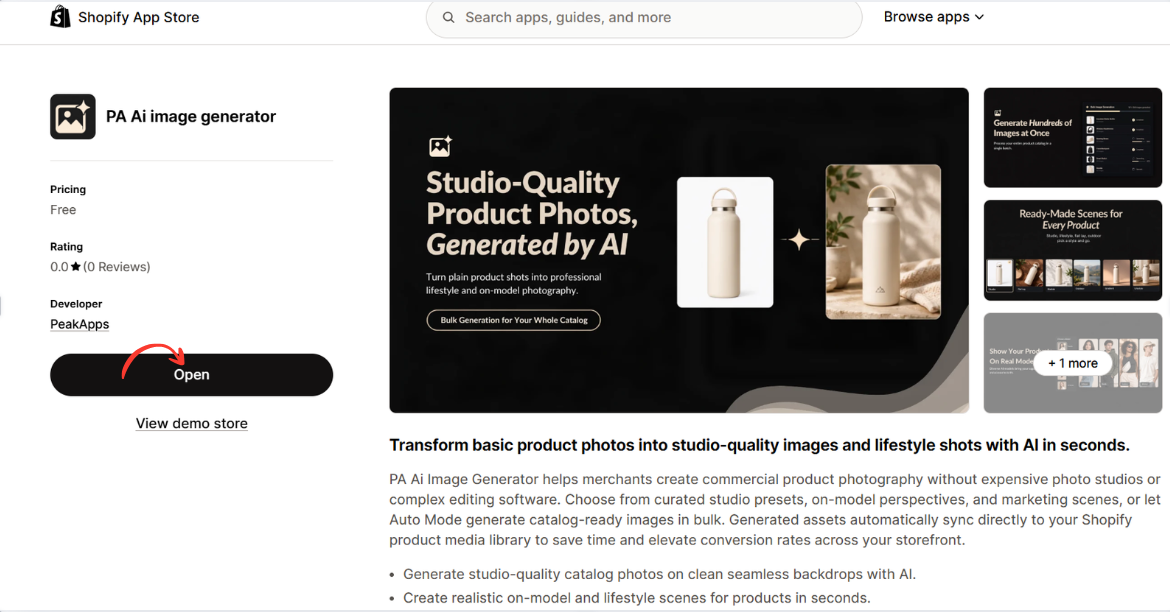
Image 2: Open PA AI Image Generator from its Shopify App Store listing.
Image explanation: The screenshot displays the app listing, including an illustration demonstrating how an ordinary product image can become a lifestyle-style photograph.
The Open button is highlighted, showing how merchants can access the installed app.
Step 3: Open the Generate Images Dashboard
After opening the app, locate Generate Images in the left navigation menu.
The image-generation workflow begins with selecting the products you want to use.
Click Browse Products to choose individual products from your Shopify catalog.
Alternatively, you can use Browse Collections to work with a collection.
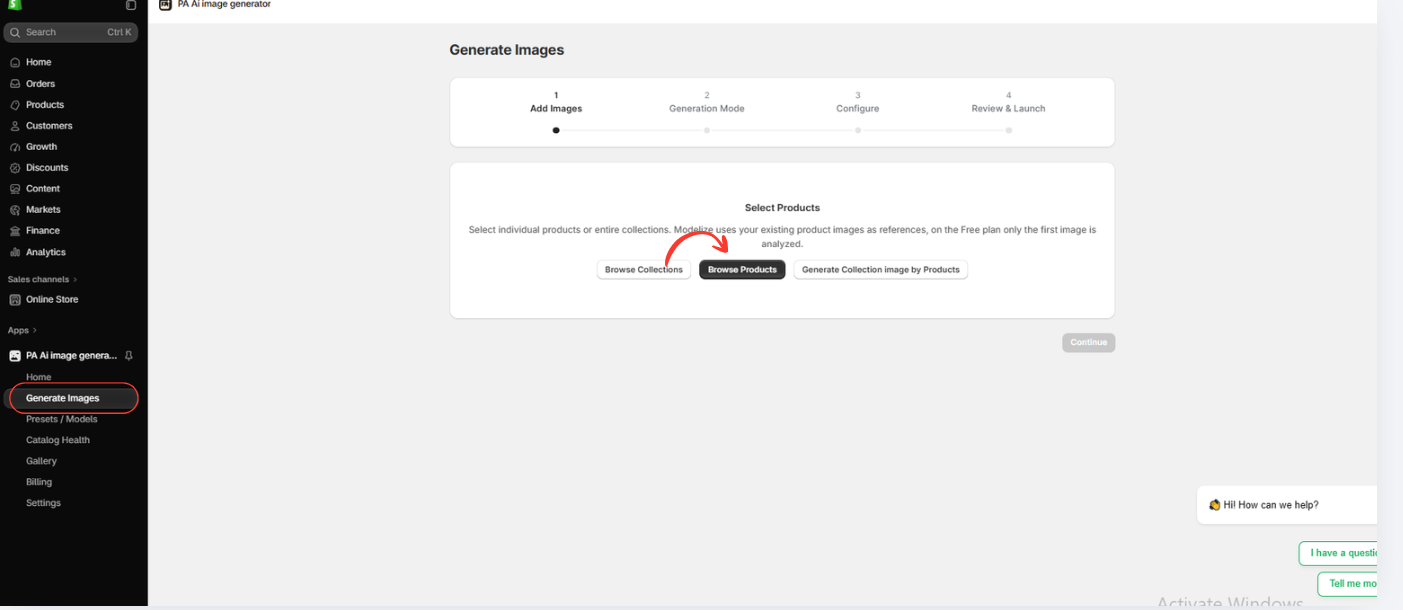
7 Tips for Getting the Best Results from AI Product Photos
Tip 1: Start With a Clear, High-Quality Product Image
The original product photograph is one of the most important parts of an AI image-generation workflow.
AI tools use reference photographs to understand the product’s appearance. If the source photograph is blurry, poorly lit, or partially cropped, the generated result may contain inaccurate details.
Whenever possible, use a clear photograph that shows the complete product, including its shape, color, and identifiable features.

Image 1: A clear reference photograph of a snowboard against a neutral studio background.
Image explanation: This original snowboard photograph has a clean background, a centered composition, and clearly visible product graphics.
The simple presentation makes it easier to examine the product’s shape and important visual details.
For Shopify merchants, similar reference photographs provide a useful starting point for AI-generated imagery.
Best practice: Use sharp, well-lit images with minimal background distractions, and retain the original photograph for product accuracy checks.
Tip 2: Choose the Right Photography Preset for Your Product
Different product categories require different photography styles.
For example, a jewelry store may benefit from macro photography that highlights small details, while a furniture store may prefer lifestyle scenes featuring products inside furnished rooms.
PA AI Image Generator offers photography presets for different products and marketing requirements.

Image 2: The PA AI Image Generator preset selection interface featuring different photography styles.
Image explanation: The screenshot shows the preset library available in the app, where merchants can browse and choose different photography compositions.
Depending on their products, merchants can select studio, lifestyle, on-model, seasonal, and other preset categories.
The important point is that merchants can choose the photography style that best matches their product and brand identity.
For example:
| Product | Recommended preset style |
|---|---|
| Clothing | On Model, Lifestyle |
| Jewelry | Detail / Macro, Studio |
| Skincare | Studio, Beauty Lifestyle |
| Furniture | Studio Furniture, Lifestyle Home |
| Sports equipment | Studio, Outdoor Lifestyle |
| Gift products | Studio, Seasonal |
Best practice: Choose presets based on how you want customers to see the product rather than selecting a style simply because it looks attractive.
Tip 3: Use Clear and Specific AI Instructions
AI image generation works better when the desired result is clearly described.
A vague instruction such as Make this product look professional provides limited guidance.
Instead, describe the lighting, background, composition, and important product details that should remain unchanged.
For example, a more effective instruction would be:
Example AI Product Photography Prompt Copy
Create a professional ecommerce product photograph using my existing product image as a reference. Preserve the original product shape, colors, logo, labels, and design. Use realistic studio lighting, an elegant background, and natural shadows. Keep the product clearly visible and do not add or remove product features.
This instruction establishes both the intended creative style and the importance of preserving the original product.
Custom instructions are particularly helpful for premium brands that want consistent lighting, background colors, and photographic compositions.
Best practice: Be specific about the visual result, but avoid overly complicated instructions that contain conflicting requirements.
Tip 4: Customize Image Settings Before Generating
Image settings influence how your final photographs appear and where they can be used.
For example, a square product image may work well on a Shopify product page, while a wide horizontal photograph may be better suited to a homepage banner.
PA AI Image Generator provides configurable output settings, including aspect ratio, background preferences, image format, and resolution options.
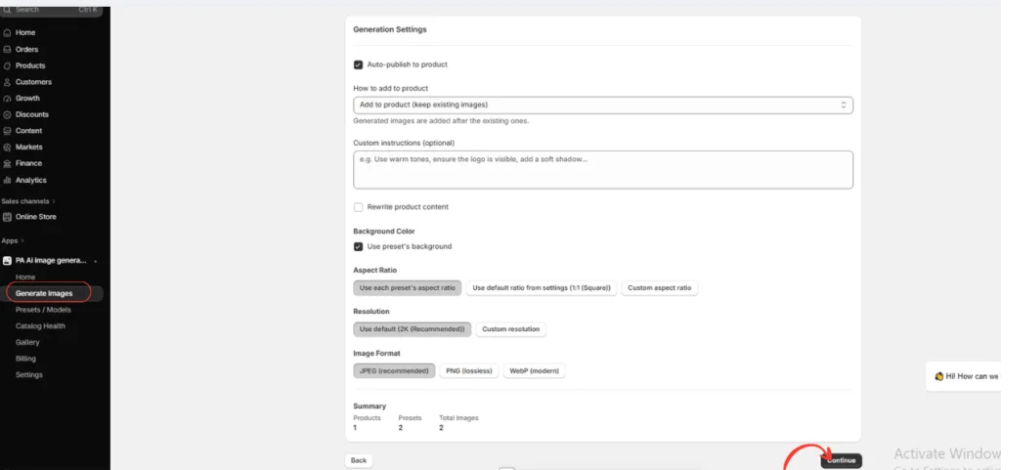
Image 3: Image generation settings inside PA AI Image Generator.
Image explanation: This screenshot shows the configuration section where merchants can adjust how their generated images are produced.
Visible options include custom instructions, background preferences, aspect ratio, resolution, image format, and product publishing settings.
Before generating, consider the intended use of your photograph.
A useful starting point is a 1:1 square format for many product listings, 4:5 for some social media content, or 16:9 for wide promotional banners. Actual display requirements depend on the theme and platform.
Best practice: Choose the correct image dimensions before generation to reduce unnecessary cropping and editing.
Tip 5: Generate Multiple Photography Styles for the Same Product
One of the most useful benefits of AI photography is the ability to explore multiple compositions based on a product reference.
Instead of relying on a single photograph, Shopify merchants can generate several styles to support different customer needs and marketing activities.
Snowboards displayed against a mountain landscape
Image 4: An outdoor lifestyle composition featuring snowboards against a mountain landscape.
Image explanation: This photograph shows two snowboards in a snowy mountain environment, accompanied by outdoor equipment.
The dramatic landscape gives the image an adventurous, lifestyle-oriented appearance.
This type of composition may be useful for homepage banners, outdoor sports promotions, and collection marketing.

Tip 7: Test Your Images and Keep Improving Them
Creating AI photographs is only part of the process.
The next step is understanding which images work best for your Shopify store.
Different images may perform differently depending on your product category, audience, and marketing channel.
For example, a simple studio photograph may be more useful as the main product image, while a lifestyle image may attract more attention in an advertisement.
PA AI Image Generator allows merchants to review generated images and manage generation jobs through its Gallery.
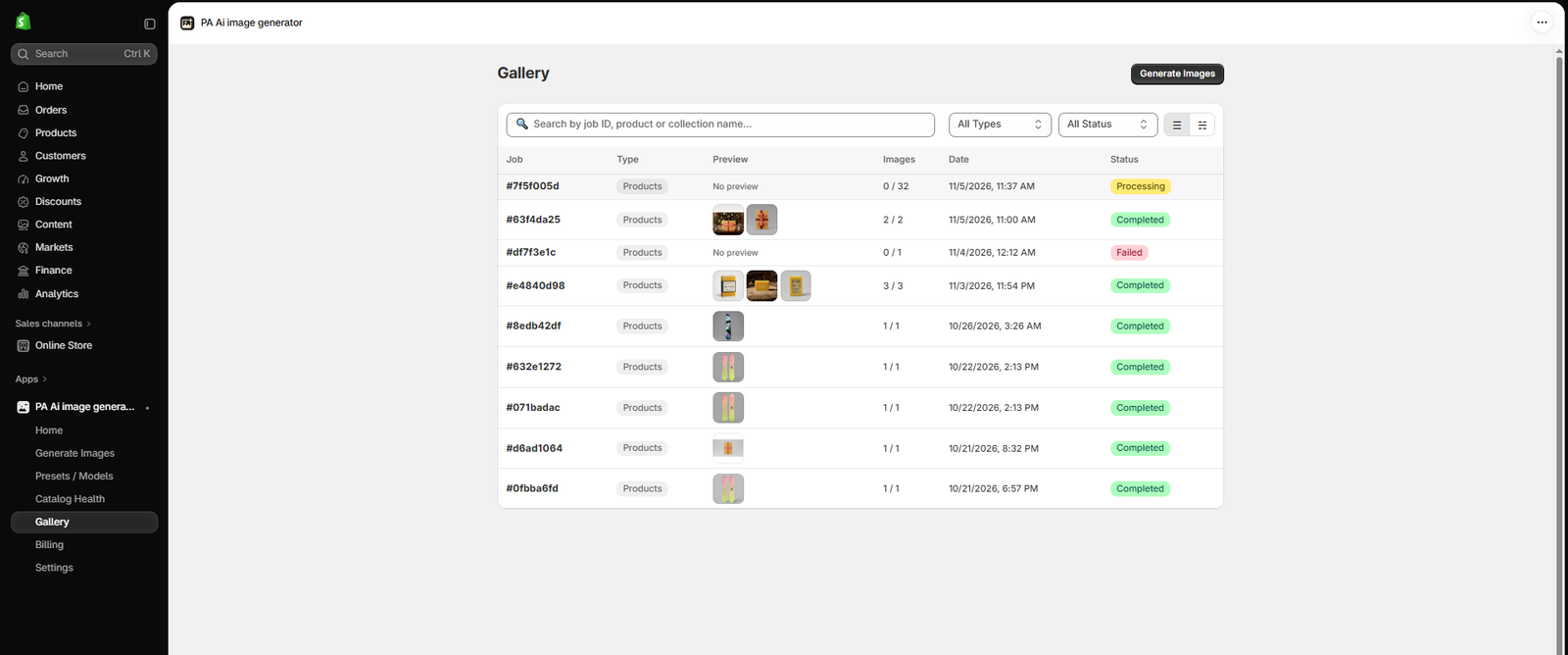
Image 7: The Gallery dashboard showing image generation jobs and their statuses.
Image explanation: The screenshot shows previously generated image jobs along with statuses such as processing, completed, and failed.
Merchants can use Gallery to review available results and locate their generated assets.
When testing images on your Shopify store, monitor metrics such as add-to-cart rate, product page conversion rate, and revenue per session. Where possible, use an A/B test to isolate the impact of the image change.
Best practice: Select images based on product accuracy, customer usefulness, and measured performance—not simply appearance.
Why PA AI Image Generator Is Useful for Shopify Merchants
PA AI Image Generator provides merchants with a flexible workflow for creating supplementary product photography.
Rather than arranging a separate photoshoot for every creative concept, merchants can select products from their Shopify catalog, choose presets, configure settings, and generate different visual compositions.
The app can be useful for businesses that want to expand lifestyle photography, improve visual consistency, prepare seasonal marketing assets, and create additional product images.
Its preset categories make it suitable for different industries, including fashion, beauty, jewelry, home decor, and outdoor equipment.
Explore PA AI Image Generator on Shopify
Frequently Asked Questions
1. How can I get better results from AI product photography?
Start with clear reference photographs, choose appropriate photography presets, provide specific instructions, adjust the output settings, and review every generated image.
2. Does the original product image affect AI photography quality?
Yes. A sharp reference photograph with clearly visible product details gives the generator useful information about the item’s appearance.
3. Can I choose different photography styles for different products?
Yes. PA AI Image Generator offers different preset categories, allowing merchants to select styles suitable for their products and brand preferences.
4. Can AI product photos be used on Shopify product pages?
Yes, provided the images accurately represent the products and comply with applicable platform requirements.
5. Can I generate lifestyle product photographs?
Yes. AI photography tools can create compositions featuring different environments, lighting, and visual arrangements.
6. Are AI-generated images always accurate?
No. AI may alter product colors, logos, proportions, labels, or small details. Always compare the generated image with the real product.
7. Should I replace all original product photographs with AI images?
Generally, no. Accurate original photographs remain important for helping customers understand the actual product. AI-generated visuals are often most useful as supplementary images.
8. Can better AI photographs increase Shopify conversions?
Better product imagery can improve presentation and reduce purchasing uncertainty, but higher conversions are not guaranteed. Test changes and evaluate their impact on store performance.
Conclusion
Creating professional-looking AI product photographs requires more than selecting a product and generating an image.
The quality of your results depends on the reference photographs you provide, the presets you choose, your generation settings, and how carefully you review the final images.
By following these 7 tips for better AI product photos, Shopify merchants can create more consistent, attractive, and useful product imagery for their online stores.
With PA AI Image Generator, merchants can explore studio photography, lifestyle scenes, close-up images, on-model compositions, and seasonal marketing visuals using existing Shopify product photographs.
As the snowboard examples demonstrate, AI can produce a wide range of creative compositions, from simple studio presentations to outdoor lifestyle imagery.
However, visual attractiveness should never come at the expense of product accuracy.
The strongest approach is to combine accurate original product photographs with carefully reviewed AI-generated images, creating a balance between reliable product information and engaging visual content.
Ready to improve your Shopify product photography?Try PA AI Image Generator on the Shopify App Store




