AI PRODUCT PHOTOS VS TRADITIONAL PHOTOSHOOTS: COST, TIME, AND QUALITY

Introduction
Professional product photography is an essential part of building a successful Shopify store. Attractive images help customers understand products, create a professional brand impression, and improve the overall shopping experience.
Traditionally, ecommerce merchants have relied on professional photographers, studios, lighting equipment, and models to create high-quality product images.
However, professional photoshoots can be expensive and time-consuming, particularly for businesses that frequently introduce new products.
Today, AI product photography offers an alternative. Shopify merchants can use existing product photographs to generate new studio-style images, lifestyle compositions, and marketing visuals without arranging a separate photoshoot for every scene.
But which option is better: AI product photography or traditional photography?
In this guide, we’ll compare both approaches based on cost, time, quality, flexibility, and scalability, using real product photography examples from PA AI Image Generator.
What Is Traditional Product Photography?
Traditional product photography involves physically photographing products using a camera, lighting equipment, and a carefully prepared environment.
A professional photoshoot may involve:
- Hiring an experienced product photographer.
- Booking a photography studio or outdoor location.
- Renting or purchasing lighting equipment.
- Hiring models and stylists.
- Arranging backgrounds and product props.
- Editing and retouching the final photographs.
Traditional photography remains particularly valuable when merchants need accurate photographs of their actual products, including dimensions, materials, colors, and intricate details.
However, producing many photographic variations can require additional time and expense.
What Is AI Product Photography?
AI product photography uses artificial intelligence to create new visual compositions from existing product images.
Instead of arranging a separate physical photoshoot for each creative concept, merchants can generate alternative images using selected styles and instructions.
For example, a basic photograph of a snowboard can be used as a reference for generating an outdoor winter scene, a lifestyle close-up, or a studio-style composition.
With PA AI Image Generator, Shopify merchants can select existing catalog products and generate different photography styles using AI presets.
App Link: https://apps.shopify.com/pa-ai-image-generator
AI Product Photography vs Traditional Photoshoots: Cost Comparison
Cost is one of the biggest differences between AI-generated product imagery and traditional photography.
Traditional photoshoots often involve separate expenses for photographers, studio rentals, styling, models, transportation, and image editing.
AI photography can reduce many of these expenses because it uses existing product references and software-based image generation.
| Expense | Traditional photoshoot | AI product photography |
|---|---|---|
| Photographer | Usually required | Not required for generated scenes |
| Studio rental | Sometimes required | Not required |
| Professional models | May be required | Not required |
| Lighting equipment | Usually required | Not required |
| Props and styling | Physical arrangements | AI-generated compositions |
| Image editing | Often additional work | Generation and review required |
| Additional scenes | May require more sessions | Can use different presets |
| Main expense | Photography services and production | App subscription or generation usage |
Example: Photographing 50 Shopify Products
Imagine a merchant selling 50 products who wants three different photographs for each item.
That means the merchant needs 150 product images.
A traditional photoshoot might involve a photographer’s fee, studio rental, styling, and post-production editing. Depending on the scope and location, the total cost could be substantial.
With AI photography, the merchant may be able to use existing images and generate additional visual variations using an application.
Actual savings depend on the app’s pricing, image volume, generation success rate, and the amount of human review required.
Cost advantage: AI photography is often more economical for generating additional marketing and lifestyle variations. Traditional photography may still be necessary to capture accurate reference images.
AI Product Photography vs Traditional Photoshoots: Time Comparison
Time is another important consideration for Shopify merchants.
Traditional photoshoots require preparation
A photography project may involve planning the concept, scheduling a photographer, preparing products, booking a location, completing the shoot, and editing the images.
This process can take days or longer, depending on the project.
AI photography can simplify production
AI image generation allows merchants to create additional compositions directly from existing references.
The merchant selects a product, chooses photography presets, configures settings, and reviews the results.
Generation time depends on the job size and app processing workload.
Which is faster?
For additional product lifestyle images, AI photography can be considerably faster because it reduces the need for physical preparation and scheduling.
However, complex images may require several attempts, and every generated result should still be checked for accuracy.
Before and After: AI Product Photography vs Traditional Photoshoots
Here are your five actual uploaded snowboard images, placed in the comparison section of your blog, with explanations for each result.
1. Before — Basic Studio Product Photograph
Original snowboard against neutral studio backgroundImage 1: A simple snowboard product photograph with a plain gray background.
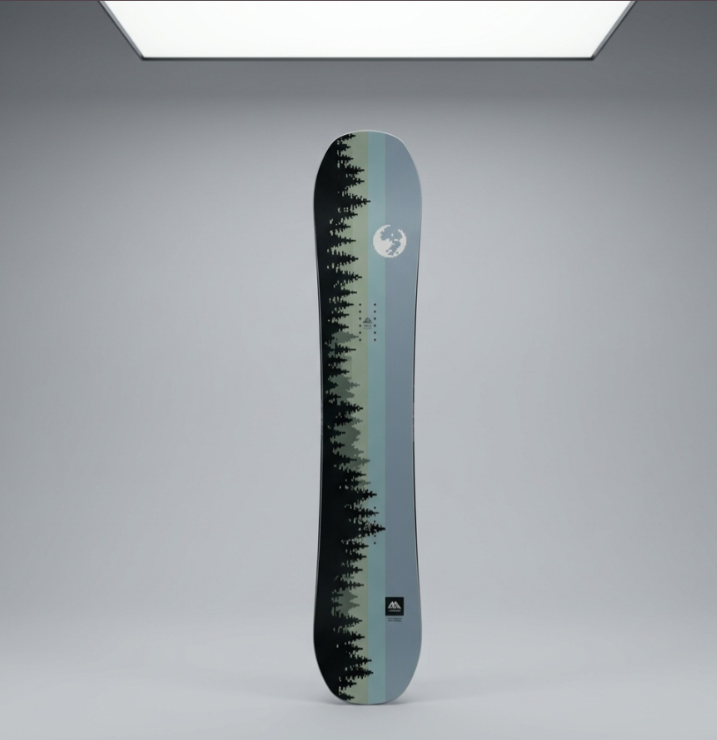
Image Explanation: This image shows a snowboard photographed against a clean studio background. The product is clearly visible, including its shape, graphics, and colors.
This type of image is useful for showing the actual product, but it doesn’t provide much lifestyle context or demonstrate how the product looks in outdoor environments.
2. After — AI Lifestyle Product Photography
AI lifestyle image with snowboard and mountain backgroundImage 2: A lifestyle close-up featuring a snowboard, hands with jewelry, and snowy mountains.
Image Explanation: This example shows how AI photography can create a more engaging lifestyle composition.

The snowy mountains, natural lighting, and human interaction make the photograph suitable for marketing and social media.
Unlike a traditional photoshoot, generating this type of scene doesn’t require physically traveling to a mountain location.
3. After — AI Outdoor Product Photography
Snowboards photographed in snowy mountain landscapeImage 3: An outdoor product composition featuring two snowboards against an alpine landscape.
Image Explanation: This image presents snowboards in a dramatic winter setting with mountains, snow, and outdoor equipment.
It demonstrates how AI can create product-focused marketing imagery with scenic backgrounds.

Merchants can use similar compositions for Shopify homepage banners, winter collection promotions, and advertising campaigns.
4. After — Natural Lifestyle Photography

Snowboards against wooden fence in snowy forestImage 4: A winter lifestyle scene featuring colorful snowboards, natural surroundings, and people preparing their equipment.
Image Explanation: This image demonstrates another photography style, with pastel-colored snowboards leaning against a wooden fence.
The natural setting provides a more authentic-looking outdoor aesthetic than a plain studio background.
Merchants can use similar compositions for lifestyle marketing, seasonal promotions, and visually engaging collection pages.
5. After — AI On-Model and Product Detail Photography
Three snowboard on-model and detailed product photography examples

What These Before-and-After Images Demonstrate
The examples show how PA AI Image Generator can help merchants create additional professional-looking product photographs, from simple studio compositions to outdoor lifestyle imagery and model-based scenes.
The different boards and designs shown are visual examples, not proof that every image preserves the exact original snowboard. AI-generated photographs must be checked for product accuracy before being published.
For Shopify merchants, the main benefits are creative flexibility, reduced dependence on repeated physical photoshoots, and the ability to produce more marketing visuals from existing product references.
Explore the app: PA AI Image Generator — Shopify App Store
Step 1: Search for PA AI Image Generator in the Shopify App Store
First, open the Shopify App Store.
Use the search bar to search for PA AI Image Generator.
The search results will display the app alongside other image generation and ecommerce photography applications.

Image 1: Search for PA AI Image Generator in the Shopify App Store.
Image explanation: The screenshot shows the Shopify App Store search results, with PA AI Image Generator highlighted. Its listing describes the app as a tool for creating studio and on-model AI product photography.
Click the app to open its listing.
Step 2: Install and Open PA AI Image Generator
On the app listing, review the description, available features, and pricing information.
Click Install if the app has not yet been installed, then approve the requested Shopify permissions.
Once installation is complete, select Open to launch the application.
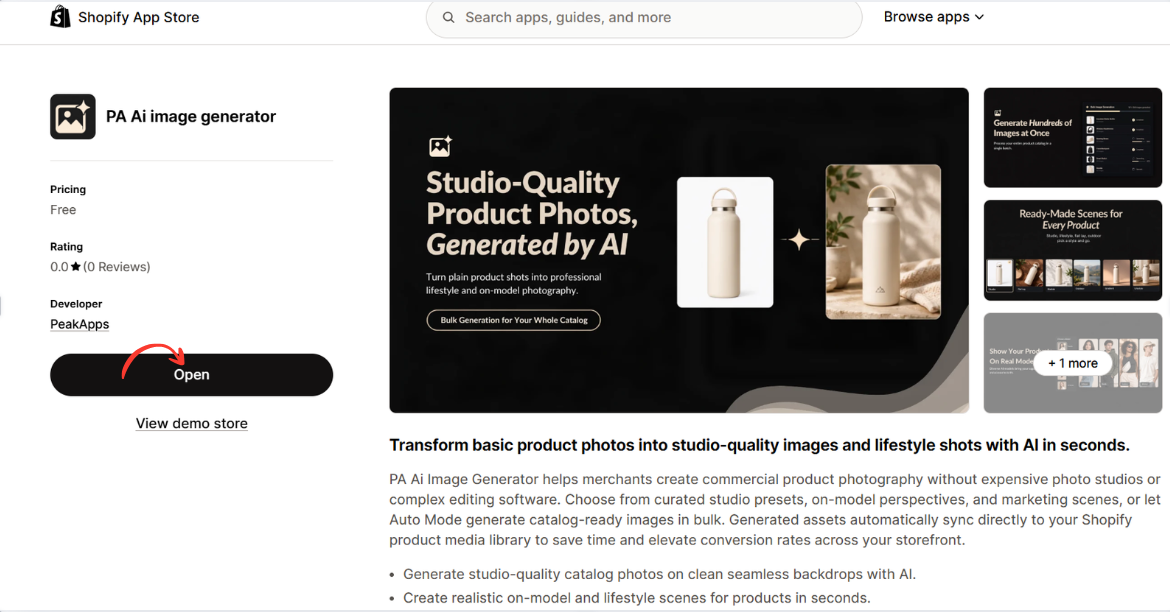
Image 2: Open PA AI Image Generator from its Shopify App Store listing.
Image explanation: The screenshot displays the app listing, including an illustration demonstrating how an ordinary product image can become a lifestyle-style photograph.
The Open button is highlighted, showing how merchants can access the installed app.
Step 3: Open the Generate Images Dashboard
After opening the app, locate Generate Images in the left navigation menu.
The image-generation workflow begins with selecting the products you want to use.
Click Browse Products to choose individual products from your Shopify catalog.
Alternatively, you can use Browse Collections to work with a collection.
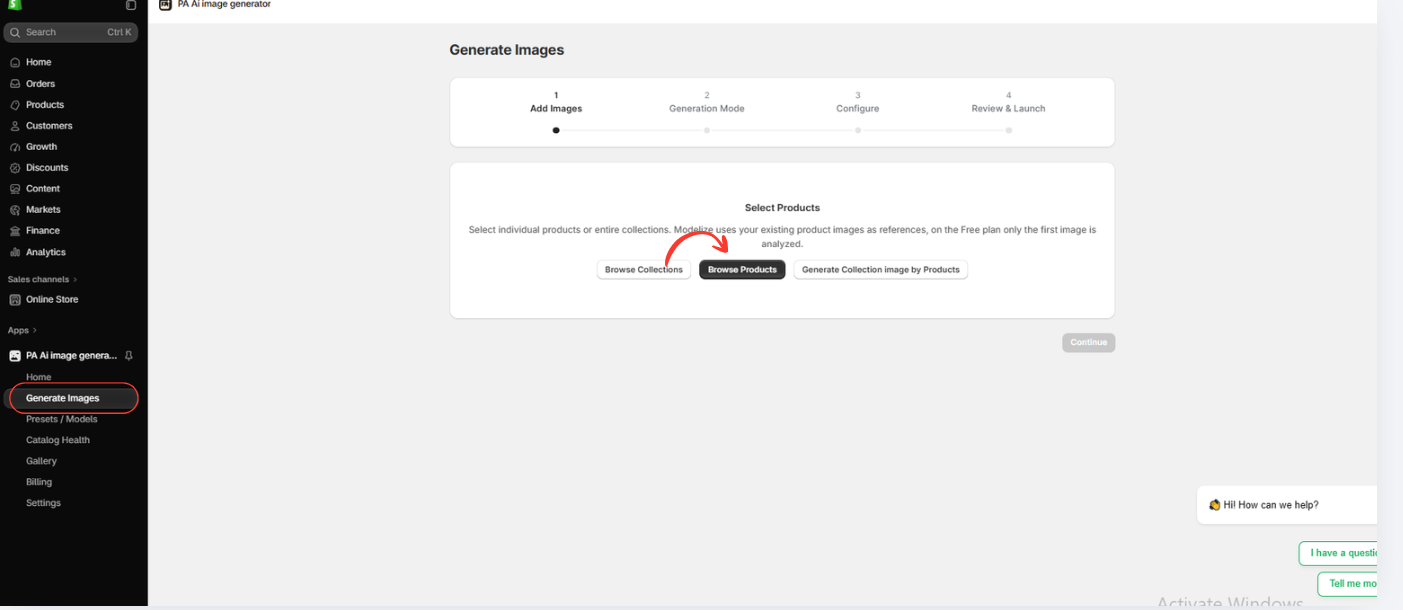
Image 3: Open Generate Images and select Browse Products.
Image explanation: The screenshot displays the image-generation interface with a progress indicator for selecting images, choosing a generation mode, configuring settings, and reviewing the generation request.
The Browse Products option allows merchants to use images already stored in Shopify.
Step 6: Choose an AI Image Generation Mode
The next screen displays two generation approaches:
Auto Mode: Allows AI to create a set of optimized product images based on the available product references.
Choose Presets: Allows you to select specific photography styles and compositions.
For this tutorial, select Choose Presets.
This option gives you more control over the visual direction of your final product photographs.

Image 6: Select Choose Presets to customize the style of AI-generated product images.
Image explanation: The screenshot shows the available generation modes. The Choose Presets option is highlighted, with previews of different photography styles.
Click Continue to browse the preset library.
Step 7: Explore Professional Product Photography Presets
The app provides a library of presets organized into several categories.
You can browse photography types such as Studio, On Model, Ghost Mannequin, Floating, Lifestyle, Flat Lay, Detail/Macro, Packaging, and Seasonal.
Industry filters include fashion, beauty, electronics, home products, jewelry, and sports.
Choose presets based on your product category and intended use.

Conclusion
When comparing AI product photography vs traditional photoshoots, both methods offer valuable benefits for Shopify merchants. However, the best choice depends on your budget, time, product requirements, and marketing goals.
Traditional photography provides accurate product representation, professional lighting, and authentic physical details. However, hiring photographers, renting studios, arranging models, and editing photographs can be expensive and time-consuming.
On the other hand, AI product photography offers a faster, more flexible, and often more affordable alternative for creating additional product visuals.
As demonstrated by the snowboard photography examples, AI can help merchants generate professional-looking studio images, outdoor lifestyle scenes, creative close-ups, and on-model compositions without organizing separate physical photoshoots.
With PA AI Image Generator, Shopify merchants can use existing product images, choose photography presets, and create visual variations for their product pages, collections, and marketing campaigns.
For merchants who frequently introduce new products or need multiple creative styles, AI photography can significantly simplify content production. However, generated images should always be checked to ensure the products are represented accurately.
The best approach is often to combine both methods: use traditional photography for accurate product references and AI-generated images for additional lifestyle and promotional content.
Ready to create professional-looking Shopify product photos without arranging expensive photoshoots?
Try PA AI Image Generator today.Install PA AI Image Generator on Shopify




