HOW TO AVOID DISCOUNT STACKING PROBLEMS WHEN RUNNING BUNDLE OFFERS ON SHOPIFY
Introduction
Discounts are one of the most effective ways to attract customers and encourage them to purchase more products from your Shopify store.
Bundle offers, quantity discounts, BOGO promotions, and discount codes can all help increase average order value (AOV) and improve the shopping experience.
However, running multiple promotions at the same time can create an unexpected problem: discount stacking.
When several discounts apply to the same order, customers may receive larger savings than you originally intended. This can reduce your profit margins and sometimes create confusing pricing at checkout.
With Section Kit Bundles, Shopify merchants can create product bundles, quantity discounts, and BOGO offers while organizing their promotional strategies more effectively.
In this guide, we’ll explain what discount stacking means, why it happens, how it affects your Shopify store, and how to manage bundle promotions more safely.
What Is Discount Stacking on Shopify?
Discount stacking happens when two or more discounts apply to the same purchase.
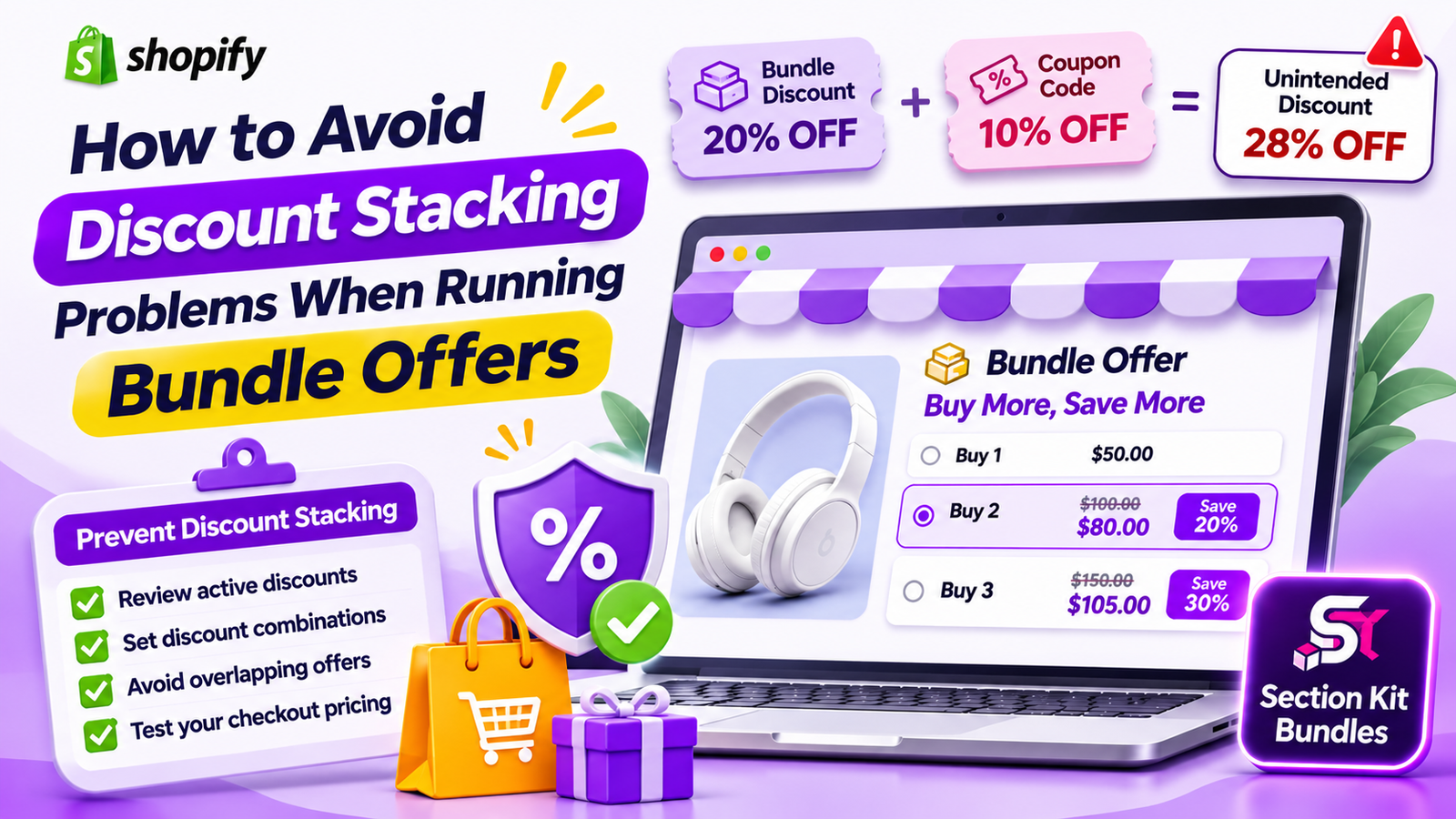
For example, imagine your Shopify store sells a product for $50.
You create a bundle offer that gives customers 20% off when they purchase two units.
The regular combined price is $100, and the bundle price becomes $80.
Now imagine the customer also uses a 10% discount code at checkout.
If that additional discount is allowed to apply to the already-discounted $80 amount, the final price becomes $72.
The customer receives a total effective discount of 28%, rather than the 20% bundle discount you originally planned.
This may be acceptable if you’ve intentionally designed the promotion that way. But if you haven’t accounted for the additional savings, it can reduce your profits.
Why Discount Stacking Can Be a Problem
Reduced Profit Margins
The biggest risk of unintended discount stacking is losing profit.
When multiple discounts apply to an order, the final selling price may become too low to cover product costs and other expenses.
Unexpected Checkout Prices
Customers may see one price on the product page and a different price at checkout.
This can create confusion if the additional discount isn’t clearly explained.
Conflicting Promotions
Running bundle discounts alongside storewide sales, automatic discounts, or promotional codes can create unexpected interactions.
Depending on Shopify’s discount combination settings and how an app implements its offers, some discounts may combine while others may not.
Difficult Promotion Management
Managing several overlapping offers can become complicated.
Without a clear promotional strategy, merchants may struggle to understand which discounts are affecting their revenue.
Inaccurate Profit Calculations
If you calculate your bundle profitability using only the original bundle discount, additional checkout discounts can make your estimates inaccurate.
This is why it’s important to evaluate the final selling price after all eligible discounts.
Common Discount Stacking Scenarios on Shopify
Bundle Discounts Combined With Coupon Codes
A customer selects a discounted bundle and then enters a promotional code at checkout.
If the discounts are eligible to combine, the final order price may decrease further.
Bundle Discounts Combined With Automatic Discounts
A store may have an automatic discount running at the same time as a quantity-based bundle offer.
The interaction depends on the discount types, their combination settings, and the implementation of the bundle offer.
BOGO Promotions Combined With Storewide Sales
A Buy One Get One promotion may overlap with another sale.
If the offers are allowed to combine, the customer may receive more savings than expected.
Quantity Discounts Combined With Loyalty Rewards
A customer might qualify for a quantity discount and also have a loyalty-related discount code.
The merchant should verify whether both promotions can apply to the same order.
Multiple Bundle Offers Affecting the Same Products
When products qualify for several promotions, customers may encounter overlapping discounts or unexpected pricing behavior.
The exact result depends on how each promotion is configured and applied.
How Shopify Discount Combinations Work
Shopify provides discount combination settings that help merchants control which eligible discounts can be used together.
Discounts are generally categorized into:
- Product discounts: Promotions that reduce the price of eligible products.
- Order discounts: Promotions that reduce an eligible order subtotal.
- Shipping discounts: Promotions that reduce eligible shipping charges.
Merchants can configure supported discounts to combine with other discount categories.
However, enabling combinations doesn’t guarantee that every discount will stack. Shopify evaluates eligibility, combination rules, and other discount restrictions.
For app-generated bundle discounts, behavior also depends on how the app creates and applies its offers.
That’s why testing your bundle alongside other active promotions is essential.
How to Prevent Discount Stacking Problems
Review Your Existing Discounts
Before launching a new bundle promotion, check the discounts already active in your Shopify store.
Look for automatic discounts, coupon codes, seasonal promotions, and other product-specific offers.
Identify any promotions that may overlap with the products included in your bundle.
Understand Discount Combination Settings
Review the combination settings for your Shopify discounts.
Decide whether your bundle promotion should be eligible alongside product, order, or shipping discounts.
Remember that the final result also depends on how your bundle offer is implemented.
Avoid Overlapping Promotions
Try not to run multiple aggressive discounts on the same products unless you’ve planned for their combined effect.
For example, offering a 20% bundle discount alongside a large storewide promotion could reduce your margins significantly if both apply.
Set a Minimum Profitable Selling Price
Calculate the lowest price at which you can sell your bundle while maintaining your target contribution margin.
Consider product costs, packaging, fulfillment, payment fees, and other relevant variable expenses.
This helps you understand how much total discount your business can afford.
Test Your Checkout Before Launching
Always test promotional combinations before making a bundle offer available to customers.
Check the product page, cart, and checkout to confirm that prices and discounts behave as intended.
Monitor Your Promotional Performance
After launching a bundle offer, review your average order value, discount amounts, revenue, and contribution profit.
These metrics help you determine whether your promotional strategy is sustainable.
HOW SECTION KIT BUNDLES HELPS YOU MANAGE BUNDLE PROMOTIONS
Section Kit Bundles is a Shopify app that helps merchants create product bundles, quantity discounts, and BOGO offers using ready-made templates.
The app provides a central interface for creating and managing bundle promotions.
While Shopify’s discount combination rules and the app’s discount implementation determine how promotions interact, Section Kit Bundles can help you organize your bundle offers and present them clearly to customers.
Create Clear Quantity Discount Offers
Quantity discounts encourage customers to purchase additional units in exchange for better pricing.
For example:
| Bundle option | Regular price | Offer price | Savings |
|---|---|---|---|
| Buy 1 | $30 | $30 | — |
| Buy 2 | $60 | $54 | 10% |
| Buy 3 | $90 | $76.50 | 15% |
Section Kit Bundles provides volume discount templates that help merchants create quantity-based promotional offers.
Before publishing these offers, calculate whether any additional eligible discounts could reduce the final selling price.
Create BOGO Promotions With Clear Conditions
BOGO promotions can encourage customers to purchase more products by offering additional items for free or at a discounted price.
For example:
Buy 2 Products, Get 1 Free
Section Kit Bundles supports BOGO-style offers, making it easier to create promotional combinations.
When running BOGO promotions, review other active discounts that could affect the same products.
This helps prevent unexpected savings at checkout.
Manage Your Bundle Offers From One Dashboard
Section Kit Bundles provides a dashboard where merchants can create and manage their bundle promotions.
Having your bundle offers organized in one place makes it easier to review your promotional strategy.
However, Shopify discount codes, automatic discounts, and promotions created through other apps may still need to be reviewed separately.
Customize Your Bundle Pricing Display
A clear promotional design helps customers understand the offer before adding products to their cart.
Section Kit Bundles includes visual customization options for presenting bundle pricing and quantity choices.
For example, a product page could display:
BUY MORE, SAVE MORE
- Single — $30
- Duo — $54 | Save 10%
- Trio — $76.50 | Save 15%
Clear pricing helps customers understand the intended bundle savings.
You should also verify that the final checkout totals remain consistent with your discount policy.
Use Bundle Offers Without Sacrificing Profitability
The purpose of a bundle promotion should be to encourage larger purchases while maintaining sustainable margins.
Section Kit Bundles helps merchants create promotional offers, but the discount amounts should always be chosen based on actual business costs.
Before launching a promotion, calculate the expected profit after all discounts that may apply.
This is particularly important during seasonal campaigns, holiday sales, and storewide promotional events.
Step 1: Open the Shopify App Store

Image 1: Search for Shopify App Store on Google and open the official website.
Open your browser and search for Shopify App Store. Select the official result to access Shopify’s app marketplace.
The Shopify App Store contains tools for product bundling, store design, marketing, inventory management, and more.
Step 2: Search for Section Kit Bundles
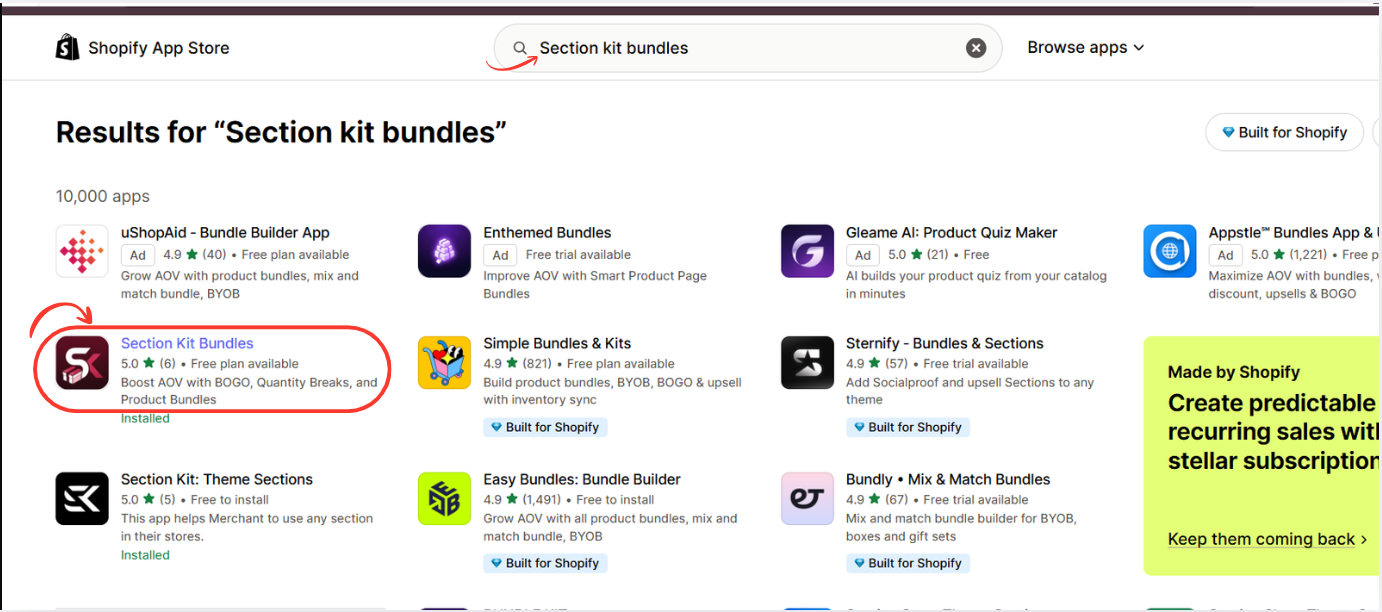
Image 2: Search for Section Kit Bundles and select the highlighted app.
In the Shopify App Store search bar, type Section Kit Bundles.
Find the app in the results and click its listing. The app supports BOGO promotions, quantity breaks, product bundles, and volume discounts. Shopify App Store
Open the app listing, review the available plans, and click Install. Once installation is complete, open the app from your Shopify admin.
You can also visit the app directly: Section Kit Bundles on the Shopify App Store.
Step 3: Install Section Kit Bundles
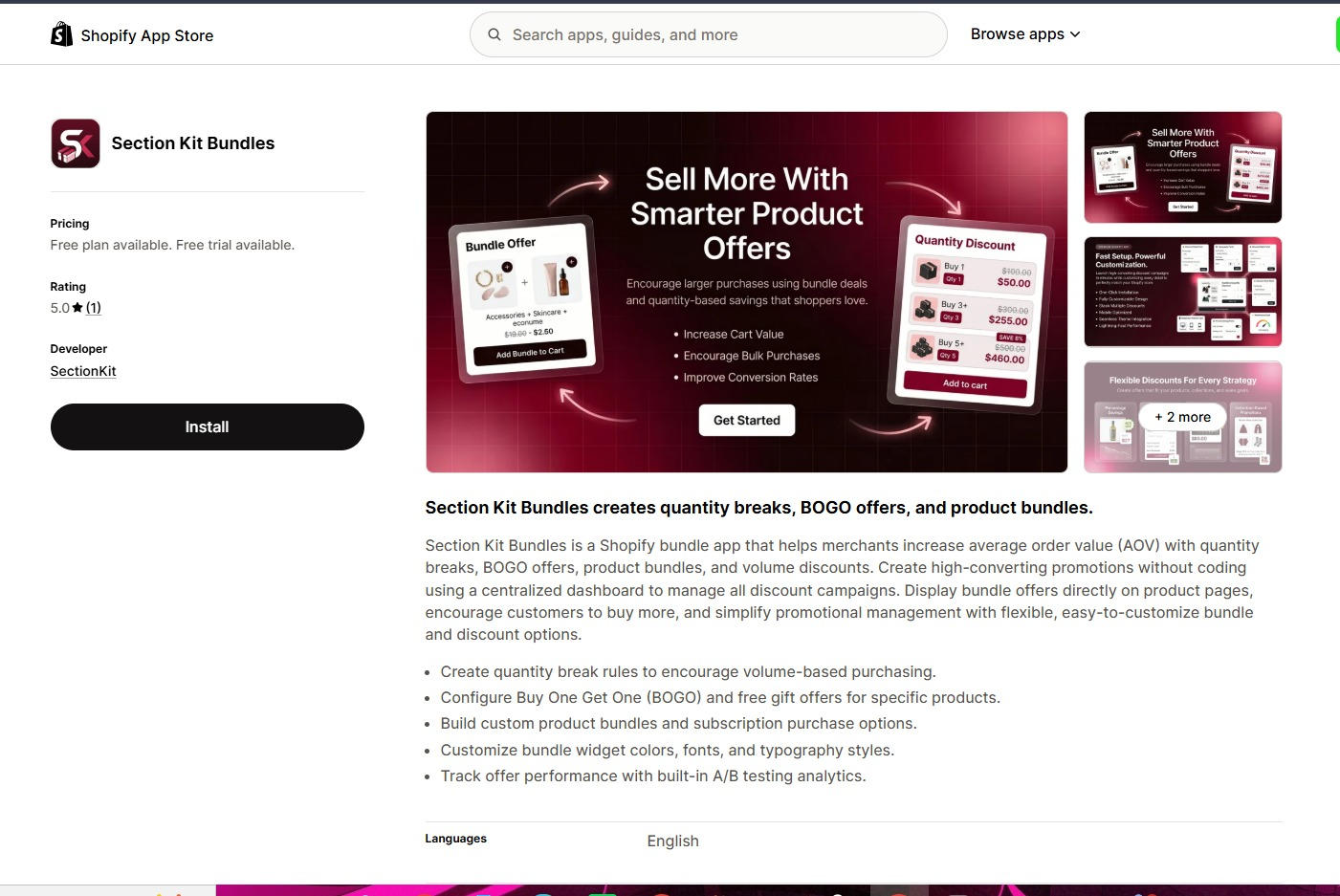
Open Section Kit Bundles in the Shopify App Store, click Install, select your store, and review the installation permissions. Once installed, open the app from your Shopify admin.
Step 4: Open the Dashboard and Create a New Bundle
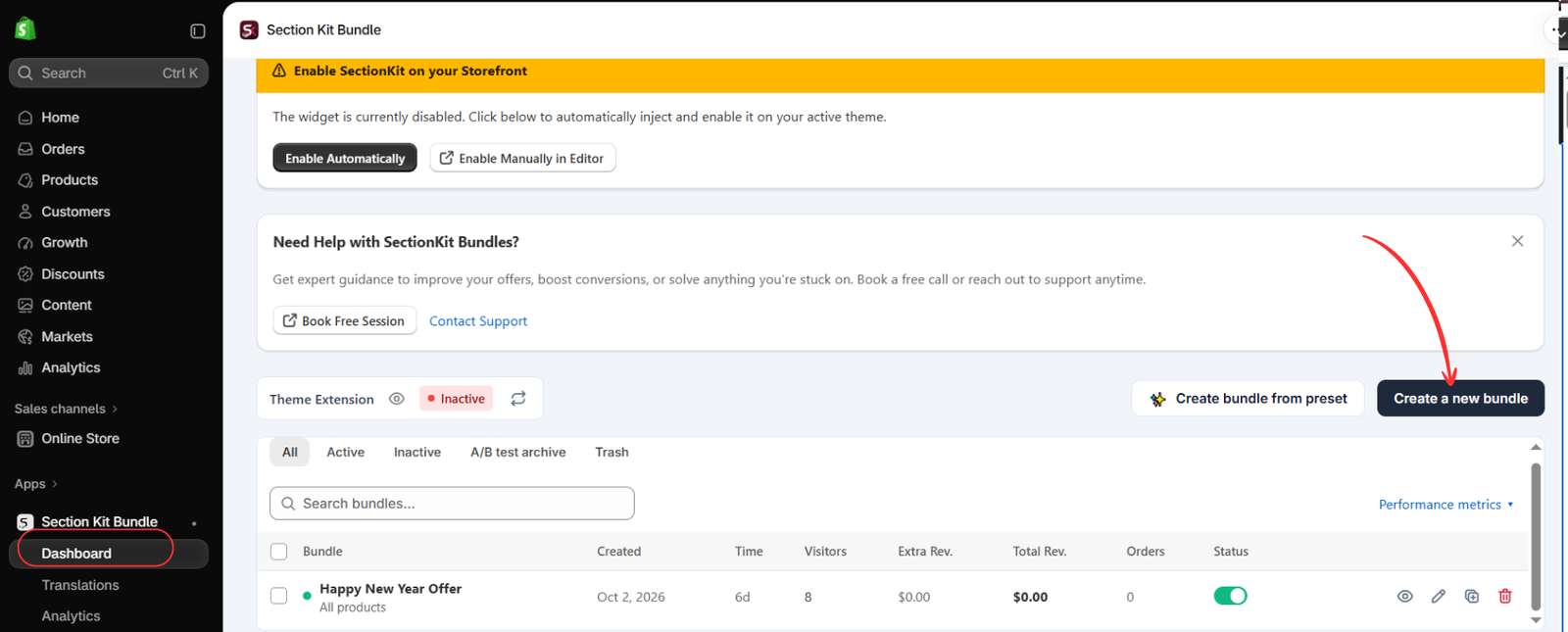
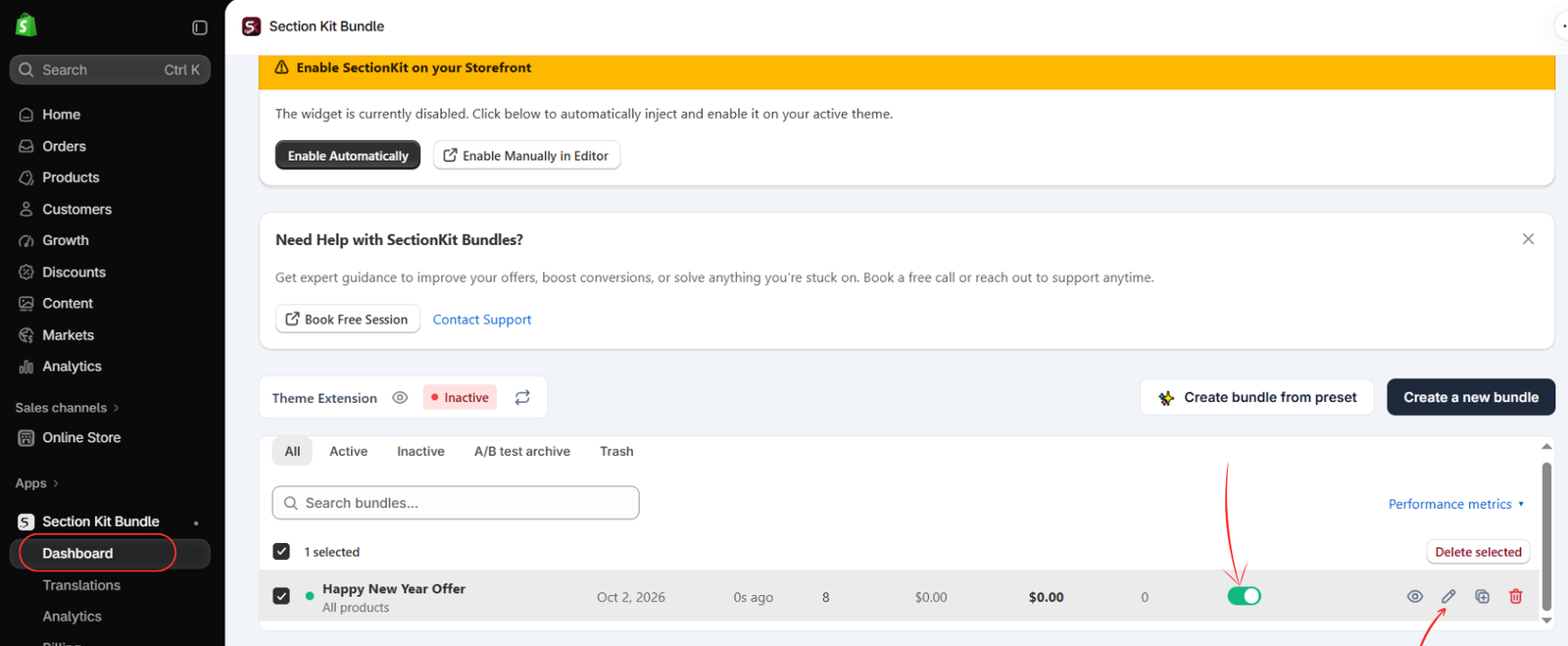
Open Apps → Section Kit Bundle → Dashboard. Click Create a new bundle, as highlighted in Image 2. The dashboard also offers a preset option and shows existing promotions.
The image shows the theme extension as inactive. Creating or activating an offer and enabling its storefront integration are separate checks; complete the theme setup before expecting the widget to appear.
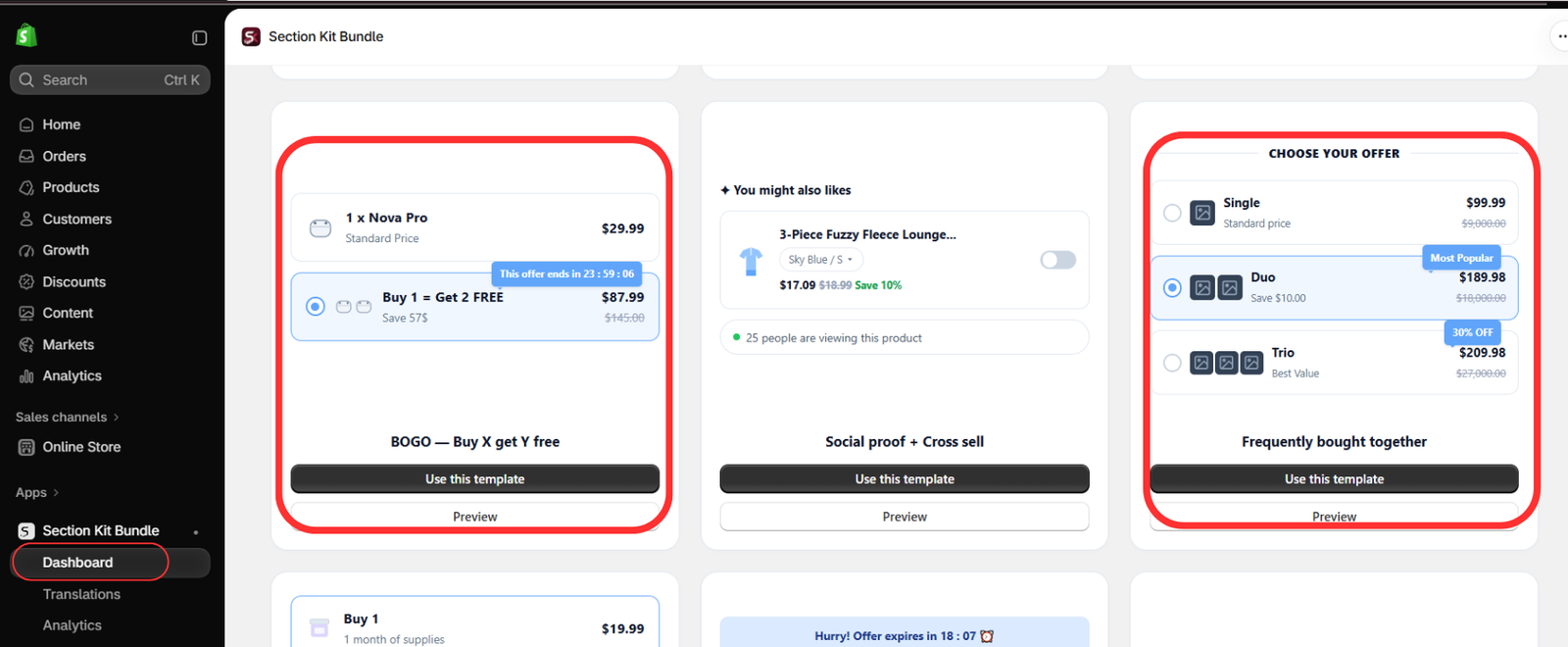
Step 5: Understand the Alternative Offer Templates
Image 4 highlights BOGO — Buy X get Y free and Frequently bought together. Choose BOGO when the benefit is a free item, or a related-product bundle when customers should purchase complementary products together. For the quantity-discount offer in this guide, continue with the classic volume discount template selected in Step 3.
Keep your offer wording consistent with the actual discount. A percentage discount should not be described as a free-item promotion.
Step 6: Find Your Offer and Open Its Editor
When your offer is saved and appears in the dashboard, locate its row and click the pencil icon to edit it. The highlighted status switch controls whether that offer is active. Finish reviewing its rules before enabling it for customers.
Image 5 shows an existing example named “Happy New Year Offer.” Give your own offer a descriptive name so it is easy to identify later. An active offer switch alone does not confirm that the theme extension is enabled.
Step 7: Configure the Savings and Preview the Widget
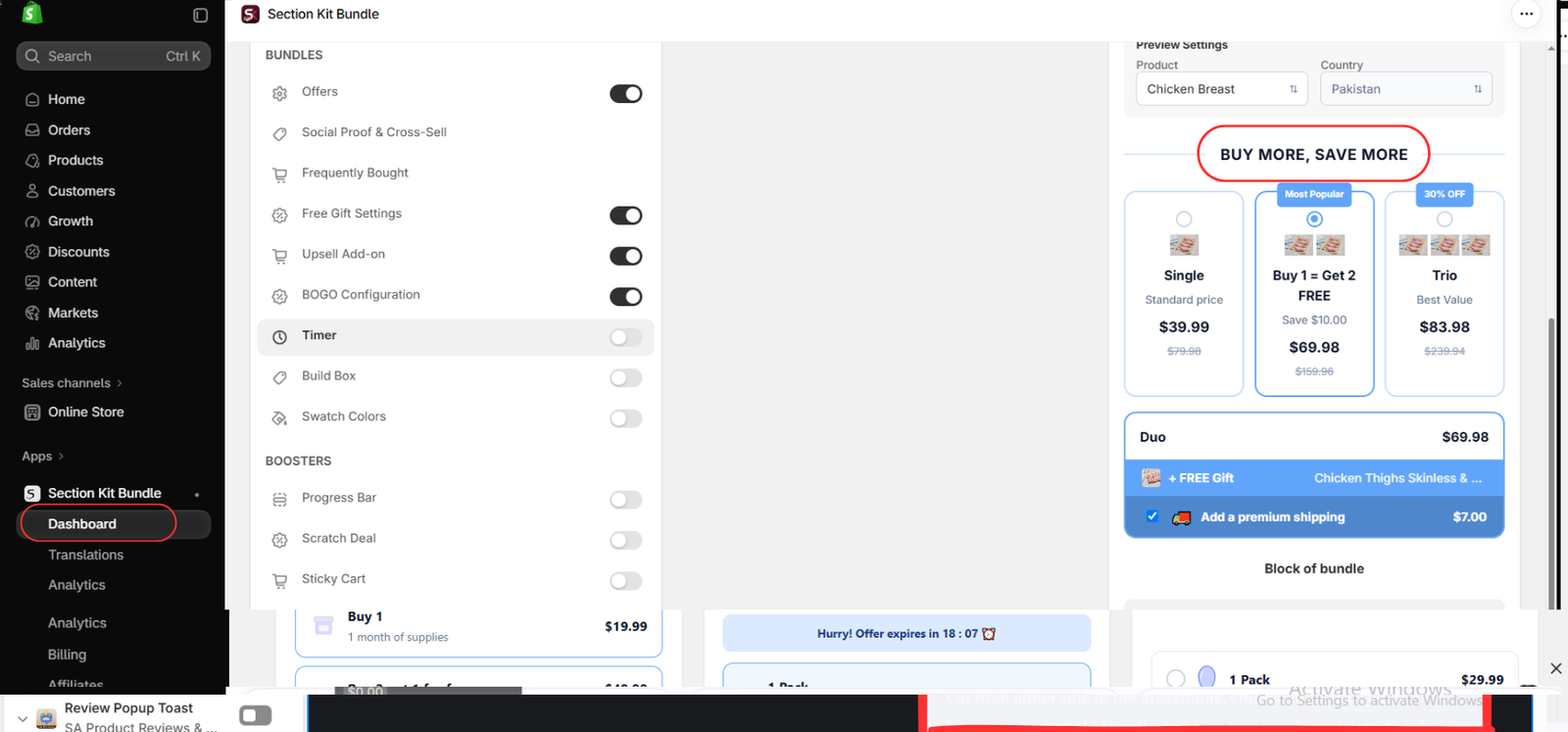
In the offer editor, set the eligible products, quantity choices, and discount values using the available offer controls. Enter a clear heading such as BUY MORE, SAVE MORE, and check the product preview as you adjust the configuration.
For a simple volume discount, use a standard-price single option and discounted choices for larger quantities. Show the total price clearly, and use labels such as “Save 10%” only when the calculation is accurate. Optional free gifts, upsells, or BOGO settings should be enabled only if they are part of your intended promotion.
Image 6 shows the editor’s feature toggles and a mixed example preview. Its free-item wording and prices demonstrate a layout, not a pricing model to copy. The image does not show every quantity or discount input; review those controls in your app before saving. Customize the widget’s colors and typography to fit your store, then save using the editor’s available save control.
Best Practices for Running Bundle Offers on Shopify
Keep Your Discount Strategy Simple
Avoid running too many overlapping promotions.
A clear discount structure is easier for customers to understand and simpler for merchants to manage.
Use Transparent Promotional Pricing
Show genuine regular prices and accurately calculated savings.
Avoid misleading discount labels or inflated reference prices.
Review Storewide Discounts Before Launching Bundles
If you’re running a storewide sale, check whether your bundle products are also eligible for that promotion.
Check Mobile and Desktop Checkout
Test the customer experience across devices to make sure your promotional pricing appears correctly.
Track Profit Instead of Revenue Alone
Higher sales volume doesn’t necessarily mean higher profit.
Monitor contribution profit and total discount expenses alongside average order value.
Why Choose Section Kit Bundles for Shopify Promotions?
Section Kit Bundles provides several useful features for merchants who want to create attractive promotional offers.
Volume Discounts: Encourage larger purchases through quantity-based pricing.
BOGO Offers: Create Buy X Get Y promotions for eligible products.
Frequently Bought Together: Present complementary products as bundled offers.
Ready-Made Templates: Build promotions using existing layouts instead of designing them from scratch.
Visual Customization: Adjust the appearance of bundle offers to match your storefront.
Bundle Management: Create, publish, and manage promotional offers from the app dashboard.
Product Page Integration: Display configured bundle offers directly on eligible Shopify product pages.
These features can help merchants build more organized and attractive bundle promotions.
Frequently Asked Questions
What is discount stacking on Shopify?
Discount stacking occurs when multiple discounts apply to the same purchase, potentially reducing the final selling price beyond the original promotion.
Can Shopify discounts be combined?
Yes. Shopify supports eligible discount combinations, subject to combination settings and other restrictions.
Can bundle discounts combine with discount codes?
They may, depending on the discount types, combination settings, and how the bundle promotion is implemented.
How can I prevent unexpected bundle discounts?
Review active promotions, configure appropriate discount combination settings, calculate minimum profitable prices, and test the final checkout totals.
Does Section Kit Bundles automatically prevent all discount stacking?
You shouldn’t assume that any bundle app automatically blocks every discount combination. Review Shopify’s discount settings and test how your Section Kit Bundles offers interact with other active promotions.
Can I create quantity discounts and BOGO offers with Section Kit Bundles?
Yes. Section Kit Bundles supports quantity-based promotions and BOGO-style bundle offers.
Conclusion
Discount stacking can create unexpected pricing problems when multiple Shopify promotions overlap.
While combining discounts can sometimes be part of an effective marketing strategy, unplanned combinations may reduce your profit margins and create confusion at checkout.
By reviewing your existing promotions, understanding Shopify’s discount combination settings, calculating profitable prices, and testing your offers, you can manage bundle discounts more effectively.
With Section Kit Bundles, you can create quantity discounts, BOGO promotions, and product bundle offers using ready-made templates and a visual editor.
Build attractive promotions, communicate savings clearly, and maintain better control over your bundle pricing strategy.
Explore Section Kit Bundles: https://apps.shopify.com/sectionkit-bundle




