BEST TRUST BADGES FOR A BRAND-NEW SHOPIFY STORE

Introduction
Launching a new Shopify store is exciting, but convincing first-time visitors to trust your business can be challenging. Unlike established ecommerce brands, a new store usually has limited customer reviews, little brand recognition, and no long history of successful orders.
When customers visit an unfamiliar store, they may hesitate before purchasing. They want to know whether their payment is secure, whether their order will arrive, and what happens if the product does not meet their expectations.
This is where trust badges can play an important role.
Trust badges are small visual elements that communicate useful information about shipping, returns, payments, guarantees, and customer support. When used correctly, they can make important purchasing information easier to find and help a new Shopify store appear more organized and professional.
However, not every badge is suitable for every store. Adding too many icons or displaying guarantees that your business does not actually provide can undermine customer confidence.
In this guide, we’ll explore the best trust badges for a brand-new Shopify store, where to place them, how to choose the right designs, and how to add them using the SA Trust Badges Shopify app.
Why Building Trust Is Difficult for New Shopify Stores
A new Shopify store faces a different set of challenges compared with an established online retailer.
When customers shop from a familiar brand, they may already know what to expect regarding product quality, delivery, and customer service.
With a new store, customers must evaluate these factors for themselves.
Common concerns include payment security, unclear shipping policies, unfamiliar branding, product quality, return eligibility, and limited customer reviews.
Even when a store has attractive product images and competitive pricing, unanswered questions can cause visitors to leave without purchasing.
New merchants sometimes focus heavily on advertising and product presentation while overlooking these basic trust-building details.
A better approach is to make your policies and services easy to understand throughout the shopping journey.
What Are Trust Badges in Shopify?
Trust badges are visual symbols, usually combining an icon with a short text message, that communicate information relevant to purchasing.
Examples include a delivery truck representing shipping, a shield representing checkout-related information, or a return arrow highlighting a return policy.
They are commonly displayed near product information, Add to Cart buttons, and cart sections.
The purpose of a trust badge is not to create trust automatically. Instead, it helps communicate genuine information that customers might otherwise have difficulty finding.
For example, a badge reading “Easy Returns” can be useful when it accurately reflects the store’s published return policy.
Why Trust Badges Matter for Brand-New Shopify Stores
Trust badges can be particularly useful for new businesses because they help communicate important information without requiring customers to navigate multiple policy pages.
They can also improve the visual organization of product pages by presenting key benefits in a consistent format.
For example, a row of three badges might highlight shipping, returns, and payment options.
When these badges use consistent icons, typography, and spacing, they can complement the store’s overall design.
However, merchants should understand that trust badges alone do not guarantee higher conversion rates. Their effectiveness depends on the quality of the information, badge placement, and the overall shopping experience.
The 7 Best Trust Badges for a New Shopify Store
1. Free Shipping Badge
A free shipping badge can help customers quickly identify whether they qualify for delivery without additional shipping charges.
It works particularly well near product prices or purchasing buttons.
If free shipping only applies above a certain order amount or within specific regions, clearly communicate those conditions.
2. Easy Returns Badge
Customers shopping from an unfamiliar brand may worry about receiving the wrong size, an unsuitable product, or an item that does not meet expectations.
An easy returns badge can direct attention to your return policy and make the purchasing conditions easier to understand.
Only describe returns as easy or free if your actual policy supports that claim.
3. Secure Checkout Badge
Payment-related concerns can be especially important for first-time customers.
A secure checkout badge may help draw attention to the store’s payment information.
However, a visual shield does not itself make checkout secure or establish an independent security certification. Avoid displaying unsupported certification claims.
4. Accepted Payment Methods Badge
Payment icons help shoppers identify the payment methods available at your store.
For example, you might display supported card brands or digital wallet options.
Only show payment methods that customers can actually use through your configured checkout.
5. Product Quality or Guarantee Badge
A genuine product guarantee can help customers understand what protections or assurances the store provides.
For example, a merchant may highlight a documented product warranty or satisfaction guarantee.
Avoid generic claims such as “100% Guaranteed” unless you clearly explain what is guaranteed.
6. Customer Support Badge
New customers may want reassurance that assistance is available if they encounter an issue.
A customer support badge can highlight your actual support hours or contact options.
Do not display “24/7 Support” unless your business genuinely provides around-the-clock assistance.
7. Order Tracking Badge
If your store provides order tracking, a tracking badge can make that service more visible.
Customers often want to know whether they will receive shipment updates after purchasing.
This badge is especially useful for stores shipping physical products.
Which Trust Badges Should a New Store Start With?
For most brand-new Shopify stores, it is better to begin with a small selection of badges rather than displaying every available icon.
A practical starting point is to choose three badges that address your customers’ most important questions.
For example, a store that offers free shipping and returns might prioritize shipping, returns, and accepted payment methods.
A store selling expensive products might instead emphasize its genuine warranty, return policy, and support availability.
| Store type | Suggested trust badges |
|---|---|
| Fashion and apparel | Shipping, returns, payment methods |
| Electronics | Warranty, returns, customer support |
| Beauty and skincare | Shipping, product guarantee, support |
| Jewelry | Delivery information, returns, payment methods |
| Home and lifestyle | Shipping, returns, order tracking |
These are starting recommendations, not universal rules. Choose badges based on the services your store actually provides.
Introducing SA Trust Badges for Shopify
Adding trust badges manually may require custom theme sections, CSS styling, or additional development work.
For merchants who want a simpler approach, SA Trust Badges provides a visual interface for creating and customizing badge content.
The app supports multiple badge styles, including single banners, icon blocks, minimal icons, and payment icons. Merchants can configure the badge text, preview the design, and publish it through the app.
It also integrates with Shopify’s theme editor through an app embed.
SA Trust Badges
Create customizable product and cart badges, display supported payment icons, and match badge designs to your storefront.Explore SA Trust Badges on the Shopify App Store
How to Add Trust Badges to a Brand-New Shopify Store
The following tutorial uses your original SA Trust Badges app images.
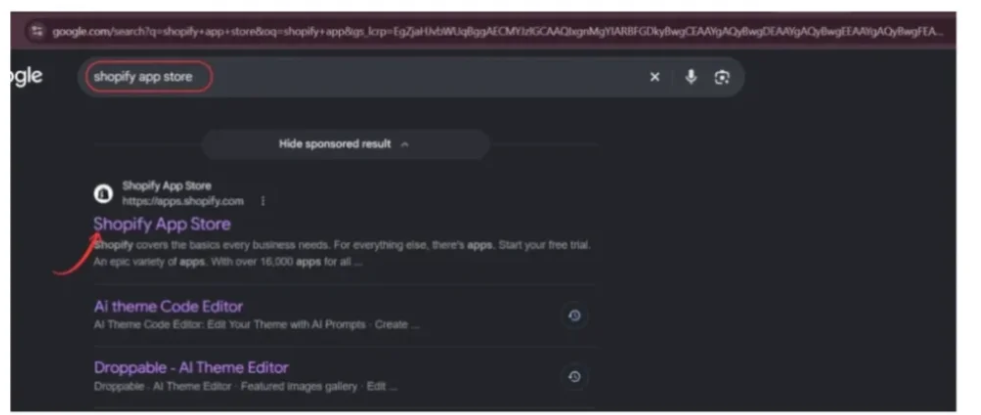
Step 1: Open the Shopify App Store
Open your browser and search for Shopify App Store on Google.
Click the official Shopify App Store result to access the marketplace.
Step 2: Search for SA Trust Badges
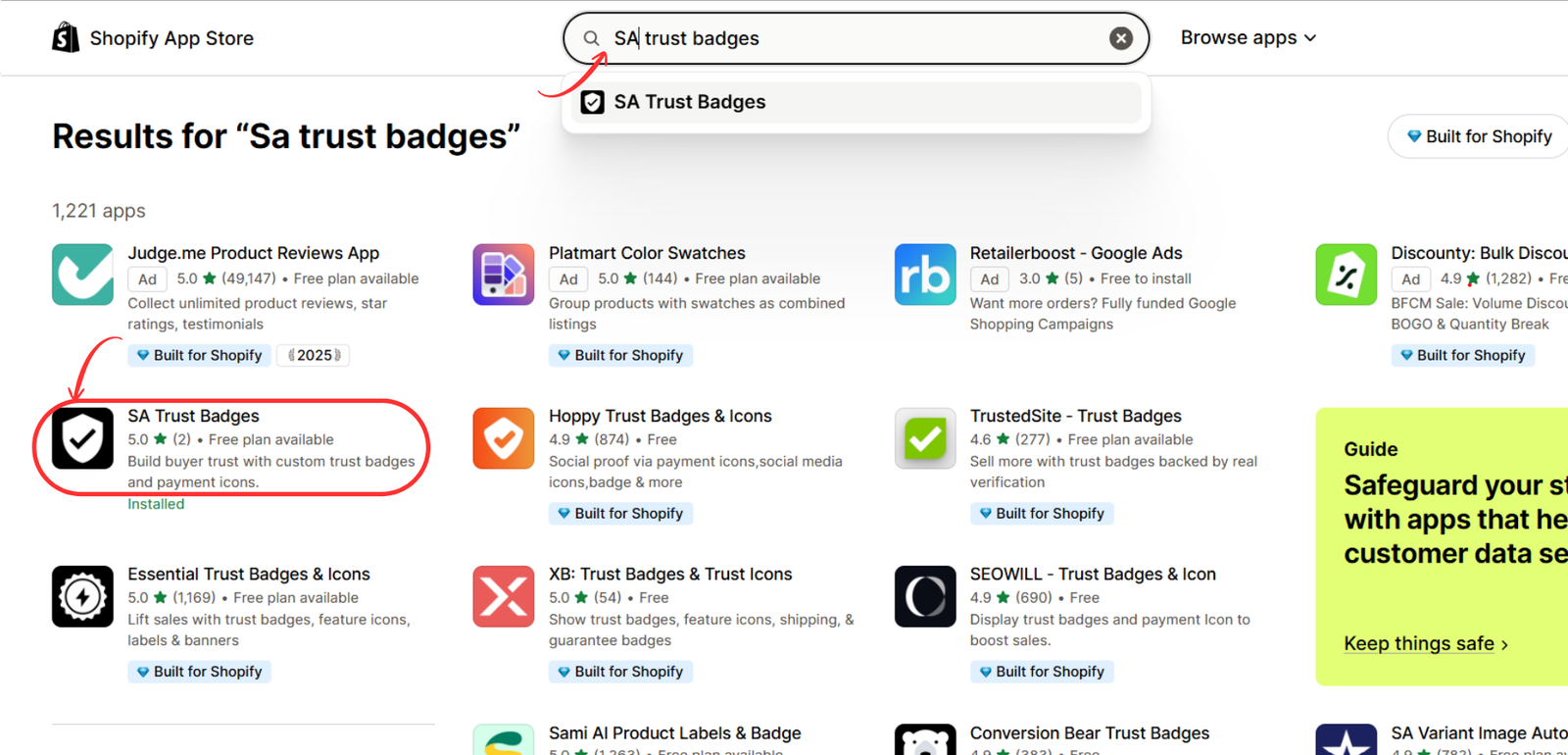
Use the Shopify App Store search bar and enter SA Trust Badges.
Locate the app with the black shield-and-checkmark icon and open its listing.
Step 3: Install SA Trust Badges
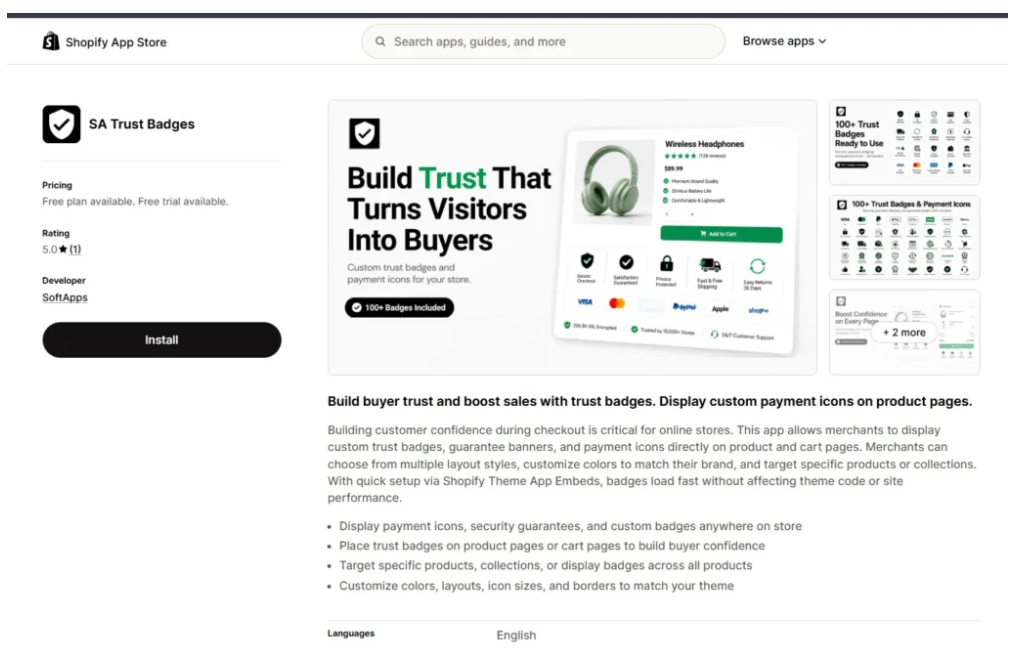
On the app listing, review its features and available pricing plans.
Click Install and complete Shopify’s installation process.
Step 4: Create a Cart Trust Badge
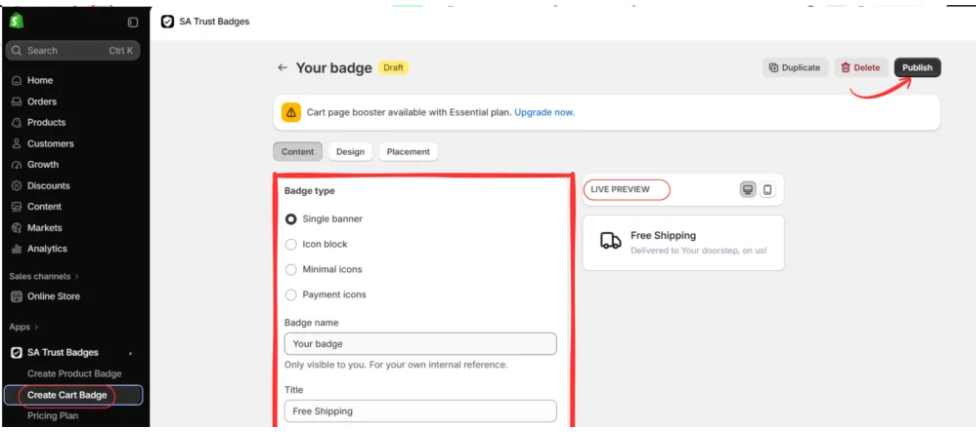
Open SA Trust Badges in your Shopify admin and select Create Cart Badge.
Choose a badge type, such as Single banner, Icon block, Minimal icons, or Payment icons.
Enter a badge name, title, and supporting description. Use the live preview to check its appearance, then click Publish.
Step 5: Open Your Shopify Theme Editor
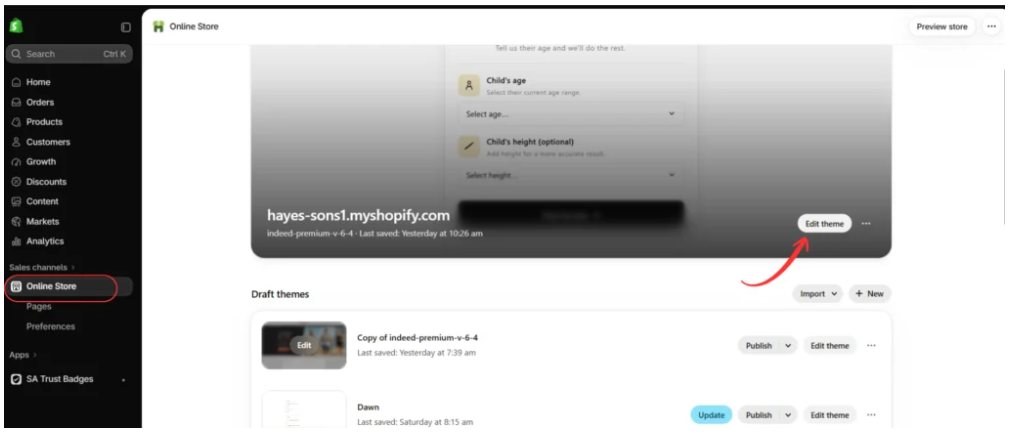
Navigate to Online Store → Themes in your Shopify admin.
Find the theme you want to customize and select Edit theme or Customize.
Step 6: Enable the SA Trust Badges App Embed
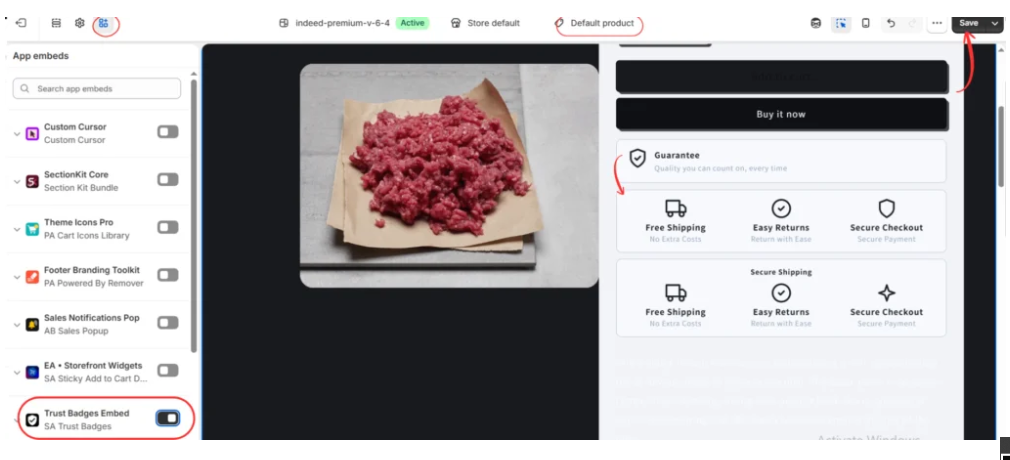
Inside the theme editor, open App embeds.
Find Trust Badges Embed — SA Trust Badges, enable the toggle, and click Save.
Preview the product page to confirm the badges appear correctly.
Step 7: Create and Customize a Product Guarantee Badge
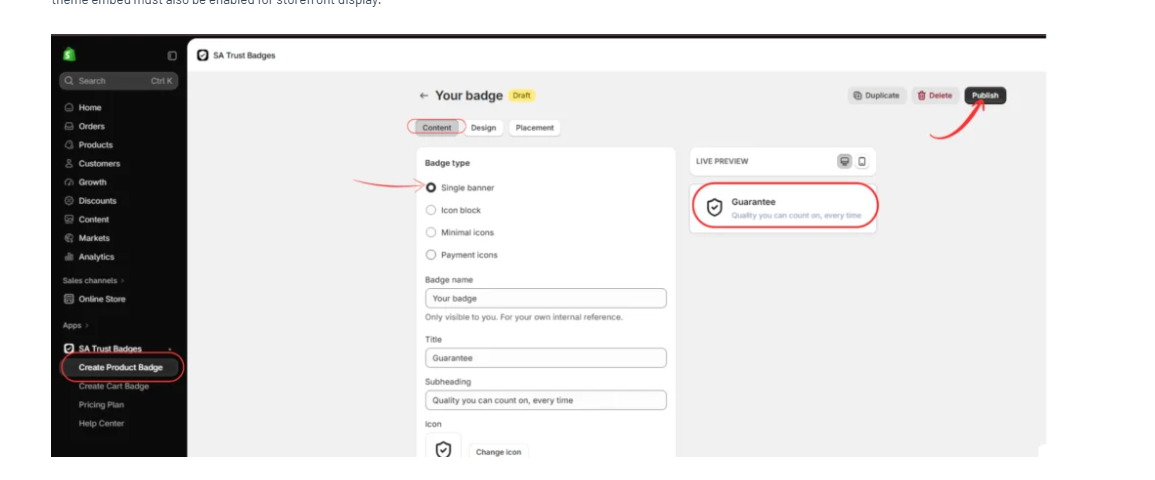
After setting up your trust badges, open the SA Trust Badges app from your Shopify admin and select Create Product Badge.
In the badge editor, open the Content tab and choose Single banner as your badge type. This layout allows you to display a guarantee message with an icon, title, and supporting description.
Enter Guarantee in the Title field and add a subheading such as Quality you can count on, every time, provided it reflects your store’s actual commitments.
Choose a suitable shield or checkmark icon to represent your guarantee. You can also use the Design tab to adjust the badge’s colors, appearance, and styling to match your Shopify theme.
Review the Live Preview to ensure the badge looks professional and is easy to read. Once you’re satisfied, click Publish to save your Guarantee Badge.
Step 8: Display the Guarantee Badge on Your Shopify Product Page
Once your Guarantee Badge is published, navigate to Shopify Admin → Online Store → Themes → Customize.
Open your product page template and select App embeds from the theme editor sidebar.
Locate Trust Badges Embed — SA Trust Badges and enable the toggle if it is not already active.
Your published Guarantee Badge should now appear in its configured position on the product page. As shown in the image, the badge is displayed below the purchasing buttons with a shield icon, the Guarantee heading, and its supporting message.
This placement helps customers notice your product-quality commitment while considering a purchase.
Finally, click Save in the upper-right corner and preview your storefront to confirm that the badge displays correctly on desktop and mobile devices.

Best Places to Display Trust Badges on Shopify
Dynamic Checkout Buttons Not Displaying Active Payment Methods
Product pages
Display relevant shipping, returns, or guarantee badges near product information and purchasing controls.
Cart pages or drawers
Use accurate shipping, payment, or returns information to address questions before checkout.
How to Write a Retail Return Policy (& Free Templates)
Store footer
Display accepted payment methods and provide links to shipping, returns, privacy, and contact information.Illustrative layout examples. Actual SA Trust Badges placement options depend on app settings and your Shopify theme.
Common Mistakes New Shopify Merchants Should Avoid
One of the biggest mistakes is displaying badges that make unsupported claims.
For example, a merchant should not display a money-back guarantee if the store does not actually offer one.
Another mistake is overcrowding product pages with too many icons. A large collection of badges can distract visitors from product details and purchasing buttons.
Inconsistent styling is also a concern. Badges with mismatched colors, fonts, and sizes can make the storefront look less professional.
Finally, merchants should not expect badges to compensate for unclear policies, poor product photography, or unreliable fulfillment.
Trust badges should reinforce a trustworthy business, not attempt to replace one.
How to Know Whether Trust Badges Are Working
Once your badges are published, monitor how customers interact with your store.
Useful metrics include product-page conversion rate, add-to-cart rate, cart-to-checkout progression, and completed purchases.
If you have sufficient traffic, consider testing a version of the product page with badges against a version without them.
Use comparable visitor groups and avoid changing multiple design elements during the same test.
This helps you understand whether the badges are contributing to a measurable improvement rather than relying on assumptions.
Frequently Asked Questions
1. What are the best trust badges for a new Shopify store?
Shipping, returns, accepted payment methods, and genuine guarantees are useful starting points. Choose badges that reflect your actual store policies.
2. Do trust badges help new Shopify stores get more sales?
They may help reduce uncertainty and communicate purchasing information, but higher sales are not guaranteed. Testing is the best way to measure their impact.
3. Can I add trust badges without coding?
Yes. Apps such as SA Trust Badges provide visual badge creation and theme integration without requiring routine manual coding.
4. How many trust badges should I display?
Start with two or three highly relevant badges and add more only when they communicate useful information.
5. Where should I place trust badges?
Product pages near purchasing information are a practical starting point. Cart pages and footers may also be appropriate.
6. Can I customize the colors and icons?
SA Trust Badges provides design customization options. Available features can vary by subscription plan.
7. Are trust badges necessary for every Shopify store?
No. They are optional design elements. Clear policies, secure payment processing, and reliable customer service are more important.
8. Should I use trust badges if my store has no customer reviews?
You can use genuine shipping, returns, and payment information even before receiving customer reviews. Do not invent testimonials or imply independent certification.
Conclusion
Building trust is one of the biggest challenges for a brand-new Shopify store.
Customers need confidence that their payments will be handled properly, their orders will be fulfilled, and their questions or problems can be addressed.
Trust badges can help communicate these details in a clear, visually organized way.
For new Shopify merchants, the best approach is to start with a few relevant badges, maintain consistent styling, and ensure every claim accurately represents the business.
With SA Trust Badges, merchants can create customizable product badges, preview different designs, and publish them through Shopify’s theme editor.
When combined with transparent store policies, high-quality product information, and dependable customer service, trust badges can contribute to a more reassuring shopping experience.
Get started: Install SA Trust Badges on Shopify




