WHY BETTER PRODUCT IMAGES INCREASE YOUR CONVERSION RATE
Introduction
Product images are one of the most important elements of a successful Shopify store. When customers visit an online store, they cannot physically touch, examine, or test the products before purchasing. Instead, they rely on product photographs to understand what they are buying.
A well-designed Shopify store may attract visitors through advertising, SEO, and social media. However, attracting traffic is only the first step. The real challenge is converting those visitors into paying customers.
This is where high-quality product photography becomes important.
Clear, professional-looking product images help customers understand product features, visualize products in real-life situations, and feel more confident about purchasing.
Poor-quality photographs, on the other hand, can create uncertainty, even when the actual product is excellent.
Fortunately, Shopify merchants no longer need to depend entirely on expensive professional photoshoots to create visually attractive product content.
With PA AI Image Generator, merchants can use existing product photographs to create studio-style images, lifestyle compositions, on-model photographs, and promotional visuals.
In this guide, we’ll explain why better product images can increase your Shopify conversion rate, how product photography influences purchasing decisions, and how AI can help merchants improve their product presentation.
What Is a Shopify Conversion Rate?
A Shopify conversion rate measures the percentage of store visits that result in a purchase.
For example, imagine your Shopify store receives 1,000 sessions and generates 20 orders.
Your conversion rate would be:
Conversion Rate = (Orders ÷ Sessions) × 100
In this example:
20 ÷ 1,000 × 100 = 2%
Now imagine the store generates 30 orders from the same 1,000 sessions.
The conversion rate increases to 3%.
That’s 10 additional orders without increasing traffic, although improved photography alone does not guarantee this result.
Conversion performance depends on many factors, including product demand, pricing, shipping, trust, website usability, and the quality of product information.
Better images can help address the uncertainty customers experience when evaluating products.
Why Product Images Influence Customer Buying Decisions
1. Product images create the first impression
When customers open a product page, they often notice the image before reading the description.
A clear photograph with attractive lighting, accurate colors, and professional composition helps communicate the product’s appearance immediately.
An unclear or poorly presented image may cause customers to question the quality of the product or store.
2. Better photographs build customer confidence
Customers want to understand exactly what they are purchasing.
High-quality photographs can show important product details, materials, finishes, packaging, and multiple viewing angles.
This helps reduce uncertainty and makes purchase decisions easier.
3. Lifestyle images help customers visualize products
A plain product photograph can show what an item looks like.
A lifestyle photograph can show how the product might appear in a relevant environment.
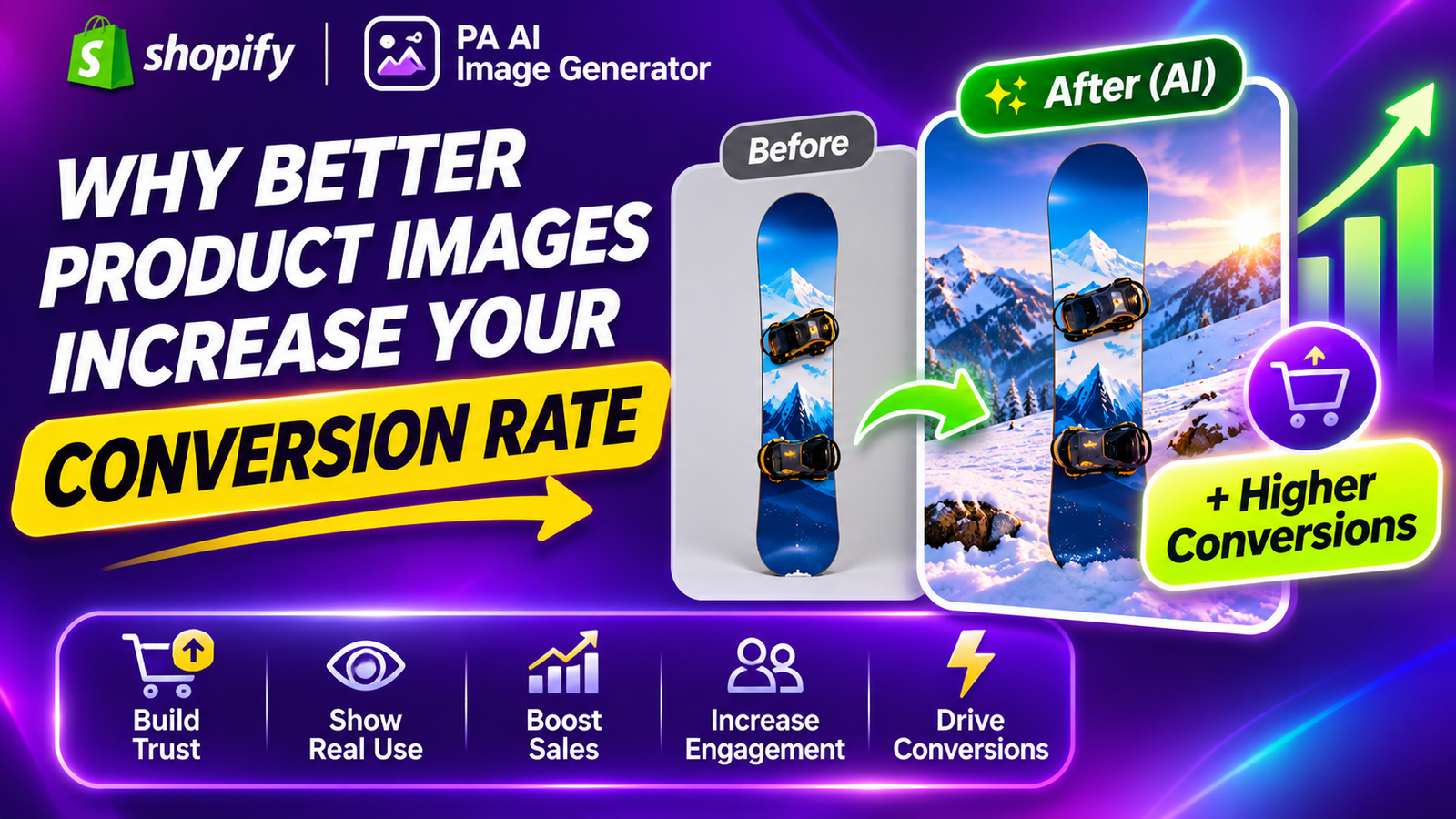
For example, a snowboard displayed against a neutral background communicates its overall design. The same product category shown in a snowy mountain environment provides additional lifestyle context.
4. Multiple product angles answer customer questions
A single product image may not provide enough information.
Customers often want to see the front, back, sides, close-up details, and relevant usage examples.
Providing these perspectives can reduce the need for customers to search elsewhere for information.
5. Professional imagery supports brand credibility
A consistent visual style makes a Shopify store appear more organized and professional.
When product images share similar lighting, backgrounds, and compositions, customers can browse collections more comfortably.
The Merchant’s Challenge: Poor-Quality Product Photography
Many Shopify merchants rely on supplier photographs, smartphone images, or basic product shots.
Although these images can communicate essential information, they may not provide the visual presentation needed for effective marketing.
Common problems include:
- Low-resolution or blurry photographs.
- Inconsistent product backgrounds.
- Poor lighting and distracting shadows.
- Missing lifestyle images.
- Limited product angles.
- Unattractive supplier photography.
- Inconsistent image sizes across collections.
- Expensive photography and editing requirements.
For merchants with large catalogs, manually improving every image can become time-consuming.
AI-powered product photography offers another way to create supplementary imagery without arranging separate photoshoots for every visual concept.
Before and After: How Better Product Photography Changes Product Presentation
The following real images from your PA AI Image Generator examples demonstrate different ways to present snowboard products.
Before: Basic Product Photography
Image 1: A basic snowboard photograph against a plain gray studio background.
This image shows the snowboard clearly, including its overall shape and graphic design.
A clean product photograph is valuable because customers can focus on the item without distractions.
However, it provides limited lifestyle context.
For a winter sports brand, adding complementary images showing outdoor use, product details, and relevant environments can create a more informative product gallery.
After: Lifestyle Product Photography
Image 2: Lifestyle photography featuring a snowboard, hands with accessories, and snowy mountains.
This photograph introduces human interaction and an outdoor environment.
The composition feels more dynamic than a plain product photograph, helping communicate the excitement and lifestyle associated with winter sports.
Such images can be valuable for social media marketing, seasonal promotions, and supporting product galleries.
The product design in this lifestyle example differs from the original studio image, so it should be treated as a creative illustration rather than an exact product transformation.
After: Premium Outdoor Photography
Image 3: Snowboards displayed in a professional-looking mountain lifestyle scene.
This image presents two snowboards against a dramatic snowy landscape.
The mountains, natural lighting, and outdoor equipment create a strong visual connection between the products and their intended use.
For Shopify merchants, this photography style can be useful for homepage banners, collection headers, and winter sports campaigns.
After: Natural Lifestyle Product Photography
Image 4: Colorful snowboards displayed in a natural winter environment.
The image shows two pastel-colored snowboards leaning against a wooden fence, with people preparing sports equipment in the background.
This composition creates a more natural storytelling approach.
Rather than presenting only the product, the image provides context about the environment in which similar products are used.
After: On-Model and Detail Photography
Image 5: Three creative photography styles featuring snowboard close-ups and a full-body model.
This image demonstrates three different approaches:
The Hydrogen Core: A close-up highlighting graphics and product details.
Complete On Model: A model standing with a snowboard in an outdoor environment.
The H2 Statement: A styled close-up emphasizing the snowboard’s appearance alongside fashion accessories.
Together, these compositions demonstrate how varied product imagery can provide more visual context than a single photograph.
For maximum customer confidence, merchants should combine this type of creative photography with accurate original product images.
How Better Product Images Can Improve Shopify Conversions
Reduce purchasing uncertainty
Customers are more likely to make informed decisions when they can clearly see the product’s appearance and important features.
Communicate product value
Professional-looking photographs can help customers understand design details, styling, and presentation.
Improve the shopping experience
Consistent images make product catalogs easier to browse and compare.
Support advertising campaigns
Attractive product imagery can make advertisements more engaging, although results depend on creative quality and audience relevance.
Help customers imagine ownership
Lifestyle compositions can help shoppers visualize products in their homes, wardrobes, routines, or outdoor activities.
Support better product understanding
Detailed images showing different angles, materials, and product features can answer common questions before purchase.
Introducing PA AI Image Generator for Shopify
PA AI Image Generator is a Shopify application that helps merchants create AI-generated product images using existing catalog photographs.
Instead of arranging multiple physical photoshoots, merchants can experiment with different photography styles and visual compositions.
The app includes several useful features.
Studio photography
Create clean, product-focused images with professional-looking backgrounds.
Lifestyle photography
Generate additional product compositions featuring relevant environments.
On-model photography
Explore images featuring models or human interaction with products.
Detail and macro photography
Create close-up visual compositions highlighting product features.
Seasonal photography
Generate visual concepts for promotional occasions such as Christmas and Valentine’s Day.
Bulk image generation
Select multiple Shopify products and prepare additional image variations.
Gallery management
Review generated images and choose which results to download or publish.
App Link: https://apps.shopify.com/pa-ai-image-generator
How Shopify Merchants Can Improve Product Images With AI
Step 1: Search for PA AI Image Generator in the Shopify App Store
First, open the Shopify App Store.
Use the search bar to search for PA AI Image Generator.
The search results will display the app alongside other image generation and ecommerce photography applications.

Image 1: Search for PA AI Image Generator in the Shopify App Store.
Image explanation: The screenshot shows the Shopify App Store search results, with PA AI Image Generator highlighted. Its listing describes the app as a tool for creating studio and on-model AI product photography.
Click the app to open its listing.
Step 2: Install and Open PA AI Image Generator
On the app listing, review the description, available features, and pricing information.
Click Install if the app has not yet been installed, then approve the requested Shopify permissions.
Once installation is complete, select Open to launch the application.
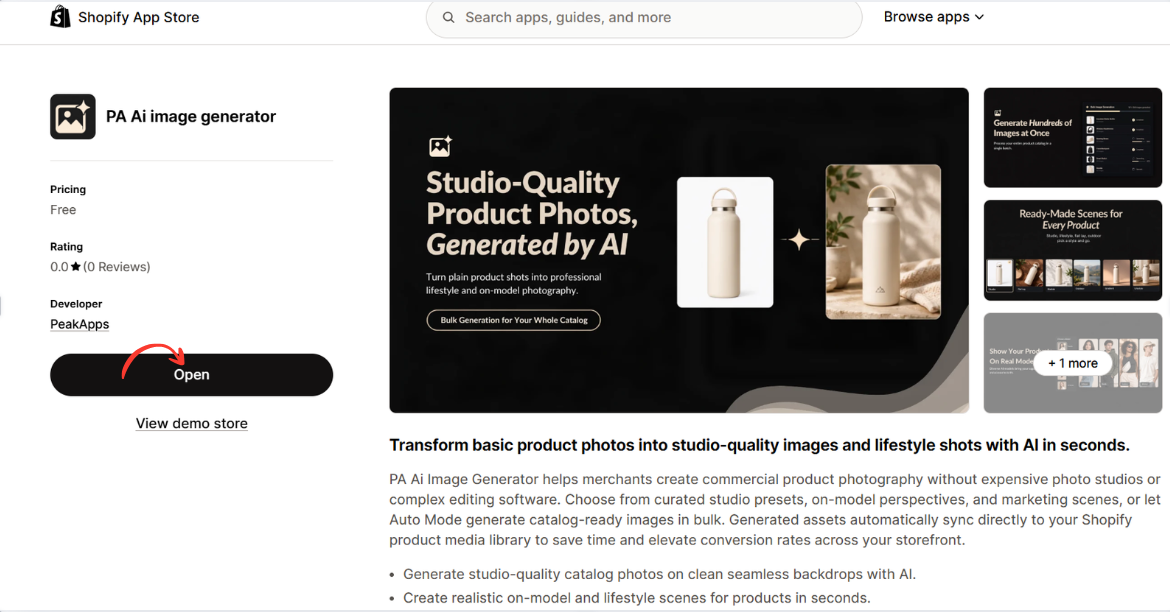
Image 2: Open PA AI Image Generator from its Shopify App Store listing.
Image explanation: The screenshot displays the app listing, including an illustration demonstrating how an ordinary product image can become a lifestyle-style photograph.
The Open button is highlighted, showing how merchants can access the installed app.
Step 3: Select the products that need better photography
Open your Shopify Admin and review your existing product catalog.

Identify products with low-quality photographs, missing angles, inconsistent backgrounds, or limited lifestyle imagery.
Step 4: Open PA AI Image Generator
Navigate to Apps → PA AI Image Generator → Generate Images.
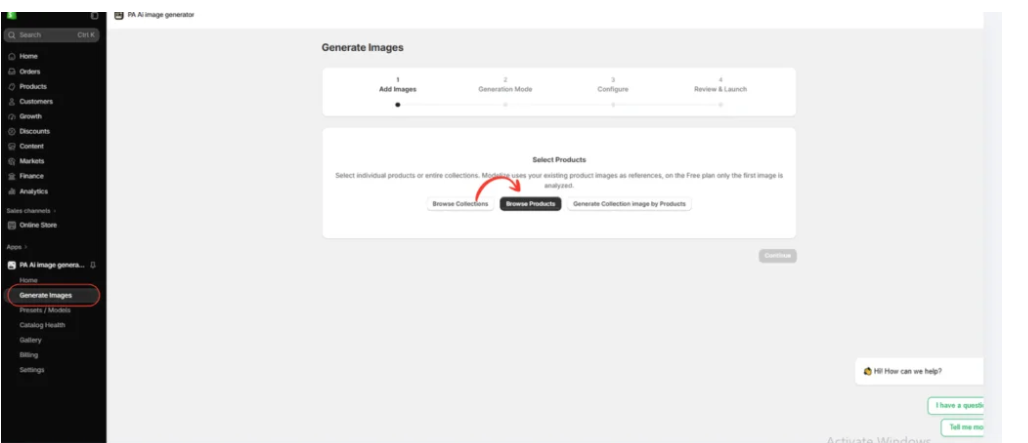
Select individual products or collections using the available product-selection options.
Step 5: Choose a photography style
Select Choose Presets to explore the available photography options.

Merchants can choose different presets depending on their products and brand identity.
For example, clothing stores may prefer on-model photographs, while furniture stores may prefer interior lifestyle photography.
Step 6: Select the right preset
Image 6: The preset selection interface inside PA AI Image Generator.

The preset library allows merchants to choose different compositions, including studio, lifestyle, on-model, seasonal, and collection photography.
Rather than applying the same style to every product, merchants can choose presets that match their requirements.
Step 7: Configure the image settings
Image 7: Configure the image background, aspect ratio, format, and publishing preferences.
Use appropriate settings for the intended image placement.

A square composition may suit product galleries, while a wide composition may be useful for promotional banners.
You can also provide custom instructions, such as:
“Create a professional ecommerce product photograph using my existing product image as a reference. Preserve the original product design, colors, shape, and branding. Use realistic lighting, a clean composition, and a visually attractive background.”
Step 8: Generate and review the images
Image 8: The Gallery dashboard showing image generation jobs and processing statuses.
Once the generation process is complete, review the results in Gallery.
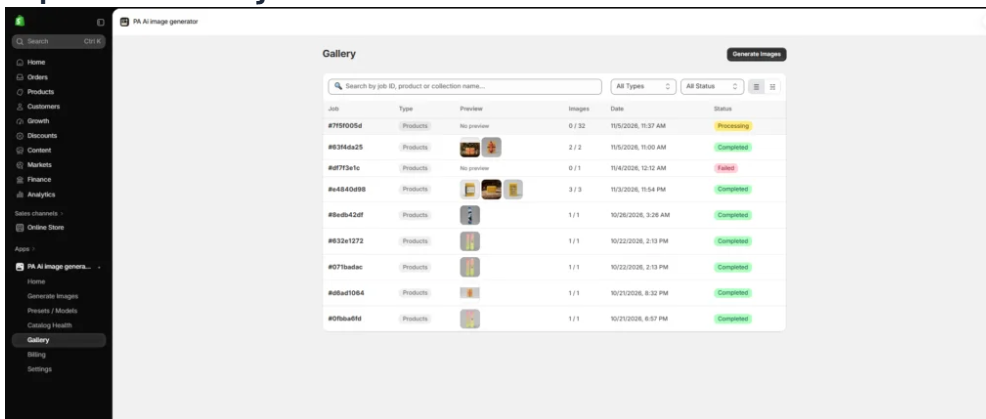
Check that all important product details match the original item.
If the result contains inaccurate colors, logos, proportions, or features, revise the image before publication.
Step 9: Publish approved product images
After reviewing the generated photographs, use the app’s Gallery controls to download or publish approved images to your Shopify products.
Combine the best lifestyle compositions with accurate original photographs to give customers both visual inspiration and reliable product information.
How Many Product Images Should a Shopify Product Page Have?
There is no universal number of images that guarantees better conversions.
The ideal number depends on product complexity and the information customers need.
For example, a simple decorative item may need fewer photographs than a piece of furniture or technical sports equipment.
A useful product gallery could include a main product photograph, alternate viewing angles, important close-up details, a lifestyle image, and a scale or size reference.
Prioritize useful information rather than adding images only to increase the total number.
Product Photography Mistakes That Can Hurt Conversions
Using blurry photographs
Low-resolution images make it difficult for customers to examine product details.
Showing inconsistent product colors
Customers may lose confidence if the color shown in the photograph differs significantly from the real product.
Using only one photograph
A single image may not answer important questions about product size, texture, or construction.
Overusing decorative backgrounds
Backgrounds should complement the product rather than distract from it.
Publishing inaccurate AI-generated images
AI visuals can introduce unrealistic details. Always verify that generated photographs accurately represent the item.
Ignoring mobile presentation
Images should remain clear and appropriately cropped on smartphones, where many customers browse Shopify stores.
How to Measure Whether Better Images Improve Conversion Rates
Merchants should test product imagery rather than assume that every new photograph increases sales.
Track relevant metrics such as:
- Product page conversion rate.
- Add-to-cart rate.
- Revenue per session.
- Bounce or engagement metrics.
- Mobile versus desktop performance.
For a meaningful comparison, run a controlled A/B test when possible, changing the product imagery while keeping pricing, offers, and other major variables consistent.
This helps determine whether the new images produce a measurable improvement.
Frequently Asked Questions
1. Do better product images increase Shopify conversion rates?
They can. Clear and informative photographs may improve customer confidence and help shoppers make purchasing decisions. The actual effect varies by product, audience, and store.
2. Are lifestyle images better than studio photographs?
Both serve different purposes. Studio photographs provide clarity, while lifestyle images help customers visualize products in context. Combining both can provide a better shopping experience.
3. Can AI create professional-looking Shopify product images?
Yes. AI tools can generate studio-style, lifestyle, and other creative product compositions using existing references.
4. Can I improve supplier images using AI?
Yes. AI can create additional visual variations from supplier photographs, provided you have permission to use the source images.
5. Can I generate multiple product images using PA AI Image Generator?
Yes. The app supports different presets and generation workflows for selected products and collections.
6. Can I publish AI-generated images directly to Shopify?
The app provides controls for publishing approved generated images to Shopify products.
7. Are AI-generated product images always accurate?
No. AI may change logos, colors, shapes, or other details. Review each result carefully before publishing.
8. How can I tell if new product photos are increasing sales?
Compare relevant conversion metrics using controlled testing where possible. Monitor add-to-cart rate and completed purchases rather than relying only on visual appearance.
Conclusion
Better product images can play an important role in improving the overall shopping experience and supporting higher Shopify conversion rates.
Clear, professional-looking photographs help customers understand products, visualize how they might use them, and make more informed purchasing decisions.
However, creating multiple photography styles through traditional photoshoots can be expensive and time-consuming, especially for merchants managing large product catalogs.
With PA AI Image Generator, Shopify merchants can create additional studio-style photographs, lifestyle compositions, on-model visuals, and seasonal images using existing product references.
As the snowboard examples demonstrate, different photography styles can make product presentations more visually engaging and provide additional context for shoppers.
The strongest approach is to combine accurate original product photographs with carefully reviewed AI-generated imagery.
Better images do not automatically guarantee more sales, but they can remove important visual barriers that prevent customers from purchasing.
By improving image quality, maintaining consistency, and testing different visual approaches, Shopify merchants can create more informative product pages and make better use of their existing store traffic.
Improve your Shopify product photography with AI.
App Link: https://apps.shopify.com/pa-ai-image-generator




