BOGO VS QUANTITY BREAKS: WHICH OFFER FITS YOUR PRODUCT?
Introduction
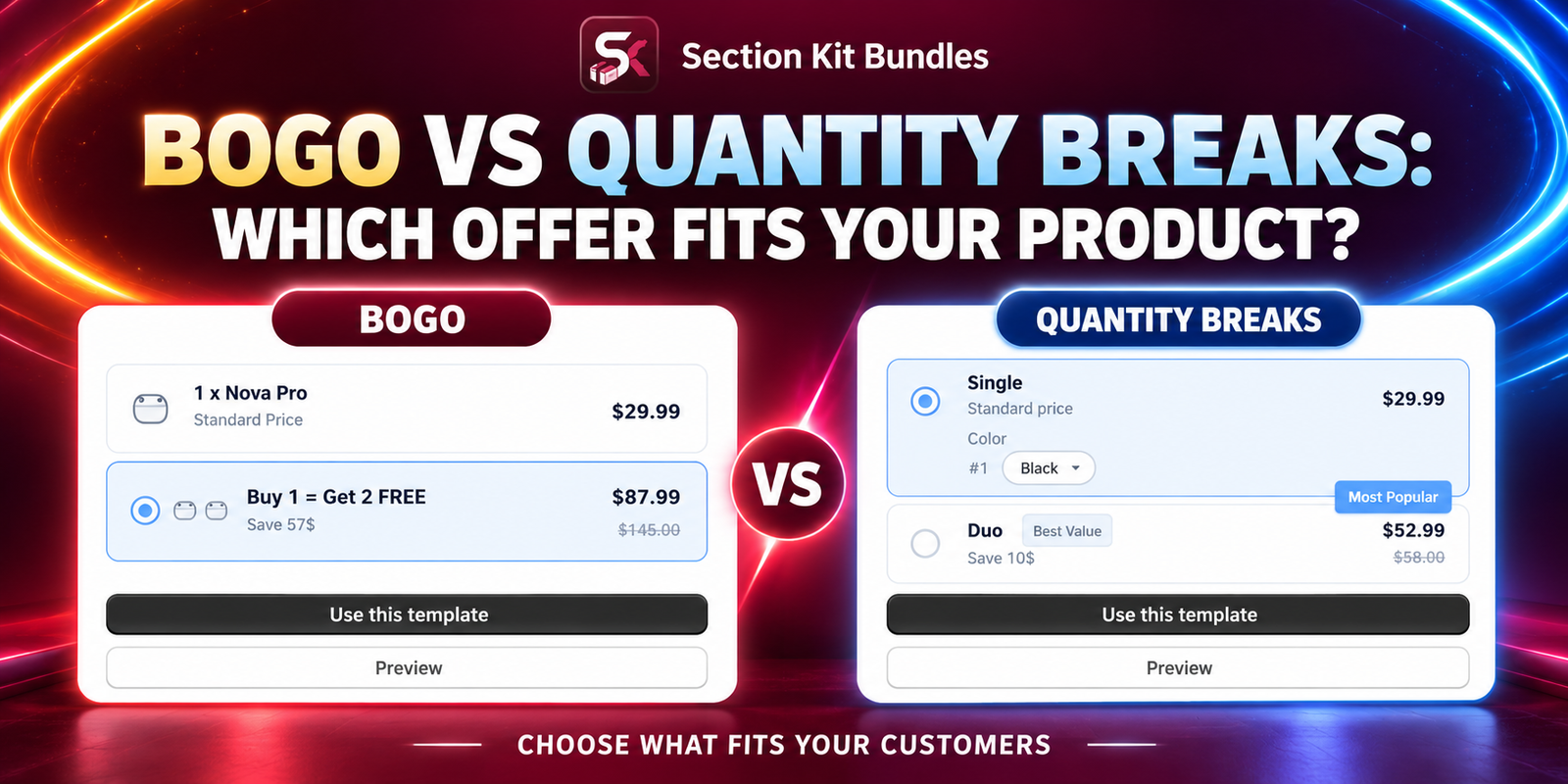
Both BOGO offers and quantity breaks give customers a reason to buy more, but they communicate value differently. BOGO emphasizes an extra item, while quantity breaks reward customers with a discount when they reach a specified quantity.
Neither format is automatically the best choice. The right offer depends on how customers use your product, how much they need, and what your margins can support. This guide compares the two formats and walks through the supplied images using Section Kit Bundles. You can then choose the approach that fits your store.
The Main Problem: A Popular Promotion May Not Fit Your Product
A merchant may copy a “buy one, get one free” offer because it looks attractive, then discover that customers do not need a second item or that fulfillment costs remove the profit. Another merchant may add several quantity tiers to a product people normally buy only once.
Promotions need to solve a real buying problem. Customers should understand what they receive, how much they pay, and why the larger purchase is worthwhile. The merchant also needs enough stock and a sustainable contribution after discounts and variable costs.
Why Use an App to Build the Offer?
Section Kit Bundles supports BOGO promotions and quantity breaks in a visual offer-building workflow. The official app listing also describes product bundles, widget styling, and A/B testing analytics. Check current plan details before selecting the features you need.
Using the app helps you present the promotion on product pages and manage its configuration. It does not replace the decision about which offer is suitable. Start with your customer’s needs, then use the app to build and test the chosen format.
What Is a BOGO Offer?
BOGO usually means “buy one, get one.” The second item may be free or discounted, depending on the stated offer. A broader Buy X, Get Y promotion requires customers to buy a qualifying quantity before receiving a specified reward.
For example, “buy one, get one free” for the same $30 product gives two units for $30, assuming no other changes. That is effectively a 50% reduction across the two units compared with buying both at their usual price. A free accessory with a different price has different economics.
BOGO can fit products customers can use, share, or gift in multiples. It can also fit a relevant extra item whose cost is sustainable. Spell out the eligible items, qualifying quantity, reward, and any limits.
What Are Quantity Breaks?
Quantity breaks offer a price reduction when the customer buys a specified number of units. A simple example is: buy one at full price, buy two with 10% off, or buy three with 15% off. Customers choose the quantity that suits them.
This format can fit regularly used products, multipacks, or purchases where customers already have a reason to stock up. It also lets you offer a modest incentive without making a whole unit free. Each tier should have accurate totals and enough stock to fulfill the purchase.
BOGO vs Quantity Breaks: Compare the Fit
| Question | BOGO | Quantity breaks |
|---|---|---|
| How is value presented? | An extra item or discounted reward | A lower price at a quantity threshold |
| When may it fit? | Customers value a relevant extra item | Customers want a choice of larger quantities |
| What must you check? | Cost, relevance, stock, and reward eligibility | Tier profitability, realistic quantities, and stock |
| What could confuse customers? | Unclear qualifying or reward rules | Unclear total price or per-item savings |
| What should determine the decision? | Customer demand and measured commercial results | |
Choose Based on Your Product and Customers
Consider BOGO when an additional unit or useful gift makes the purchase more appealing and your costs support it. Consider quantity breaks when customers need different purchase quantities and appreciate a clear choice of savings.
A regularly used consumable might suit either format. A one-time purchase with little use for a duplicate may suit neither; a relevant accessory bundle could be more helpful. Perishable products require realistic quantities, storage considerations, and reliable fulfillment.
Ask whether the customer can explain the offer in one sentence. If the answer is complicated, simplify it before adding more badges, gift rules, or pricing tiers. Readers should make the final choice based on their own products and evidence, rather than treating this comparison as a universal recommendation.
Compare the Economics Before Launch
Suppose a product sells for $30 and costs $12 per unit. A same-product buy-one-get-one-free offer brings in $30 for two units and leaves $6 after the $24 product cost, before fees, packing, shipping, and other costs. A two-unit quantity offer at 10% off brings in $54 and leaves $30 after the same product cost, before those other costs.
These illustrative offers provide very different discounts, so the figures do not prove quantity breaks are superior. BOGO may attract a different response, while quantity breaks may attract fewer buyers. Compare profit per exposed visitor and total contribution, not just the discount label or order value.
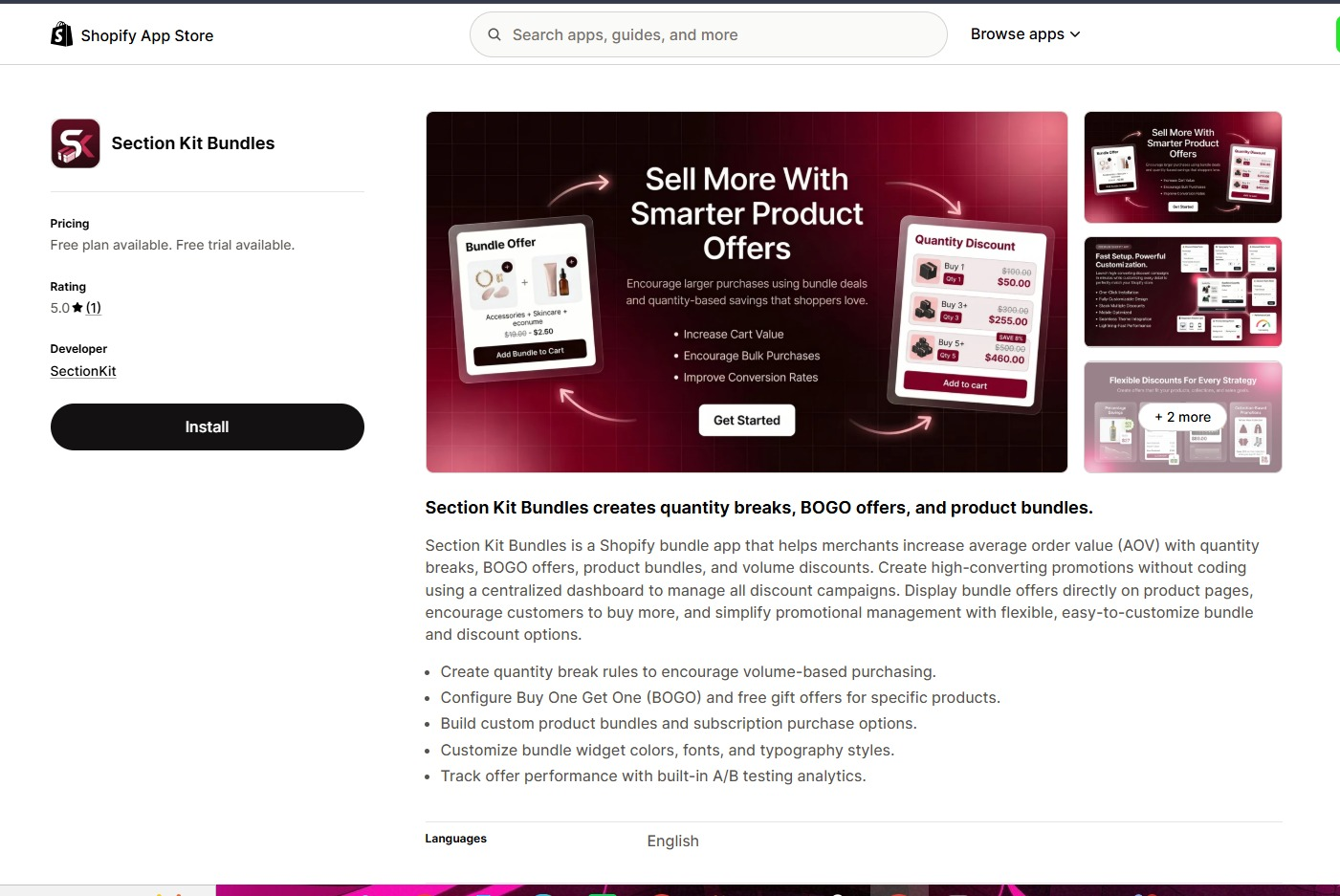
Step 1: Install Section Kit Bundles
Visit Section Kit Bundles in the Shopify App Store, click Install, select your store, and review the requested access. Complete installation and open the app in Shopify admin. If already installed, proceed to its dashboard.
Step 2: Start a New Offer From the Dashboard
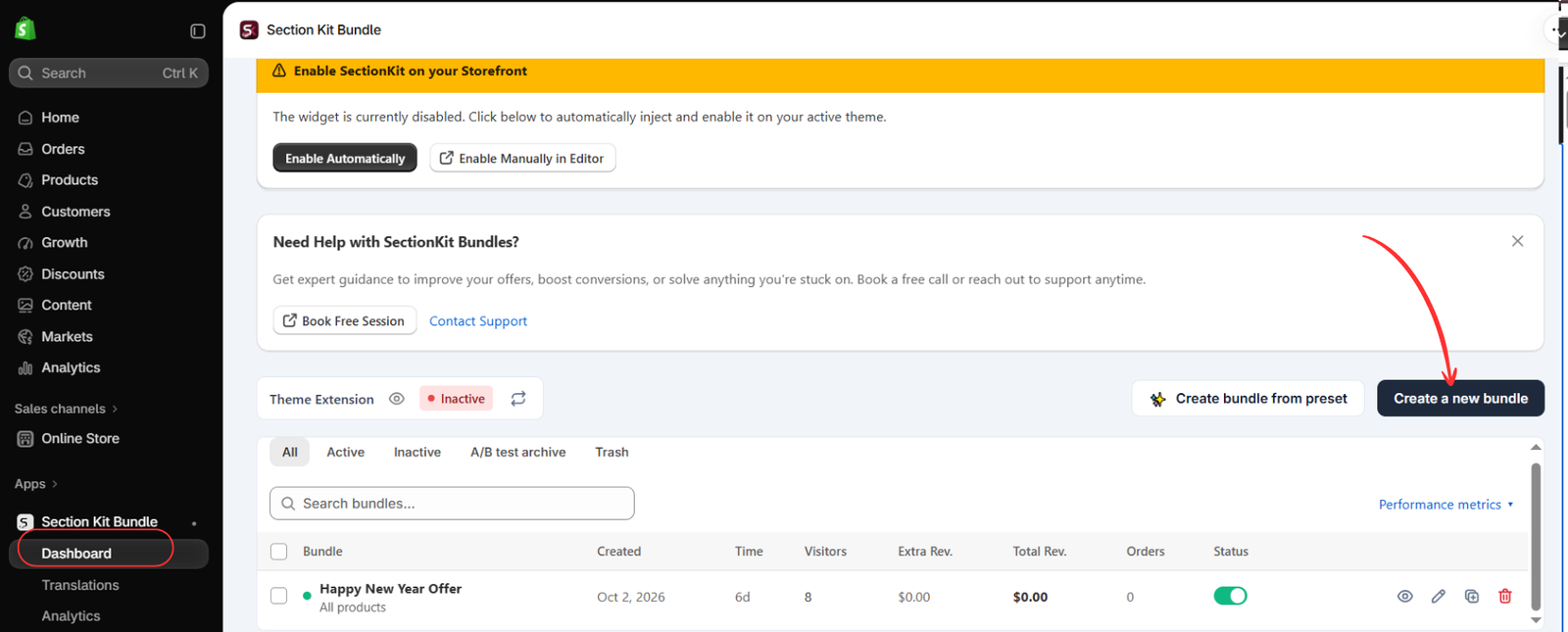
Open Apps → Section Kit Bundle → Dashboard and click Create a new bundle. Give the promotion a descriptive name so you can identify it later.
Image 2 shows the theme extension as Inactive. The offer’s status and storefront integration need separate checks before customers can use the widget.
Step 3: Inspect the BOGO Template if It Fits Your Plan
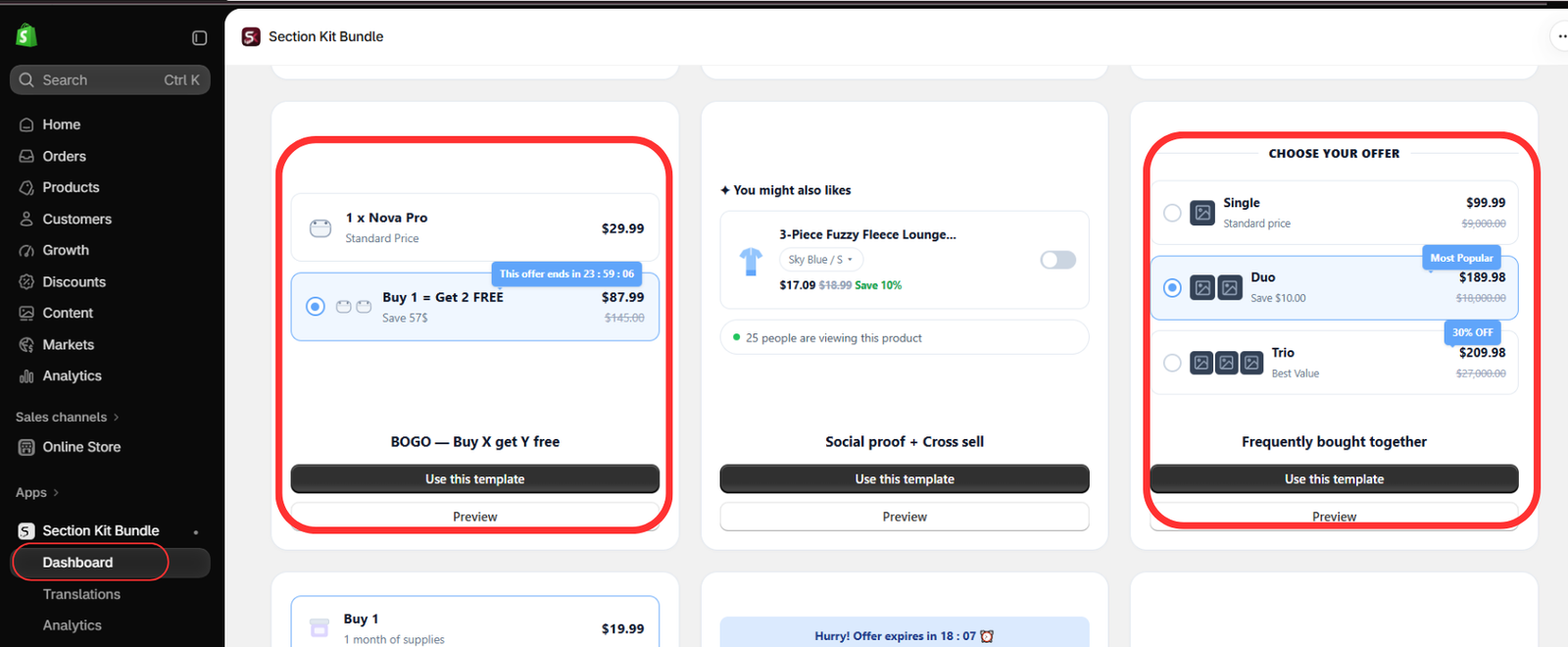
In the template gallery, locate BOGO — Buy X get Y free. Use Preview to inspect it, then select Use this template if you have chosen a BOGO strategy.
Image 3 also highlights Frequently bought together, which is a separate bundle format. It should not be treated as a quantity-break template merely because its preview shows several offer cards.
The BOGO preview contains example prices and “Buy 1 = Get 2 FREE” wording that do not clearly reconcile with the standard-price option. Treat it as a layout demonstration. Your final reward wording and checkout charges must match the actual rules.
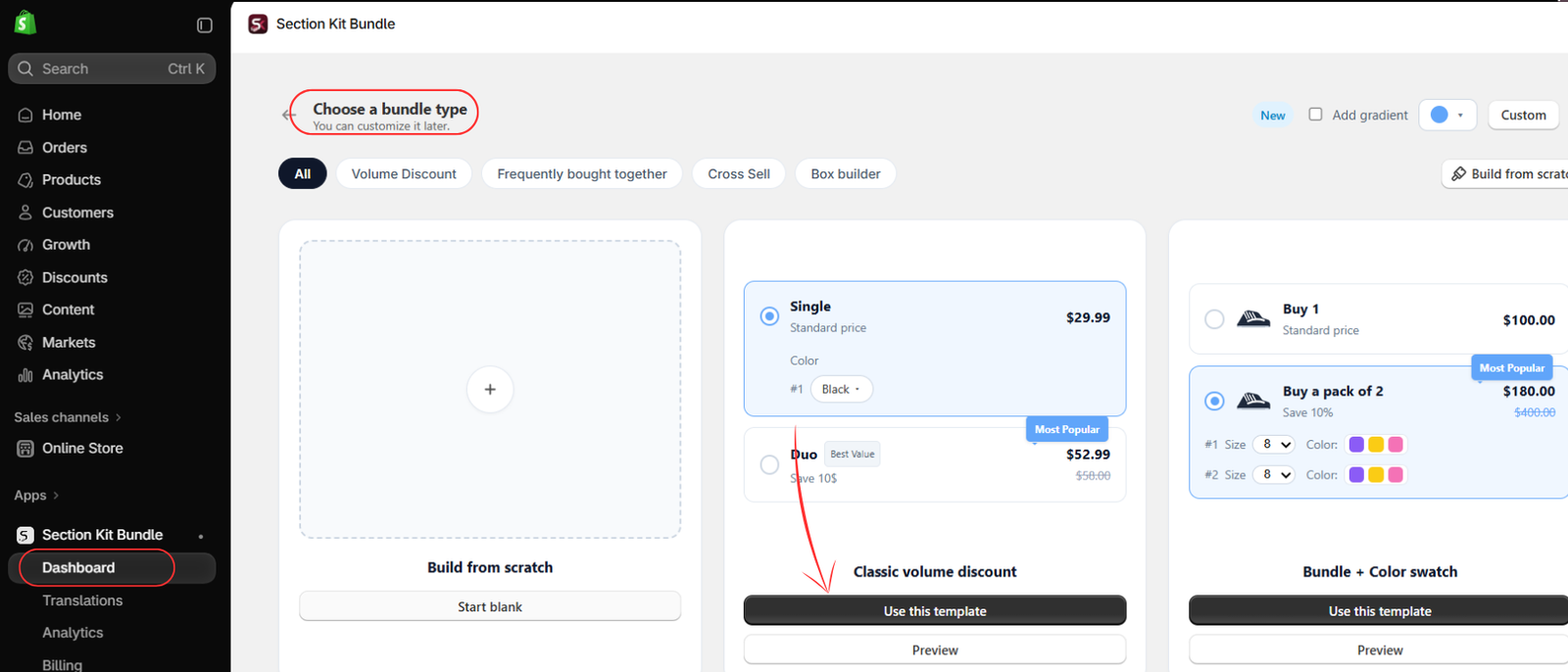
Step 4: Inspect Classic Volume Discount for Quantity Breaks
If quantity-based savings better suit your customers, locate Classic volume discount. Image 4 highlights its Use this template button. Preview the layout and choose it for your quantity-break offer.
Steps 3 and 4 describe alternative paths. You do not need to publish both promotions. Compare the structures, then configure the one you choose. Create a separate test variant only when you intentionally plan a controlled comparison.
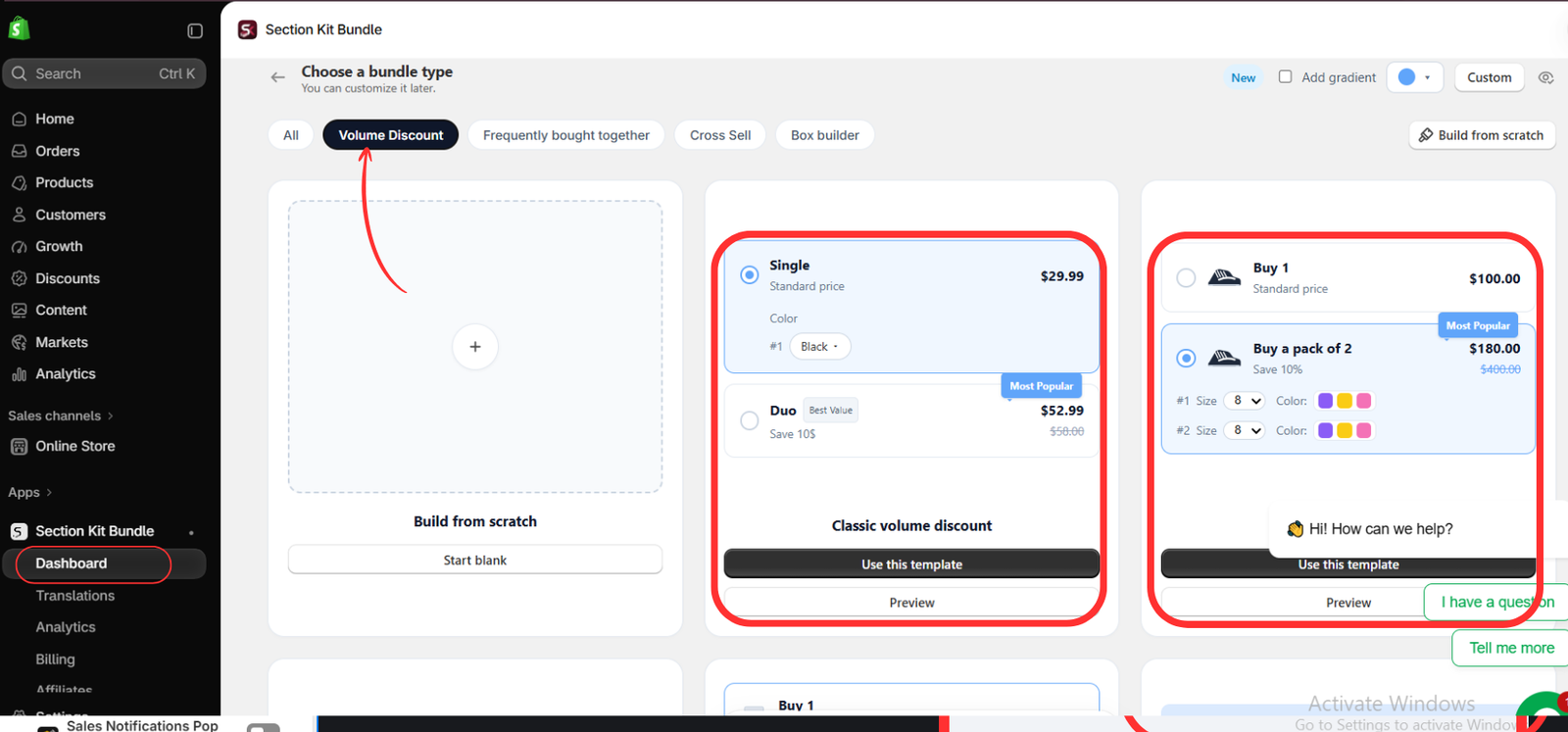
Step 5: Review the Volume Discount Layout Options
Image 5 shows the Volume Discount category selected. Compare the classic layout with the adjacent swatch-based layout. Choose according to your product’s variant requirements and the space available on the product page.
Color or size choices should be clear when customers buy multiple units. Verify that each selected variant is available. The preview amounts are examples and may include inconsistent comparison prices, so enter and validate your own values instead of copying them.
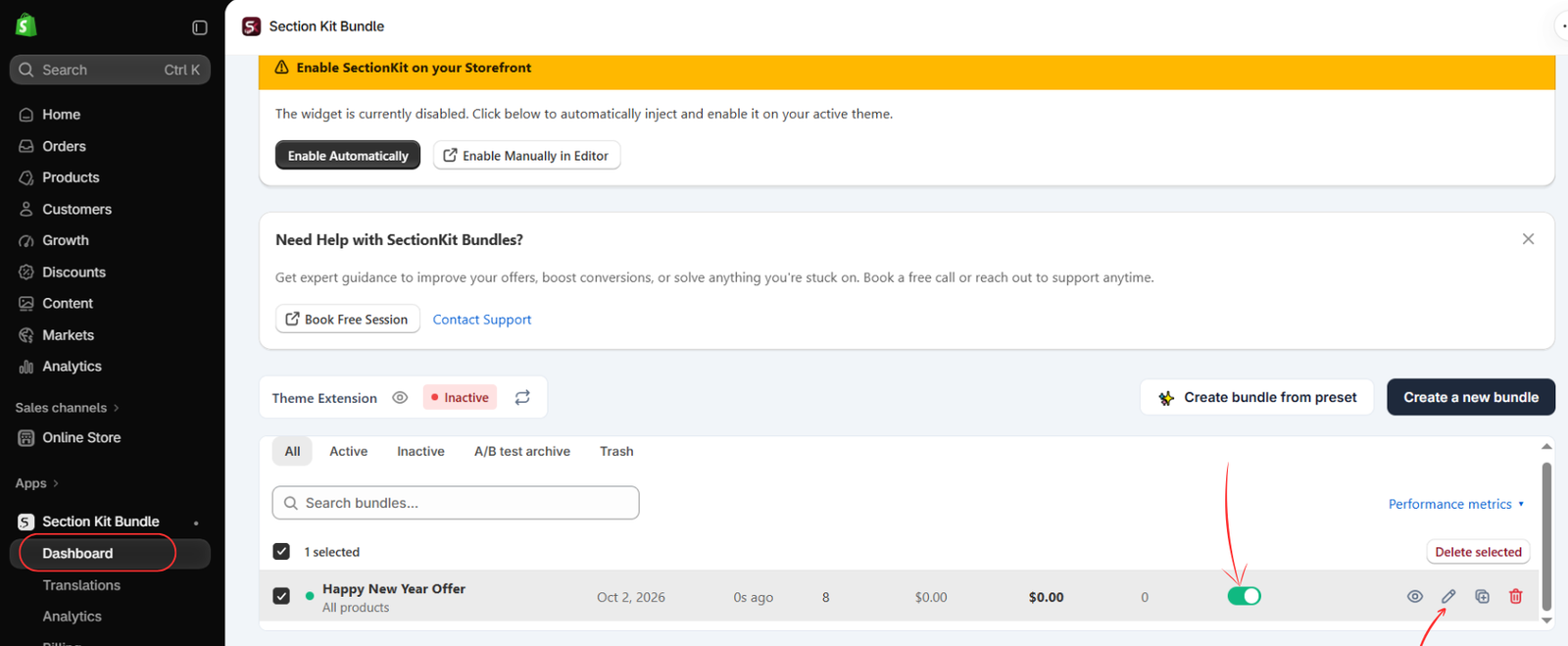
Step 6: Open Your Saved Promotion for Final Configuration
After creating and saving the offer, return to the dashboard, find its row, and click the pencil icon to edit it. Image 6 highlights the edit icon and the active-status switch.
The example is named “Happy New Year Offer.” Review your own eligible products and markets, and keep the offer inactive or in draft until the rules are ready. The images do not show every intervening product, quantity, and discount field; complete these in the current editor.
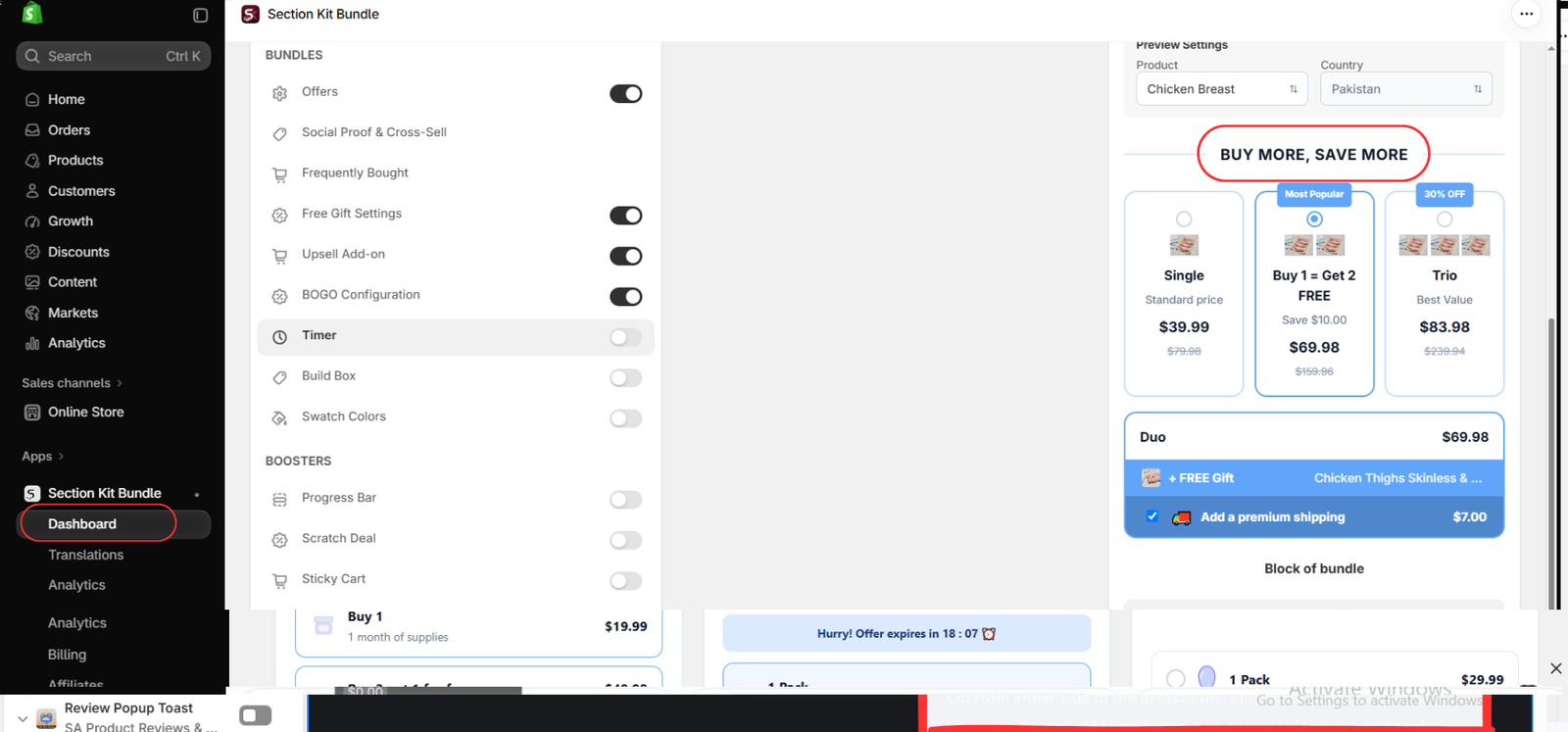
Step 7: Configure the Chosen Rules and Check the Preview
The editor in Image 7 shows Offers, Free Gift Settings, and BOGO Configuration controls, alongside a live product preview. For BOGO, configure the qualifying purchase and the exact free or discounted reward using the available settings. For quantity breaks, configure the quantity thresholds and discounts in the relevant offer controls.
Enable only the features that belong to your chosen promotion. You do not need to turn on BOGO or free gifts to run a basic quantity discount. The supplied image displays a mixed example with several features enabled; it is not a required setup for either format.
Review the heading, labels, product quantities, and final prices. A title such as BUY MORE, SAVE MORE can describe the overall value, but the individual options must still explain the exact benefit. Use a product and country preview relevant to the offer, then save or publish using the editor’s available controls.
Enable the Widget and Test the Purchase Path
If the theme extension is inactive, use Enable Automatically or Enable Manually in Editor on the dashboard and complete the integration for the intended theme. Save any theme-editor changes.
Test eligible and ineligible products, each quantity tier, and each reward condition. Confirm that the correct products and variants reach the cart and that the displayed savings match checkout. Check mobile presentation, discount combinations, and stock behavior.
For BOGO, verify whether the customer must select or add a reward and communicate that clearly. For quantity breaks, check quantities just below, at, and above each threshold. Use countdowns only for genuine deadlines and popularity labels only when supported by actual data.
Let Performance Guide Your Final Choice
Compare conversion rate, revenue per visitor, average order value, and contribution after product, gift, and fulfillment costs. A promotion that generates more orders may still contribute less profit.
If you use the app’s available A/B testing features, check plan access and test configuration. Keep exposure and measurement comparable, avoid changing unrelated settings during the test, and collect enough data before choosing a winner. Sparse or uncertain results can remain inconclusive.
Conclusion
BOGO emphasizes a reward; quantity breaks offer savings at different purchase quantities. The best fit depends on whether customers value an extra item, how much they need, and whether the promotion is sustainable for your store.
Use the comparison to make your own choice, then explore Section Kit Bundles to build the offer. Clear rules, accurate pricing, and measured results matter more than choosing a format because it is popular.
Feature reference: official Section Kit Bundles Shopify App Store listing. Setup follows the supplied images; controls and feature access may vary with app version and plan.




