HOW TO BULK GENERATE PRODUCT IMAGES FOR YOUR ENTIRE SHOPIFY CATALOG
Shopify AI Product Photography Guide | Bulk Image Generation | 2026

Introduction
Managing product photography for a large Shopify store can be expensive, time-consuming, and difficult to scale. Whether you sell fashion, electronics, beauty products, accessories, or sports equipment, your store needs high-quality product images to attract shoppers, communicate product details, and build customer confidence.
But what happens when your store has 100, 500, or even 1,000 products?
Creating professional images for every product through traditional photography can require multiple photoshoots, editing sessions, and considerable financial investment.
This is where bulk AI product image generation can make a difference.
With the right Shopify AI image generator, merchants can select multiple products or an entire collection, choose professional photography styles, and generate multiple product visuals through one workflow.
In this guide, you’ll learn how to bulk generate product images for your Shopify catalog using PA AI Image Generator, with real screenshots showing each stage, from selecting collections to reviewing generated images.
Why High-Quality Product Images Matter for Shopify Stores
Product photography is more than a decorative element of your online store. It plays a significant role in the customer shopping experience.
1. Creates a professional first impression
When customers visit a Shopify store, product images are often among the first elements they notice. Clear images with consistent lighting and backgrounds can help establish a professional brand identity.
2. Helps customers understand products
Detailed product images help customers evaluate product appearance, colors, shapes, and important features before purchasing.
3. Supports purchasing decisions
Well-presented products can reduce uncertainty during the buying process. Although photography alone cannot guarantee higher sales, it is an important part of an effective product page.
4. Improves catalog consistency
Consistent visual presentation across products makes collections easier to browse and creates a more polished shopping experience.
5. Supports marketing campaigns
Merchants can use suitable product images across social media, email marketing, landing pages, and advertising campaigns.
The Merchant’s Challenge: Creating Images for Hundreds of Products
Imagine you operate a Shopify store selling snowboard equipment.
Your catalog contains 200 products, including snowboards, accessories, winter clothing, and sporting equipment.
Each product may require several image types:
- A clean studio photograph.
- A lifestyle image showing the product in use.
- A close-up of the product’s important details.
- A promotional image for marketing campaigns.
- An alternative product angle.
- A seasonal image for special offers.
Producing five images for 200 products means preparing approximately 1,000 product images.
If every image requires individual editing or a separate photography setup, the process can quickly become overwhelming.
Common difficulties include photography costs, inconsistent image backgrounds, manual editing, slow product launches, and managing large numbers of image files.
For growing Shopify stores, bulk image generation can help simplify this process.
What Is Bulk AI Product Image Generation?
Bulk AI product image generation is the process of creating multiple AI-generated product visuals from a batch of existing product images.
Instead of working on one product at a time, merchants can select a group of products, choose image styles, configure generation settings, and submit them together.
For example, a merchant could select eight snowboard products and generate several visual variations for each one.
The AI image generator uses available product reference images and selected presets to create new compositions.
This approach can support:
- Bulk catalog photography.
- Product launches.
- Seasonal image updates.
- Lifestyle photography.
- Promotional campaigns.
- Collection-wide visual improvements.
- Consistent studio-style product imagery.
Generated images must still be reviewed for product accuracy before publication.
Introducing PA AI Image Generator for Shopify
PA AI Image Generator is a Shopify application designed to help merchants create studio-style and lifestyle product photography using artificial intelligence.
The app lets merchants select products from their Shopify catalog, use ready-made photography presets, configure image settings, and manage generated assets from one dashboard.
One of its useful features is the ability to select multiple products or browse entire collections for image generation.
Key Features of PA AI Image Generator
Bulk product selection: Select multiple products or choose products from an existing Shopify collection.
AI photography presets: Choose studio, lifestyle, on-model, seasonal, flat-lay, and other creative styles.
Multiple image variations: Generate alternative compositions for selected products using the available presets.
Custom image settings: Configure image resolution, aspect ratio, background, file format, and creative instructions.
Shopify integration: Use existing catalog images as references and publish approved results to products.
Centralized gallery: Review generation jobs, inspect completed images, download assets, and manage publication.
App link: PA AI Image Generator — Shopify App Store
Why Bulk AI Image Generation Is Useful for Shopify Merchants
Saves time during catalog preparation
Rather than setting up separate image-generation requests for every product, merchants can select multiple products and configure them together.
Reduces dependence on repeated photoshoots
AI-generated visuals can provide additional photographic styles without arranging a new physical photoshoot for every composition.
Makes seasonal content easier to create
Merchants can prepare alternative marketing imagery for Black Friday, Christmas, Valentine’s Day, and other promotional occasions.
Helps maintain a consistent visual identity
Applying related photography presets across a catalog can create a more coordinated appearance.
Supports growing product catalogs
As merchants introduce new products, a repeatable image-generation workflow can simplify visual content preparation.
Bulk AI Image Generation vs. Manual Product Photography
| Feature | Manual photography | Bulk AI image generation |
|---|---|---|
| Physical studio | Often needed | Not needed for generated visuals |
| Multiple products | Individual setups or sessions | Batch selection |
| Photography backgrounds | Physical or edited | Preset-based |
| Seasonal photographs | New setups or edits | Seasonal presets |
| Image variations | Additional photography/editing | Multiple AI outputs |
| Image management | Manual or external tools | In-app gallery |
| Product accuracy | Captures physical product | Requires verification |
| Shopify integration | Upload images manually | App publishing options |
AI generation is particularly useful for creating supplementary lifestyle and promotional images at scale. Real photography remains valuable for accurately documenting physical product details.
Step 1: Search for the Shopify App Store
Open Google Chrome or your preferred web browser.
Type Shopify App Store into Google and press Enter.
Find the official Shopify App Store result and click it.

Step 2: Search for PA AI Image Generator in the Shopify App Store
First, open the Shopify App Store.
Use the search bar to search for PA AI Image Generator.
The search results will display the app alongside other image generation and ecommerce photography applications.

Image 1: Search for PA AI Image Generator in the Shopify App Store.
Image explanation: The screenshot shows the Shopify App Store search results, with PA AI Image Generator highlighted. Its listing describes the app as a tool for creating studio and on-model AI product photography.
Click the app to open its listing.
Step 3: Install and Open PA AI Image Generator
On the app listing, review the description, available features, and pricing information.
Click Install if the app has not yet been installed, then approve the requested Shopify permissions.
Once installation is complete, select Open to launch the application.
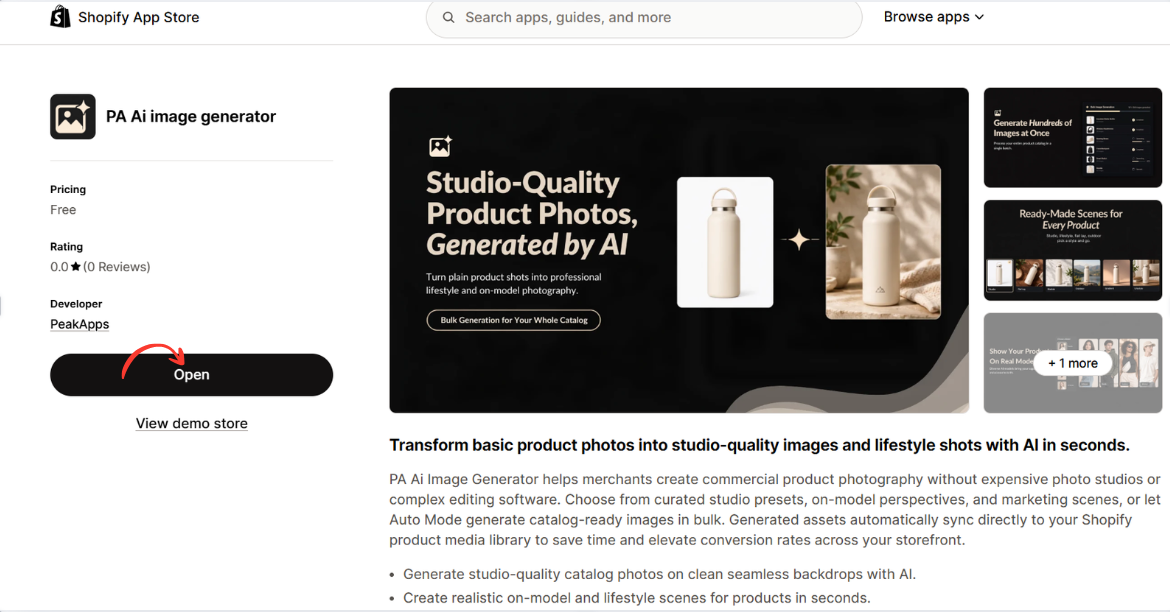
Image 2: Open PA AI Image Generator from its Shopify App Store listing.
Image explanation: The screenshot displays the app listing, including an illustration demonstrating how an ordinary product image can become a lifestyle-style photograph.
The Open button is highlighted, showing how merchants can access the installed app.
Step 4: Open Generate Images and Browse Collections

Image 1: Open PA AI Image Generator, select Generate Images, and click Browse Collections.
This lets you select an existing Shopify collection instead of manually choosing every product.
Step 5: Select a Shopify Collection

Image 2: Select the collection whose product images you want to generate.
The popup displays your collections and their product counts. Select Automated Collection (8 products) and click Add to include its products.
Step 6: Confirm All Selected Products

Image 3: Review all eight selected snowboard products before continuing.
The app displays the products selected from the collection. You can remove individual products or use the option to group products into combined images. Click Continue after reviewing.
Step 7: Select the AI Generation Mode

Image 4: Choose between automatic image generation and predefined photography presets.
Select Choose Presets to control the types of product photographs the AI creates.
Step 8: Browse Professional Photography Presets

Image 5: Explore the available studio, lifestyle, on-model, and other photography presets.
The preset library contains different photography styles. Merchants can select designs that match their products and brand appearance.
Step 9: Select Additional Image Styles
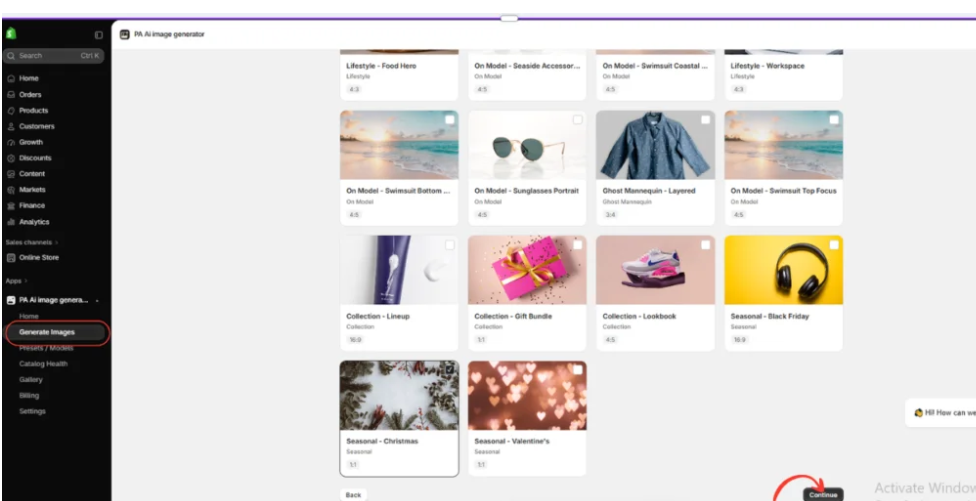
Image 6: Browse seasonal, collection, studio, and promotional photography styles.
Select the visual styles you need, such as winter lifestyle photography or clean product shots. When finished, click Continue.
Step 10: Configure Bulk Generation Settings
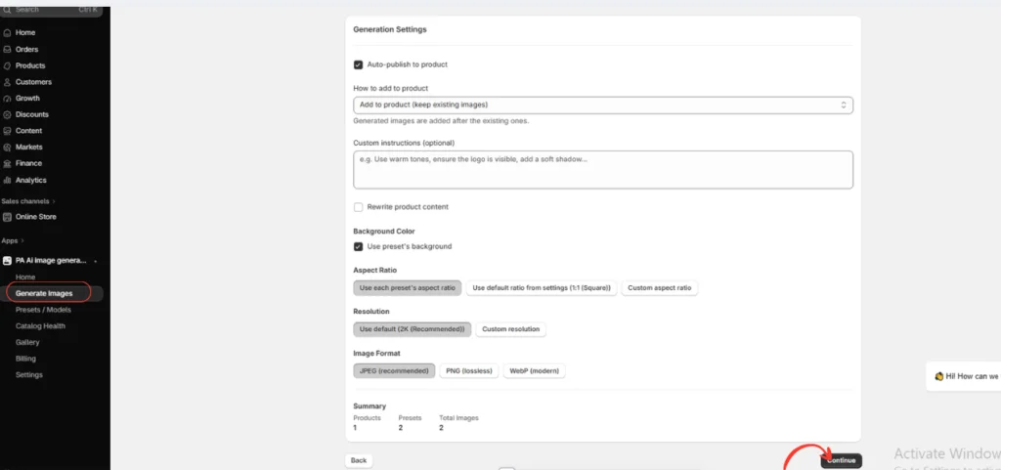
Image 7: Configure image formats, resolution, aspect ratios, backgrounds, and publishing preferences.
These settings help maintain a consistent appearance across generated images. You can preserve existing Shopify product images and add custom instructions before launching the generation job.
Step 11: Monitor Bulk Image Generation

Image 8: Track the status of your bulk image-generation request in the Gallery.
Your screenshot shows a job processing 32 images. The Gallery also displays previously completed and failed jobs, helping you monitor your image-generation activity.
Step 12: Review the First Generated Product Images
Step 9 – Generated snowboard product photos
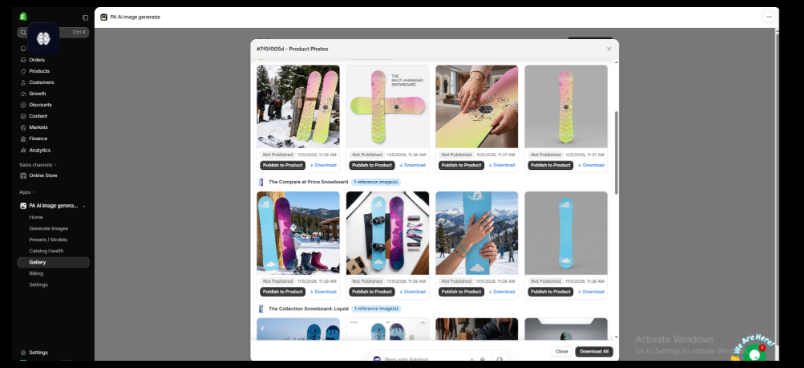
Image 9: Review AI-generated snowboard images in studio, lifestyle, and promotional settings.
The results show different visual compositions for individual snowboard products. Each image includes Download and Publish to Product options.
Step 10: Review the Remaining Images and Publish
Step 10 – Review and publish bulk generated images

Image 10: Review additional generated product photographs and publish approved images to Shopify.
The final screenshot demonstrates how different snowboard products receive multiple image variations within the same bulk-generation job.
Review each image for accuracy, download the ones you want to keep, and use Publish to Product to add approved results to your Shopify catalog.
Conclusion
Bulk product image generation can help Shopify merchants manage large catalogs more efficiently.
Instead of arranging separate photography sessions or editing every image manually, merchants can select multiple products, apply photography presets, and create new product visuals through one workflow.
With PA AI Image Generator, Shopify store owners can generate studio-style images, lifestyle photography, seasonal visuals, and additional product compositions using their existing catalog images as references.
The built-in Gallery makes it possible to track generation progress, review completed images, download visual assets, and publish selected results to Shopify products.
For growing ecommerce businesses, this approach can reduce repetitive content-production work while helping maintain a consistent store appearance.
Create professional-looking product images for your Shopify catalog with AI.Explore PA AI Image Generator on the Shopify App Store




