CAN YOU REMOVE “POWERED BY SHOPIFY” FROM YOUR STORE? WHAT’S ALLOWED.

Shopify Tutorial | Store Branding | Footer Customization
Introduction
When creating a professional Shopify store, merchants often invest significant time in designing attractive product pages, customizing their themes, and building a recognizable brand identity. However, one small detail frequently raises questions: the default “Powered by Shopify” text displayed in the store footer.
Many merchants want to remove this attribution to create a cleaner, more personalized shopping experience. But before making the change, an important question arises:
Are Shopify merchants actually allowed to remove “Powered by Shopify” from their stores?
The answer is yes. Shopify officially provides instructions for removing this attribution from an online store. Merchants can use Shopify’s built-in theme-content editor, modify supported theme code, or use an application designed for footer customization.
One such application is PA Powered By Remover, developed by PeakApps. It allows merchants to manage footer attribution and customize copyright information without manually editing Liquid code.
In this article, we’ll explain what Shopify allows, why merchants remove the attribution, the common challenges they encounter, and how to remove the text using PA Powered By Remover.
What does “Powered by Shopify” mean?
Shopify themes commonly include a default footer attribution identifying Shopify as the eCommerce platform powering the store.
It typically appears as:
© 2026 Your Store Name. Powered by Shopify
This text is usually displayed at the bottom of the homepage, product pages, collection pages, and other storefront pages.
Although the attribution identifies the underlying platform, it is not a requirement for establishing a professional online store.
Merchants may prefer to display their own business name, copyright notice, and relevant footer information instead.
For example, a customized footer could display:
© 2026 Your Brand Name. All Rights Reserved.
This allows the footer to match the merchant’s overall branding preferences.
Is removing “Powered by Shopify” allowed?
Yes. Shopify’s official Help Center includes a dedicated guide explaining how merchants can remove the default attribution.
Shopify provides two native approaches: editing default theme content and modifying theme code when necessary.
This means removing the default attribution through Shopify’s documented customization methods is permitted.
However, there are important distinctions between customizing your storefront and misusing Shopify’s trademarks or platform services.
What merchants can and cannot do
| Customization | Is it allowed? |
|---|---|
| Remove “Powered by Shopify” from the theme footer | Yes |
| Replace the attribution with custom copyright text | Yes |
| Use Shopify’s theme-content editor | Yes |
| Modify permitted theme code | Yes |
| Use a compatible footer customization app | Yes |
| Claim Shopify officially endorses your business without authorization | No |
| Use Shopify trademarks in ways prohibited by its terms | No |
| Remove legally required business disclosures | No, where those disclosures are required |
Removing a footer attribution does not remove the merchant’s responsibilities under Shopify’s Terms of Service or applicable laws
Common problems Shopify merchants face
Although Shopify allows the removal, merchants can still encounter challenges when trying to customize their footers.
1. Uncertainty about Shopify’s rules
Some merchants believe the default attribution must remain visible because their store is hosted on Shopify.
This misunderstanding can prevent them from making otherwise permitted branding changes.
2. Difficulty finding the correct settings
Depending on the theme, the attribution may be controlled through default theme content or a Liquid template.
Merchants unfamiliar with these options may struggle to locate the relevant setting.
3. Limited coding experience
Editing theme files can be intimidating for merchants who do not work with Liquid, HTML, or CSS.
4. Concerns about theme compatibility
Different Shopify themes may implement footer content differently, particularly when custom modifications are involved.
5. Risk of unintended changes
Removing the wrong code could affect copyright information, navigation links, or other footer elements.
6. Difficulty maintaining consistent branding
Merchants who switch themes may need to review their footer settings again to ensure the attribution remains hidden.
These challenges make a straightforward footer customization solution useful.
Introducing PA Powered By Remover
PA Powered By Remover is a Shopify application developed by PeakApps that helps merchants remove default footer attribution and customize their storefront branding.
The application provides a centralized dashboard where store owners can configure attribution removal, add custom copyright information, and access additional footer customization options.
Instead of manually searching through Liquid files, merchants can manage supported changes using the app interface and Shopify’s theme app embed functionality.View PA Powered By Remover on the Shopify App Store
Key features of PA Powered By Remover
- Remove default footer branding: Hide the “Powered by Shopify” attribution.
- Customize copyright information: Display personalized business details in the footer.
- No manual coding required: Configure supported settings through the app dashboard.
- Theme app embed integration: Activate footer functionality through Shopify’s theme editor.
- Centralized branding dashboard: Manage footer settings from one interface.
- Additional customization options: Access payment icons, trust badges, and other tools depending on the subscription plan.
The application offers a free plan, with certain advanced features available through paid options.
Why removing default footer branding can be important
Stronger brand identity
A footer displaying your business name and copyright information can help maintain a consistent brand presentation.
Cleaner storefront appearance
Removing unnecessary platform attribution creates a simpler footer layout.
Greater customization control
Merchants can decide which business details and copyright information appear at the bottom of their website.
Simpler ongoing management
An app-based approach can reduce the need for manual theme code modifications.
More consistent customer experience
A carefully designed footer complements the rest of the storefront and makes important information easier to locate.
However, removing the attribution itself does not guarantee improved SEO rankings, increased conversions, or faster website performance.
Step-by-step guide: How to remove “Powered by Shopify” from your store
Now that you know Shopify permits this customization, follow the steps below to remove the default attribution using PA Powered By Remover.
The procedure uses the original app screenshots you previously shared, arranged in the correct order.
Step 1: Search for the Shopify App Store
Open your browser and visit Google.
In the search bar, enter Shopify App Store and press Enter.
Find the official Shopify App Store website in the search results and click it.
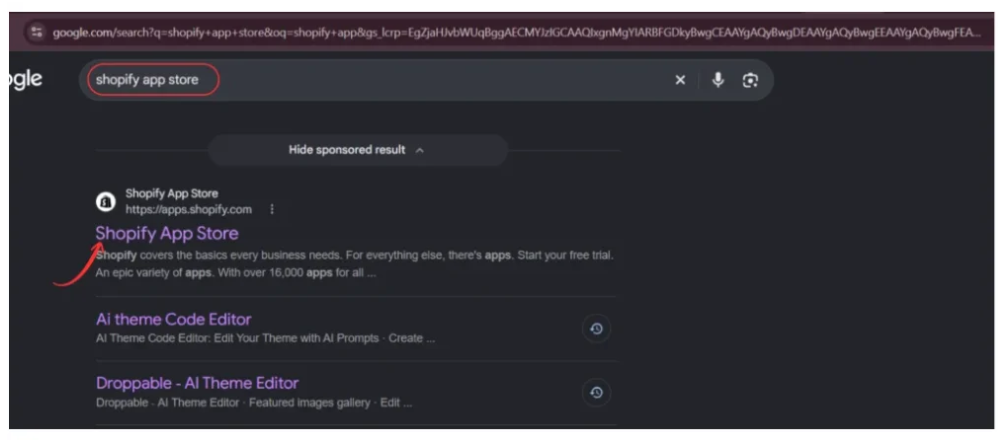
The Shopify App Store provides applications that help merchants customize their storefronts, improve customer experiences, and manage different aspects of their online businesses.
Once the website opens, you can search for the footer customization application.
Step 2: Find PA Powered By Remover
Locate the search bar at the top of the Shopify App Store.
Enter:
PA Powered By Remover
Press Enter to display the search results.
Find the application named PA Powered By Remover, developed by PeakApps.

Click the app name to open its listing.
Before installing any Shopify application, review its functionality, pricing, and requested permissions.
Step 3: Install and open PA Powered By Remover
On the app listing page, you can review the available features, screenshots, pricing information, and description.
PA Powered By Remover is designed to help merchants manage default footer attribution without manually editing theme files.
Click Install to add the application to your Shopify store.
If the app is already installed, Shopify may display an Open button instead.
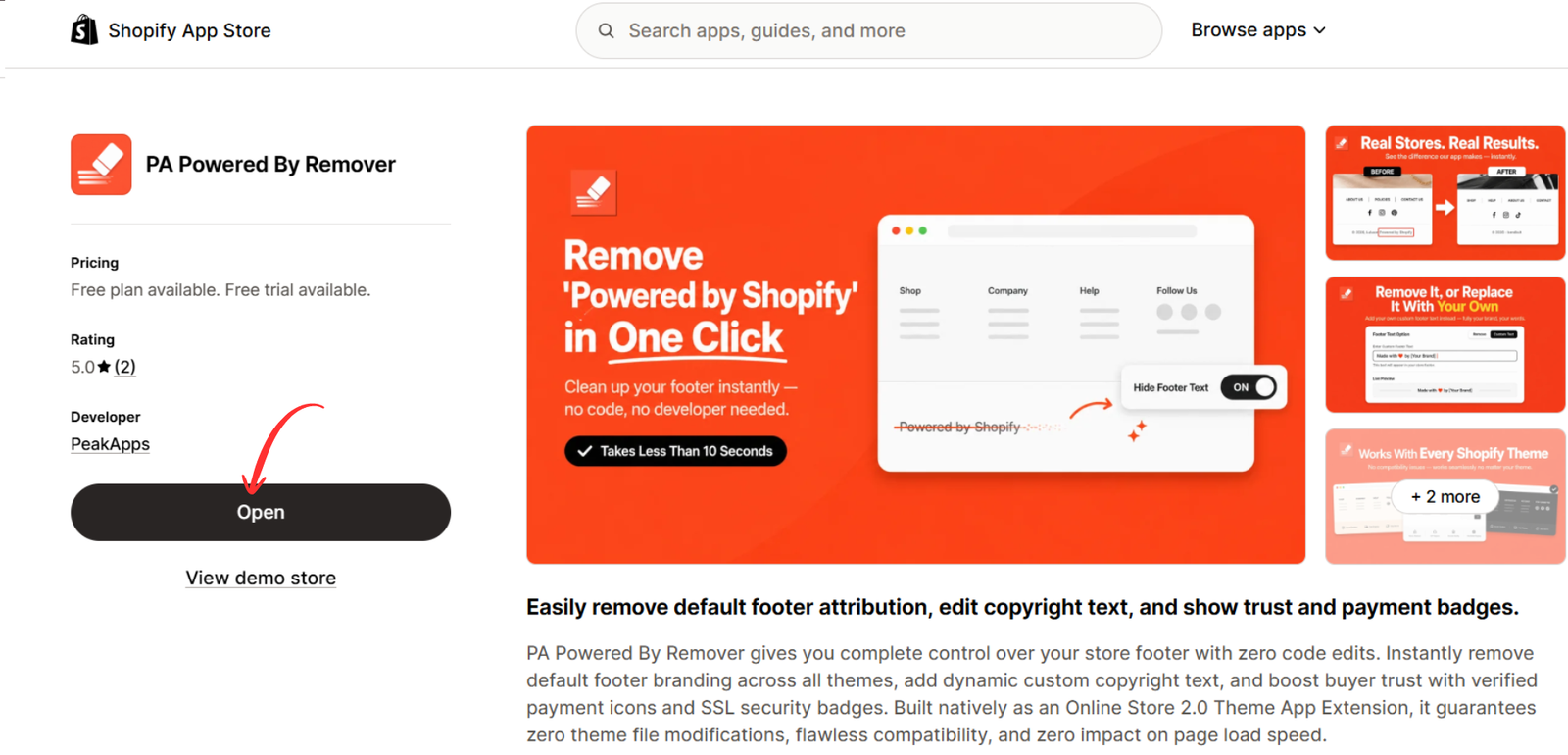
Follow Shopify’s authorization instructions to complete installation.
Once installed, the app becomes accessible through your Shopify admin dashboard.
Step 4: Configure the footer attribution settings
Open PA Powered By Remover from your Shopify admin.
Navigate to the Remove Branding section.
Inside the Branding & Footer Dashboard, locate the Store Attribution Settings panel.
Find the checkbox labeled:
Remove 'Powered by Shopify' credit
Enable this option to configure the removal of the default Shopify attribution.
Next, locate the Custom Copyright Text field.
Enter your preferred copyright information, such as:
© 2026 Your Brand Name. All Rights Reserved.
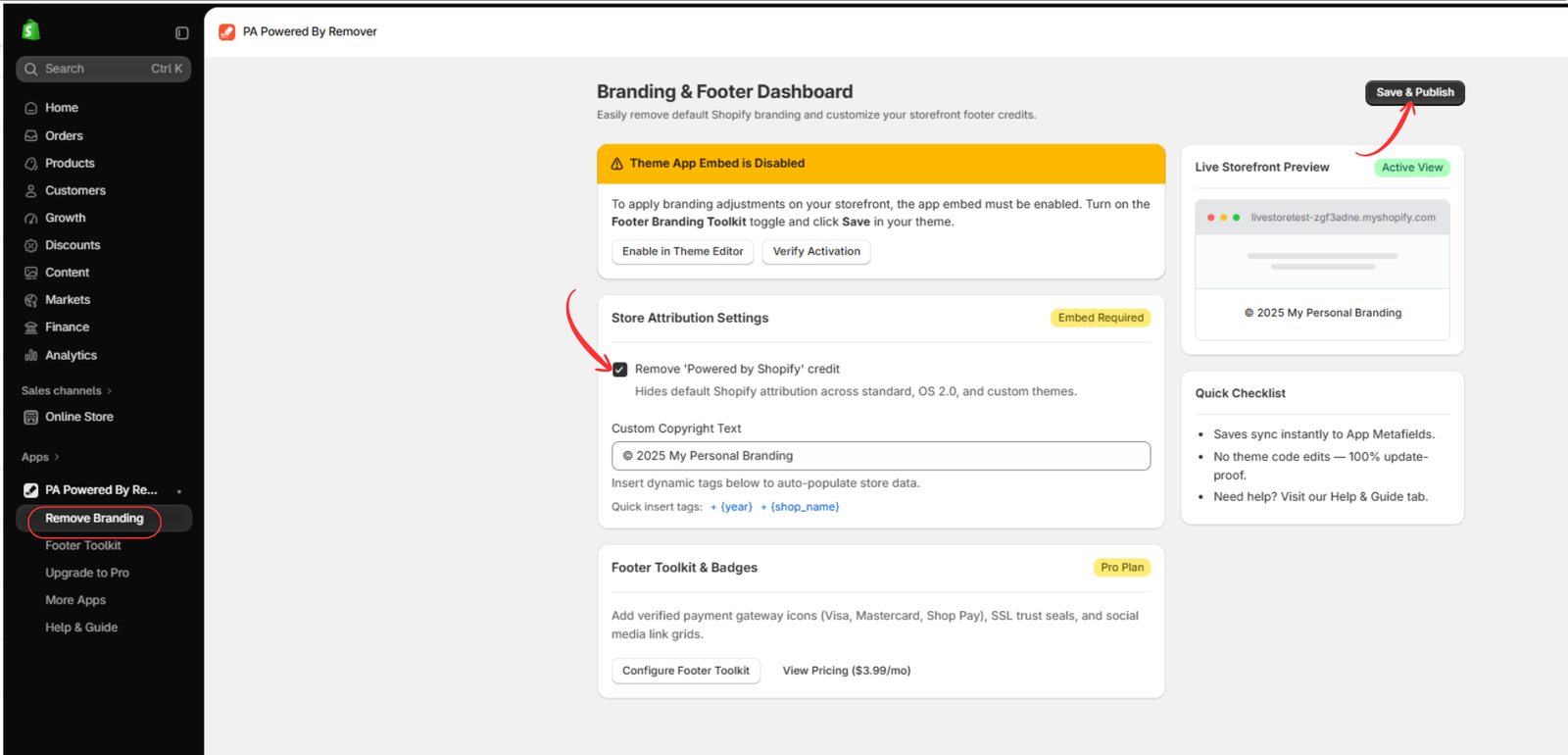
You may also be able to use dynamic placeholders for the current year and store name, depending on the app’s available functionality.
After updating the settings, click Save & Publish.
If the dashboard indicates that the theme app embed is disabled, continue to the next step.
Step 5: Open Shopify Theme Editor and locate App embeds
After saving your branding preferences, open your Shopify theme editor.
From your Shopify admin, navigate to:
Online Store → Themes → Customize
Once the theme editor opens, locate the App embeds icon in the left sidebar.
Click it to display your installed app embeds.
Find Footer Branding Toolkit, associated with PA Powered By Remover.
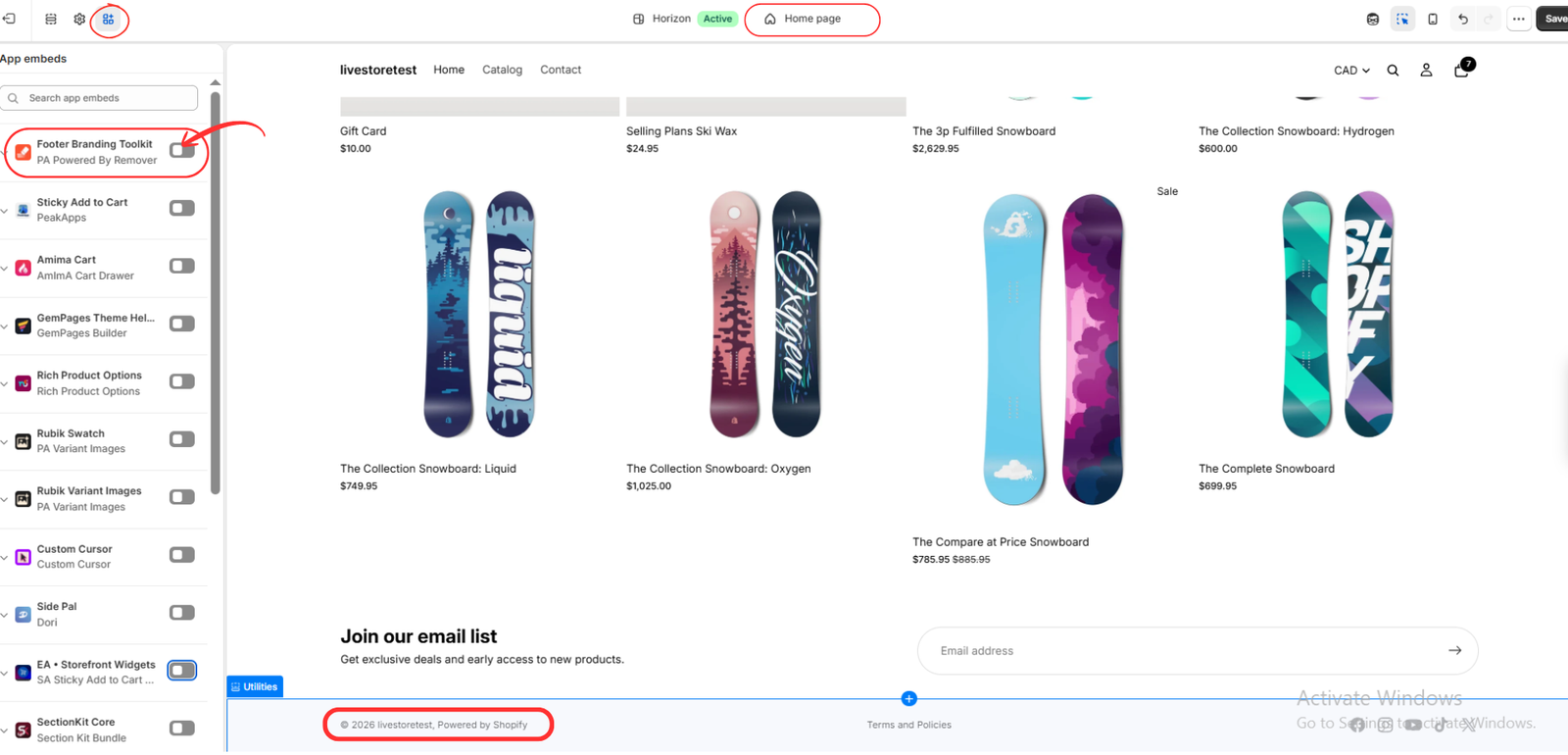
The app embed allows the application to apply its supported footer customization settings to your selected theme.
If the toggle is disabled, you will need to activate it.
Step 6: Enable Footer Branding Toolkit and save
Locate the toggle beside Footer Branding Toolkit.
Switch the toggle on.
Once activated, click the Save button in the upper-right corner of the Shopify theme editor.
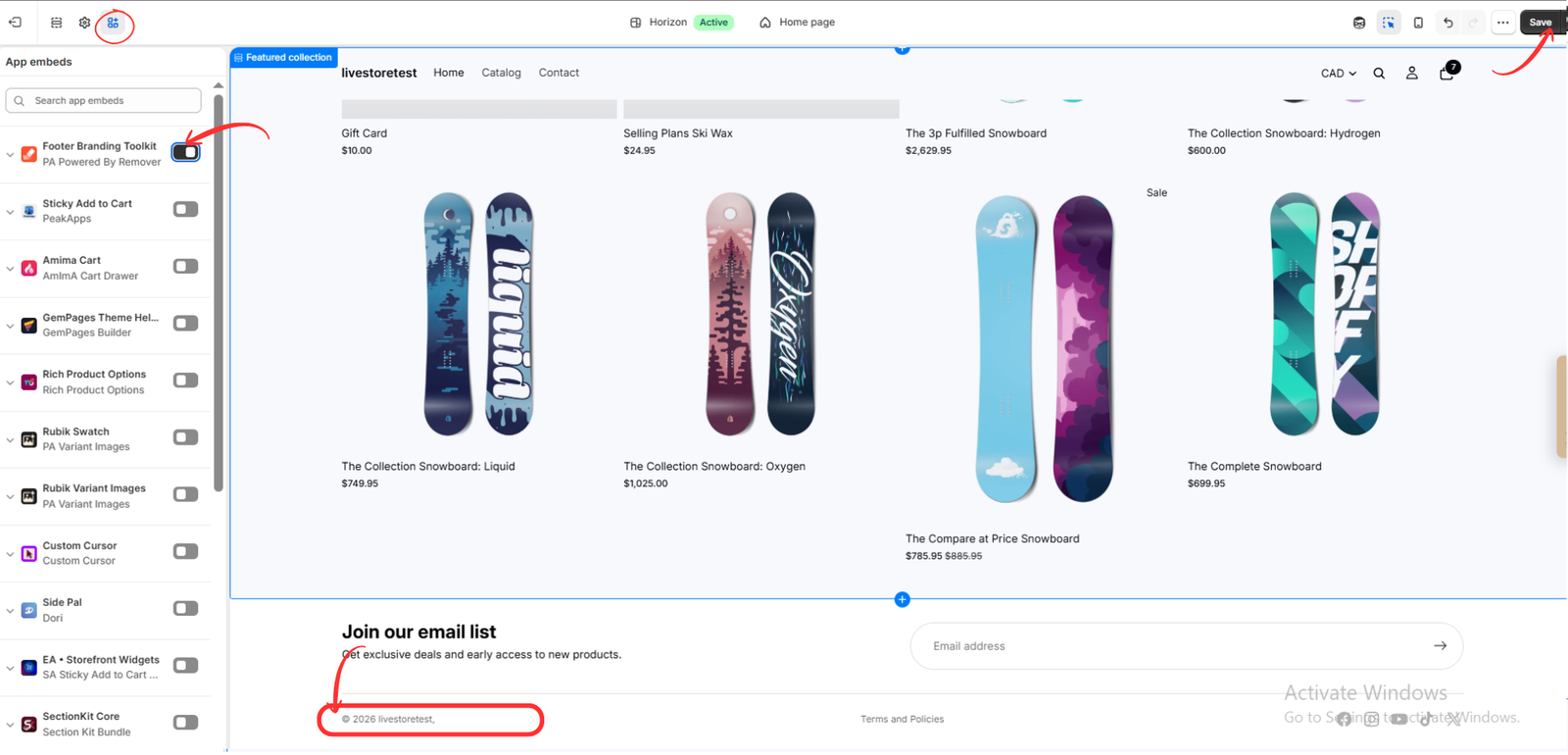
After saving, scroll down to the footer in the storefront preview.
If the app is correctly configured and compatible with your theme, the default “Powered by Shopify” attribution should no longer appear.
Instead, your footer can display your personalized copyright information.
Step 7: Verify the customization on another Shopify theme
If you use multiple Shopify themes, remember that app embed settings may need to be configured separately for each theme.
For example, you might use Horizon as your published theme while testing Atelier as a draft theme.
Open the alternative theme in Shopify’s theme editor and locate the App embeds section.
Find Footer Branding Toolkit, enable it, and save the changes.
The following image shows the app embed enabled on the Atelier theme, with the default Shopify attribution removed.
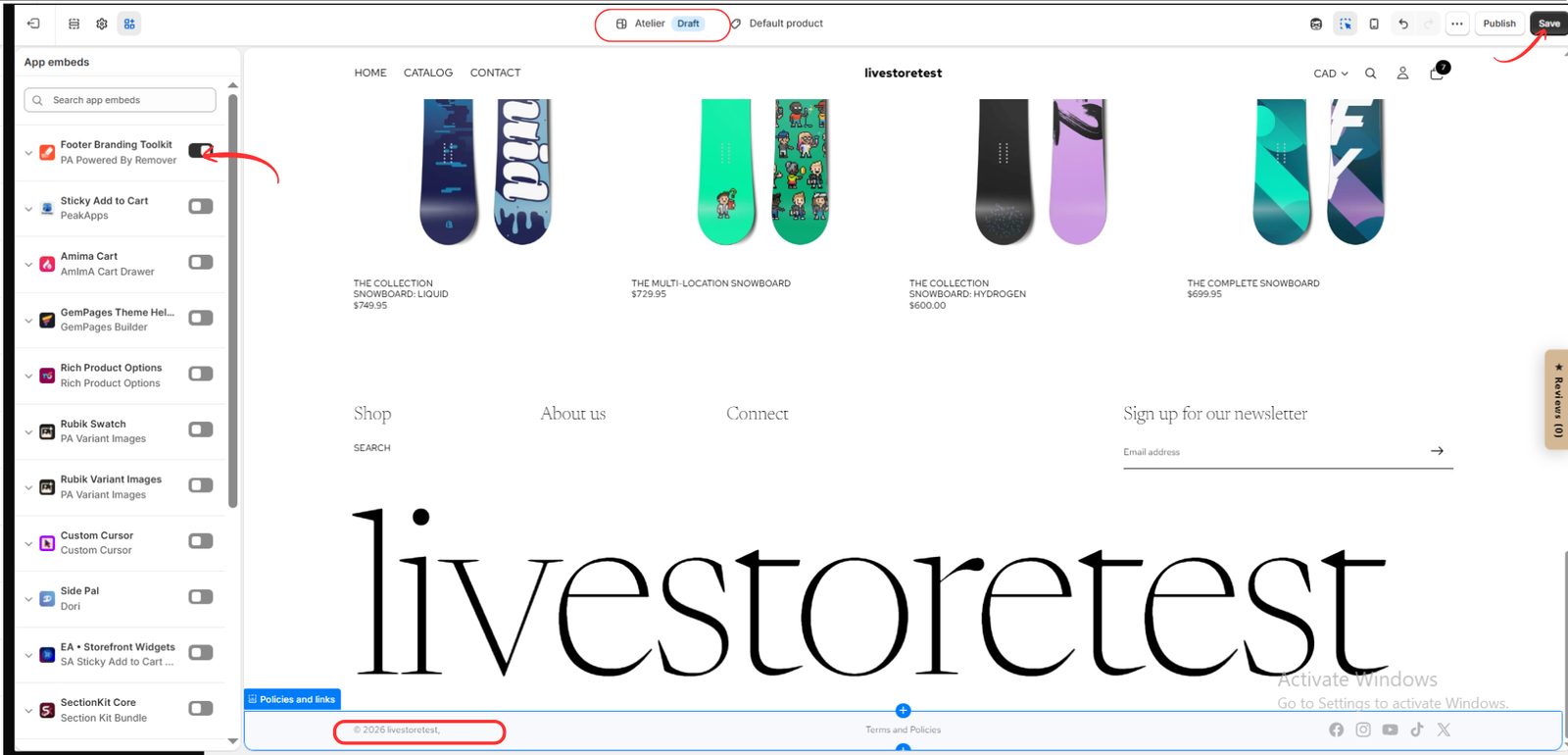
This example demonstrates that footer customization can be tested across different themes.
However, compatibility may vary depending on the theme’s structure and any custom footer modifications.
Step 8: Check your live storefront
After completing the configuration, open your Shopify storefront in a separate browser tab.
Scroll to the footer and confirm that the default attribution has disappeared.
Make sure your copyright text is correct, your navigation links still work, and your footer looks appropriate on both desktop and mobile devices.
If the attribution remains visible, verify that the removal option is enabled in the app dashboard and that Footer Branding Toolkit is active in the correct theme.
What should merchants avoid when customizing their footer?
Although Shopify permits removing its default attribution, merchants should still follow responsible customization practices.
Do not remove important legal information
Your footer may contain links to privacy policies, refund policies, shipping information, and other legally relevant disclosures.
Removing platform attribution does not eliminate the need to provide information required by applicable law or Shopify’s terms.
Do not misrepresent your relationship with Shopify
Removing the attribution does not mean you can claim Shopify officially endorses, sponsors, or partners with your business without authorization.
Avoid unnecessary theme code modifications
When a built-in setting or compatible app can perform the customization, there may be no reason to modify unrelated theme files.
Do not remove important navigation elements
Preserve useful footer links and other content that helps customers navigate your website.
Test before publishing
Review the footer on desktop and mobile devices to ensure the customization works as intended.
Does removing “Powered by Shopify” affect SEO?
Removing the attribution itself is not expected to negatively affect your Google rankings.
Google does not require merchants to display “Powered by Shopify” for their stores to be indexed.
However, removing the text also does not automatically improve SEO.
The more important considerations include maintaining useful content, accessible navigation, a functional mobile experience, and a technically sound website.
If you customize your footer, avoid accidentally removing important internal links or other elements that support site usability.
Frequently asked questions
Is removing “Powered by Shopify” against Shopify’s rules?
No. Shopify officially documents how merchants can remove the default footer attribution.
Can I remove “Powered by Shopify” for free?
Yes. Shopify provides a native method through its default theme-content editor. PA Powered By Remover also offers a free plan.
Can I remove the attribution without coding?
Yes. You can use Shopify’s theme-content settings or a compatible app such as PA Powered By Remover.
Can I replace “Powered by Shopify” with my own business name?
Yes. You can customize your footer to display your business name and appropriate copyright information.
Does removing the attribution affect Shopify checkout?
Removing the storefront footer attribution itself should not affect checkout functionality.
Will Shopify suspend my store for removing the attribution?
Removing the attribution through Shopify’s documented customization methods is permitted and is not, by itself, grounds for suspension. Merchants must still comply with Shopify’s other terms and policies.
Can I remove the attribution from Dawn, Impulse, Horizon, and Atelier?
Yes, these themes can support footer customization, although the exact process and app compatibility may vary by theme and version.
Do I need to activate the app embed?
Yes, for the PA Powered By Remover workflow shown in this tutorial. Enable Footer Branding Toolkit in the theme editor and save your changes.
Conclusion
So, can you remove “Powered by Shopify” from your online store?
Yes. Shopify officially allows merchants to remove the default attribution from their storefront footers.
This customization gives merchants greater control over their website’s appearance and allows them to create a more personalized branding experience.
While Shopify provides native options for removing the text, PA Powered By Remover offers an app-based alternative for merchants who prefer a centralized dashboard and additional footer customization features.
By following the steps in this guide, you can configure your footer attribution, add custom copyright information, and verify the changes without manually editing Liquid code.
Remember that removing platform branding does not eliminate your responsibility to provide required business information or comply with Shopify’s terms.
Ready to customize your Shopify store footer?Explore PA Powered By Remover on the Shopify App Store




