DO TRUST BADGES ACTUALLY INCREASE SHOPIFY CONVERSIONS?
Introduction
Building customer trust is one of the most important challenges for Shopify store owners. Even when a store offers excellent products, competitive prices, and attractive product images, customers may hesitate before completing a purchase.
One reason is uncertainty.
Online shoppers cannot physically inspect products before ordering. They may have questions about payment security, shipping costs, return policies, product quality, or the reliability of an unfamiliar brand.
This is where trust badges can help.
Trust badges are small visual elements that communicate information about a store’s services, policies, and payment options. Common examples include secure checkout symbols, free shipping icons, money-back guarantees, and easy-return badges.
But an important question remains: Do trust badges actually increase Shopify conversions?
The answer is that trust badges can help reduce purchase hesitation when they communicate genuine, relevant information. However, simply adding badges does not guarantee more sales.
In this article, we’ll explore how trust badges influence customer confidence, where they work best, common mistakes merchants should avoid, and how to add customizable badges to your Shopify store using SA Trust Badges.
The Merchant’s Challenge: Why Visitors Leave Without Buying
Many Shopify merchants attract visitors through advertising, social media, search engines, and other marketing channels.
However, attracting traffic is only the first step. Converting visitors into paying customers requires a trustworthy shopping experience.
A potential customer might find a product they like, read its description, and even add it to their cart. But uncertainty can prevent them from completing the purchase.
For example, a customer may wonder whether their payment information will be handled securely, whether the product can be returned, or whether unexpected shipping charges will appear during checkout.
These concerns become particularly important for new Shopify stores that have not yet established strong brand recognition.
Merchants sometimes try to solve the problem by adding more promotional banners or discounts. However, additional promotions do not necessarily address the customer’s underlying questions.
A better approach is to make important store policies and purchase information clear at the point where customers need reassurance.
What Are Trust Badges in Shopify?
Trust badges are visual indicators that communicate information intended to increase shopper confidence.
They typically combine a recognizable icon with a short message, such as “Free Shipping,” “Easy Returns,” or “Secure Checkout.”
For example, a delivery-truck icon can help shoppers quickly identify shipping information, while a shield icon can draw attention to checkout-related messaging.
Trust badges may appear on product pages, cart pages, and other relevant storefront sections.
The most effective badges communicate a specific, truthful benefit rather than making vague claims about trustworthiness.
Do Trust Badges Actually Increase Shopify Conversions?
Trust badges may improve conversions when they address concerns that would otherwise prevent customers from purchasing.
For example, if customers are unsure whether returns are available, a clearly displayed return-policy badge can make that information easier to find.
Similarly, a free-shipping badge can help shoppers understand an important purchasing benefit without searching through multiple pages.
However, there is no universal conversion increase that applies to every Shopify store.
The impact depends on factors such as product price, customer expectations, brand reputation, badge placement, and whether the information is relevant and credible.
A store with unclear shipping policies will not necessarily improve conversions by displaying a generic security icon.
Trust badges work best when they support a reliable shopping experience that already includes accurate product descriptions, transparent policies, secure payment processing, and responsive customer service.
Why Trust Badges Can Influence Buying Decisions
1. They Make Important Information Easier to Find
Customers often scan product pages rather than reading every paragraph.
A recognizable icon paired with a short message can help communicate a key benefit quickly.
For example, displaying “Free Shipping” near the purchase button may make a shipping offer more noticeable.
The badge should accurately reflect the store’s shipping conditions. If free shipping only applies above a minimum order value, that condition should be clearly stated.
2. They Can Reduce Purchase Uncertainty
Shoppers may hesitate when they cannot find information about returns, shipping, or payment options.
Relevant badges can direct attention to these details and make the purchase process feel more transparent.
A return-policy badge, for example, can reassure customers that they have a way to resolve certain issues after purchasing.
3. They Support a More Professional Product Page
A product page should present essential information in a clear and organized way.
Consistent icons, spacing, and typography can make shipping and policy information easier to understand.
Trust badges can contribute to this organization when their design matches the rest of the storefront.
4. They Highlight Genuine Store Benefits
Trust badges can emphasize services that distinguish a store from competitors.
These might include free delivery, straightforward returns, customer support availability, or specific payment methods.
However, merchants should only display claims that are accurate and supported by their actual policies and services.
5. They Can Help New Brands Communicate Their Policies
Established brands may already benefit from customer familiarity.
Newer Shopify stores often need to explain their purchasing conditions more explicitly.
Trust badges can help make those conditions visible, although they cannot replace authentic customer reviews, reliable fulfillment, or a trustworthy business reputation.
Introducing SA Trust Badges for Shopify
For merchants who want to add and customize trust badges without manually editing theme code, SA Trust Badges provides an app-based solution.
The app allows Shopify merchants to create visual badges for product pages and supported cart placements, with options for payment icons, guarantee messaging, and other trust-related information.
Merchants can customize badge content, designs, and placement to better match their storefront.
SA Trust Badges
Shopify app for customizable trust badges, payment icons, and purchase-confidence messaging.Explore SA Trust Badges on the Shopify App Store
The app is particularly useful for merchants who want to organize important information near purchasing decisions without building each badge manually.
What Research Says About Trust Badges and Customer Confidence
There is evidence that visual trust signals can influence how secure shoppers perceive an online checkout to be.
Research from the Baymard Institute has found that security-related visual cues, including trust seals and reassuring text, can affect customers’ perceptions of payment security. Its research also reports that 19% of surveyed shoppers who recently abandoned checkout cited not trusting the website with their credit card information. Baymard+1
However, perceived security is not the same as a measured increase in completed orders.
Trust badges should be treated as one part of a broader conversion optimization strategy, alongside clear return policies, transparent shipping information, accessible customer support, and a reliable checkout process.
Which Trust Badges Should Shopify Merchants Use?
Different badges communicate different benefits.
| Trust badge | Information communicated | Suggested placement |
|---|---|---|
| Secure checkout | Reassurance about payment handling | Near purchasing information |
| Free shipping | Shipping eligibility and benefits | Product or cart page |
| Easy returns | Return-policy availability | Product page |
| Payment icons | Accepted payment methods | Product or cart page |
| Money-back guarantee | A genuine refund guarantee | Near purchase button |
| Customer support | Available assistance | Product page or footer |
Avoid displaying payment brands, certifications, or guarantees that your business does not actually support.
How to Add Trust Badges to Shopify Using SA Trust Badges
You can use the SA Trust Badges app to create and publish trust-related messaging on supported Shopify storefront pages. The app listing confirms options for different badge types, design customization, product targeting, and theme app embeds. Shopify App Store+1
The following tutorial uses your six original images in their supplied order.
Step 1: Open the Shopify App Store
Open Google and search for Shopify App Store.
Select the official Shopify App Store result to find apps for your online store.
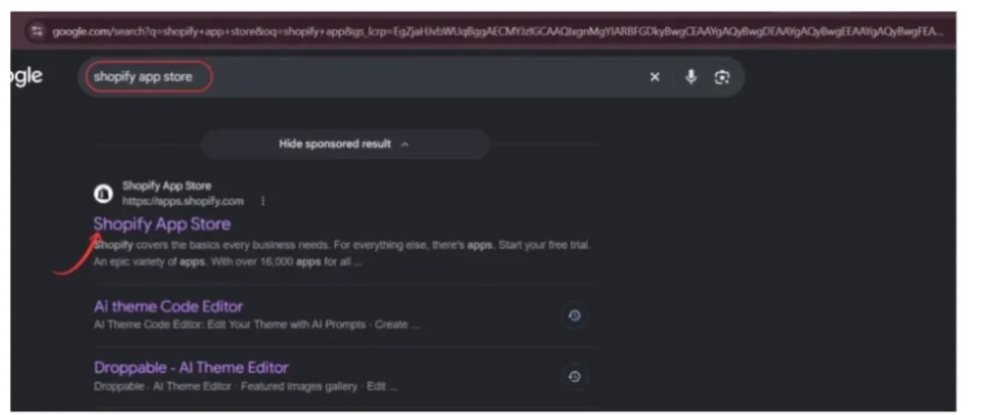
Image 1: Search for the Shopify App Store using Google.
Step 2: Search for SA Trust Badges
Once you’re on the Shopify App Store, use the search bar and enter SA Trust Badges.
Find the listing with the shield-and-checkmark icon.
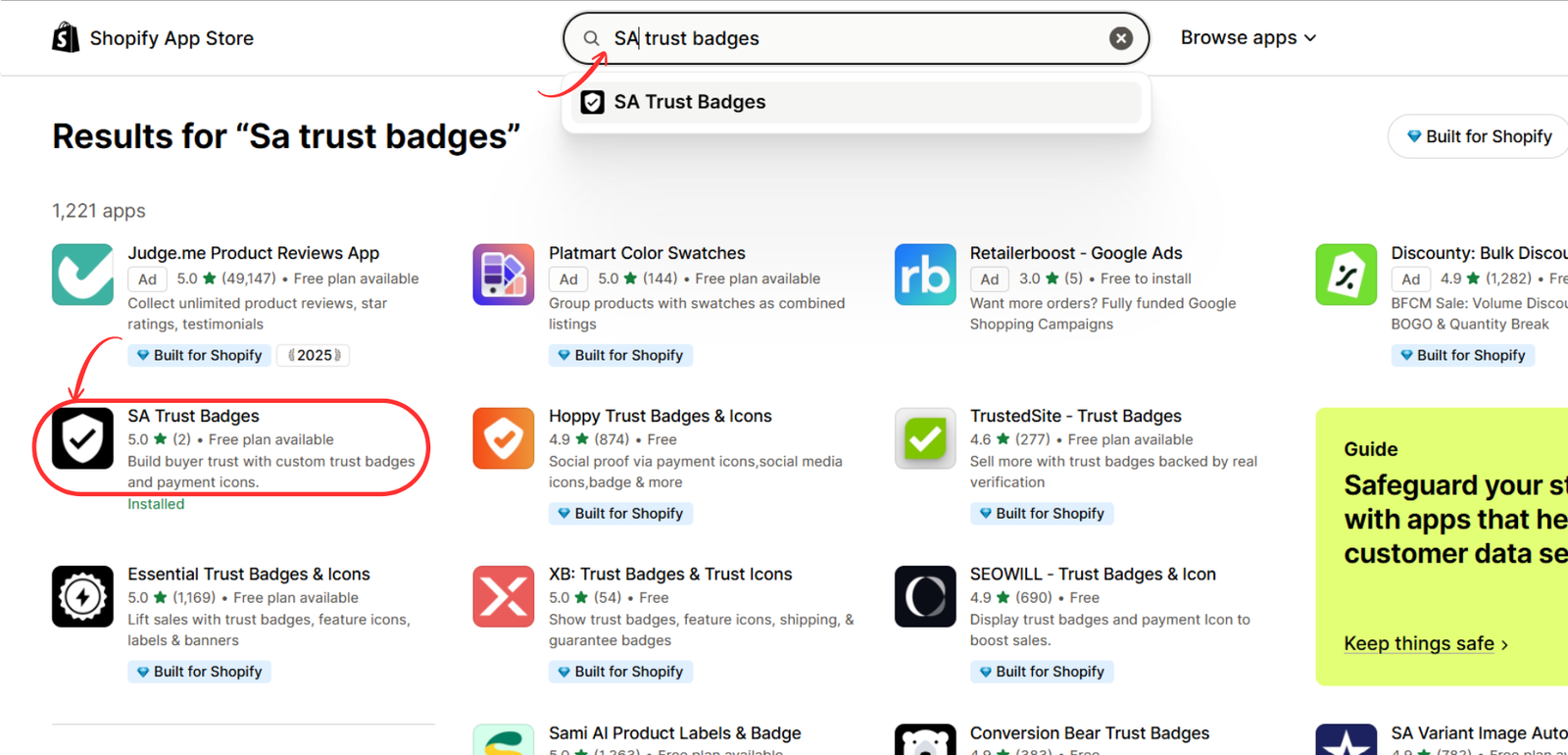
Image 2: Find SA Trust BadgesImage 2: Locate SA Trust Badges in the Shopify App Store results.
Step 3: Install the SA Trust Badges App
Click the app listing to open its details page.
Review the available features, supported placements, and pricing before selecting Install.
The app offers a free plan, with additional features available through paid subscriptions. Shopify App Store

Image 3: Review the SA Trust Badges listing and install the app.
Step 4: Create and Publish Your Trust Badge
After installation, open SA Trust Badges from your Shopify admin.
Select the appropriate badge creation option, such as Create Product Badge or Create Cart Badge, depending on your plan and intended placement.
In the badge editor, you’ll find options such as Content, Design, and Placement.
Choose the badge type that best suits your purpose. The supplied image shows options including Single banner, Icon block, Minimal icons, and Payment icons.
Enter a descriptive badge name and customize the displayed message.
For example, you might create a “Free Shipping” badge if your store genuinely offers that benefit.
Use the live preview to check the design before selecting Publish.
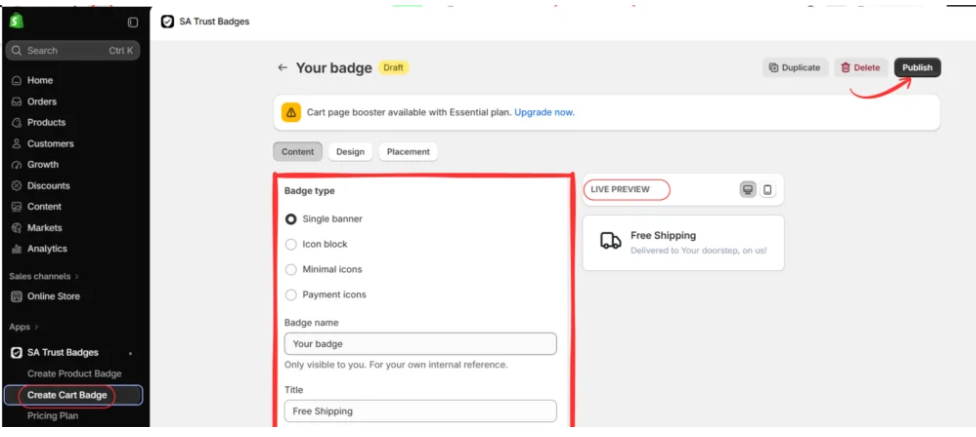
Image 4: Configure your badge type, content, and preview before publishing.
Step 5: Open Your Shopify Theme Editor
Go to Shopify Admin → Online Store → Themes.
Find the theme you want to customize and click Edit theme or Customize, depending on your Shopify interface.
You can configure a draft theme first to preview your changes without immediately modifying the live storefront.
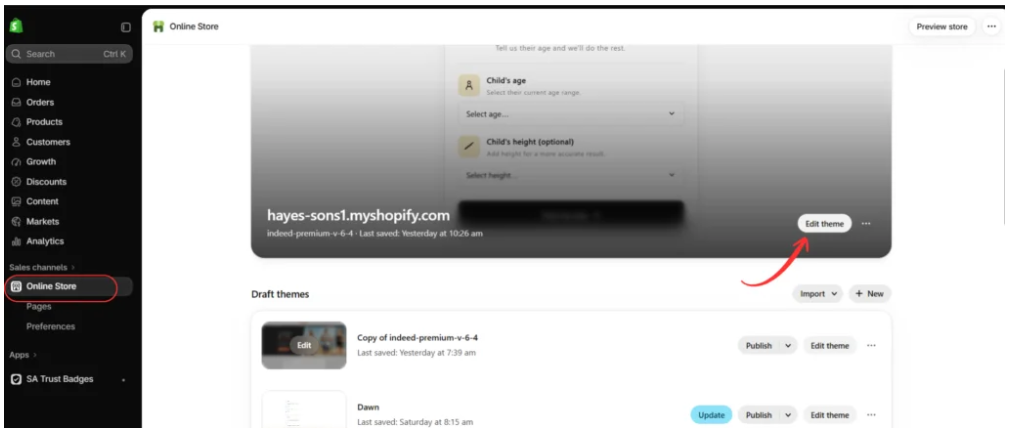
Image 5: Access your Shopify theme editor from Online Store.
Step 6: Enable the SA Trust Badges App Embed
Inside the theme editor, open App embeds.
Locate Trust Badges Embed — SA Trust Badges in the available app embeds list.
Enable the toggle and click Save.
Your supplied image shows trust-related messages appearing on a product page, including shipping, returns, and checkout information.
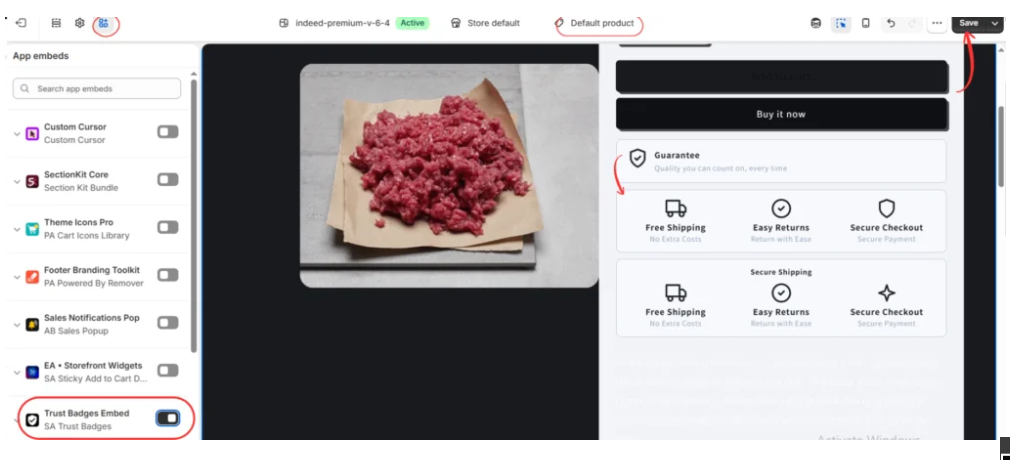
Image 6: Enable the SA Trust Badges app embed and preview badges on a Shopify product page.
Once saved, review the relevant storefront pages to confirm the badges display as expected. Some badge layouts or placements may require additional configuration in the app or theme editor.
Where Should You Place Trust Badges for Better Results?
Placement matters because customers need different information at different stages of the shopping journey.
On product pages: Shipping, return, and guarantee information can help customers evaluate the purchase before clicking Add to Cart.
Near the Add to Cart button: A small group of relevant badges can provide reassurance without requiring shoppers to scroll elsewhere.
On cart pages: Payment options, shipping conditions, and return information can address questions before customers proceed to checkout.
Near checkout-related information: Clear, legitimate security messaging can help customers understand the payment process. Shopify checkout customization capabilities vary, so merchants should not assume that a product-page badge app can place content directly inside checkout.
For most stores, a small number of meaningful badges is preferable to a crowded row of unrelated icons.
Common Mistakes to Avoid When Using Trust Badges
Using Fake or Unsupported Claims
Never display a security certification, payment logo, or guarantee unless it accurately represents your store.
A badge does not create technical security, certify a business, or establish a refund policy.
Adding Too Many Badges
Displaying numerous icons can make a product page feel cluttered and reduce attention on important purchasing information.
Choose badges that answer actual customer questions.
Using Inconsistent Designs
Badges should complement your Shopify theme.
Keep icon sizes, colors, spacing, and typography consistent with the surrounding product information.
Ignoring Mobile Layouts
Many customers shop on smartphones.
Check that badges remain readable and do not crowd product information or purchasing buttons on smaller screens.
Assuming Badges Guarantee Sales
Trust badges can help communicate reassurance, but they cannot fix poor product quality, unclear pricing, unreliable shipping, or a complicated checkout.
How to Measure Whether Trust Badges Improve Conversions
The most useful way to evaluate trust badges is to compare customer behavior with and without them.
Start by recording your current product-page conversion rate, add-to-cart rate, and completed purchases.
Then introduce a specific group of relevant badges.
If possible, use an A/B test so comparable groups of visitors see different versions of the page during the same period.
Keep the rest of the page consistent and measure the effect over a sufficient sample size.
For example, if your store receives 5,000 relevant sessions:
| Metric | Before | After |
|---|---|---|
| Sessions | 5,000 | 5,000 |
| Orders | 100 | 110 |
| Conversion rate | 2.0% | 2.2% |
Illustrative example only, not measured results from SA Trust Badges.
In this hypothetical example, the conversion rate increases by 0.2 percentage points, or 10% relative to the original rate.
That does not prove the badges caused the increase. Traffic quality, promotions, seasonality, and statistical uncertainty must also be considered.
Frequently Asked Questions
1. Do trust badges actually increase Shopify conversions?
They can help by addressing shopper concerns, but the results vary. A meaningful conversion improvement should be verified through testing rather than assumed.
2. Which trust badges work best for Shopify stores?
Shipping, returns, payment-method, and legitimate security-related badges are common options. The best choice depends on what your customers need to know.
3. Where should I add trust badges on Shopify?
Product pages and cart pages are useful starting points. Place relevant badges near the information or purchasing action they support.
4. Can I add trust badges without coding?
Yes. SA Trust Badges provides badge creation and Shopify theme app embed functionality without requiring routine manual theme-code edits.
5. Is SA Trust Badges free?
The Shopify App Store listing includes a free plan with limits. Additional features and higher usage allowances are available through paid plans. Shopify App Store
6. Can I customize trust badge colors and icons?
Yes. The app supports customization of colors, layouts, icon sizes, borders, and other presentation options. Certain features depend on the selected plan. Shopify App Store
7. Do trust badges make a Shopify store more secure?
No. A visual badge does not change payment encryption or the technical security of your store. It communicates information and may influence customer confidence.
8. Can I display trust badges on specific products?
The app supports product- and collection-related targeting, with availability depending on the relevant feature and subscription plan. Shopify App Store
9. Can too many trust badges hurt conversions?
Potentially. Excessive badges can distract customers or make a page appear cluttered. Prioritize a few relevant messages.
10. Should every Shopify store use trust badges?
Not necessarily. They are most useful when they communicate genuine benefits or address customer uncertainty. Clear policies and reliable service remain more important than decorative badges.
Conclusion
Trust badges can play a useful role in building customer confidence on Shopify stores.
They help merchants communicate shipping information, return policies, payment options, and other purchasing benefits in a clear visual format.
Research supports the idea that security-related visual cues can influence how shoppers perceive a checkout experience. However, trust badges alone do not guarantee higher conversions.
The most effective strategy is to use accurate, relevant badges in locations where customers are likely to have questions.
With SA Trust Badges, merchants can create customizable badge designs, preview their appearance, and add them to supported storefront pages through Shopify’s theme editor.
When combined with transparent policies, reliable fulfillment, and a user-friendly checkout experience, trust badges can become a valuable part of your store’s conversion optimization strategy.
App link: Install SA Trust Badges on Shopify




