FAKE TRUST BADGES: WHAT YOU CAN AND CAN’T LEGALLY DISPLAY ON YOUR STORE
Introduction
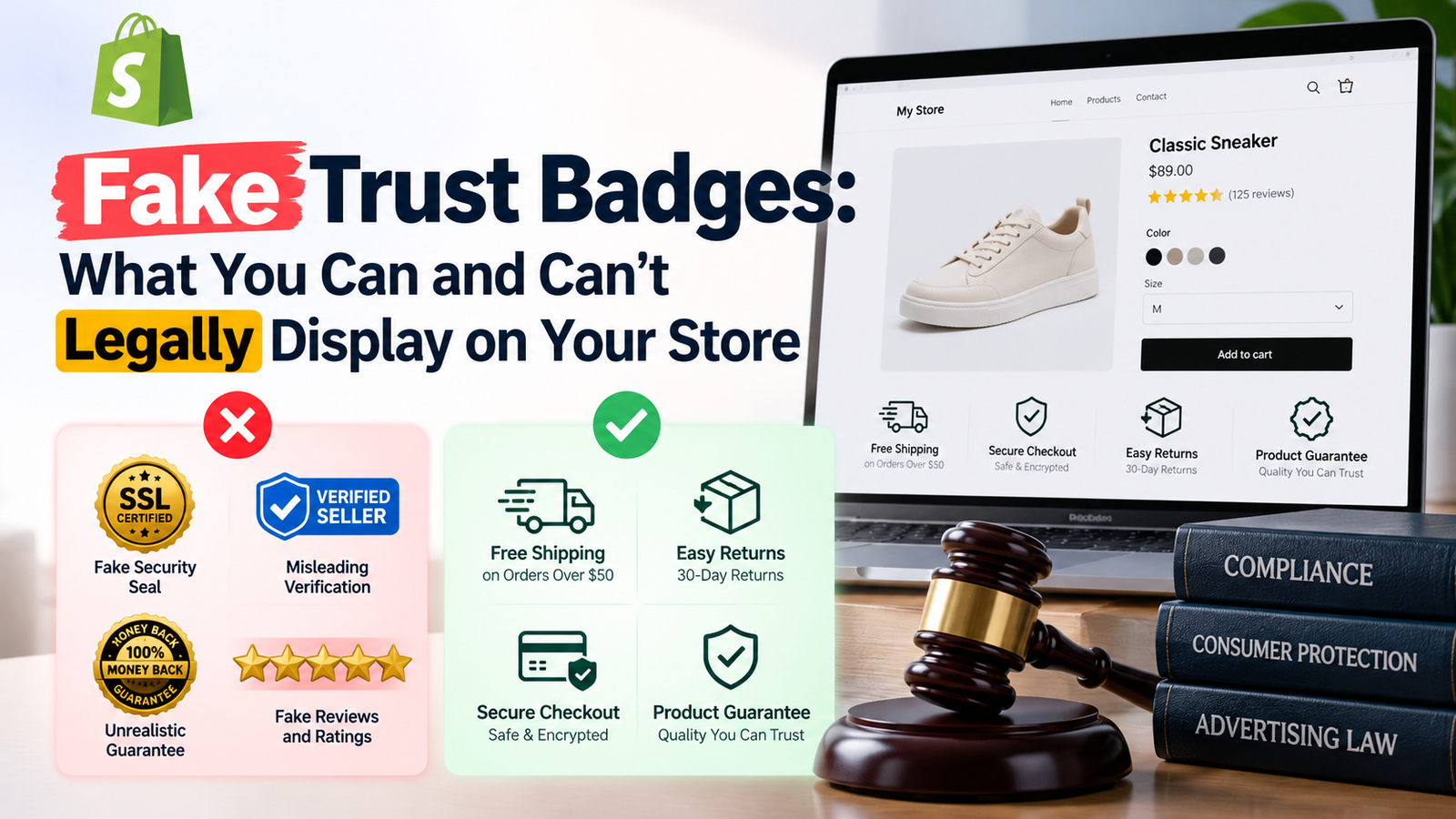
Trust is one of the most important factors influencing online shopping decisions. When customers visit an unfamiliar Shopify store, they want reassurance that the business is legitimate, their payment information will be handled securely, and their orders will be delivered as promised.
To communicate this information, many ecommerce merchants display trust badges on product pages, cart pages, and other areas of their storefronts.
Common examples include Secure Checkout, Free Shipping, Money-Back Guarantee, Verified Seller, and Accepted Payment Methods badges.
However, not every trust badge is appropriate to display.
Some merchants unintentionally use misleading badges, while others display security certifications, guarantees, or payment logos without having the necessary authorization or supporting policies.
These practices can create legal and reputational risks.
In this guide, we’ll explain what fake trust badges are, which types of badges Shopify merchants can generally display, which claims require verification or authorization, and how to create trustworthy badges using the SA Trust Badges Shopify app.
Why Shopify Merchants Use Trust Badges
Running an online store requires more than attractive product images and competitive pricing.
Customers also need confidence that their orders will be processed correctly and that the store will honor its commitments.
This is particularly important for new Shopify stores that have not yet developed strong brand recognition or accumulated many customer reviews.
Trust badges help communicate useful information in a simple visual format.
For example, a delivery icon can highlight shipping information, while a return arrow can direct attention to a store’s return policy.
When used accurately, these badges can make important purchasing information easier to find.
However, trust badges should never create a false impression of certification, security, or customer protection.
What Are Fake Trust Badges?
Fake trust badges are visual symbols or messages that falsely represent a store’s certifications, services, guarantees, affiliations, or other business practices.
For example, a merchant might display a “Certified Secure” seal without holding the certification it implies.
Another store might display a “30-Day Money-Back Guarantee” badge even though its refund policy does not allow customers to request refunds within that period.
These examples can mislead customers about the protections available when purchasing.
A trust badge does not have to be completely fabricated to become misleading. Even a genuine-looking icon can create problems when its wording exaggerates a store’s services or omits important conditions.
The most important rule is simple: every trust badge should communicate information that is accurate, verifiable, and consistent with your actual business practices.
Why Fake Trust Badges Are Risky
Misleading trust badges can create several problems for Shopify merchants.
Customer complaints: Shoppers may feel deceived if the store does not provide the security, shipping service, or guarantee advertised.
Refund disputes: Unsupported promises may lead to disagreements when customers request refunds or other remedies.
Regulatory consequences: Consumer protection authorities may investigate misleading advertising or deceptive commercial practices.
Trademark concerns: Unauthorized use of certification seals, payment logos, or other protected brand assets can create intellectual property issues.
Damage to brand reputation: Customers who discover misleading claims may lose confidence in the business.
Depending on the circumstances, misleading trust badges may also conflict with platform policies or payment-provider requirements.
Trust Badges You Can Generally Display on Shopify
Shopify merchants can generally display badges describing their own genuine services and policies, provided the wording is accurate and does not imply an unauthorized endorsement or certification.
1. Free Shipping Badges
A Free Shipping badge is appropriate when your store genuinely offers free shipping under the conditions advertised.
For example, if your store provides free shipping on orders over $50, your badge could state:
Free Shipping on Orders Over $50
This is clearer than displaying an unconditional Free Shipping badge when some customers must pay delivery charges.
Make sure any geographical restrictions or exclusions are easy to find.
2. Easy Returns Badges
An Easy Returns badge can communicate your store’s return policy.
However, the wording should match the actual return process.
If customers can return eligible products within 14 days, you might display:
14-Day Returns on Eligible Items
Avoid promising free returns unless your business covers the relevant return shipping costs.
3. Customer Support Badges
Customer support badges can help shoppers understand how to contact your business.
For example, you can display “Email Support” or “Support Available Monday–Friday” if those statements accurately describe your services.
Avoid using “24/7 Customer Support” if your team does not provide assistance around the clock.
4. Order Tracking Badges
If your store provides shipment tracking, you can highlight that service with an Order Tracking badge.
The badge should not imply that every order includes real-time tracking if some shipping methods do not support it.
5. Genuine Product Guarantee Badges
Merchants may display badges describing warranties or satisfaction guarantees that they actually provide.
For example, a store offering a documented 12-month product warranty can communicate that information through a badge.
However, guarantee wording should clearly reflect the applicable terms, eligibility requirements, and exclusions.
A generic “100% Guaranteed” message may be misleading if customers cannot determine what is guaranteed.
Trust Badges That Require Additional Caution
Some badges involve third-party trademarks, independent certifications, or technical security claims.
These require greater care than ordinary store-policy badges.
1. Security Certification Badges
Security-related badges often feature shields, locks, checkmarks, or certification-style designs.
A generic shield icon paired with truthful wording about checkout may be acceptable, but merchants should not imply they hold a specific security certification without evidence.
For example, displaying an official-looking “PCI Certified” seal without the relevant authorization or substantiation could mislead customers.
Similarly, a visual badge does not prove that a store has completed an independent security audit.
2. Payment Provider Logos
Payment icons help shoppers identify accepted payment methods.
However, displaying a payment provider’s logo can be subject to its trademark and brand-usage rules.
Only display payment methods your checkout actually supports, and follow the provider’s applicable logo guidelines.
For example, showing a PayPal logo when customers cannot pay using PayPal could create a misleading impression.
3. Verified Seller Badges
A badge reading “Verified Seller” can suggest that an independent organization has reviewed or approved your business.
If no such verification exists, the wording may be misleading.
Avoid using certification-style seals that imply third-party approval unless your store genuinely qualifies and is authorized to display them.
4. Money-Back Guarantee Badges
Money-back guarantees can reassure customers, but they also communicate a meaningful promise.
Before displaying one, make sure the guarantee exists, the terms are clear, and your business can honor it.
If the guarantee has time limits or exclusions, communicate those conditions rather than implying an unconditional refund.
5. Fake Review and Rating Badges
Displaying fabricated star ratings, invented customer counts, or false review-verification symbols can mislead shoppers.
For example, a badge stating “Trusted by 10,000 Customers” should not be displayed unless the business has evidence supporting that claim.
Merchants should use genuine, properly represented customer feedback rather than inventing social proof.
Trust Badge Compliance Comparison
| Badge type | Generally acceptable when | Potentially misleading when |
|---|---|---|
| Free Shipping | Actual eligibility conditions are clear | Shipping charges or exclusions are concealed |
| Easy Returns | Matches the published return policy | Returns are unavailable or materially restricted |
| Secure Checkout | Claims are accurate and substantiated | Implies an unearned security certification |
| Payment Logos | Methods are supported and brand rules followed | Methods are unavailable or logos unauthorized |
| Money-Back Guarantee | A genuine, clearly explained guarantee exists | Refund promises cannot be honored |
| Verified Seller | Independent verification is genuine and authorized | The store invents or implies certification |
| Customer Support | Advertised availability is accurate | Claims 24/7 assistance without providing it |
| Customer Ratings | Ratings reflect authentic customer feedback | Ratings or review counts are fabricated |
What Laws Apply to Fake Trust Badges?
The legal requirements depend on the countries where your business operates and where you market or sell products.
In the United States, the Federal Trade Commission can challenge deceptive or unfair commercial practices under Section 5 of the FTC Act. False endorsements, fabricated reviews, and misleading advertising claims can create additional concerns under applicable rules.
In the European Union, consumer protection rules prohibit various misleading commercial practices. Falsely claiming approval, authorization, or endorsement from a public or private body can be particularly problematic.
In the United Kingdom, misleading commercial practices are addressed under consumer protection legislation, including the Digital Markets, Competition and Consumers Act 2024.
Trademark and intellectual property laws can also apply when a merchant uses another organization’s logo or certification seal without permission.
Important: A badge being available in an app or icon library does not mean every claim made with it is legally permitted. Merchants remain responsible for the accuracy of their own storefront messaging.
Introducing SA Trust Badges for Shopify
Creating consistent trust badges manually can require additional theme customization and design work.
For merchants who want a more convenient solution, SA Trust Badges provides tools for creating and customizing trust-related visual elements on Shopify storefronts.
The app allows merchants to design badges for messages such as shipping benefits, return policies, product guarantees, and accepted payment methods.
It offers different layouts and styling options so badges can complement a store’s branding.
Merchants can customize the badge title, description, icon, and visual appearance, then preview the result before publishing.
Explore the app: https://apps.shopify.com/trust-badges-7
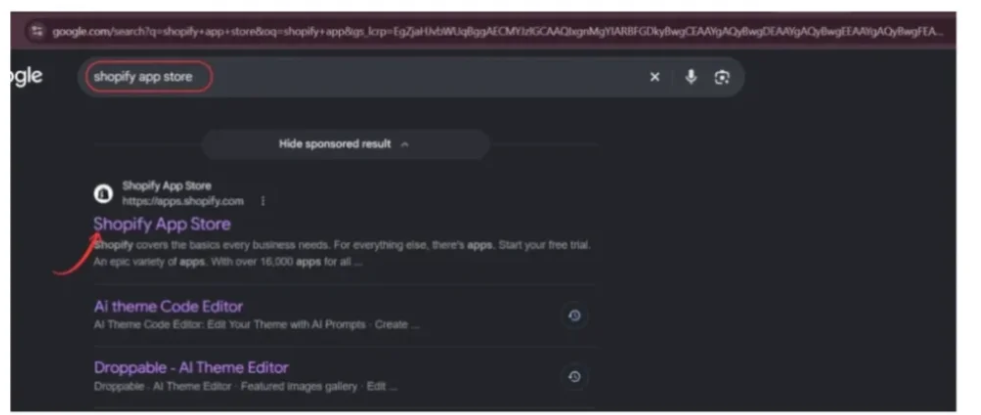
Step 1: Open the Shopify App Store
Open your browser and search for Shopify App Store on Google.
Click the official Shopify App Store result to access the marketplace.
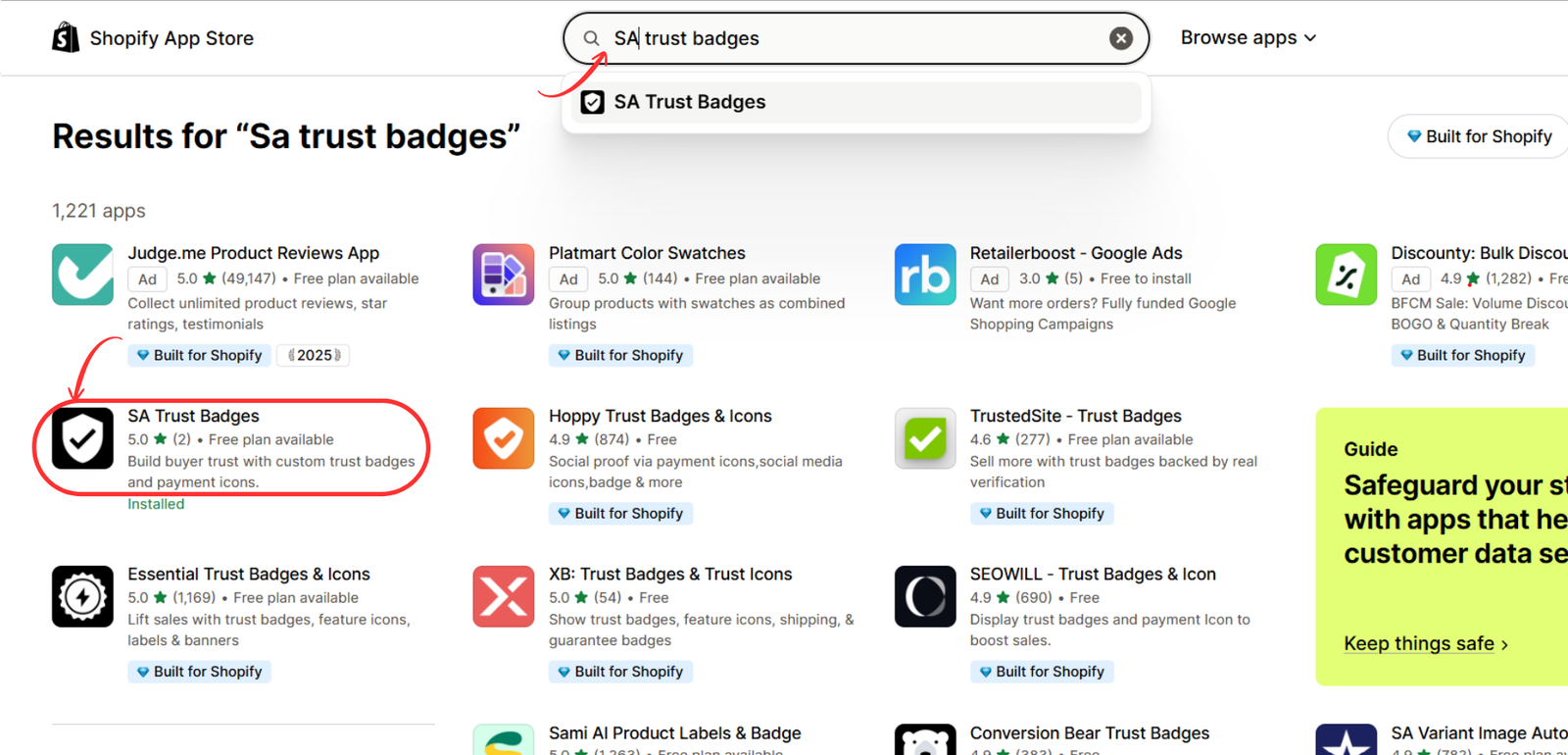
Step 2: Search for SA Trust Badges
Use the Shopify App Store search bar and enter SA Trust Badges.
Locate the app with the black shield-and-checkmark icon and open its listing.
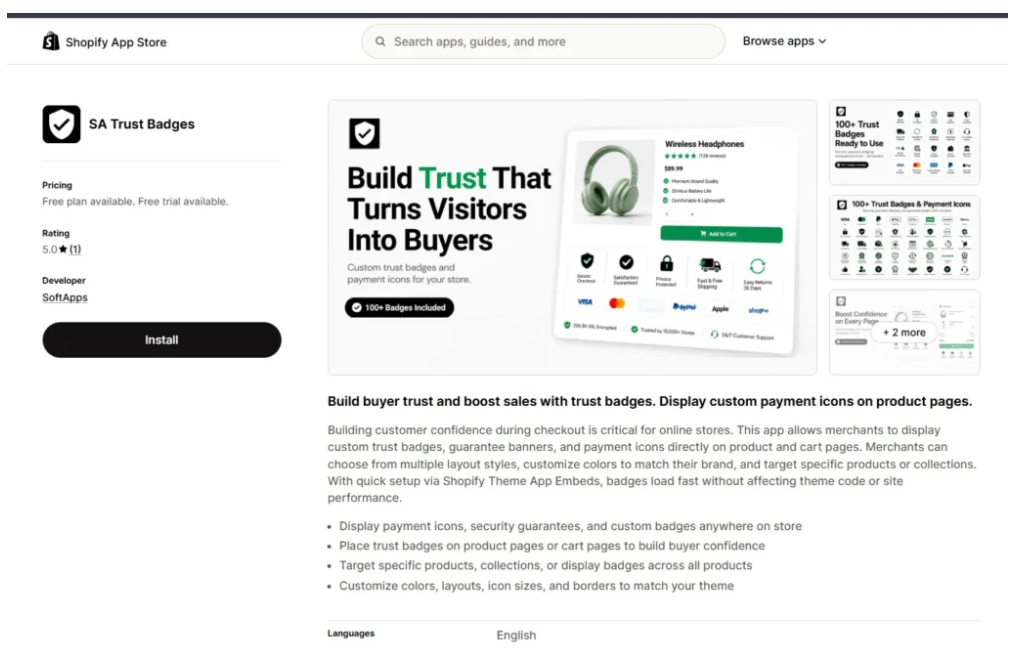
Step 3: Install SA Trust Badges
On the app listing, review its features and available pricing plans.
Click Install and complete Shopify’s installation process.
Step 4: Create a Cart Trust Badge
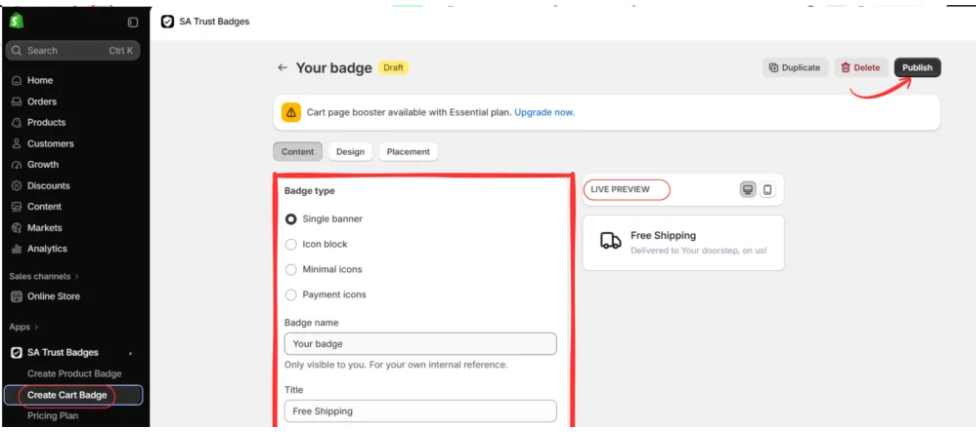
Open SA Trust Badges in your Shopify admin and select Create Cart Badge.
Choose a badge type, such as Single banner, Icon block, Minimal icons, or Payment icons.
Enter a badge name, title, and supporting description. Use the live preview to check its appearance, then click Publish.
Step 5: Open Your Shopify Theme Editor
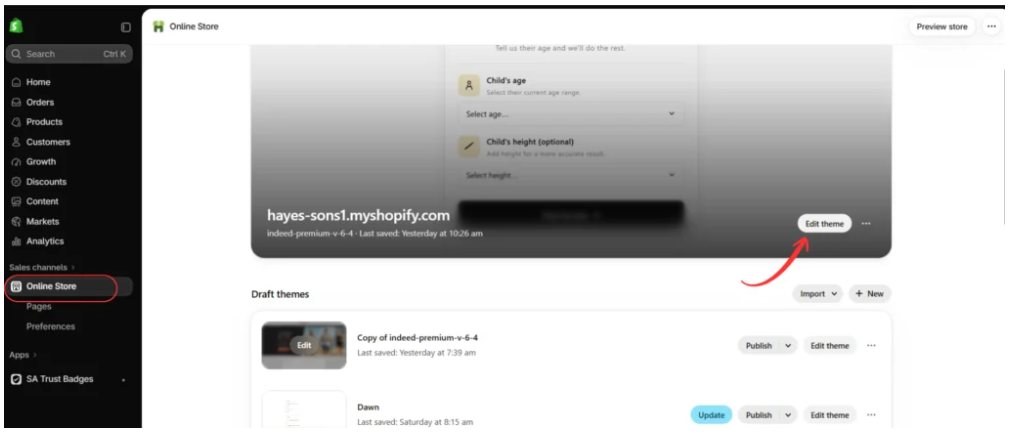
Navigate to Online Store → Themes in your Shopify admin.
Find the theme you want to customize and select Edit theme or Customize.
Step 6: Enable the SA Trust Badges App Embed
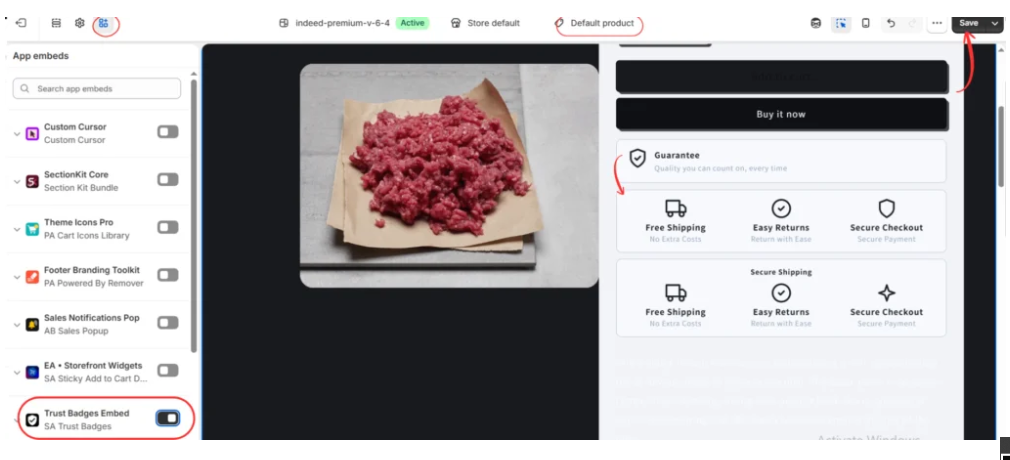
Inside the theme editor, open App embeds.
Find Trust Badges Embed — SA Trust Badges, enable the toggle, and click Save.
Preview the product page to confirm the badges appear correctly.
Step 7: Create and Customize a Product Guarantee Badge
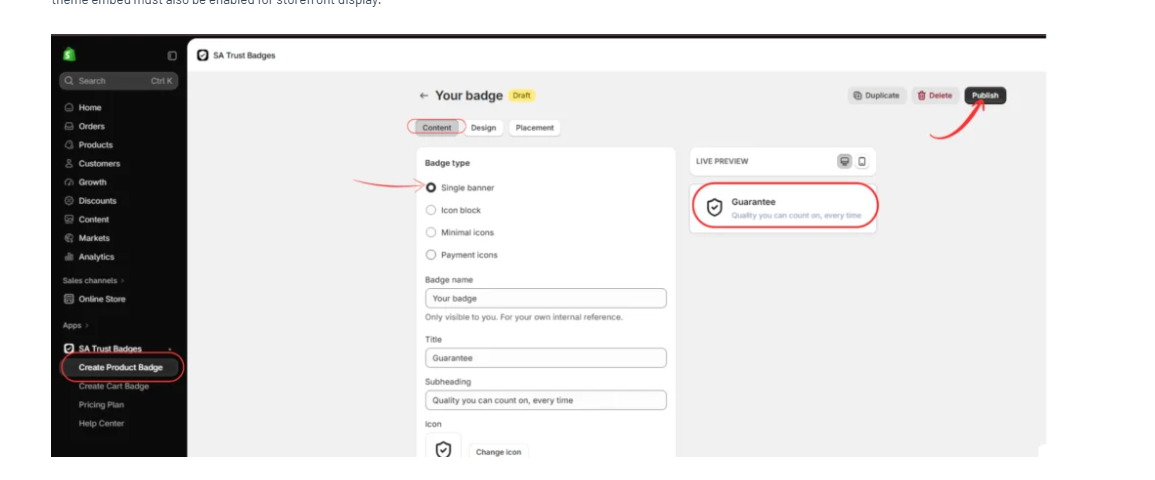
After setting up your trust badges, open the SA Trust Badges app from your Shopify admin and select Create Product Badge.
In the badge editor, open the Content tab and choose Single banner as your badge type. This layout allows you to display a guarantee message with an icon, title, and supporting description.
Enter Guarantee in the Title field and add a subheading such as Quality you can count on, every time, provided it reflects your store’s actual commitments.
Choose a suitable shield or checkmark icon to represent your guarantee. You can also use the Design tab to adjust the badge’s colors, appearance, and styling to match your Shopify theme.
Review the Live Preview to ensure the badge looks professional and is easy to read. Once you’re satisfied, click Publish to save your Guarantee Badge.
Step 8: Display the Guarantee Badge on Your Shopify Product Page
Once your Guarantee Badge is published, navigate to Shopify Admin → Online Store → Themes → Customize.
Open your product page template and select App embeds from the theme editor sidebar.
Locate Trust Badges Embed — SA Trust Badges and enable the toggle if it is not already active.

Your published Guarantee Badge should now appear in its configured position on the product page. As shown in the image, the badge is displayed below the purchasing buttons with a shield icon, the Guarantee heading, and its supporting message.
This placement helps customers notice your product-quality commitment while considering a purchase.
Finally, click Save in the upper-right corner and preview your storefront to confirm that the badge displays correctly on desktop and mobile devices.
How SA Trust Badges Helps Merchants Communicate Genuine Store Benefits
SA Trust Badges provides a convenient way to organize important store information in a visual format.
Instead of relying on generic badge designs, merchants can create messages that accurately reflect their policies.
For example, a merchant offering free shipping above a certain order amount can create a badge with that specific condition.
Similarly, a store providing a documented product warranty can create a guarantee badge that reflects its actual coverage.
The app also supports design customization, helping merchants maintain consistent typography, colors, and icon styling across their storefront.
However, SA Trust Badges is a design and display tool, not a legal certification service. Installing the app does not independently verify claims, grant permission to use third-party trademarks, or guarantee legal compliance.
Merchants should review all badge wording before publishing.
Best Practices for Creating Honest Trust Badges
1. Use Clear and Specific Language
Avoid vague statements that customers may interpret differently.
For example, “Free Shipping on Orders Over $50” is more informative than a generic “Free Shipping” claim when restrictions apply.
2. Match Badges With Store Policies
Your badge messages should reflect the information available in your shipping, return, refund, warranty, and customer service policies.
If your policies change, update the badges accordingly.
3. Avoid Unsupported Certifications
Do not create official-looking seals suggesting that your store has been independently certified unless that certification is genuine and authorized.
4. Follow Payment Provider Branding Rules
Only display supported payment methods and use their logos in accordance with applicable brand guidelines.
5. Keep the Design Professional
Trust badges should complement the store rather than overwhelm it.
Use consistent icon sizes, spacing, colors, and typography.
A few relevant badges are usually more useful than a crowded collection of unrelated symbols.
6. Review Badges Regularly
Store policies, shipping conditions, payment options, and guarantees can change over time.
Periodically review your badges to ensure they remain accurate.
Can Fake Trust Badges Increase Conversions?
Misleading trust badges might initially influence how some customers perceive a store, but that does not make them an acceptable conversion strategy.
Any short-term benefit can be outweighed by complaints, refund disputes, regulatory risk, and reputational damage.
More importantly, a conversion achieved through a false claim does not represent genuine customer confidence.
A sustainable ecommerce business should focus on transparent policies, reliable fulfillment, accurate product information, authentic reviews, and legitimate trust signals.
Frequently Asked Questions
1. Are trust badges legal on Shopify?
Yes, trust badges are generally permissible when they communicate truthful information and comply with applicable advertising, consumer protection, and intellectual property laws.
2. Can I display a Secure Checkout badge?
You may display accurate checkout-related messaging, but you should not imply an independent security certification that your business does not hold.
3. Is it illegal to use fake trust badges?
Fake or misleading badges can violate consumer protection or advertising laws, depending on the claim and jurisdiction. Unauthorized logos can also raise trademark concerns.
4. Can I use Visa, Mastercard, or PayPal logos?
You should only display payment methods your store actually supports and comply with the relevant provider’s brand-usage requirements.
5. Can I display a Money-Back Guarantee badge?
Yes, when your store genuinely offers the advertised guarantee and clearly communicates its terms.
6. Can I create my own trust badges?
Yes. You can create custom badges describing your own legitimate services and policies, provided they do not falsely imply external certification or authorization.
7. Does SA Trust Badges verify my store?
No. The app helps create and display trust badges. It does not independently certify your business or verify the truth of your claims.
8. Can trust badges improve Shopify conversions?
They may help customers understand purchasing conditions and reduce uncertainty, but conversion improvements are not guaranteed and should be measured through testing.
Conclusion
Trust badges can be valuable additions to Shopify stores when they communicate accurate, meaningful information.
They help customers identify shipping benefits, return policies, payment options, product guarantees, and other important details.
However, merchants must distinguish between legitimate trust signals and misleading claims.
Displaying fake certifications, unsupported guarantees, fabricated customer ratings, or unauthorized logos can create legal risks and damage a brand’s credibility.
The best approach is to use badges that accurately reflect your store’s services and policies.
With SA Trust Badges, Shopify merchants can create customized badge designs, adjust their appearance, and display relevant purchasing information without manually building every visual element.
The goal should always be to build genuine customer confidence rather than simply make a store appear trustworthy.
Shopify App: https://apps.shopify.com/trust-badges-7




