HOW TO COLLECT PHOTO REVIEWS FROM SHOPIFY CUSTOMERS
Introduction
Customer reviews play an important role in building trust and credibility for an online store. When customers shop online, they want to know whether a product meets their expectations before making a purchase.
While written reviews provide useful information, photo reviews offer visual proof of real customer experiences. They allow potential buyers to see how products look in real life, helping them make more confident purchasing decisions.
For Shopify merchants, collecting and managing customer photo reviews can be challenging, especially when reviews are stored in spreadsheets or collected through different platforms.
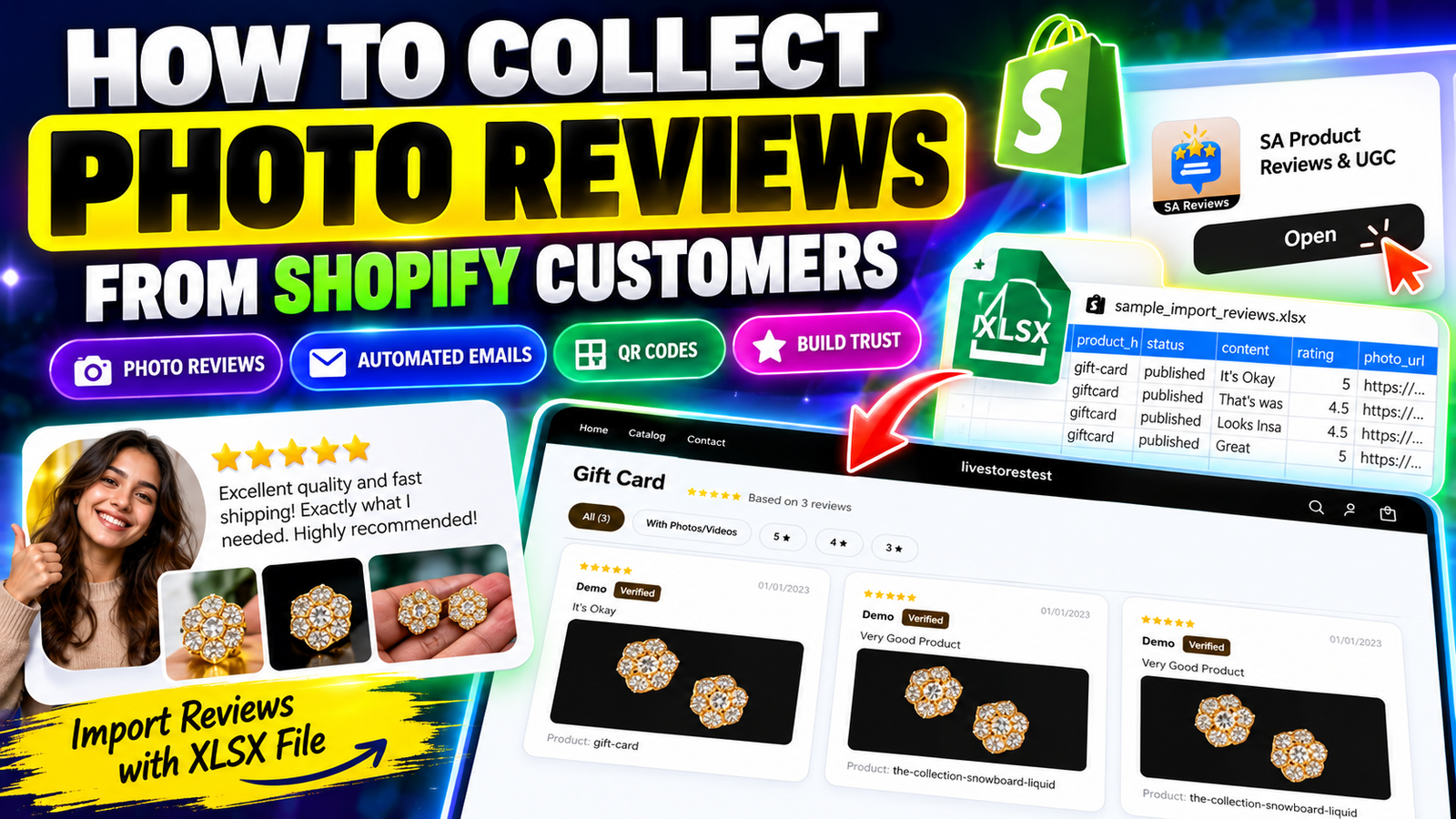
Fortunately, SA Product Reviews & UGC makes it easier to import, manage, and display customer photo reviews on Shopify stores.
In this guide, we’ll explain how to collect and display customer photo reviews using an XLSX file, with a simple step-by-step process.
Challenges Shopify Merchants Face When Collecting Photo Reviews
Many Shopify merchants struggle to collect photo reviews from customers, even when their products receive positive feedback.
One of the biggest challenges is encouraging customers to share product images after completing a purchase. Most customers do not submit reviews unless they receive a reminder or an easy way to provide feedback.
Another common problem is managing reviews collected from different sources. Merchants may already have customer reviews stored in Excel files or other review platforms but find it difficult to import them into Shopify.
Additionally, manually uploading customer feedback, organizing product images, and displaying reviews on product pages can become time-consuming.
Without an efficient review management system, merchants may miss opportunities to showcase authentic customer experiences.
Why Do You Need a Shopify Photo Review App?
A Shopify photo review app helps merchants simplify the process of collecting, organizing, and displaying customer feedback.
Instead of manually adding reviews to individual product pages, merchants can use a dedicated app to manage their reviews from one dashboard.
SA Product Reviews & UGC offers features such as automated review request emails, QR codes, discount rewards, photo reviews, and review imports.
The app also supports XLSX file imports, allowing merchants to upload existing customer reviews along with their associated photo URLs.
This makes it easier to transfer genuine customer feedback and display it on Shopify product pages.
Importance of Collecting Photo Reviews
Photo reviews help online shoppers understand how products look and perform in real-world situations.
When customers see authentic product images shared by previous buyers, they can better evaluate the quality, appearance, and suitability of a product.
Collecting photo reviews can help Shopify merchants:
- Build customer trust through genuine product experiences.
- Increase credibility by displaying customer-generated images.
- Help shoppers make informed purchasing decisions.
- Reduce uncertainty about product appearance and quality.
- Strengthen product pages with visual social proof.
- Encourage engagement and potentially improve conversion rates.
By showcasing genuine customer experiences, merchants can create a more transparent and trustworthy shopping environment.
How to Collect Photo Reviews From Shopify Customers: Step-by-Step Guide
Follow these steps to install SA Product Reviews & UGC, import customer photo reviews through an XLSX file, and display them on your Shopify storefront.
Step 1: Search for the Shopify App Store
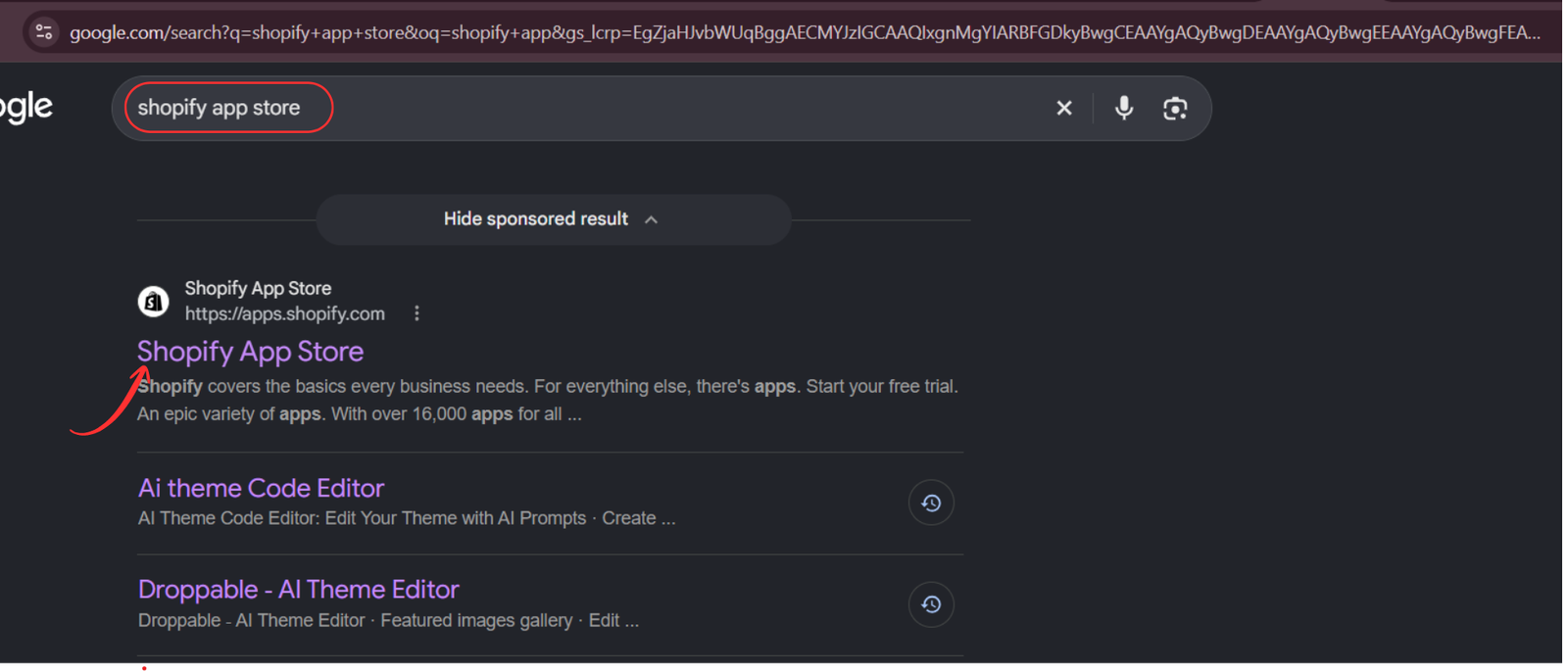
Open your browser and search for Shopify App Store on Google.
Click the official Shopify App Store website from the search results to access Shopify’s app marketplace.
Step 2: Search for SA Product Reviews & UGC
Once you have opened the Shopify App Store, locate the search bar at the top of the page.
Enter SA Product Reviews & UGC and search for the app.
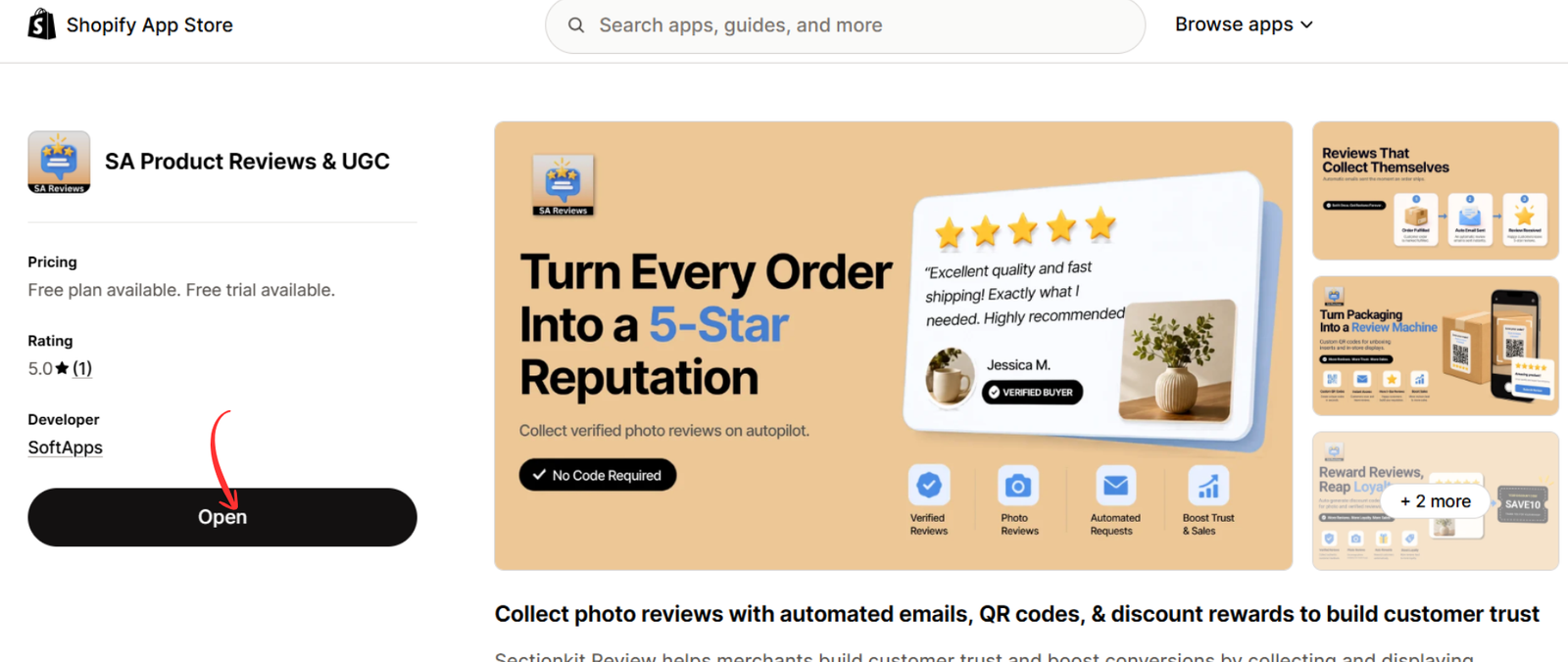
Find SA Product Reviews & UGC in the search results and click on it to open the app listing.

Step 3: Install SA Product Reviews & UGC
After opening the app listing, review the app information and available features.
Click the Install button to add the app to your Shopify store. If the app is already installed, you will see the Open button instead.
Follow Shopify’s installation instructions to complete the process.
You can also access the app directly through the following link:
Install SA Product Reviews & UGC
Step 4: Open Manage Reviews and Select Import Reviews
After installing the app, navigate to your Shopify admin dashboard.
Open SA Product Reviews & UGC from the Apps section.
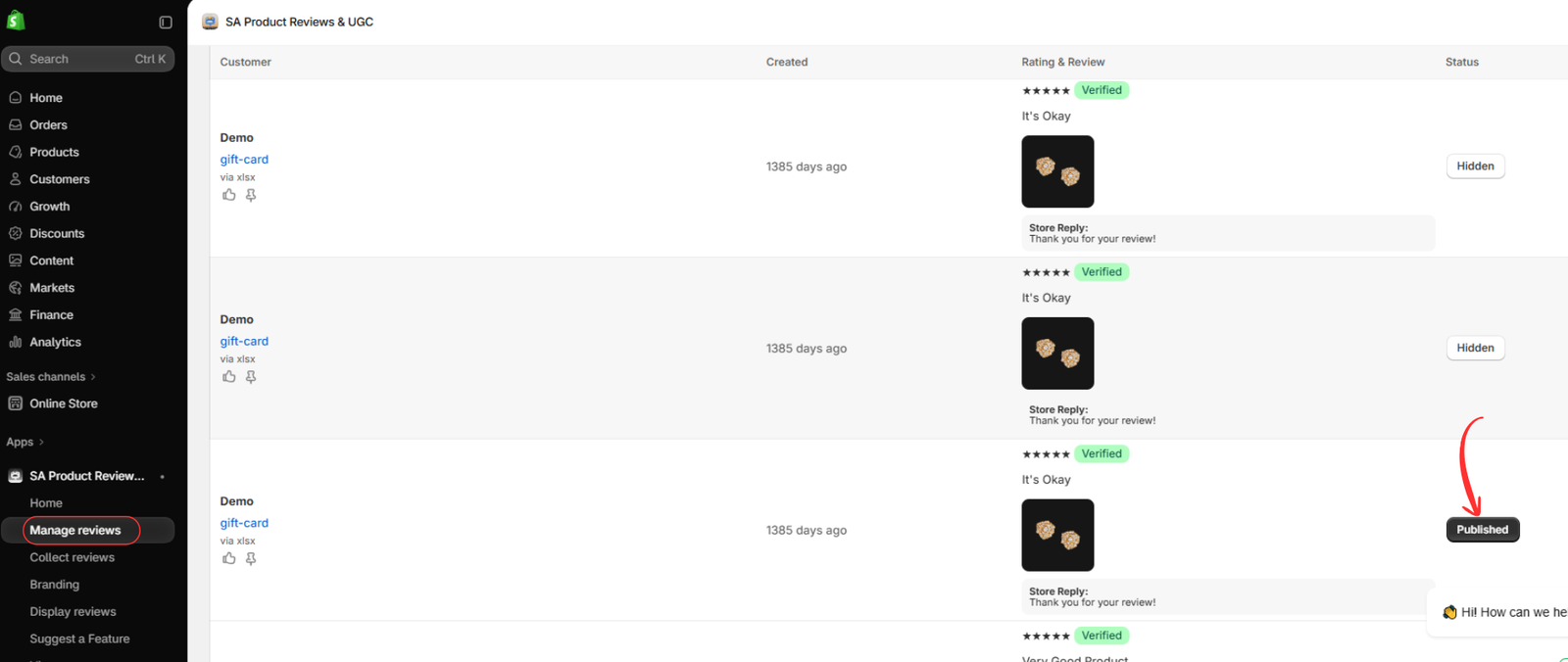
From the app’s left sidebar, click Manage reviews.
This page allows you to manage existing customer reviews, check their publication status, and view customer ratings.
To import customer photo reviews, click the Import reviews button in the upper-right corner.

Step 5: Select XLSX and Download the Sample File
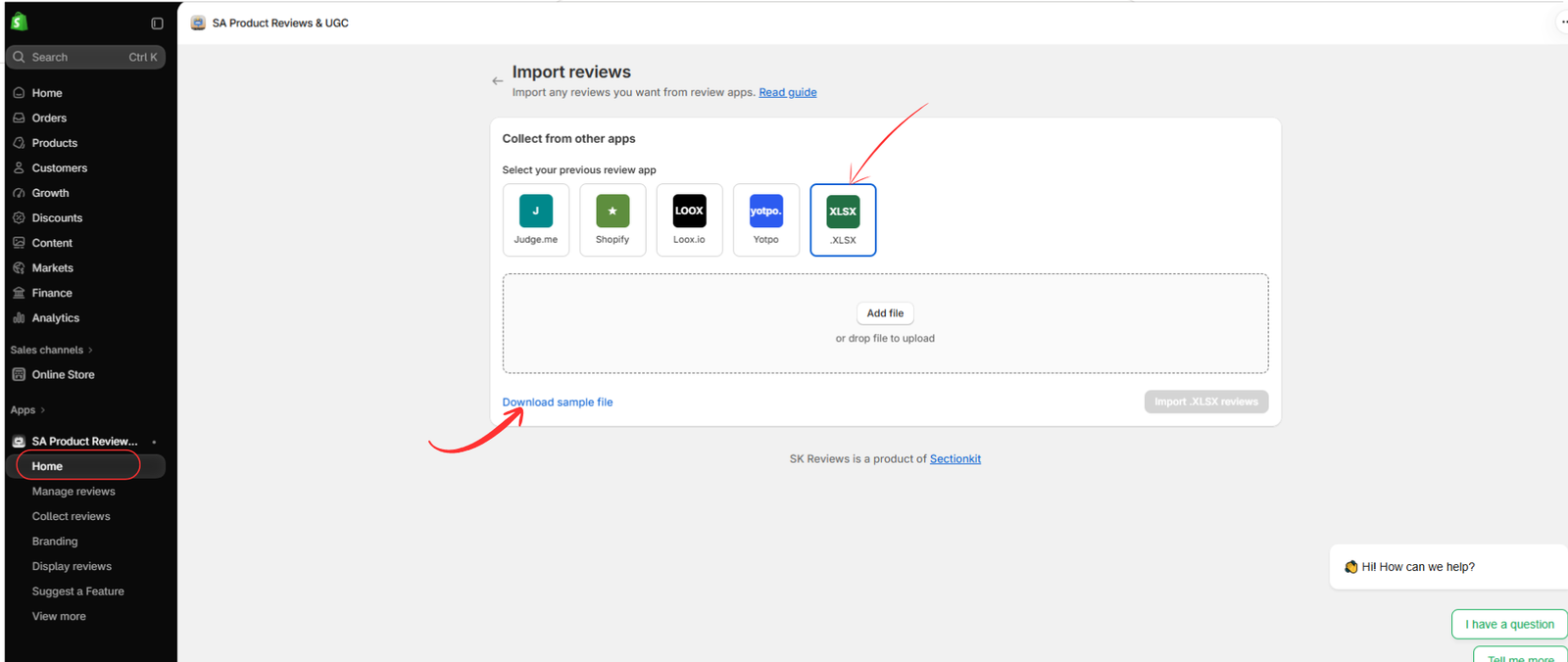
After clicking Import reviews, the app will open the review import page.
Here, you will find different import options, including Judge.me, Shopify, Loox.io, Yotpo, and XLSX.
To import customer reviews from an Excel spreadsheet, select the .XLSX option.
Next, click Download sample file to download the template provided by the app.
This template helps you prepare customer review information in the required format.
Step 6: Add Customer Photo Reviews to the XLSX File
Open the downloaded sample file in Microsoft Excel.
The spreadsheet contains different columns for customer review information, such as product handle, review status, content, rating, photo URL, customer name, email, date, and product ID.
Enter your existing customer reviews into the spreadsheet while keeping the original column headings unchanged.
To include customer photos, locate the photo_url column and enter the corresponding image URL for each review.
Make sure each photo URL is publicly accessible and points to the correct customer image.
You should also ensure that the product handles and IDs match the products in your Shopify store.
Once you have added the required review information. Save the completed spreadsheet :

Step 7: Upload the XLSX File and Import Customer Reviews
Return to the Import reviews page in SA Product Reviews & UGC.
Make sure the .XLSX option is selected.
Click Add file and choose the completed XLSX spreadsheet from your computer. Alternatively, drag and drop the file into the upload area.
After selecting the file, its name will appear in the upload section.
Click Import .XLSX reviews to begin importing your customer reviews.
Once the import process is complete, open Manage reviews to check that your customer reviews have been imported successfully.

Step 8: Verify and Manage Imported Reviews
After the import completes, navigate back to Manage reviews.
Review the imported entries and confirm that their customer information, ratings, review content, and associated products are correct.
Use the available publication controls to manage which reviews appear on your storefront.
The dashboard allows you to distinguish between published and hidden or unpublished reviews.
Before publishing, check that the imported reviews are authentic and accurately associated with the relevant products.
Step 9: Enable the Review Display in Your Shopify Theme
After importing your customer reviews, the next step is to display them on your Shopify storefront.
Go to Shopify Admin → Online Store → Themes.
Click Customize on your active theme to open the Shopify theme editor.
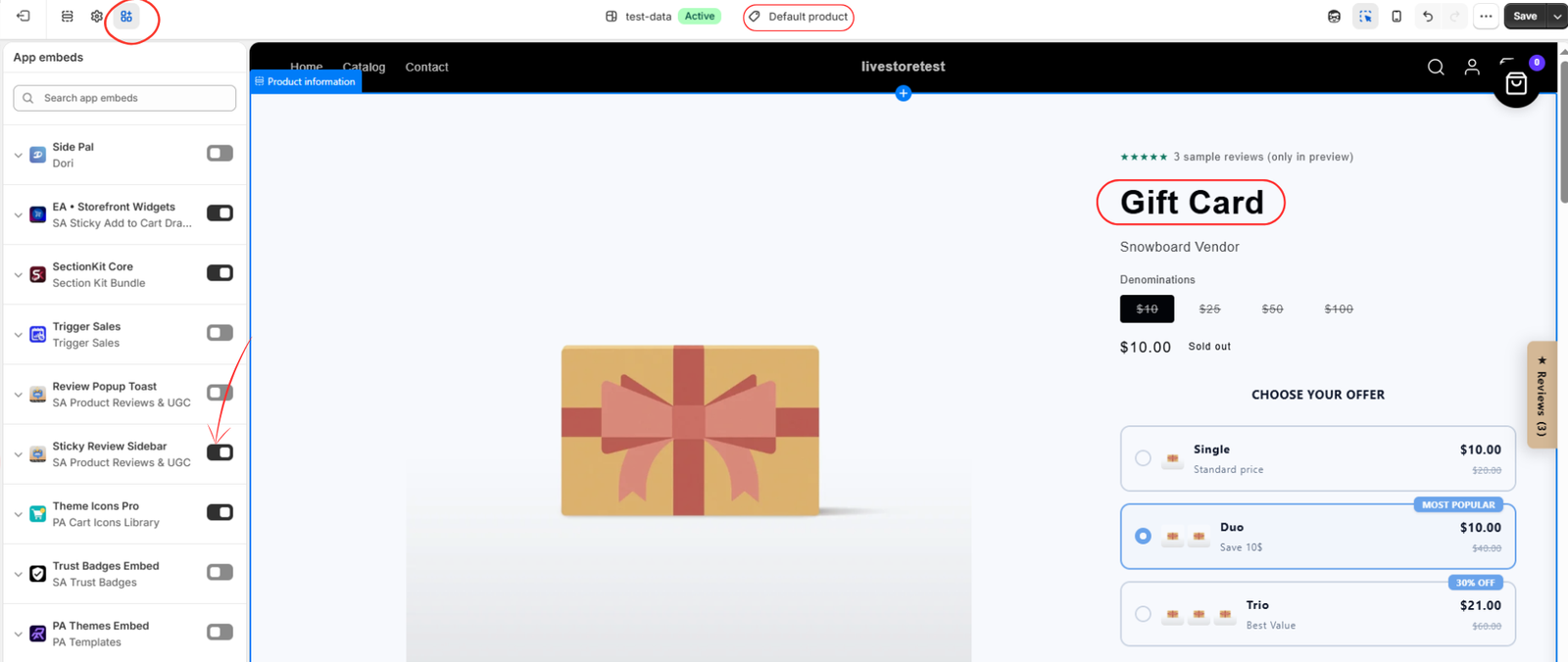
From the theme editor, select the product page template where you want customer reviews to appear.
Next, click the App embeds icon in the left sidebar.
Find the review display options provided by SA Product Reviews & UGC, such as Sticky Review Sidebar, and enable the relevant option.
This allows the selected review feature to appear on your storefront.
Step 10: Save Changes and Check Your Photo Reviews
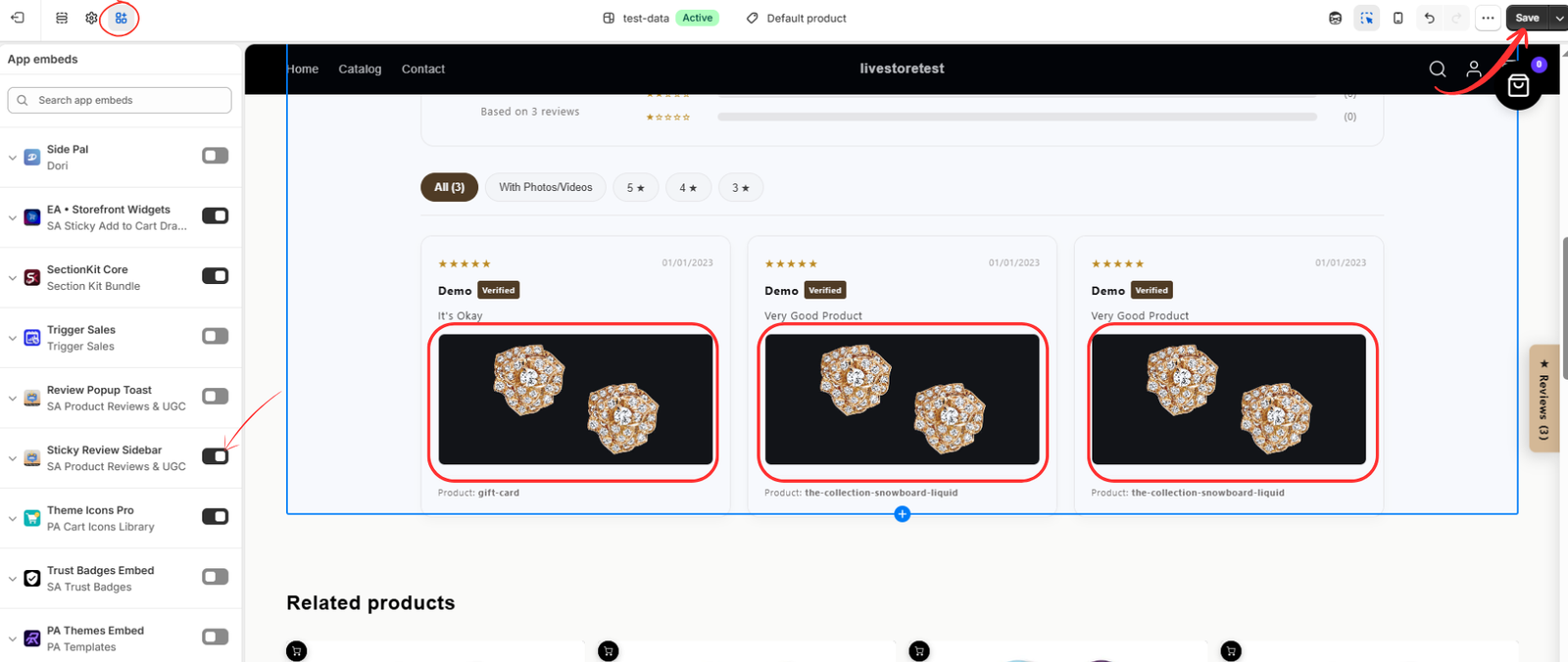
Once the review display settings are enabled, click the Save button in the upper-right corner of the Shopify theme editor.
Now preview your Shopify product page and navigate to the customer reviews section.
Your imported reviews should appear with the corresponding customer ratings, review content, and product images, provided the review display has been configured correctly.
Check that the photos load properly and that each review is associated with the correct product.
Your Shopify store is now ready to showcase genuine customer photo reviews to potential buyers.
Best Practices for Collecting More Customer Photo Reviews
Importing existing customer reviews is a useful starting point, but Shopify merchants should also focus on collecting new reviews regularly.
Automated post-purchase emails can encourage customers to share their experiences after receiving their orders. Providing a simple review submission process makes it easier for buyers to upload product photos.
Merchants can also use QR codes on product packaging to direct customers to review forms.
Offering discounts or rewards for honest reviews may encourage participation, provided incentives are disclosed where required and are not conditional on positive feedback.
Regularly monitoring customer reviews and responding to feedback can also help maintain strong customer relationships.
Why Choose SA Product Reviews & UGC?
SA Product Reviews & UGC provides Shopify merchants with tools to collect, manage, import, and display customer reviews.
Its XLSX import functionality makes it convenient to transfer existing reviews from spreadsheets, including customer images through photo URLs.
The app also supports automated review requests, QR codes, and discount rewards to help merchants encourage ongoing customer feedback.
With these features, merchants can create a more organized review collection process and showcase customer experiences directly on their storefronts.
Conclusion
Collecting photo reviews from Shopify customers is an effective way to build trust, improve product credibility, and help potential buyers make confident purchasing decisions.
Although managing customer reviews manually can be challenging, SA Product Reviews & UGC simplifies the process by providing an easy way to import existing reviews using XLSX files and display them on Shopify product pages.
By following the steps outlined above, merchants can organize their customer feedback and turn genuine product experiences into valuable social proof.
Start collecting and displaying customer photo reviews today with SA Product Reviews & UGC.




