How to Migrate from WooCommerce to Shopify: A Complete Guide for Store Owners
Hey! So you’re thinking about moving your store from WooCommerce over to Shopify, that’s a big decision, and honestly, a really common one these days. A lot of store owners start out on WooCommerce because it’s free and flexible, but as their business grows, they start running into limitations that make Shopify look a lot more appealing. Let’s walk through exactly how this migration works, what to expect, and how to do it without losing your mind or your data.
Why Store Owners Move from WooCommerce to Shopify
Before we get into the how, let’s quickly talk about the why, because understanding this will help you make smarter decisions during the migration itself.
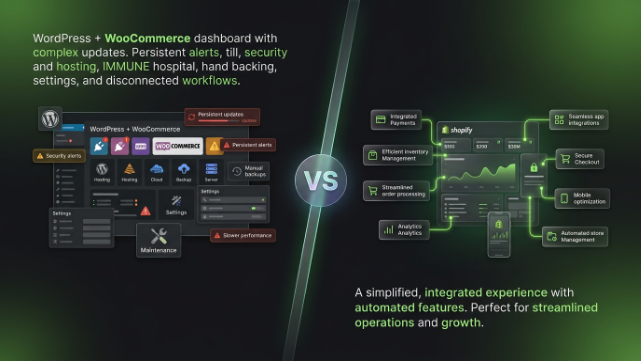
WooCommerce is essentially a plugin that sits on top of WordPress, which means you’re responsible for managing hosting, security, plugin updates, and basically everything technical about keeping your store running smoothly. When your store is small, this isn’t a huge deal. But as you start getting more traffic and more orders, WooCommerce can start feeling like a lot of maintenance work, things breaking after plugin updates, slow loading times, security vulnerabilities, and the constant need to troubleshoot technical issues.
Shopify, on the other hand, is a fully hosted platform. That means Shopify handles all the technical infrastructure, security, and updates for you. You just focus on running your business, not babysitting a website. This is honestly the biggest reason store owners make the switch, they want to spend less time fixing things and more time actually growing their store.
What You Need to Prepare Before Migrating
Migration isn’t something you should just jump into without a plan. Before you touch anything, it’s worth taking stock of everything you’ll need to move over.
This includes your product catalog with all their details like titles, descriptions, prices, images, and variants. You’ll also need your customer data, meaning names, emails, addresses, and order history if you want to keep that continuity with existing customers. Don’t forget about your existing orders too, especially recent ones, since some store owners like to keep historical order data accessible even after the move.
You’ll also want to gather your blog content if you have one, your SEO data like URL structures and meta descriptions, and any custom pages you’ve built like About Us or FAQ pages. Having all of this mapped out before you start makes the actual migration process so much smoother.
Choosing Your Migration Method
There are a few different ways to actually move your data from WooCommerce to Shopify, and which one you pick depends on your technical comfort level and how much data you’re dealing with.
The first option is using a migration app. Shopify has several apps built specifically for this purpose, like Cart2Cart or LitExtension, that can automatically pull your products, customers, and orders from WooCommerce and import them directly into your new Shopify store. This is by far the easiest route for most store owners because it handles the heavy lifting for you without needing any coding knowledge.
The second option is manual migration using CSV files. WooCommerce lets you export your data as CSV files, and Shopify lets you import CSV files too. This method gives you more control over exactly what gets migrated, but it requires more manual work to make sure the file formats match up correctly between the two platforms.
The third option, which is really only for larger stores with complex needs, is hiring a developer to build a custom migration script. This is more expensive and time-consuming, but it gives you the most flexibility if you have unusual data structures or specific requirements that the standard tools can’t handle.
For most small to medium stores, a migration app is genuinely the best balance of ease and reliability.
Setting Up Your New Shopify Store
While your migration app is handling the data transfer, or before you start a manual migration, you’ll want to get your actual Shopify store set up. This means choosing a theme that matches your brand, or is at least close enough that you can customize it afterward.
Take some time here to think about your store structure too. Are your product categories from WooCommerce going to translate cleanly into Shopify collections? Sometimes the way WooCommerce organizes products doesn’t map perfectly onto how Shopify handles things, so it’s worth planning this out rather than just letting the migration tool decide for you.
This is also a good time to set up your payment gateways, shipping settings, and tax configurations in Shopify, since these won’t automatically transfer over from WooCommerce, they need to be configured fresh on the new platform.
Migrating Your Products
Products are usually the biggest and most important part of any migration, so let’s talk through this specifically. When you migrate products from WooCommerce to Shopify, you want to make sure titles, descriptions, images, prices, and variants (like size and color options) all come across accurately.
One thing that often gets messed up during migration is product variants, since WooCommerce and Shopify handle variant structures a bit differently. After migration, it’s worth manually spot checking a handful of products, especially ones with multiple variants, to make sure everything transferred correctly and nothing got mixed up or duplicated.
Also double check your product images. Sometimes migration tools compress or resize images differently, which can affect how your product pages look once everything’s live on Shopify.
Migrating Customer Data and Order History
If you’ve been running your store for a while, you probably have a solid customer base with accounts, saved addresses, and purchase history. Most migration apps can transfer this data over, but it’s important to communicate with your existing customers about the change.
Send out an email letting them know you’re moving to a new platform, and if their account requires them to reset their password on the new system (which is common, since passwords typically can’t be migrated for security reasons), let them know clearly how to do that. This little bit of communication goes a long way in avoiding confused customers or a flood of support requests after launch.
Order history migration is useful mainly for your own records and for customers who want to reference past purchases. It’s not always essential for every store, so if you’re on a tight budget or timeline, this is one area where you could potentially simplify things if needed.
Handling SEO and URL Redirects
This is honestly one of the most important parts of migration that a lot of store owners overlook, and it can seriously hurt your search rankings if you don’t handle it properly.
When you move to Shopify, your URL structure is going to change. WooCommerce URLs and Shopify URLs follow different formats, which means all your existing indexed pages on Google are technically going to point to broken links unless you set up proper redirects.
You need to create 301 redirects from your old WooCommerce URLs to your new corresponding Shopify URLs. This tells search engines that your page has permanently moved, and it passes along most of the SEO value your old pages had built up over time. Skipping this step can tank your search rankings and lose you a ton of organic traffic that took months or years to build.
It’s also worth updating your meta titles and descriptions on Shopify to match what you had on WooCommerce, or improving them if you see the opportunity, since these directly affect how your pages show up in search results.
Testing Before You Go Live
Once your migration is mostly complete, resist the urge to just flip the switch and launch immediately. Take time to thoroughly test your new Shopify store first.
Go through the entire customer journey yourself. Browse products, add items to cart, go through checkout, and make sure payment processing actually works correctly. Test this across different devices too, desktop, mobile, and tablet, since a lot of your traffic is probably coming from phones these days.
Check that your shipping rates are calculating correctly, your tax settings are accurate, and that any discount codes or promotions you had are still functioning the way you expect. It’s much better to catch these issues before customers do.
Managing the DNS Switch
When you’re ready to actually launch your Shopify store publicly, you’ll need to point your domain to Shopify instead of your WooCommerce hosting. This involves updating your DNS settings, which can sound intimidating but is actually a pretty straightforward process that Shopify walks you through step by step.
Keep in mind that DNS changes can take anywhere from a few minutes to 48 hours to fully propagate across the internet, so it’s smart to do this during a lower-traffic period for your store, and definitely not during a big sale or promotion.
What to Do After Migration
Once you’re live on Shopify, your work isn’t quite done yet. Monitor your site closely for the first few weeks. Keep an eye on your Google Search Console to make sure your redirects are working properly and your pages are still being indexed correctly.
Watch your analytics too, comparing traffic and conversion rates before and after the migration. Some dip in the first few weeks is normal as search engines adjust to your new URLs, but if you see a dramatic and sustained drop, that’s a sign something in your migration or redirect setup needs attention.
Keep your old WooCommerce site accessible in some read-only capacity for a little while too, just in case you discover you missed migrating something important. It’s better to have that safety net than to realize weeks later you lost data with no way to recover it.
Common Mistakes to Avoid During Migration
Let’s go over a few things that trip up store owners during this process so you can avoid them.
Not setting up proper URL redirects is probably the biggest mistake, since it directly damages your SEO rankings that took real time and effort to build. Rushing the testing phase is another common issue, launching before thoroughly checking checkout flow, shipping calculations, and payment processing can lead to lost sales and frustrated customers right when you need things to go smoothly.
Forgetting to communicate with existing customers about the platform change, especially around password resets, can also create a wave of confused support messages that could’ve been avoided with a simple heads up email beforehand.
What This Means for Shopify Stores in Pakistan
If you’re running a WooCommerce store here in Pakistan and considering the move to Shopify, there are a few specific things worth thinking through.
Payment gateways are a big one. If you’ve been using local payment options integrated into your WooCommerce store, you’ll need to make sure equivalent options are properly set up on Shopify, since not all local Pakistani payment gateways have the same level of native support across both platforms. It’s worth confirming compatibility before you migrate so there’s no gap in payment processing for your customers.
Cash on delivery, which is still hugely popular among Pakistani shoppers, also needs to be configured correctly on your new Shopify store, since this isn’t always turned on by default the same way it might have been set up on your WooCommerce site through custom plugins.
Courier and shipping integrations are another consideration. If you were using specific plugins on WooCommerce to connect with local couriers like Leopards, TCS, or M&P, you’ll want to find the Shopify equivalent apps and get them properly configured before launch, so your fulfillment process doesn’t hit a snag right when you’re trying to establish trust on your new platform.
Since a lot of local customers are still building trust in online shopping generally, any disruption during migration, like broken pages or payment issues, can be more damaging to customer trust here compared to markets where online shopping is already deeply established. Taking extra care with testing before launch is especially important for this reason.
Wrapping It Up
Migrating from WooCommerce to Shopify is a legitimate undertaking, but it’s absolutely manageable if you approach it with a clear plan. Take time to prepare your data, choose the right migration method for your situation, handle your SEO redirects carefully, and thoroughly test everything before you go live.
The payoff is a store that’s easier to manage, more reliable, and built on infrastructure that scales with you as your business grows, without you having to worry about hosting, security patches, or plugin conflicts anymore.
If you’re running a store in Pakistan and thinking about making this move, that’s exactly the kind of migration we handle at TheScriptFlow. We work with Shopify stores across Pakistan and internationally, and we can manage your entire migration process, from data transfer to SEO redirects to local payment and courier setup, so you can move over to Shopify smoothly without losing traffic, customers, or sleep over it. Reach out to us at thescriptflow.com and let’s get your store moved the right way.