How to Personalize Your Shopify Store for Each Visitor
Let’s talk about something most Shopify store owners know they should be doing but keep putting off: personalization. And I get why. It sounds like a big, technical project that needs a data science team. But honestly, personalization has gotten way more accessible over the last couple of years, and even small stores can pull off meaningful versions of it without hiring anyone or writing a single line of code.
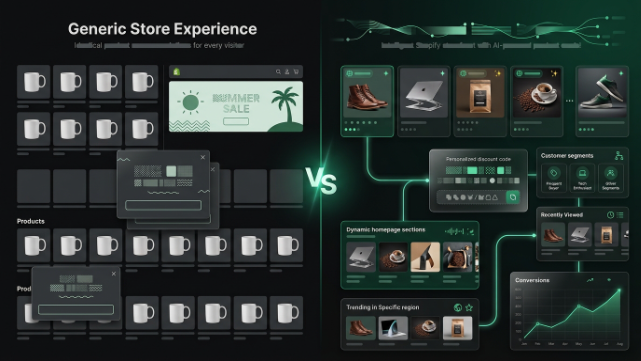
Here’s the core idea before we get into the how. Every visitor who lands on your store is different. A first time visitor from an Instagram ad has different needs than a returning customer who’s bought from you three times. Someone browsing on their phone during a lunch break behaves differently than someone comparison shopping on a laptop at night. If your store shows the exact same experience to every single one of these people, you’re leaving conversions on the table, plain and simple.
So let’s go through exactly how to personalize your Shopify store, starting with the basics and working up to the more advanced stuff.
Why Personalization Actually Moves The Needle
Generic experiences convert at generic rates. When a visitor feels like a store understands what they’re looking for, whether that’s showing them relevant products, remembering their size preference, or greeting them by name in an email, they’re far more likely to stick around and buy. This isn’t just a nice to have anymore either, people have gotten used to platforms like Netflix and Amazon adapting to them, so a static, one size fits all store experience actually feels a little dated by comparison now.
The good news is you don’t need to personalize everything at once. Start small, measure what works, and build from there.
Start With Product Recommendations Based On Behavior
The easiest and highest impact personalization move you can make is showing relevant product recommendations instead of generic “you might also like” sections that show the same five products to everyone.
Apps like Nosto, LimeSpot, and Rebuy specialize in this. They track what a visitor browses, what they’ve added to cart, and what similar customers have bought, then dynamically adjust the product recommendations shown to that specific person. So instead of every visitor seeing your bestsellers on the homepage, a visitor who’s been browsing running shoes sees running related recommendations, while someone browsing formal wear sees a completely different set.
This kind of dynamic merchandising typically shows up in a few key spots: your homepage, your product pages under a “customers also bought” section, your cart page, and post-purchase thank you pages. Each of these spots is a chance to nudge the visitor toward something relevant instead of something generic, and it usually has a direct, measurable impact on average order value.
Personalize Based On Traffic Source
Here’s something a lot of store owners never think about. If someone clicks through from a Facebook ad for a specific product, and they land on your generic homepage instead of that exact product or a page built around it, you’ve already lost a chunk of that momentum. The ad promised something specific, and the landing experience should match it.
You can build dedicated landing pages for your biggest traffic sources using Shopify’s native page builder or tools like PageFly or Shogun, tailoring the messaging, imagery, and even currency or language to match where the traffic is coming from. If you’re running geo-targeted ads, this matters even more, since a Pakistan targeted ad campaign should probably land visitors on a page that reflects local pricing, COD availability, and delivery timelines rather than a generic international page.
Use On-Site Personalization Based On Behavior Signals
Beyond just product recommendations, you can personalize entire sections of your store dynamically based on how someone’s behaving in real time. This is where apps like Nosto and LimeSpot go a bit deeper, letting you set up rules like showing a specific banner to visitors who’ve viewed three or more products without adding anything to cart, or displaying a size guide prompt to visitors who’ve lingered on a product page without scrolling to the size chart.
You can also personalize based on cart contents. If someone has a cart full of baby products, showing them a banner about your baby safe materials or your return policy for baby items builds trust at exactly the right moment. If someone abandoned a cart with a specific item last week and returns to browse again, some tools let you show a subtle “still thinking about this?” nudge with that exact product.
Email and SMS Personalization Matters Just As Much
Personalization shouldn’t stop when the visitor leaves your store. Klaviyo is the most widely used tool here for Shopify, and it lets you build flows based on actual behavior rather than generic blasts. Someone who abandoned a cart gets a different email than someone who just made their first purchase. Someone who’s bought from you five times gets treated differently than someone who’s never purchased.
The personalization here goes beyond just inserting a first name into a subject line, though that helps too. You can dynamically populate the actual product images and details of what someone left in their cart, recommend products based on their purchase history, and time these messages based on when that specific customer tends to be most active, rather than sending everything at the same fixed hour for your entire list.
SMS personalization through the same kind of behavioral triggers works well for time sensitive nudges too, like a restock alert for a product someone specifically viewed, rather than a generic “we’re back in stock” blast to your whole subscriber base.
Remember Returning Visitors
One of the most underrated personalization moves is simply recognizing when someone’s been to your store before. Tools like Klaviyo and most modern popup apps such as Justuno or Privy let you show different messaging to first-time visitors versus returning ones. A first time visitor might see a “welcome, here’s 10% off your first order” popup, while a returning visitor who already used that code sees something different entirely, like a loyalty program invite or a reminder about items they were browsing last time.
This avoids the awkward and honestly kind of annoying experience of showing the same “first order discount” popup to someone on their fifth visit, which does nothing but signal that your store isn’t paying attention.
Let Customers Personalize Things Themselves
Not all personalization has to be automated and behind the scenes. Sometimes the most effective move is just letting customers tell you their preferences directly. Simple account-level features like saved sizes, favorite categories, or wishlist functionality let customers build their own personalized experience over time, and then you can use that data to inform your recommendations and email content going forward.
Apps that add wishlist functionality, like Wishlist Plus, are a low effort way to start collecting this kind of first party preference data, which becomes increasingly valuable as third-party tracking gets more restricted across the web.
Use Shopify’s Native Search & Discovery Features
Don’t overlook Shopify’s own free Search & Discovery app either. It lets you set up personalized search results and “related products” sections without needing a third-party subscription. While it’s not as deep as dedicated personalization platforms, it’s a solid starting point for smaller stores that want to dip a toe into this without adding another monthly bill, and it’s worth having installed even if you eventually layer other tools on top of it.
Personalize Pricing And Offers Carefully
This one needs a bit of caution, but it’s worth mentioning. Some stores personalize discount offers based on browsing behavior or purchase history, showing a slightly bigger incentive to a visitor who’s shown high purchase intent but hasn’t converted, versus a smaller or no discount to someone who converts easily without one. This can work well, but be careful with transparency here, since customers who discover they’re being shown different prices or discounts than others can feel like they’ve been treated unfairly. If you go this route, keep it to discount codes and offers rather than actual product price differences, and be thoughtful about how it might look if a customer compares notes with a friend.
Measuring Whether Your Personalization Is Actually Working
Personalization only matters if it’s improving your numbers, so don’t set it up and forget it. Track conversion rate, average order value, and email click through rates before and after implementing personalized elements, and isolate specific changes where you can. Most personalization apps come with their own built in analytics showing the lift from personalized recommendations versus generic ones, so use that data to figure out which personalization efforts are actually paying off and which ones are just adding complexity without much return.
A Note for Store Owners in Pakistan
If you’re running a Shopify store targeting Pakistani customers, personalization takes on a slightly different shape here compared to Western markets. Payment method personalization matters a lot, showing COD prominently to visitors who’ve shown COD preference before, or defaulting to it for new visitors from regions where prepaid adoption is still lower, can meaningfully reduce checkout drop-off.
WhatsApp is also worth building into your personalization strategy directly. If a visitor has previously interacted with your store through WhatsApp, whether that’s confirming an order or asking a product question, tailoring their next on-site experience or follow-up message around that same channel tends to feel more natural to them than pushing them into email, which isn’t always the primary channel Pakistani shoppers check regularly.
Language and currency personalization matters too, especially if you’re serving both local and international customers from the same store. Detecting location and adjusting currency display, and offering Urdu-friendly messaging in banners or popups for local traffic, is a small touch that can make the experience feel noticeably more tailored without much technical lift.
Wrapping It Up
Personalization doesn’t have to mean building some complex AI system from scratch. Start with dynamic product recommendations, tailor your landing pages to match your traffic sources, personalize your email and SMS flows based on actual behavior, and make sure returning visitors don’t see the exact same generic messaging as first-timers. Layer in customer-driven personalization like wishlists and saved preferences, and always measure whether the changes you’re making are actually moving your numbers.