Remove ‘Powered by Shopify’ in Under 60 Seconds
If you’ve typed “how to remove Powered by Shopify” into YouTube or Google, you already know the problem, and you’ve probably already sat through a 10-minute video that ends with “now open your theme.liquid file and find this line of code.“
For most merchants, that’s where the tutorial dies.
This guide breaks down exactly why “Powered by Shopify” shows up in your footer, why the old coding method is risky, and how to remove it permanently in under 60 seconds using an app called PA Powered By Remover no code editor, no developer, no theme file edits required.
The Pain Point: Why “Powered by Shopify” Is a Problem for Your Brand
Every Shopify store ships with a default footer credit line “Powered by Shopify.” It’s harmless from Shopify’s side, but for a merchant trying to build a brand, it quietly undercuts you in a few ways:
- It breaks the illusion of a custom-built store. Customers land on your footer and instantly know you’re running on a template platform, not a custom build.
- It looks unfinished next to competitors who’ve already removed it.
- It’s a small trust signal, and in ecommerce, trust signals compound. A polished footer with your own copyright text and trust badges reads as more established than a stock Shopify line.
- It’s one of the most searched Shopify customization questions on YouTube, which tells you how many merchants hit this exact wall early in their store setup.
The good news: removing it doesn’t require a redesign. It requires about five clicks.
The Old Way: Editing Theme Code (And Why Most Merchants Get Stuck)
Before theme app extensions existed, the only way to remove the footer credit was to manually dig into your theme’s code:
- Go to Online Store → Themes → Edit Code
- Search through
theme.liquid,footer.liquid, orsections/footer.liquidfor the “powered by” snippet - Delete or comment out the exact line — without breaking the rest of the footer
- Repeat this every time you switch themes, since the code lives inside the theme file itself
Here’s why this approach causes so many merchants to give up or hire a developer:
- One wrong character breaks your footer, or worse, your whole storefront.
- It’s not update-safe. The moment you update your theme or switch to a new one, the code snippet is gone and you have to find and remove it all over again.
- It voids easy support. If something looks off after a manual edit, Shopify support and most theme developers will tell you it’s a “custom code” issue meaning you’re on your own.
- It’s not built for merchants who aren’t developers. Liquid syntax, theme structure, and version differences between Online Store 2.0 and older themes make this genuinely difficult for non-technical store owners.
This is exactly why the topic keeps trending merchants are searching for a fix that doesn’t involve opening Edit Code at all.
The Better Way: PA Powered By Remover
PA Powered By Remover solves this the way Shopify actually recommends solving footer customization in 2026 as a Theme App Extension, not a code edit.
That distinction matters:
- Zero theme file edits. The app doesn’t touch
theme.liquidor any footer template. It layers on top of your theme through Shopify’s native App Embed system. - Survives theme updates and theme switches. Because nothing is hardcoded into your theme files, updating or changing your theme won’t bring “Powered by Shopify” back.
- Works across Online Store 2.0 themes, so it’s not tied to one specific theme structure.
- No performance cost. No extra scripts weighing down your page speed it’s a native embed, not a bloated third-party script.
On top of removing the default credit, the app lets you:
- Add your own custom copyright text, with dynamic tags that auto-update the year and pull in your store name automatically
- Display trust and payment badges in the footer to boost buyer confidence
- Do all of this from a simple dashboard inside your Shopify admin live preview included
In short: what used to take a developer and a risky code edit now takes one toggle.
Step-by-Step: How to Remove “Powered by Shopify” With PA Powered By Remover
Step 1: Install the App
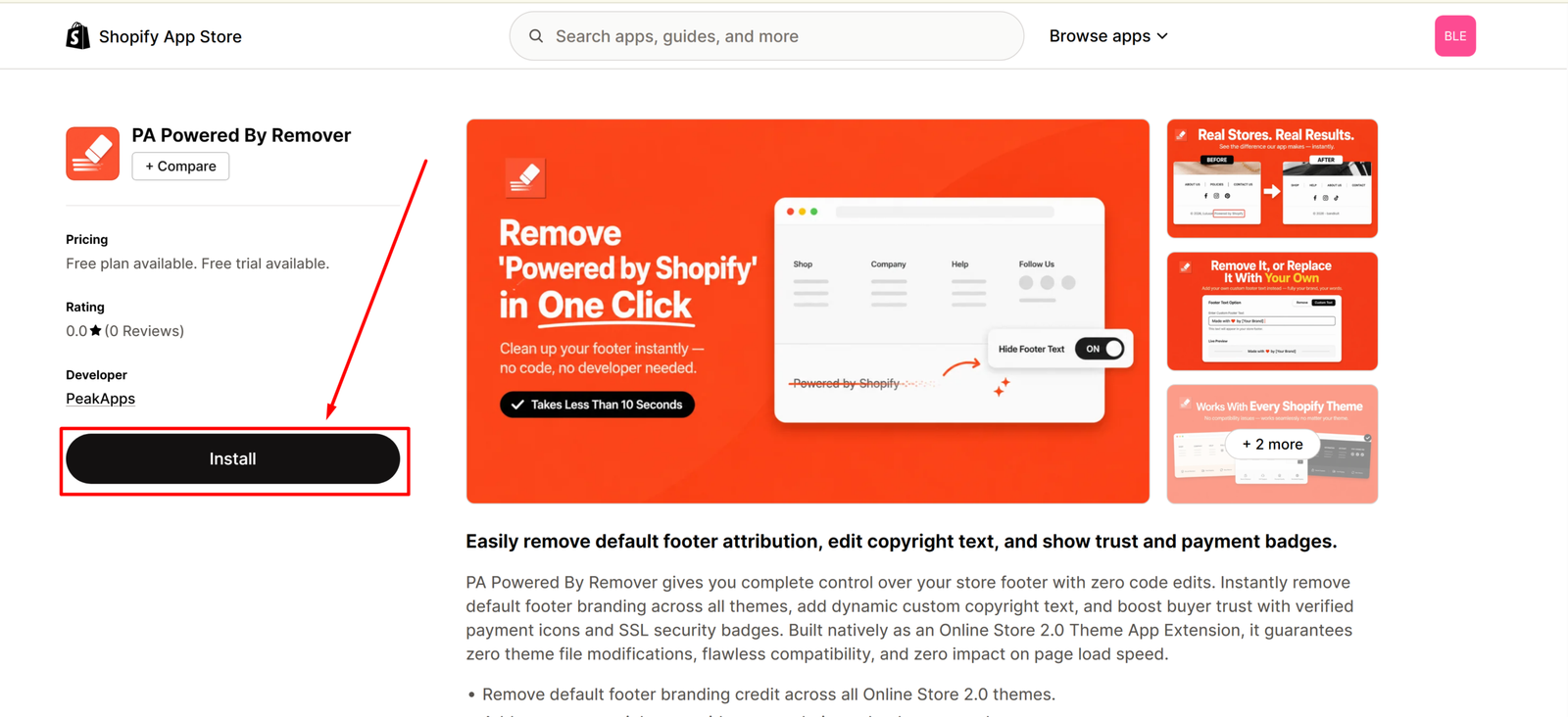
Head to the PA Powered By Remover app listing and click Install. Approve the requested permissions, the app only needs access to your theme to apply the embed.
Step 2: Open the App From Your Shopify Admin
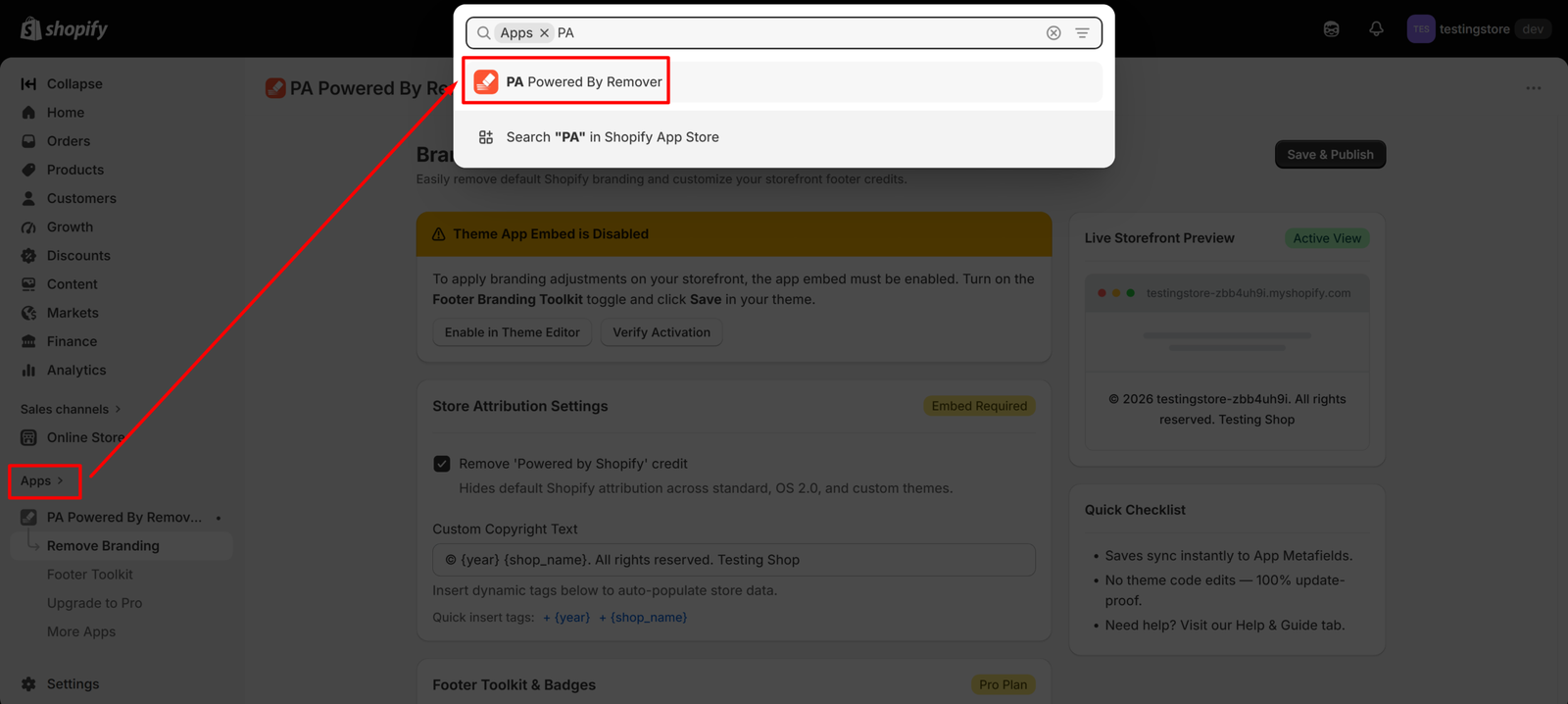
Once installed, find PA Powered By Remover under the Apps section in your Shopify admin. This opens the Branding & Footer Dashboard, where you’ll manage everything.
Step 3: Enable the App Embed
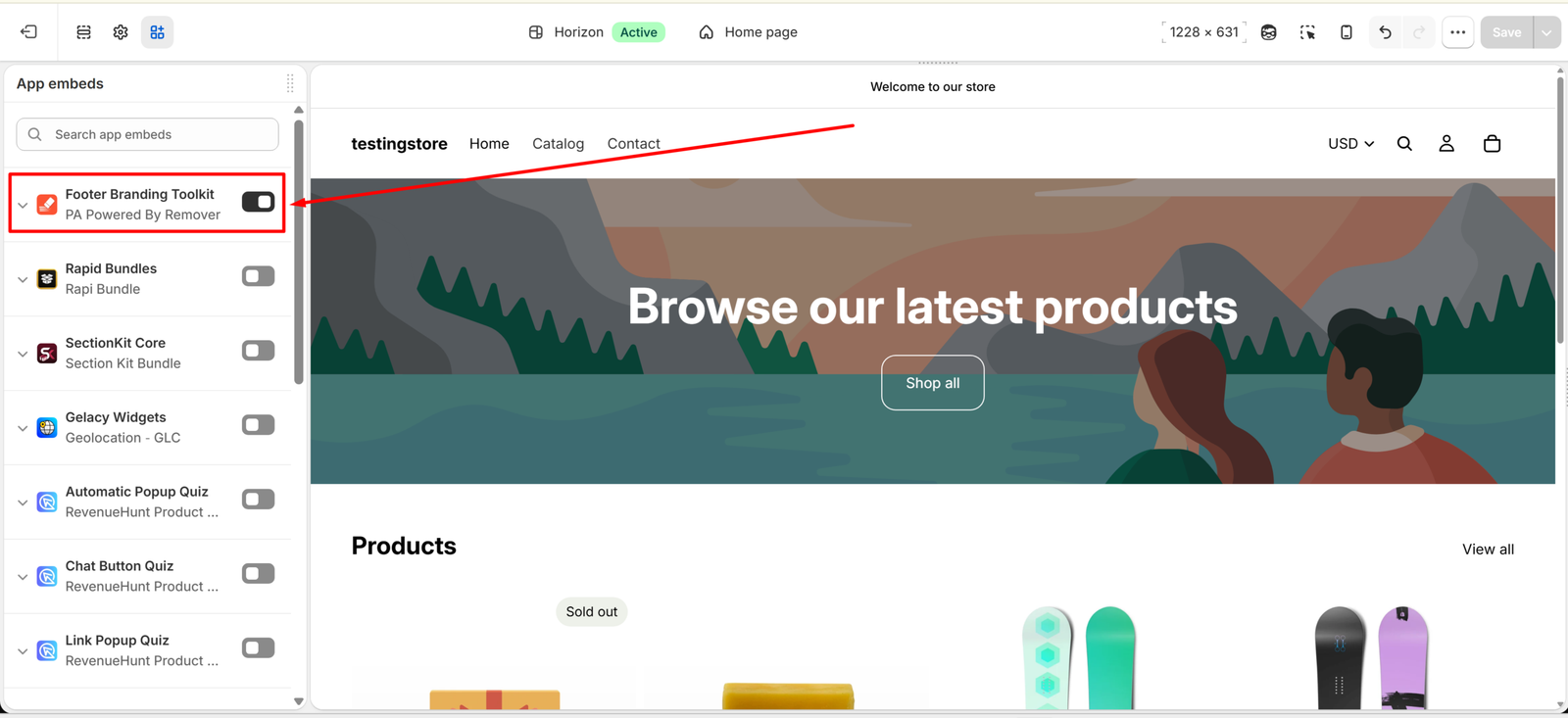
You’ll see a notice that reads “Theme App Embed is Disabled.” This is expected, Shopify requires you to manually turn on app embeds for security. Click Enable in Theme Editor, and the Footer Branding Toolkit will activate inside your active theme.
Step 4: Remove the Default Credit and Add Your Own
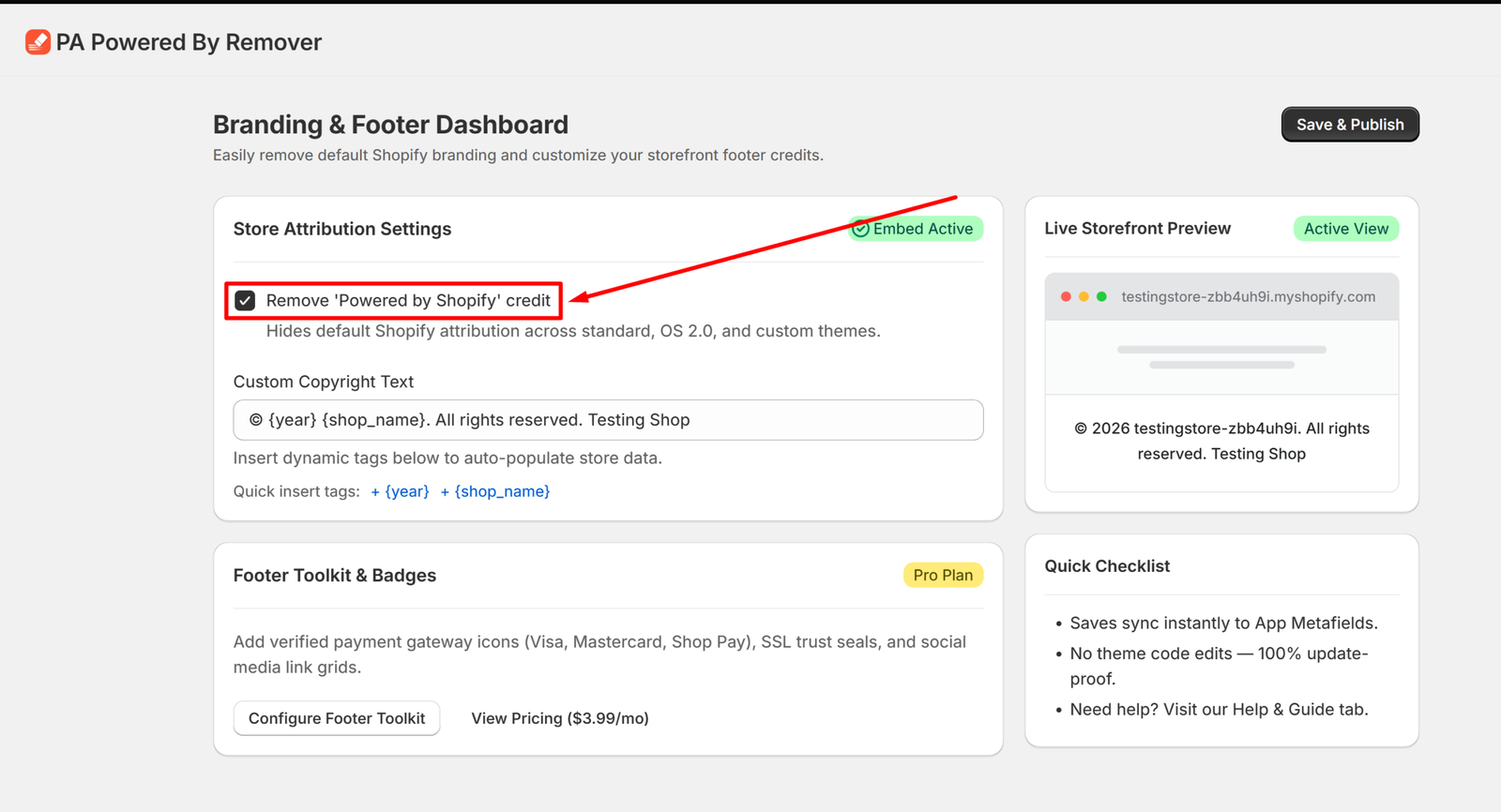
Back in the dashboard, toggle “Remove ‘Powered by Shopify’ credit” on. This instantly hides the default attribution across standard, OS 2.0, and custom themes.
While you’re there, update the Custom Copyright Text field. The app supports dynamic tags like {year} and {shop_name}, so your footer text updates automatically every year no manual edits needed going forward.
Step 5: Save, Publish, and Check Your Storefront
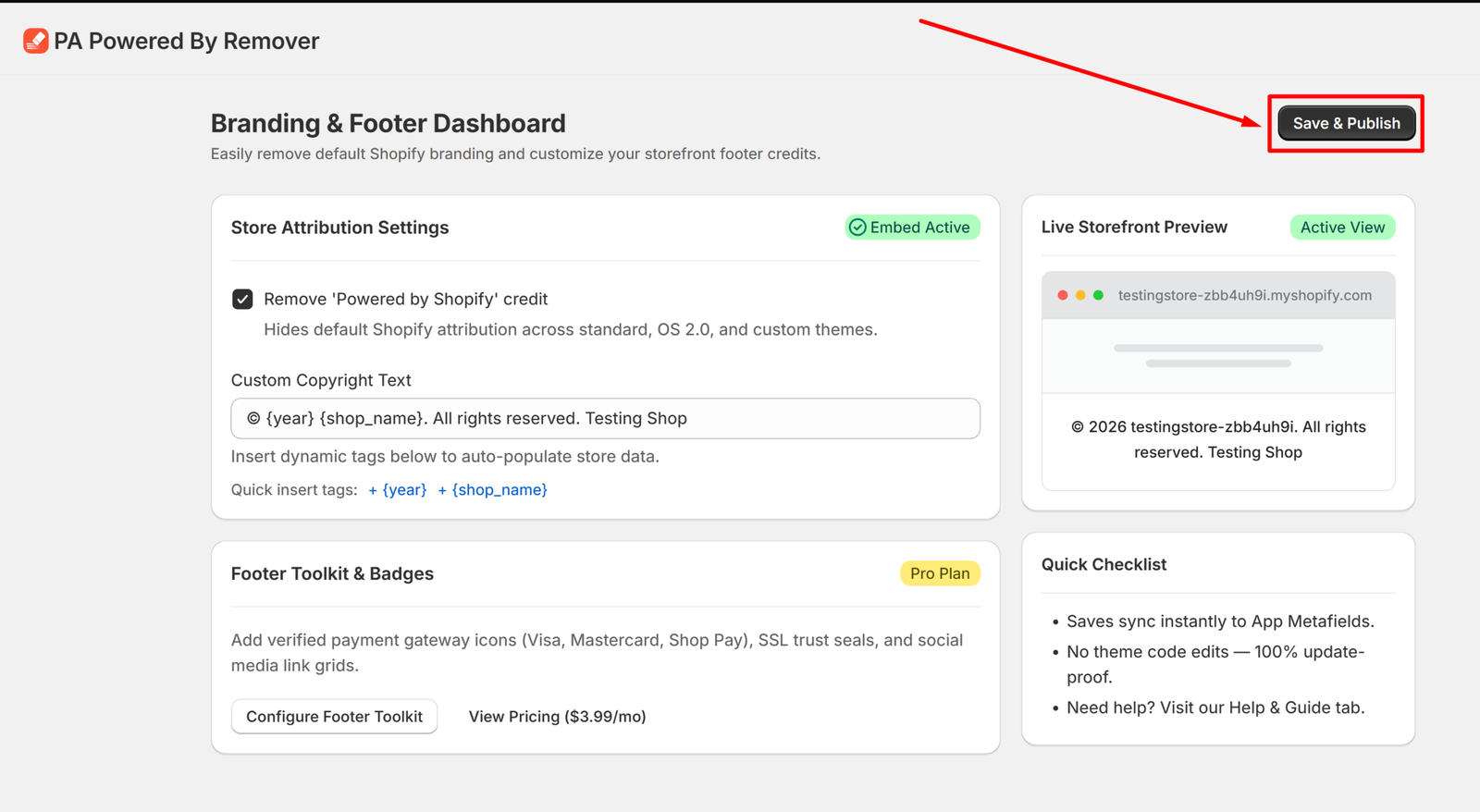
Click Save & Publish, then open your live storefront to confirm the change. You’ll see the before-and-after instantly: “Powered by Shopify” gone, your own branding in its place.
That’s the entire process, five steps, no code editor, and it’s reversible at any time if you ever want to switch it back.
Why This Matters Beyond Just “Removing a Line of Text”
A clean, branded footer is a small detail that adds up to a bigger impression: that your store is a real, established business, not a template someone spun up over a weekend. Combined with custom copyright text and trust badges, it’s one of the fastest, lowest-effort improvements you can make to how your store is perceived.
And because it’s handled through a theme app extension instead of hardcoded liquid, you won’t have to think about it again, not when you update your theme, not when you switch themes entirely.
FAQ
Does removing “Powered by Shopify” break Shopify’s terms of service? No. Shopify explicitly supports footer customization through themes and apps like this one. It’s a standard store customization, not a workaround.
Will this work if I change my theme later? Yes. Because the app works as a Theme App Extension rather than editing theme code directly, you’ll just need to re-enable the app embed on your new theme no code hunting required.
Do I need any coding knowledge to use this app? None. Everything is managed through toggles and text fields in the app dashboard.
Is there a free plan? Yes, PA Powered By Remover offers a free plan that includes one-click removal, and a Pro plan for merchants who want additional customization like dynamic copyright formatting and a social media link bar.
Ready to clean up your footer? Install PA Powered By Remover and get it done in under a minute, no developer required.




