HOW TO SHOW BUNDLE SAVINGS ON A SHOPIFY PRODUCT PAGE TO BOOST CONVERSIONS
Introduction
Customers love discounts, but simply offering a lower price isn’t always enough to convince them to buy. They need to clearly understand how much they’re saving and why purchasing a bundle is a better deal.
Displaying bundle savings on your Shopify product pages can help customers compare offers, encourage larger purchases, and potentially increase your store’s conversion rate and average order value (AOV).
With Section Kit Bundles, merchants can create attractive product bundle offers, highlight quantity discounts, and present savings directly on Shopify product pages.
What Are Bundle Savings on Shopify?
Bundle savings refer to the amount customers save when purchasing multiple products together instead of buying them individually.
For example, imagine a product normally costs $30.
| Bundle offer | Regular price | Bundle price | Savings |
|---|---|---|---|
| Buy 1 | $30 | $30 | — |
| Buy 2 | $60 | $54 | 10% |
| Buy 3 | $90 | $76.50 | 15% |
Instead of displaying only the final price, showing the original price, discounted price, and savings percentage helps customers understand the value of the offer immediately.
This is where a well-designed bundle offer can make a difference.
Why Showing Bundle Savings Matters for Shopify Stores
Customers Can Understand the Value Instantly
When customers see a clear savings label such as Save 10% or Save $6, they don’t need to calculate the discount themselves.
Clear pricing reduces confusion and makes promotional offers easier to understand.
Encourages Customers to Purchase More Products
A customer planning to buy one item may consider purchasing two or three when they notice the additional savings.
Quantity-based offers can encourage larger purchases and increase average order value.
Makes Product Pages More Attractive
Visually organized bundle offers can help promotional pricing stand out on product pages.
Clear headings, discount labels, and pricing options make it easier for customers to notice available deals.
Helps Customers Compare Different Offers
When multiple bundle options appear together, shoppers can quickly compare the available quantities and prices.
For example, displaying Single, Duo, and Trio options makes it easier to understand the difference between purchasing one item and purchasing multiple units.
Builds Customer Confidence
Transparent pricing helps customers understand exactly what they’re purchasing.
Displaying genuine savings and accurate discounts can create a more trustworthy shopping experience.
How Section Kit Bundles Helps Display Savings on Shopify
Section Kit Bundles is a Shopify app designed to help merchants create product bundles, quantity discounts, and promotional offers.
Instead of developing custom bundle layouts, merchants can use ready-made templates and a visual editor to present their offers.
The app supports different promotional strategies, including volume discounts, BOGO offers, and frequently bought together bundles.
These options help merchants communicate value directly on eligible product pages.
Display Quantity Discounts With Clear Savings
Quantity discounts are useful for encouraging customers to purchase multiple units of the same product.
With Section Kit Bundles, merchants can create quantity-based offers with different pricing tiers.
For example:
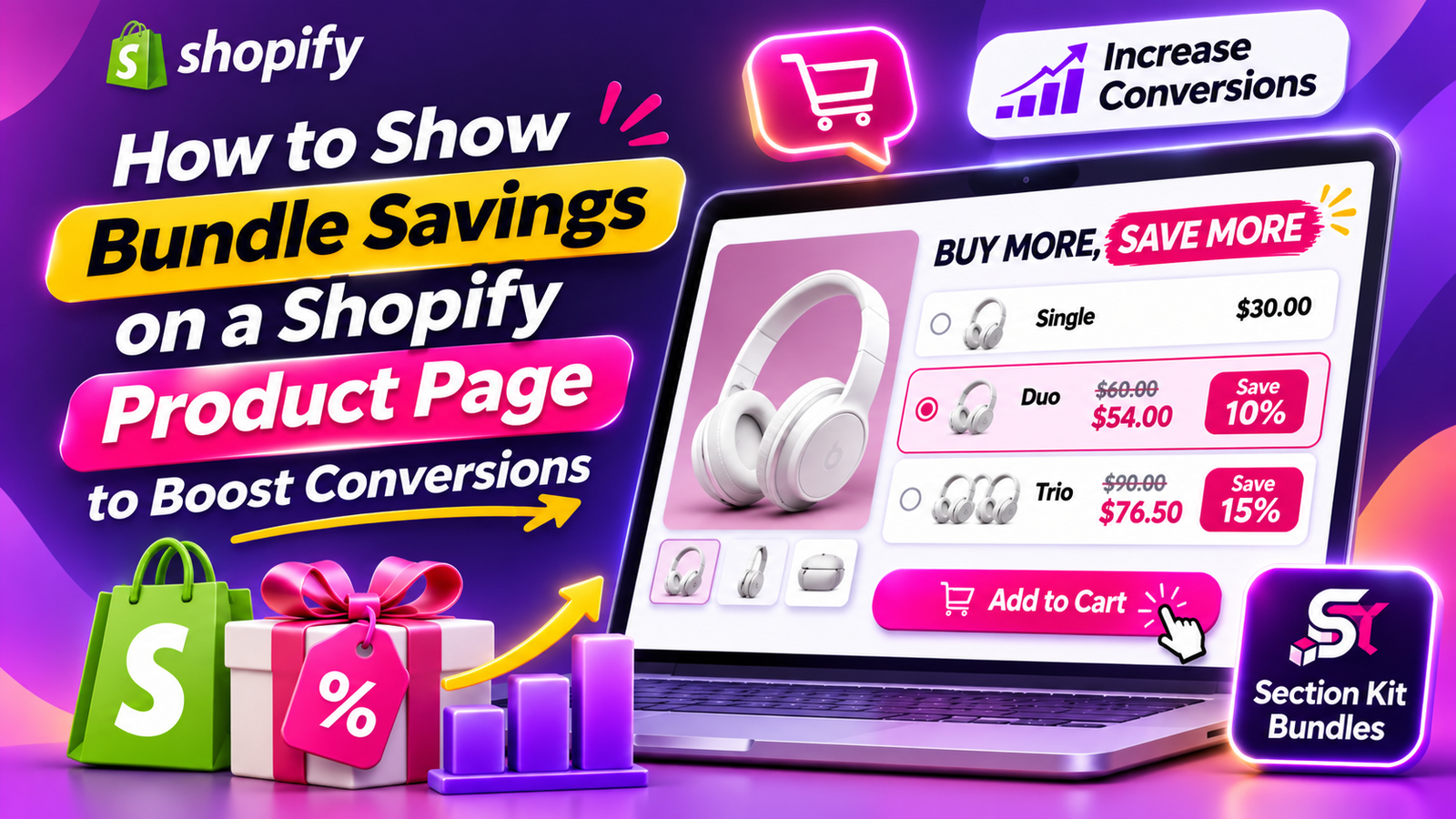
BUY MORE, SAVE MORE
- Single — $30
- Duo — $54 | Save 10%
- Trio — $76.50 | Save 15%
This type of presentation makes the available savings easy to compare.
Customers can quickly identify which option offers the best value for their needs.
Make Bundle Savings More Noticeable With Attractive Designs
The visual presentation of a bundle offer matters almost as much as the discount itself.
A poorly organized offer can confuse shoppers, even when the savings are attractive.
Section Kit Bundles provides customizable layouts that help merchants present their promotions in a clean, organized format.
A strong bundle design should emphasize the offer heading, quantity options, regular prices, discounted prices, and savings.
The goal is to make the promotion easy to understand without overwhelming the product page.
Why Volume Discounts Can Increase Average Order Value
Average order value measures how much customers spend per order.
When customers purchase multiple units through a quantity discount, their order total can increase.
For example, a customer originally planning to spend $30 might choose a $54 two-unit offer after seeing the savings.
Although the customer receives a discount, the store generates a larger order.
However, merchants should also consider profit margins when setting quantity discounts. Higher order values do not automatically guarantee higher profits.
BOGO Offers Can Make Bundle Savings More Appealing
Buy One Get One (BOGO) promotions are another way to communicate value.
Offers such as Buy 2 Get 1 Free can attract customers who want to purchase multiple products.
Section Kit Bundles supports BOGO-style promotional offers, allowing merchants to create offers around additional free or discounted products.
When presented clearly, these promotions help customers understand what they need to purchase and what they’ll receive.
Frequently Bought Together Bundles Encourage Additional Purchases
Frequently bought together bundles combine complementary products into one offer.
For example, a skincare store could offer a cleanser, moisturizer, and serum together.
Instead of purchasing each product separately, customers can choose a combined offer.
Section Kit Bundles supports frequently bought together promotional layouts that help merchants present related products.
Showing genuine savings alongside these combinations can make the offers more appealing.
Best Practices for Displaying Bundle Savings
Show Accurate Original and Discounted Prices
Customers should be able to compare the regular price with the promotional price.
Avoid exaggerated or misleading savings claims.
Use Clear Discount Labels
Simple labels such as Save 10%, Save $5, or Buy More, Save More communicate promotional value quickly.
Keep Bundle Options Easy to Compare
Too many options can make purchasing decisions difficult.
A small number of clearly presented offers can create a more straightforward shopping experience.
Make Savings Visible on Mobile Devices
Bundle pricing should be easy to read and interact with on smaller screens.
Mobile shoppers should be able to understand the offer without excessive scrolling or confusion.
Protect Your Profit Margins
Discounts should be attractive to customers while remaining financially sustainable.
Calculate your product costs and other expenses before deciding how much savings to offer.
Test Different Bundle Offers
Different customers may respond to different discount amounts and bundle combinations.
Monitor conversion rate, average order value, and profitability to identify which offers perform best.
Why Choose Section Kit Bundles for Your Shopify Store?
Section Kit Bundles helps merchants create and manage promotional offers without complicated custom development.
Its features include:
- Volume Discounts: Create quantity-based promotional offers.
- BOGO Offers: Encourage additional purchases with Buy X Get Y promotions.
- Frequently Bought Together: Present complementary products in attractive bundles.
- Ready-Made Templates: Use prebuilt layouts to create offers more efficiently.
- Visual Customization: Adjust promotional designs to match your storefront.
- Offer Management: Manage and publish bundle promotions from the app dashboard.
- Product Page Integration: Display configured offers on eligible Shopify product pages.
Whether you want to highlight percentage discounts, encourage larger purchases, or promote complementary products, Section Kit Bundles provides tools to support your bundling strategy.
Step 1: Open the Shopify App Store

Image 1: Search for Shopify App Store on Google and open the official website.
Open your browser and search for Shopify App Store. Select the official result to access Shopify’s app marketplace.
The Shopify App Store contains tools for product bundling, store design, marketing, inventory management, and more.
Step 2: Search for Section Kit Bundles
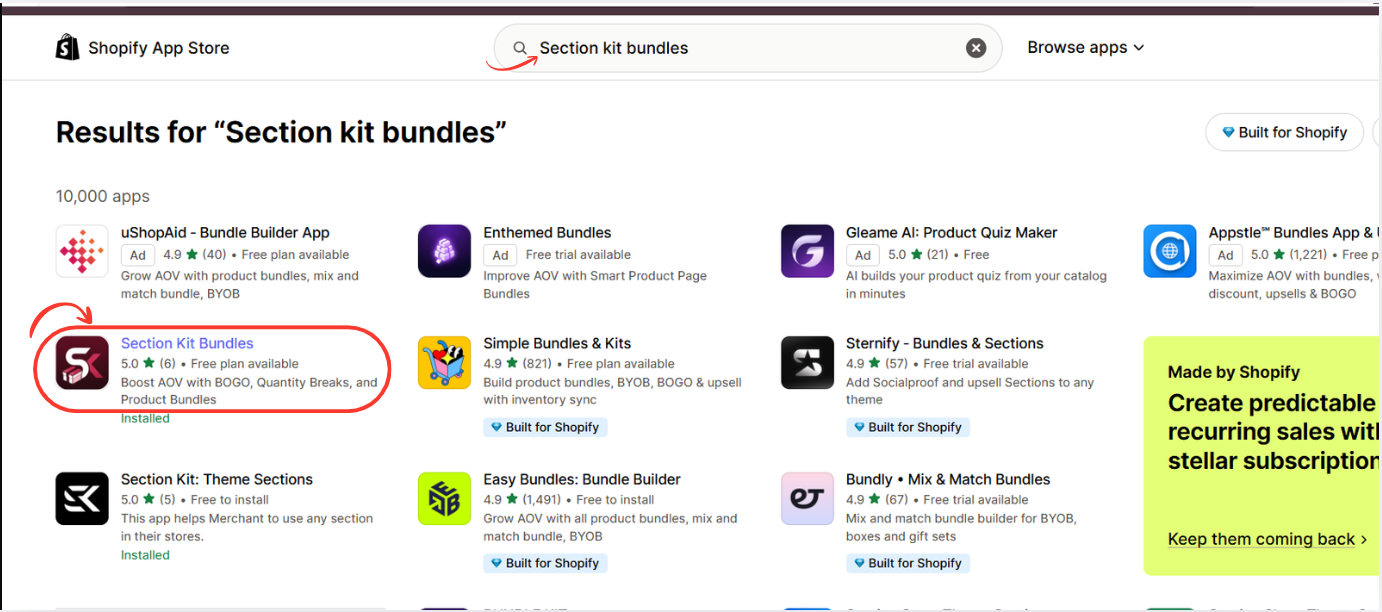
Image 2: Search for Section Kit Bundles and select the highlighted app.
In the Shopify App Store search bar, type Section Kit Bundles.
Find the app in the results and click its listing. The app supports BOGO promotions, quantity breaks, product bundles, and volume discounts. Shopify App Store
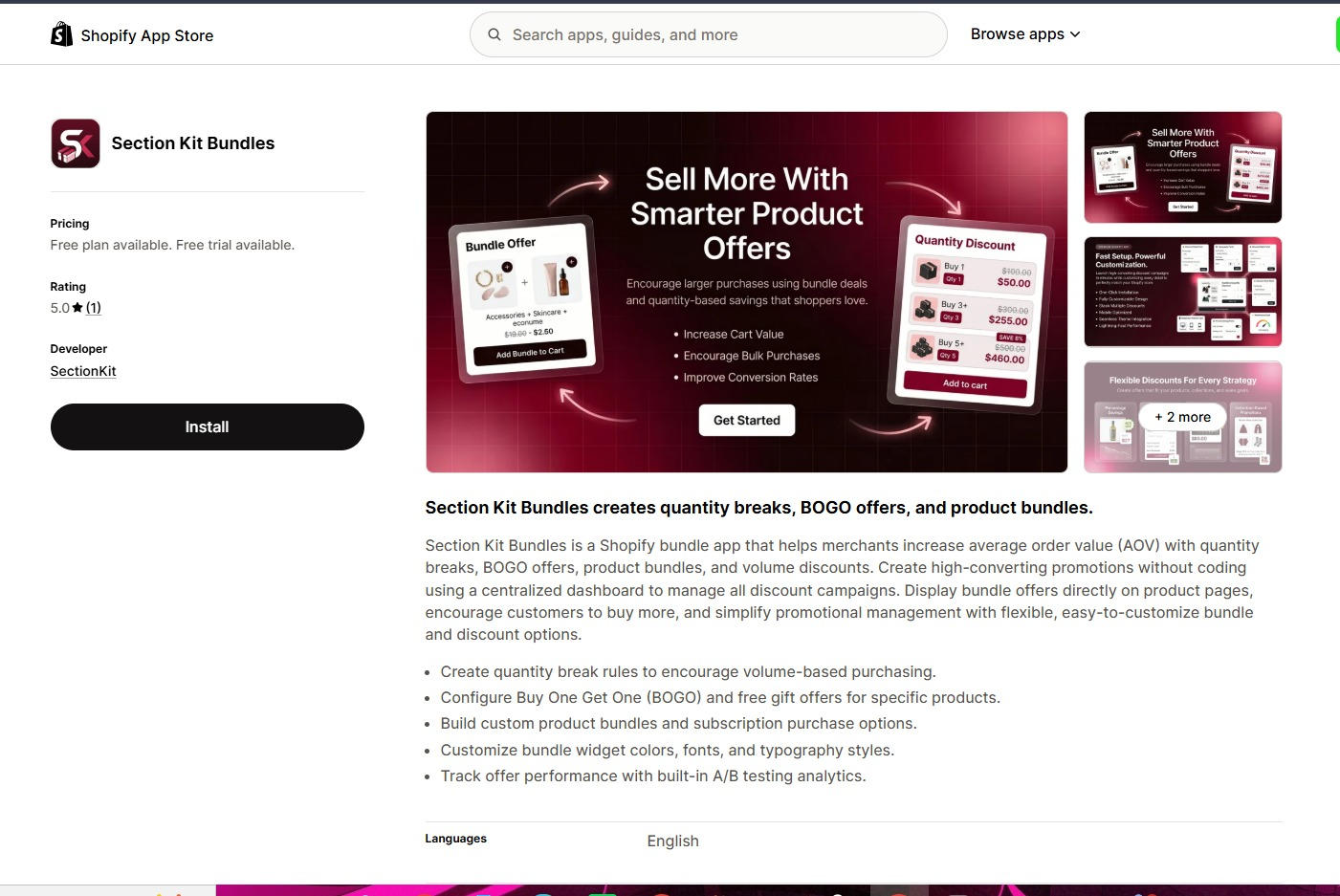
Open the app listing, review the available plans, and click Install. Once installation is complete, open the app from your Shopify admin.
You can also visit the app directly: Section Kit Bundles on the Shopify App Store.
Step 3: Install Section Kit Bundles
Open Section Kit Bundles in the Shopify App Store, click Install, select your store, and review the installation permissions. Once installed, open the app from your Shopify admin.
Step 4: Open the Dashboard and Create a New Bundle
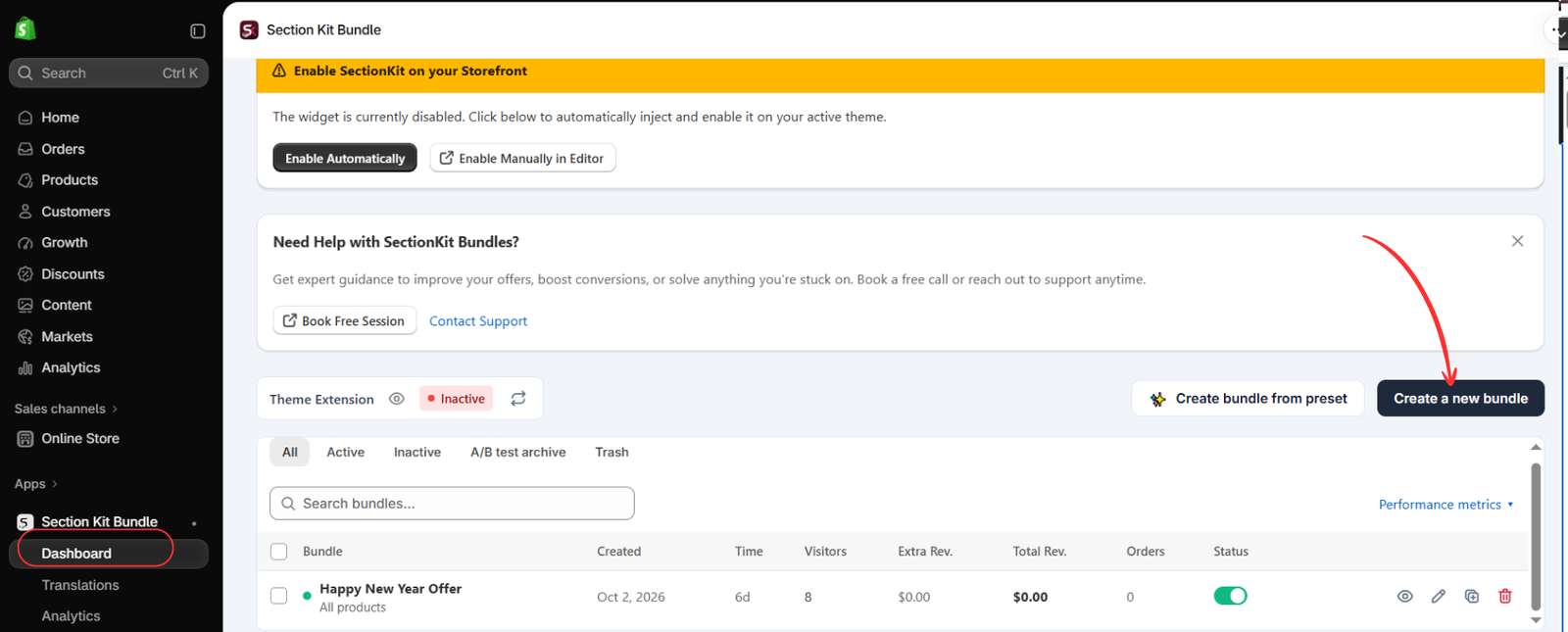
Open Apps → Section Kit Bundle → Dashboard. Click Create a new bundle, as highlighted in Image 2. The dashboard also offers a preset option and shows existing promotions.
The image shows the theme extension as inactive. Creating or activating an offer and enabling its storefront integration are separate checks; complete the theme setup before expecting the widget to appear.
Step 5: Choose a bundle template
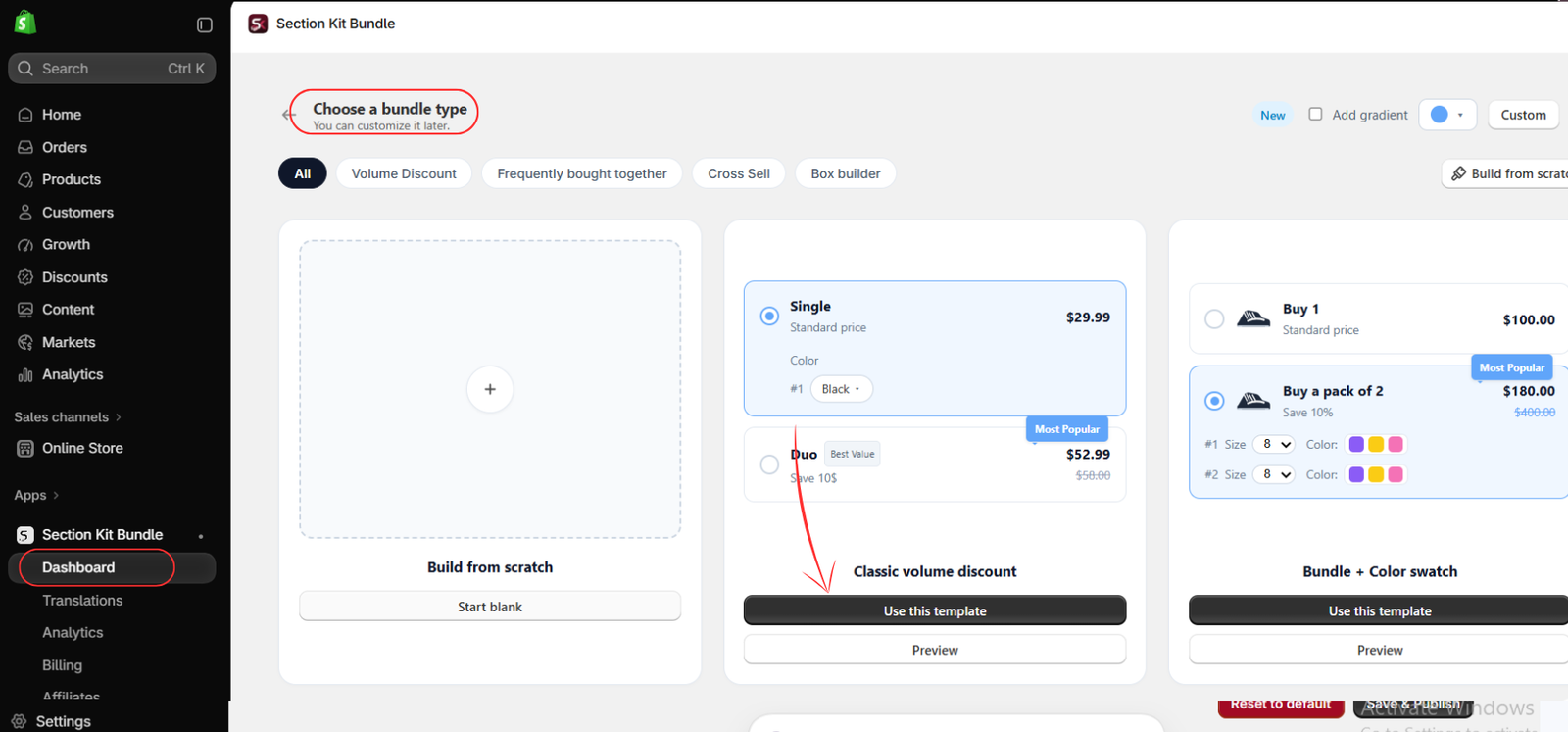
On the Choose a bundle type page, select a layout that suits your offer. For the quantity-based setup shown here, choose Classic volume discount and click Use this template. You can also preview a template before choosing it. A volume discount groups different quantities of the same product; a frequently bought together offer is more suitable when you want to recommend complementary products.
Step 6: Open the offer and check its status
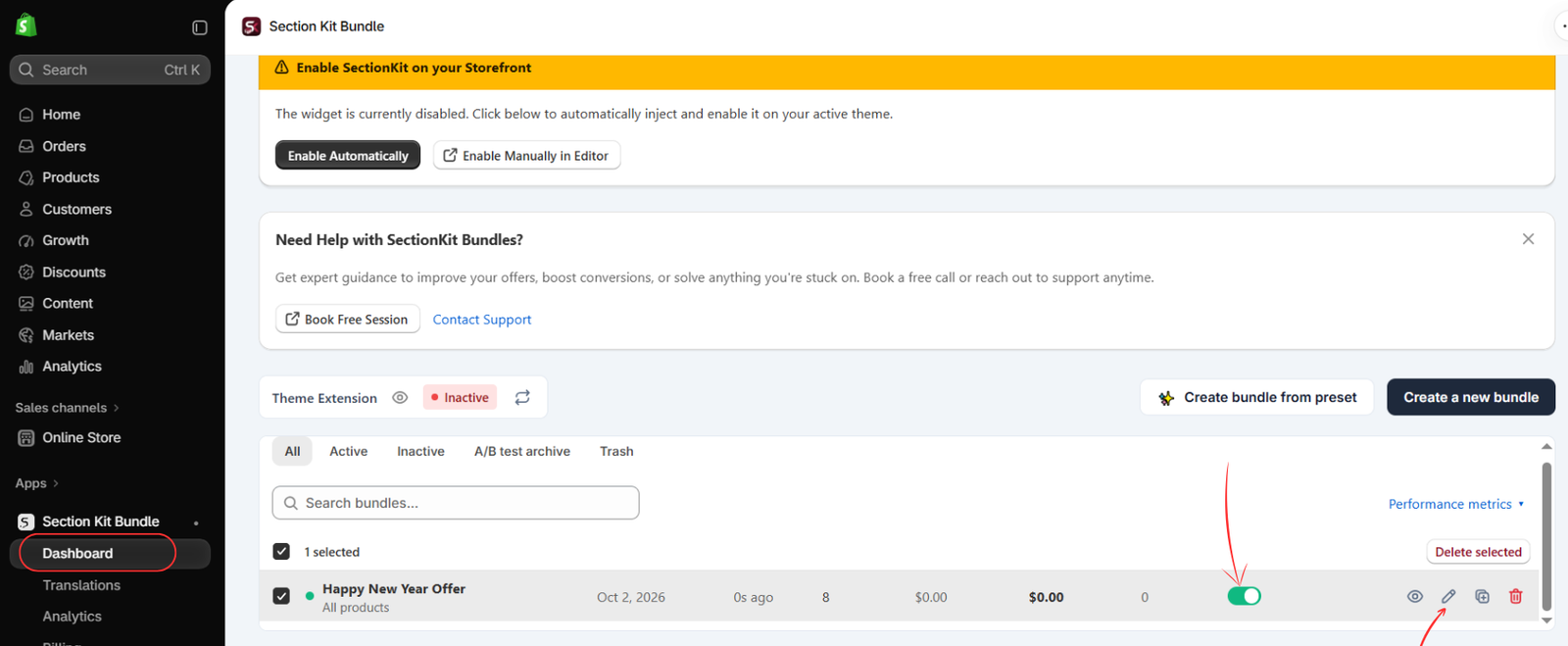
After creating the offer, return to the dashboard. Locate your bundle and use the pencil icon to open its settings. The image shows an offer named Happy New Year Offer with its status toggle switched on. Use your own descriptive campaign name. An enabled offer does not appear on the storefront until the app’s theme integration is also enabled.
Step 7: Customize your bundle and publish it
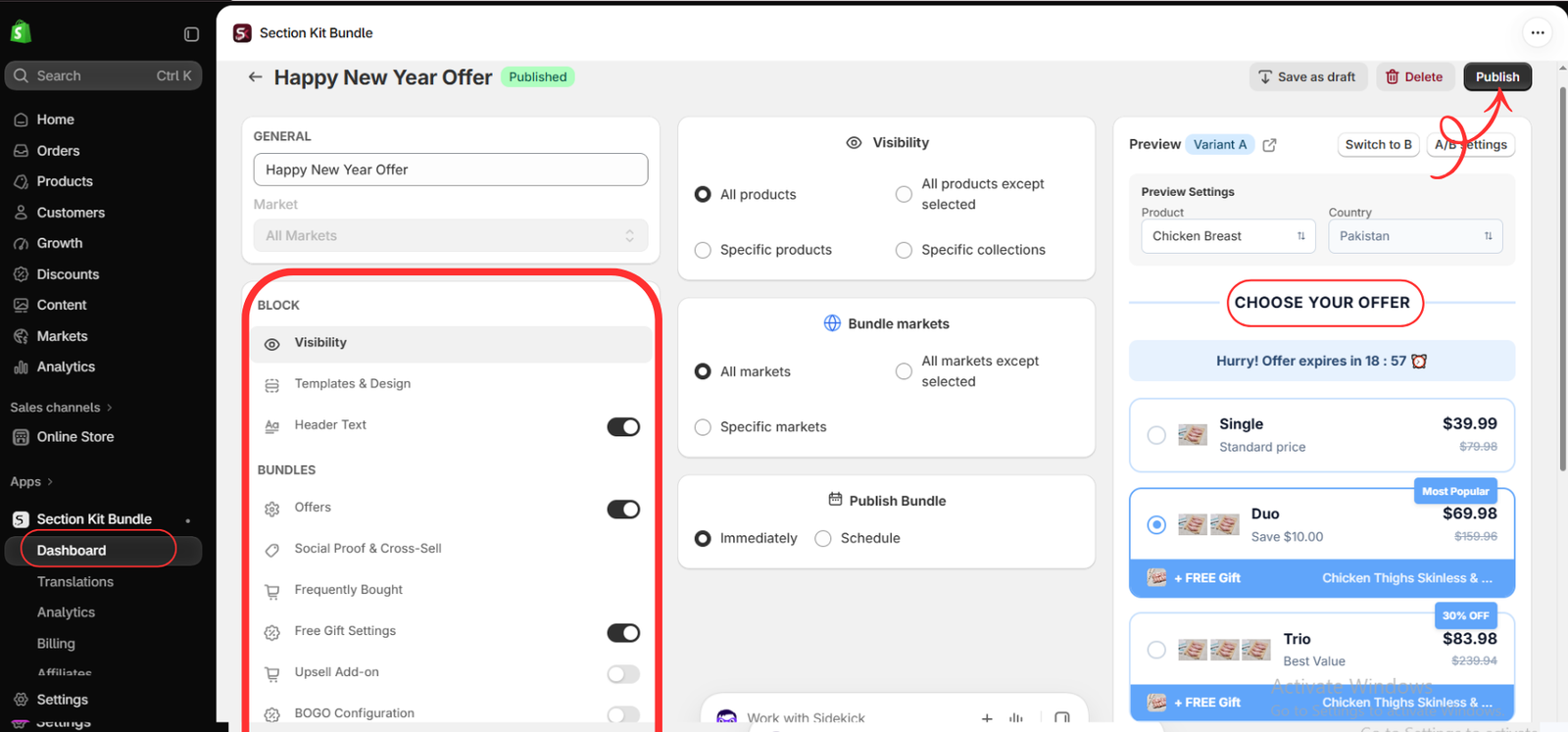
Give the offer a clear name, then work through the settings in the editor. Under Visibility, choose all products, specific products, specific collections, or an exclusion rule. For a first campaign, targeting a small selection of suitable products makes testing easier.
Use Templates & Design to adjust the appearance and Header Text to write a clear heading. Open Offers to configure the quantity options and their prices or discounts. Add free gifts or other optional offer elements only when they support your campaign and are available on your plan.
Choose the appropriate Bundle markets and decide whether to publish Immediately or use Schedule. Review the product preview on the right, then click Publish. The prices, labels, and products in the image are examples: check that your own quantities, savings, and gift conditions agree with one another.
Step 8: Enable the app embed and save
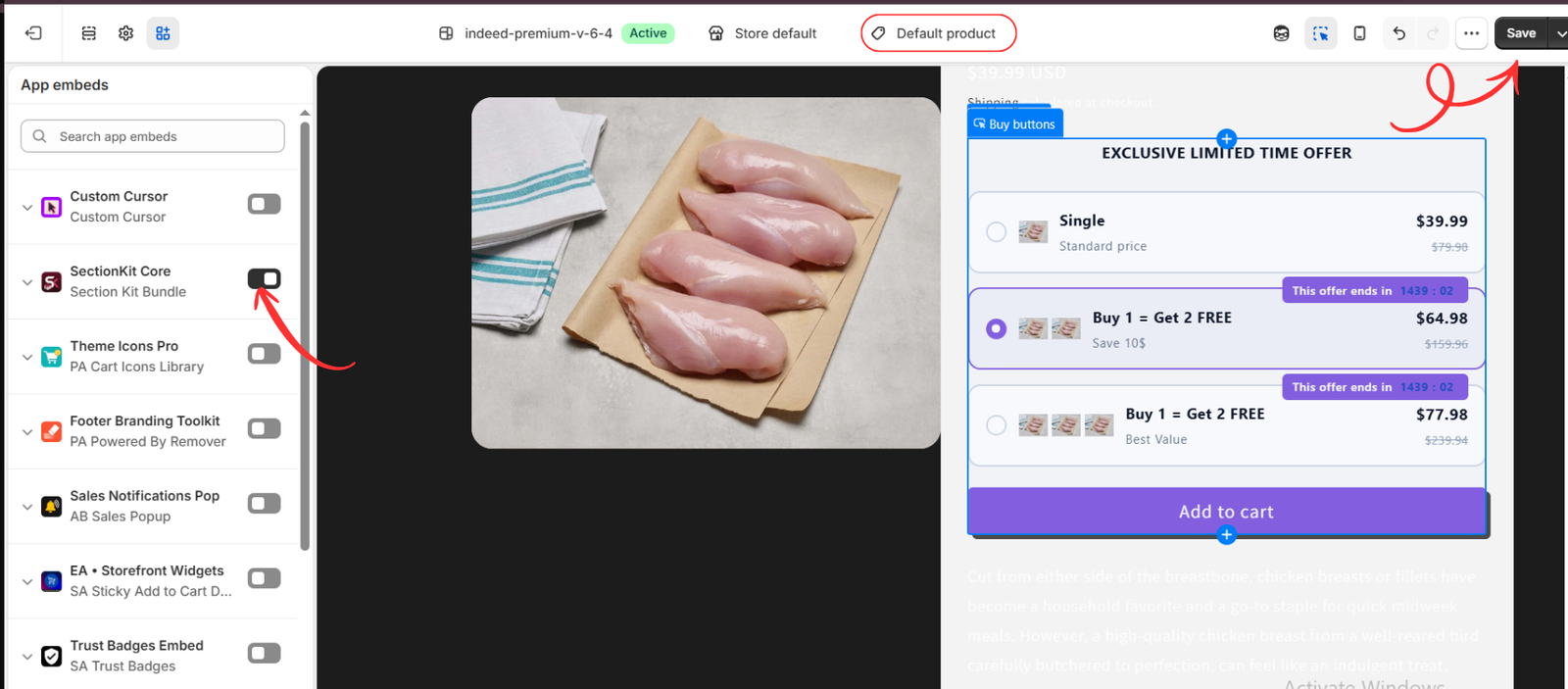
In the theme editor, open a product template such as Default product. Select App embeds in the left panel and switch on SectionKit Core, identified underneath as Section Kit Bundle in the supplied image. Click Save in the top-right corner.
Preview a product that matches the offer’s visibility settings. The bundle choices should now be visible on its product page. If your products use a different template, preview that template too. Finally, check the live product page to confirm the widget appears where customers can use it.
Frequently Asked Questions
Can displaying bundle savings increase Shopify conversions?
Clearly displaying savings can help customers understand promotional value and may improve conversions. Actual results depend on pricing, products, and customer behavior.
Should I show percentage savings or dollar savings?
Both can work well. Percentage savings help customers compare discounts, while dollar savings communicate the exact amount saved.
Can I display multiple quantity offers on one product page?
Yes. Section Kit Bundles supports quantity-based promotional layouts that can display different purchasing options.
Can I customize my bundle offers?
Yes. Section Kit Bundles includes visual customization options for creating offers that match your store’s design.
Are bundle discounts good for every Shopify store?
Bundle discounts can be useful for many stores, but their effectiveness depends on customer demand, product costs, and pricing strategy.
Conclusion
Showing bundle savings clearly on your Shopify product pages can help customers recognize the value of your offers and encourage them to purchase more.
When shoppers can easily compare regular prices, discounted prices, and quantity options, they can make purchasing decisions with greater confidence.
With Section Kit Bundles, you can create volume discounts, BOGO promotions, and frequently bought together offers while presenting promotional pricing in an attractive format.
If you want to make your Shopify product pages more engaging and encourage larger orders, Section Kit Bundles can help you build and display your bundle offers.
Explore Section Kit Bundles: https://apps.shopify.com/sectionkit-bundle




