IS FAKE SOCIAL PROOF ILLEGAL? A COMPLIANCE GUIDE FOR SHOPIFY STORE OWNERS
Shopify Compliance Guide | Fake Reviews | Sales Popups | Consumer Protection | AB Sales Popup | 2026
Introduction
Social proof is one of the most widely used marketing techniques in ecommerce. Shopify merchants use customer reviews, purchase notifications, visitor counters, and product popularity indicators to help shoppers feel more confident about purchasing.
But what happens when that social proof isn’t real?
Imagine visiting a Shopify store and seeing a notification that says:
“Sarah from New York just purchased this product!”
What if Sarah doesn’t exist and no purchase actually happened?
Or imagine a product page displaying “Only 3 items left” when the merchant actually has hundreds of units available.
These practices can mislead shoppers, damage credibility, and create legal risks.
So, is fake social proof illegal?
The short answer is yes, fake or misleading social proof can violate consumer protection laws. However, the exact rules depend on the country, the claim being made, and how customers interpret it.
In this guide, we’ll explain the legal risks of fake reviews, false purchase notifications, artificial visitor counts, and misleading countdown timers. We’ll also show Shopify merchants how to configure authentic social proof using AB Sales Popup.
Legal information, not legal advice. Regulations differ by jurisdiction. This guide is based on official regulatory guidance available as of November 2026.
What Is Fake Social Proof on Shopify?
Fake social proof is information that creates a misleading impression of customer activity, popularity, satisfaction, or demand.
Social proof becomes problematic when it presents invented, altered, or materially misleading information as genuine.
Common examples include:
- Fake customer reviews from people who never purchased or used the product.
- Purchase notifications representing nonexistent transactions.
- Visitor counters displaying fabricated activity.
- Sold counters showing invented sales numbers.
- Fake low-stock messages.
- Countdown timers that repeatedly reset while the advertised discount remains available.
These practices might appear to create urgency or popularity, but customers may make purchasing decisions based on false information.
Real vs Fake Social Proof
| Social proof feature | Genuine use | Misleading use |
|---|---|---|
| Sales popup | Shows an actual purchase | Invents a customer or order |
| Visitor counter | Displays accurately measured sessions | Generates artificial visitor numbers |
| Sold counter | Uses real sales records | Inflates purchase totals |
| Customer reviews | Reflect genuine customer experiences | Uses invented or purchased positive reviews |
| Stock countdown | Reflects actual available inventory | Claims false scarcity |
| Sale countdown | Tracks an actual offer deadline | Resets when the customer returns |
Is Fake Social Proof Illegal in the United States?
The United States Federal Trade Commission (FTC) regulates deceptive and unfair commercial practices.
Fake reviews and testimonials
The FTC’s Consumer Reviews and Testimonials Rule became effective on October 21, 2024.
The rule prohibits several practices, including creating or selling fake consumer reviews, purchasing certain fake reviews, and offering incentives conditioned on a review expressing a particular sentiment.
It also addresses certain undisclosed insider testimonials and misleading review suppression. GovInfo+1
Importantly, a merchant cannot make a purchased five-star review compliant simply by disclosing that it was incentivized. Under the FTC rule, compensation conditioned on positive sentiment is prohibited. Federal Trade Commission
Fake sales notifications and fabricated visitor counts
A fabricated purchase popup is not automatically governed by the FTC’s specific consumer-review rule, because a purchase notification is not necessarily a review or testimonial.
However, a false purchase notification or visitor count may still be deceptive advertising under broader FTC consumer protection principles.
For example, telling shoppers that several customers purchased a product when none did may communicate a misleading factual claim about demand.
Key point: The legal analysis depends on the content and overall impression of the message, not merely whether it was generated through a Shopify app.
Is Fake Social Proof Illegal in the United Kingdom?
The UK’s Digital Markets, Competition and Consumers Act 2024 introduced updated protections against unfair commercial practices, which took effect on April 6, 2025.
These include specific prohibitions related to fake reviews and concealed incentivized reviews.
The legislation also addresses misleading commercial practices that influence purchasing decisions. GOV.UK+1
The UK’s Competition and Markets Authority (CMA) has separately warned about misleading countdown timers, scarcity statements, and urgency claims.
For example, a countdown may be misleading when the promised discount continues after the timer finishes. Competition and Markets Authority
Businesses that breach relevant consumer protection rules can face serious enforcement consequences. The CMA can impose substantial financial penalties under its direct consumer enforcement powers. GOV.UK
What About the European Union?
EU consumer protection rules also prohibit misleading commercial practices.
Under EU rules, merchants must not falsely present reviews as coming from genuine customers.
Businesses presenting consumer reviews must provide information about whether and how they check that reviews originate from real consumers. False reviews and manipulated ratings are prohibited. Your Europe
Other deceptive social proof claims, including artificial scarcity or misleading popularity statements, may also be assessed under broader unfair commercial practices requirements.
For merchants selling internationally, compliance should be evaluated for the markets where customers are located—not only the country where the Shopify business is registered.
What Types of Fake Social Proof Should Shopify Merchants Avoid?
1. Fake purchase notifications
A notification suggesting a real person just bought a product should be based on a genuine transaction.
Avoid creating imaginary buyers or changing old purchase timestamps to make orders appear recent.
2. Fabricated visitor counts
A visitor counter should reflect the measurement it claims to display.
If a counter represents sessions during the last five minutes, the message shouldn’t imply that every visitor is simultaneously viewing the same product.
3. Invented sold counters
A claim such as “500 units sold” should have reliable supporting sales data.
Merchants should also make clear whether figures refer to a particular product, product variant, or reporting period when that distinction matters.
4. Fake scarcity messages
Claims such as “Only 2 left” should correspond to actual available inventory.
Stock messages need special care when inventory is distributed across locations, product variants, or fulfillment systems.
5. Misleading countdown timers
A sale countdown should represent a genuine promotion deadline.
If the timer expires but the advertised offer continues unchanged, the message may be misleading.
6. Fake or selectively manipulated reviews
Never create reviews from fictional customers, condition review rewards on five-star ratings, or misrepresent a selectively filtered set of reviews as representative of all customer feedback.
How to Use Authentic Social Proof on Shopify With AB Sales Popup
Shopify merchants don’t need to fabricate demand to show customer activity.
AB Sales Popup provides tools for configuring sales notifications, visitor counters, sold counters, stock countdowns, and promotional timers.
The application includes settings for dynamic content, display conditions, styling, and Shopify theme integration.
App link: AB Sales Popup — Shopify App Store
Step-by-Step Guide: How to Configure Social Proof Responsibly
Step 1: Open the Shopify App Store
Open Google, search for Shopify App Store, and select the official result.
Then visit the Shopify App Store search bar.
Step 2: Search for AB Sales Popup
Search for AB Sales Popup and find the app with the black icon and yellow notification bell.
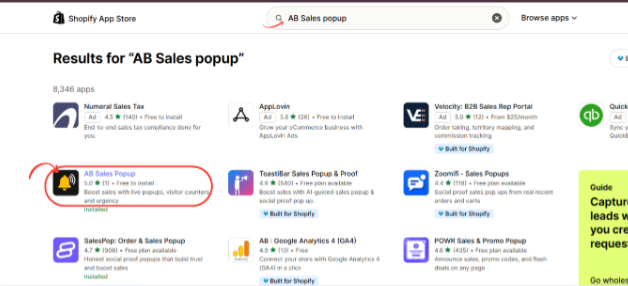
Image 1: Locate AB Sales Popup in Shopify App Store search results.
Image explanation: The screenshot highlights the AB Sales Popup listing. Open its app page to review the available social proof features.
Step 3: Install and Open the App
Click Install to add AB Sales Popup to your Shopify store.
If it’s already installed, click Open.

Image 2: AB Sales Popup listing showing its sales notification, visitor counter, and urgency tools.
Image explanation: The listing introduces the app’s main functionality. After installation, open the application from your Shopify Admin.
Step 4: Review the Available Social Proof Features
Navigate to:
Shopify Admin → Apps → AB Sales Popup → Dashboard
Find the Manage Features section.
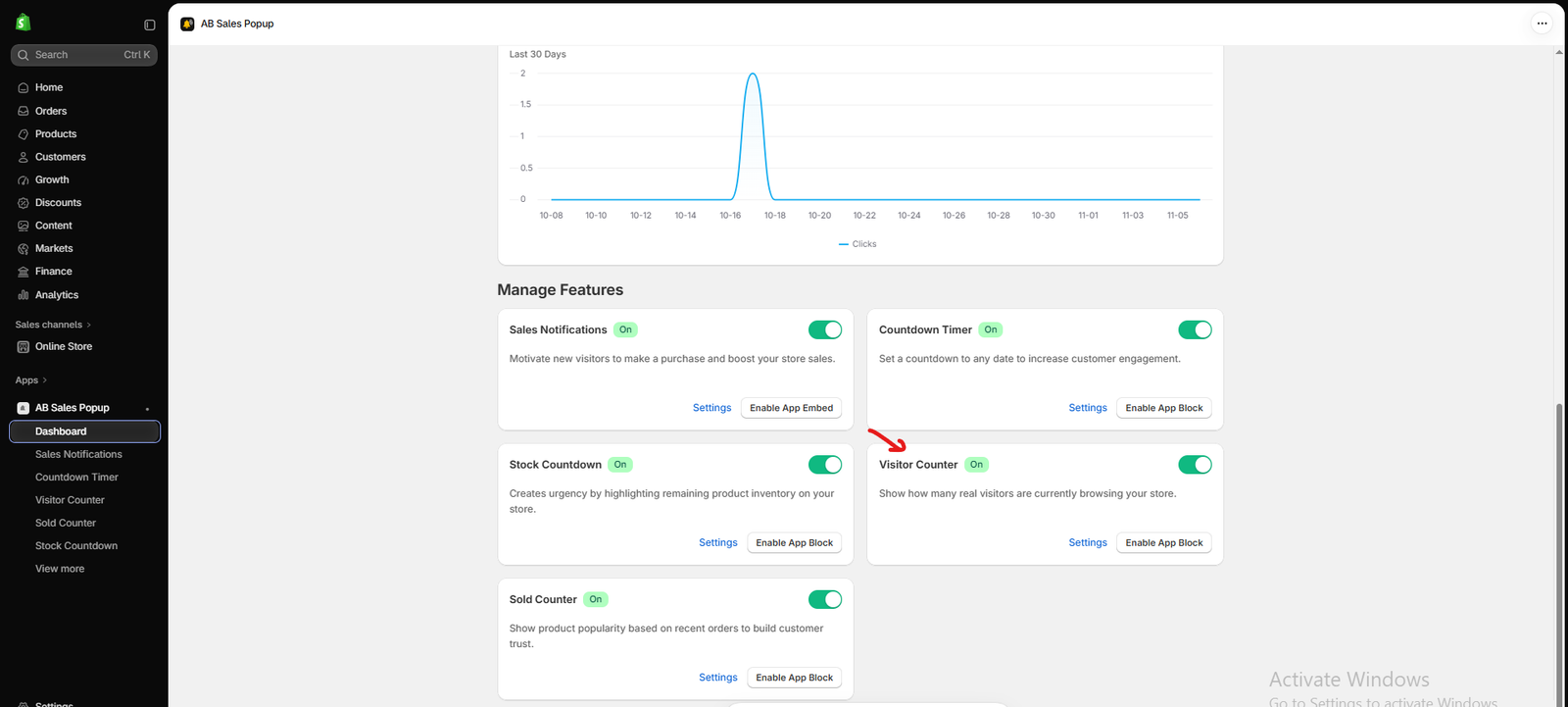
Image 3: The AB Sales Popup dashboard showing the available social proof tools.
Image explanation: The screenshot displays Sales Notifications, Countdown Timer, Stock Countdown, Visitor Counter, and Sold Counter.
Each feature communicates a different type of customer activity or availability.
Before enabling any feature, identify what data supports the claim it will display.
For example, purchase notifications should have actual order records, while visitor counts should correspond to measured browsing activity.
Step 5: Configure Genuine Purchase Notifications
Click Sales Notifications from the left sidebar.
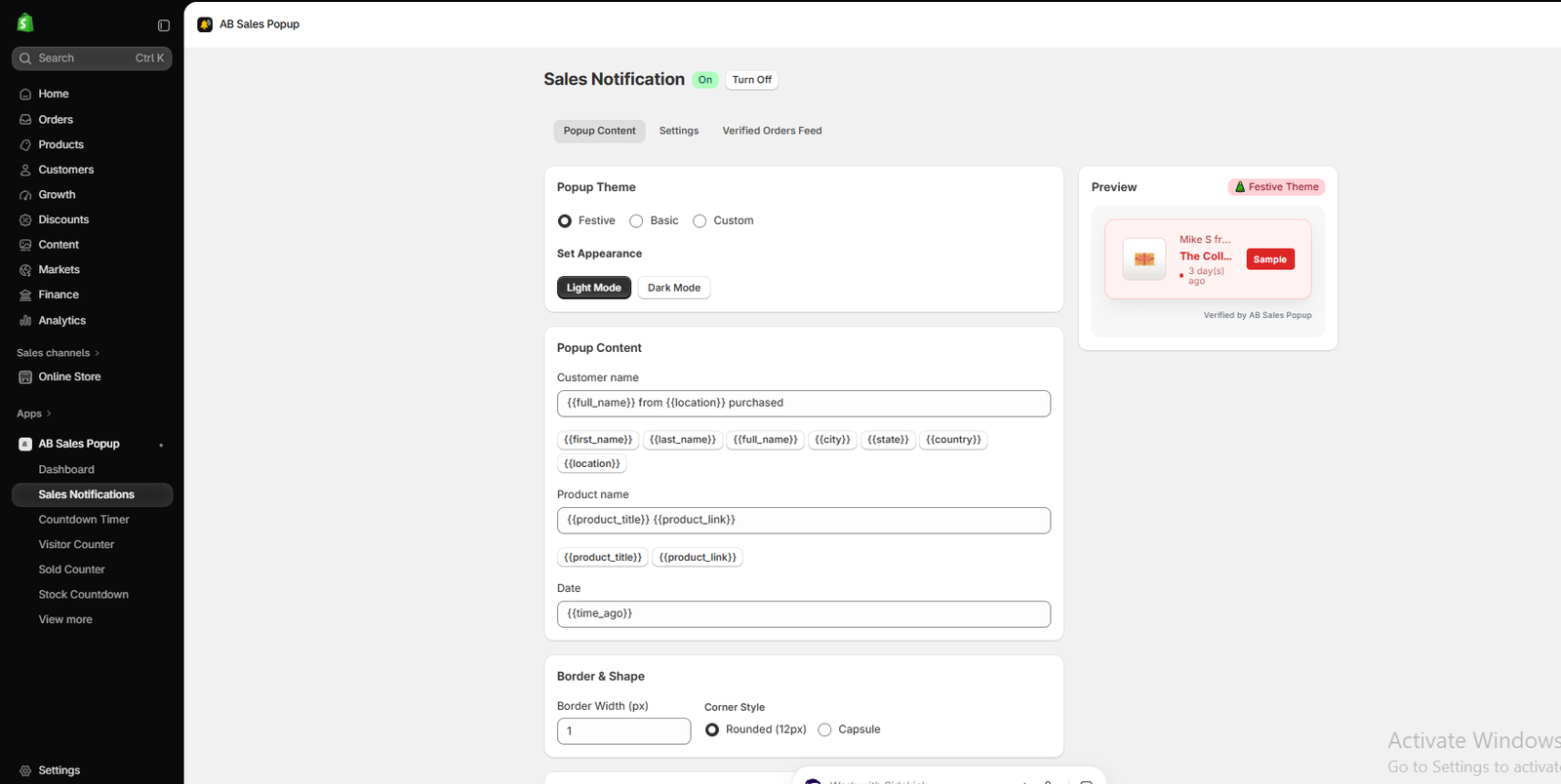
Image 4: Sales Notifications settings showing customer, product, and purchase-time fields.
Image explanation: The screenshot shows the Sales Notification editor with Popup Content, Settings, and Verified Orders Feed tabs.
The customer information field uses variables such as:
{{full_name}} from {{location}} purchased
The product field uses {{product_title}} and {{product_link}}, while the date field uses {{time_ago}}.
These variables let the interface present purchase-related information.
To reduce compliance risks:
- Display only authentic purchases.
- Make sure product names match the corresponding orders.
- Use accurate purchase times.
- Avoid unnecessary disclosure of customers’ identities.
- Review canceled, refunded, or test orders before including them in purchase notifications.
The Verified Orders Feed tab is visible in the app interface, but your supplied screenshots don’t show the contents of that tab. Check its actual behavior and available controls rather than assuming that every order-status filter is automatic.
Step 6: Configure Popup Timing and Targeting
Open the Settings tab under Sales Notifications.

Image 5: Configuring notification timing, frequency, and product or collection targeting.
Image explanation: The screenshot shows Initial delay, Display duration, Delay between notifications, and product-targeting options.
These settings help control how often sales notifications appear.
Consider allowing a reasonable interval between notifications rather than repeatedly displaying the same purchase.
Also avoid randomizing notification content in a way that misrepresents when purchases happened.
Step 7: Configure Visitor Counters Using Accurate Session Data
Return to the dashboard and open Visitor Counter.
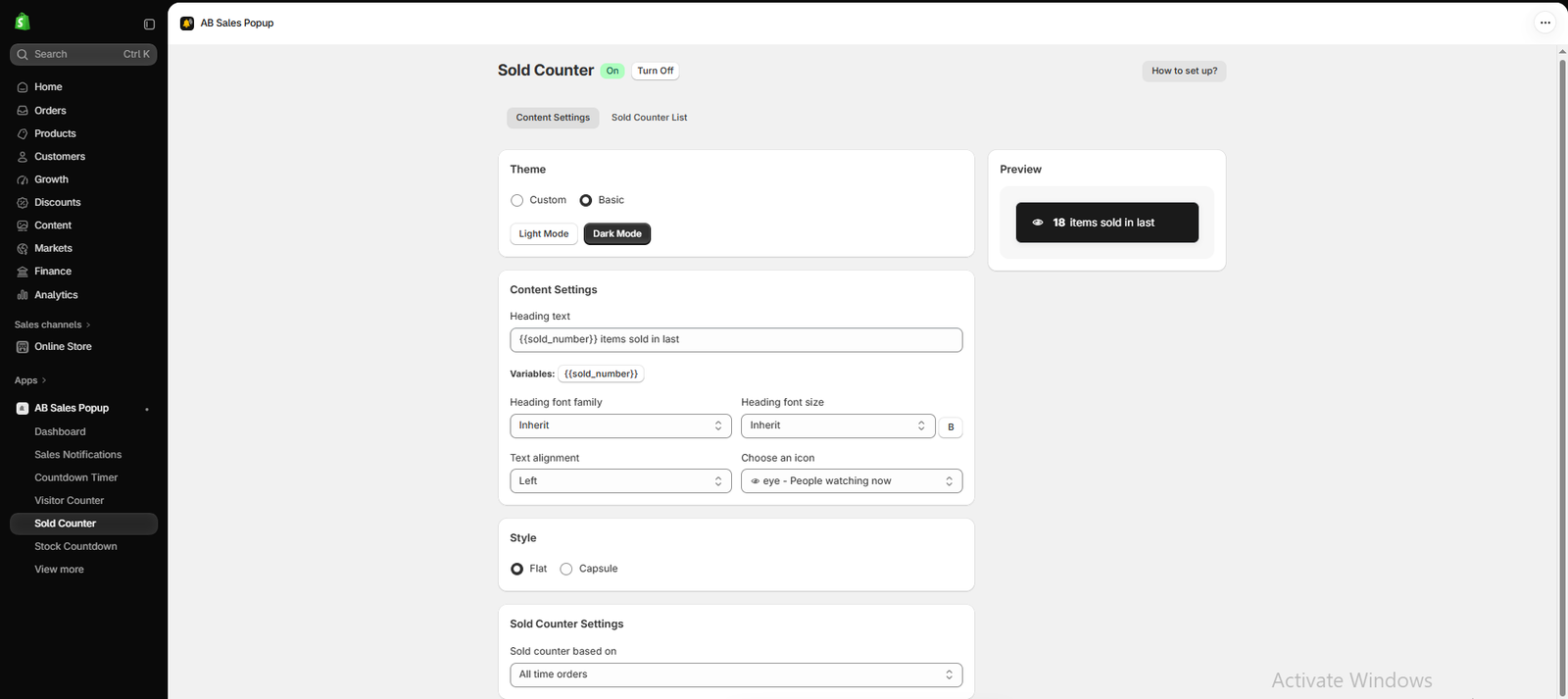
Image 6: Visitor Counter settings showing the custom theme, dynamic count variable, and preview.
Image explanation: The screenshot shows a Visitor Counter with customizable colors and a heading field containing:
{{visitor_number}} users are present on our store.
The app also provides settings for the visitor source and measurement window, including an option labeled Live Visitors (Last 5 minutes).
Use a message that accurately describes the measurement period and audience being counted.
For instance, if the metric represents storewide sessions in a five-minute window, avoid claiming that the same number of shoppers are viewing a specific product right now.
Step 8: Set Real Countdown Deadlines
Open Countdown Timer from the sidebar.
The interface provides Start Date & Time, End Date & Time, and expiration behavior options.

Image 7: Countdown Timer settings for real promotion deadlines and product targeting.
Image explanation: Your screenshot shows configurable start and end times and an option to hide the timer after expiration.
Enter the actual date your promotion ends.
Also ensure the Shopify discount or advertised offer genuinely ends as promised. Merely hiding a timer isn’t sufficient if the claim about the offer is false.
Step 9: Save and Test Before Publishing
Once you’ve configured the relevant social proof features, click Save.
Use the dashboard’s Enable App Embed or Enable App Block action, depending on the feature.
Open your Shopify theme editor and activate the applicable integration.
Before publishing, test the storefront to confirm that the displayed data is correct, the notification content is accurate, and the widgets work on desktop and mobile.
Do not confuse sample previews with live, verified activity.
Can Shopify Merchants Be Penalized for Fake Social Proof?
Potentially, yes.
The consequences depend on the applicable law and the specific conduct.
They can include regulatory investigations, orders to stop misleading practices, financial penalties, and in some circumstances claims for compensation.
For example, the FTC’s consumer review rule allows civil penalties for knowing violations of the rule. The UK’s consumer protection enforcement framework can also result in significant penalties. Federal Trade Commission+1
Separate consequences can include customer complaints, reputational damage, and loss of trust.
Merchants should not assume that using a third-party Shopify application transfers all legal responsibility to the developer. Store owners still need to review the accuracy of claims presented to their customers.
Frequently Asked Questions
1. Is fake social proof illegal on Shopify?
Fake social proof can violate consumer protection and advertising laws when it misleads customers. The legal requirements depend on the jurisdiction and specific claim.
2. Are fake sales notifications illegal?
Fabricated sales notifications can create deceptive impressions of purchases or demand. They may violate general consumer protection laws even though they aren’t necessarily covered by rules specifically addressing customer reviews.
3. Is it illegal to buy five-star reviews?
In the US, the FTC prohibits paying or incentivizing consumer reviews on the condition that they express a positive or negative sentiment. Other jurisdictions also restrict fake and misleading reviews.
4. Can I show customer names in purchase notifications?
Only where appropriate under applicable privacy requirements. Using minimal identifying information, such as a general location, can reduce unnecessary privacy exposure.
5. Can I use a visitor counter on Shopify?
Yes. Make sure the counter reflects genuine measured activity and that the message accurately describes what is being counted.
6. Are countdown timers illegal?
No. A genuine countdown to a real offer deadline is generally different from a misleading timer that resets or falsely claims an offer is expiring.
7. Can I use sample purchase notifications while designing my store?
Sample notifications are useful for testing. However, they should not be presented to real shoppers as genuine customer purchases. Keep previews clearly identified and separate from live social proof.
8. Does using AB Sales Popup automatically make my store legally compliant?
No. The application provides configuration tools, but merchants must ensure their messages, data, disclosures, and promotional practices comply with applicable laws.
Conclusion
Social proof can help Shopify customers make more informed purchasing decisions, but it should be based on real information.
Fake reviews, fabricated purchases, artificial visitor numbers, and misleading countdown timers can undermine trust and create legal risks.
For merchants seeking sustainable growth, the better approach is to use genuine customer activity, accurate stock information, and transparent promotional offers.
With AB Sales Popup, Shopify store owners can configure sales notifications, visitor counters, sold counters, and countdown features through a visual interface.
The goal should never be to make a store appear busier than it is.
The goal is to communicate authentic customer activity in a clear and trustworthy way.Explore AB Sales Popup on the Shopify App Store




