HOW TO RESPOND TO NEGATIVE PRODUCT REVIEWS ON SHOPIFY
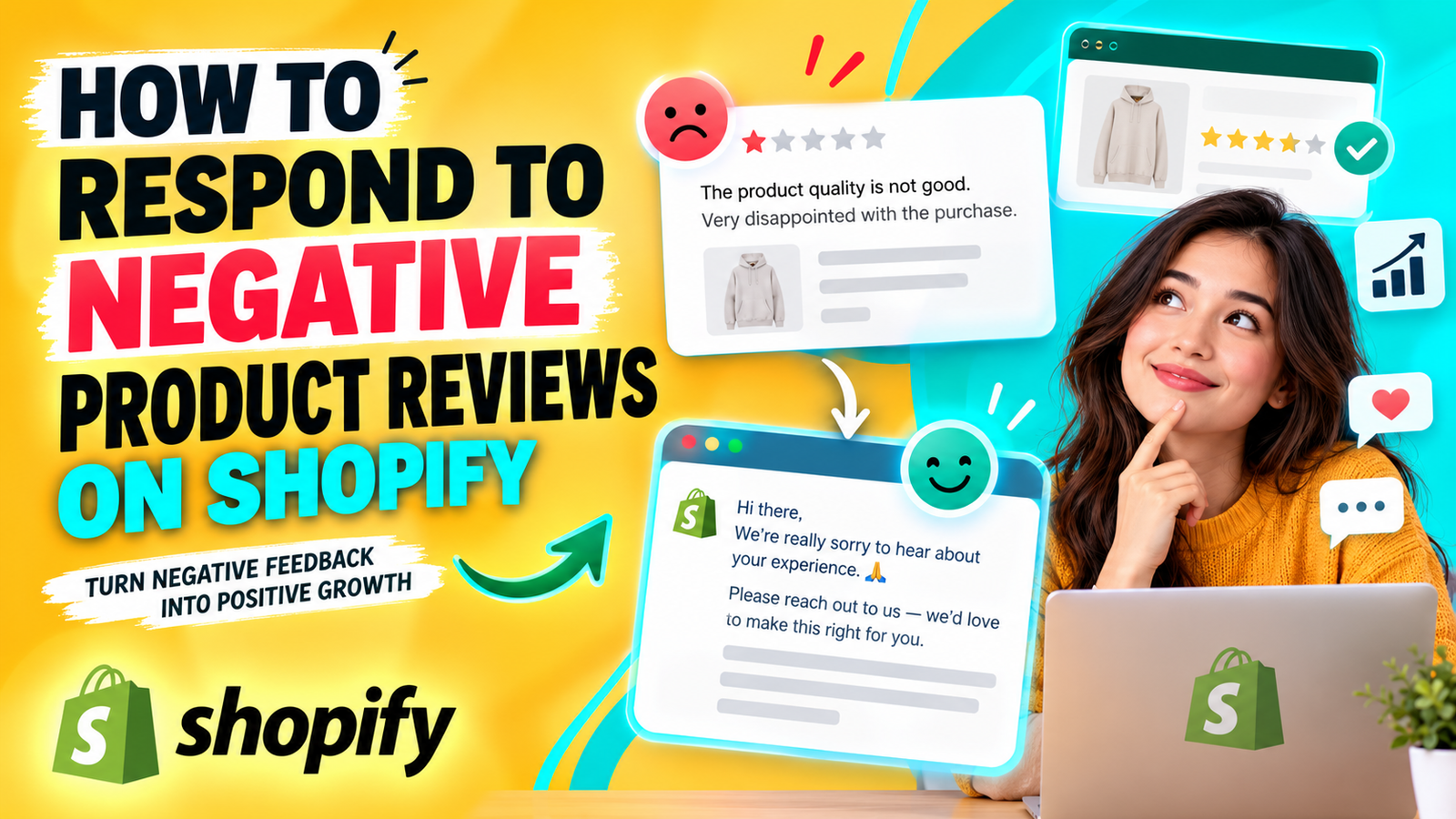
Customer reviews play an important role in building trust and influencing purchasing decisions in an online store. While positive reviews highlight customer satisfaction, negative product reviews reveal areas where a business may need to improve.
Receiving a one-star or two-star review can be frustrating for Shopify merchants, especially when they have invested significant time and effort into delivering quality products and services.
However, negative feedback does not always mean losing a customer. A professional, thoughtful response can demonstrate accountability, improve customer relationships, and show potential buyers that your business takes customer satisfaction seriously.
In this guide, we will explain how to respond to negative product reviews on Shopify, common mistakes to avoid, practical response examples, and how to manage customer feedback more effectively. We will also explore how SA Product Reviews & UGC can support a more organized review collection strategy.
Why negative product reviews are a challenge for Shopify merchants
Negative reviews can affect how potential customers perceive an online store. When shoppers encounter complaints about product quality, shipping, sizing, or customer service, they may hesitate before completing a purchase.
Some common challenges Shopify merchants face include:
- Reduced customer confidence: Critical feedback can make new shoppers uncertain about purchasing.
- Unanswered complaints: Reviews left without a response may give the impression that customer concerns are being ignored.
- Difficulty managing feedback: As order volume increases, tracking reviews across multiple products becomes more complicated.
- Emotional responses: Merchants may respond defensively, which can damage customer relationships.
- Recurring product issues: Without reviewing customer complaints regularly, businesses may overlook problems that require attention.
The biggest challenge is not necessarily receiving negative feedback. It is knowing how to handle that feedback professionally and consistently.
Why responding to negative reviews matters
Responding to negative product reviews gives Shopify merchants an opportunity to demonstrate their commitment to customer service.
A helpful response shows that the business listens to customer concerns, acknowledges mistakes when appropriate, and is willing to investigate problems.
It can also help other shoppers understand how the store handles situations when an order does not meet expectations.
A well-written response should focus on resolving the issue rather than defending the business or persuading the customer to change their rating.
How to respond to negative product reviews professionally
1. Read the entire review carefully
Before responding, understand the customer’s actual concern.
Determine whether the complaint relates to product quality, delivery, sizing, missing items, unclear descriptions, or another issue.
Avoid using a generic reply without understanding what happened.
2. Acknowledge the customer’s experience
Begin by recognizing the customer’s concern.
Even when you disagree with certain details, you can acknowledge that the customer had a disappointing experience.
For example:
Thank you for sharing your feedback. We’re sorry to hear that the product did not meet your expectations. We appreciate you bringing this to our attention.
3. Apologize when appropriate
A sincere apology can help reduce tension and demonstrate professionalism.
Keep the wording natural and avoid exaggerated promises.
If the business made a mistake, acknowledge it clearly rather than shifting responsibility to the customer.
4. Provide a practical solution
Whenever possible, explain how the problem can be addressed.
Depending on your store’s policies and the circumstances, possible solutions may include troubleshooting assistance, replacement products, refunds, or further investigation.
Do not promise a particular outcome until you have confirmed that it can be provided.
5. Move private discussions to customer support
Order details, addresses, payment information, and other personal information should not be discussed publicly.
If additional information is required, invite the customer to contact your support team through an appropriate private channel.
6. Keep your response polite and concise
A professional response should be easy to understand.
Avoid lengthy explanations, defensive language, or blaming the customer.
Focus on the customer’s concern, the next step, and your willingness to help.
7. Use negative feedback to improve your store
Customer complaints can reveal patterns that might otherwise go unnoticed.
For example, repeated comments about sizing may indicate that a size guide needs improvement. Complaints about damaged packaging may suggest a fulfillment or shipping issue.
Review feedback regularly and use it to make meaningful operational improvements.
Examples of professional responses to negative Shopify reviews
Example 1: Product quality complaint
Thank you for your feedback. We’re sorry the product did not meet your expectations. We take quality concerns seriously and would appreciate the opportunity to investigate. Please contact our support team with your order details so we can review the issue and discuss the available options.
Example 2: Delayed delivery
We’re sorry your order arrived later than expected. We understand how frustrating delivery delays can be and appreciate your patience. Thank you for bringing this to our attention. We’ll review the shipping experience to identify opportunities for improvement.
Example 3: Incorrect product size
Thank you for sharing your experience. We’re sorry the sizing wasn’t what you expected. Your feedback helps us improve our product information. Please reach out to our support team so we can help you review the available options.
Example 4: Damaged product
We’re sorry your order arrived damaged. This is not the experience we want our customers to have. Please contact our support team with your order information and a photo of the issue so we can investigate and help resolve it.
Example 5: General one-star review
Thank you for taking the time to share your feedback. We’re sorry your experience wasn’t satisfactory. We’d appreciate the opportunity to understand what went wrong and see how we can help. Please contact our support team when convenient.
Common mistakes to avoid when responding to negative reviews
Merchants should avoid arguing publicly with customers, copying the same response to every complaint, sharing private order information, or pressuring customers to remove negative feedback.
It is also important not to offer discounts or rewards in exchange for changing a negative review into a positive one.
A trustworthy review collection strategy welcomes honest feedback, even when it identifies problems.
Why Shopify merchants need a product review management app
As a Shopify store grows, collecting and organizing customer feedback manually becomes increasingly difficult.
Merchants need a reliable process for requesting reviews, keeping existing feedback organized, and making it easier for customers to share their experiences.
A dedicated review app can support these activities by bringing review collection tools into one interface.
This is where SA Product Reviews & UGC can be useful.
Introducing SA Product Reviews & UGC
SA Product Reviews & UGC is a Shopify application designed to help merchants collect and manage product reviews.
The app supports review collection through post-purchase requests, photo reviews, review imports, discount incentives, and product-specific QR codes.
These features help merchants build a consistent review collection process while reducing reliance on manual follow-ups.
Key features of SA Product Reviews & UGC
- Review requests: Manage review invitations associated with customer orders.
- Photo reviews: Encourage customers to share product experiences through images.
- Review imports: Transfer existing customer feedback using supported sources, including XLSX files.
- Discount and loyalty rewards: Configure incentives for honest review participation.
- QR code generator: Create product-specific QR codes for packaging and printed materials.
- Centralized review management: Access review-related tools from the Shopify admin interface.
SA Product Reviews & UGC: Features and Step-by-Step Guide
You can add this section to your blog “HOW TO RESPOND TO NEGATIVE PRODUCT REVIEWS ON SHOPIFY” after explaining how merchants should handle negative customer feedback.
The images below are your original 11 uploaded images, in the exact order you shared them in the previous blog. They demonstrate the app’s installation, review requests, review imports, discount rewards, and QR code features.
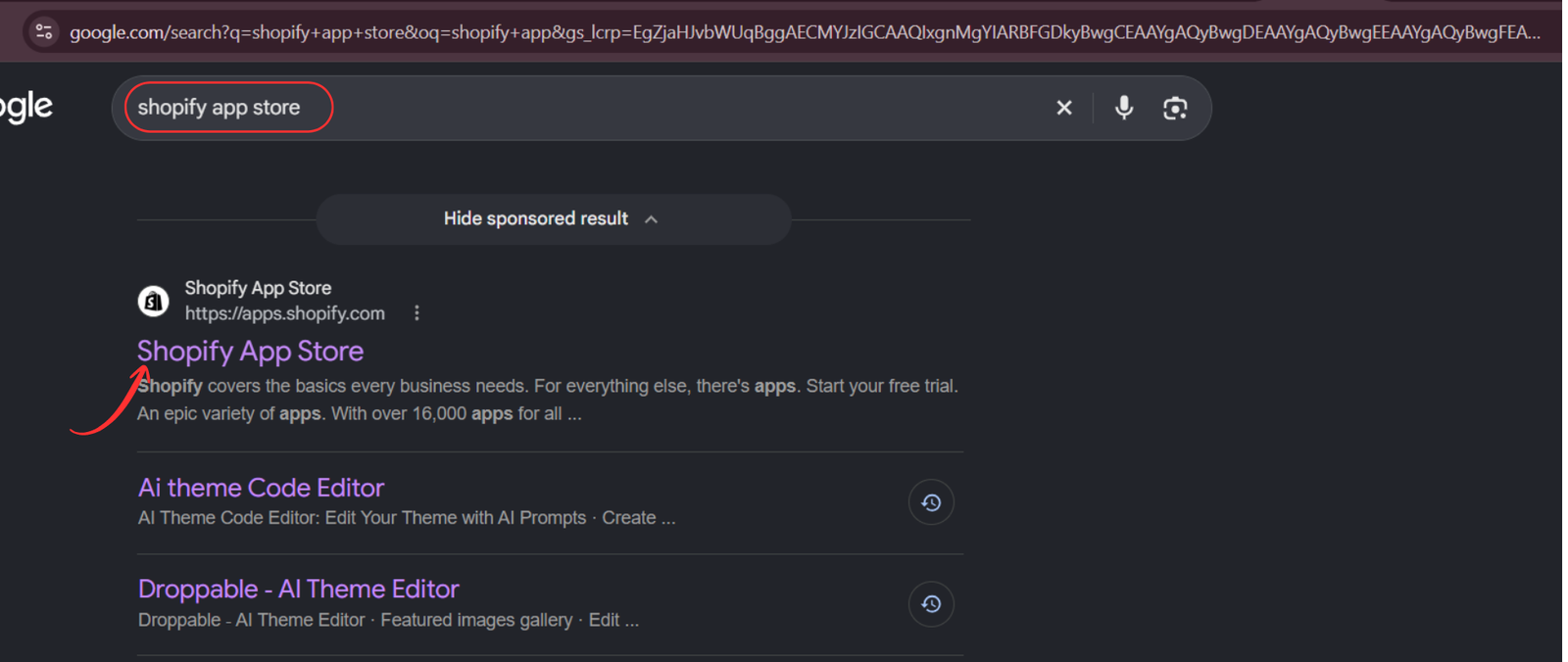
Step 1: Open the Shopify App Store
Start by searching for Shopify App Store on Google. Click the official result to access the marketplace.
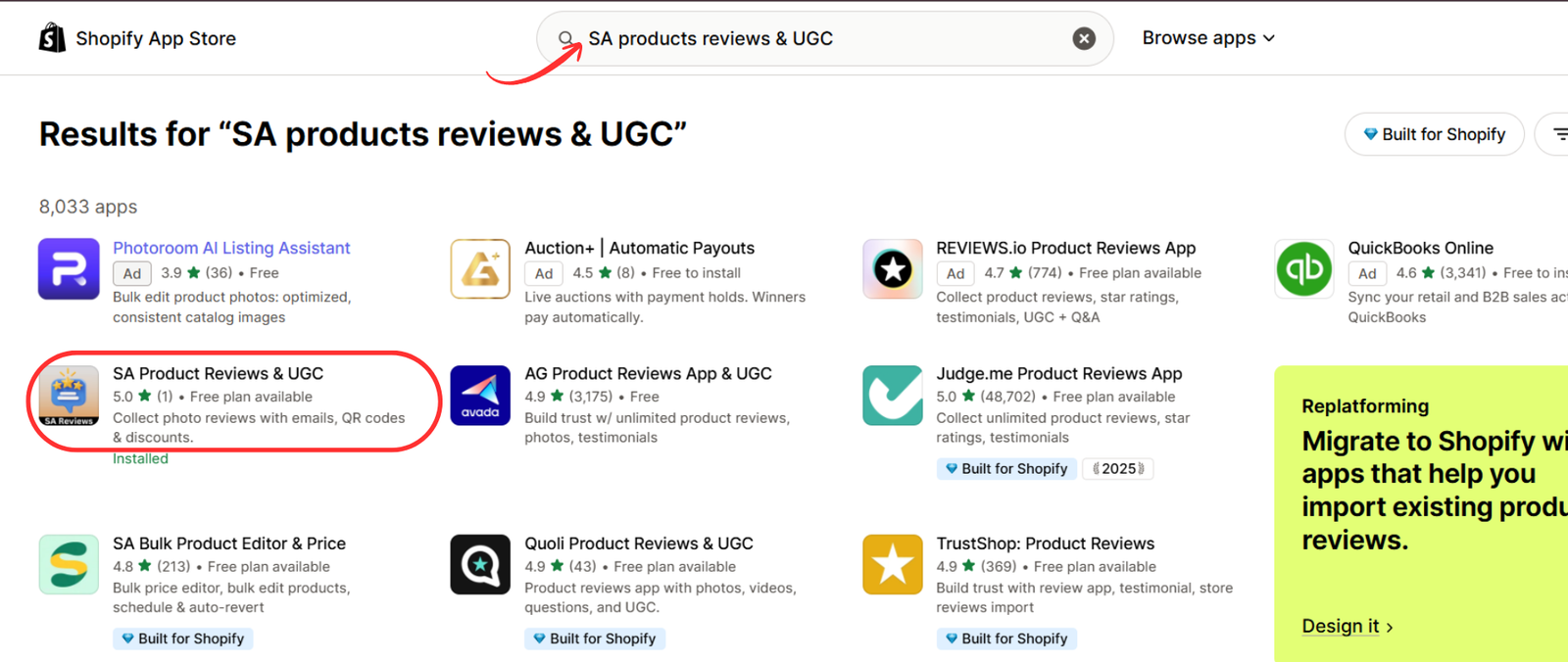
Step 2: Find SA Product Reviews & UGC
Search for SA Product Reviews & UGC in the Shopify App Store. Select the application from the results to explore its review collection features.
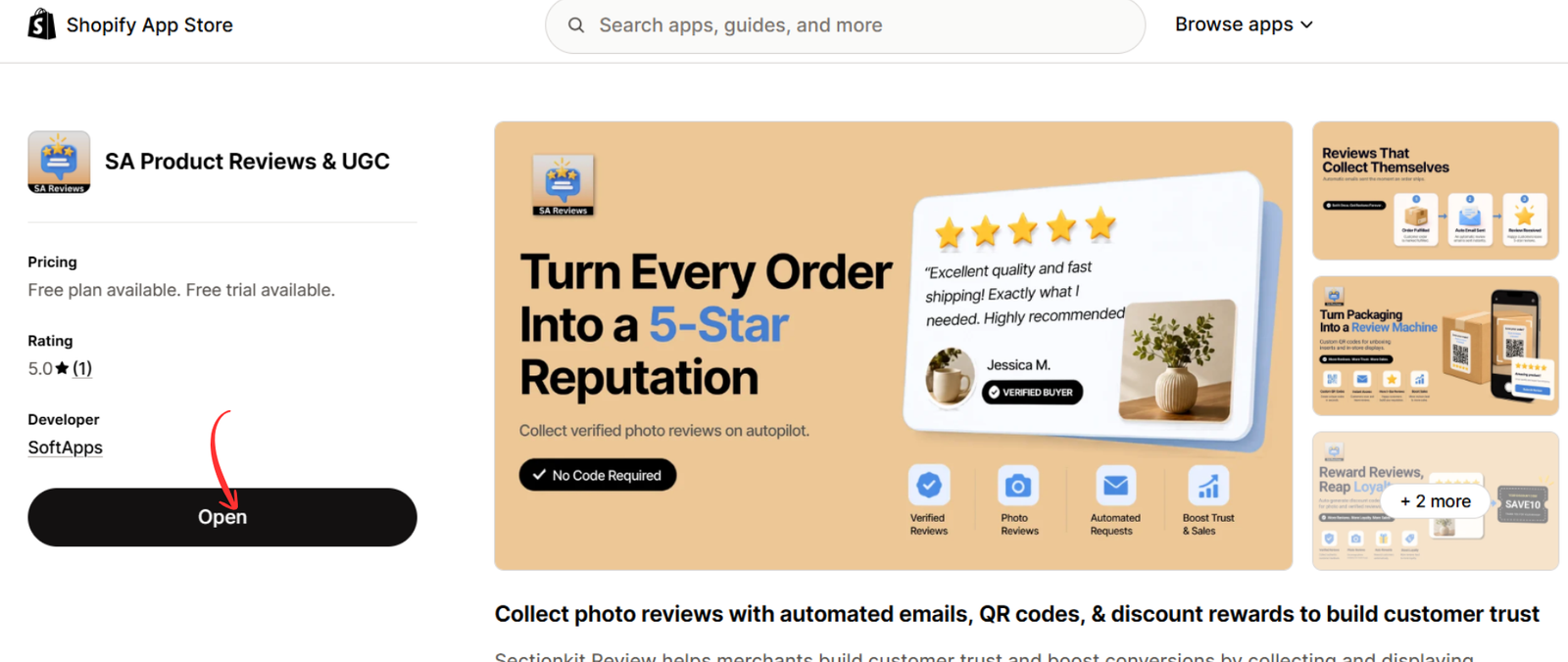
Step 3: Install or open the app
Visit the SA Product Reviews & UGC listing. Review its features and available plans, then click Install or Open, depending on whether the app is already installed.
Step 4: Explore the Collect Reviews dashboard
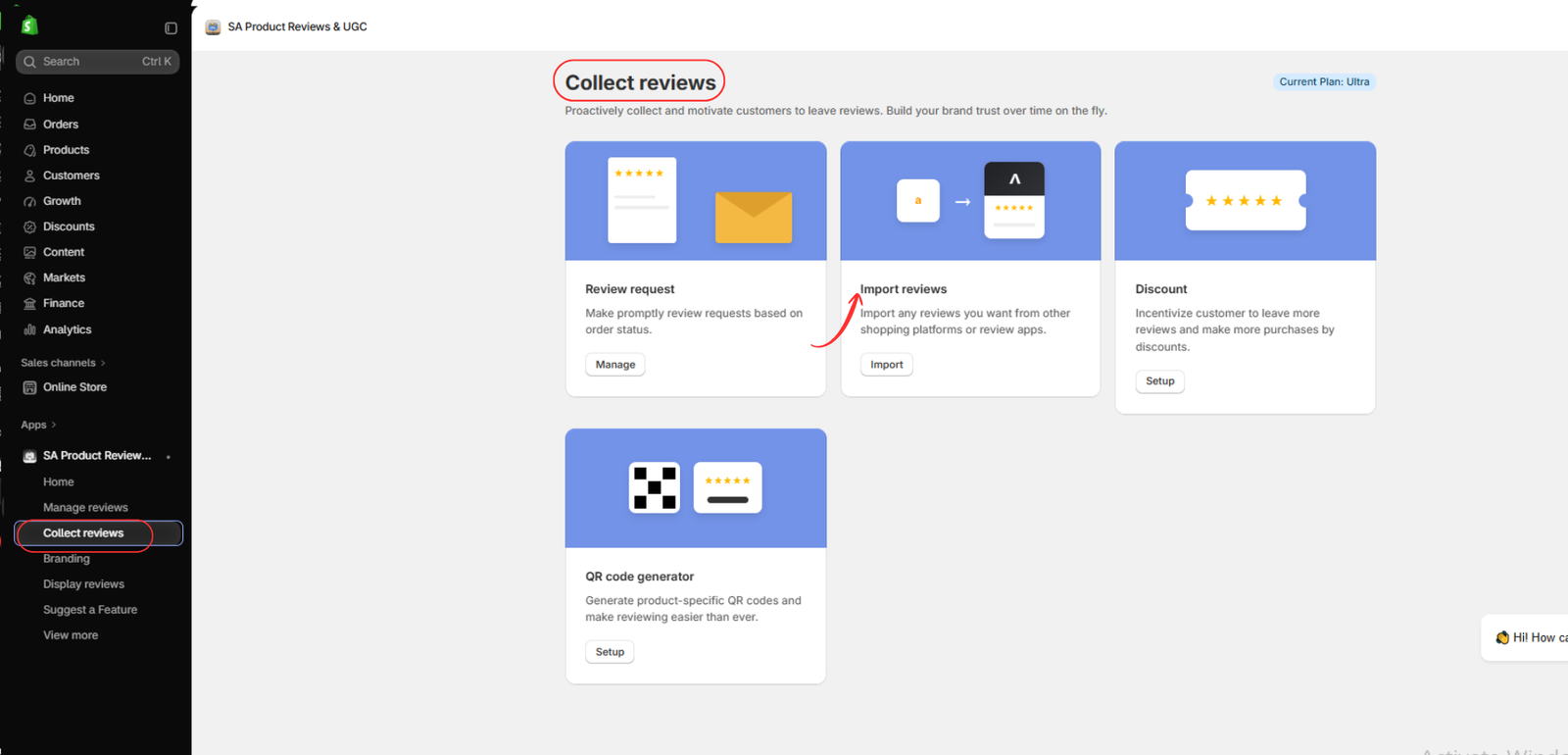
Inside the application, navigate to Collect reviews. This dashboard brings together review requests, importing existing reviews, discount incentives, and QR code generation.
Having these tools in one place helps merchants maintain an organized approach to customer feedback.

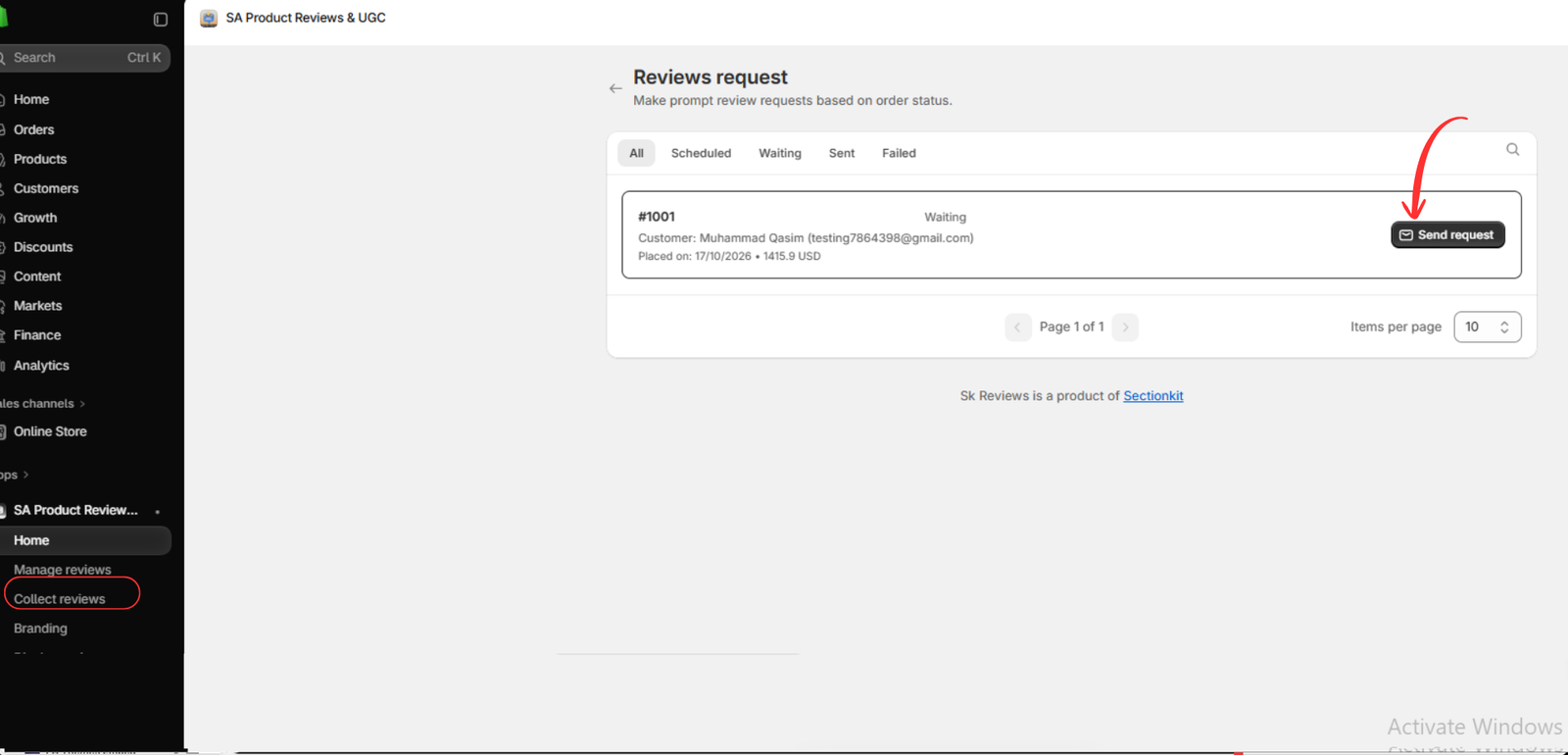
Step 5: Manage review requests
Select the Review request option and click Manage.
This feature helps merchants organize post-purchase review invitations and follow up with customers at appropriate times.
Step 6: Send review invitations to customers
In the review request interface, locate the relevant order and select Send request.
Requesting honest feedback after customers have received their products can help merchants better understand satisfaction levels and identify problems early.
Step 7: Access the Import Reviews feature
Return to the Collect reviews dashboard and select Import reviews.
This feature is useful for merchants who already have genuine customer reviews collected through another application or platform.
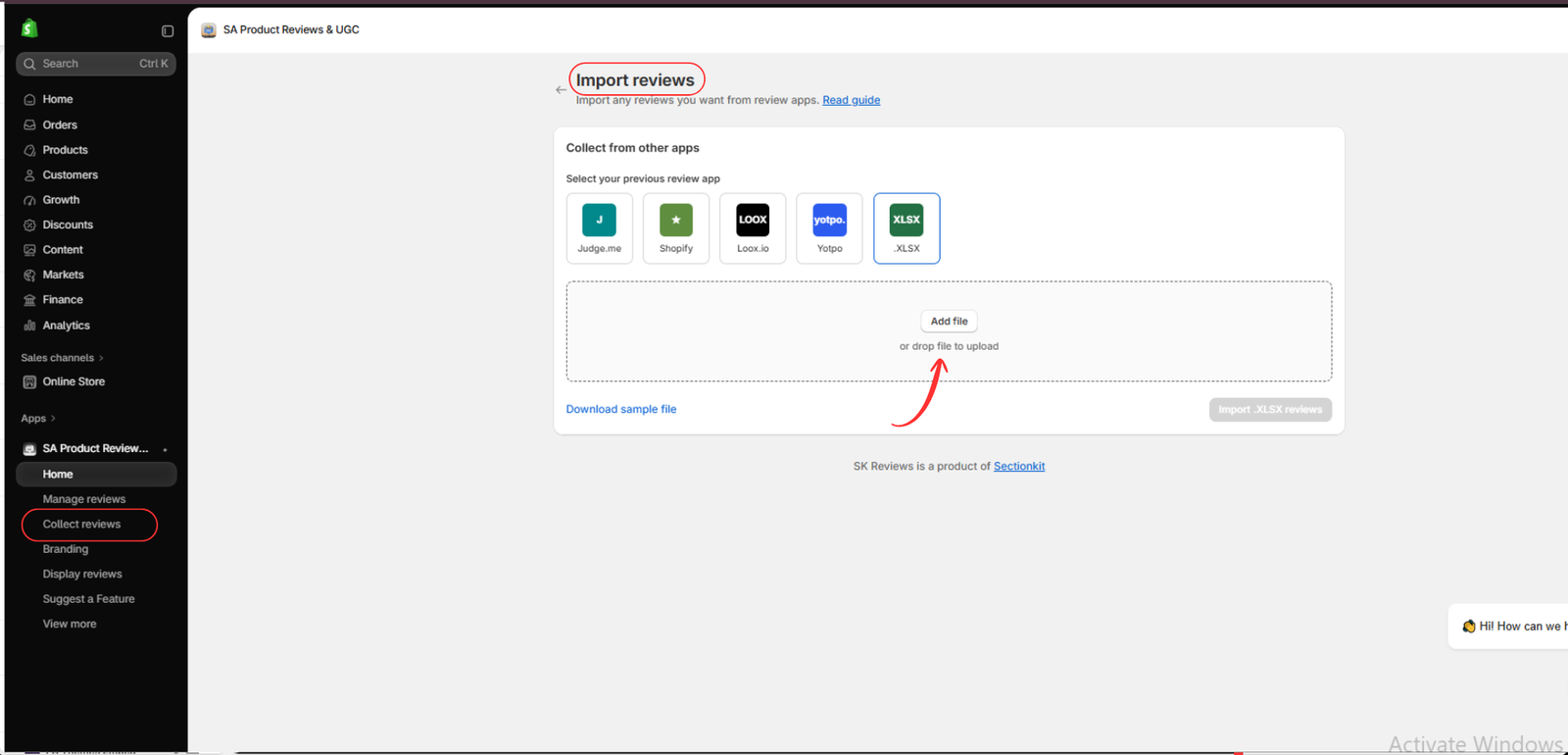
Step 8: Import existing customer feedback
Choose an available import source, such as XLSX, and upload the appropriate file.
Importing authentic reviews helps merchants retain historical feedback, including constructive or negative reviews that may provide useful product insights.
Step 9: Explore discount incentives
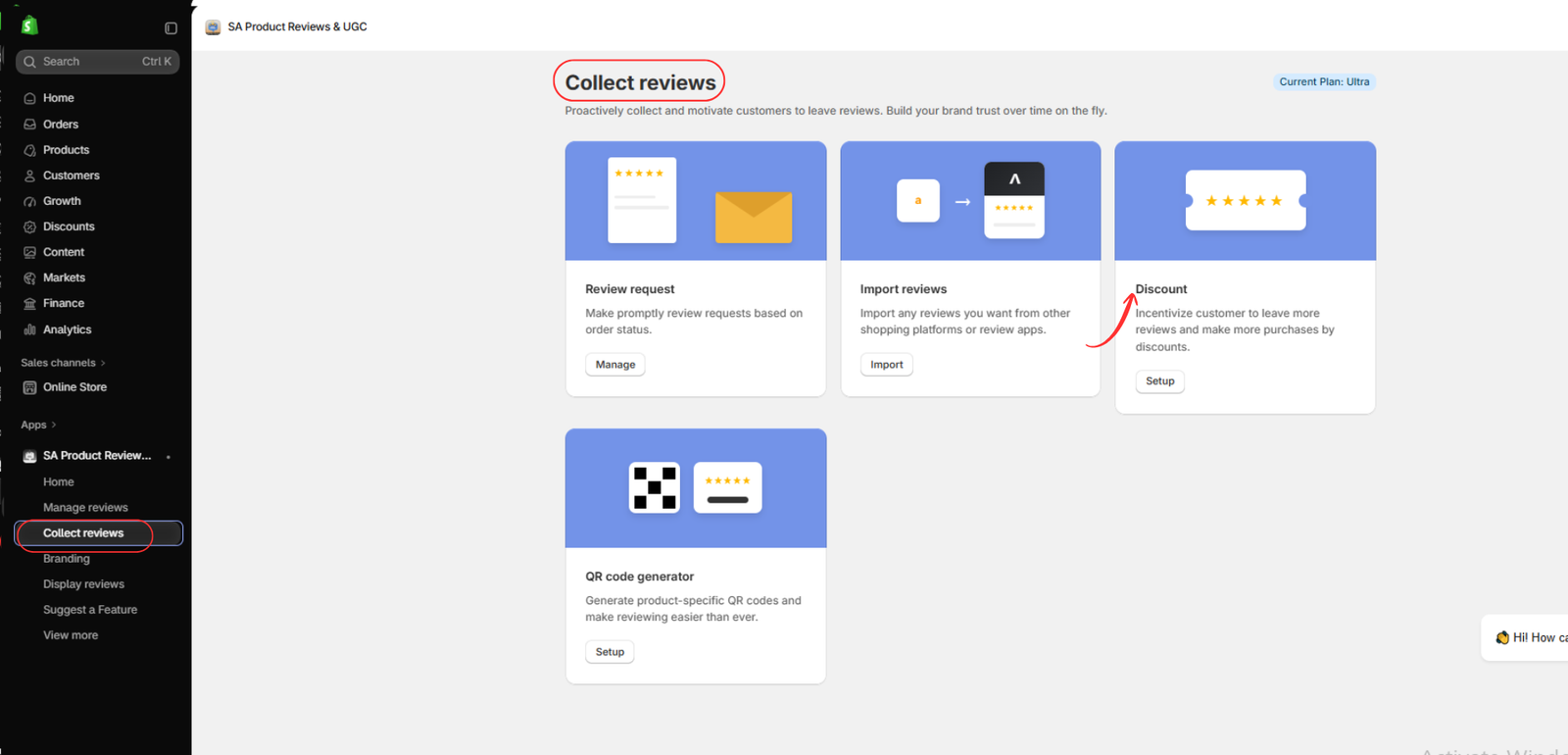
Navigate back to Collect reviews and open the Discount feature.
Discount incentives can encourage customers to participate in the review process. Rewards should be offered for honest feedback, regardless of the rating customers provide.
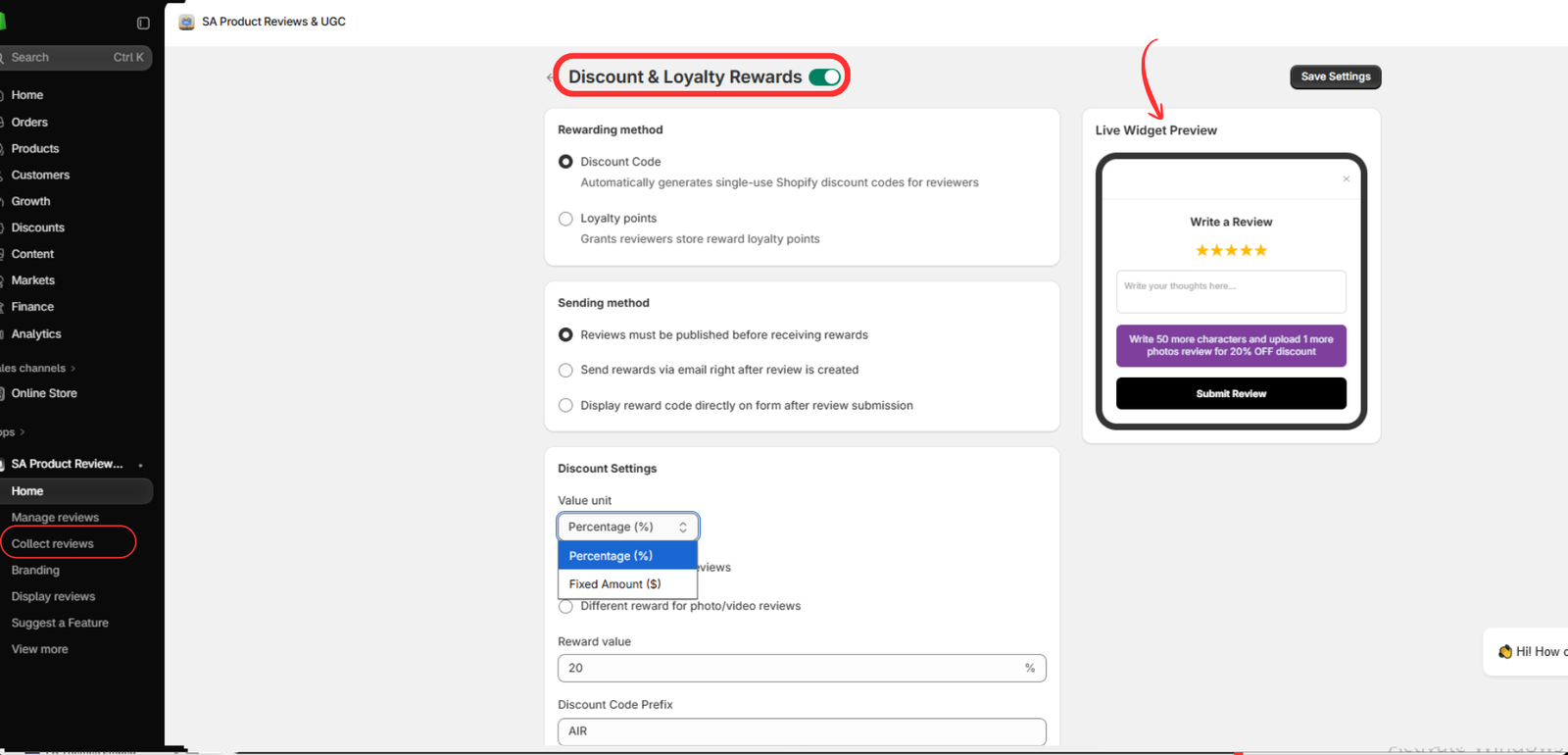
Step 10: Configure discount and loyalty rewards
Enable Discount & Loyalty Rewards and select the appropriate reward method.
Depending on your configuration, you can offer percentage discounts, fixed-amount discounts, or loyalty points. Review the customer-facing preview and save your settings.
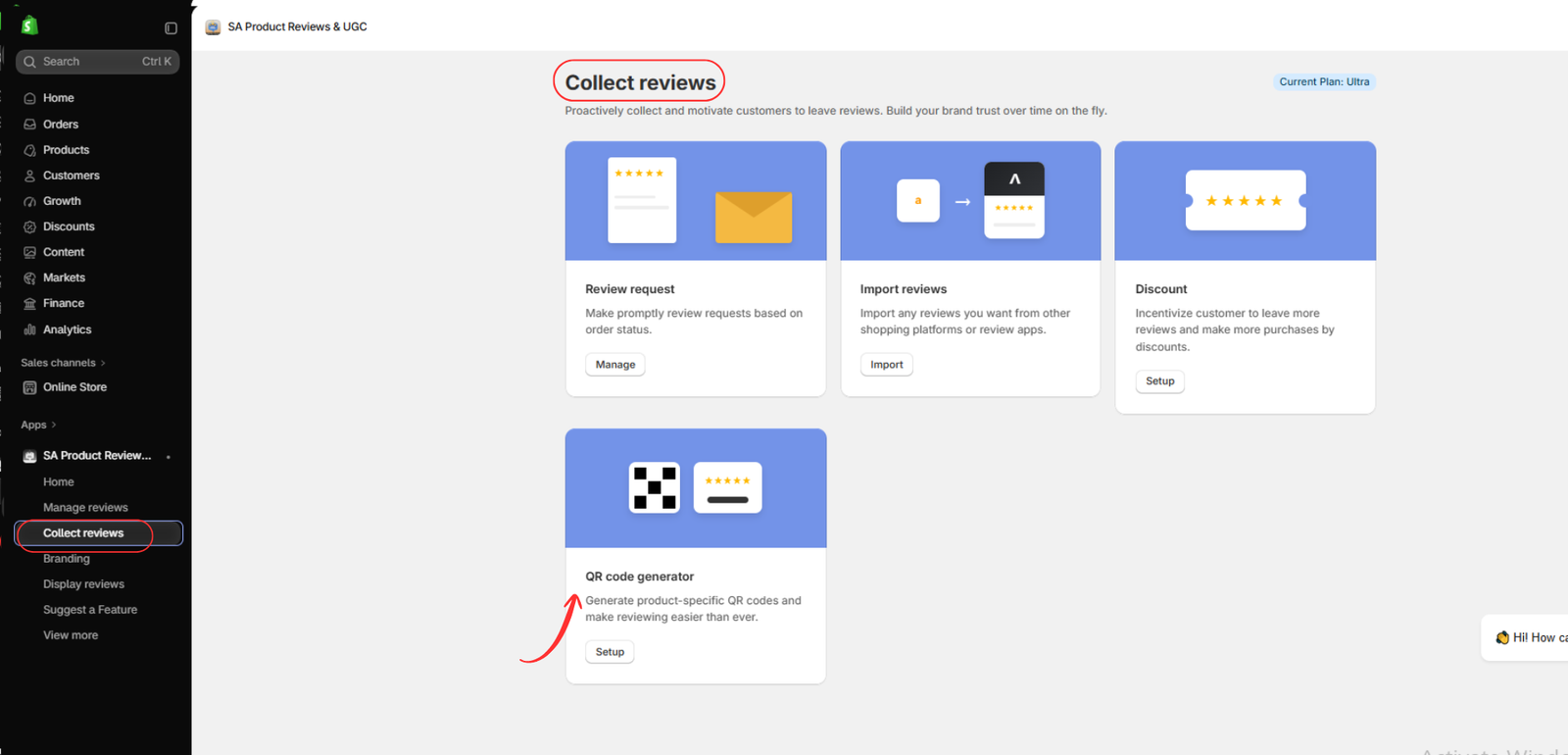
Step 11: Generate product-specific review QR codes
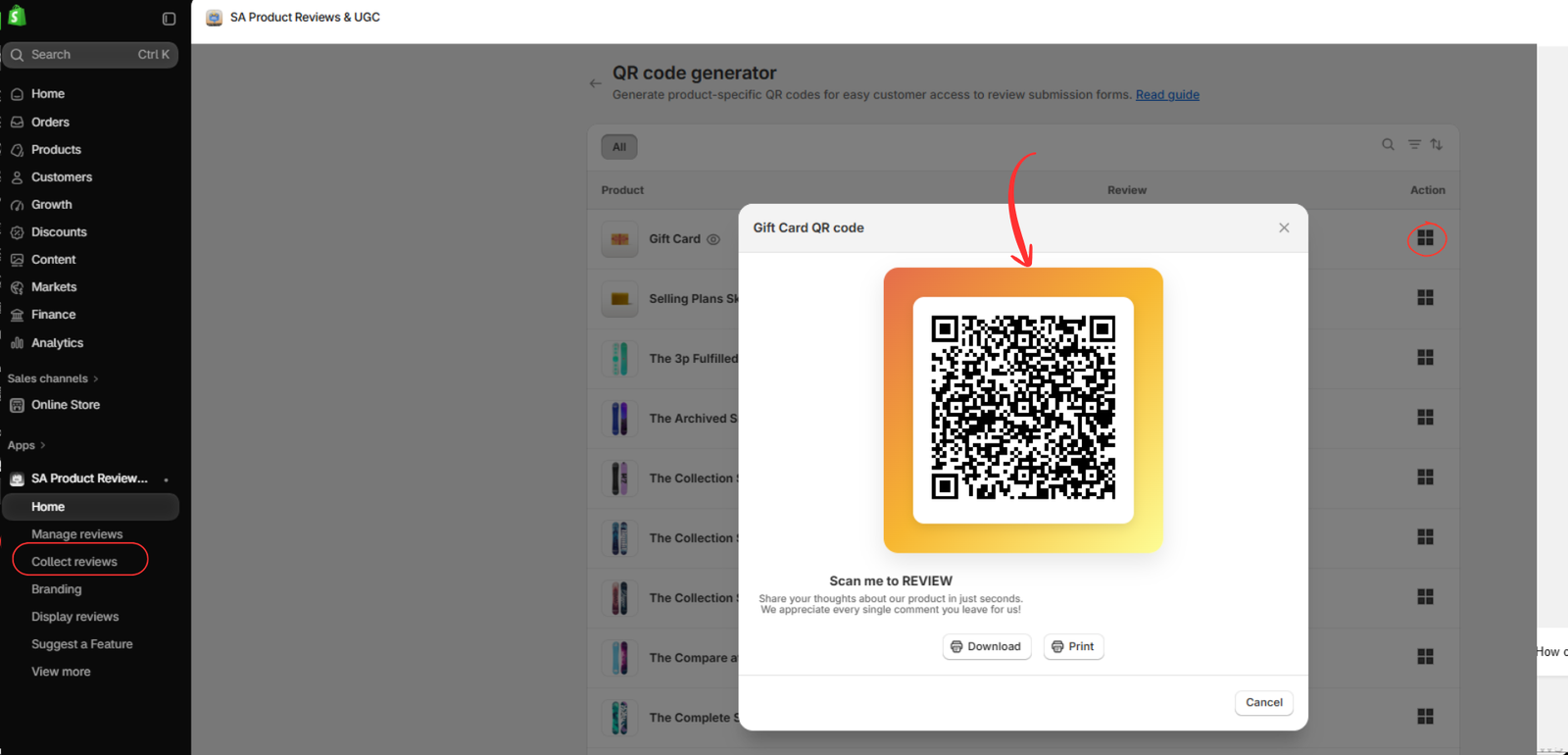
Open the QR code generator and select a product.
Download or print the generated QR code for packaging inserts, thank-you cards, or other suitable materials. Customers can scan the code to access the product review form.
This creates an additional opportunity to collect authentic customer feedback after delivery.
How these features support negative review management
SA Product Reviews & UGC supports merchants by making customer feedback easier to collect and organize. Its app listing confirms features such as automated post-purchase requests, photo reviews, discount rewards, customizable review widgets, and QR codes.

Shopify App Store
When customers submit critical feedback, merchants can use it to identify recurring issues and improve their products or services. The actual response to a negative review should remain professional, respectful, and focused on resolving the customer’s concern.
Explore the app: SA Product Reviews & UGC




