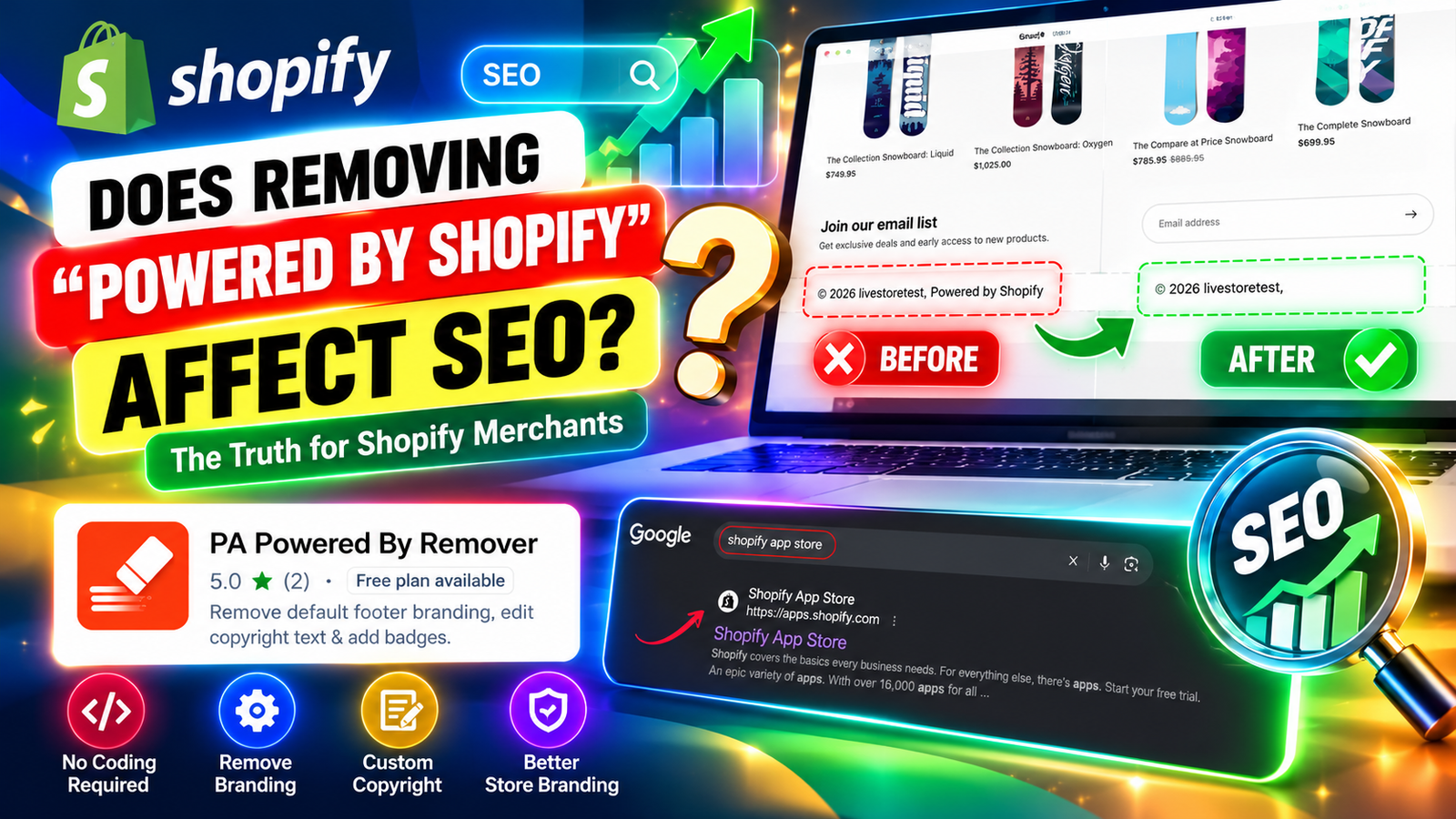
DOES REMOVING “POWERED BY SHOPIFY” AFFECT SEO?
Introduction
Search engine optimization (SEO) plays an important role in helping Shopify merchants attract organic traffic, improve product visibility, and reach potential customers through Google and other search engines.
When building an online store, merchants often focus on optimizing product descriptions, improving page speed, adding relevant keywords, and creating valuable content. However, one small detail that frequently raises questions is the default “Powered by Shopify” text displayed in the footer of many Shopify stores.
Many store owners wonder whether removing this attribution could negatively affect their search engine rankings or whether keeping it provides any SEO advantages.
The answer is straightforward: Removing “Powered by Shopify” does not directly harm your store’s SEO. There is no established Google ranking requirement to display this attribution.
In fact, removing the text can help create a cleaner, more personalized footer, although the removal itself should not be expected to improve rankings.
In this article, we’ll explore how footer attribution relates to SEO, the challenges Shopify merchants face, and how to remove it using the PA Powered By Remover app without manually editing theme code.
What is “Powered by Shopify” in a store footer?
When you create a Shopify store, your theme may automatically include a small attribution at the bottom of the website.
It usually appears in a format similar to:
© 2026 Your Store Name. Powered by Shopify
This text identifies Shopify as the platform powering the online store.
While it is a standard theme element, it is not essential to the store’s search engine visibility.
Google evaluates websites using many signals, including content relevance, page experience, crawlability, links, and overall website quality. The presence or absence of this particular attribution is not a recognized ranking factor.
The main problem Shopify merchants face
Merchants often want complete control over their storefront design, but default theme elements can create uncertainty.
1. Concerns about SEO rankings
Some merchants worry that removing Shopify’s default attribution could negatively influence how Google evaluates their website.
Because Shopify is a well-established eCommerce platform, store owners sometimes assume displaying its name provides additional search engine credibility.
However, there is no reliable evidence that keeping this footer attribution improves organic rankings.
2. Limited branding flexibility
A store’s footer is an extension of its branding. Default platform text may not fit the visual identity merchants want to create.
3. Difficulty modifying theme files
Although some Shopify themes allow merchants to remove the attribution through native settings or language-content editing, other implementations may require additional customization.
Merchants unfamiliar with Liquid code may prefer avoiding manual changes.
4. Fear of breaking the website
Editing the wrong theme file can introduce layout or functionality problems. Merchants often want a simpler way to manage footer content.
5. Lack of control over copyright information
Store owners may want to display personalized copyright text, company information, or other relevant footer elements.
These challenges make footer customization tools useful for merchants who want greater control without unnecessary technical complexity.
Does removing “Powered by Shopify” actually affect SEO?
Removing the text alone is not expected to improve or reduce your Google rankings.
Google does not require Shopify stores to display the “Powered by Shopify” attribution to remain indexed or eligible to rank.
Consider the following factors:
| SEO factor | Effect of removing the attribution |
|---|---|
| Google indexing | No expected direct effect |
| Keyword rankings | No established direct ranking benefit or penalty |
| Website speed | Usually negligible |
| Mobile usability | No expected direct effect |
| Brand presentation | Can create a cleaner, more personalized appearance |
| Internal linking | Unchanged if important footer links are preserved |
| Structured data | Unchanged when only the attribution is removed |
There is one important distinction: removing the text is different from deleting or rebuilding the entire footer.
If a merchant accidentally removes important navigation links, policy pages, or other useful elements while editing the footer, those broader changes could affect usability and site structure.
For this reason, it is important to use a controlled method that targets the attribution without unnecessarily changing other footer components.
Introducing PA Powered By Remover
PA Powered By Remover, developed by PeakApps, is a Shopify app designed to help merchants remove default footer branding and customize copyright information.
Instead of manually searching through theme files, merchants can configure the relevant settings from the app dashboard.View PA Powered By Remover on Shopify App Store
The app offers features including:
- Removing the default “Powered by Shopify” attribution.
- Adding personalized copyright text.
- Managing footer settings through a centralized dashboard.
- Activating functionality through a Shopify theme app embed.
- Accessing additional footer customization options, such as payment icons and trust badges, depending on the plan.
The app is useful for merchants who want to customize their storefront without manually editing Liquid code.
Why using a footer customization app can be important
Simpler store management
A dedicated app provides a convenient interface for managing footer branding settings.
Reduced need for manual code editing
Merchants can configure supported changes without searching through theme files.
More consistent branding
Personalized copyright text can help the footer match the rest of the storefront.
Greater customization flexibility
Additional footer features can provide options for displaying business information and relevant visual elements.
Easier verification
Merchants can review the storefront after enabling the app to confirm that the attribution has been removed.
However, installing an app does not automatically improve SEO. Merchants should still consider app performance, theme compatibility, and whether the additional functionality is necessary.
Step-by-step guide: Remove “Powered by Shopify” without affecting your SEO
Step 1: Search for the Shopify App Store
Start by opening Google and searching for Shopify App Store.
Click the official Shopify App Store result to access Shopify’s marketplace, where you can find applications for store customization, marketing, SEO, and other business needs.
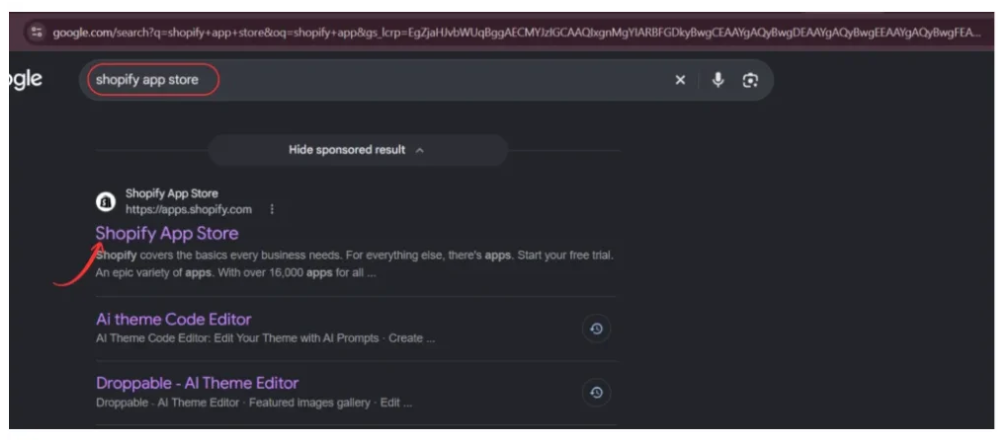
Using the official marketplace helps ensure you find the correct application before making changes to your storefront.
Step 2: Find PA Powered By Remover
Once the Shopify App Store opens, locate the search bar at the top of the page.
Type PA Powered By Remover and press Enter.
Find the application developed by PeakApps in the search results.
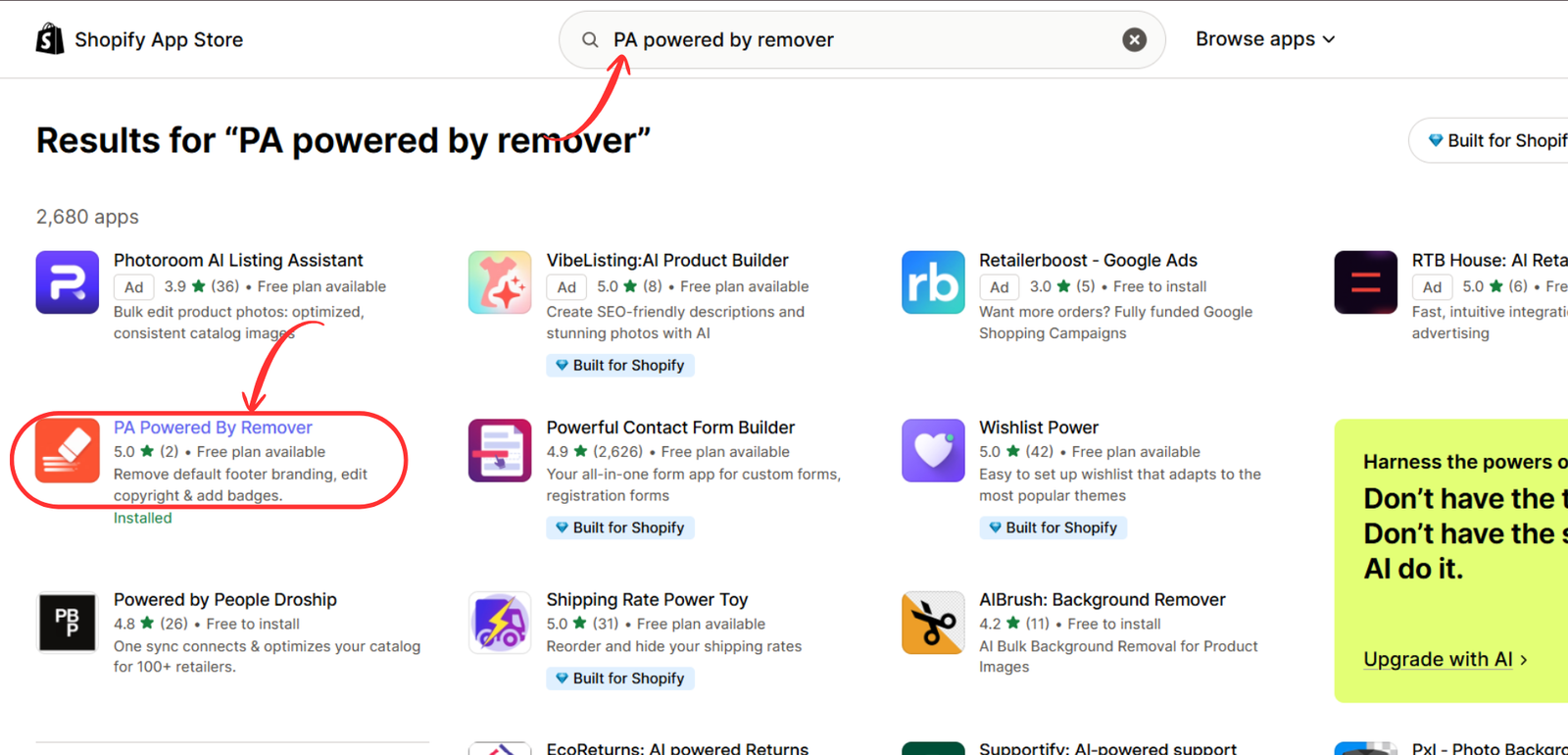
Select the application to view its details and available customization features.
Step 3: Install and open PA Powered By Remover
On the application listing page, review its features, screenshots, and pricing information.
The app helps merchants remove default footer branding and customize copyright information without manually editing Liquid code.
Click Install to add it to your Shopify store. If you have already installed the application, click Open.

You can also access the app directly:PA Powered By Remover – Shopify App Store
Step 4: Configure your footer branding settings
After installation, open PA Powered By Remover from your Shopify admin dashboard.
Navigate to the Remove Branding section.
Inside the Branding & Footer Dashboard, locate the Store Attribution Settings panel.
Enable the checkbox labeled Remove ‘Powered by Shopify’ credit.
Next, enter your preferred copyright information in the Custom Copyright Text field.
For example:
© 2026 Your Brand Name. All Rights Reserved.
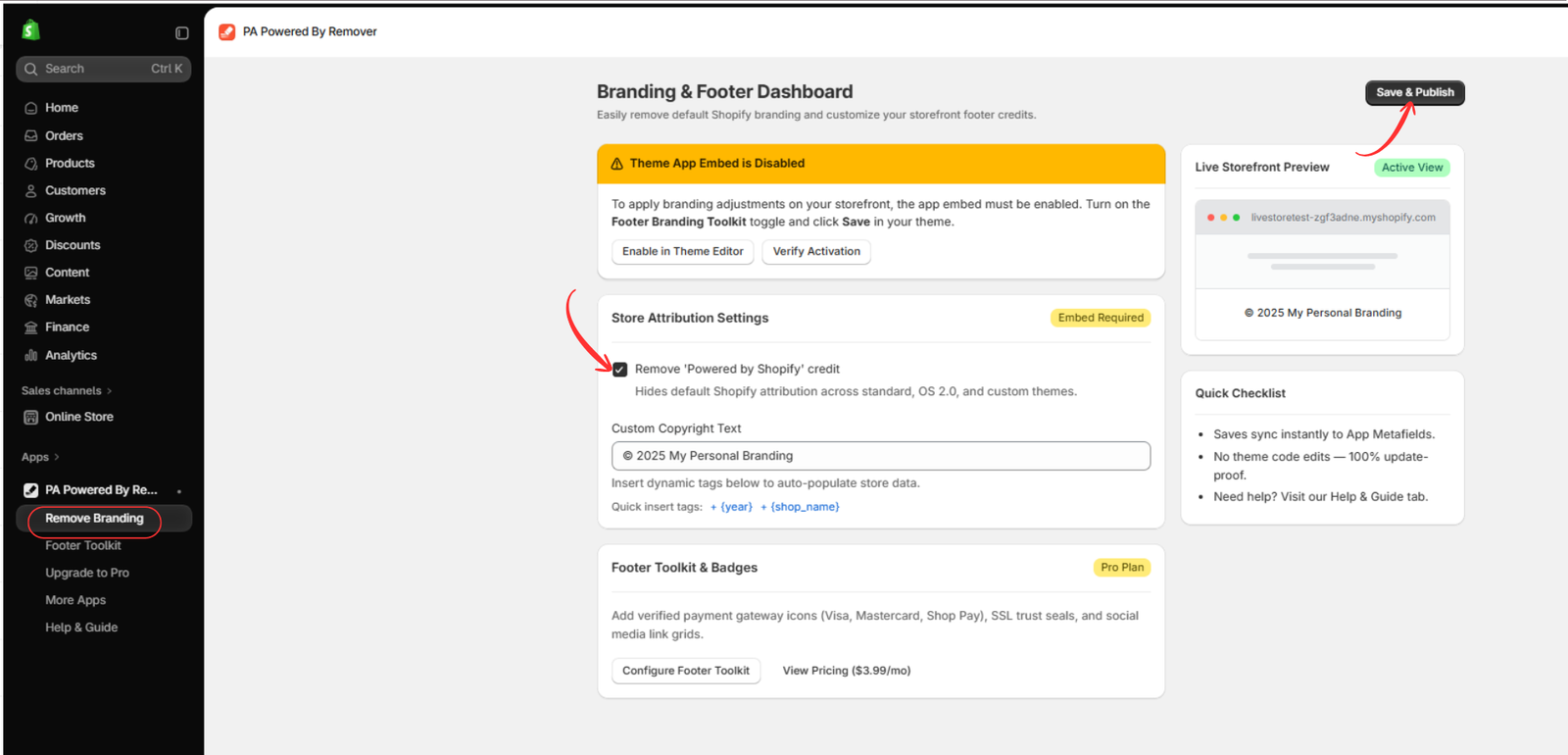
Click Save & Publish to save your preferences.
This step primarily changes your storefront’s branding. Removing the attribution does not directly improve or harm SEO rankings.
Step 5: Activate Footer Branding Toolkit in the theme editor
After saving your settings, open the Shopify theme editor.
Navigate to Online Store → Themes → Customize.
In the theme editor, locate the App embeds icon on the left side and click it.
Find Footer Branding Toolkit, associated with PA Powered By Remover.
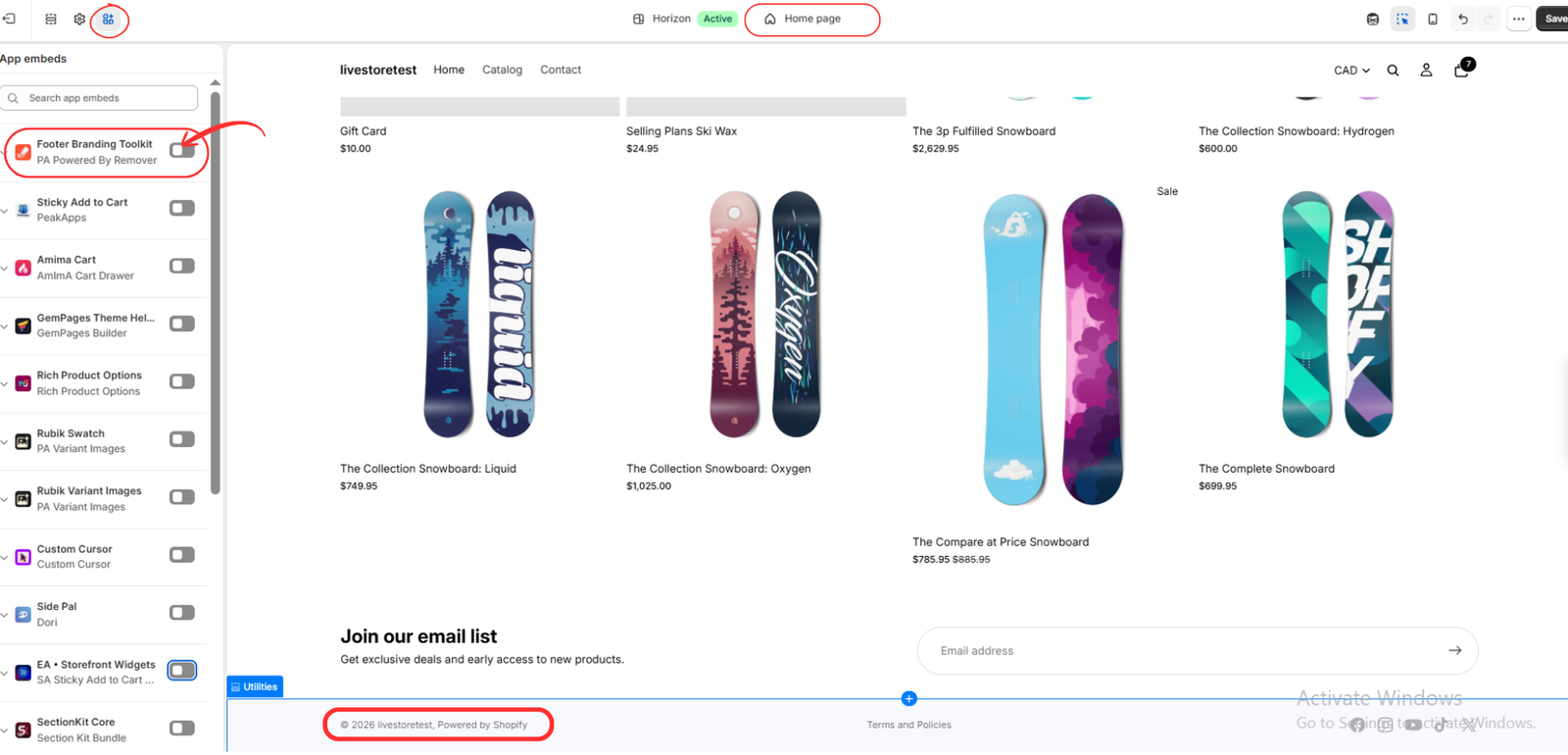
Enabling the app embed allows the application to apply its supported footer customization settings to your storefront.
Step 6: Enable the app embed and save your changes
Switch on the toggle next to Footer Branding Toolkit.
Click the Save button in the top-right corner of the Shopify theme editor.
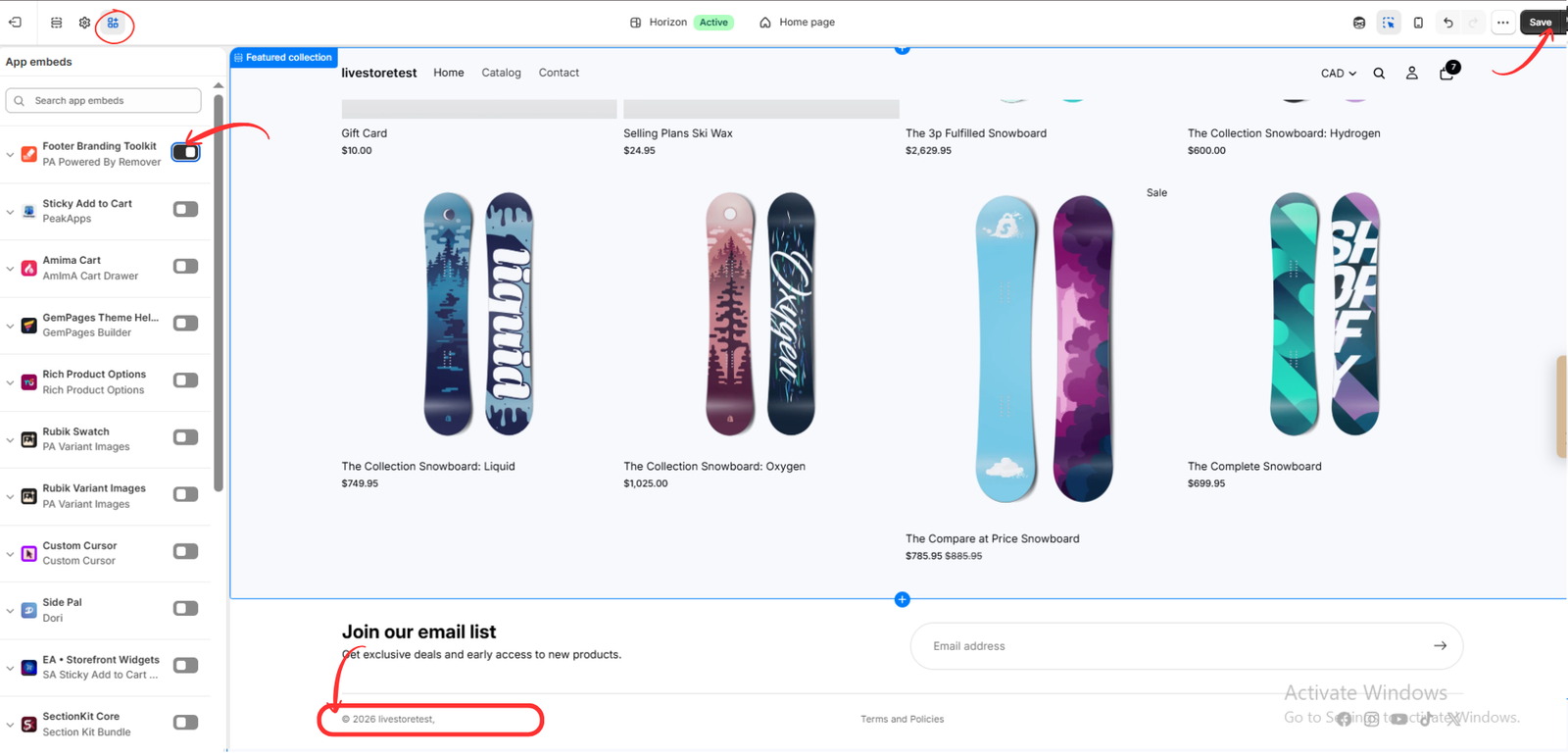
Now open your live Shopify store and scroll to the bottom of the page.
You should see that the default “Powered by Shopify” attribution has been removed, leaving your customized copyright information.
Step 7: Check your storefront and SEO after removal
Once the changes are published, verify that your storefront is functioning correctly.
Check that your footer navigation links, policy pages, contact information, and other important elements remain accessible.
Review the footer on desktop and mobile devices to ensure the layout is responsive.
You can also use Google Search Console to monitor your website’s indexing and search performance over time.
Important: Removing “Powered by Shopify” is a branding customization, not an SEO ranking technique. As long as the change does not interfere with important site elements, it is not expected to negatively affect your organic search visibility.
Conclusion
Removing “Powered by Shopify” from your store footer is a branding decision, not an SEO requirement.
There is no established evidence that keeping the attribution improves Google rankings or that removing it causes a ranking penalty.
For merchants who want a more personalized footer, PA Powered By Remover provides a convenient way to manage attribution settings and copyright information without manually editing theme code.
The most important consideration is making sure your footer continues to function properly and that useful navigation elements remain intact.
If you want to create a cleaner storefront while maintaining your existing SEO structure, follow the steps above and verify the changes after publishing.Explore PA Powered By Remover on Shopify App Store




