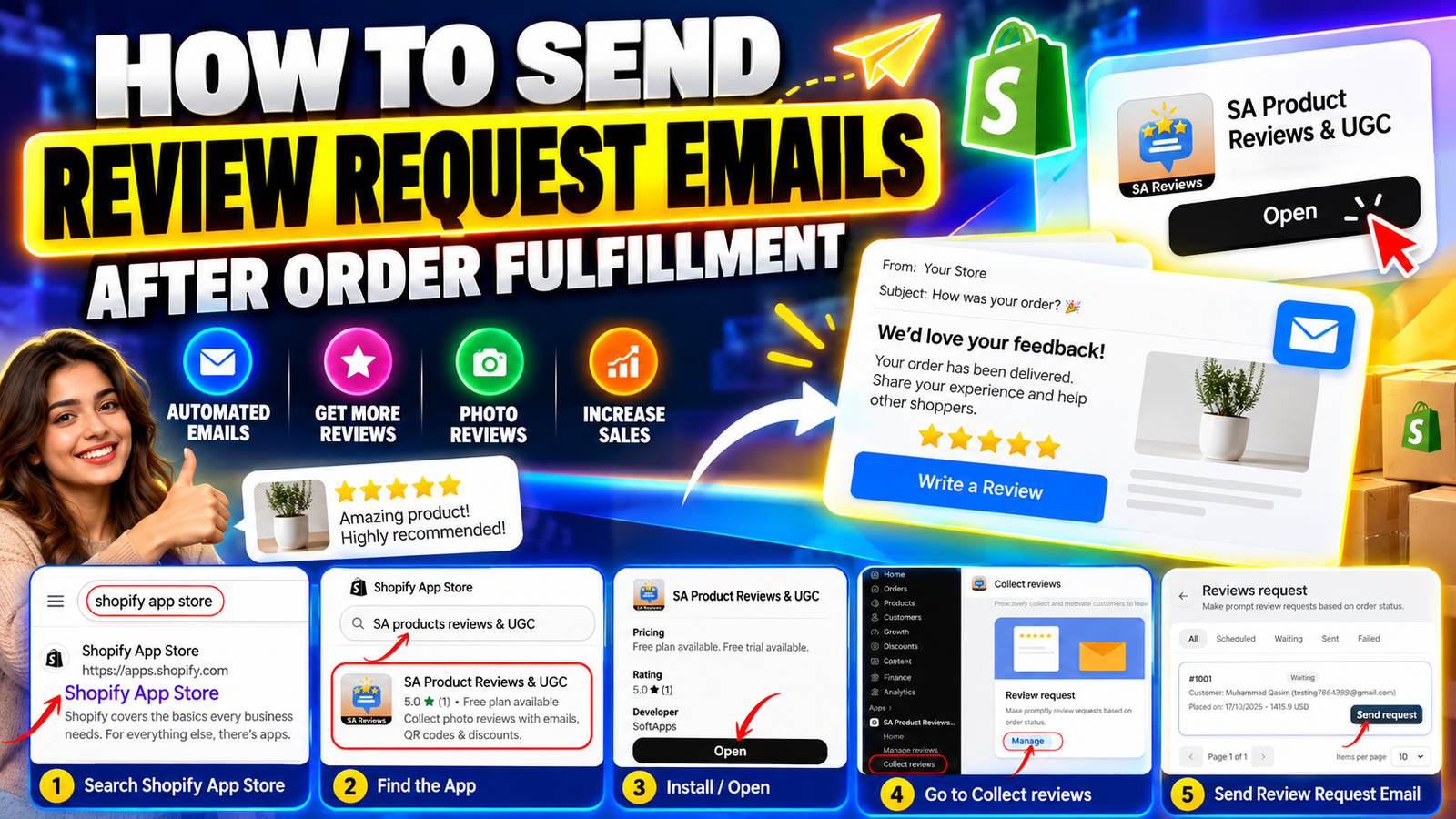
HOW TO SEND REVIEW REQUEST EMAILS AFTER ORDER FULFILLMENT
Introduction
Customer reviews play an essential role in building trust and credibility for Shopify stores. After receiving their orders, customers can share valuable feedback about product quality, shopping experiences, and overall satisfaction.
However, many satisfied customers forget to leave reviews unless they receive a reminder. This makes post-purchase review request emails an important part of a successful customer feedback strategy.
With SA Product Reviews & UGC, Shopify merchants can manage review request emails after order fulfillment, encourage customers to submit product ratings and photos, and collect valuable customer feedback.
In this guide, you’ll learn how to send review request emails after order fulfillment using SA Product Reviews & UGC.
Challenges Shopify Merchants Face When Collecting Photo Reviews
Collecting customer reviews, especially photo reviews, can be challenging for Shopify merchants.
Many customers complete their purchases and never return to leave feedback. Even when customers are satisfied with their products, they may not take the time to write reviews or upload product photos.
Sending individual follow-up emails to every customer is also time-consuming, especially for stores processing multiple orders daily.
Other common challenges include low review submission rates, inconsistent customer follow-ups, difficulty tracking review requests, and limited customer-generated product images.
Without an organized review collection system, merchants may miss opportunities to build trust through authentic customer experiences.
Why Do You Need a Shopify Photo Review App?
A dedicated Shopify photo review app simplifies the process of collecting and managing customer feedback.
Instead of manually contacting customers after every purchase, merchants can use review request tools to organize customer follow-ups and encourage feedback.
SA Product Reviews & UGC provides features such as post-purchase review request emails, photo review collection, QR codes, discount incentives, and review management.
The app also allows merchants to monitor review request statuses, including scheduled, waiting, sent, and failed requests.
This helps Shopify merchants maintain a more organized and efficient review collection process.
Importance of Collecting Photo Reviews
Photo reviews provide visual evidence of real customer experiences. They help potential buyers understand how products look and perform outside professional product photography.
Displaying authentic customer photos can improve product credibility and help shoppers make more informed purchasing decisions.
Photo reviews can also strengthen social proof, encourage customer engagement, and support conversions by reducing uncertainty about product quality.
By sending review request emails after order fulfillment, merchants can encourage customers to share both written feedback and product images.
How to Send Review Request Emails After Order Fulfillment
Follow these steps to install SA Product Reviews & UGC and send review request emails to Shopify customers.
Step 1: Search for the Shopify App Store
Open your preferred browser and search for Shopify App Store on Google.
Find the official Shopify App Store website in the search results and click on it.
This will take you to Shopify’s app marketplace, where you can discover applications designed to improve your store’s functionality.

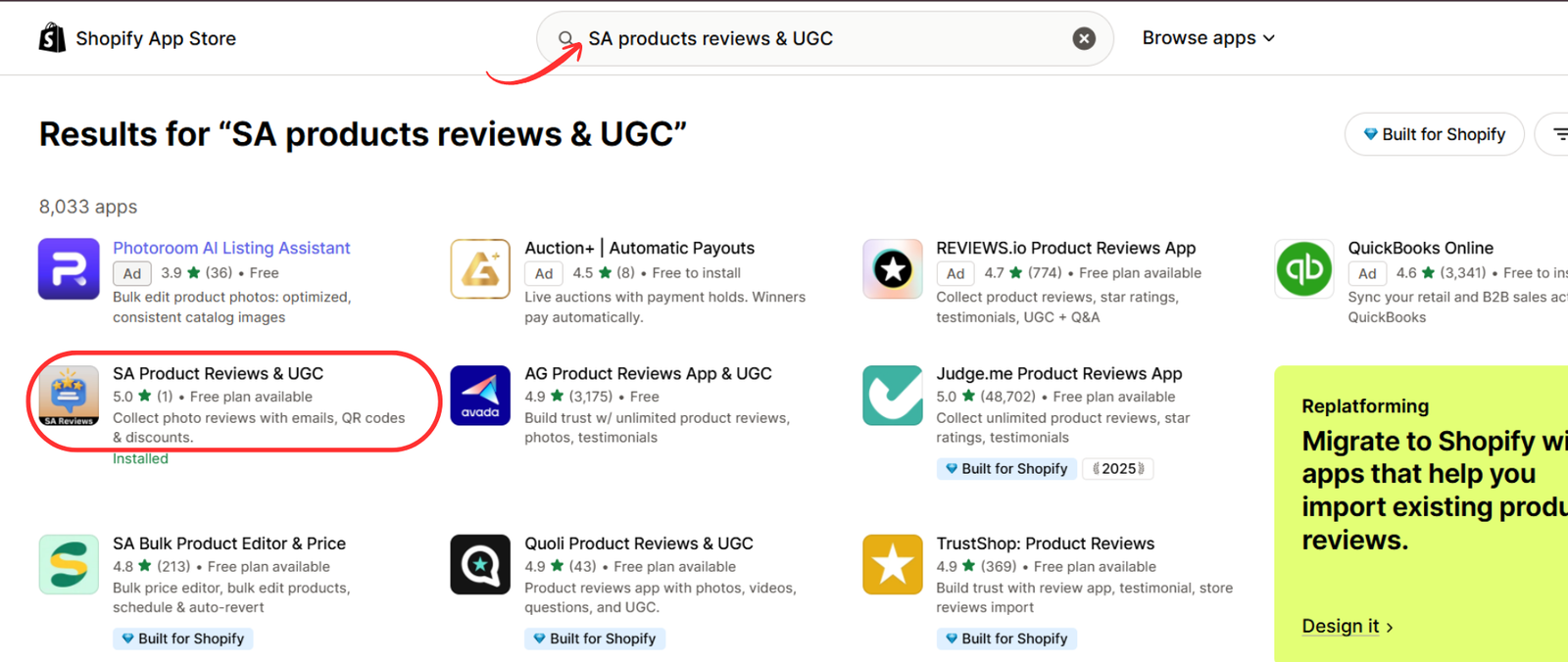
Step 2: Search for SA Product Reviews & UGC
Once you’re on the Shopify App Store, locate the search bar at the top of the page.
Type SA Product Reviews & UGC into the search field.
Find the app in the search results and click on its listing to view more details.
Step 3: Install SA Product Reviews & UGC
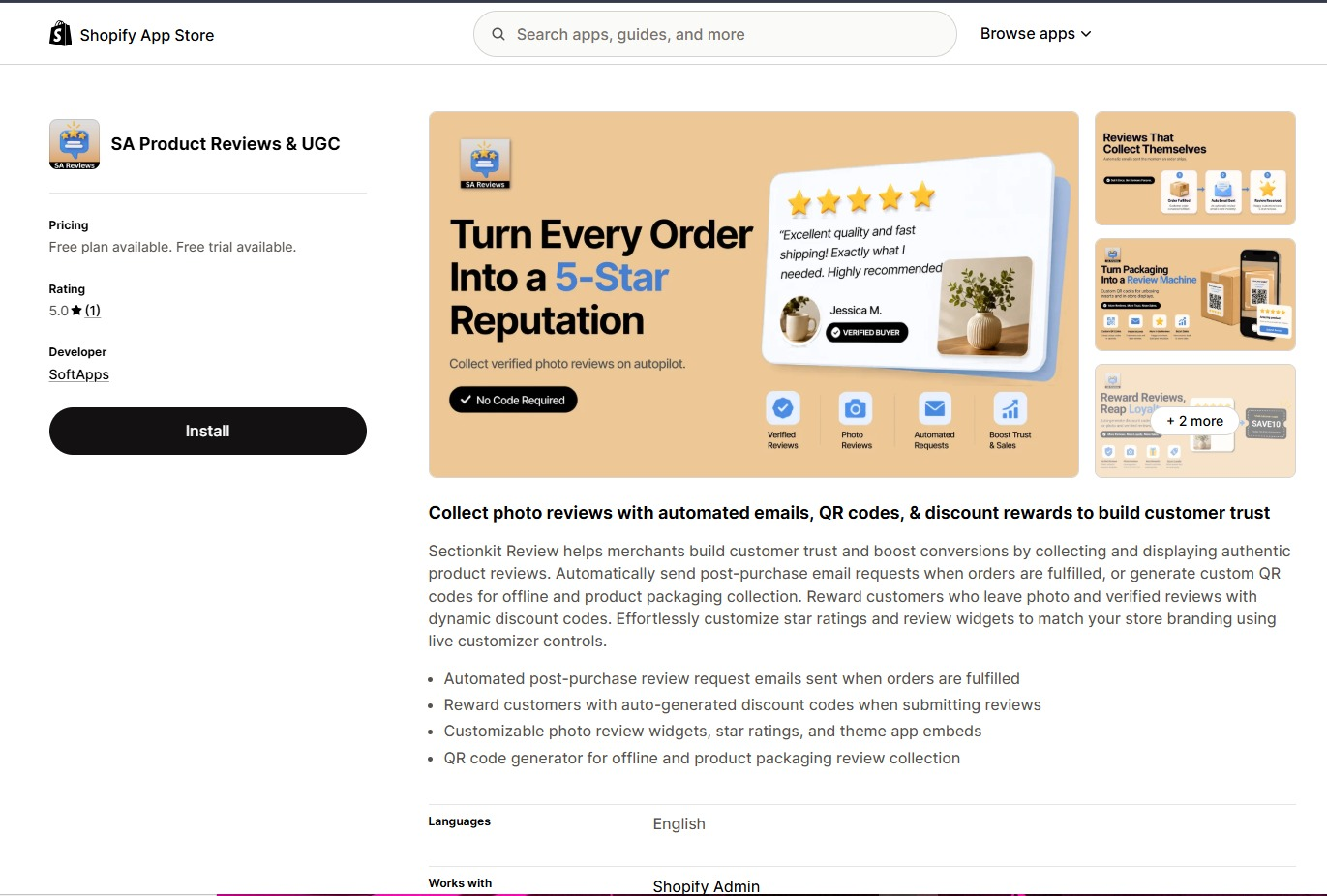
After opening the app listing, review its available features and pricing information.
SA Product Reviews & UGC helps Shopify merchants collect customer reviews through automated emails, QR codes, and discount rewards.
Click the Install button to add the app to your Shopify store.
Follow Shopify’s installation instructions to complete the process.
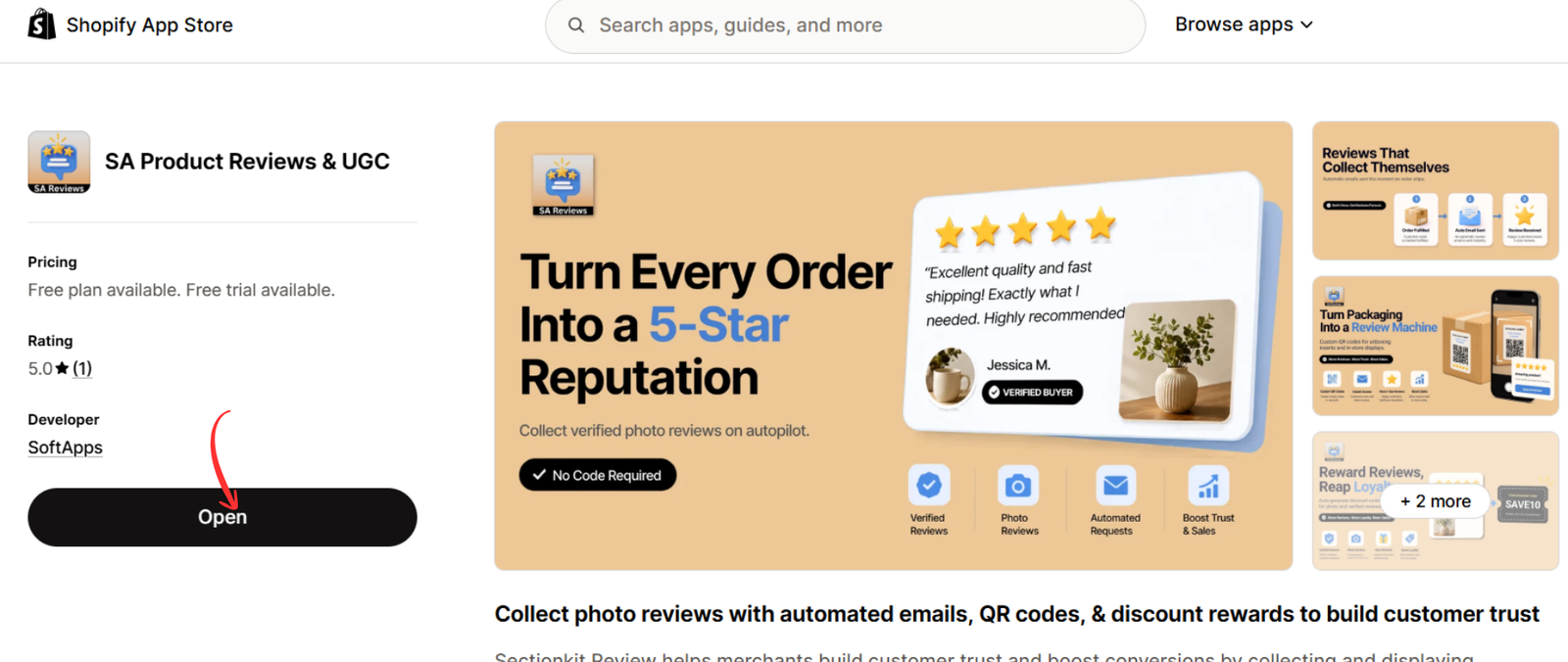
Step 4: Open SA Product Reviews & UGC
After installing the app, navigate to your Shopify admin dashboard.
Open SA Product Reviews & UGC from the Apps section.
If the app is already installed, its Shopify App Store listing will display an Open button instead of Install.
Click Open to access the app dashboard.
Step 5: Navigate to Collect Reviews
Inside the app dashboard, locate the left navigation menu.
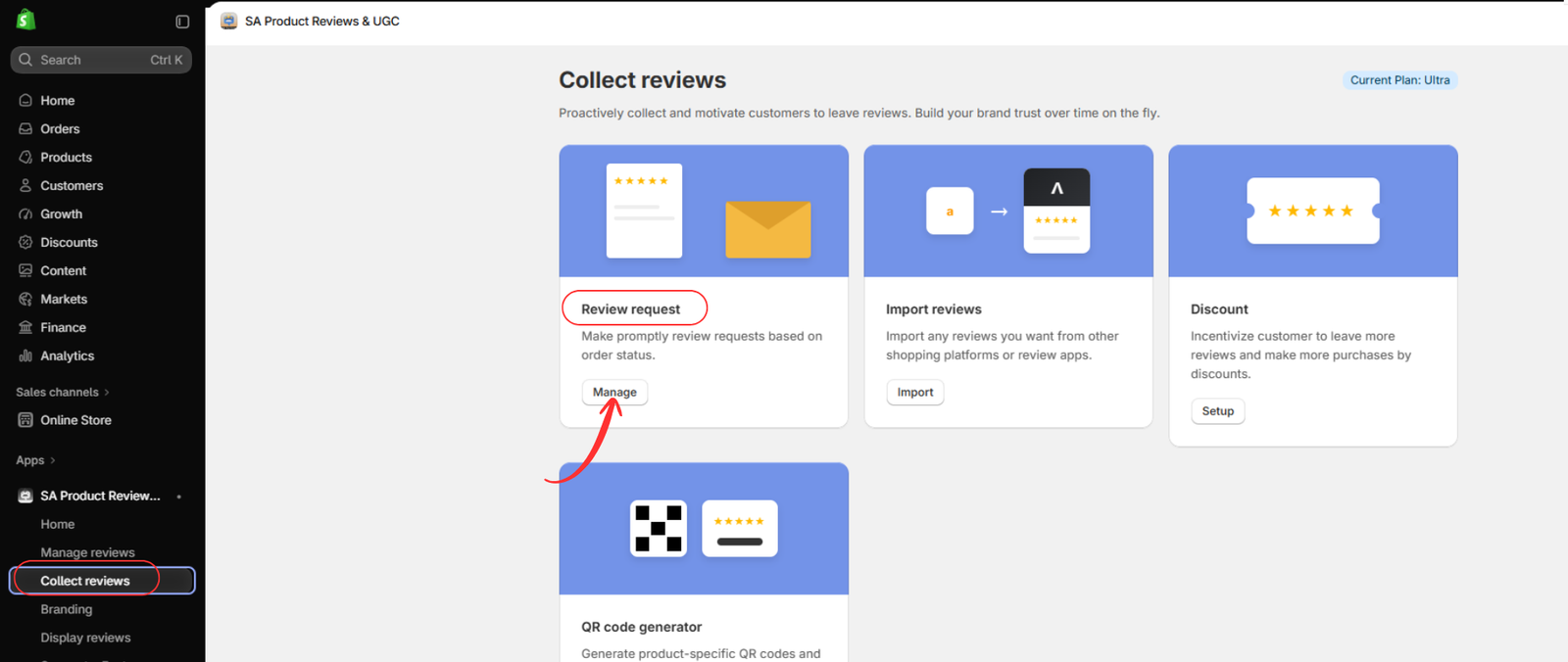
Click Collect reviews to access the review collection features.
On this page, you’ll find options for review requests, importing reviews, discount incentives, and QR code generation.
Locate the Review request section and click Manage.
This will open the review request management page, where you can view and manage customer review request emails based on order status.
Step 6: Send a Review Request Email
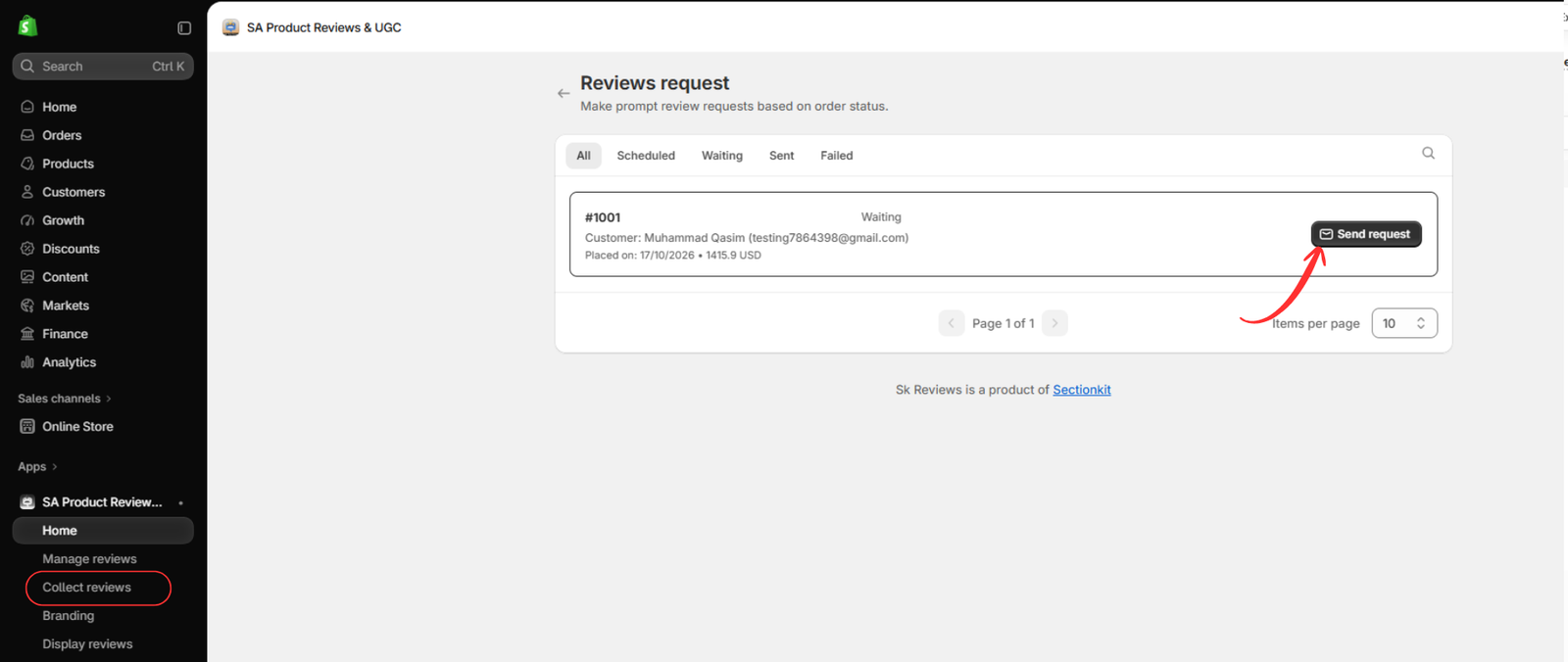
After clicking Manage, you’ll be redirected to the Reviews request page.
This page displays customer orders and their corresponding review request statuses.
At the top, you’ll find tabs such as All, Scheduled, Waiting, Sent, and Failed, allowing you to monitor review requests.
Locate the customer order for which you want to send a review request.
For an eligible order showing the Waiting status, click the Send request button on the right side.
The app will initiate the review request email, inviting the customer to share feedback about their purchase.
After sending the request, check the status to confirm whether the email was sent successfully.
Best Practices for Sending Review Request Emails
Sending review request emails at the right time can improve customer participation.
Merchants should allow customers enough time to receive and experience their products before requesting feedback. Order fulfillment does not necessarily mean that an order has been delivered.
Review request emails should be clear, friendly, and concise. Explain the value of customer feedback and make the review submission process easy.
Encouraging customers to upload product photos can also help generate authentic user-generated content.
Additionally, merchants should regularly monitor review request statuses to identify pending or failed emails and maintain consistent customer follow-ups.
Why Choose SA Product Reviews & UGC?
SA Product Reviews & UGC provides Shopify merchants with practical tools for collecting and managing customer feedback.
Its review request functionality helps merchants manage post-purchase emails based on order activity.
The app also supports customer photo reviews, review imports, QR code generation, and discount incentives.
By combining these features, merchants can create a more organized review collection process and showcase genuine customer experiences on their Shopify storefronts.
Conclusion
Sending review request emails after order fulfillment is an effective way to encourage customers to share their shopping experiences.
With SA Product Reviews & UGC, Shopify merchants can manage customer review requests, track email statuses, and encourage customers to submit valuable feedback and product photos.
By following this step-by-step guide, you can simplify your post-purchase review collection process and strengthen customer trust through authentic reviews.
Start collecting customer reviews today with SA Product Reviews & UGC




