HOW TO TURN SHOPIFY STORE DATA INTO QUESTIONS AN AI ASSISTANT CAN ANSWER
Shopify Tutorial | PA Claude Connector by PeakApps | AI Store Analytics & Business Insights

Introduction
Running a successful Shopify store requires more than tracking orders and adding new products. Merchants need to understand their sales performance, customer activity, product demand, inventory levels, and overall business growth.
Shopify provides valuable store information, but understanding that data can sometimes be challenging, especially for merchants who don’t have experience working with detailed analytics reports.
For example, you might want to know why sales dropped last month, which products are performing well, or whether your current inventory levels match customer demand.
Traditionally, answering these questions may involve reviewing dashboards, downloading reports, comparing spreadsheets, or asking a data analyst for assistance.
Today, AI assistants offer a more conversational approach.
Instead of manually interpreting every metric, Shopify merchants can ask questions in everyday English and receive explanations based on the store information available to the assistant.
With PA Claude Connector, merchants can use Claude Assistant inside Shopify admin to ask questions, review available store data, prepare written content, and generate downloadable reports.
In this tutorial, you’ll learn how to turn Shopify store data into questions an AI assistant can answer, using real screenshots of PA Claude Connector and practical examples.
The Merchant’s Challenge: Understanding Shopify Store Data
1. Too many reports to review
Shopify stores generate information about orders, sales, inventory, products, and customer activity.
Although this data is useful, manually reviewing multiple reports can take considerable time.
2. Difficulty identifying important trends
Knowing your total revenue is helpful, but understanding why revenue increased or decreased requires additional analysis.
3. Limited technical knowledge
Some merchants aren’t familiar with analytics terminology or spreadsheet formulas.
They need clear explanations rather than complex tables.
4. Uncertainty about which questions to ask
A merchant may notice that sales are slowing down but not know where to begin investigating.
5. Difficulty creating business reports
Preparing reports for meetings, business partners, or team members often involves collecting information and organizing it into documents.
6. Making decisions with incomplete information
Not every app has access to every Shopify metric.
Merchants need to know whether an AI-generated conclusion is supported by available data or is simply a possible explanation.
What Does It Mean to Ask Questions About Shopify Store Data?
Asking questions about Shopify data means using natural language to request information or analysis about your store.
For example, instead of manually calculating total sales for a reporting period, you can ask:
“How much revenue did my Shopify store generate in the last 30 days?”
An AI assistant with access to the relevant sales information can retrieve or analyze available figures and explain the result.
You can also ask follow-up questions to explore the findings further.
For example, after reviewing sales, you might ask whether a longer reporting period reveals a different trend.
This type of interaction is often called conversational analytics.
Why AI-Powered Store Analysis Is Useful
Understand sales information more easily
AI can translate available sales figures into written explanations.
Ask follow-up questions
Merchants can move from a general question to more specific investigations without starting an entirely new reporting process.
Review available order information
An assistant can summarize order counts, revenue, and other accessible metrics.
Identify information gaps
A useful AI assistant should explain when the available data is insufficient to answer a question accurately.
Generate written reports
Instead of copying analysis into a document manually, merchants can request a structured report when the assistant supports document creation.
Save time on routine analysis
AI-assisted workflows can reduce the repetitive effort involved in examining business information.
Introducing PA Claude Connector
PA Claude Connector, developed by PeakApps, is a Shopify application that provides AI-assisted tools for store management, analytics, content creation, and other workflows.
The app’s Claude Assistant interface allows merchants to ask questions in conversational language.
Based on the screenshots you provided, the assistant can help with tasks such as reviewing sales information, drafting store policy content, suggesting follow-up analysis, and generating downloadable DOCX documents.
Key capabilities shown
- Natural-language AI chat inside Shopify admin.
- Suggested prompts for common store tasks.
- Sales and order analysis using available store data.
- Drafting customer-facing store content.
- Explaining reporting limitations.
- Recommending follow-up questions.
- Generating downloadable DOCX reports.
App Link: Install PA Claude Connector on Shopify
What Questions Can You Ask an AI Assistant About Your Shopify Store?
The most effective questions are specific, measurable, and related to information the assistant can access.
| Business area | Example question |
|---|---|
| Sales | How much revenue did my store generate in the last 30 days? |
| Orders | How many customer orders were placed this month? |
| Average order value | What is my average order value for the selected period? |
| Sales trends | How do my sales compare with the previous month? |
| Products | Which products sold the most units in the last 90 days? |
| Inventory | Which products have stock but no recent sales? |
| SEO | Which Shopify products are missing SEO titles? |
| Marketing | What marketing opportunities can we investigate from our sales results? |
| Store policies | Can you draft a customer-friendly returns policy for my store? |
| Reporting | Can you summarize these findings in a downloadable document? |
The assistant’s ability to answer each question depends on its access to the relevant Shopify information.
How to Write Better AI Questions for Shopify Analytics
1. Specify the reporting period
Instead of asking, “How are my sales?” ask, “How many orders did my store receive in the last 30 days?”
2. Mention the metric you need
Specify whether you want revenue, order count, average order value, units sold, or inventory quantities.
3. Ask for comparisons
Comparing the last 30 days with the previous 30 days can be more informative than reviewing a single number.
4. Request an explanation
Ask the AI to explain what the figures mean, rather than simply listing them.
5. Request actionable recommendations
You can ask what additional checks or business actions would be appropriate.
6. Ask the assistant to identify missing data
This helps distinguish confirmed information from assumptions.
Example Prompt for Shopify Store Analysis
Copy this AI prompt Copy
Analyze my Shopify store data for the last 30 days. Show total revenue, total orders, average order value, and any meaningful trends. Explain the findings in simple English, identify missing or unavailable data, and suggest practical next steps. Do not guess unsupported figures. Create a downloadable report if supported.
How AI Can Help Beyond Sales Analysis
AI assistants can also assist with written store management tasks.
For example, merchants may need a draft of a returns policy, FAQ content, customer support responses, or other business documents.
The same chat interface can help prepare these materials.
However, generated policies must be adapted to the merchant’s actual operations, customer commitments, and applicable laws before publication.
The Importance of Accurate Shopify Data
AI responses are only as reliable as the information used to produce them.
For example, a store with just one order in the last 30 days does not provide enough transaction history to establish meaningful product demand trends.
An assistant may still summarize the total number of orders and revenue, but it should avoid claiming to know which product is growing fastest without the necessary product-level sales data.
Merchants should also verify important financial figures against Shopify’s original reports.
Step-by-Step Guide: How to Turn Shopify Store Data Into Questions an AI Assistant Can Answer
The following tutorial uses your four original screenshots in the exact order you provided. Each image is placed directly below its corresponding step, with instructions and a detailed explanation.
Step 1: Search for the Shopify App Store
Open Google and search for Shopify App Store. Click the official Shopify App Store result highlighted by the red arrow.

Image 1: Open the official Shopify App Store from Google search results.
Step 2: Search for PA Claude Connector
Enter PA Claude Connector in the Shopify App Store search bar. Select the application highlighted in the red circle.

Image 2: Locate PA Claude Connector in the Shopify App Store results.
Step 3: Install or Open the App
Open the PA Claude Connector listing. Click Install if you are a new user, or Open if the app is already installed.

Step 4: Open PA Claude Connector and Start Claude Assistant
First, visit the PA Claude Connector Shopify App Store listing.
Install the app if you haven’t already, or open it from your Shopify admin if it’s installed.
Inside Shopify admin, locate PA Claude Connector in the Apps sidebar and click Claude Assistant.
This opens the AI-powered chat workspace.

Image 1: Open PA Claude Connector, select Claude Assistant, and locate the chat input field highlighted by the red arrow.
Image explanation
The screenshot shows the Claude Assistant interface inside Shopify admin.
On the left, Claude Assistant is highlighted with a red circle.
The main workspace displays the heading How can I help you today?
Below this heading are suggested questions for different Shopify tasks, including writing product descriptions, reviewing sales, drafting store policies, and identifying missing SEO titles.
At the bottom of the screen, the red arrow points toward the AI chat input.
Click this field to begin asking questions.
For example, you could enter:
Analyze my Shopify sales for the last 30 days. Show total orders, revenue, and any important findings.
Why this step matters: The chat interface makes it possible to explore supported Shopify store information without manually navigating several analytics reports.
Step 5: Ask AI to Create a Store Policy From Your Instructions
Claude Assistant can also help prepare written documents for your Shopify store.
For example, imagine you need to draft a customer-friendly returns and refunds policy.
Instead of writing everything from scratch, describe your requirements in the AI chat.
In this screenshot, the merchant asks Claude to prepare a 30-day returns and refunds policy.

Image 2: Claude Assistant responds to a natural-language request by drafting a structured Shopify returns and refunds policy.
Image explanation
At the top of the screenshot, the merchant enters this instruction:
Draft a clear, customer-friendly 30-day returns and refunds policy page formatted for my Shopify store.
Claude responds by preparing a structured policy template.
The visible response includes a 30-day return window, return eligibility conditions, non-returnable items, and other policy sections.
The assistant organizes the information using headings and readable paragraphs.
Why this step matters: This demonstrates that AI chat is useful beyond numerical analytics. Merchants can use it to turn business requirements into drafts of store documents.
However, the generated policy is only a template. Before using it, merchants must verify that every condition reflects their actual refund practices and applicable consumer protection laws.
Step 6: Generate and Download an AI-Created Document
After Claude prepares a response, you can ask it to organize the content into a downloadable document.
In your example, the assistant provides a DOCX file for the returns and refunds policy.
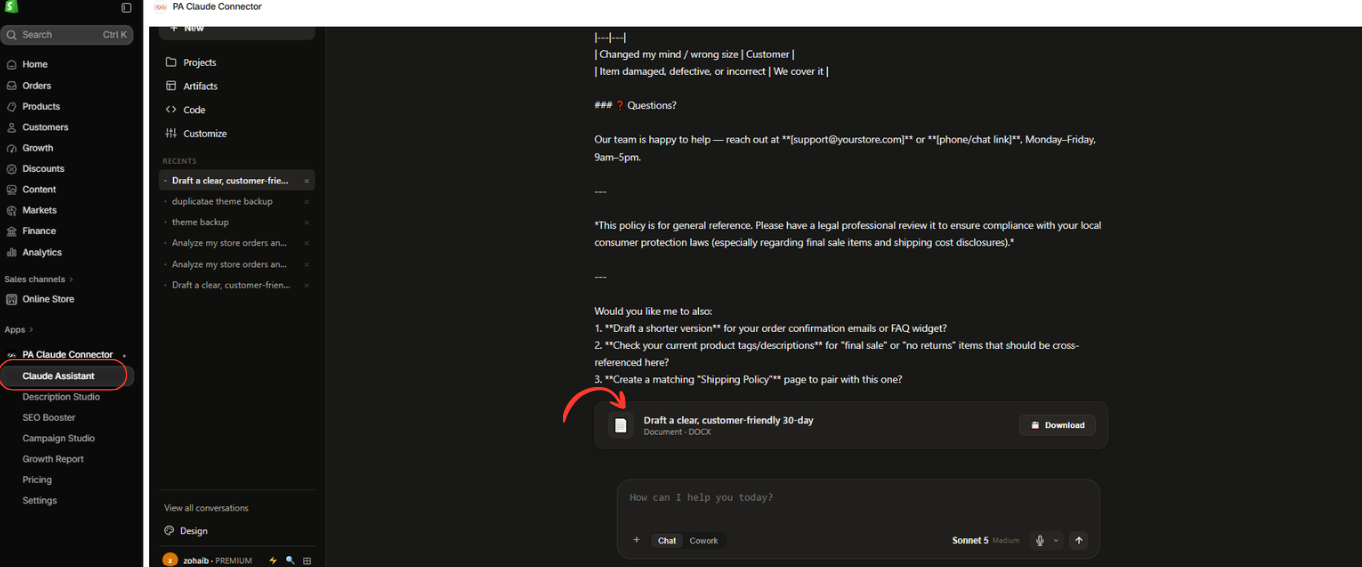
Image 3: Claude Assistant displays a downloadable DOCX document containing the generated Shopify policy draft.
Image explanation
The screenshot shows the lower section of the AI-generated policy response.
The assistant includes additional recommendations and a reminder that the policy should be reviewed for legal compliance.
Below the response is a document card with a Download button, highlighted by the red arrow.
Clicking this button allows the merchant to download the generated DOCX document.
The document can then be reviewed, edited, and adapted for the store.
Once the policy has been approved, the merchant can add it to the appropriate Shopify policy settings.
Why this step matters: The assistant doesn’t only produce conversational answers. It can also prepare structured documents, reducing the effort required to move information from a chat into a reusable report or draft.
Step 7: Ask AI Questions About Product Performance and Store Growth
One of the most useful applications of AI chat is analyzing available Shopify performance information.
For example, a merchant may want to know:
“Which product in my store is growing the fastest?”
The AI assistant can review accessible data and determine whether there is enough information to answer accurately.
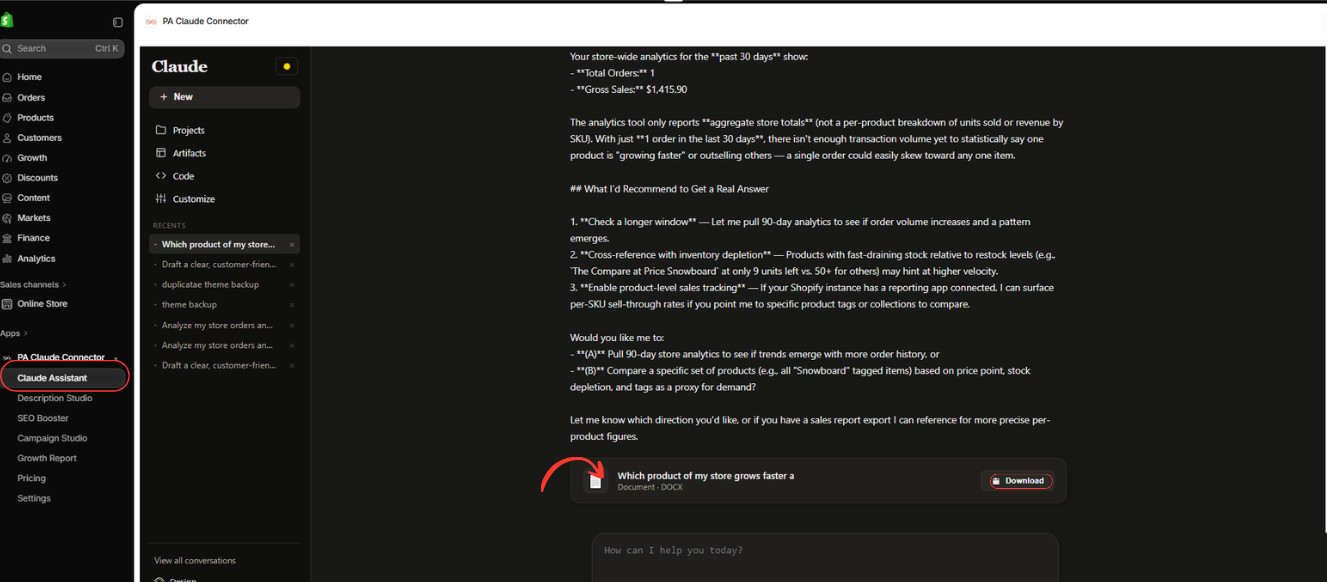
Image 4: Claude Assistant reviews Shopify sales information, explains limitations in the available data, and provides a downloadable analysis document.
Image explanation
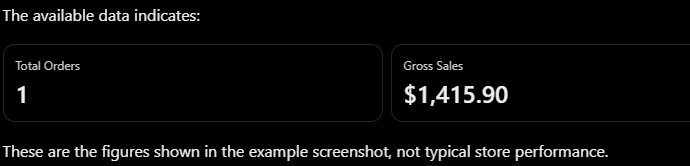
These are the figures shown in the example screenshot, not typical store performance.
Claude explains that the available analytics report contains aggregate sales totals but does not provide the necessary product-level sales breakdown.
Because there is only one order in the reporting period, the assistant cannot reliably determine which product is growing fastest.
Rather than inventing an answer, Claude suggests several ways to investigate further.
1. Review a longer reporting period
The assistant recommends examining 90 days of sales information to see whether a clearer trend emerges.
2. Compare inventory movement
It suggests looking at inventory depletion to identify products that may have experienced stronger demand.
3. Request product-level sales data
The assistant explains that product-level reporting would provide more accurate information for ranking products.
Below these recommendations, the screenshot shows a generated DOCX document with a Download button.
The merchant can download the report and review the findings.
Why this step matters: AI should not simply provide confident answers to every question. A useful assistant identifies missing data, explains uncertainty, and suggests how to obtain more reliable information.
How to Ask Better Shopify Questions With Claude Assistant
Here are three practical prompts you can copy and use in PA Claude Connector.
Sales Performance Copy
Analyze my Shopify sales for the last 30 days. Provide total orders, gross sales, average order value, and important observations. Explain the data in simple English and identify any information you cannot verify.
Product Growth Copy
Which products in my Shopify store are growing fastest over the last 90 days? Use product-level sales data if accessible. Compare units sold and revenue across periods, explain your method, and do not guess if the required data is unavailable.
Downloadable Business Report Copy
Create a professional business report using my available Shopify store data. Include confirmed sales metrics, important findings, data limitations, and recommended next steps. Generate a downloadable DOCX document if supported.
Best Practices for Using AI With Shopify Store Data
When using AI to analyze Shopify information, begin with a clear question and a specific reporting period.
Ask the assistant to distinguish between confirmed figures and assumptions. If product-level information is unavailable, request a longer reporting period or a more suitable report rather than accepting an unsupported conclusion.
For generated store policies or other business documents, verify all information before publishing.
Finally, download useful reports for future reference and compare important metrics against your Shopify analytics dashboard.
Frequently Asked Questions (FAQs)
1. Can I ask Claude questions about my Shopify sales?
Yes. PA Claude Connector’s Claude Assistant can respond to questions about store information that is available through its integration.
2. Can AI identify my best-selling Shopify products?
It can help when the necessary product-level sales information is accessible. Aggregate revenue figures alone are not enough to identify best-selling products reliably.
3. Can Claude generate Shopify business reports?
The screenshots show Claude Assistant creating downloadable DOCX documents containing analysis and written content.
4. Can I ask AI to write Shopify store policies?
Yes. The supplied screenshots demonstrate Claude drafting a returns and refunds policy. The merchant must review it before using it.
5. Can AI analyze my Shopify sales over different periods?
You can request different reporting windows, but the results depend on the historical data and reporting tools available to the assistant.
6. Does Claude automatically know everything about my Shopify store?
No. Its answers depend on the information it is authorized and technically able to access.
7. Is AI-generated Shopify analysis always accurate?
No. Results should be checked against the original data, especially when making financial, inventory, or advertising decisions.
8. Can non-technical merchants use Claude Assistant?
The conversational interface allows merchants to ask questions in ordinary language without needing to write SQL queries or formulas.
Conclusion
Understanding Shopify store data doesn’t have to involve manually reviewing every report or learning complex analytics tools.
With PA Claude Connector, merchants can use Claude Assistant to ask questions about their store, review available sales information, prepare written content, and generate downloadable documents.
As demonstrated in your screenshots, the assistant can draft store policies, explain sales figures, recommend additional analysis, and produce reports that merchants can save for later reference.
The greatest benefit is the ability to turn business questions into a more structured investigation while recognizing the limitations of the available information.
By combining AI-generated explanations with verified Shopify data, merchants can save time, improve their understanding of store performance, and make more informed decisions.
Ready to ask smarter questions about your Shopify store?Install PA Claude Connector on Shopify




