HOW TO WRITE SHOPIFY COLLECTION PAGE SEO CONTENT WITH AI
Shopify SEO Guide | PA Claude Connector | 2026

Introduction
Shopify collection pages play an important role in helping customers discover products and navigate an online store. Whether you’re selling fashion, electronics, skincare, or sporting goods, properly optimized collection pages can improve search visibility and make it easier for shoppers to find relevant products.
However, writing unique SEO titles, meta descriptions, collection headings, and introductory content for multiple collections can be time-consuming.
Many Shopify merchants struggle to identify relevant keywords, write compelling descriptions, and maintain consistent content across their collections.
This is where artificial intelligence can simplify the process.
With PA Claude Connector, Shopify store owners can use Claude AI to draft collection page SEO content, review catalog information, and generate structured content for different product categories.
In this guide, you’ll learn how to write Shopify collection page SEO content with AI, including SEO titles, meta descriptions, collection descriptions, and downloadable reports, using actual screenshots from PA Claude Connector.
Why Shopify Collection Page SEO Matters
A Shopify collection page groups related products into one location. For example, a sports store might organize its catalog into Snowboards, Winter Accessories, Gift Cards, and Bundles & Deals.
Well-written collection content can help search engines understand what a page offers while giving visitors useful information before they browse products.
Improve organic search visibility
Relevant collection titles, descriptions, and helpful page content can support visibility for searches related to your product categories.
Improve customer navigation
Clear headings and descriptions help shoppers understand which collection best matches their needs.
Target category-level keywords
A collection page can target broader search intent than an individual product page, such as “winter sports accessories” instead of a specific snowboard model.
Reduce repetitive content
Unique descriptions help differentiate collections that might otherwise contain similar products.
Create a better shopping experience
Useful introductory content can explain what shoppers will find, how products differ, and what factors to consider before purchasing.
The Merchant’s Challenge: Writing SEO Content for Multiple Shopify Collections
As a store grows, writing and maintaining collection descriptions becomes increasingly difficult.
Merchants commonly encounter problems such as missing meta descriptions, repetitive collection headings, weak keyword targeting, inconsistent brand language, and limited time for content optimization.
For example, a merchant selling winter sports equipment might have 20 collections. Each collection needs distinct, relevant SEO content that reflects the products it actually contains.
Writing these pages manually requires research and editing. Generic AI-generated text can also introduce inaccurate claims about shipping, product performance, materials, and availability.
The goal is to create useful SEO content that stays accurate to the store’s catalog.
Introducing PA Claude Connector for Shopify
PA Claude Connector by PeakApps provides AI-assisted store workflows through Shopify admin.
Its Claude Assistant allows merchants to ask natural-language questions about available store information and request content drafts.
For collection SEO, merchants can ask Claude to prepare:
- SEO-friendly collection titles and meta descriptions.
- Relevant H1 headings and introductory descriptions.
- Suggested collection URL handles.
- Content organized around product categories.
- Recommendations for missing product-level SEO metadata.
- Downloadable documents containing the generated content.
The screenshots supplied for this tutorial demonstrate Claude identifying five potential collection groups, drafting their SEO content, and creating a downloadable DOCX file.
App Link: Install PA Claude Connector from the Shopify App Store
What Should a Shopify Collection Page Include?
| SEO element | Purpose |
|---|---|
| SEO title | Describes the collection in search results |
| Meta description | Summarizes the page and encourages relevant clicks |
| H1 heading | Identifies the collection’s main topic |
| Collection description | Helps shoppers understand the products |
| URL handle | Provides a readable, descriptive page address |
| Internal links | Connects related collections and helpful pages |
| Product information | Makes the page genuinely useful to shoppers |
A collection page should not be written solely for search engines. Its content should also help customers make shopping decisions.
How AI Helps Generate Shopify Collection SEO Content
Claude can help create multiple pieces of content from a single instruction.
For instance, you can ask it to review available product information, group products by category, and draft collection metadata and descriptions.
Instead of writing everything separately, the merchant receives a structured starting point that can be reviewed and refined before publication.
The important distinction is that AI produces a draft, not guaranteed SEO performance. Merchants should verify product details, keyword relevance, and collection availability.
Step-by-Step Guide: How to Write Shopify Collection Page SEO Content With Claude AI
The following three steps use your original screenshots in the exact order shared.
Step 1: Search for the Shopify App Store
Open Google Chrome or your preferred web browser.
Type Shopify App Store into Google and press Enter.
Find the official Shopify App Store result and click it.

Image 1: Search for Shopify App Store on Google and open the official Shopify application marketplace.
Image explanation
The screenshot shows a Google search results page, with the phrase shopify app store highlighted in red.
A red arrow points toward the official Shopify App Store result.
Click this link to access Shopify’s app marketplace.
You can also open the marketplace directly by visiting https://apps.shopify.com.
This is where you’ll find PA Claude Connector and its official app listing.
Step 2: Search for PA Claude Connector
Once the Shopify App Store opens, locate the search bar.
Enter PA Claude Connector and search.
Find the application with the orange-and-white icon and open its listing.
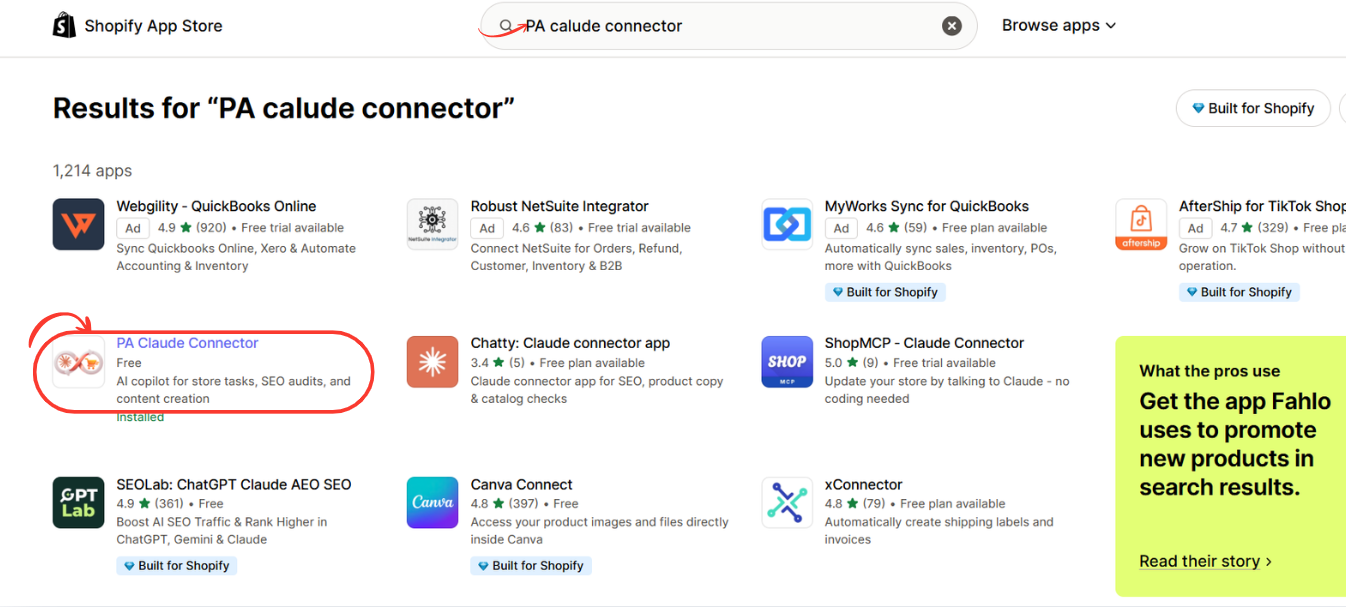
Image 2: Find PA Claude Connector in the Shopify App Store search results and click the highlighted application.
Image explanation
The screenshot displays multiple Shopify applications in the search results.
PA Claude Connector is circled in red.
Its description identifies it as an AI copilot for Shopify store tasks, SEO audits, and content creation.
The example also shows an Installed status, indicating that this Shopify store has already installed the application.
If you’re installing it for the first time, open the app listing to continue.
Step 3: Install PA Claude Connector in Shopify
After opening the application listing, review its description, pricing, and requested functionality.
Click Install to begin the installation process.
Shopify may ask you to sign in or select the store where you want to install the app.
Review the permissions requested by the application and authorize the installation if you’re comfortable with them.
If PA Claude Connector is already installed, click Open instead.

Image 3: Open the PA Claude Connector listing and click Install or Open to access the application in Shopify admin.
Image explanation
The screenshot shows the PA Claude Connector listing.
On the left, the application name, pricing information, developer name, and black Open button are displayed.
The right side contains promotional images explaining the application’s Claude-powered functionality.
The listed developer is PeakApps.
Once installation is complete, the app becomes accessible through your Shopify admin.
Why this step matters: Installing the app provides the foundation for using its Claude-powered tools. The exact connection and authorization process may vary depending on the app version and your store permissions.
Step 4: Open Claude Assistant Inside Shopify Admin
Return to your Shopify admin.
Under Apps, find PA Claude Connector.
Expand the application menu and click Claude Assistant.
This opens the AI chat interface, where you can begin asking questions and using the assistant.

Image 4: Open Claude Assistant from the PA Claude Connector sidebar and locate the AI chat input.
Image explanation
The screenshot shows the Claude Assistant interface inside Shopify.
The Claude Assistant navigation option is highlighted in red.
In the center, the application displays the heading:
How can I help you today?
Several suggested prompts are displayed underneath, including questions about product descriptions, sales performance, returns policies, and missing SEO titles.
A red arrow highlights the message input near the bottom.
This is where you can enter your first question.
Note: This screenshot confirms that the assistant interface is available. It does not independently show the initial Claude authentication or authorization screens.
Type a clear instruction describing the SEO content you want to generate.
Recommended AI prompt Copy
Write Shopify collection page SEO content with AI. Review my available product catalog and identify relevant existing collections. For each collection, draft a unique SEO title, meta description under approximately 155 characters, H1 heading, descriptive URL handle, and 150-word introduction. Use relevant keywords naturally, maintain a professional brand tone, and avoid inventing product specifications, discounts, or shipping promises. Organize the output by collection and prepare a downloadable DOCX document if supported.
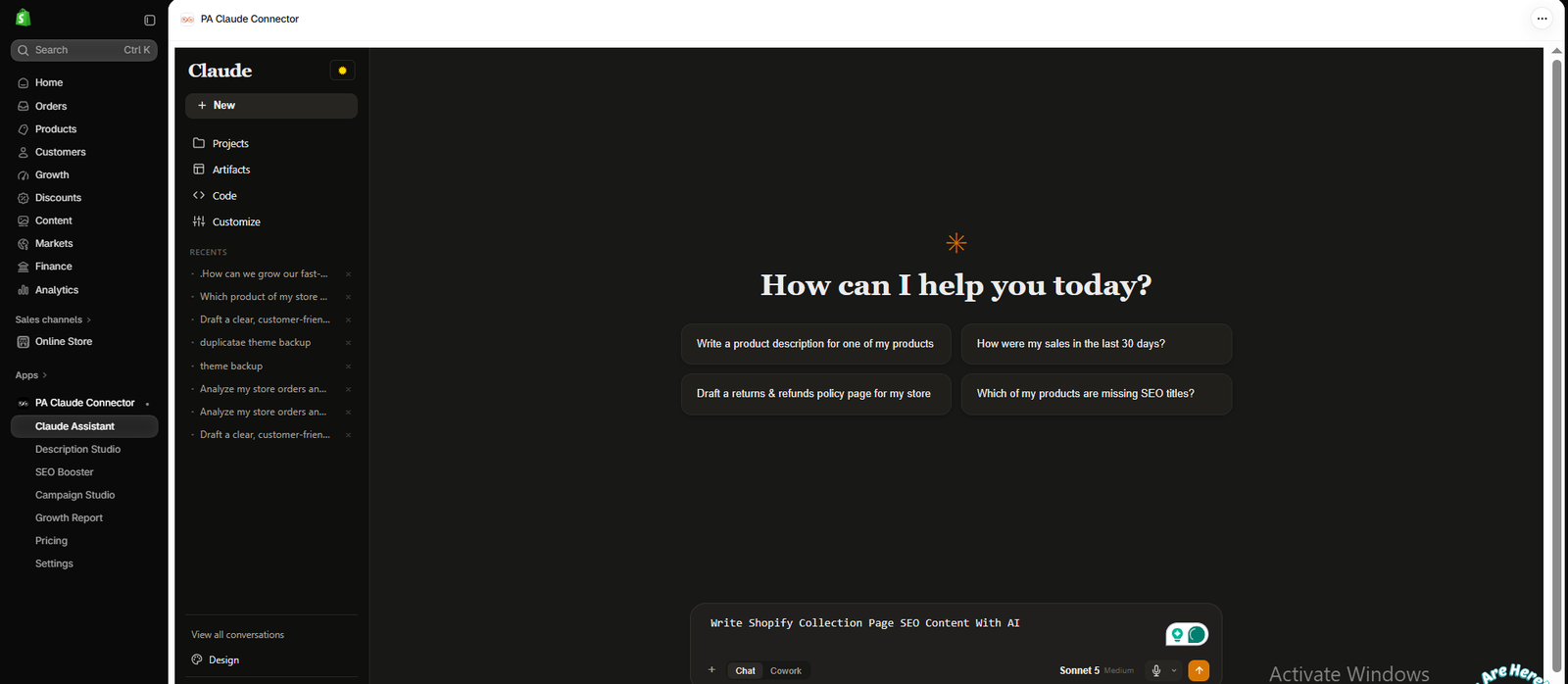
Image 1: Open Claude Assistant and type your request to generate Shopify collection page SEO content using AI.
Image explanation: In the screenshot, Claude Assistant is selected in the left Shopify admin sidebar. The central workspace displays the chat interface, and the bottom input contains the request, “Write Shopify Collection Page SEO Content With AI.”
The orange send button is visible beside the input. Once the merchant submits this request, Claude can begin preparing a response using the accessible store information.
For a more targeted result, mention specific collection names, the primary keyword for each collection, and your preferred writing style.
Step 5: Review the Generated SEO Titles, Meta Descriptions, and Collection Content
After submitting the prompt, Claude produces a structured response based on the information it can access.
In your screenshot, the assistant reports finding 13 out of 18 products missing SEO titles or descriptions and organizes the catalog into five proposed collection groups.
These include Snowboards, Premium Snowboards, Winter Accessories, Bundles & Deals, and Gift Cards.

Image 2: Claude Assistant displays its SEO audit and drafts collection page SEO content, including titles, descriptions, headings, and introductory text.
Image explanation: The left side displays the Claude conversation and a downloadable document card. The right side shows a document preview containing an SEO audit summary and generated content for the proposed collections.
For the Snowboards collection, the draft includes an SEO title, meta description, URL handle, H1 heading, and introductory paragraph.
This saves the merchant from starting each collection description from a blank page.
What to check before using the generated content: Make sure the proposed collections exist, the text matches the actual products, and the SEO metadata does not contain unsupported claims. AI-generated collection groupings should be treated as suggestions rather than proof of existing Shopify collections.
Step 6: Review the Complete Document and Download the SEO Content
Once the content is generated, inspect the complete document before adding it to your Shopify collection pages.
The screenshot shows Claude presenting additional collection drafts, including Gift Cards and Bundles & Deals, in a document preview.
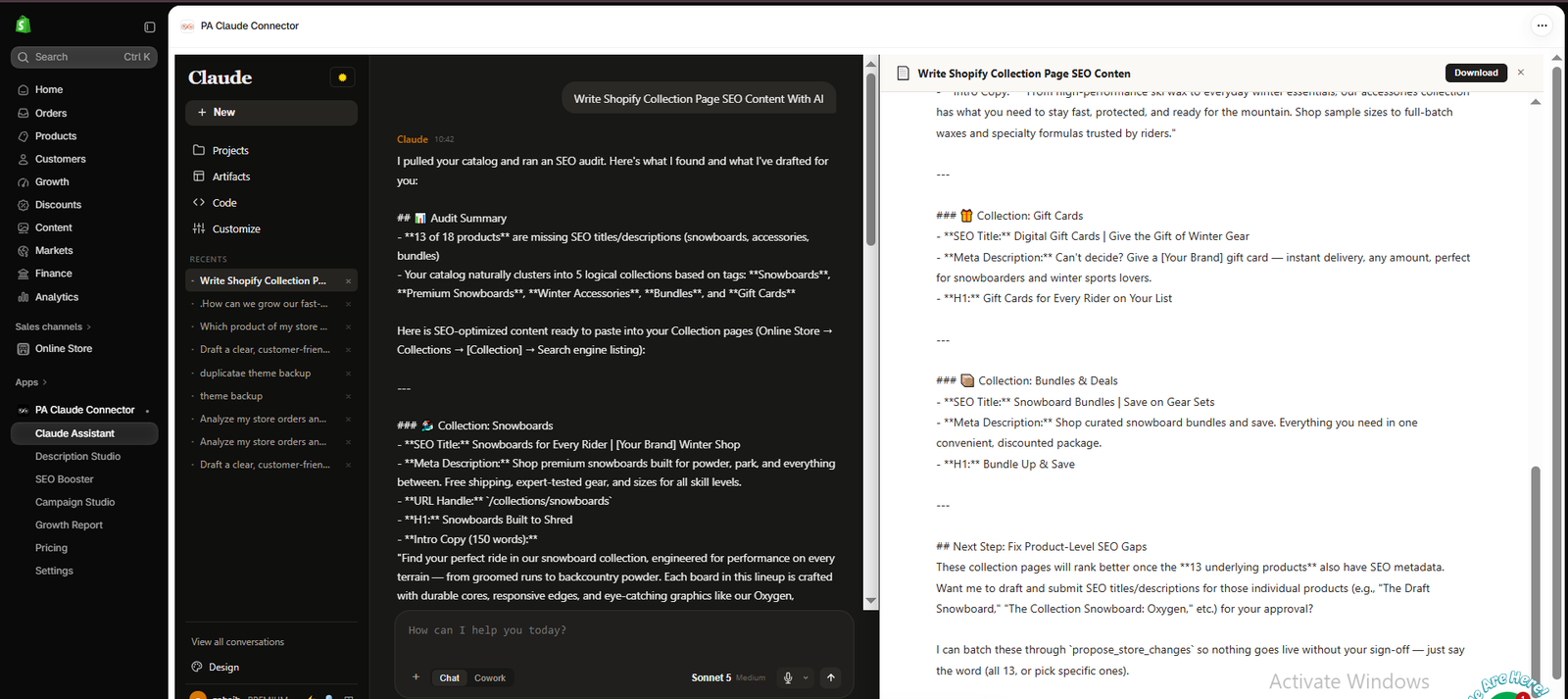
Image 3: The generated SEO document includes multiple collection drafts and a Download button for exporting the content.
Image explanation: On the left, Claude displays the audit findings and generated content. On the right, the document contains individual SEO titles, meta descriptions, and headings for different collections.
A Download button is visible at the top-right of the document preview.
Click this button to download the generated document. The earlier screenshot also shows a DOCX attachment in the conversation.
After downloading, review the copy and manually add the approved content to the appropriate Shopify collections. Generating a document does not automatically publish these edits to the storefront.
How to Add AI-Generated SEO Content to Shopify
After reviewing your draft, open your Shopify admin and navigate to Products → Collections. Select the collection you want to optimize.
Update the collection title and description where appropriate. Then find the Search engine listing section and click its edit control to update the SEO page title, meta description, and URL handle.
Review the preview carefully, save your changes, and check how the collection appears on your storefront.
For an existing collection, changing the URL handle can affect incoming links. Make sure an appropriate URL redirect is created if you change its address.
Best Practices for AI-Generated Collection SEO Content
Write unique content for every collection
Avoid copying the same paragraph across several categories. Different collections should have different descriptions reflecting their actual products.
Use your primary keyword naturally
Include the most relevant search phrase in the page title and description when appropriate, without repeating it excessively.
Keep your meta descriptions concise
Aim for approximately 120–155 characters as a practical guideline. Google may display a different snippet or truncate text depending on the search and device.
Make the collection introduction useful
Explain what the collection contains, who the products are for, and what customers should consider while shopping.
Verify AI-generated claims
Do not publish unsupported statements about delivery speeds, discounts, product materials, or performance.
Optimize for mobile shoppers
Keep introductions readable and avoid placing excessively long blocks of text ahead of the product grid.
Frequently Asked Questions
1. Can Claude write Shopify collection descriptions?
Yes. Claude can generate collection description drafts, SEO titles, headings, and meta descriptions when given suitable product and collection information.
2. Can AI automatically improve Shopify SEO rankings?
No. AI-assisted content can improve your optimization workflow, but search rankings also depend on relevance, competition, technical SEO, website quality, and other factors.
3. Can PA Claude Connector write content for multiple collections?
The screenshots demonstrate Claude preparing drafts for multiple proposed collection groups in a single response.
4. How long should a Shopify collection description be?
There is no universal ideal length. A useful introduction of approximately 100–200 words may work for some collections, while others benefit from shorter or more detailed content.
5. Can AI identify missing Shopify SEO metadata?
Yes. PA Claude Connector’s demonstrated SEO tools can flag products missing metadata. Collection-level availability depends on the information the assistant can access.
6. Can I download AI-generated collection SEO content?
Yes. The supplied screenshots demonstrate a downloadable DOCX document containing generated collection SEO drafts.
7. Do I need coding knowledge?
No. You can write your instructions in ordinary English and manually paste approved content into Shopify.
Conclusion
Writing unique SEO content for Shopify collections is an important part of creating a well-organized and discoverable online store.
With PA Claude Connector, merchants can use Claude AI to prepare collection SEO titles, meta descriptions, introductory content, and structured reports without writing every section from scratch.
By combining AI-generated drafts with accurate catalog information and careful human review, Shopify store owners can streamline their SEO workflow while keeping collection pages helpful and relevant.
Get started: PA Claude Connector — Shopify App Store




