THE ULTIMATE SHOPIFY PRODUCT IMAGE CHECKLIST
Shopify Product Photography | Image Optimization | Ecommerce SEO | 2026

Introduction
Product images are one of the most important elements of a successful Shopify store. Before customers read your product descriptions, compare prices, or check shipping information, they often look at your product photographs.
High-quality images help customers understand what they’re purchasing, examine product details, and visualize how products might look in real-life situations.
However, uploading attractive photographs is only one part of creating an effective product gallery.
Shopify merchants also need to consider image resolution, dimensions, file formats, mobile responsiveness, loading performance, SEO, visual consistency, and product accuracy.
A beautiful image won’t help your business if it loads slowly, appears blurry on mobile devices, or misrepresents your product.
That’s why having a Shopify product image checklist is useful.
In this guide, we’ll cover the essential elements of product image optimization and explain how PA AI Image Generator can help Shopify merchants create professional-looking studio images, lifestyle photographs, and additional marketing visuals.
Why Shopify Product Images Matter
1. Create a professional first impression
Customers often evaluate a product’s appearance within seconds of opening a product page.
Clear photographs, appropriate lighting, and consistent backgrounds help create a professional shopping experience.
2. Help customers understand products
Multiple images can communicate important information that may be difficult to explain through text alone.
Customers may want to examine product shape, materials, colors, textures, and details before purchasing.
3. Build customer confidence
Accurate product photography reduces uncertainty by showing customers what they can reasonably expect to receive.
4. Support conversion rate optimization
Better product imagery can help customers make purchasing decisions. However, higher conversion rates are not guaranteed and should be verified through testing.
5. Improve the mobile shopping experience
Product photographs need to display clearly on mobile screens without unnecessary cropping or distorted proportions.
6. Support search visibility
Descriptive image filenames, meaningful alt text, and good page performance contribute to an accessible, search-friendly product experience.
How Many Images Should a Shopify Product Have?
There is no single perfect number of product images for every Shopify store.
The ideal number depends on product complexity, customer expectations, and the information needed to make a purchase.
A simple accessory may require fewer photographs than furniture, clothing, or technical equipment.
For many products, a useful gallery may include a clear main image, alternative angles, close-up details, lifestyle imagery, and a size or scale reference.
The goal is to answer customer questions—not simply upload as many images as possible.
What Are the Best Image Dimensions for Shopify?
Shopify supports different image dimensions depending on their intended use and theme design.
For product images, consistency is usually more important than using one particular dimension.
| Image purpose | Practical starting point |
|---|---|
| Square product images | 2048 × 2048 px |
| Portrait product images | 1600 × 2000 px |
| Wide promotional imagery | 1920 × 1080 px |
| Collection images | Consistent ratio across the collection |
| Thumbnail images | Generated and sized appropriately by the theme |
These are suggested starting dimensions, not mandatory Shopify requirements. Check the design and image handling of your particular theme.
Which Image Format Is Best for Shopify?
JPEG
JPEG is suitable for many photographic images, especially those with detailed colors and textures.
PNG
PNG is useful when transparency or lossless image detail is necessary, although files may be larger.
WebP
WebP often provides efficient image compression while maintaining good visual quality.
AVIF
AVIF can provide strong compression efficiency when supported by the relevant image delivery workflow.
For most merchants, the best approach is to upload high-quality images in a supported format and allow Shopify’s image delivery system to provide optimized versions where applicable.
Why Image Compression Matters
Large image files can increase loading time and negatively affect the shopping experience.
This is particularly important for customers using mobile networks.
Before uploading an image, consider whether the file contains unnecessarily high resolution or excessive file size.
Image optimization should preserve the visual details customers need while avoiding unnecessary data.
Why Product Image Consistency Matters
A Shopify catalog can look unprofessional when every product uses different backgrounds, framing, and lighting.
For example, one product may use a white studio background, another may use a dark lifestyle environment, and another may feature an unrelated supplier photograph.
Creating a consistent visual direction makes the product catalog easier to browse.
Merchants can establish photography guidelines covering backgrounds, lighting, camera framing, product positioning, and aspect ratios.
AI photography can help produce additional variations that follow a chosen visual style.
How AI Can Help Improve Shopify Product Images
Traditional product photography can require photographers, studios, models, lighting equipment, and editing services.
For merchants managing large catalogs, organizing new photoshoots for every product or marketing campaign can become expensive.
AI product photography provides another approach.
With PA AI Image Generator, Shopify merchants can use existing product images as references and create additional studio, lifestyle, seasonal, and on-model compositions.
PA AI Image Generator Features
- Studio and product-focused photography.
- Lifestyle and outdoor image compositions.
- On-model photography presets.
- Seasonal and promotional imagery.
- Product and collection selection.
- Configurable image generation settings.
- Gallery management and publishing controls.
App link: PA AI Image Generator on Shopify
Step 1: Search for PA AI Image Generator in the Shopify App Store
First, open the Shopify App Store.
Use the search bar to search for PA AI Image Generator.
The search results will display the app alongside other image generation and ecommerce photography applications.

Image 1: Search for PA AI Image Generator in the Shopify App Store.
Image explanation: The screenshot shows the Shopify App Store search results, with PA AI Image Generator highlighted. Its listing describes the app as a tool for creating studio and on-model AI product photography.
Click the app to open its listing.
Step 2: Install and Open PA AI Image Generator
On the app listing, review the description, available features, and pricing information.
Click Install if the app has not yet been installed, then approve the requested Shopify permissions.
Once installation is complete, select Open to launch the application.
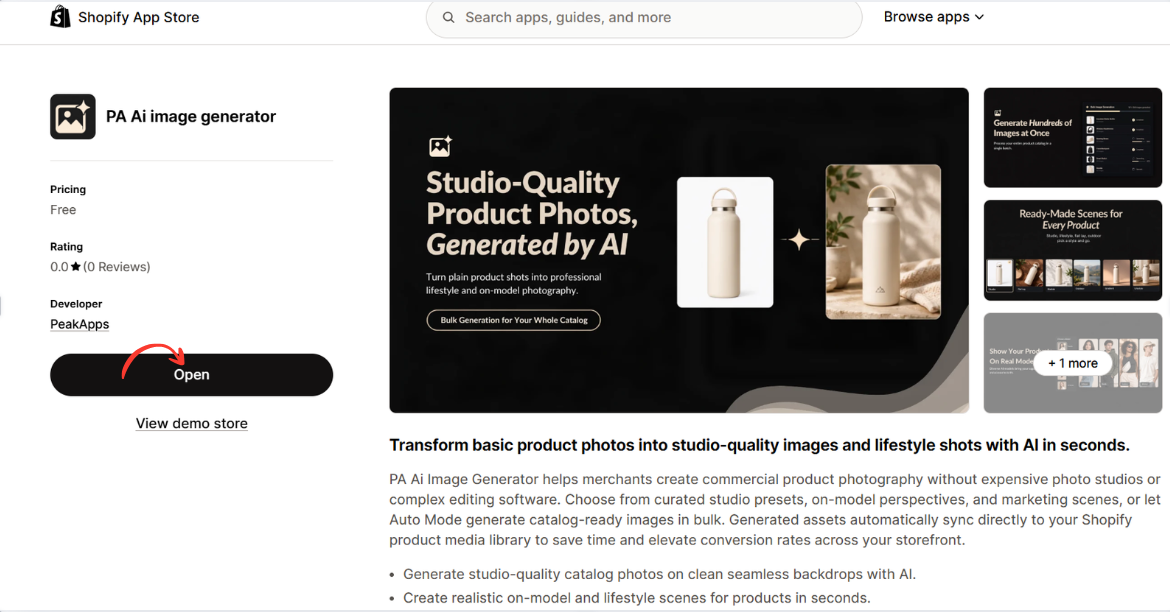
Image 2: Open PA AI Image Generator from its Shopify App Store listing.
Image explanation: The screenshot displays the app listing, including an illustration demonstrating how an ordinary product image can become a lifestyle-style photograph.
The Open button is highlighted, showing how merchants can access the installed app.
Step 3: Select the products that need better photography
Open your Shopify Admin and review your existing product catalog.

Identify products with low-quality photographs, missing angles, inconsistent backgrounds, or limited lifestyle imagery.
Step 4: Open PA AI Image Generator
Navigate to Apps → PA AI Image Generator → Generate Images.
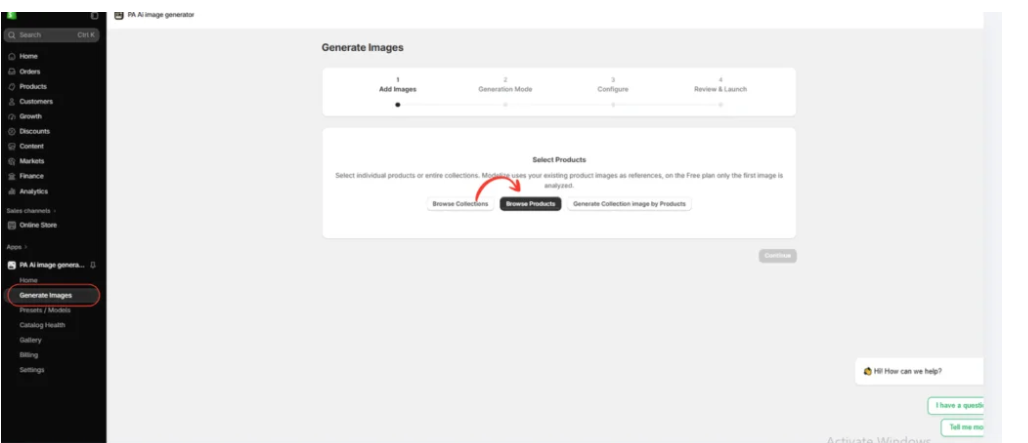
Select individual products or collections using the available product-selection options.
Step 5: Choose a photography style
Select Choose Presets to explore the available photography options.

Merchants can choose different presets depending on their products and brand identity.
For example, clothing stores may prefer on-model photographs, while furniture stores may prefer interior lifestyle photography.
Step 6: Select the right preset
Image 6: The preset selection interface inside PA AI Image Generator.

The preset library allows merchants to choose different compositions, including studio, lifestyle, on-model, seasonal, and collection photography.
Rather than applying the same style to every product, merchants can choose presets that match their requirements.
Step 7: Configure the image settings
Image 7: Configure the image background, aspect ratio, format, and publishing preferences.
Use appropriate settings for the intended image placement.

A square composition may suit product galleries, while a wide composition may be useful for promotional banners.
You can also provide custom instructions, such as:
“Create a professional ecommerce product photograph using my existing product image as a reference. Preserve the original product design, colors, shape, and branding. Use realistic lighting, a clean composition, and a visually attractive background.”
Step 8: Generate and review the images
Image 8: The Gallery dashboard showing image generation jobs and processing statuses.
Once the generation process is complete, review the results in Gallery.
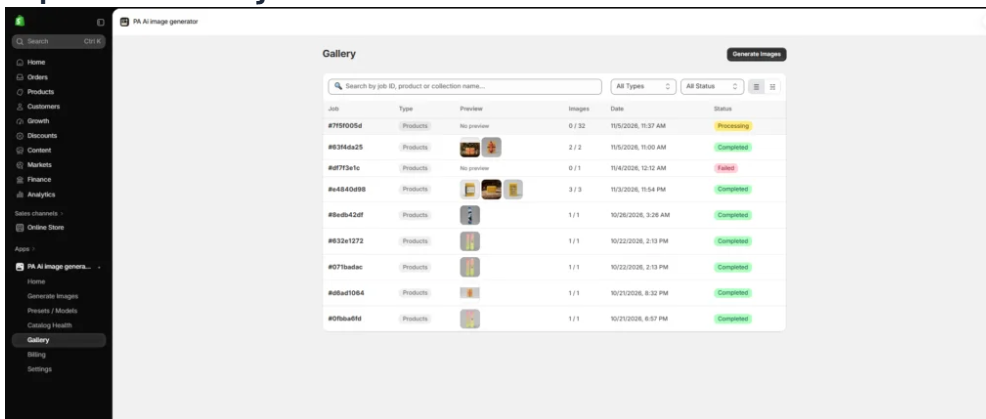
Check that all important product details match the original item.
If the result contains inaccurate colors, logos, proportions, or features, revise the image before publication.
Generate Multiple Photography Styles for the Same Product
One of the most useful benefits of AI photography is the ability to explore multiple compositions based on a product reference.
Instead of relying on a single photograph, Shopify merchants can generate several styles to support different customer needs and marketing activities.
Snowboards displayed against a mountain landscape
Image 4: An outdoor lifestyle composition featuring snowboards against a mountain landscape.
Image explanation: This photograph shows two snowboards in a snowy mountain environment, accompanied by outdoor equipment.
The dramatic landscape gives the image an adventurous, lifestyle-oriented appearance.
This type of composition may be useful for homepage banners, outdoor sports promotions, and collection marketing.

How Better Product Images Support Shopify Conversions
Product photography helps reduce uncertainty by showing customers what they are purchasing.
A useful product gallery provides accurate information, clear details, and visual context.
Lifestyle photographs can help customers imagine how a product might appear in relevant settings, while close-up images can reveal details that are difficult to communicate through descriptions.
When reviewing image changes, merchants should monitor add-to-cart rate, product page conversion rate, and revenue per session.
Where possible, test different images under comparable conditions before deciding which approach performs best.
Frequently Asked Questions
1. What is the best image size for Shopify products?
A square image around 2048 × 2048 pixels is a practical starting point for many product galleries, but the best size depends on your Shopify theme and layout.
2. How many images should a Shopify product have?
Include enough images to clearly communicate the product’s appearance, important details, and usage. There is no universal number.
3. Should I use JPEG, PNG, or WebP?
Each format has benefits. JPEG is suitable for photographs, PNG is useful for transparency, and WebP often provides efficient compression.
4. Do product image filenames help SEO?
Descriptive filenames can provide useful context, although they are only one small part of image SEO.
5. Should every Shopify image have alt text?
Informative images should have meaningful alt text. Purely decorative images may appropriately use empty alt text.
6. Can AI create product images for Shopify?
Yes. AI tools such as PA AI Image Generator can create supplementary studio and lifestyle compositions using existing product references.
7. Are AI-generated images safe to use on product pages?
They can be used when they accurately represent the real product and comply with applicable rules. Always inspect the results before publication.
8. Can better product images increase conversion rates?
Better images may improve customer understanding and trust, but conversion improvements are not guaranteed. Measure performance and test changes.
Conclusion
Optimizing product images is an important part of creating a professional and trustworthy Shopify store.
The best product galleries combine clear photography, accurate product details, appropriate image sizes, optimized formats, mobile-friendly presentation, and helpful visual context.
By following this Shopify product image checklist, merchants can identify missing product angles, inconsistent photography, oversized files, SEO issues, and other problems that affect the shopping experience.
With PA AI Image Generator, Shopify merchants can also create additional studio-style photographs, lifestyle images, and marketing visuals using existing product references.
However, AI-generated imagery should always complement accurate product information rather than misrepresent the items customers will receive.
A well-optimized product gallery does more than look attractive. It helps customers make informed decisions and gives merchants a stronger foundation for improving their online stores.
Ready to improve your Shopify product images?Explore PA AI Image Generator on Shopify




