HOW TO KEEP PRODUCT IMAGES CONSISTENT ACROSS YOUR WHOLE SHOPIFY STORE

Introduction
Product photography is one of the first things customers notice when visiting a Shopify store. Whether you sell fashion, skincare, jewelry, home decor, electronics, or sports equipment, your images play an important role in how customers perceive your products and brand.
However, many Shopify merchants struggle with inconsistent product images.
Some products have white backgrounds, others use colorful lifestyle scenes, and some feature low-quality supplier photographs. Different lighting, image sizes, camera angles, and editing styles can make a store look disorganized.
A consistent product catalog creates a cleaner, more professional shopping experience and helps customers compare products more easily.
The challenge is maintaining that consistency when your store contains dozens, hundreds, or even thousands of products.
Fortunately, Shopify product image consistency can be easier to manage with clear photography guidelines and AI-powered image generation.
With PA AI Image Generator, merchants can use existing product photographs as references and generate additional studio-style, lifestyle, and promotional images using selected photography presets.
In this guide, we’ll explain why consistent product photography matters, the most common problems merchants encounter, and practical ways to maintain a recognizable visual style across your Shopify store.
What Is Product Image Consistency?
Product image consistency means using coordinated visual standards across your product catalog.
This includes maintaining similar backgrounds, lighting, image dimensions, framing, product positioning, and photographic styles.
For example, a skincare brand might use warm beige backgrounds and soft lighting across its product images.
A fashion store might use neutral studio backgrounds for main product photographs and a consistent on-model photography style for supplementary images.
A furniture store might prefer bright indoor settings with natural lighting and complementary decor.
The goal is not to make every image identical. It is to create a cohesive visual identity that makes products feel like part of the same brand.
Why Consistent Product Images Matter for Shopify Stores
1. Create a professional first impression
When customers browse a collection page, they often see several product photographs together.
If those images have inconsistent backgrounds, proportions, or lighting, the page may appear less organized.
Using consistent photography guidelines can create a cleaner storefront.
2. Strengthen brand recognition
A recognizable photography style helps communicate your brand identity.
Luxury brands may favor soft shadows and elegant compositions, while colorful lifestyle brands may use brighter backgrounds.
Maintaining those visual choices across products creates a coordinated presentation.
3. Make product comparisons easier
Customers often compare similar products before purchasing.
Consistent camera angles and image framing make it easier to compare appearance, design, size, and other relevant characteristics.
4. Improve the mobile shopping experience
Product collections with inconsistent image proportions may create uneven cropping or awkward spacing, depending on the Shopify theme.
Consistent dimensions and aspect ratios help create a more predictable mobile layout.
5. Support customer confidence
Clear, accurate, and consistent imagery can help customers understand the products being sold.
Although consistent images do not guarantee more sales, they can reduce unnecessary confusion during the shopping experience.
Common Product Photography Problems Shopify Merchants Face
Different supplier backgrounds
Dropshipping merchants frequently receive photographs from different suppliers.
One supplier may provide white-background photographs, while another uses lifestyle images or dark studio settings.
Combining these photographs without a consistent visual approach can make collections appear disorganized.
Inconsistent image sizes
Some products may use square photographs, while others use portrait or landscape images.
This can cause uneven product grids or unexpected cropping.
Different lighting styles
Mixing warm, cool, natural, and dramatic lighting can make products look inconsistent.
Missing product angles
Some products may have multiple detailed photographs while others only have one image.
This creates an uneven shopping experience.
Different editing standards
Inconsistent exposure, sharpening, color correction, and background removal can affect the overall appearance of a catalog.
Repeated photography expenses
Maintaining a consistent appearance through traditional photography may require additional photoshoots, particularly when merchants frequently add new products.
How to Create a Consistent Product Photography Style
Choose one main photography style
Start by deciding how your main product images should look.
For example, you might choose clean studio photography with neutral backgrounds.
Use that approach consistently across related products.
Establish background guidelines
Choose backgrounds that complement your brand colors and products.
A minimalist store might use white or light-gray backgrounds, while a luxury brand could use warmer neutral tones.
Maintain similar camera framing
Keep products positioned consistently within the image.
For example, similar handbags should occupy approximately the same proportion of the frame.
Use consistent image dimensions
Choose suitable image dimensions and aspect ratios for your Shopify theme.
A square image around 2048 × 2048 pixels is a practical starting point for many product galleries, although your theme may support other dimensions.
Standardize lighting and shadows
Choose a consistent lighting direction, brightness level, and shadow style.
This makes product galleries more cohesive.
Use a recognizable lifestyle style
Lifestyle images do not need identical backgrounds, but they should share a consistent visual direction.
For example, a home decor store might use bright interiors, natural light, and neutral furnishings across its lifestyle photography.
How AI Helps Maintain Product Image Consistency
Maintaining a consistent catalog manually can require significant photography and editing work.
AI-powered product photography provides another way to create supplementary visual assets using similar styles.
With PA AI Image Generator, Shopify merchants can select photography presets and configure image-generation settings for their products.
Rather than relying on unrelated supplier images, merchants can create additional images using coordinated compositions.
The app supports studio-style imagery, lifestyle scenes, on-model compositions, seasonal visuals, and collection photography.
App Link: https://apps.shopify.com/pa-ai-image-generator
Introducing PA AI Image Generator for Shopify
PA AI Image Generator is a Shopify application designed to help merchants generate product images using existing catalog photographs.
Its photography preset library supports different industries and creative requirements.
Studio photography
Create clean, product-focused compositions suitable for ecommerce galleries.
Lifestyle photography
Generate product images in environments relevant to their intended use.
On-model photography
Explore human-centered product compositions for suitable categories.
Detail and macro photography
Generate close-up compositions that emphasize product features.
Collection photography
Create coordinated presentations featuring multiple related products.
Seasonal photography
Generate promotional images for different holidays and campaigns.
Bulk image generation
Select multiple products or collections to produce additional visual variations efficiently.
The most important benefit for merchants is the ability to establish preferred photography styles and use similar settings across related products.
However, AI-generated images still require review because exact consistency and product accuracy are not guaranteed.
Real Product Photography Examples: Maintaining a Consistent Visual Style
The following examples illustrate different photography approaches using the snowboard images previously shared from the PA AI Image Generator workflow.
Example 1: Clean Studio Product Photography
Image: Original snowboard against a neutral gray background.
This photograph shows a snowboard standing upright against a simple studio background.
Its centered composition allows customers to examine the overall product design without distractions.
Using similar framing, image dimensions, and lighting for other snowboards could help create a consistent product catalog.
For the main product gallery, this style is particularly useful because it prioritizes product clarity.
Example 2: Outdoor Lifestyle Photography
Image: Snowboards displayed against a snowy mountain landscape.
This composition introduces an outdoor winter environment.
The dramatic mountains and natural scenery communicate an adventurous brand identity.
A Shopify sports store could use similar outdoor compositions across its marketing materials to maintain a recognizable lifestyle direction.
Example 3: Natural Winter Photography
Image: Two colorful snowboards leaning against a wooden fence.
This image uses a more natural, documentary-style composition.
It demonstrates how products can be presented in real-looking outdoor environments without relying entirely on studio backgrounds.
Merchants could create similar scenes while maintaining consistent lighting, framing, and background aesthetics.
Example 4: On-Model Product Photography
Image: Snowboard model and product detail composition.
This example includes close-up photographs and a full-body model composition.
It illustrates how merchants can combine different image types while maintaining a consistent overall brand aesthetic.
For example, a snowboard store could use clean studio images for product listings, close-ups for details, and winter lifestyle photographs for additional visual context.
The generated snowboard designs in these examples vary, so merchants should not assume that all generated compositions preserve an identical product reference.
How to Maintain Consistency Across a Large Shopify Catalog
For stores with hundreds of products, it’s useful to establish a repeatable image-production workflow.
Start by creating a simple photography style guide that defines your preferred backgrounds, lighting, framing, dimensions, and image types.
Organize products into categories that require similar visual styles.
For example, all handbags might use one studio composition, while all skincare products use another.
Prepare reusable AI instructions for each category.
When generating new images, compare them with existing catalog photographs before publishing.
Periodically audit your product collections to identify images that appear inconsistent or outdated.
This approach can help maintain a professional catalog as your Shopify store grows.
Product Image Consistency Checklist
Before publishing a new product, review the following:
- Main product image uses the preferred background style.
- Image dimensions match your catalog guidelines.
- Product positioning and framing are consistent.
- Lighting and shadows complement your brand.
- Original product colors and details remain accurate.
- Supplementary photographs use relevant lifestyle settings.
- Image files are optimized for storefront performance.
- Alt text accurately describes informative images.
- Product galleries display correctly on mobile.
- Images match the selected product variants.
Common Mistakes to Avoid
Using identical backgrounds for every product category
Consistency does not mean every product must use exactly the same background.
Different categories may require different styles while still following a unified brand identity.
Mixing unrelated photography styles
A product gallery containing highly inconsistent lighting, backgrounds, and image proportions can feel disorganized.
Ignoring product accuracy
AI-generated images may alter details. Attractive images should never misrepresent what customers will receive.
Uploading oversized files
Large, unnecessarily heavy images may affect storefront performance.
Forgetting mobile presentation
Always check image cropping, product visibility, and layout consistency on smaller screens.
Failing to update older products
New photographs may look different from images already used in the catalog.
Review existing products periodically to maintain consistency.
Step 1: Search for PA AI Image Generator in the Shopify App Store
First, open the Shopify App Store.
Use the search bar to search for PA AI Image Generator.
The search results will display the app alongside other image generation and ecommerce photography applications.

Image 1: Search for PA AI Image Generator in the Shopify App Store.
Image explanation: The screenshot shows the Shopify App Store search results, with PA AI Image Generator highlighted. Its listing describes the app as a tool for creating studio and on-model AI product photography.
Click the app to open its listing.
Step 2: Install and Open PA AI Image Generator
On the app listing, review the description, available features, and pricing information.
Click Install if the app has not yet been installed, then approve the requested Shopify permissions.
Once installation is complete, select Open to launch the application.
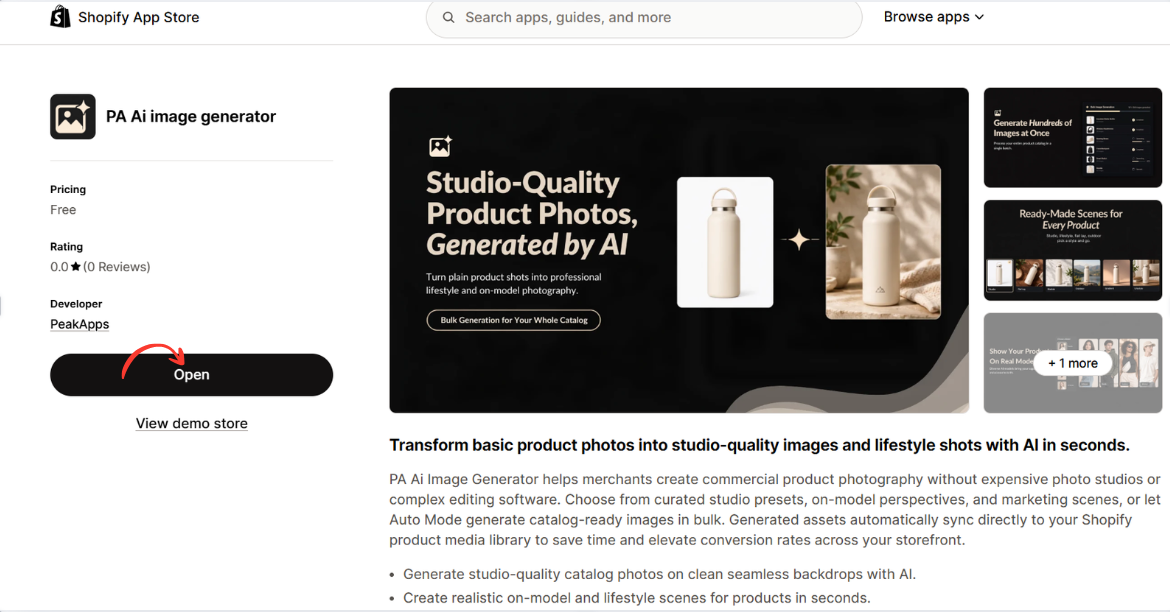
Image 2: Open PA AI Image Generator from its Shopify App Store listing.
Image explanation: The screenshot displays the app listing, including an illustration demonstrating how an ordinary product image can become a lifestyle-style photograph.
The Open button is highlighted, showing how merchants can access the installed app.
Step 3: Select the products that need better photography
Open your Shopify Admin and review your existing product catalog.

Identify products with low-quality photographs, missing angles, inconsistent backgrounds, or limited lifestyle imagery.
Step 4: Open PA AI Image Generator
Navigate to Apps → PA AI Image Generator → Generate Images.
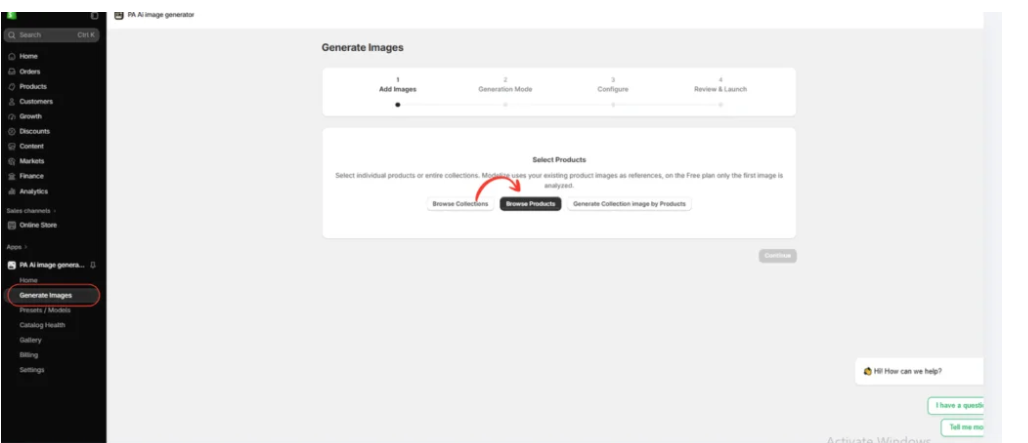
Select individual products or collections using the available product-selection options.
Step 5: Choose a photography style
Select Choose Presets to explore the available photography options.

Merchants can choose different presets depending on their products and brand identity.
For example, clothing stores may prefer on-model photographs, while furniture stores may prefer interior lifestyle photography.
Step 6: Select the right preset
Image 6: The preset selection interface inside PA AI Image Generator.

The preset library allows merchants to choose different compositions, including studio, lifestyle, on-model, seasonal, and collection photography.
Rather than applying the same style to every product, merchants can choose presets that match their requirements.
Step 7: Configure the image settings
Image 7: Configure the image background, aspect ratio, format, and publishing preferences.
Use appropriate settings for the intended image placement.

A square composition may suit product galleries, while a wide composition may be useful for promotional banners.
You can also provide custom instructions, such as:
“Create a professional ecommerce product photograph using my existing product image as a reference. Preserve the original product design, colors, shape, and branding. Use realistic lighting, a clean composition, and a visually attractive background.”
Step 8: Generate and review the images
Image 8: The Gallery dashboard showing image generation jobs and processing statuses.
Once the generation process is complete, review the results in Gallery.
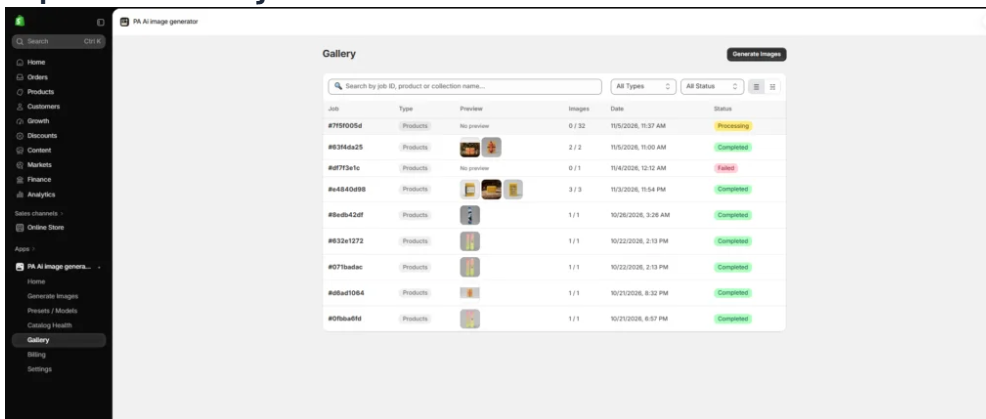
Check that all important product details match the original item.
If the result contains inaccurate colors, logos, proportions, or features, revise the image before publication.
Step 9: Publish approved product images
After reviewing the generated photographs, use the app’s Gallery controls to download or publish approved images to your Shopify products.
Combine the best lifestyle compositions with accurate original photographs to give customers both visual inspiration and reliable product information.
Frequently Asked Questions
1. Why is product image consistency important for Shopify stores?
Consistent product photography creates a more cohesive catalog, helps customers compare items, and supports a recognizable brand identity.
2. Should every Shopify product have the same image background?
Not necessarily. Related products should follow similar photography guidelines, but different categories may use different suitable styles.
3. What is the best image size for consistent Shopify product photography?
Square images around 2048 × 2048 pixels are a practical starting point for many product galleries, but the ideal dimensions depend on your Shopify theme.
4. Can AI help make Shopify product images more consistent?
Yes. AI image-generation tools can help merchants create supplementary images using similar presets, backgrounds, and photographic instructions.
5. Can PA AI Image Generator work with multiple Shopify products?
Yes. The app provides product and collection selection workflows.
6. Can I use lifestyle images while keeping my catalog consistent?
Yes. You can use clean studio photography for main product images and coordinated lifestyle compositions for supplementary images.
7. Does consistent photography guarantee higher conversion rates?
No. Consistent images can improve product presentation and customer understanding, but conversion performance depends on many factors.
8. Should I review AI-generated photographs before publishing?
Yes. Always check product colors, logos, proportions, labels, and other important details.
Conclusion
Keeping product images consistent across your Shopify store is an important part of creating a professional and recognizable ecommerce brand.
Consistent photography helps customers browse products, compare options, and better understand what they are purchasing.
However, maintaining the same visual standards across hundreds of products can be challenging, especially when merchants rely on photographs from different suppliers.
With PA AI Image Generator, Shopify merchants can create additional studio-style photographs, lifestyle compositions, and marketing images using existing product references and selected photography presets.
By establishing clear photography guidelines, using consistent generation settings, and reviewing every image before publication, merchants can build a more cohesive product catalog.
The goal is not simply to make every image look identical. It is to create a recognizable visual identity while preserving accurate product information.
Ready to create a more consistent Shopify product catalog?
Explore PA AI Image Generator:




