HOW TO FIND SHOPIFY PRODUCTS MISSING SEO TITLES AND DESCRIPTIONS
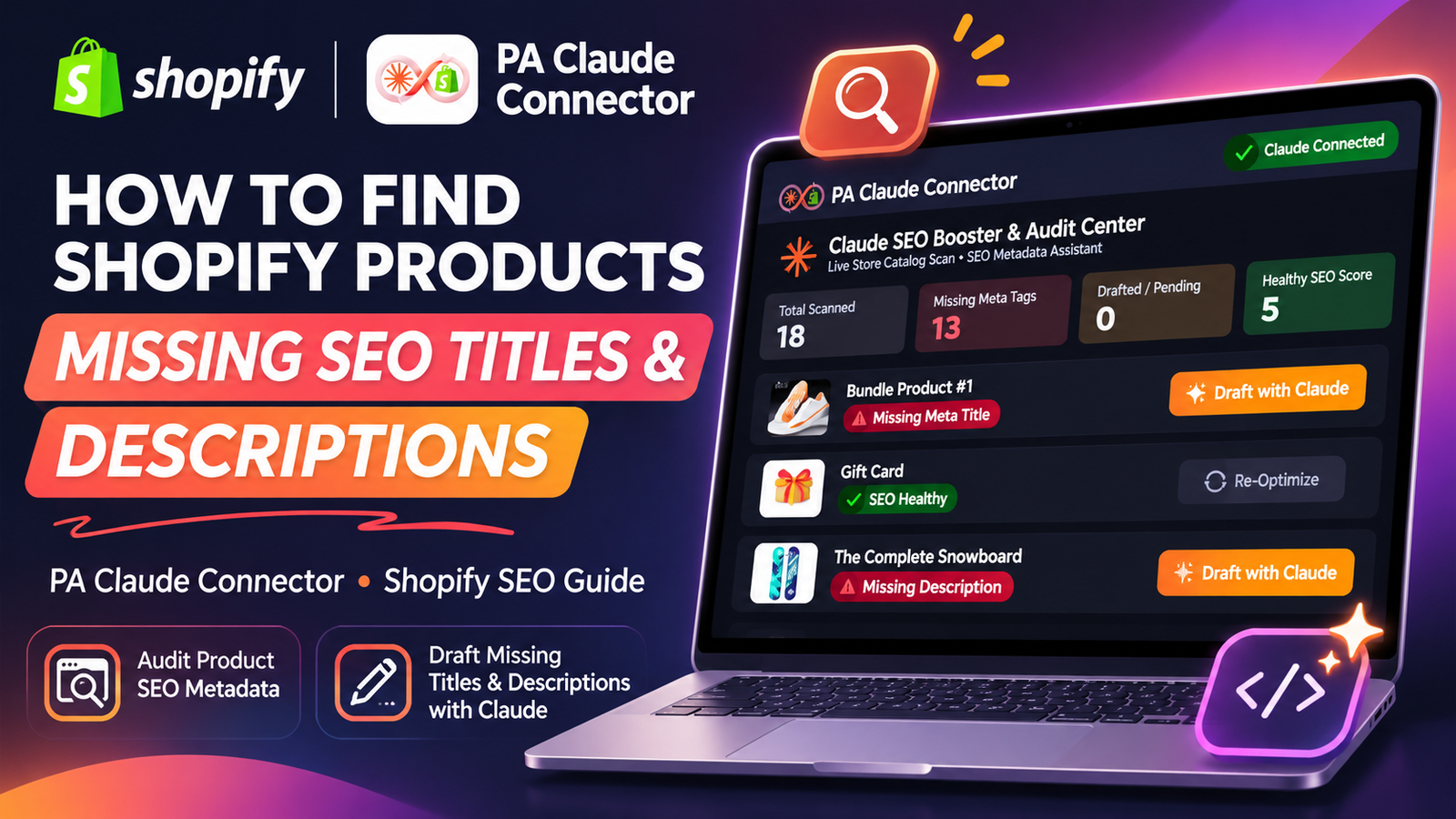
Introduction
Search engine optimization (SEO) is essential for helping customers discover your Shopify products through Google and other search engines.
However, many Shopify merchants overlook one important part of product SEO: SEO titles and meta descriptions.
When a Shopify product is missing its SEO title or meta description, search engines may generate their own text using available page content. This can result in search snippets that don’t communicate your product’s main benefits as effectively as intended.
For stores with hundreds or thousands of products, manually checking each product’s SEO information can become time-consuming.
Fortunately, PA Claude Connector helps Shopify merchants audit product catalogs, identify missing SEO metadata, and prepare AI-generated product content.
In this tutorial, we’ll explain how to find Shopify products missing SEO titles and descriptions using PA Claude Connector.
You’ll learn how to install the app, review your product SEO audit, identify missing metadata, generate optimized descriptions with Claude, and review content before publishing.
The Merchant’s Challenge: Why Shopify Product SEO Is Difficult
1. Missing SEO titles
Some Shopify merchants publish products without adding a dedicated search engine title.
Although Shopify can use the product title as a fallback, a carefully written SEO title can communicate product relevance more clearly.
2. Empty meta descriptions
Without a custom meta description, merchants have less control over the text that may appear beneath their product pages in search results.
Google can still generate a snippet from other page content, even when a meta description is provided.
3. Large product catalogs
Checking every product individually becomes challenging as a store grows.
4. Repetitive product descriptions
Stores with similar products may struggle to write distinct, useful descriptions for each item.
5. Limited SEO experience
Not every merchant understands how to write effective titles, descriptions, and keyword-focused product copy.
6. Time-consuming manual updates
Writing and updating metadata for dozens of products can require considerable effort.
These challenges make automated product SEO auditing especially useful.
Why SEO Titles and Meta Descriptions Matter
An SEO title helps describe what a page is about and can influence how its title link appears in search results.
A meta description gives search engines a suggested summary of the page.
Although neither field guarantees higher search rankings or a particular search appearance, writing clear and relevant metadata is an important part of maintaining an understandable product catalog.
For example, consider a Shopify store selling luxury gift cards.
A generic SEO title might simply say:
Gift Card
A more descriptive title could be:
Luxury Gift Card | Digital Gifts for Every Occasion
Similarly, a useful meta description could explain that customers can purchase a digital gift card and redeem it for selected products.
The goal is to make each product easier for potential customers to understand.
Introducing PA Claude Connector for Shopify SEO
PA Claude Connector, developed by PeakApps, is a Shopify app that integrates AI-assisted workflows into Shopify admin.
The app supports product catalog auditing, AI-generated descriptions, SEO metadata review, theme maintenance, and other store management tasks. Shopify App Store
For this guide, we’ll focus on two features:
Claude SEO Booster & Audit Center: Helps identify products that may be missing SEO titles or meta descriptions.
Claude Description Studio: Helps merchants create product descriptions and SEO metadata using selectable brand voice profiles.
The app also provides an approval-oriented workflow for reviewing changes before they are applied to Shopify.Install PA Claude Connector on Shopify
Step-by-Step Guide: How to Find Shopify Products Missing SEO Titles and Descriptions
Follow these seven steps using your original screenshots. Each image is placed directly below the relevant step, in the same order you shared.
Step 1: Search for the Shopify App Store
Open Google and search for Shopify App Store. Click the official Shopify App Store result highlighted by the red arrow.

Image 1: Open the official Shopify App Store from Google search results.
Step 2: Search for PA Claude Connector
Enter PA Claude Connector in the Shopify App Store search bar. Select the application highlighted in the red circle.

Image 2: Locate PA Claude Connector in the Shopify App Store results.
Step 3: Install or Open the App
Open the PA Claude Connector listing. Click Install if you are a new user, or Open if the app is already installed.

Image 3: The official PA Claude Connector listing, with its app description and Open button.
Step 4: Open Description Studio
Inside Shopify admin, click PA Claude Connector → Description Studio. Select a suitable Brand Voice Profile, such as Luxury, Minimalist & High-End, to guide the writing style of AI-generated content.

Image 4: Description Studio displaying the Brand Voice Profile options, product selection button, and SEO fields.
Step 5: Find Products Missing SEO Metadata
Click SEO Booster in the app sidebar. The dashboard displays products with missing SEO titles or meta descriptions.
In your screenshot, 18 products have been scanned, 13 are flagged for missing metadata, and 5 are marked healthy.

Image 5: Claude SEO Booster & Audit Center showing missing metadata warnings, SEO status filters, and Draft with Claude buttons.
Step 6: Select a Product for SEO Optimization
Return to Description Studio and click Pick Store Product.
Use the product search field, choose the item you want to optimize, and click Add. Your screenshot demonstrates selecting a Gift Card product.
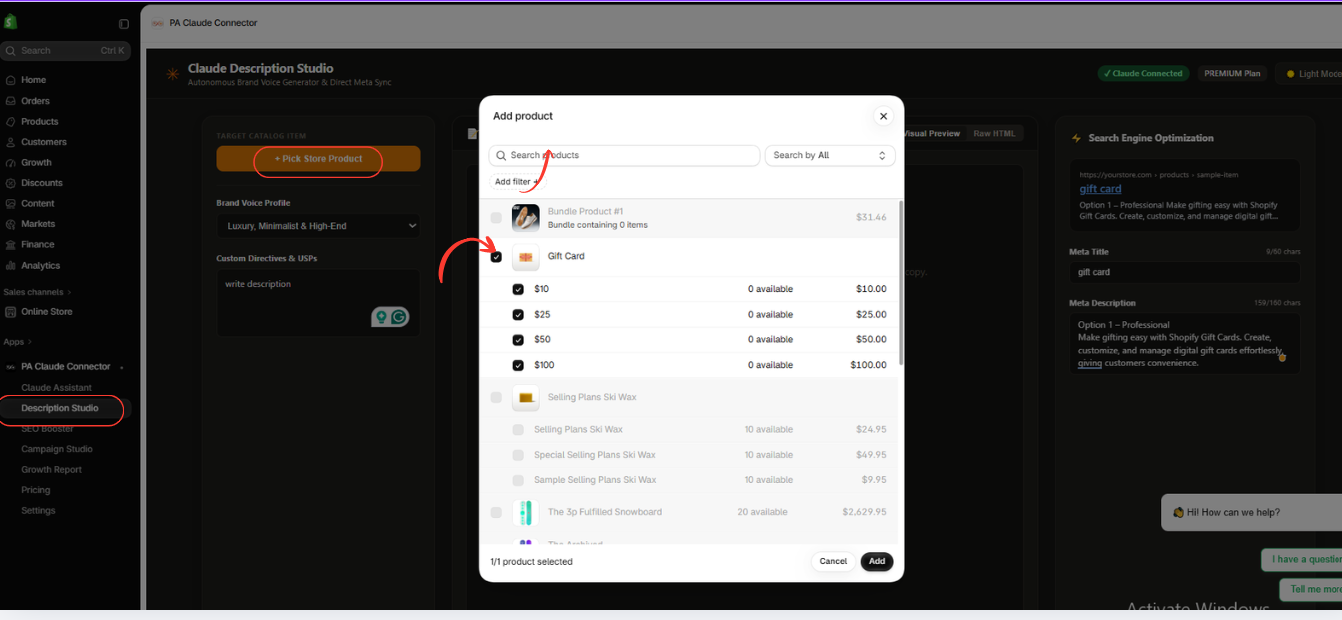
Image 6: Select the Gift Card product from the product picker to prepare its SEO metadata.
Step 7: Review SEO Titles and Descriptions
Description Studio displays the selected product on the left, its generated description in the center, and the SEO title and meta description on the right.
Review the content for accuracy and relevance. Once satisfied, use Push Live to Shopify to publish the approved changes.
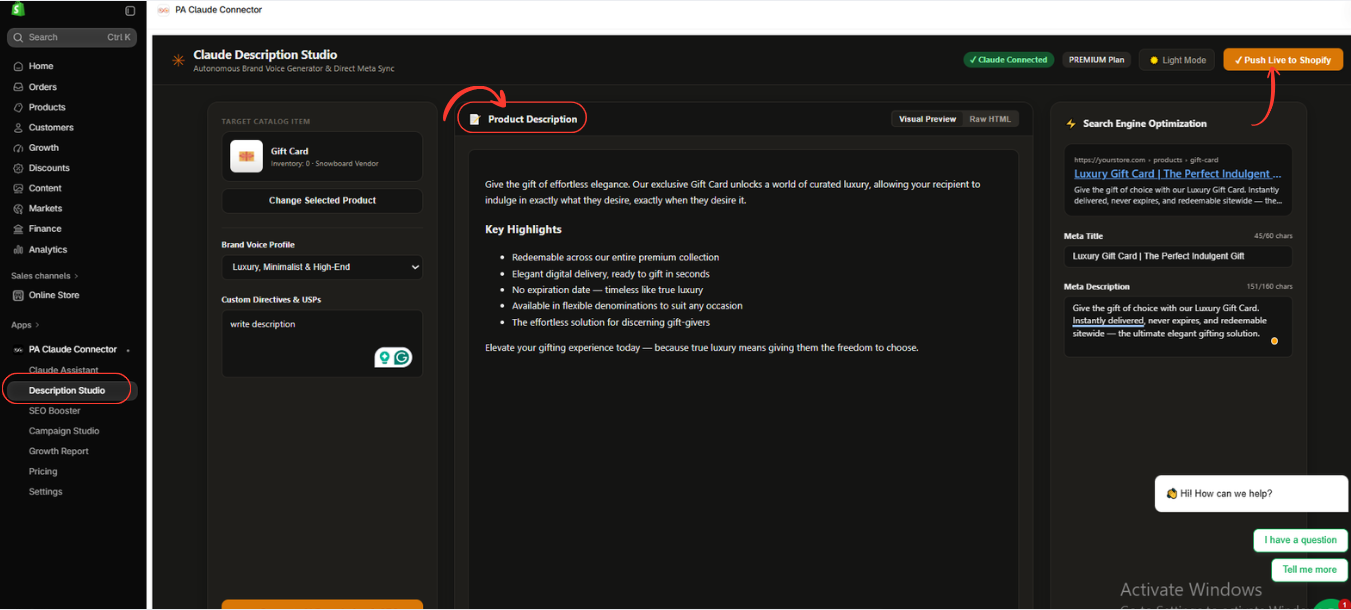
Image 7: Review the AI-generated product description, SEO title, and meta description before publishing the updates to Shopify.
All seven screenshots are embedded above, not replaced by generic images. Each appears immediately beneath its matching step with a description and caption.
App Link: PA Claude Connector — Shopify App Store
Best Practices for Shopify Product SEO
Use unique, relevant titles
Give each product a descriptive title that reflects what customers are searching for.
Avoid keyword stuffing
Repeated keywords can make titles and descriptions difficult to read.
Write accurate product content
Never publish AI-generated features, specifications, prices, or promises without confirming that they are correct.
Optimize important products first
Prioritize high-value products, bestsellers, and pages with missing or poor metadata.
Keep descriptions human-friendly
SEO content should help shoppers understand products, not merely satisfy keyword checks.
Recheck metadata after updates
Review important products after making significant catalog changes.
Frequently Asked Questions (FAQs)
1. How do I find Shopify products missing SEO titles?
Install PA Claude Connector, open SEO Booster, and review the products flagged for missing metadata. Use the Needs SEO filter to focus on items requiring attention.
2. Can PA Claude Connector detect missing meta descriptions?
Yes. Its SEO audit interface identifies missing SEO metadata, including absent meta titles and descriptions.
3. Can Claude generate Shopify product SEO titles?
Yes. Description Studio provides AI-assisted product content and SEO metadata fields.
4. Can I optimize multiple products?
The SEO Booster dashboard audits products across the catalog, and Description Studio supports selecting products for content generation. The exact batch-processing options should be checked in the app.
5. Does PA Claude Connector write product descriptions?
Yes. The app includes Description Studio for generating product copy using different brand voice profiles.
6. Can I change the writing style?
Yes. Your screenshot shows multiple profiles, including luxury, technical, benefit-driven, direct-response, and storytelling styles.
7. Does the app automatically publish everything?
The interface includes publishing and approval-related controls. Review the generated content and confirm the selected action before applying changes.
8. Is PA Claude Connector free?
The Shopify App Store currently lists PA Claude Connector as Free. Check the app listing for the latest pricing and any plan-specific feature restrictions. Shopify App Store
9. Will adding SEO titles guarantee higher Google rankings?
No. Accurate metadata supports search presentation and relevance, but rankings depend on many factors, including page content, indexing, competition, and site quality.
10. How often should I audit Shopify product SEO?
Audit your catalog after major product imports or content updates, and periodically review new and important products for missing or outdated metadata.
Conclusion
Missing SEO titles and meta descriptions are common problems for Shopify merchants managing growing product catalogs.
Although Shopify provides built-in SEO editing options, identifying missing information across multiple products can take considerable time.
With PA Claude Connector, merchants can use SEO Booster to identify products requiring metadata attention and Description Studio to prepare AI-generated product descriptions and SEO content.
The workflow demonstrated in this guide starts with installing the app, reviewing the audit dashboard, choosing an affected product, and preparing metadata for review and publication.
By combining catalog auditing with carefully reviewed AI-generated content, merchants can manage product SEO more efficiently.
Ready to find and improve missing Shopify product SEO metadata?Install PA Claude Connector on the Shopify App Store




