HOW TO OFFER A DISCOUNT IN EXCHANGE FOR AN HONEST PRODUCT REVIEW

Introduction
Customer reviews are one of the most valuable forms of social proof for an online store. They help shoppers understand product quality, learn from real customer experiences, and make more confident purchasing decisions.
However, even satisfied customers don’t always take the time to write a review. After receiving an order, many customers simply move on without sharing their feedback.
One way to encourage participation is to offer a discount in exchange for an honest product review. With a transparent, properly configured review reward program, Shopify merchants can thank customers for sharing genuine feedback while encouraging future purchases.
Using SA Product Reviews & UGC, merchants can configure discount rewards, customize review submission requirements, and choose how customers receive their incentives.
This guide explains how to set up a discount-for-review program in Shopify, step by step.
Why Shopify Merchants Struggle to Collect Product Reviews
Many Shopify stores receive orders consistently but collect relatively few customer reviews.
The challenge isn’t always customer satisfaction. Often, customers simply have little motivation to revisit a store after receiving their purchases.
Some common difficulties include:
- Customers forgetting to leave reviews after delivery.
- Low engagement with post-purchase review requests.
- Limited customer-uploaded photos and videos.
- Difficulty encouraging repeat purchases.
- Lack of a structured system for rewarding customer participation.
Without enough authentic reviews, potential buyers may have fewer real customer experiences to reference before making purchasing decisions.
Why Offer Discounts for Honest Product Reviews?
A review reward program gives customers an additional reason to share their experiences.
For example, a Shopify merchant might offer a discount on a future purchase to customers who submit an eligible product review.
When implemented responsibly, this approach can support two business objectives: collecting useful customer feedback and encouraging customers to return.
The key is to reward participation and honest feedback, not positive ratings. Customers should be eligible for the incentive regardless of whether they leave a positive, neutral, or negative review.
Benefits of a Review Discount Program
A properly managed review incentive program can help Shopify merchants:
- Encourage customer feedback: Give customers a clear reason to participate.
- Collect more user-generated content: Invite customers to share product photos or videos.
- Support repeat purchases: Provide discounts customers can use on future orders.
- Build customer relationships: Show appreciation for customers who share their experiences.
- Gather product insights: Learn what customers like and what needs improvement.
Merchants should also disclose incentives clearly and comply with applicable review, advertising, and platform policies.
How to Offer a Discount in Exchange for an Honest Product Review on Shopify
The following tutorial uses SA Product Reviews & UGC and follows the screenshots provided.
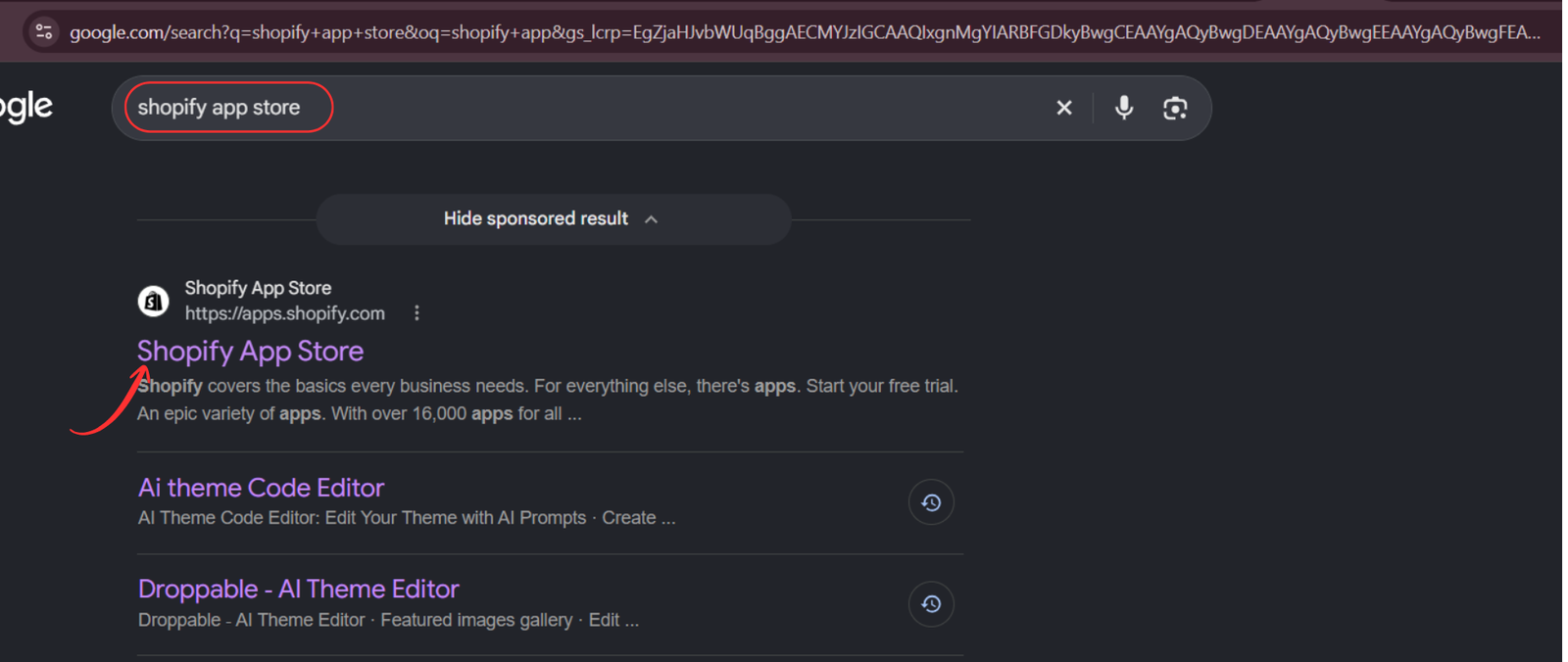
Step 1: Open the Shopify App Store
Open your web browser and search for Shopify App Store on Google.
Click the official Shopify App Store result to access Shopify’s application marketplace.
Step 2: Search for SA Product Reviews & UGC
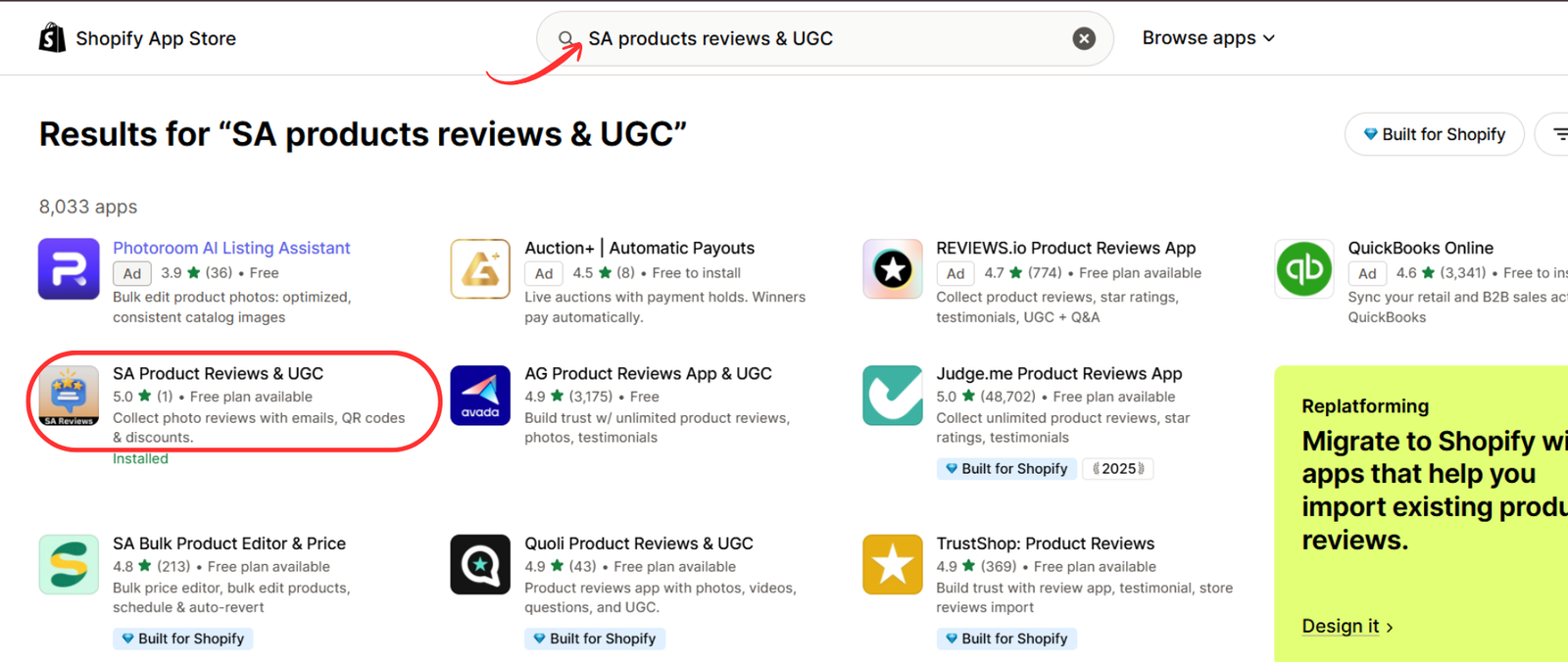
Once you’re on the Shopify App Store, locate the search bar.
Enter SA Product Reviews & UGC and search for the application.
Find the app in the search results and click its listing to view the details.
Step 3: Install the Product Review App
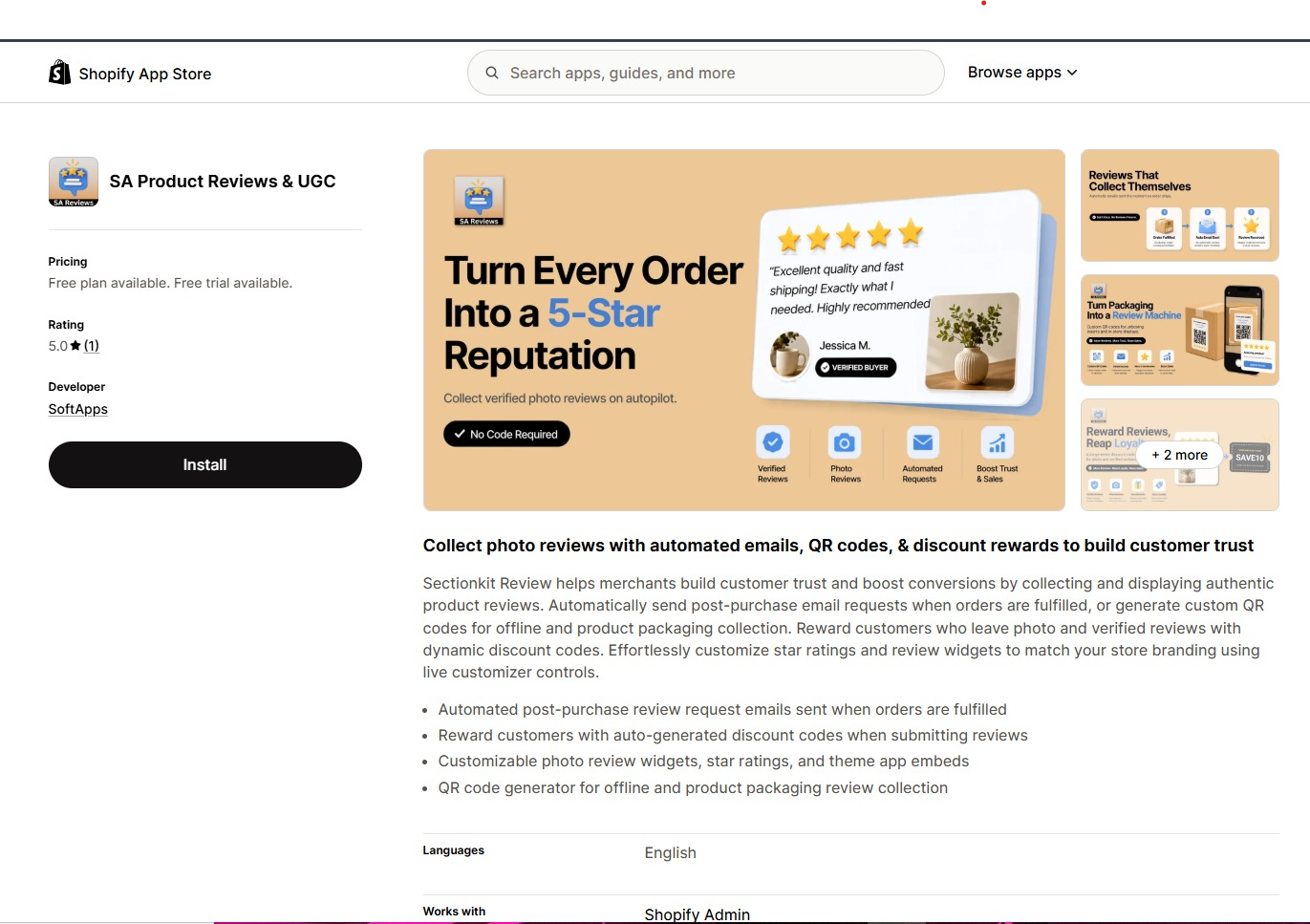
On the app listing page, review the available features and pricing information.
Click Install and follow Shopify’s authorization process to add the application to your store.
You can also visit the app directly:Install SA Product Reviews & UGC on Shopify
Step 4: Open the Installed App
After installation, click Open to launch SA Product Reviews & UGC.
You can also access the app from the Apps section of your Shopify admin dashboard.
Once inside, you’ll have access to review management, review collection, and reward configuration features.

Step 5: Navigate to Collect Reviews and Select Discount
Inside the app dashboard, locate Collect reviews in the left-hand navigation menu.
Click Collect reviews to view the available collection tools.
Find the Discount section, which is designed to configure incentives for customers who submit reviews.
Click Setup to open the discount reward settings.
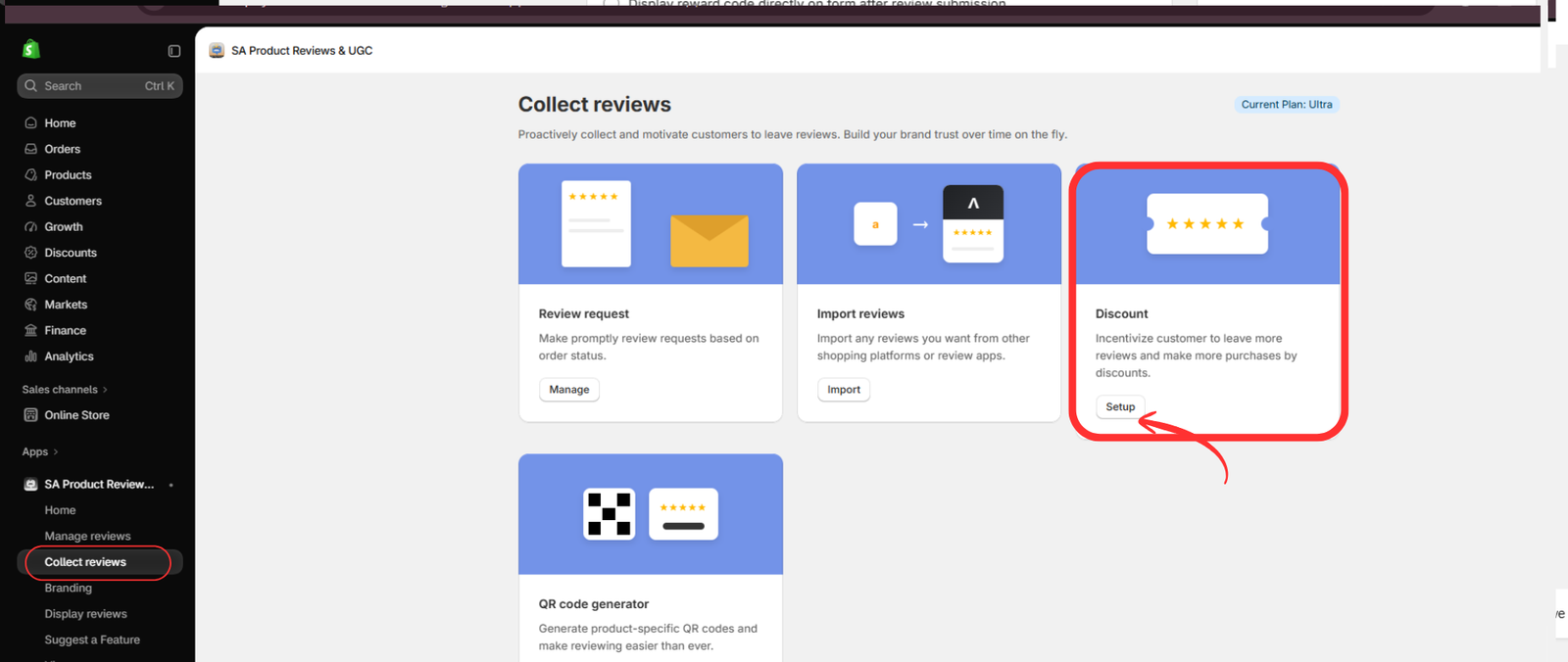
Step 5: Open Collect reviews and select Setup under Discount.
Step 6: Configure Discount Settings and Review Requirements
After opening the discount configuration page, scroll to the Discount Settings section.
Here, you can customize how customers receive rewards for submitting reviews.
First, choose the discount value unit, such as a percentage. Then select whether you want to provide the same reward for all reviews or configure different rewards for photo and video reviews.
Next, enter the discount value. For example, you might configure a 10% discount for eligible reviews.
You can also set a Discount Code Prefix to help identify review-related discounts in your Shopify store.
Under Submit form settings, customize the appearance of the reward notice and configure requirements such as the minimum number of characters or uploaded photos.
The live widget preview allows you to see how these settings will appear to customers.
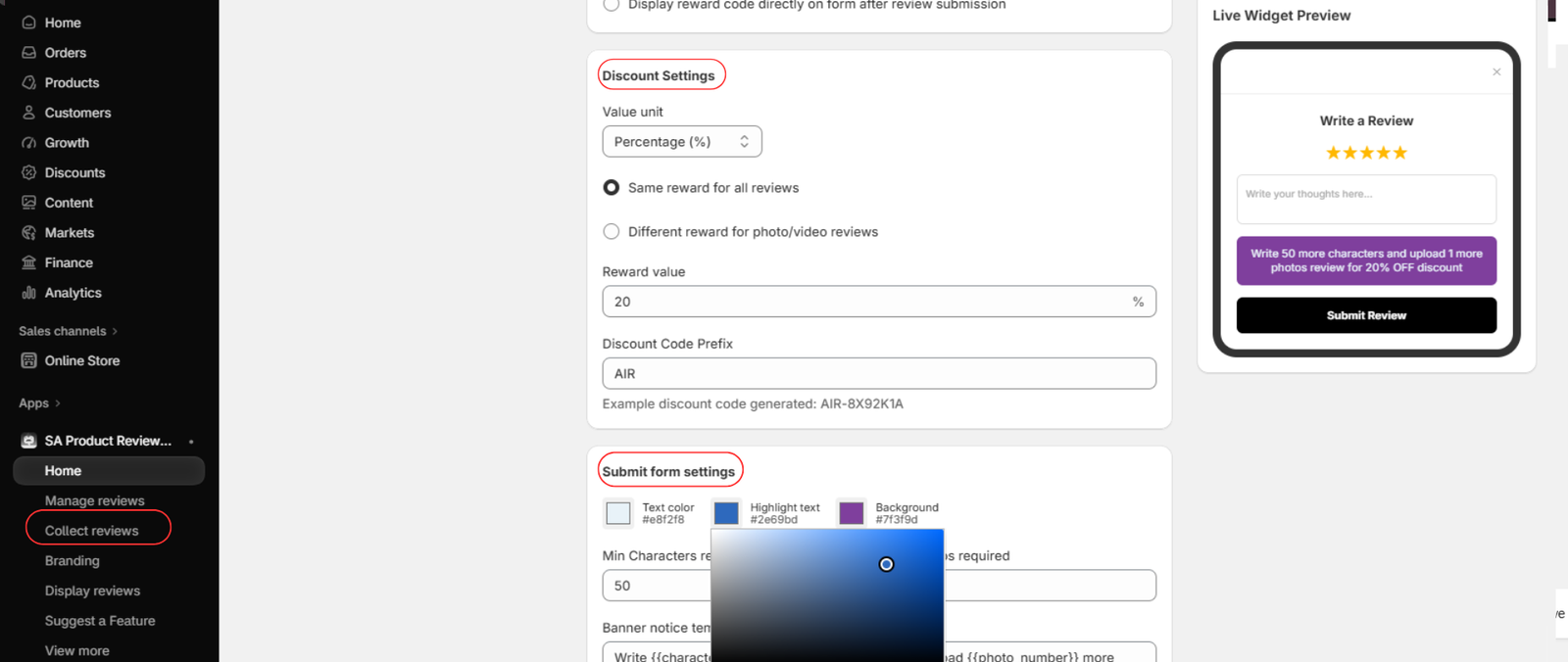
Step 6: Configure the discount amount, reward eligibility, and review submission requirements.
Important: Set eligibility based on submitting an honest review, not on the number of stars awarded. If photo or video reviews receive a different reward, disclose that condition clearly.
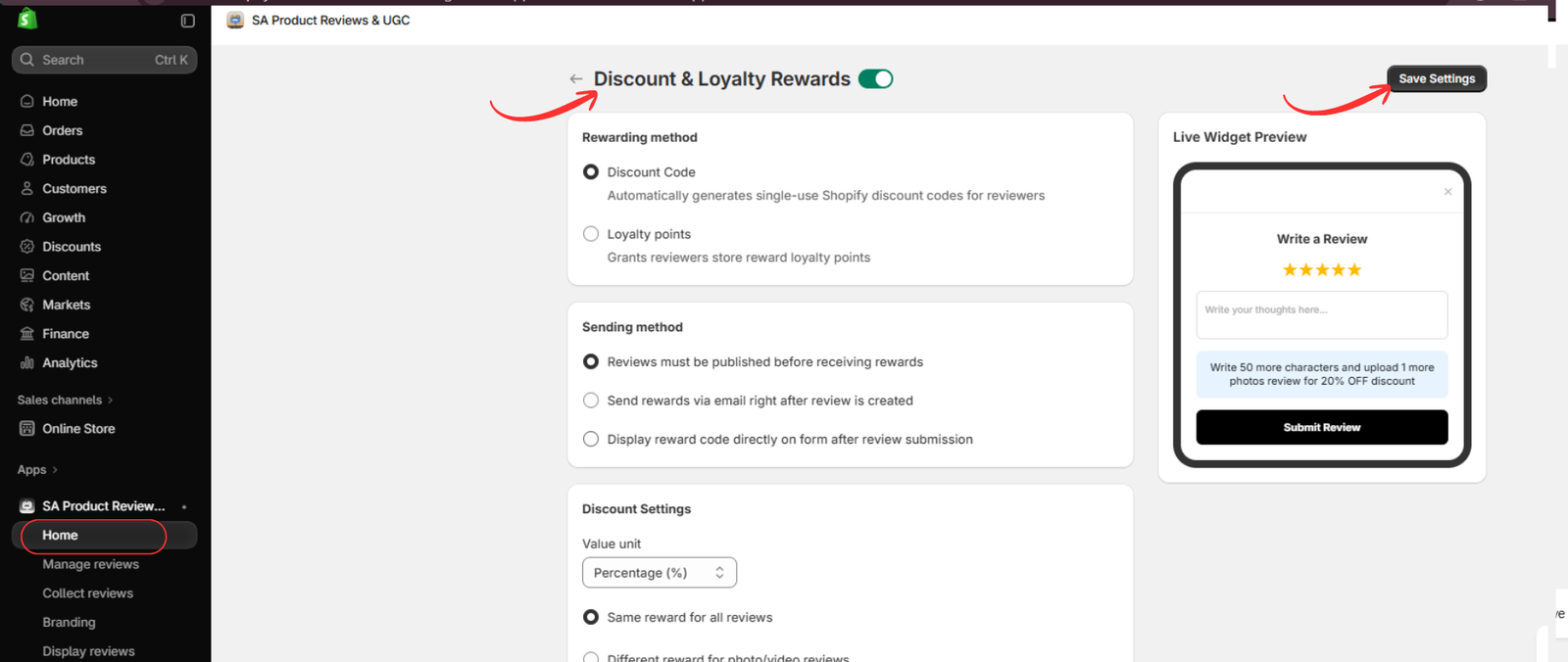
Step 7: Enable Discount Rewards and Save Your Settings
After configuring the discount values, review the remaining reward settings.
At the top of the page, enable Discount & Loyalty Rewards using the toggle switch.
Under Rewarding method, select Discount Code to generate discount codes for customers.
Next, choose the Sending method that determines when and how customers receive their rewards. The application provides options such as sending rewards by email or displaying the reward code after submission.
Review your settings and check the live widget preview.
Finally, click Save Settings in the upper-right corner to apply your configuration.Once saved, test the review submission process to ensure customers can receive their rewards according to your configured rules.
Best Practices for Offering Discounts for Product Reviews
A successful review incentive program should prioritize transparency and genuine customer feedback.
Reward honest reviews, not five-star ratings. Customers should be free to share positive or negative experiences without affecting their eligibility for the advertised reward.
Keep discount amounts reasonable. Choose an incentive that encourages participation without creating unnecessary pressure or harming profit margins.
Disclose the incentive. Clearly explain that customers may receive a discount for submitting a review. Where incentivized reviews are displayed, make sure the incentive is appropriately disclosed.
Follow applicable platform policies. Some review platforms and shopping services restrict incentivized reviews, even when they are honest. Check the rules for every platform where reviews may appear or be syndicated.
Monitor review quality. Look for meaningful feedback that helps customers make informed decisions rather than focusing only on increasing review counts.
Frequently Asked Questions
Can I offer a discount for product reviews on Shopify?
You can configure a review reward program using a compatible Shopify app, but you must follow applicable laws and the policies of platforms where the reviews appear. Avoid rewarding only positive ratings or requiring customers to change their opinions.
Can customers receive discounts for photo reviews?
SA Product Reviews & UGC includes options for configuring different rewards for photo and video reviews. Merchants should communicate eligibility requirements clearly.
Can I automatically generate discount codes for reviews?
The app includes a discount code rewarding method with options for delivering rewards to customers. Test your selected configuration before launching it.
How much discount should I offer for a review?
A modest discount, such as 5% or 10%, may be a starting point, depending on your product margins and business goals. There is no universal ideal amount, and you should check that the incentive complies with relevant policies.
Conclusion
Encouraging customers to share their experiences is an important part of building trust in an online store.
By creating a transparent review reward program, Shopify merchants can make feedback collection more engaging while showing appreciation for customer participation.
SA Product Reviews & UGC provides tools for configuring discount rewards, customizing review submission requirements, and managing how customers receive incentives.
The most important principle is simple: reward honest participation, never a particular rating or sentiment.
Explore SA Product Reviews & UGC on the Shopify App Store to configure your review collection workflow.




