HOW TO ADD A STICKY CART BUTTON TO YOUR SHOPIFY STORE IN ANY THEME

Introduction
A Shopify sticky add to cart button helps customers add products to their carts without scrolling back to the top of a product page. As shoppers explore product images, descriptions, reviews, and specifications, the sticky button remains accessible, making the purchasing process more convenient.
For Shopify merchants, this small improvement can make a significant difference in the shopping experience, especially on mobile devices where customers frequently scroll through long product pages.
However, not every Shopify theme includes built-in sticky cart functionality. Adding this feature manually can require technical knowledge and custom coding.
Fortunately, SA Sticky Add to Cart Drawer offers a straightforward way to add a sticky cart button to compatible Shopify themes without manually editing theme code.
In this guide, we will explain why sticky cart buttons matter, the common challenges merchants face, and how to install, activate, and customize the feature step by step.
Common Problems Shopify Merchants Face
Customers Cannot Easily Find the Add to Cart Button
Many Shopify product pages contain extensive information, including product descriptions, images, customer reviews, and recommended products.
When customers scroll down to explore these details, the original Add to Cart button disappears from view. They must scroll back to the purchase section to add the product to their cart.
This extra effort can interrupt the shopping experience.
Shopify Themes Have Limited Sticky Cart Features
Some Shopify themes do not include a sticky add to cart button. Others offer limited customization options.
Merchants may struggle to adjust the button’s appearance, control when it becomes visible, or position it appropriately.
Custom Coding Requires Technical Knowledge
Creating a sticky cart button manually may involve editing Shopify Liquid, CSS, and JavaScript.
Incorrect changes can cause display problems or conflicts with existing theme functionality. Custom modifications may also require maintenance after theme updates.
Mobile Shopping Can Become Frustrating
On mobile devices, customers have less screen space and often need to scroll further to view product information.
Without a conveniently accessible purchase button, customers may need to navigate back through the page before adding an item to their cart.
Why a Shopify Sticky Add to Cart Button Is Important
A sticky add to cart button helps keep the purchase action available while customers browse a product page.
Its benefits include:
- Improved shopping convenience: Customers can add products without scrolling back to the original purchase button.
- Better mobile accessibility: A fixed cart bar makes the purchase action easier to find on smaller screens.
- Reduced shopping friction: Customers can continue exploring product information while keeping the purchase option nearby.
- More consistent navigation: A sticky cart bar provides a recognizable shopping action throughout the product page.
- Conversion optimization opportunities: Easier access to the purchase button may support better conversion performance, depending on the store and audience.
Introducing SA Sticky Add to Cart Drawer
SA Sticky Add to Cart Drawer is a Shopify application that helps merchants improve their storefront shopping experience with customizable cart features.
The app provides a Sticky Add To Cart Bar that can remain visible while customers scroll through product pages.
It also includes additional cart functionality, such as a side cart drawer, product recommendations, and other cart enhancements.
Using the app, merchants can configure the sticky bar’s visibility, activate it through their Shopify theme, and preview the results before publishing.
Shopify App Store: https://apps.shopify.com/sk-sticky-add-to-cart-drawer
Step-by-Step Procedure With Your Original Images
Step 1: Open the Shopify App Store
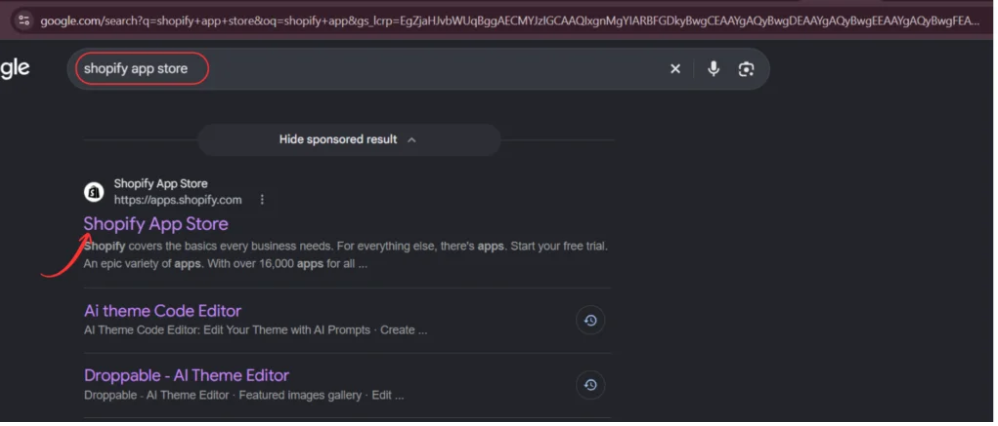
Open Google and search for Shopify App Store. Select the official result to access Shopify’s marketplace for store applications.
Step 2: Find SA Sticky Add to Cart Drawer
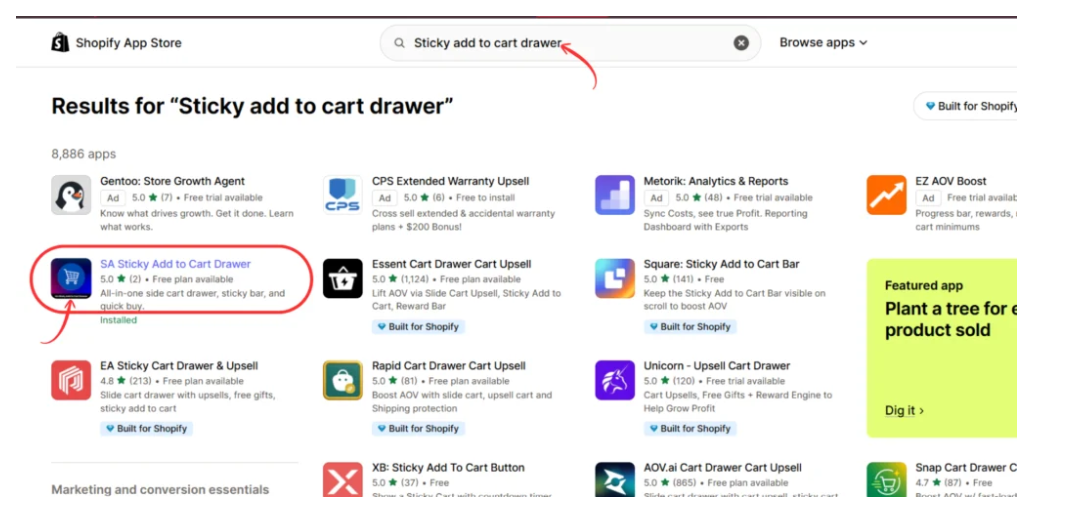
In the Shopify App Store search bar, enter Sticky add to cart drawer. Locate SA Sticky Add to Cart Drawer in the results and select it to open the listing.
Step 3: Install or Open the App
Review the app listing and its available features. Click Install if it is not already installed, or Open if you have previously added it to your store.

Step 4: Activate the Sticky Add to Cart Bar
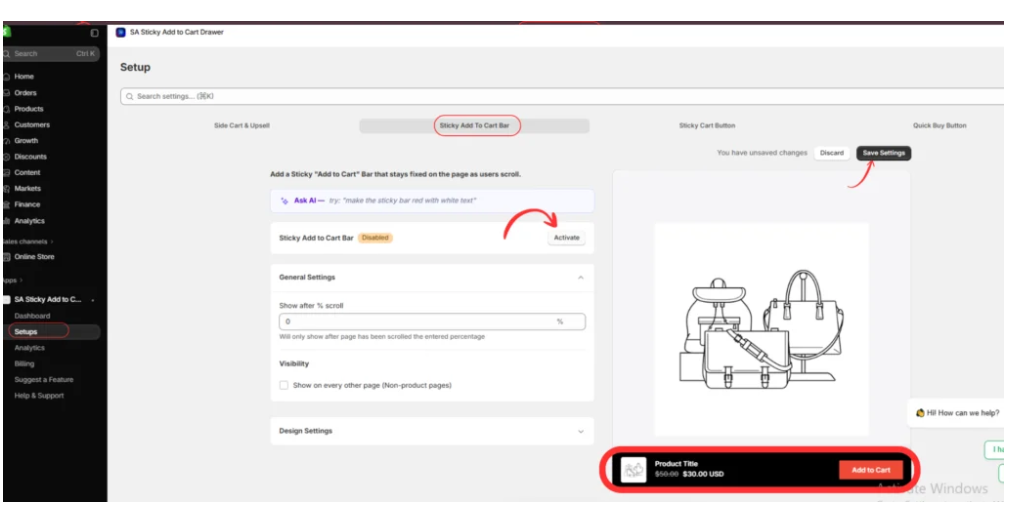
Inside the app dashboard, open Setups and select Sticky Add To Cart Bar.
Click Activate, configure the scroll percentage under General Settings, review the design options, and click Save Settings.
The preview shows how the sticky bar will appear with product information and an Add to Cart button.
Step 5: Enable the App in Your Shopify Theme
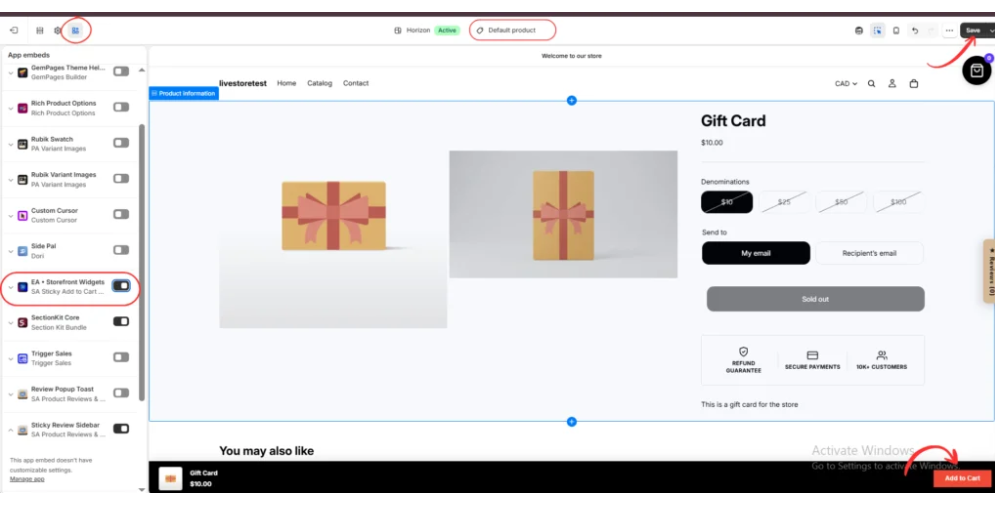
Navigate to Online Store → Themes → Customize in your Shopify admin.
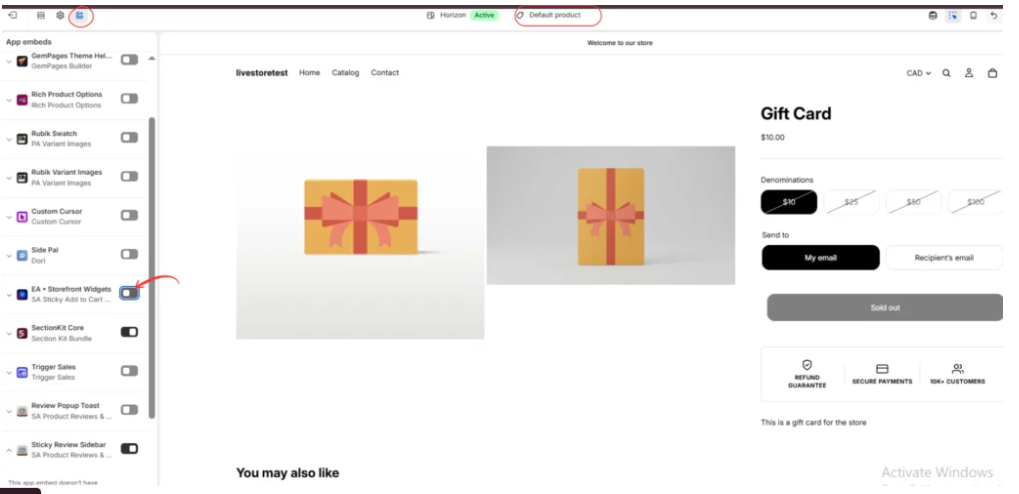
Open App embeds and locate EA • Storefront Widgets, associated with SA Sticky Add to Cart Drawer. Enable its toggle to allow the app’s storefront functionality to load.
Step 6: Preview the Sticky Cart Button
Select the Default product template in the theme editor. Scroll through the product page and inspect the sticky cart bar displayed at the bottom.
Check that it does not cover important content and that the Add to Cart button works for an available product. Click Save when finished.
Step 7: Test the Sticky Cart Bar in Another Theme
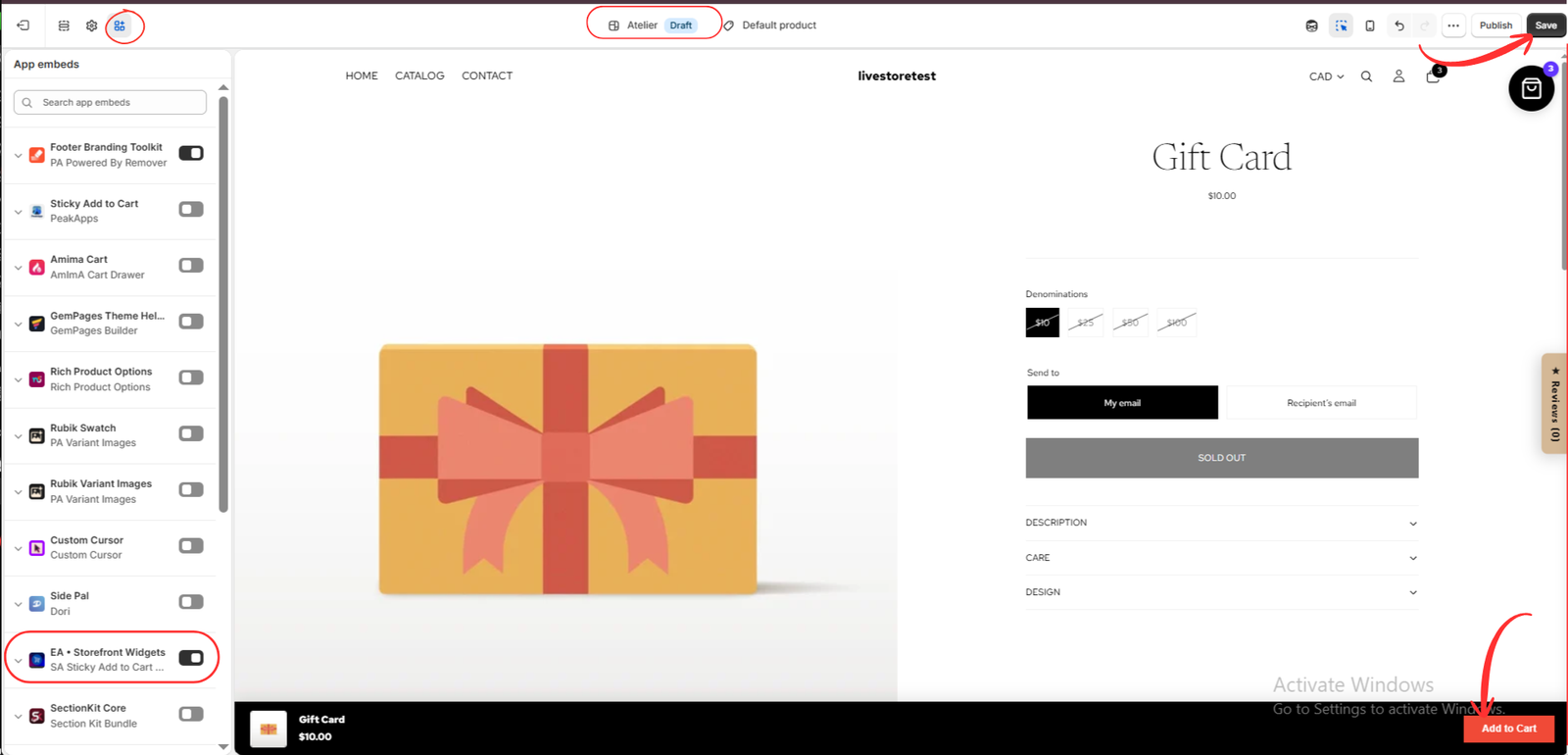
Open another compatible Shopify theme, such as the Atelier theme shown in your final image.
Enable the same app embed, open a product page, and confirm that the sticky bar appears correctly. Test it with an available product, then save your theme configuration.
Best Practices
Keep the sticky button visible without obstructing the storefront. Choose a suitable scroll position, test mobile layouts, verify product variants and availability, and check how the bar behaves across different themes.
Conclusion
A Shopify sticky add to cart button can make product pages easier to navigate and keep the purchase option within reach. SA Sticky Add to Cart Drawer provides an app-based approach to activating and customizing this functionality.
Explore the app: https://apps.shopify.com/sk-sticky-add-to-cart-drawer




