The Complete Guide to Shopify A/B Testing
If you run a Shopify store, you already know that getting traffic is only half the battle. The real challenge is turning that traffic into paying customers. This is where Shopify A/B testing comes in. A/B testing, also called split testing, is one of the most powerful ways to grow your online store without spending extra money on ads or discounts.
In this guide, we will break down everything you need to know about Shopify A/B testing in simple, easy to understand language. Whether you are a beginner or someone who has tried testing before without much success, this guide will help you build a solid testing strategy for your store.
What is Shopify A/B Testing?
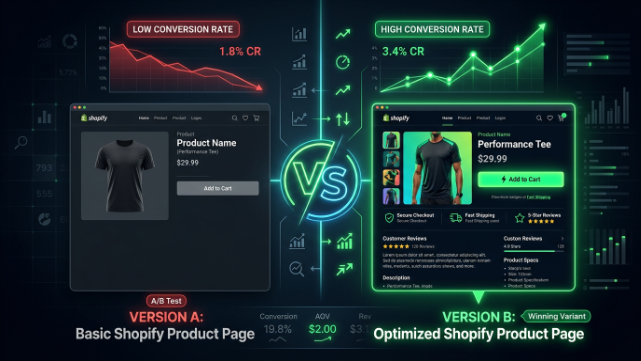
A/B testing means showing two different versions of a webpage, product, or feature to different groups of visitors at the same time. Version A is usually the original (called the “control”), and Version B is the new version you want to test (called the “variant”).
By comparing how each version performs, you can find out which one gets more clicks, more add-to-carts, or more sales. Once you know the winner, you apply that change to your entire store.
For example, you might test:
- A red “Add to Cart” button versus a green one
- A short product description versus a longer, detailed one
- A homepage with a video versus one with a static image
Shopify A/B testing helps you make decisions based on real data instead of guesswork. Instead of assuming what your customers like, you let them show you through their actions.
Why A/B Testing Matters for Shopify Store Owners
Many Shopify store owners spend most of their budget on driving traffic through ads, influencer marketing, or SEO. But if your store’s conversion rate is low, you are wasting a lot of that traffic. This is why conversion rate optimization (CRO) through A/B testing is so important.
Here are the main reasons why A/B testing matters:
1. It Removes Guesswork
Instead of making changes based on opinions, A/B testing shows you what actually works for your specific audience.
2. It Increases Conversion Rates
Even small changes, like a different headline or button color, can lead to a noticeable increase in sales.
3. It Reduces Risk
Instead of making a big change to your entire store and hoping it works, you can test it first on a small percentage of visitors.
4. It Improves Customer Experience
A/B testing often reveals what confuses or frustrates customers, helping you create a smoother shopping experience.
5. It Saves Money Long Term
A store with a higher conversion rate needs less traffic to hit the same revenue goals, which means your ad spend goes further.
Key Elements You Can A/B Test on Shopify
There are many parts of your Shopify store you can test. Let’s go through the most impactful ones.
1. Homepage Design
Your homepage is often the first impression visitors get. You can test different layouts, banner images, hero sections, and navigation menus to see what keeps visitors engaged longer.
2. Product Pages
Product pages are where most buying decisions happen. Things you can test include:
- Product titles
- Product descriptions (short vs. detailed)
- Product images (lifestyle photos vs. plain white background)
- Price display (with or without a “compare at” price)
- Customer reviews placement
- Size charts and guides
3. Call to Action (CTA) Buttons
CTA buttons like “Add to Cart,” “Buy Now,” or “Shop Now” play a huge role in conversions. Testing button color, size, wording, and placement can make a real difference.
4. Checkout Process
A complicated checkout process is one of the biggest reasons for cart abandonment. You can test:
- One-page checkout vs. multi step checkout
- Guest checkout options
- Trust badges near the payment section
- Shipping information placement
5. Pricing and Discounts
You can test different pricing strategies, such as bundle pricing, free shipping thresholds, or percentage based discounts versus fixed dollar discounts.
6. Email Pop ups and Opt ins
Testing different pop up designs, timing, and offers can help you grow your email list faster without annoying visitors.
7. Navigation and Menu Structure
Sometimes customers leave simply because they can’t find what they are looking for. Testing menu categories and search bar placement can improve the browsing experience.
8. Product Recommendations
Testing where and how you show “related products” or “customers also bought” sections can increase your average order value.
How to Set Up A/B Testing on Shopify
Now let’s talk about the actual process of setting up A/B testing on Shopify. Follow these steps to get started the right way.
Step 1: Define a Clear Goal
Before you start any test, decide what you are trying to improve. Are you trying to increase add-to-cart rate, reduce bounce rate, or boost overall sales? A clear goal keeps your test focused.
Step 2: Pick One Variable to Test
It’s tempting to change multiple things at once, but this makes it hard to know what actually caused the results. Stick to testing one variable at a time, such as just the headline or just the button color.
Step 3: Create Your Hypothesis
A hypothesis is simply a prediction. For example: “If we change the CTA button from blue to orange, more visitors will click Add to Cart because orange stands out more against our color scheme.”
Step 4: Choose the Right Tool
Shopify does not have a built in native A/B testing tool for most store elements, so you will need an app. Some popular Shopify A/B testing apps include:
- Google Optimize alternatives (since Google Optimize was discontinued, many store owners now use other tools)
- Intelligems great for pricing and discount tests
- Neat A/B Testing simple and beginner friendly
- VWO (Visual Website Optimizer) advanced testing features
- Convert Experiences good for larger stores
- PageFly or Shogun with built in testing features for page builders
Choose a tool based on your store size, budget, and technical comfort level.
Step 5: Set Up Your Test
Once you have chosen your tool, create your two versions (A and B). Make sure the only difference between them is the variable you are testing.
Step 6: Split Your Traffic
Most tools automatically split your traffic 50/50 between the two versions. Make sure visitors consistently see the same version throughout their visit to avoid confusing results.
Step 7: Run the Test Long Enough
This is one of the most important steps. Many store owners stop their tests too early, which leads to inaccurate conclusions. Run your test until you reach statistical significance, which usually means:
- At least 1,000–2,000 visitors per variation
- At least one to two full weeks, to account for different shopping behaviors on weekdays versus weekends
Step 8: Analyze the Results
Look at your key metric (conversion rate, click-through rate, average order value, etc.) and compare the two versions. Most testing tools will tell you if the result is “statistically significant,” meaning the difference is likely due to the actual change and not random chance.
Step 9: Implement the Winner
Once you have a clear winner, apply that change permanently to your store. Then move on to your next test idea.
Common Mistakes to Avoid in Shopify A/B Testing
Even experienced store owners make mistakes when running A/B tests. Here are the most common ones to avoid.
1. Testing Too Many Things at Once
If you change the headline, image, and button color all at the same time, you won’t know which change actually caused the improvement.
2. Ending Tests Too Early
Stopping a test after just a few days or a small number of visitors can lead to false conclusions. Patience is key.
3. Ignoring Mobile Traffic
Most Shopify traffic comes from mobile devices. Make sure your tests account for both mobile and desktop experiences separately, since behavior can differ a lot between the two.
4. Not Having a Clear Hypothesis
Testing random ideas without a clear reason wastes time. Always have a logical reason for why you think a change will improve performance.
5. Testing During Unusual Periods
Avoid running tests during major sales events like Black Friday or holiday seasons unless you are specifically testing for that period, since customer behavior is very different during these times.
6. Not Segmenting Your Audience
New visitors and returning customers often behave differently. Segmenting your results can give you deeper insights into what works for each group.
Best Practices for Successful Shopify A/B Testing
To get the most value from your testing efforts, keep these best practices in mind.
Start With High Impact Pages
Focus your first tests on pages that get the most traffic, like your homepage, best-selling product pages, or checkout page. This gives you faster, more reliable data.
Prioritize Tests Based on Potential Impact
Not all tests are equal. Use a simple framework to prioritize which tests to run first, based on:
- How much traffic the page gets
- How easy the test is to implement
- How much potential impact it could have on revenue
Keep a Testing Log
Document every test you run, including the hypothesis, results, and what you learned. This helps you avoid repeating tests and builds a knowledge base over time.
Combine Quantitative and Qualitative Data
Numbers tell you what happened, but tools like heatmaps, session recordings, and customer surveys tell you why it happened. Combining both gives you a fuller picture.
Test Continuously
A/B testing is not a one time task. Customer preferences change, trends shift, and your store evolves. Make testing a regular part of your growth strategy.
Be Patient With Small Stores
If your store gets low traffic, it may take longer to reach statistically significant results. In this case, focus on testing bigger changes that are likely to have a bigger impact, rather than small tweaks.
How Long Should a Shopify A/B Test Run?
A common question is how long to run a test. While there is no exact universal number, here are some general guidelines:
- Run tests for a minimum of 1 to 2 weeks to capture different shopping patterns
- Aim for at least 1,000 to 2,000 visitors per variation for reliable results
- Avoid stopping a test just because one version is temporarily ahead early on, results can shift over time
If your store has lower traffic, consider testing bigger, bolder changes rather than tiny details, since small changes need much larger sample sizes to show a clear winner.
Real-World Examples of Shopify A/B Testing Wins
To help you understand the power of testing, here are a few examples of the kinds of changes that have helped Shopify stores improve conversions:
- Changing product description format from paragraphs to bullet points, making it easier to scan and improving add to cart rates
- Adding customer reviews closer to the “Buy Now” button, which boosted trust and reduced hesitation
- Simplifying the checkout process from multiple steps to a single page, which reduced cart abandonment
- Testing free shipping thresholds, which increased average order value as customers added more items to qualify
- Using lifestyle images instead of plain product photos, which helped customers visualize the product in real life
These examples show that testing doesn’t always require huge changes. Sometimes small, thoughtful adjustments create meaningful results.
Tools to Help With Shopify A/B Testing
Besides dedicated A/B testing apps, here are other tools that can support your testing efforts:
- Google Analytics to track visitor behavior and conversion goals
- Hotjar or Microsoft Clarity for heatmaps and session recordings to understand user behavior
- Shopify’s built in analytics to monitor sales trends and customer behavior over time
- Klaviyo if you’re testing email campaigns alongside your store tests
Using a combination of these tools alongside your A/B testing app gives you a well-rounded view of your store’s performance.
Final Thoughts
Shopify A/B testing is one of the smartest ways to grow your ecommerce business without increasing your marketing budget. By testing small, meaningful changes to your homepage, product pages, checkout process, and more, you can steadily improve your conversion rate over time.
The key is to be consistent, patient, and data driven. Start with a clear hypothesis, test one variable at a time, give your tests enough time to gather reliable data, and always apply what you learn to future tests.
Over time, these small, tested improvements add up to significant growth for your Shopify store. Whether you are just starting out or already running a successful store, making A/B testing a regular part of your strategy will help you build a store that truly works for your customers, and for your bottom line.
Start with one simple test today. Pick a page, form a hypothesis, and see what your data tells you. That is the first step toward building a smarter, more profitable Shopify store.