The Complete Guide to Shopify AI
Let’s talk about something that’s changed the way Shopify stores are built and run: artificial intelligence. If you’ve logged into your Shopify admin recently, you’ve probably noticed a little purple icon sitting there, ready to chat with you. That’s Sidekick. And if you’ve clicked “Generate with Magic” while writing a product description, you’ve already used Shopify’s AI without even thinking twice about it. This guide is going to walk you through everything, what Shopify AI actually is, how it works, what you can do with it today, and how you can use it to run a smarter, faster, more profitable store. No jargon, no fluff, just a real conversation about a tool that’s become part of daily store management for merchants everywhere, including right here in Pakistan.
What Exactly Is Shopify AI
Here’s the thing that trips people up first. “Shopify AI” isn’t one single feature. It’s actually two connected systems working together, and understanding the difference between them will save you a lot of confusion.
Shopify Magic is the embedded generation layer. Think of it as a set of smart buttons scattered throughout your admin. You’re writing a product description, you click Generate, and Magic writes it for you based on the details you’ve already entered. You’re editing a product photo and want a cleaner background, Magic does that too. You’re drafting a marketing email, Magic suggests subject lines and body copy. Shopify Magic is embedded generation, where you click a button inside a specific feature like a product description field, email composer, or blog editor, and it produces text or pixels right where your cursor is.
Shopify Sidekick, on the other hand, is the conversational agent. It’s a chat sidebar you can open from any admin page, and you describe what you want in plain English, and it plans, executes, and reports back, often calling Magic to do the actual generation. So Magic is the hands, and Sidekick is closer to the brain that tells those hands what to do. Sidekick has direct access to your store data, understands commerce workflows, and can actually take action inside your admin, which is very different from a generic AI chatbot that has no idea your store even exists.
The best way to think about it: Magic is foundational content generation, and Sidekick is command and control. You’ll use both, often without even realizing which one is doing the work behind the scenes, since Sidekick often calls Magic under the hood to execute a task.
Getting Started With Sidekick
Opening Sidekick is refreshingly simple. You open your Shopify admin and click the purple glasses icon, and that’s really it. There’s no setup and no configuration needed. You just start typing what you want, the way you’d message a smart, slightly overachieving employee.
Ask it things like “show me my best selling products this month” or “which collections have the lowest conversion rate” and it pulls real numbers from your store, not guesses. Ask it to draft a discount code for repeat customers and it’ll set that up too, though it will always show you a preview first. Sidekick will always present a preview and require you to click Approve before making changes, which is a safety feature rather than a limitation, though it does mean it can’t run fully unattended overnight jobs. That’s actually a good thing for merchants who want AI assistance without losing control of their storefront.
One detail worth knowing: every staff member can use Sidekick according to their own admin permissions, so it respects your existing access controls and team members only interact with data they’re already authorized to see. If you run a small team, this means you don’t have to worry about giving everyone the keys to the whole store just because they want AI help with their part of the job.
What Shopify Magic Can Actually Do For You
Let’s get specific, because this is where the real time savings live. Magic covers a wide range of everyday tasks that used to eat up hours of your week.
Product descriptions are the obvious one. Shopify Magic helps merchants create unique product descriptions by analyzing product details and highlighting the main points, which saves enormous time compared to writing everything manually. If you’re running a store with two hundred SKUs, this alone can save you days of work.
Image editing has gotten genuinely useful too. You can transform the background of your product images just by typing a simple prompt describing what you want it to look like, which means fewer expensive photoshoots and faster product launches. On the more advanced end, merchants are now placing their products into hyper-realistic AI-generated environments based on season and location instead of booking traditional photo shoots.
Tagging and metadata used to be a tedious, manual grind, especially for larger catalogs. Now, Magic suggests and applies product tags based on product images and descriptions, automatically suggesting things like size, color, material, style, and category the moment you upload a new product. It also handles SEO groundwork. Magic generates meta titles and meta descriptions that follow SEO best practices for length, keyword inclusion, and click-through rate, which matters a lot if you’ve got a store with hundreds of products lacking proper metadata.
And then there’s email. Shopify Email integrates AI to suggest subject lines, messaging structure, and campaign ideas by analyzing customer behaviour patterns to recommend content more likely to resonate with your audience.
Where Sidekick Goes Beyond Simple Automation
Sidekick isn’t just a smarter search bar. It’s capable of handling genuinely complex, multi-step operations. It can build Shopify Flow automations from a plain sentence, like tagging any customer whose lifetime spend exceeds a certain amount as VIP and triggering a thank-you email automatically, work that used to require either a developer or a lot of trial and error on your part.
It also helps with visual customization. You can describe the look you want in natural language, and Sidekick suggests specific theme settings, color palettes, and layout adjustments, which speeds up visual customization even though it can’t fundamentally redesign your store from scratch.
One newer and more advanced capability is custom app generation, though this one comes with a catch worth knowing before you get excited. Sidekick’s custom app generation feature lets you describe an internal tool and have Sidekick build it using Polaris components and the GraphQL Admin API, but this is not free on every plan, it’s available to merchants on Grow, Advanced, Shopify Plus, and Enterprise plans. If you’re on a Basic plan, don’t be surprised if this particular feature isn’t available to you the same way.
There’s also a newer layer called Sidekick Pulse, which shifts Sidekick from something you have to ask questions to something that proactively flags issues. Rather than waiting for you to request a report, Pulse tells you when something is wrong, comparing your store’s real-time performance against broader market trends and acting more like a proactive business consultant than a passive tool.
How Magic and Sidekick Work Together
You don’t have to choose one or the other. In practice, they’re a team. Sidekick handles the analysis, automation setup, and bottleneck identification, while Magic handles the actual content generation, and Sidekick often calls Magic to execute the creative work after making a strategic suggestion. A simple real-world example: Sidekick notices a slow-moving collection and suggests a promotion, then it hands that off to Magic to generate the banner copy and email content.
There’s also a quiet but genuinely useful detail in how brand consistency works across both tools. Because Sidekick calls Magic under the hood, your Brand Voice profile applies to both tools, so once you train Magic on your tone, every Sidekick generated piece of content inherits that same voice. That means you configure your brand personality once, and it carries through everything, product descriptions, emails, chat responses, without you having to repeat yourself.
Is Shopify AI Actually Free
Yes, for the most part. Both Sidekick and Magic are free across every Shopify plan, and that’s genuinely rare in a market where most AI tools charge a monthly subscription on top of everything else. The one meaningful exception is that custom app generation feature mentioned earlier, which is plan gated. Outside of that, you’re not paying extra to use the core AI functionality baked into your store.
Merchant surveys back up the value here too. Shopify Magic and Sidekick save an average of five to ten hours per week for solo operators and small teams, which at an effective rate of fifty dollars an hour works out to somewhere between thirteen thousand and twenty six thousand dollars a year in productivity gains, and since it’s included free with your subscription, the return on investment is effectively unlimited.
Where AI Fits Into the Bigger Shopify Ecosystem
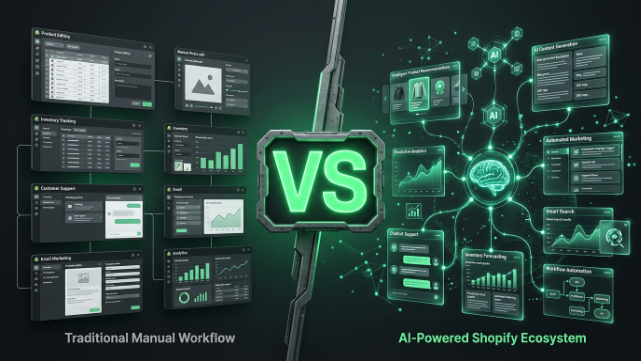
It’s worth zooming out for a second, because Shopify AI isn’t just Magic and Sidekick anymore, it’s becoming a broader layer across the whole platform. The 2026 picture includes native generative tools like Magic and Sidekick, a newer agent and commerce layer built around things like AI Toolkit and Storefront MCP that supports agentic checkout, plus a growing third party app ecosystem, with Magic and Sidekick being free and native while much of the rest is paid or additive. As AI driven search and answer engines become a bigger source of traffic, structured, well-organized product data matters more than ever, since that’s what these systems read and cite.
The practical takeaway for a merchant isn’t to chase every new AI feature that launches. It’s to ask three honest questions before adopting anything new: does it actually do real work, is it free and already built into the platform you’re paying for, and can you measure whether it’s moving the needle on your own store’s numbers rather than trusting a vendor’s own dashboard.
Where Shopify AI Still Needs a Human Touch
I’d be doing you a disservice if I made this sound like a magic wand that needs zero oversight. Shopify Magic and Sidekick have real limitations, complex product descriptions involving many technical specifications may not be effectively auto-generated, and merchants need to carefully review generated text since AI models can sometimes produce inappropriate or inaccurate content. AI is a lever that speeds up your work, not a replacement for someone who understands your brand, your customers, and your market.
The smartest approach, especially if you’ve got a small team, is setting simple internal guidelines. Decide which tasks go to Magic, which go to Sidekick, and which still need a human. Always have a review step before anything AI generated gets published live on your store. That one habit alone prevents most of the embarrassing mistakes merchants run into.
Shopify AI for Pakistani Merchants
Now let’s bring this home, because running a Shopify store from Pakistan comes with its own layer of considerations that a generic AI guide won’t cover.
Cash on Delivery is still the dominant payment method for a huge share of Pakistani ecommerce, and Sidekick can actually help here. You can ask it to analyze which of your products have the highest COD return or refusal rates, and it’ll pull that data straight from your store rather than making you dig through reports manually. That kind of insight matters a lot when COD orders can quietly eat into your margins if left unchecked.
If you’re accepting JazzCash or Easypaisa through a payment gateway integration, Magic can help you write clear, simple checkout instructions and FAQ content explaining these payment options to customers who might be new to online shopping. A lot of first time Pakistani buyers hesitate at checkout simply because they’re unsure how a payment method works, and AI generated, easy to understand copy can genuinely reduce cart abandonment.
WhatsApp commerce is huge here too, and while Shopify’s native AI tools don’t run inside WhatsApp itself, you can use Sidekick to draft the product messaging, order confirmations, and follow-up texts that your team then sends manually or through a connected app. It’s a small workflow shortcut, but when you’re sending dozens of these messages a day, it adds up fast.
And when it comes to logistics, if you’re shipping through Leopards, TCS, or M&P, you can ask Sidekick to flag delayed shipments or identify which courier has the best on-time delivery rate for your specific city coverage, based on your own order data. That’s the kind of localized decision-making AI is genuinely good at, once you know how to ask the right questions.
Wrapping This Up
Shopify AI in 2026 isn’t a gimmick anymore, it’s genuinely part of how a well run store operates day to day. Magic handles your content and creative work, Sidekick handles your strategy, automation, and admin tasks, and together they save real hours every single week without costing you anything extra. But like any tool, it works best in the hands of someone who understands both the platform and the market they’re selling into.
That’s exactly where TheScriptFlow comes in. We help Shopify merchants across Pakistan and internationally set up, optimize, and actually use these AI tools the right way, from configuring Sidekick’s brand voice to building out AI-assisted product catalogs and localized customer experiences that fit the Pakistani market. If you’d rather have experts handle the setup while you focus on running your business, reach out to us at thescriptflow.com and let’s build your AI-powered Shopify store together.