The Ultimate Guide to Shopify Dropshipping Automation
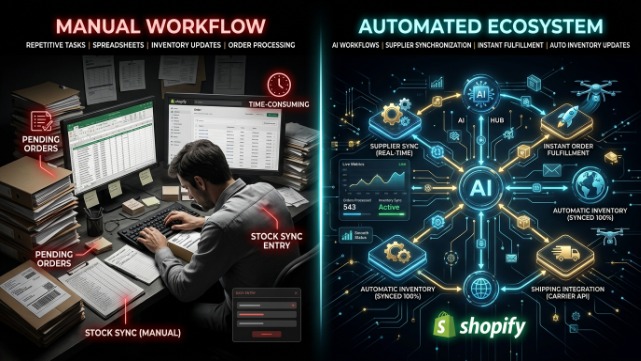
If you’re still manually checking out orders on AliExpress one by one, copying tracking numbers into spreadsheets, and updating stock levels by hand, you’re not running a dropshipping business you’re running a part time data entry job. Shopify dropshipping automation exists to fix exactly that problem, and in 2026, the gap between stores that automate and stores that don’t has never been wider. The ones running lean, automated systems are scaling to hundreds of orders a day with a two person team. The ones still doing everything manually are burning out before they even hit their first thousand dollars in monthly revenue.
This guide walks through everything you need to know about Shopify dropshipping automation what it actually means, which parts of your business you should automate first, the tools that do it well, and how to build a system that runs itself while you focus on the parts of the business that actually need a human brain: marketing, branding, and customer relationships.
What Shopify dropshipping automation actually means
Dropshipping automation is the use of software to handle the repetitive, rules based tasks in your store’s operations product imports, order routing, inventory syncing, price updates, tracking notifications, and customer service replies without you touching each one manually. It’s not about replacing your judgment on strategy or product selection. It’s about removing yourself from the mechanical, repeatable parts of the process so those decisions aren’t eating your time.
Think of it this way: when a customer places an order on your Shopify store, a fully automated dropshipping workflow sends that order straight to your supplier, deducts the item from your synced inventory, generates a tracking number once it ships, and emails the customer an update all without you opening a single tab. That’s the end goal, and it’s genuinely achievable with the tools available today.
Why automation matters more in 2026 than it used to
A few years ago, dropshipping automation was a nice to have. Now it’s closer to a requirement. Ad costs have climbed steadily, which means your margins are thinner and every hour you spend on manual order processing is an hour not spent testing creative or optimizing your funnel. Customer expectations around shipping speed and communication have also gone up significantly people expect near instant order confirmation and proactive tracking updates, and manual fulfillment simply can’t keep pace once you’re doing more than a handful of orders a day.
There’s also the error factor. Manual order entry inevitably leads to mistakes wrong addresses, wrong variants, duplicate orders, missed cancellations and each of those mistakes costs you money in refunds, chargebacks, or damaged reviews. Automated systems dramatically cut down on human error simply by removing the human from the repetitive step.
The core areas of your Shopify store you should automate
Order fulfillment automation. This is the backbone of dropshipping automation and usually the first thing new sellers set up. Instead of manually placing each customer order with your supplier, automation tools like DSers, AutoDS, or Zendrop instantly route the order the moment it’s placed on your Shopify store, deduct it from inventory, and push a tracking number back to Shopify once the supplier ships it. Shopify’s own Flow app also lets you build custom rules for order routing, carrier selection, and shipping label generation entirely free on qualifying plans, which is worth exploring even if you’re using a dedicated dropshipping app on top of it.
Inventory and stock syncing. Nothing kills a customer relationship faster than selling something that’s actually out of stock. Automated inventory sync pulls real time stock levels from your supplier and updates your Shopify listings automatically, so a product goes “sold out” the moment your supplier runs dry instead of you finding out after three angry emails. Most major dropshipping apps DSers, Zendrop, Spocket, CJ Dropshipping — handle this natively as part of their core integration.
Pricing automation. Supplier prices shift more often than most sellers realize, especially with AliExpress based sourcing. Automation tools let you set pricing rules for example, “always mark up supplier cost by 3x” so your Shopify prices adjust automatically whenever your cost changes, protecting your margin without you manually re checking every listing every week.
Product import and catalog updates. Rather than manually copying titles, images, and descriptions from a supplier page into Shopify, automation apps let you import a product with a single click, complete with variants, images, and descriptions already formatted. Many tools now also refresh those listings automatically if a supplier updates their product photos or details, so your storefront doesn’t quietly go stale.
Customer service automation. A growing share of customer support tickets in dropshipping are repetitive “where’s my order,” “can I change my address,” “how do I return this.” Automation here doesn’t mean eliminating human support entirely; it means using AI chatbots, canned reply macros, and self-service order tracking pages so your team (even if that team is just you) only has to step in for genuinely complex issues.
Marketing and email automation. This lives slightly outside the “sourcing and fulfillment” side of automation, but it matters just as much for a scalable store. Abandoned cart emails, post-purchase upsell flows, and win back campaigns triggered automatically by customer behavior can add a meaningful percentage to your revenue without any additional ad spend, using tools like Klaviyo integrated directly into your Shopify store.
The best Shopify dropshipping automation tools right now
DSers remains the most widely used automation layer for AliExpress-based Shopify dropshipping, and it’s Shopify’s own recommended replacement for the discontinued Oberlo app. Its free plan alone supports up to 3,000 products and multiple stores, with bulk ordering letting you process hundreds of orders in a single click instead of checking out one at a time. If your store is AliExpress-heavy, DSers is close to a default starting point.
AutoDS has built a reputation as one of the most comprehensive all-in-one automation platforms, handling product sourcing, price monitoring, automatic order fulfillment, and tracking updates across multiple sales channels including Shopify, WooCommerce, and even eBay or Facebook Marketplace if you’re running a multi-channel operation. For sellers who want a single dashboard managing everything rather than stitching together several apps, AutoDS is one of the strongest options on the market.
Zendrop combines curated product sourcing with strong fulfillment automation and notably fast US based shipping on select inventory, making it a solid choice for sellers who want automation and speed bundled together rather than sourced separately.
Spocket automates fulfillment specifically around its network of vetted US and EU suppliers, which pairs automation with the shipping speed advantage that matters so much for conversion with Western customers.
Inventory Source is worth mentioning for sellers with more established supplier relationships who need dedicated data feed syncing its automation tiers range from a free directory browsing plan up to full order routing automation, giving you flexibility depending on how hands off you want the system to be.
Shopify Flow, Shopify’s own built in automation and workflow tool, deserves a special mention because it’s free on qualifying plans and lets you build custom triggers for example, automatically tagging high risk orders for manual review, or notifying your team when stock drops below a threshold without needing a third-party app for every single rule.
Building your automation stack step by step
Trying to automate everything on day one usually backfires you end up with five overlapping apps, conflicting inventory data, and no clear picture of what’s actually happening in your store. A better approach is layering automation in as your order volume justifies it.
Start with order fulfillment and inventory sync first, since these two directly protect you from the most damaging mistakes overselling and fulfillment delays. Once that’s stable, layer in pricing automation so your margins stay protected as supplier costs shift. From there, add customer service automation even something as simple as an automated order tracking page and a canned reply system cuts support workload dramatically. Marketing automation, particularly abandoned cart and post purchase email flows, should come in once you have consistent order volume to actually generate meaningful revenue from those flows.
Resist the urge to install every automation app you come across. Each additional tool is another potential point of failure, another sync that can break, and another monthly subscription eating into your margin. A lean stack of two or three well-integrated tools almost always outperforms a bloated stack of ten apps that don’t talk to each other properly.
Common automation mistakes to avoid
Over-automating customer communication is a real risk if every single customer touchpoint is a bot with no path to a real human, you’ll frustrate exactly the customers who needed a human the most, usually the ones with a genuine problem. Keep an escalation path visible at all times.
Ignoring automation errors is another trap. Automated systems fail silently sometimes a sync breaks, an API connection drops, a supplier changes their product feed format — and if you’re not checking in periodically, you might not notice until customers start complaining about orders that never got placed. Set a weekly habit of spot-checking your automation dashboards rather than assuming “set it and forget it” means truly forgetting it.
And don’t automate a broken process. If your supplier relationship is unreliable or your product research process is weak, automation just makes those problems happen faster and at greater scale. Get the fundamentals right first, then automate.
Shopify dropshipping automation for sellers in Pakistan
If you’re running your automated Shopify store from Pakistan, a few local realities matter on top of the standard automation stack. Most of the automation tools mentioned above assume payment gateways like PayPal or Stripe are fully available, which isn’t always the case for Pakistani merchants so factor payment gateway compatibility into your app choices early, since some automation platforms require a connected gateway to function fully.
If a meaningful share of your orders are Cash on Delivery, standard automated fulfillment flows built around prepaid international orders need adjusting you’ll want automation rules that flag COD orders for a WhatsApp confirmation step before they’re auto forwarded to your supplier, since COD refusal rates run high in the local market and you don’t want to be paying suppliers upfront for orders that get rejected at the doorstep. Several Shopify automation apps support custom order tagging and conditional workflows through Shopify Flow, which makes this kind of local adjustment possible without abandoning automation altogether.
For shipping and tracking automation specifically, make sure whatever system you’re using can accommodate local courier integrations like Leopards, TCS, or M&P alongside your international dropshipping supplier’s tracking, since most automation apps are built with US and EU carriers as the default assumption.
The bottom line
Shopify dropshipping automation isn’t about removing yourself from the business it’s about removing yourself from the parts of the business that don’t need your judgment, so you have time and energy left for the parts that do. Order fulfillment, inventory syncing, and pricing rules are mechanical tasks that software handles better and faster than a human ever will. Your job is strategy, product selection, marketing, and building something that feels like a real brand rather than a random product dump.
Get the fundamentals automated properly, layer in tools as your order volume grows, and keep a human checkpoint on anything customer-facing that matters. That’s the difference between a dropshipping store that scales and one that burns its owner out by month three.
If building and automating this kind of Shopify setup sounds like more than you want to take on solo, this is exactly the kind of work TheScriptFlow handles for Shopify merchants day in and day out — from choosing the right automation stack to setting up fulfillment workflows built around the Pakistani and international markets. Reach out through thescriptflow.com and let a team that lives in Shopify automation daily set it up right the first time.