TRUST BADGES FOR DROPSHIPPING STORES: WHAT TO SHOW AND WHAT TO AVOID
Introduction
Building customer trust is one of the biggest challenges for dropshipping businesses. Unlike established ecommerce brands, many dropshipping stores are relatively new, have limited customer reviews, and rely on third-party suppliers to fulfill orders.
When customers visit an unfamiliar Shopify dropshipping store, they may have several concerns. Will the product arrive on time? Is the payment process secure? Can they return an item if something goes wrong? Is the business reliable?
These concerns can influence whether a visitor completes a purchase or leaves the website.
One way to address common customer questions is by displaying trust badges on important storefront pages.
Trust badges are visual elements that communicate information about shipping, returns, payments, guarantees, and customer support. When used correctly, they can make a dropshipping store look more professional and help customers understand its policies.
However, not every trust badge is suitable for dropshipping.
Displaying unrealistic delivery promises, unsupported guarantees, or misleading security certifications can damage customer confidence and create compliance problems.
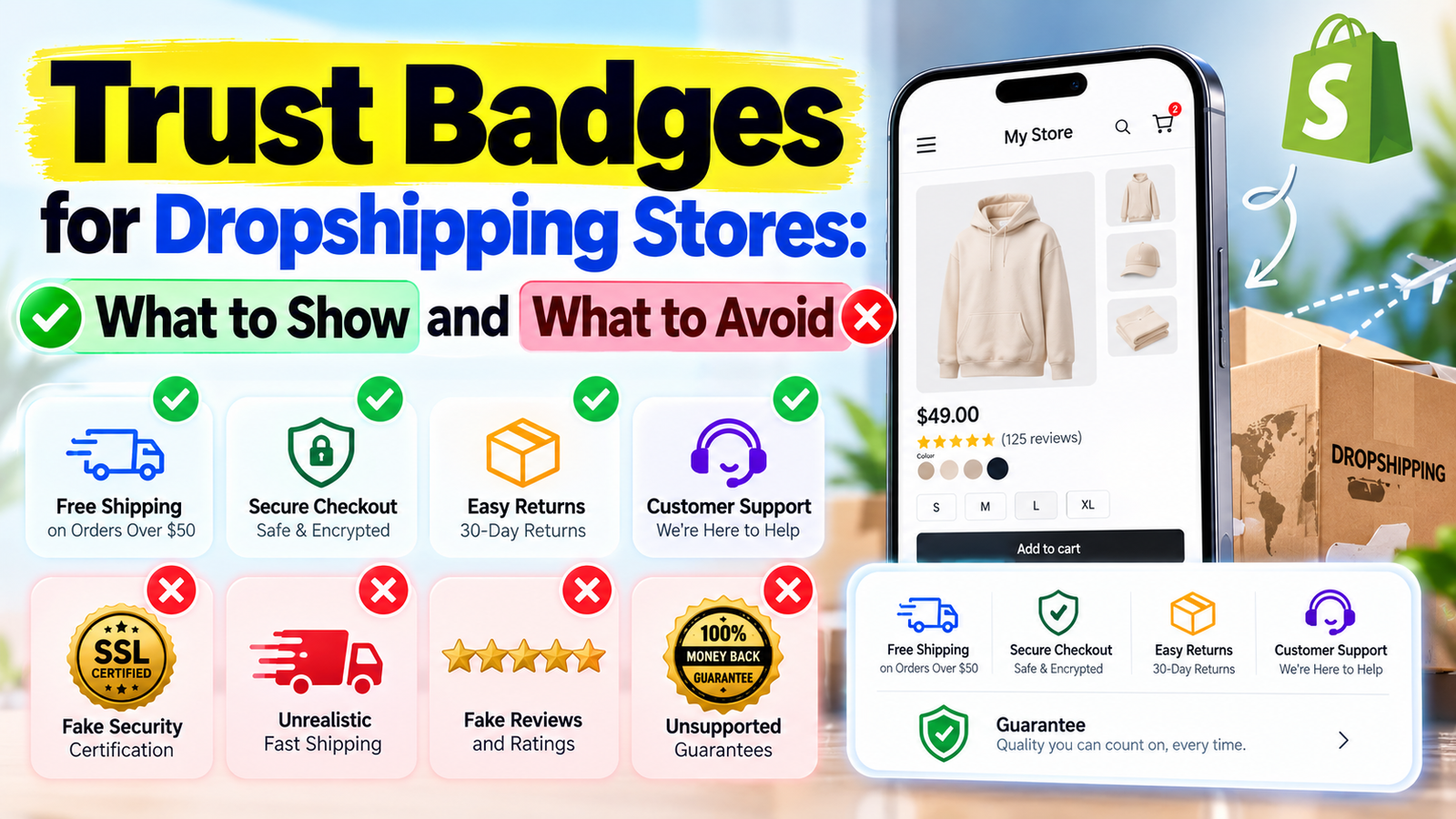
In this guide, we’ll explore the best trust badges for Shopify dropshipping stores, which badges to avoid, where to display them, and how to customize them using the SA Trust Badges Shopify app.
Why Customer Trust Matters for Dropshipping Stores
Dropshipping businesses operate differently from traditional ecommerce stores.
Instead of maintaining their own inventory, merchants typically forward customer orders to suppliers who handle fulfillment and shipping.
Although this business model offers flexibility, it also introduces challenges that can affect the customer experience.
For example, delivery times may vary depending on the supplier’s location, shipping method, and destination country.
Product quality may also differ between suppliers, making it important for merchants to evaluate the products they sell.
Customers do not necessarily know how the dropshipping model works. They primarily want clear answers about their orders.
Some common customer concerns include:
- Whether the store is legitimate and reliable.
- How long shipping will take.
- Whether the checkout process is secure.
- What happens if a product arrives damaged.
- Whether returns and refunds are available.
- How to contact customer support.
Providing accurate information about these concerns can reduce uncertainty during the shopping experience.
Trust badges help highlight this information without requiring customers to search through multiple policy pages.
What Are Trust Badges in Dropshipping?
Trust badges are small icons, banners, or visual labels that communicate specific store benefits, policies, or services.
For example, a shipping truck icon may represent delivery information, while a shield icon may highlight checkout security.
Dropshipping merchants commonly use badges to communicate shipping options, refund policies, customer support availability, and product guarantees.
These badges can appear on product pages, cart pages, and other storefront sections.
However, a trust badge should never be treated as proof of a service or certification that the merchant does not actually provide.
The information displayed must match the store’s real policies and capabilities.
Best Trust Badges for Dropshipping Stores
Choosing the right trust badges depends on your products, suppliers, shipping arrangements, and customer service policies.
Below are some of the most useful trust badge categories for Shopify dropshipping businesses.
1. Secure Checkout Badge
Customers want confidence when entering their payment information.
A Secure Checkout badge can help draw attention to the store’s checkout experience.
Common wording includes:
Secure Checkout
Encrypted Checkout
Protected Payment Process
However, security-related statements should be accurate and supported by the actual checkout configuration.
A generic shield icon should not be used to imply that your store holds an independent security certification.
For dropshipping stores, this badge is most relevant near the Add to Cart button, cart summary, or checkout-related information.
2. Shipping Information Badge
Shipping is one of the most important concerns for dropshipping customers.
Because many merchants work with international suppliers, delivery times may be longer or more variable than customers expect.
A shipping badge can communicate useful information before customers place an order.
Examples include:
Tracked Shipping Available
Free Shipping on Orders Over $50
Estimated Delivery: 7–14 Business Days
Only display these messages when they accurately reflect your shipping arrangements.
Avoid promising fast delivery simply because it sounds attractive.
If your supplier typically takes 10–15 business days to deliver an order, advertising two-day shipping can mislead customers and lead to complaints.
3. Easy Returns Badge
Customers may hesitate to purchase products from unfamiliar dropshipping stores because they are uncertain about returns.
An Easy Returns badge can make your return policy more visible.
For example:
14-Day Returns on Eligible Items
Returns Accepted Within 30 Days
Easy Return Requests
Before displaying these badges, confirm that your supplier arrangements and store policies support the advertised return process.
If certain products are excluded from returns, those restrictions should be clearly communicated.
4. Money-Back Guarantee Badge
A money-back guarantee can provide reassurance when customers are unfamiliar with a product or brand.
However, it represents a meaningful promise.
If your dropshipping store offers a 30-day money-back guarantee, you should have a documented policy explaining eligibility, conditions, and the refund process.
Avoid displaying an unconditional guarantee if your store cannot honor it.
Accurate guarantee messaging is more valuable than exaggerated promises.
5. Order Tracking Badge
Order tracking is particularly useful for dropshipping stores that rely on external fulfillment partners.
Customers often want to know whether their orders have shipped and when they can expect delivery.
An Order Tracking badge can highlight the availability of tracking information.
Suitable examples include:
Track Your Order
Shipment Tracking Available
Tracking Details After Dispatch
Make sure the tracking service is genuinely available for the shipping methods you use.
If some orders do not include tracking, avoid presenting it as a universal benefit.
6. Customer Support Badge
Customer support is essential for addressing delivery delays, product questions, refund requests, and other concerns.
A Customer Support badge can communicate how shoppers can reach your business.
For example:
Email Support Available
Customer Support Monday–Friday
We’re Here to Help
Do not advertise 24/7 support unless your business actually provides it.
Displaying realistic support information can help set appropriate customer expectations.
7. Accepted Payment Methods Badge
Payment badges can help shoppers identify the payment options supported by your store.
For example, you may display icons for eligible card networks or payment services available at checkout.
However, payment logos should only be used when the relevant methods are genuinely accepted and the use complies with applicable brand guidelines.
Displaying unsupported payment methods can confuse customers.
Step 1: Go to the Shopify App Store
First, open your web browser and search for Shopify App Store on Google.
Select the official Shopify App Store website from the search results. The Shopify App Store provides applications that help merchants customize their storefronts, improve customer experiences, and manage different aspects of their online businesses.
Once the website opens, you can search for a trust badge application suitable for your dropshipping store.
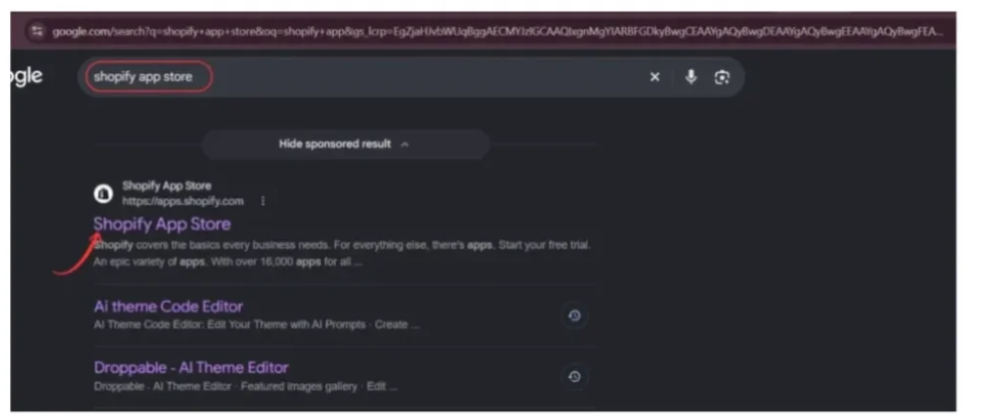
Image 1: Search for the official Shopify App Store using Google.
Step 2: Search for SA Trust Badges
After opening the Shopify App Store, locate the search bar and type SA Trust Badges.
Find the SA Trust Badges application in the search results and select it to open the app listing.
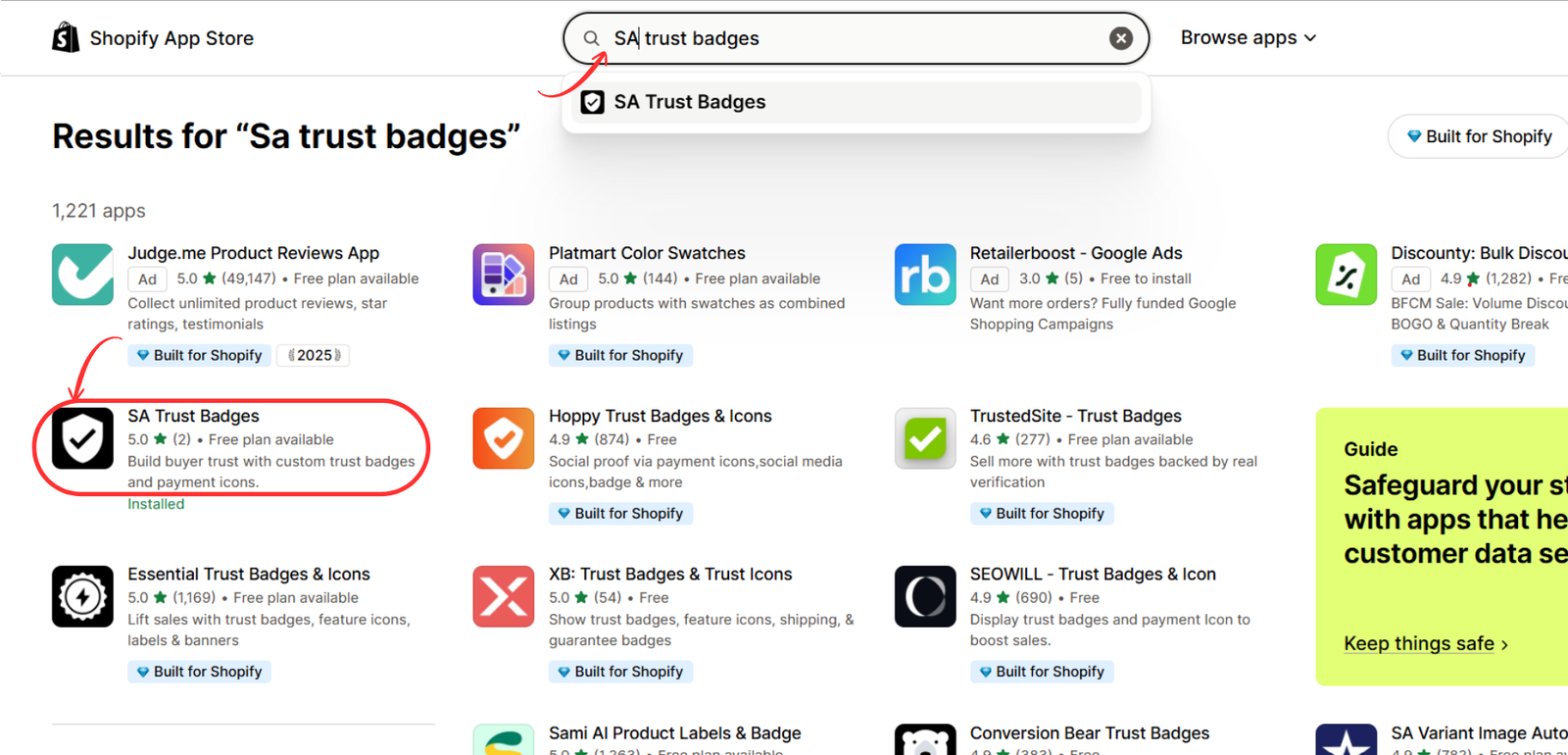
The app is designed to help Shopify merchants display customizable trust badges, guarantee banners, and payment icons on their storefronts.
Image 2 – Search for SA Trust Badges
Image 2: Search for SA Trust Badges in the Shopify App Store and select the application.
Step 3: Install SA Trust Badges on Your Shopify Store
On the SA Trust Badges listing page, review the application’s features and available plans.
Click the Install button to begin the installation process. Shopify may ask you to select your store and approve the permissions required by the app.
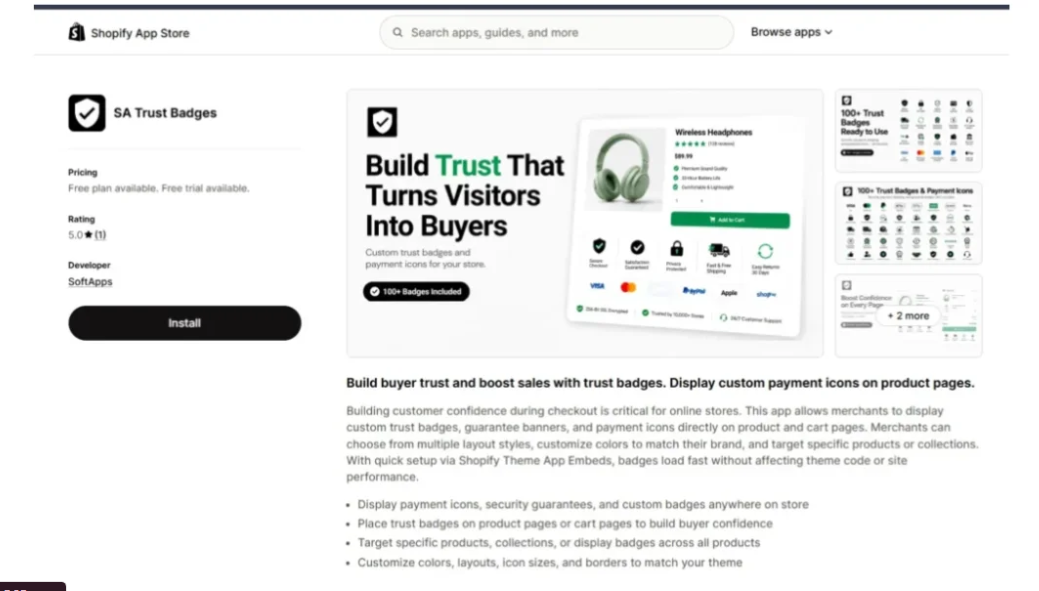
Once the installation is complete, open SA Trust Badges from your Shopify admin dashboard.
You can also access the application directly through its Shopify App Store listing.
Image 3: Open the SA Trust Badges app listing and click Install to add it to your Shopify dropshipping store.
Step 4: Create and Customize Your Trust Badges
After installing the app, open the SA Trust Badges dashboard and select Create Cart Badge.
The badge editor provides different layout options, including Single banner, Icon block, Minimal icons, and Payment icons.
Choose a layout that suits your store’s design and the information you want to communicate.
For example, a dropshipping merchant might create badges highlighting:
- Free Shipping on Eligible Orders
- Easy Returns
- Secure Checkout
- Order Tracking Available
Add an appropriate badge title and supporting description. Customize the icon, colors, and layout to match your store’s branding.
Use the live preview to review your design, then click Publish when you’re satisfied.
Only display shipping, return, or security claims that accurately reflect your store’s services.
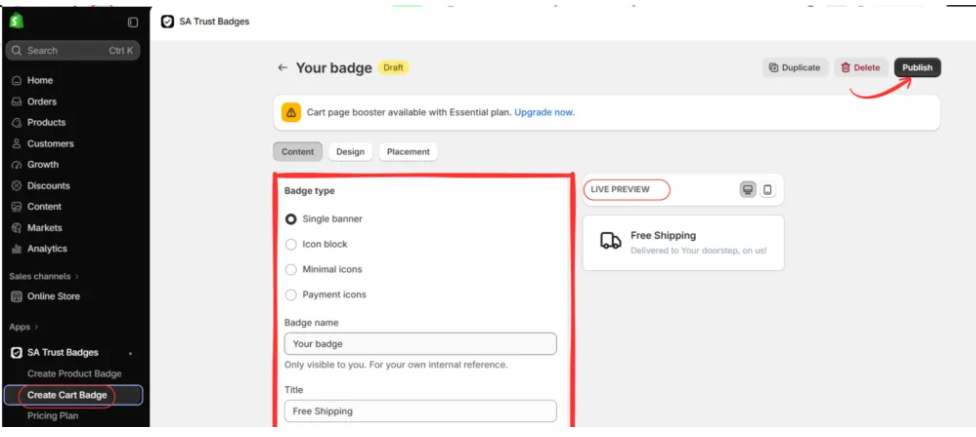
Image 4: Create and customize cart trust badges using different layouts, icons, and descriptions in the SA Trust Badges editor.
Step 5: Open Your Shopify Theme Editor
Once your trust badges are published, return to your Shopify admin dashboard.
Navigate to Online Store → Themes and locate the theme currently used by your dropshipping store.
Click Customize or Edit theme to open the Shopify theme editor.
This is where you can manage the storefront appearance and enable supported app integrations.
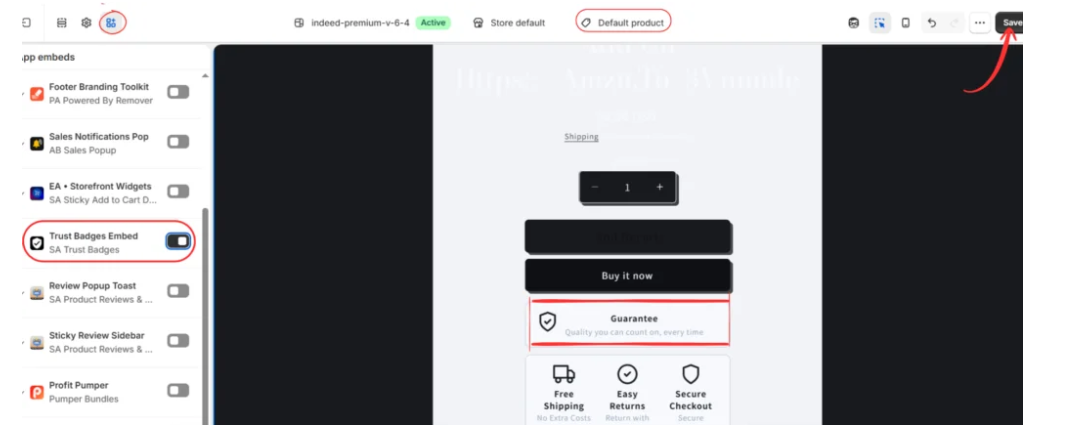
Image 5: Navigate to Online Store, open Themes, and select the theme editor to configure your trust badges.
Step 6: Enable Trust Badges on Your Storefront
Inside the Shopify theme editor, locate the App embeds section in the left sidebar.
Find Trust Badges Embed — SA Trust Badges and enable its toggle.
Once enabled, your published badges can appear in their configured storefront positions.
As shown in the image, badges such as Guarantee, Free Shipping, Easy Returns, and Secure Checkout can be displayed near the product purchasing area.
This placement allows customers to review important store information while considering a purchase.
Click Save to apply the changes.
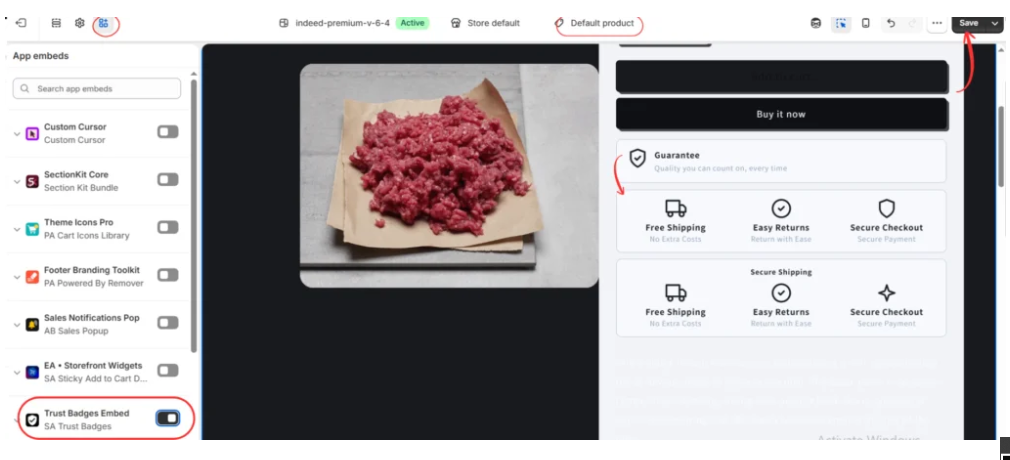
Image 6: Enable the SA Trust Badges app embed and preview the published badges on your Shopify product page.
Step 7: Create and Customize a Product Guarantee Badge
In addition to shipping and payment badges, dropshipping merchants can highlight genuine product guarantees.
Return to the SA Trust Badges dashboard and select Create Product Badge.
In the badge editor, choose Single banner as the badge type. Enter Guarantee in the Title field and add a supporting description.
For example, you can use:
Title: Guarantee
Description: Quality you can count on, every time.
Use this wording only when your store has a genuine product-quality commitment that supports it.
Choose a suitable shield or checkmark icon and adjust the badge’s colors, text, and styling using the available customization options.
Review the Live Preview to ensure the guarantee message is clear, readable, and visually consistent with your storefront.
Once everything looks correct, click Publish.
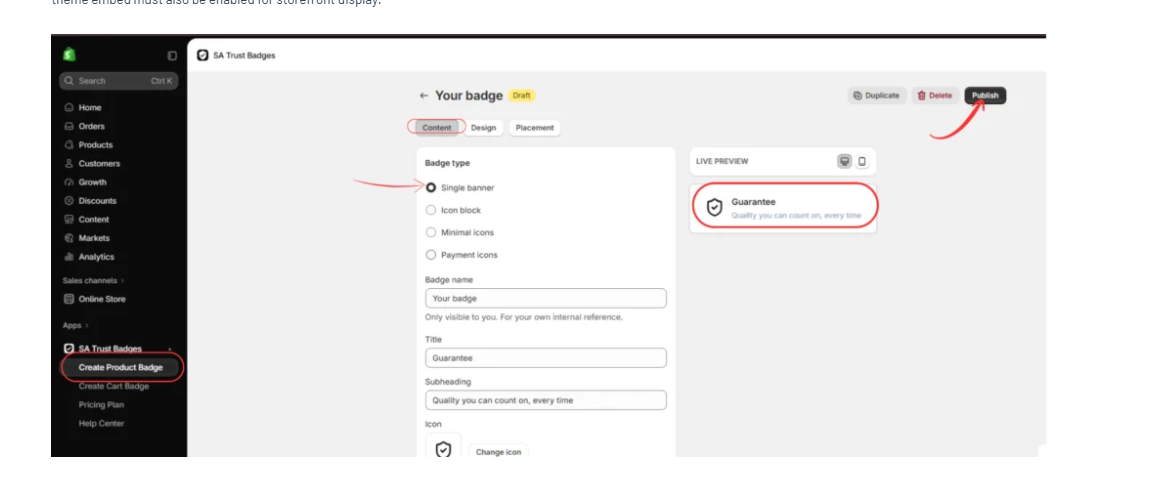
Image 7: Create a customized product Guarantee Badge by selecting a banner layout, adding a guarantee message, choosing an icon, and publishing the badge.
Step 8: Display the Guarantee Badge on Your Product Page
After publishing the Guarantee Badge, navigate to Online Store → Themes → Customize.
Open the product page template where you want to display the badge.
Go to App embeds and confirm that Trust Badges Embed — SA Trust Badges is enabled.
As shown in the image, the Guarantee Badge appears below the purchasing buttons with a shield icon, the Guarantee title, and its supporting description.
This location can help shoppers notice the store’s product-quality commitment before making a purchasing decision.
Click Save, then preview the product page on desktop and mobile devices to ensure the badge displays correctly.
Image 8: Display the published Guarantee Badge beneath the product purchasing buttons and confirm the SA Trust Badges app embed is enabled.
Final Tips for Dropshipping Merchants
Trust badges work best when they communicate genuine store benefits rather than unsupported promises.
Before publishing, check that your shipping badges match supplier delivery estimates, your return badges reflect your actual refund policy, and your guarantee badges describe commitments your business can honor.
Avoid displaying fake certifications, unrealistic delivery times, or misleading customer ratings.
With SA Trust Badges, Shopify dropshipping merchants can create consistent, customizable badge designs that make important store policies more visible to customers.
App link: SA Trust Badges — Shopify App Store




