AI PRODUCT PHOTOGRAPHY FOR COSMETICS AND SKINCARE BRANDS
Shopify AI Photography Guide | Beauty & Skincare | 2026

Introduction
High-quality product photography is essential for cosmetics and skincare brands selling online. When customers browse a Shopify store, the first thing they notice is often the product image. Attractive visuals help communicate product quality, brand identity, packaging details, and the overall shopping experience.
However, creating professional beauty and skincare photography can be expensive. Traditional photoshoots often require professional photographers, studio lighting, models, backgrounds, and photo editing.
For smaller Shopify merchants, producing new photographs for every skincare product, cosmetic collection, or promotional campaign can become time-consuming.
Fortunately, AI product photography for cosmetics and skincare brands offers a more flexible solution.
With PA AI Image Generator, Shopify merchants can use existing product images as references and create professional-looking studio photography, beauty lifestyle scenes, model-based photographs, and marketing visuals.
The best part is that merchants can choose photography styles based on their products and branding requirements.
In this guide, we’ll explore how AI can help cosmetics and skincare merchants create product photography, using your actual screenshots and examples of generated beauty images.
Why Professional Product Photography Matters for Beauty Brands
1. Creates a strong first impression
Customers often judge the presentation of a skincare or cosmetics product before reading its description.
Clean, high-quality product photographs help create an attractive storefront and communicate the brand’s visual identity.
2. Highlights packaging and product details
Cosmetics and skincare products often feature carefully designed bottles, jars, tubes, labels, and containers.
Professional photography can help highlight these elements and make products easier to recognize.
3. Builds a consistent brand identity
A skincare brand may prefer warm neutral colors, soft lighting, and minimalist compositions.
A cosmetics brand might prefer colorful backgrounds, dramatic lighting, and bold styling.
Consistent imagery helps different products feel like part of the same collection.
4. Supports lifestyle marketing
Lifestyle photographs can show products in bathroom settings, spa-inspired environments, or beauty routines.
These compositions provide additional visual context beyond a traditional product photograph.
5. Creates content for multiple platforms
Professional product images can be used across Shopify product pages, Instagram, Pinterest, Facebook, promotional emails, and advertising campaigns.
The Merchant’s Challenge: Traditional Cosmetics Photography
Beauty and skincare brands frequently introduce new products, collections, packaging designs, and promotional campaigns.
Photographing these products professionally can involve several challenges.
- Hiring photographers and booking studios.
- Creating different lighting setups for reflective packaging.
- Hiring models for skincare-related lifestyle photographs.
- Arranging props, backgrounds, and product compositions.
- Editing large numbers of photographs.
- Maintaining visual consistency across product collections.
- Creating seasonal advertising imagery.
For a small skincare business, these requirements may increase marketing expenses and delay new product launches.
AI-powered product photography provides an alternative for creating additional visual compositions without arranging every scene physically.
How AI Product Photography Works for Skincare Products
AI product photography uses artificial intelligence to create new visual compositions from product references.
For example, a simple photograph of a face wash bottle can be used as the starting point for an attractive studio-style image.
A skincare serum can be presented in a warm luxury composition, while a moisturizer may be shown in a spa-inspired environment.
Cosmetics brands can also explore model-focused photography, product arrangements, and seasonal marketing imagery.
However, AI-generated images may change labels, packaging, colors, or product details. Merchants should verify the results against the real product before publishing.
Introducing PA AI Image Generator for Shopify
PA AI Image Generator helps Shopify merchants create AI-powered product photographs directly from their existing catalog.
Instead of relying on a single photography style, the app offers a collection of presets for different product categories and visual requirements.
For cosmetics and skincare brands, merchants can select styles appropriate for product packaging, beauty campaigns, lifestyle photography, and product detail shots.
Key Features
- Studio Photography: Create clean, professional-looking product photographs.
- Beauty Lifestyle Presets: Produce visually styled skincare and cosmetic scenes.
- Detail and Macro Photography: Highlight product textures, designs, and packaging.
- On-Model Photography: Explore beauty and fashion-oriented compositions.
- Collection Images: Create visual presentations for groups of products.
- Custom Generation Settings: Adjust backgrounds, aspect ratios, and output formats.
- Bulk Image Generation: Work with multiple Shopify products.
- Shopify Integration: Review and publish approved product images.
App Link: PA AI Image Generator — Shopify App Store
AI Photography Styles for Different Beauty Products
Choosing the correct photography style depends on the product and the merchant’s marketing goals.
| Product category | Recommended photography style |
|---|---|
| Face wash | Studio Clean, Lifestyle Beauty Spa |
| Moisturizer | Studio, Detail / Macro |
| Face serum | Studio Dramatic, Lifestyle |
| Foundation | On-Model, Studio |
| Lipstick | Detail / Macro, Beauty Lifestyle |
| Skincare kits | Collection Lineup |
| Haircare products | Lifestyle Beauty, Studio |
| Sunscreen | Lifestyle, Studio Clean |
Merchants can explore different presets and select the ones that best match their brand identity.
Why AI Product Photography Is Useful for Small Beauty Brands
Reduces the need for repeated photoshoots
AI-generated images can provide additional studio and lifestyle compositions without organizing a new physical photoshoot for every scene.
Supports faster creative experimentation
Merchants can test different photography styles, background colors, and compositions before deciding which visuals best represent their products.
Helps maintain visual consistency
Using similar presets and settings across multiple products can create a more coordinated catalog.
Supports product launches
New skincare products can be accompanied by additional promotional imagery based on existing product photographs.
Provides more visual variety
One product can be shown through studio-style compositions, lifestyle scenes, close-up details, and collection photographs.
Step-by-Step Guide: How to Create AI Product Photography for Cosmetics and Skincare Brands
The following tutorial includes all four of your actual uploaded images, placed in the order you provided, with explanations of what each screenshot or result demonstrates.
Step 1: Install PA AI Image Generator
Visit the Shopify App Store and search for PA AI Image Generator.
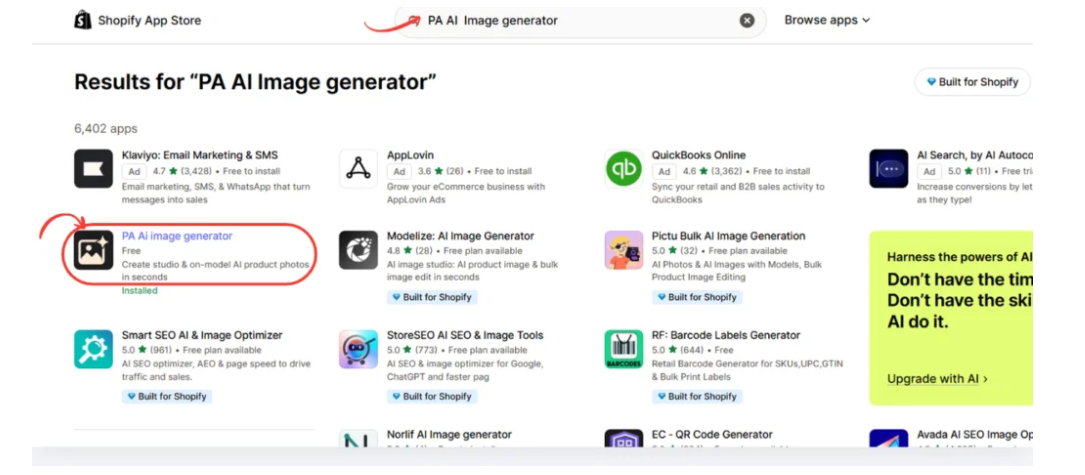
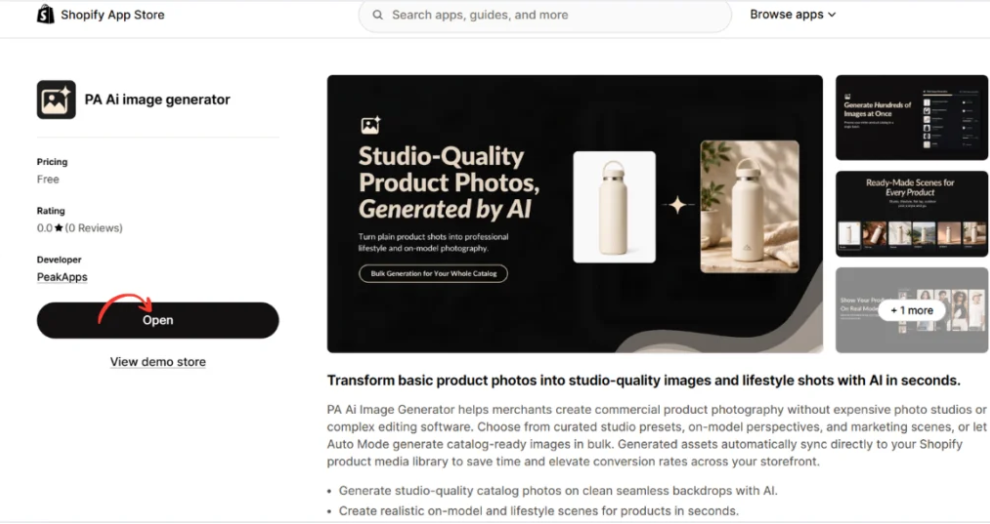
Open the application listing, review its features, and install it on your Shopify store.
Once the installation is complete, open PA AI Image Generator from your Shopify Admin.
Step 2: Open the Generate Images Section
Inside your Shopify Admin, navigate to:
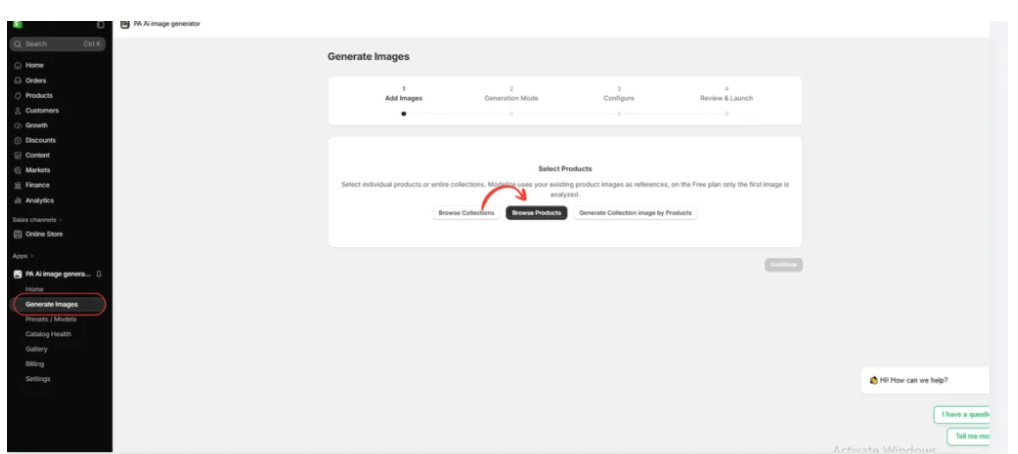
Apps → PA AI Image Generator → Generate Images
The application allows merchants to choose products already available in their Shopify catalog.
Select Browse Products for an individual skincare product or Browse Collections to work with a group of products.
Choose the product or collection you want to use and click Continue.
Step 3: Choose Preset Generation Mode
After selecting your products, proceed to the Generation Mode screen.
Choose Choose Presets to select the photography styles manually.
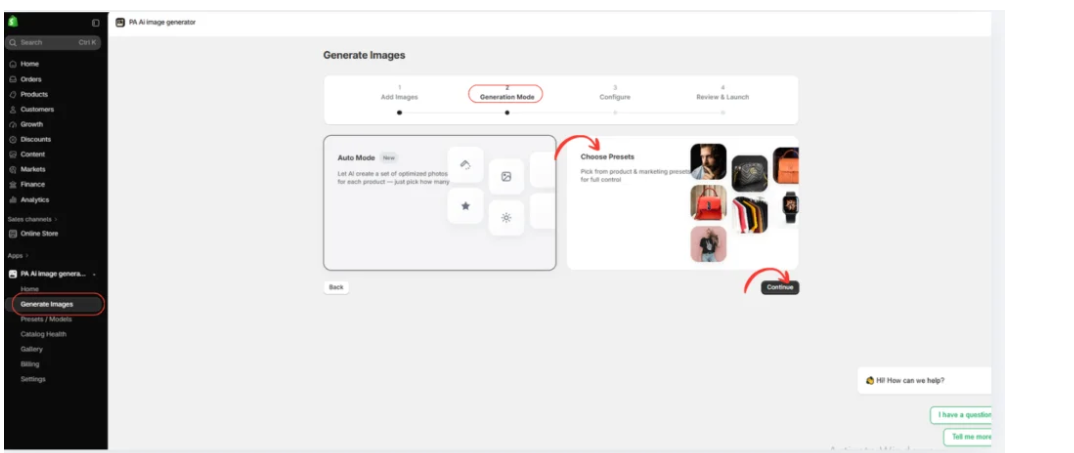
This is especially useful for cosmetics and skincare brands because different products often require different visual presentations.
For example, a premium serum may benefit from dramatic lighting, while a moisturizer may look more appropriate in a clean studio setting.
Step 4: Select the Beauty & Cosmetics Photography Category
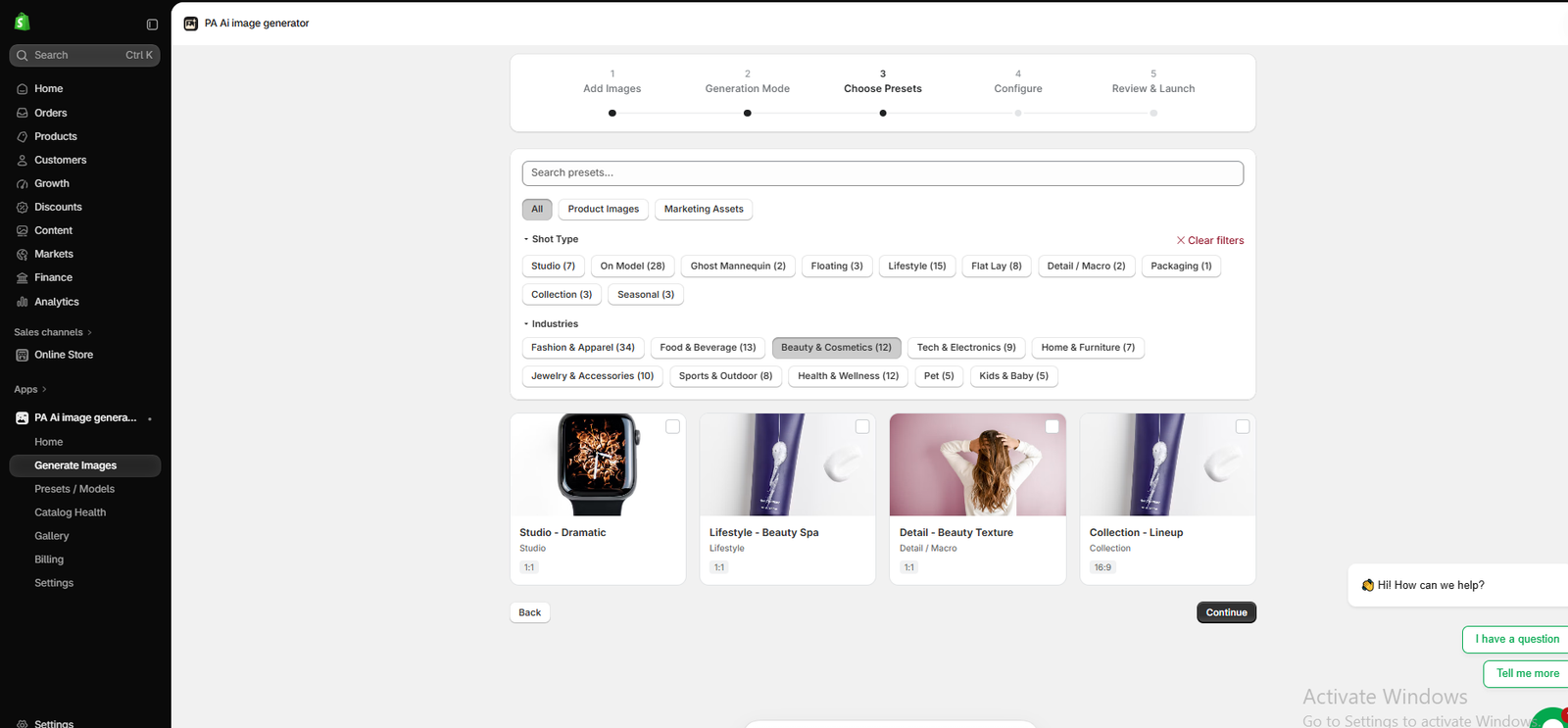
Image 1: PA AI Image Generator displaying the Beauty & Cosmetics industry filter and available photography presets.
Image Explanation
This screenshot shows the actual Choose Presets interface inside PA AI Image Generator.
At the top, you can see the image-generation workflow, including Add Images, Generation Mode, Choose Presets, Configure, and Review & Launch.
Under Industries, Beauty & Cosmetics (12) is selected.
The visible preset options include:
- Studio – Dramatic: For bold product presentations.
- Lifestyle – Beauty Spa: For spa-inspired skincare scenes.
- Detail – Beauty Texture: For close-up beauty compositions.
- Collection – Lineup: For displaying products together.
What should merchants do?
Select the preset that best matches the product and the visual style you want.
For example, use Studio – Dramatic for a luxury serum campaign or Collection – Lineup for a group of skincare products.
Once your desired presets are selected, click Continue.
Step 5: Create Professional Studio Photography for Skincare Products
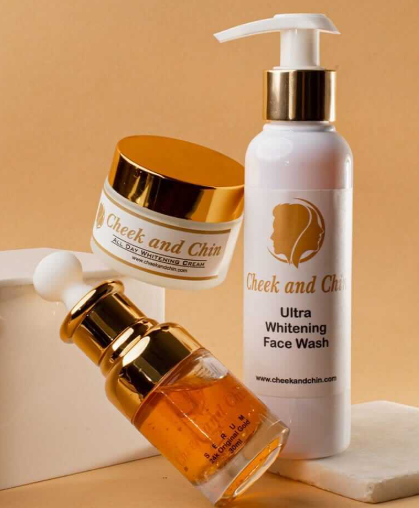
Image 2: A studio-style skincare product composition featuring face wash, whitening cream, and serum products.
Image Explanation
This uploaded result demonstrates a professional-looking skincare product photograph.
The image contains three different cosmetic products arranged against a warm beige background.
A tall pump bottle, a cosmetic cream jar, and a serum bottle are presented with coordinated styling, soft shadows, and reflective golden packaging details.
Instead of placing each product against an unrelated background, the composition creates a cohesive beauty-brand presentation.
How merchants can use this photography style:
This type of image is suitable for skincare collection pages, product bundles, homepage banners, and promotional campaigns.
It is particularly useful when a merchant wants to present several related skincare products together.
When creating similar images, use accurate reference photographs and carefully review all packaging labels and product details.
Step 6: Create Beauty Lifestyle and On-Model Photography
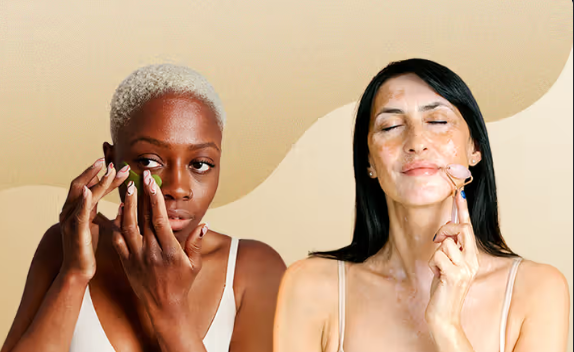
Image 3: A beauty lifestyle composition featuring models interacting with skincare products.
Image Explanation
Your third uploaded image demonstrates a different approach to skincare photography.
Instead of focusing only on product packaging, the composition features two models applying or demonstrating skincare products.
The warm background, natural facial expressions, and close-up framing create a beauty campaign aesthetic.
This photography style can help customers visualize a skincare routine or the context in which a product might be used.
Where merchants can use this type of image:
Beauty lifestyle photographs can support homepage banners, skincare routine articles, social media content, product education, and promotional campaigns.
Merchants should avoid using AI-generated imagery to imply verified clinical results, before-and-after improvements, or product performance that has not been established.
Step 7: Create a Product Collection or Flat-Lay Composition
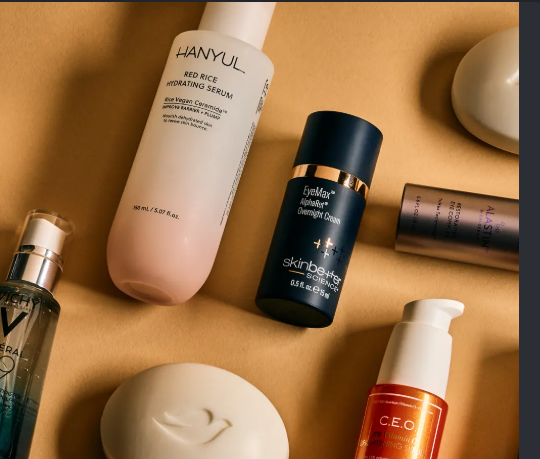
Image 4: A coordinated skincare product arrangement featuring multiple beauty products against a warm background.
Image Explanation
Your fourth uploaded image shows a group of skincare products arranged in a coordinated composition.
Different bottles and containers are positioned together against a warm beige background.
The products have different shapes, colors, and packaging styles, but the lighting and background create a cohesive visual presentation.
This type of composition is useful for presenting multiple items together rather than highlighting only one product.
How merchants can use this photography style:
Beauty brands can use similar visuals for skincare collection pages, product bundles, promotional banners, gift sets, and seasonal marketing campaigns.
For example, a merchant could create a collection image featuring a cleanser, face serum, moisturizer, and sunscreen to represent a skincare routine.
Step 8: Configure Your Image Generation Settings
After choosing your photography presets, proceed to the Configure stage.
Review the available options for backgrounds, image dimensions, aspect ratios, formats, and custom instructions.
For cosmetics and skincare products, you can use this example instruction:
Create a premium skincare product photograph using my existing product image as a reference. Preserve the original packaging, bottle shape, logo, label text, and product colors. Use professional beauty lighting, a soft neutral background, elegant shadows, and a clean composition. Do not modify the actual product design or invent product claims.
For product galleries, a square image may provide a consistent presentation, while a wider image may be more appropriate for banners.
Choose the dimensions that match your intended placement.
Step 9: Generate and Review Your AI Images
Once your settings are complete, proceed to Review & Launch.
Check the selected products, presets, and generation settings before starting the job.
After generation, open Gallery to review the results.
For cosmetics and skincare photography, pay particular attention to bottle shapes, packaging colors, logos, label spelling, product quantities, and other identifying details.
These elements are important because an attractive image is not useful if it misrepresents the real product.
Step 10: Download or Publish Approved Product Images
After reviewing the generated images, choose the photographs you want to use.
PA AI Image Generator offers Gallery controls for downloading generated images and publishing approved results to Shopify products.
You can use the photographs across product listings, collection pages, homepage banners, and social media campaigns.
Keep original accurate product images available so customers can see what they will actually receive.
Best Practices for AI Skincare Product Photography
Preserve original packaging
Always check that generated images represent the actual product packaging, including brand names, labels, and container shapes.
Choose consistent backgrounds
Using similar lighting and color combinations across your skincare catalog can create a recognizable brand identity.
Avoid misleading product claims
Do not use generated images to suggest that a skincare product provides medical, therapeutic, or cosmetic results that have not been demonstrated.
Use the right photography style
Studio images are useful for showing product packaging clearly, while lifestyle images provide additional creative context.
Combine AI and original photography
Actual product images are important for accuracy. AI-generated visuals can supplement them with marketing-focused compositions.
Frequently Asked Questions
1. Can AI create professional skincare product photographs?
Yes. AI image-generation tools can create studio-style and lifestyle photographs using existing product references.
2. Can I use PA AI Image Generator for cosmetics products?
Yes. The app includes a Beauty & Cosmetics category with photography presets suitable for different visual compositions.
3. Can I generate images featuring beauty models?
The app provides on-model photography options. Results depend on the selected presets and product references.
4. Can I create photographs featuring multiple skincare products?
Yes. Collection-style compositions can be used to present groups of products in a coordinated visual arrangement.
5. Can I create spa-inspired skincare images?
Yes. The preset library includes a Lifestyle – Beauty Spa option.
6. Can I generate images for an entire Shopify collection?
Yes. The app supports selecting products and collections for image-generation workflows.
7. Can I publish AI-generated skincare photos directly to Shopify?
The app provides options to publish approved generated images to Shopify products.
8. Are AI-generated cosmetics images always accurate?
No. AI may alter packaging, labels, logos, colors, or other details. Review the images before publishing them.
Conclusion
Professional product photography is an important part of building an attractive and recognizable cosmetics or skincare brand.
However, traditional photography can require significant time, equipment, and financial investment.
With AI-powered image generation, Shopify merchants can create additional studio photographs, skincare lifestyle visuals, model-based images, and coordinated product collection compositions using existing product photographs.
PA AI Image Generator provides merchants with a photography preset library designed for different industries, including Beauty & Cosmetics.
As the real images in this guide demonstrate, different photography styles can help the same category of products appear in studio settings, lifestyle compositions, and coordinated product arrangements.
The most important advantage is flexibility. Merchants can select styles based on their products, preferred appearance, and marketing requirements.
By choosing suitable presets, preserving product accuracy, and reviewing generated photographs before publication, cosmetics and skincare brands can create more consistent product imagery for their Shopify stores.
Create professional-looking beauty and skincare product photographs with AI.Try PA AI Image Generator on the Shopify App Store




