SLIDE-OUT CART VS CART PAGE: WHICH IS BETTER FOR YOUR SHOPIFY STORE?

Introduction
The shopping cart is an important part of every Shopify store because it connects product browsing with checkout.
Merchants generally have two common approaches to presenting cart information: a traditional cart page and a slide-out cart drawer.
A traditional cart page displays selected products on a dedicated page. A slide-out cart opens a panel while customers remain on the page they are browsing.
Understanding Shopify slide-out cart vs cart page differences can help merchants choose an appropriate experience for their customers.
Common Cart Experience Problems
Too Many Page Changes
Customers may need to navigate repeatedly between product pages and their cart.
Difficult Product Review
A poorly organized cart makes it harder to check quantities, variants, and prices.
Interrupted Product Discovery
Customers who want to add multiple items may prefer to continue browsing without opening a separate cart page each time.
Mobile Navigation Challenges
Extra page changes can feel inconvenient on smaller screens.
What Is a Slide-Out Cart?
A slide-out cart is a panel that opens over the current storefront page.
It typically displays the customer’s selected products and important cart information.
Because the customer remains on the current page, the cart can be reviewed without fully interrupting product browsing.
What Is a Traditional Cart Page?
A traditional cart page is a dedicated page containing the customer’s selected products.
It may provide more space for additional cart information and detailed interactions.
Both approaches can work well when designed carefully.
Shopify Slide-Out Cart vs Cart Page: Comparison
| Feature | Slide-Out Cart | Traditional Cart Page |
|---|---|---|
| Shopping navigation | Remains on current page | Opens separate page |
| Product browsing | Easier to continue | Requires navigation back |
| Cart display | Compact panel | Full-page layout |
| Available space | More limited | More extensive |
| Mobile usability | Convenient when optimized | Familiar full-page experience |
| Best suited for | Quick cart review | Detailed cart interactions |
Advantages of a Slide-Out Cart
Convenient Cart Access
Customers can review their selected products without leaving the current page.
Continued Shopping
The drawer can be closed so customers can continue exploring products.
Compact Cart Information
A well-designed drawer brings important product details and checkout controls together.
Product Recommendations
Relevant suggestions can appear within the cart when supported.
Advantages of a Traditional Cart Page
A dedicated cart page can provide additional space for detailed information, complex cart interactions, or store-specific purchasing requirements.
For some stores, this may be preferable to a compact drawer.
Introducing SA Sticky Add to Cart Drawer
SA Sticky Add to Cart Drawer provides a configurable side cart with product upsell functionality.
The app helps merchants create a convenient cart review experience.
App link: https://apps.shopify.com/sk-sticky-add-to-cart-drawer
Step-by-Step Guide to Add a Slide-Out Cart
Step 1: Open the Shopify App Store
Search for the official Shopify App Store.

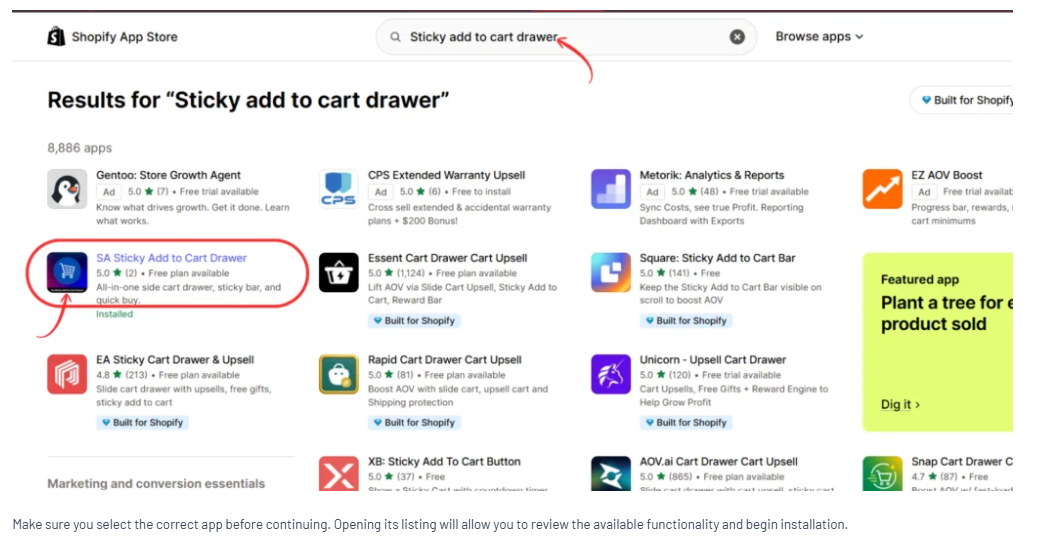
Step 2: Find SA Sticky Add to Cart Drawer
Search for Sticky add to cart drawer and open the SA application.
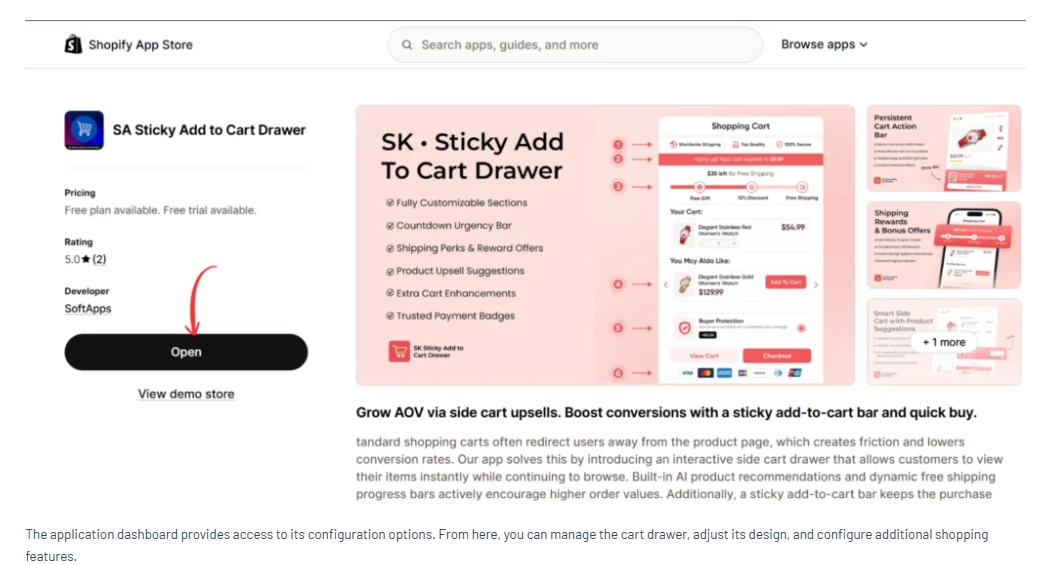
Step 3: Install or Open the Application
Click Install or Open from the app listing.
Step 4: Configure Side Cart & Upsell
Open Setups → Side Cart & Upsell.
Review the drawer position, border style, and general design settings.

Step 5: Enable the App Embed
Open the Shopify theme editor and enable EA • Storefront Widgets.

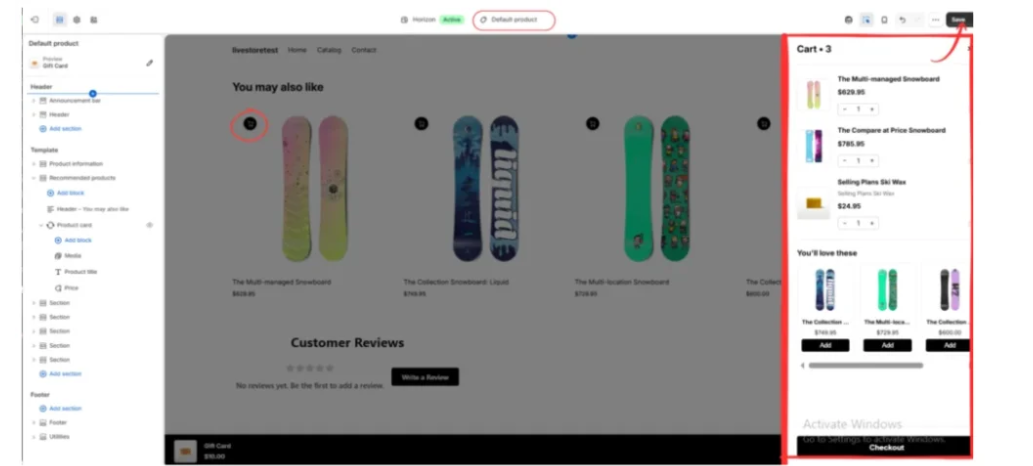
Step 6: Test the Drawer
Add an available product to the cart and check the drawer.
Confirm that the cart displays correct product information, quantities, and checkout controls.
Step 7: Compare Shopping Experiences
Test the slide-out cart and your existing cart page on mobile and desktop.
Observe how easily customers can review products, continue browsing, and proceed to checkout.
How to Choose the Right Cart Experience
Consider your product catalog, customer behavior, mobile traffic, and cart complexity.
A slide-out cart may suit stores where customers frequently add several products.
A traditional cart page may suit stores requiring more detailed cart interactions.
Neither format guarantees better conversions. Store-specific testing is the most reliable way to evaluate the choice.
Conclusion
The Shopify slide-out cart vs cart page decision should be based on customer convenience and business requirements.
Both approaches can support a good shopping experience.
With SA Sticky Add to Cart Drawer, merchants can configure a slide-out cart and test whether it improves cart usability for their customers.
Explore the app: https://apps.shopify.com/sk-sticky-add-to-cart-drawer




